Lemcal Alternatives: 9 Scheduling Tools for Sales Teams in 2026
Lemcal is a clean, free booking tool from the lemlist team. Once you need routing, round-robin or deeper CRM sync, it can start to feel thin. Here are 9 alternatives, sorted by the job each one does best.
TL;DR
- Lemcal is a clean, sales-focused booking page from the lemlist team. It works well for solo reps and small outbound teams already using lemlist, but you get less routing, reporting and enterprise control than you do with the category leaders.
- Calendly is the safest all-round replacement. Cal.com suits teams that want open source or self-hosting. Chili Piper is for inbound routing at scale.
- For free options, look at HubSpot Meetings (if you already live in HubSpot), Zcal, or Google Calendar appointment schedules.
- Per-seat pricing grows faster than most teams expect. Work out your cost at 10, 25 and 50 seats before you commit.
- A booking link can't help you if your email bounces. The scheduler is the last step of outbound, and verified contact data comes first.
What is Lemcal, and why are teams looking for alternatives?#
Lemcal is a meeting-scheduling tool built by lemlist. Like Calendly, it gives you a booking link. What sets it apart is that it's aimed at salespeople. The booking pages are designed to look good and show who you are. They carry your photo, your company and some social proof, so the page does a little selling before the prospect picks a slot. It also connects naturally to lemlist sequences, so you can drop a booking link into a cold email step without extra setup.
That's a good pitch for a solo SDR or a founder running outbound. Teams usually start looking at Lemcal alternatives for one of these reasons:
- Routing needs. An inbound demo request needs to reach the right AE based on territory, company size or account ownership. That's a different problem from sharing a personal link.
- Round-robin and pooled availability. Bigger teams want meetings spread evenly across reps, with fairness rules.
- CRM depth. RevOps wants meetings logged on the right contact, company and deal in Salesforce or HubSpot. Creating a calendar event isn't enough.
- Reporting. Managers want no-show rates, meetings booked per rep, and conversion from booked to held.
- Stack consolidation. If you're leaving lemlist, the tight Lemcal integration matters less.
None of this makes Lemcal a bad tool. Your team may simply need a different tool now than it did when you picked Lemcal.
What should you look for in a Lemcal alternative?#
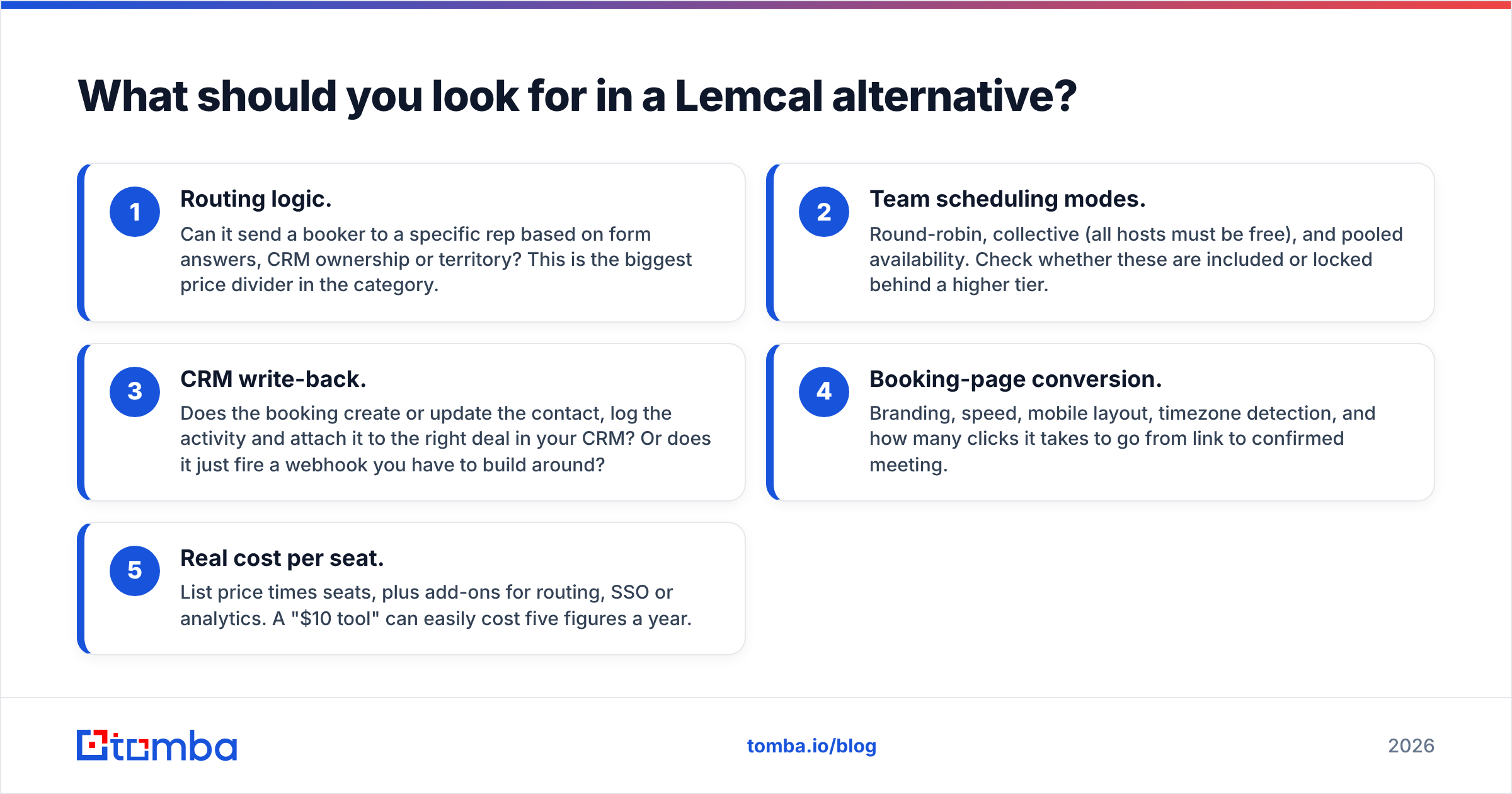
Before you compare vendors, decide what job the scheduler has to do. Five criteria separate these tools in practice:
- Routing logic. Can it send a booker to a specific rep based on form answers, CRM ownership or territory? This is the biggest price divider in the category.
- Team scheduling modes. Round-robin, collective (all hosts must be free), and pooled availability. Check whether these are included or locked behind a higher tier.
- CRM write-back. Does the booking create or update the contact, log the activity and attach it to the right deal in your CRM? Or does it just fire a webhook you have to build around?
- Booking-page conversion. Branding, speed, mobile layout, timezone detection, and how many clicks it takes to go from link to confirmed meeting.
- Real cost per seat. List price times seats, plus add-ons for routing, SSO or analytics. A "$10 tool" can easily cost five figures a year.
Rank these five for your team before you read the rest of this post. A 3-person agency and a 60-seat SaaS sales floor will make opposite choices, and both can be right.
How do the top Lemcal alternatives compare?#
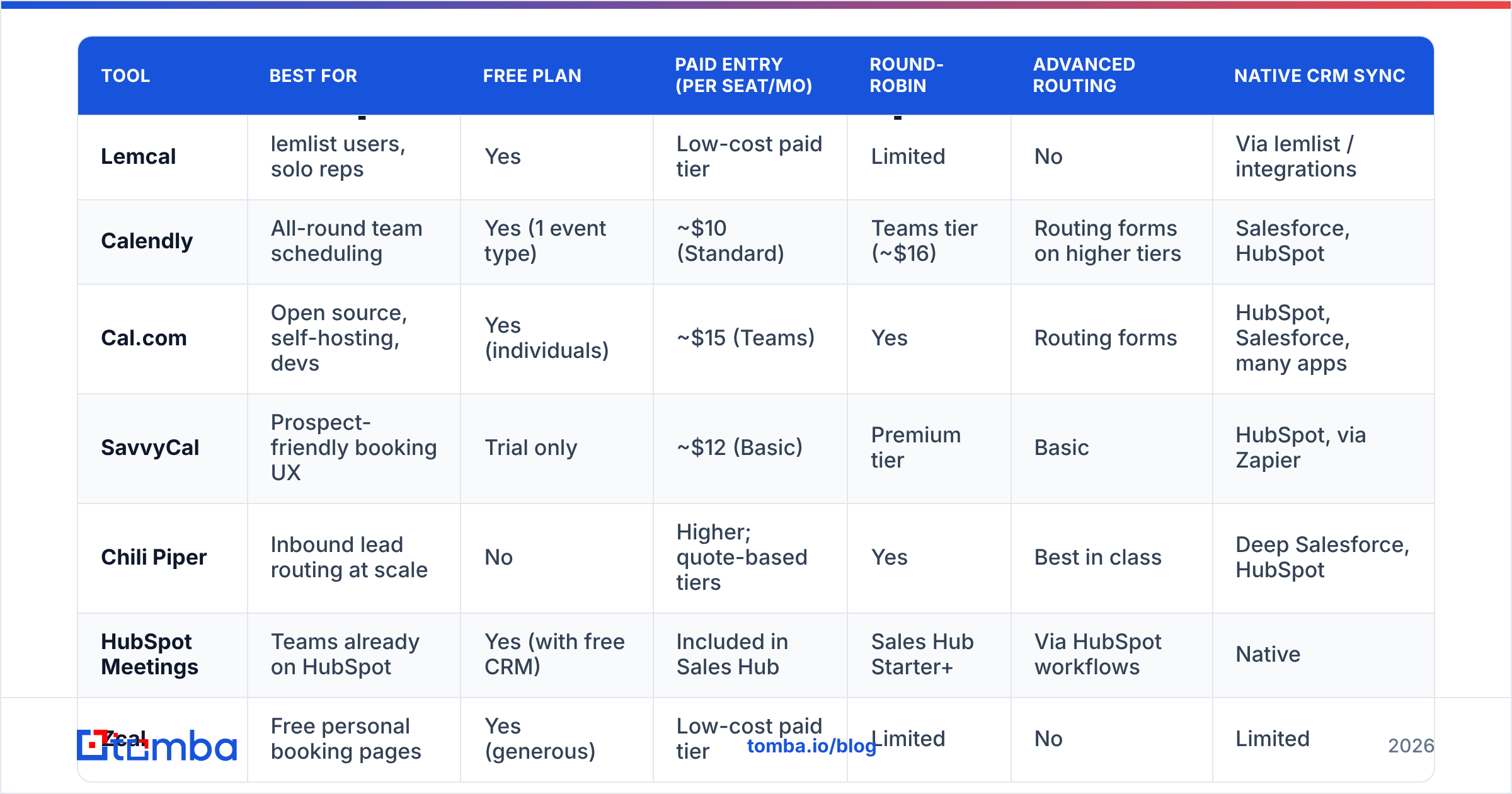
Here's the side-by-side view. Prices are list prices at the time of writing, usually billed annually. Vendors change their tiers often, so check the pricing page before you buy.
| Tool | Best for | Free plan | Paid entry (per seat/mo) | Round-robin | Advanced routing | Native CRM sync |
|---|---|---|---|---|---|---|
| Lemcal | lemlist users, solo reps | Yes | Low-cost paid tier | Limited | No | Via lemlist / integrations |
| Calendly | All-round team scheduling | Yes (1 event type) | ~$10 (Standard) | Teams tier (~$16) | Routing forms on higher tiers | Salesforce, HubSpot |
| Cal.com | Open source, self-hosting, devs | Yes (individuals) | ~$15 (Teams) | Yes | Routing forms | HubSpot, Salesforce, many apps |
| SavvyCal | Prospect-friendly booking UX | Trial only | ~$12 (Basic) | Premium tier | Basic | HubSpot, via Zapier |
| Chili Piper | Inbound lead routing at scale | No | Higher; quote-based tiers | Yes | Best in class | Deep Salesforce, HubSpot |
| HubSpot Meetings | Teams already on HubSpot | Yes (with free CRM) | Included in Sales Hub | Sales Hub Starter+ | Via HubSpot workflows | Native |
| Zcal | Free personal booking pages | Yes (generous) | Low-cost paid tier | Limited | No | Limited |
| Google Calendar appointment schedules | Workspace-first teams | Basic, yes | Included in Workspace tiers | No | No | No (manual/Zapier) |
| Microsoft Bookings | Microsoft 365 organisations | No | Included in M365 Business Standard+ | Basic staff assignment | No | Dynamics via add-ons |
A pattern shows up quickly. The free and cheap tools cover booking. The expensive tools cover routing and data. Most teams that outgrow Lemcal are really moving from the first group to the second.
Is Calendly better than Lemcal?#
For most teams of 5 or more, yes. Calendly is the default in this category because it does almost everything well enough. You get one-on-one, group, round-robin and collective event types, plus reminders, workflows, and native integrations with Salesforce and HubSpot. Routing forms on the higher tiers let you qualify bookers before they see a calendar.
Where Lemcal still wins: Lemcal's booking pages are more personal and "sales-y" out of the box. The lemlist integration also takes zero effort if you already sequence there. Calendly's pages are functional but generic, and many prospects have seen them hundreds of times.
Watch out for: Calendly's per-seat pricing grows as your team does. The features RevOps usually wants, like routing, admin controls and deeper reporting, sit in the higher tiers.
Pick it if: you want the least-risky, most-integrated choice and you're willing to pay for the Teams tier.
Is Cal.com a good free alternative to Lemcal?#
Cal.com is the open-source challenger, and it's the strongest option for technical teams. Individuals get a solid free plan. Paid Teams plans add round-robin, collective events and routing forms, and you can self-host the whole thing if data residency matters to you.
Strengths: a large app store (CRMs, video, payments), an API-first design, embeddable booking flows, and full control over hosting.
Weaknesses: the admin experience is less polished than Calendly's for non-technical managers. Some enterprise features also need the paid organisation tier.
Pick it if: your team is comfortable with a bit of configuration and you care about owning your scheduling infrastructure, or about paying less per seat than Calendly.
Which Lemcal alternative has the best booking experience?#
SavvyCal was built around the person receiving the link. Bookers can overlay their own calendar on your availability and see mutual free time at a glance. That cuts down on "none of these work for me" replies, which quietly kill cold-email conversions.
It also supports ranked availability, so you can nudge bookers toward your preferred slots, plus personalised links and a clean, fast page. Team features exist, but routing is lighter than Calendly's or Chili Piper's.
Pick it if: you're a founder, consultant or small SDR team and the booking-page experience matters more to you than routing.
Zcal is worth a mention here too. It's a free, polished personal booking tool with nice page design, and it's a sensible Lemcal swap for individuals who aren't on lemlist.
What's the best Lemcal alternative for inbound lead routing?#
Chili Piper. If your real problem is "a lead filled in the demo form and we took four hours to reply," Chili Piper was built for exactly that. It qualifies and routes inbound leads the moment they submit a form, and shows the right rep's calendar straight away. It also handles handoffs from SDRs to AEs and meetings booked by reps on behalf of prospects.
Its Salesforce and HubSpot integrations go deep. Routing can follow account ownership, territory, company size, or any field you capture. For high-volume inbound teams, the speed-to-lead gain often pays for the tool.
Downsides: it's among the most expensive options, and pricing depends on which products you combine. It's also overkill for a mostly-outbound team that just needs a link in a sequence.
Pick it if: inbound demo volume is meaningful and routing mistakes are costing you pipeline.
Should HubSpot users just use HubSpot Meetings?#
In most cases, yes. HubSpot Meetings comes with the free CRM, and bookings log automatically to the contact record with no integration work. Round-robin and team meeting links unlock on Sales Hub paid tiers. You can add routing by combining forms and workflows.
The booking pages look plain compared with Lemcal or SavvyCal, and routing takes more building than in Chili Piper. But for teams already paying for HubSpot, a second scheduler often adds cost without adding value. If you enrich contacts in HubSpot before outreach, Tomba's HubSpot integration keeps the email field accurate, so meeting confirmations and reminders actually arrive.
Pick it if: HubSpot is your system of record and you'd rather have one fewer vendor.
What about free built-in options from Google and Microsoft?#
Google Calendar appointment schedules let anyone with a Google account publish a booking page. Workspace tiers add features such as multiple calendar checks and payments. The tool is basic: no round-robin, no routing, no CRM sync. But it costs nothing extra if you're already on Workspace.
Microsoft Bookings is the equivalent for Microsoft 365 organisations. It handles staff assignment and service menus, and it fits well in companies that standardise on Outlook and Teams.
Pick either if: you only need a personal booking page, IT won't approve another vendor, and your meeting volume is low.
TidyCal is also worth a look for solo users on a tight budget. It's sold as a one-time lifetime purchase, so you trade monthly fees for a lighter feature set.
How much do Lemcal alternatives really cost at scale?#
This is where teams get surprised. Scheduling tools look cheap per seat, but the seats keep adding up.

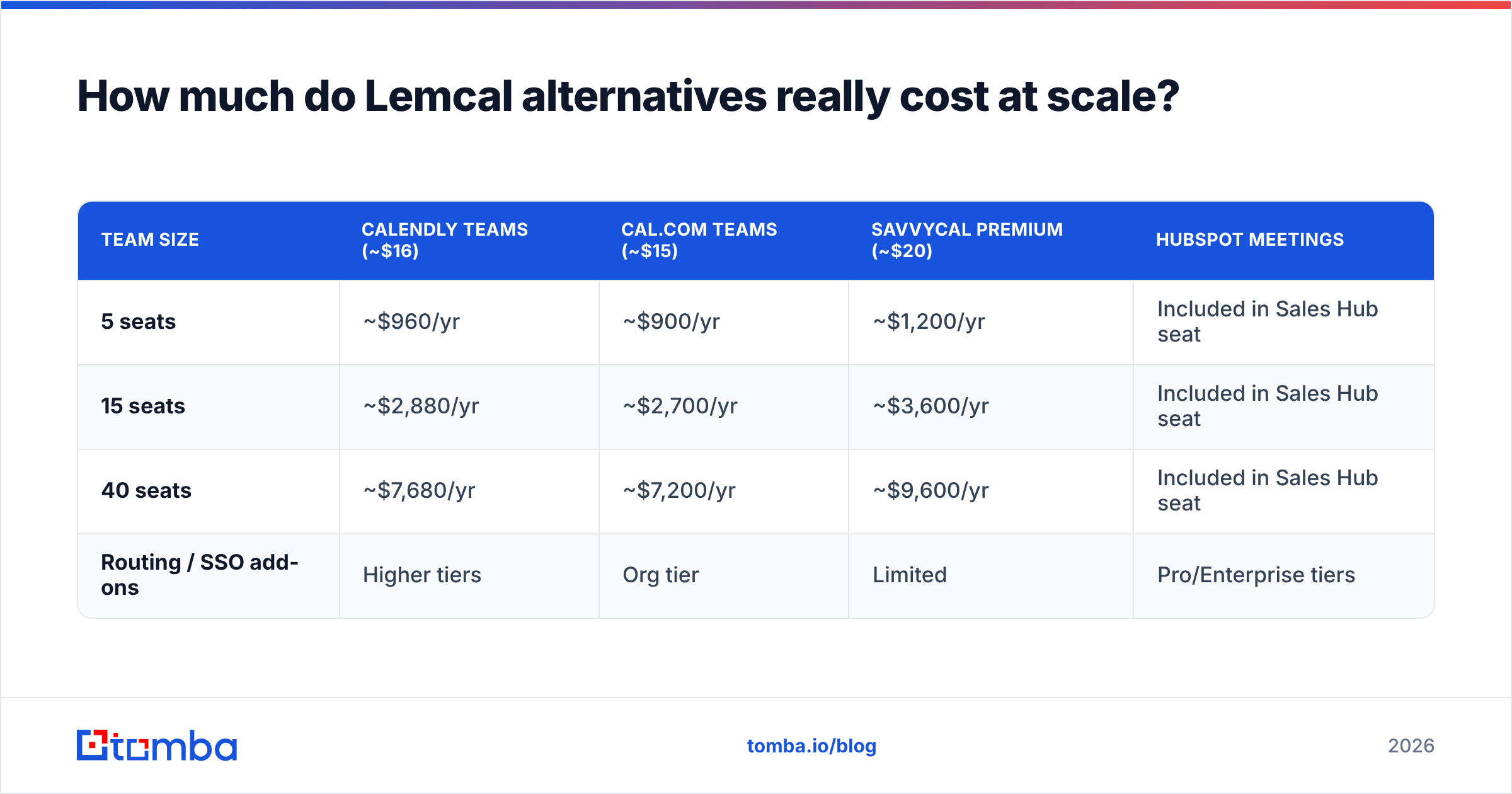
Here's a rough model using list prices billed annually:
| Team size | Calendly Teams (~$16) | Cal.com Teams (~$15) | SavvyCal Premium (~$20) | HubSpot Meetings |
|---|---|---|---|---|
| 5 seats | ~$960/yr | ~$900/yr | ~$1,200/yr | Included in Sales Hub seat |
| 15 seats | ~$2,880/yr | ~$2,700/yr | ~$3,600/yr | Included in Sales Hub seat |
| 40 seats | ~$7,680/yr | ~$7,200/yr | ~$9,600/yr | Included in Sales Hub seat |
| Routing / SSO add-ons | Higher tiers | Org tier | Limited | Pro/Enterprise tiers |
Chili Piper is left out of this table because pricing depends on the product mix. Ask for a quote early if routing is a priority. Treat all of these figures as estimates: they give you a starting point for negotiation, not a quote.
Two practical tips:
- Not everyone needs a seat. Customer success, marketing and support often only need a shared or pooled link. Many vendors offer one.
- Price the tier you'll actually need in 12 months, not the one you need today. Moving plans mid-contract is where budgets break.
Does your scheduler matter if prospects never see your email?#
This is the part most "Lemcal alternatives" posts leave out. The booking link sits at the end of your outbound workflow. The best-converting scheduling page does nothing if:
- the email address you sent to doesn't exist and hard-bounces,
- the domain is catch-all and your message quietly disappears,
- bounces pile up and damage your sender reputation, so even good addresses start going to spam.
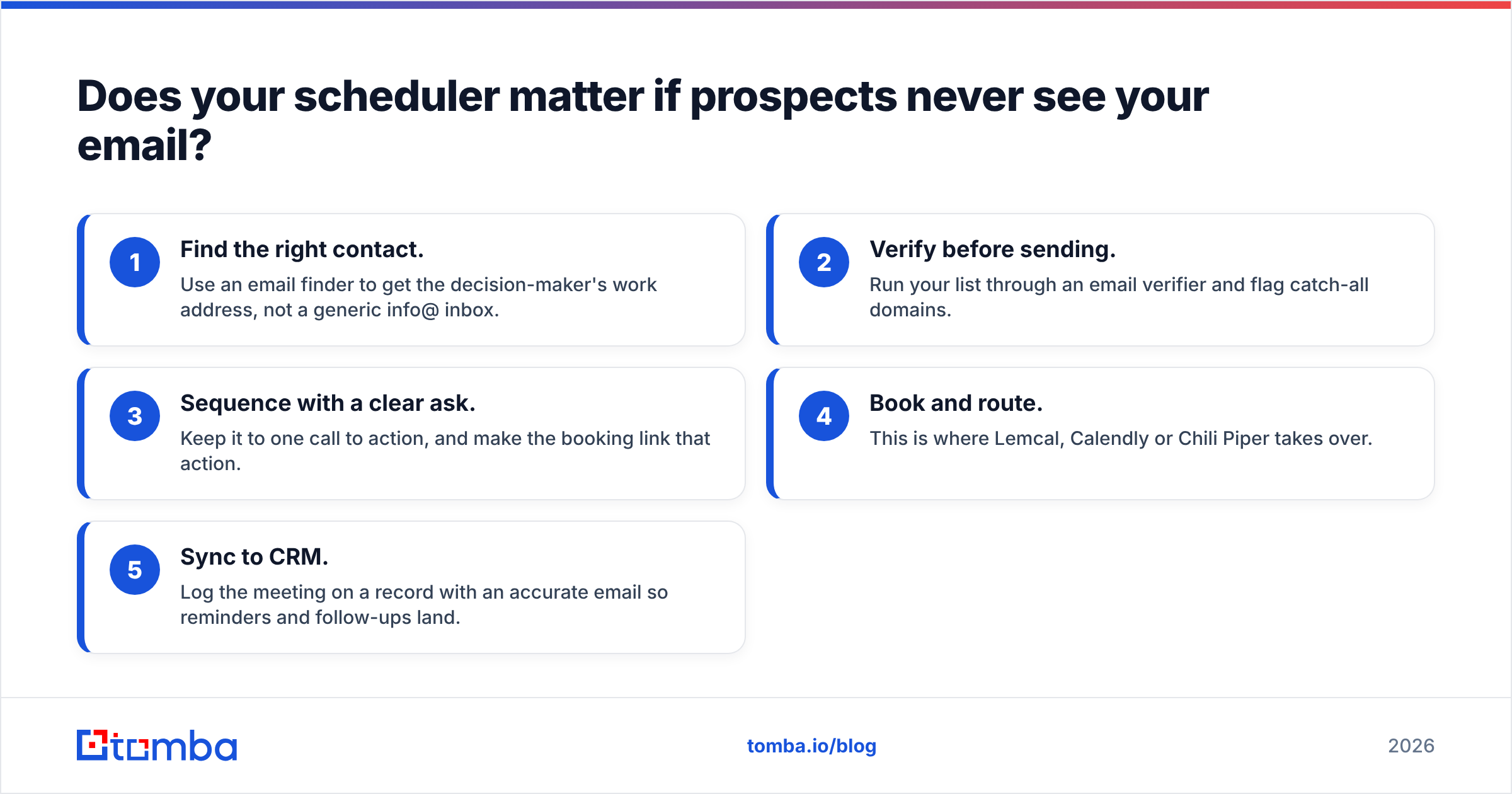
Industry data from providers like HubSpot and peer reviews on G2 consistently show that deliverability and list quality drive reply rates more than page design does. Here's the order of operations that works:
- Find the right contact. Use an email finder to get the decision-maker's work address, not a generic info@ inbox.
- Verify before sending. Run your list through an email verifier and flag catch-all domains.
- Sequence with a clear ask. Keep it to one call to action, and make the booking link that action.
- Book and route. This is where Lemcal, Calendly or Chili Piper takes over.
- Sync to CRM. Log the meeting on a record with an accurate email so reminders and follow-ups land.
If you switch schedulers but skip steps 1 and 2, you've changed the last 5% of the funnel and left the first 95% broken.
Which Lemcal alternative should you choose?#
Short version:
- Staying on lemlist, solo or small team: keep Lemcal. It does its job well, and switching costs you the native link.
- Growing outbound team, want a safe default: Calendly Teams.
- Technical team, cost-sensitive or needs self-hosting: Cal.com.
- Booking experience comes first, small team: SavvyCal (or Zcal if you want free).
- High inbound volume, routing is the bottleneck: Chili Piper.
- Already on HubSpot: HubSpot Meetings.
- Only need a basic link, no new vendors: Google appointment schedules or Microsoft Bookings.
Run a two-week trial with your top two picks, using real prospects. Track the booked-to-held rate, not just meetings booked. A scheduler that books more meetings that no one shows up to is not better.
Ready to fill the calendar you just set up?#
A new scheduler only pays off when real decision-makers receive the link. Tomba Email Finder finds verified professional email addresses by name, domain or company, so the booking link in your sequence lands in an inbox that exists and gets read. Start on the free plan with 25 searches a month. When your outbound volume grows, move up to Starter at $49/month.
Related guides#
// get started
Find, verify and enrich your first contacts today
Start on the free plan with 25 searches a month, then scale when your team is ready.
Free plan · No credit card required · GDPR & CCPA
// about the author