Lemcal Pricing Reviews, Pros and Cons: Is the $9 Pro Plan Worth It?
Lemcal gives you a free booking page and a $9 Pro plan. Here's what the free tier actually covers, where the limits start to hurt, and how Lemcal compares with Calendly, Cal.com and SavvyCal for outbound sales teams.
TL;DR
- Lemcal has two plans: a free Starter plan (1 connected calendar, 3 active meeting types) and a Pro plan at about $9 per user per month, with a 14-day Pro trial. Some third-party listings show $7–$9 depending on billing cycle, so check the live price before you buy.
- The main reason to pick Lemcal is its native lemlist integration. If your outbound already runs through lemlist, the booking step connects to the same prospect data.
- On the downside, the free plan works for one rep with one calendar. Round robin, multiple calendars, paid bookings, and CRM sync all need Pro. Lemcal also has much less brand recognition and far fewer reviews than Calendly.
- Pro costs less per seat than Calendly Standard and Cal.com Teams. The gap is small, though, so pick on workflow fit, not the price.
- A scheduler doesn't create meetings. If your emails bounce or reach the wrong person, nobody gets to your booking link, so fix your contact data first.
What is Lemcal, and who is it built for?#
Lemcal is a meeting-scheduling tool from the team behind lemlist, the cold email platform. It does what every scheduler does: it publishes your availability, lets a prospect pick a slot, creates the calendar event, and sends reminders. The difference is who it's built for. Lemcal was made for sales reps running outbound, not for consultants, recruiters, or general appointment booking.
That shows up in the product. The booking pages are built to feel like part of a cold email thread. You can add qualifying questions so you screen prospects before they take a slot. And lemlist users get a native connection that ties the booking back to the campaign and the lead.
If you don't use lemlist, Lemcal is a solid, low-cost scheduler that competes with Calendly, Cal.com, SavvyCal, and Zcal. If you do use lemlist, it's the scheduler that fits your existing workflow with the least setup.
You can see the current product and plan page at lemcal.com.
How much does Lemcal cost in 2026?#
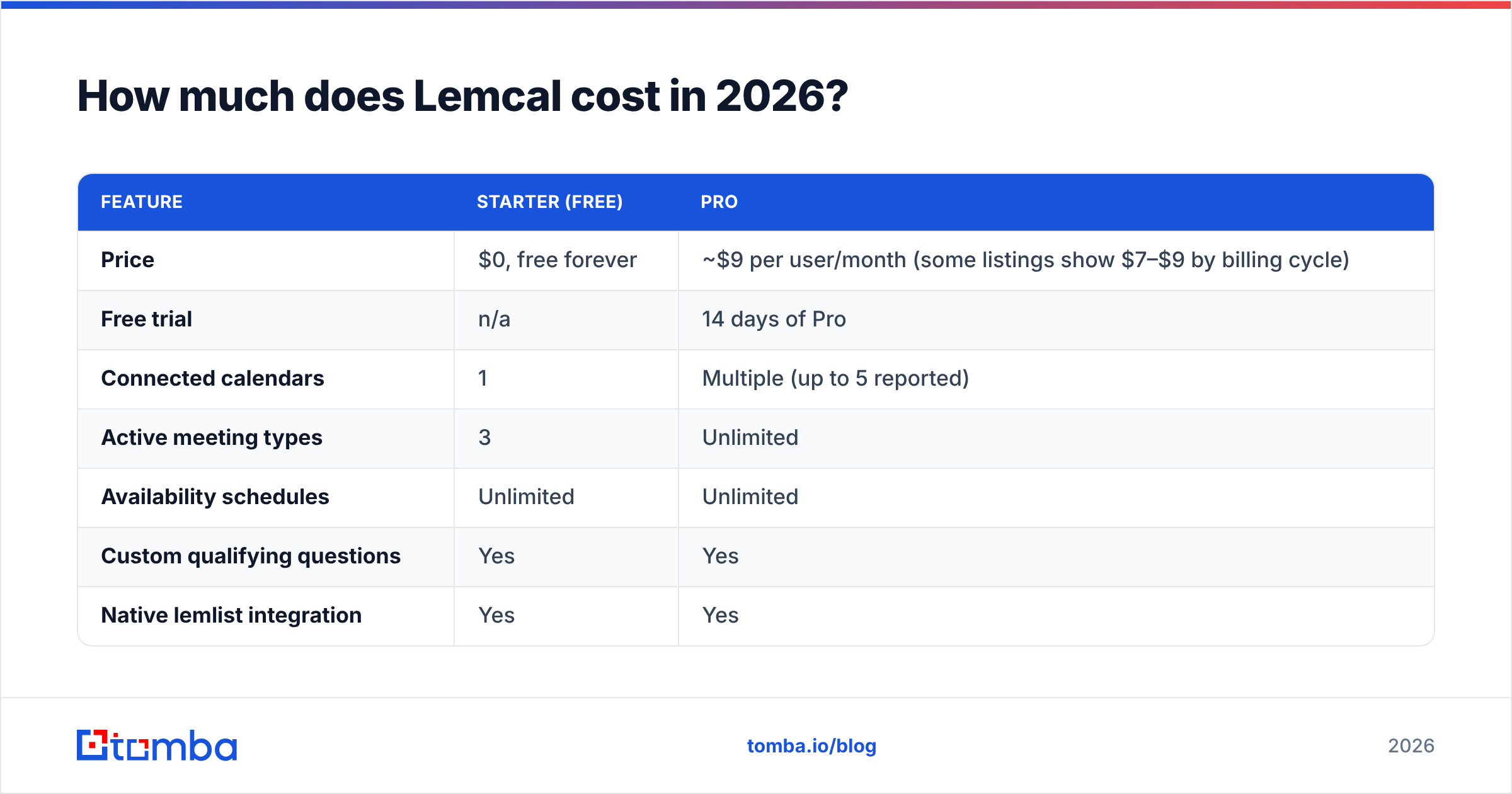
Lemcal's pricing is simple, which counts in its favor. There are two tiers:
| Feature | Starter (Free) | Pro |
|---|---|---|
| Price | $0, free forever | ~$9 per user/month (some listings show $7–$9 by billing cycle) |
| Free trial | n/a | 14 days of Pro |
| Connected calendars | 1 | Multiple (up to 5 reported) |
| Active meeting types | 3 | Unlimited |
| Availability schedules | Unlimited | Unlimited |
| Custom qualifying questions | Yes | Yes |
| Native lemlist integration | Yes | Yes |
| Reminders | Standard | Custom reminders |
| Website embed | Yes | Yes |
| Round robin / team scheduling | No | Yes |
| Paid bookings | No | Yes |
| CRM integration | Limited | Yes |
| Best for | Solo rep, one calendar | SDR teams, multi-calendar reps |
The free plan comes from lemlist's own help center article, lemcal free plan: what's included. The Pro price is what G2's Lemcal pricing page and several independent reviews report. Small differences between listings usually come from annual vs monthly billing, so confirm the checkout price before you commit a team budget.
What do you actually get on the free plan?#
For a free scheduler, the Starter plan is generous. It includes:
- 1 connected calendar (Google or Outlook)
- 3 active meeting types, for example a 15-minute intro, a 30-minute discovery call, and a 45-minute demo
- Unlimited availability schedules
- Multiple attendees on a meeting
- Custom questions to qualify prospects before they book
- Native lemlist integration
- Reminders and website embed
- Import of existing configurations from another scheduler
Calendly's free plan limits you to a single event type, so Lemcal's three meeting types matter here. An outbound rep usually needs at least two, a short qualifying call and a longer demo, and Lemcal covers both at no cost.
The one real limit is the single calendar connection. If you have a work Google calendar plus a personal one, or you split time across two companies, Lemcal can't see both on the free plan and you'll get double-booked. That limit, not the meeting-type cap, is what pushes most people to Pro.
When is Lemcal Pro worth paying for?#
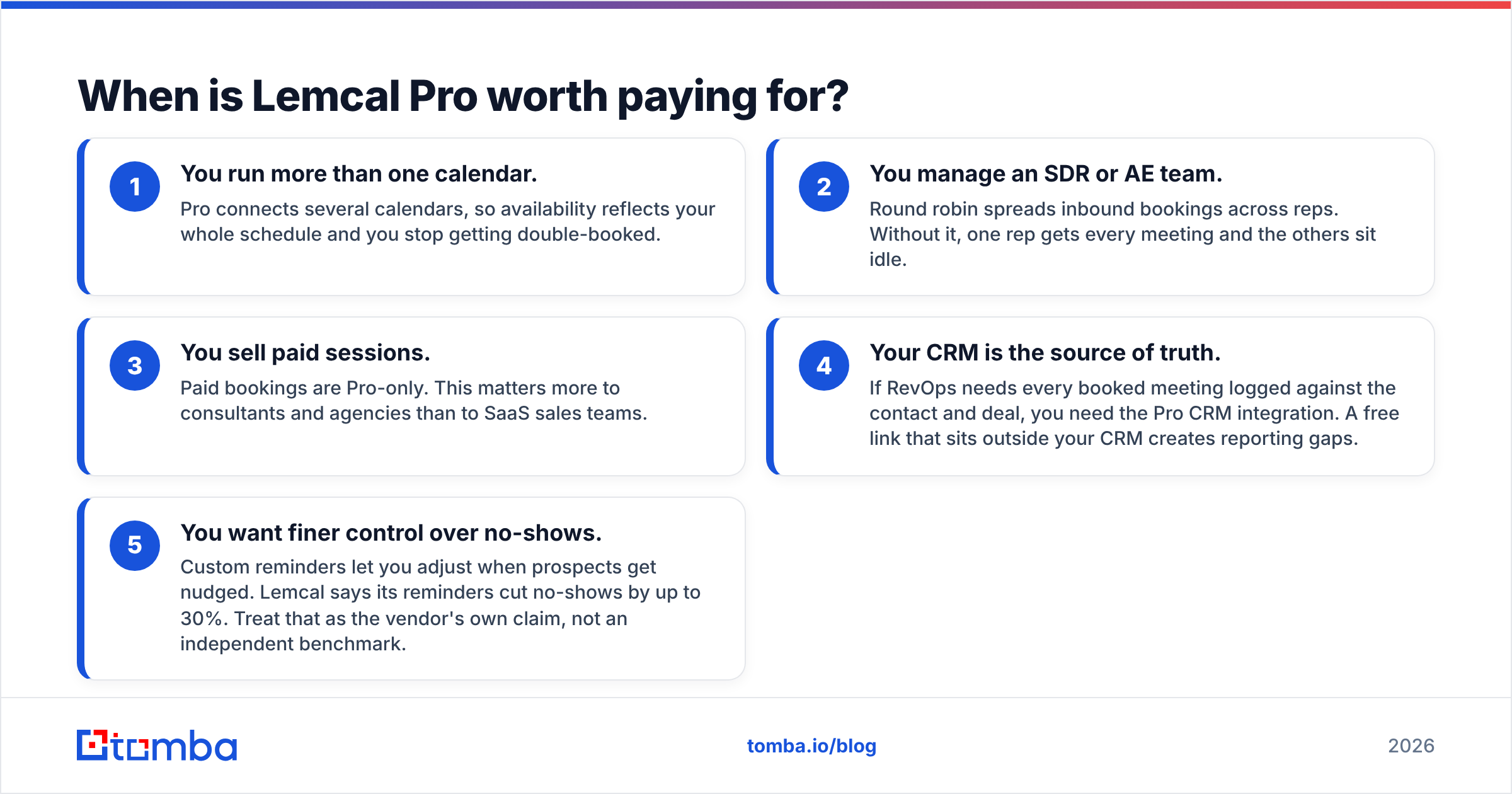
Upgrade when one of these applies to you. For anyone else, the free plan is enough.
- You run more than one calendar. Pro connects several calendars, so availability reflects your whole schedule and you stop getting double-booked.
- You manage an SDR or AE team. Round robin spreads inbound bookings across reps. Without it, one rep gets every meeting and the others sit idle.
- You sell paid sessions. Paid bookings are Pro-only. This matters more to consultants and agencies than to SaaS sales teams.
- Your CRM is the source of truth. If RevOps needs every booked meeting logged against the contact and deal, you need the Pro CRM integration. A free link that sits outside your CRM creates reporting gaps.
- You want finer control over no-shows. Custom reminders let you adjust when prospects get nudged. Lemcal says its reminders cut no-shows by up to 30%. Treat that as the vendor's own claim, not an independent benchmark.
A quick way to decide: if a single extra booked demo per quarter is worth more than $27 to you (three months of one Pro seat), the math works. For almost any B2B sales team with a deal size above a few hundred dollars, it does.
How does Lemcal compare with Calendly, Cal.com, and SavvyCal?#
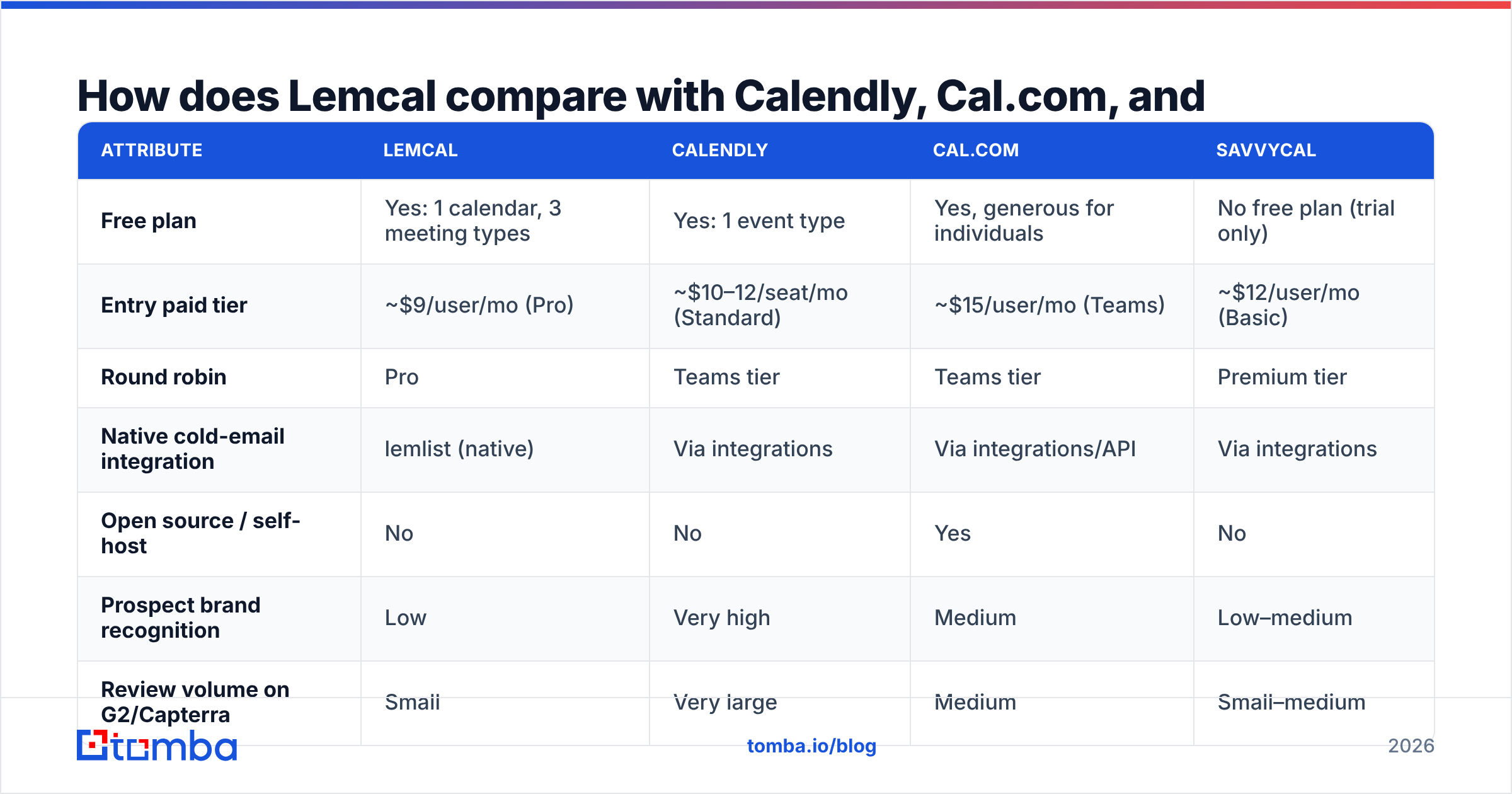
These are the options most teams shortlist. Prices below are list prices at the time of writing and change often, so check each vendor's pricing page before deciding.
| Attribute | Lemcal | Calendly | Cal.com | SavvyCal |
|---|---|---|---|---|
| Free plan | Yes: 1 calendar, 3 meeting types | Yes: 1 event type | Yes, generous for individuals | No free plan (trial only) |
| Entry paid tier | ~$9/user/mo (Pro) | ~$10–12/seat/mo (Standard) | ~$15/user/mo (Teams) | ~$12/user/mo (Basic) |
| Round robin | Pro | Teams tier | Teams tier | Premium tier |
| Native cold-email integration | lemlist (native) | Via integrations | Via integrations/API | Via integrations |
| Open source / self-host | No | No | Yes | No |
| Prospect brand recognition | Low | Very high | Medium | Low–medium |
| Review volume on G2/Capterra | Small | Very large | Medium | Small–medium |
| Best fit | lemlist-based outbound teams | Enterprise and mixed-use teams | Dev-led teams wanting control | Individuals who care about booking UX |
Lemcal vs Calendly. Calendly costs a little more per seat and is far better known. Prospects have seen a Calendly link thousands of times, and familiar things feel lower-risk to click. Lemcal is cheaper, and its free plan is better for sales use because of the three meeting types. If you live in lemlist, Lemcal's native connection is a real workflow advantage that Calendly can't match. You can compare user sentiment directly on G2's Calendly vs Lemcal page.
Lemcal vs Cal.com. Cal.com's strengths are open source and self-hosting. If your security team wants the scheduler on your own infrastructure, Cal.com wins outright. If you want a hosted tool that plugs into an outbound stack with no engineering work, Lemcal is simpler.
Lemcal vs SavvyCal. SavvyCal's booking experience is polished. It overlays the prospect's own calendar and ranks slots. It has no free plan, though, and its outbound integrations aren't native. Pick SavvyCal for booking UX and Lemcal for cost and lemlist fit.
What do Lemcal reviews say? The pros#
Independent reviews and user comments mostly agree on these strengths:
- Low cost. A usable free plan plus a Pro tier at or below the category's usual price.
- Built for outbound. Booking pages, qualifying questions, and the lemlist connection are designed around cold outreach, not generic appointments.
- Customisation. Reviewers regularly mention how much you can brand and style the booking page, and on the free plan too.
- Standard integrations covered. Google Meet, Zoom, Microsoft Teams, Zapier, and lemlist all work. For most teams, Zapier fills any remaining gaps.
- Easy switching. You can import existing configurations, so you don't have to rebuild every event type by hand when moving from another scheduler.
What are the cons of Lemcal?#
The weaknesses are just as consistent:
- The free plan is for one person. One calendar and three meeting types are fine for a solo rep. It won't scale into a team scheduling setup without upgrading.
- Low brand recognition. Some prospects hesitate on an unfamiliar booking domain. This is minor, but it's real in conservative industries such as finance or healthcare.
- Fewer reviews. Lemcal has far fewer reviews on G2 and Capterra than Calendly, so you have less independent evidence about reliability, support, and edge-case bugs. You'll probably need to run your own trial.
- Its main advantage depends on lemlist. Take away the lemlist integration and Lemcal becomes a competent, cheap scheduler without much else to set it apart.
- Price listings don't always match. Seeing $7 in one place and $9 in another isn't a scandal, but it does mean you should confirm billing terms before you roll out seats.

Are there hidden costs in Lemcal pricing?#
There are no hidden fees in the usual sense. The real costs sit next to the scheduler:
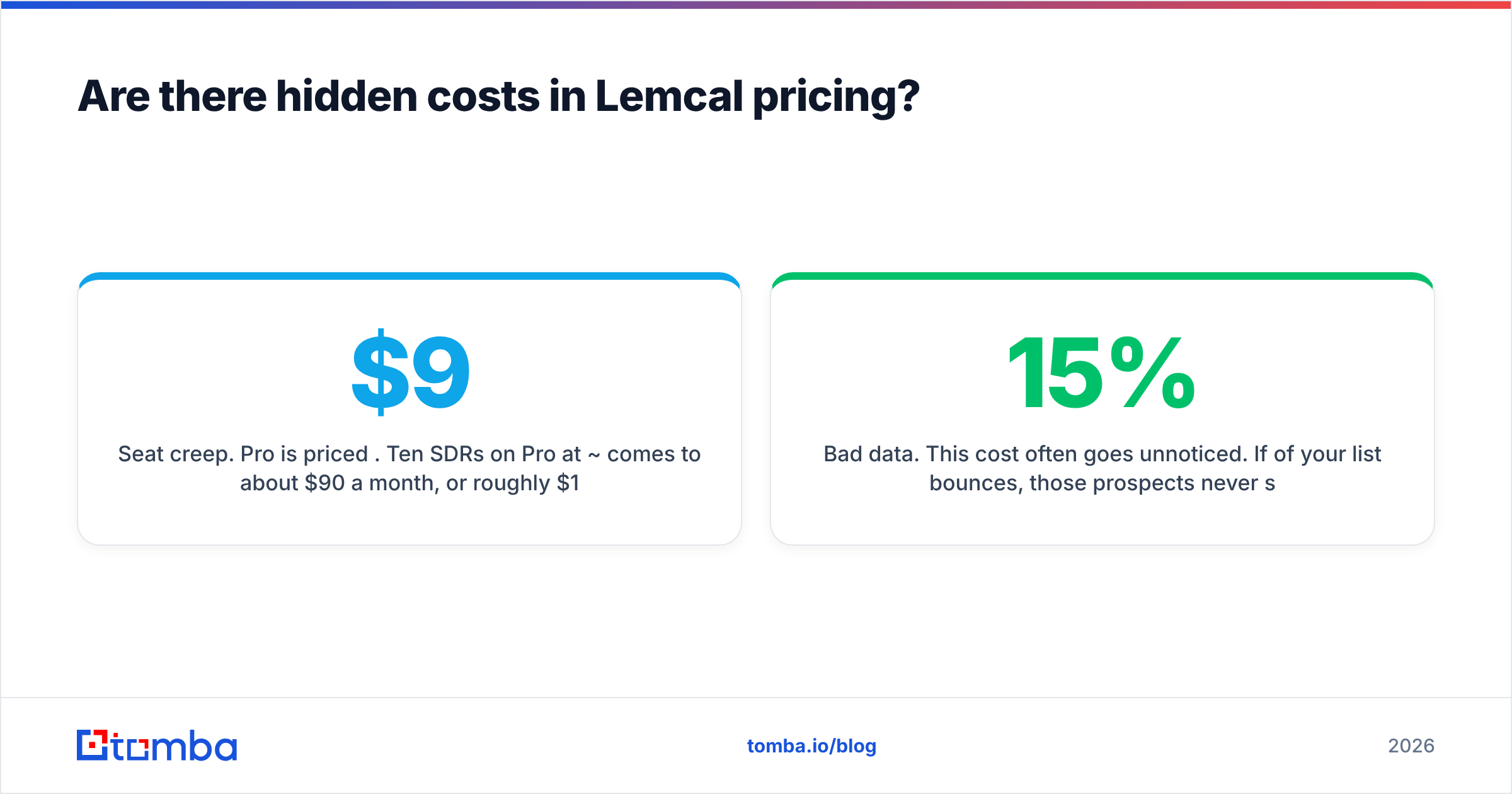
Seat creep. Pro is priced per user. Ten SDRs on Pro at ~$9 comes to about $90 a month, or roughly $1,080 a year. That's cheap, but it isn't free, and it grows with headcount.
The rest of the outbound stack. A scheduler handles the last step of a meeting, after a prospect has already said yes. To get there you need a sending tool, warmed-up domains, and a list of correct email addresses. Lemcal doesn't provide any of those, so budget for them separately.
Bad data. This cost often goes unnoticed. If 15% of your list bounces, those prospects never see your booking link, and your sender reputation drops a little with every bounce. Many teams upgrade their scheduler when the actual problem is that emails aren't reaching the right people. Before you blame your booking page for low meeting volume, run your list through an email verifier and fill gaps with an email finder so you're reaching real decision-makers.
How should you set up Lemcal for outbound?#
If you choose Lemcal, this setup covers most of the value:
- Create three meeting types on day one. Make a 15-minute qualifier, a 30-minute discovery call, and a 45-minute demo. That uses the full free-plan allowance on the meetings that actually move deals forward.
- Add two qualifying questions to each type. Ask for company size and current tool. You'll screen out tyre-kickers before they take a slot.
- Put the link in your second or third touch, not the first. Early links in cold email come across as presumptuous. Once a prospect has engaged, the link removes friction.
- Connect lemlist if you use it. This is the main reason to pick Lemcal, so don't skip it.
- Check your response rate before and after. Measure your email response rate and booked-meeting rate for two weeks before adding the link and two weeks after. If the booking rate doesn't move, the scheduler isn't your bottleneck.
Is Lemcal pricing worth it? The verdict#
For most outbound teams, yes. It's one of the better-value schedulers in the category, with some caveats:
- Solo reps and founders: Start on the free plan. One calendar and three meeting types cover a typical outbound workflow, and you may never need to upgrade.
- Teams running on lemlist: Go straight to Pro. The per-seat price is low, and round robin plus the native integration pay for themselves quickly.
- Teams not on lemlist: Lemcal is still a good cheap choice. Compare it honestly with Calendly, whose brand familiarity can matter, and Cal.com, which suits you if you need self-hosting.
- Enterprise and regulated industries: The small review base and lower brand recognition point toward Calendly or a self-hosted Cal.com setup.
Whatever you choose, remember that the scheduler is the last step of the process. What happens earlier matters more: the right contact, a verified address, and a message relevant enough to earn a reply. If you're comparing costs across your whole stack, Tomba pricing starts with a free tier of 25 searches a month, with paid plans from $49/month.
Fill your calendar with the right people. A $9 booking page only books meetings if your emails reach real decision-makers. Tomba Email Finder finds professional email addresses by domain, name, or company, so the prospects who get your Lemcal link are the ones who can buy. Start with 25 free searches a month and check how many more of your emails land.
Related guides#
// get started
Find, verify and enrich your first contacts today
Start on the free plan with 25 searches a month, then scale when your team is ready.
Free plan · No credit card required · GDPR & CCPA
// about the author