Lemlist Pros and Cons in 2026: An Honest Review for Outbound Teams
Lemlist is still one of the most personalised cold email tools you can buy. It is also one of the easiest to overpay for. Here's where it earns the seat price, and where it doesn't.
TL;DR
- Lemlist is strongest at personalisation and multichannel sequences. It handles custom images, liquid-syntax variables, and email + LinkedIn + call steps in one flow better than most rivals.
- The main cons are cost and complexity. Pricing is per seat, the multichannel features sit on the higher tiers, and small teams often pay for more than they use.
- Deliverability depends on you, not the tool. lemwarm helps, but a list with unverified addresses will still get your domains burned.
- The built-in lead database and email finder are handy, but many teams still verify contacts elsewhere before a launch.
- Pick lemlist if you run personalised, multi-touch outbound at moderate volume. Look at other tools if you need cheap high-volume sending or huge mailbox rotation.
What is lemlist and who is it built for?#
Lemlist is a sales engagement platform that started as a cold email tool known for personalised images. It has since grown into a multichannel outbound suite. A single campaign can mix emails, LinkedIn steps (profile visits, invites, messages, voice notes), manual or dialer calls, and custom tasks. Conditional logic sends each prospect down a branch based on how they respond.
Around that sequencer, lemlist has added:
- lemwarm, its email warmup and deliverability tool
- A B2B lead database you can search and pull into campaigns
- Built-in email finding and verification, paid for with credits
- AI features that generate sequences, write personalised lines, and suggest copy
- CRM integrations with HubSpot, Salesforce, Pipedrive, and others
The core buyer is a small or mid-sized outbound team: SDRs, founders doing their own selling, and agencies running personalised campaigns for clients. It suits you if your pitch depends on showing you did your homework. It suits you less if you're sending 10,000 near-identical emails a day across 80 inboxes.
What are the biggest pros of lemlist?#
Across user reviews on G2 and in hands-on use, the same five strengths keep coming up.
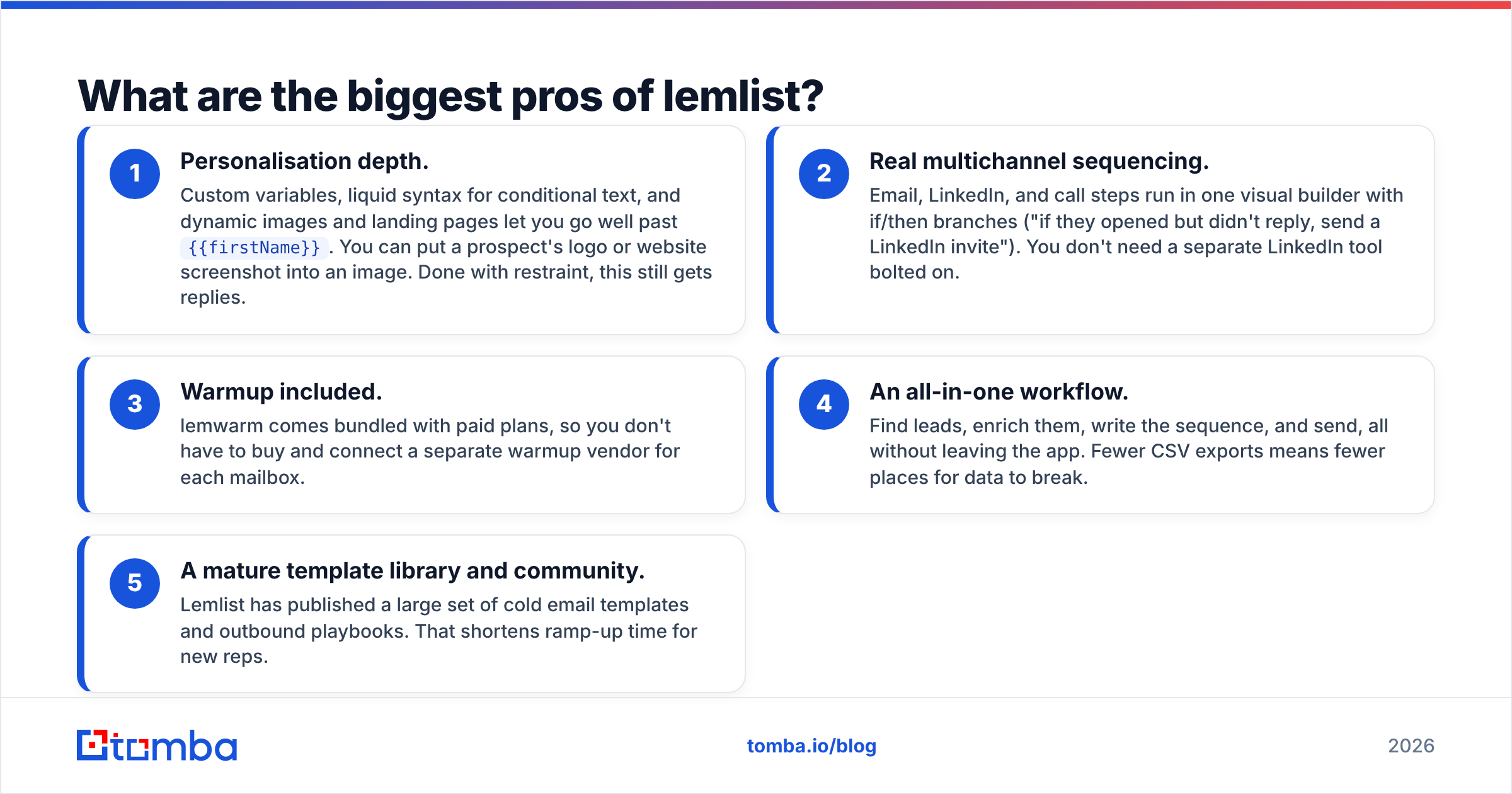
- Personalisation depth. Custom variables, liquid syntax for conditional text, and dynamic images and landing pages let you go well past
{{firstName}}. You can put a prospect's logo or website screenshot into an image. Done with restraint, this still gets replies. - Real multichannel sequencing. Email, LinkedIn, and call steps run in one visual builder with if/then branches ("if they opened but didn't reply, send a LinkedIn invite"). You don't need a separate LinkedIn tool bolted on.
- Warmup included. lemwarm comes bundled with paid plans, so you don't have to buy and connect a separate warmup vendor for each mailbox.
- An all-in-one workflow. Find leads, enrich them, write the sequence, and send, all without leaving the app. Fewer CSV exports means fewer places for data to break.
- A mature template library and community. Lemlist has published a large set of cold email templates and outbound playbooks. That shortens ramp-up time for new reps.
The personalisation point deserves a caveat. Custom images were a novelty in 2019. In 2026 many buyers have seen them, and some filters treat image-heavy first touches with suspicion. Treat them as an occasional pattern-breaker, not the default.
What are the main cons of lemlist?#
These complaints come up just as consistently.
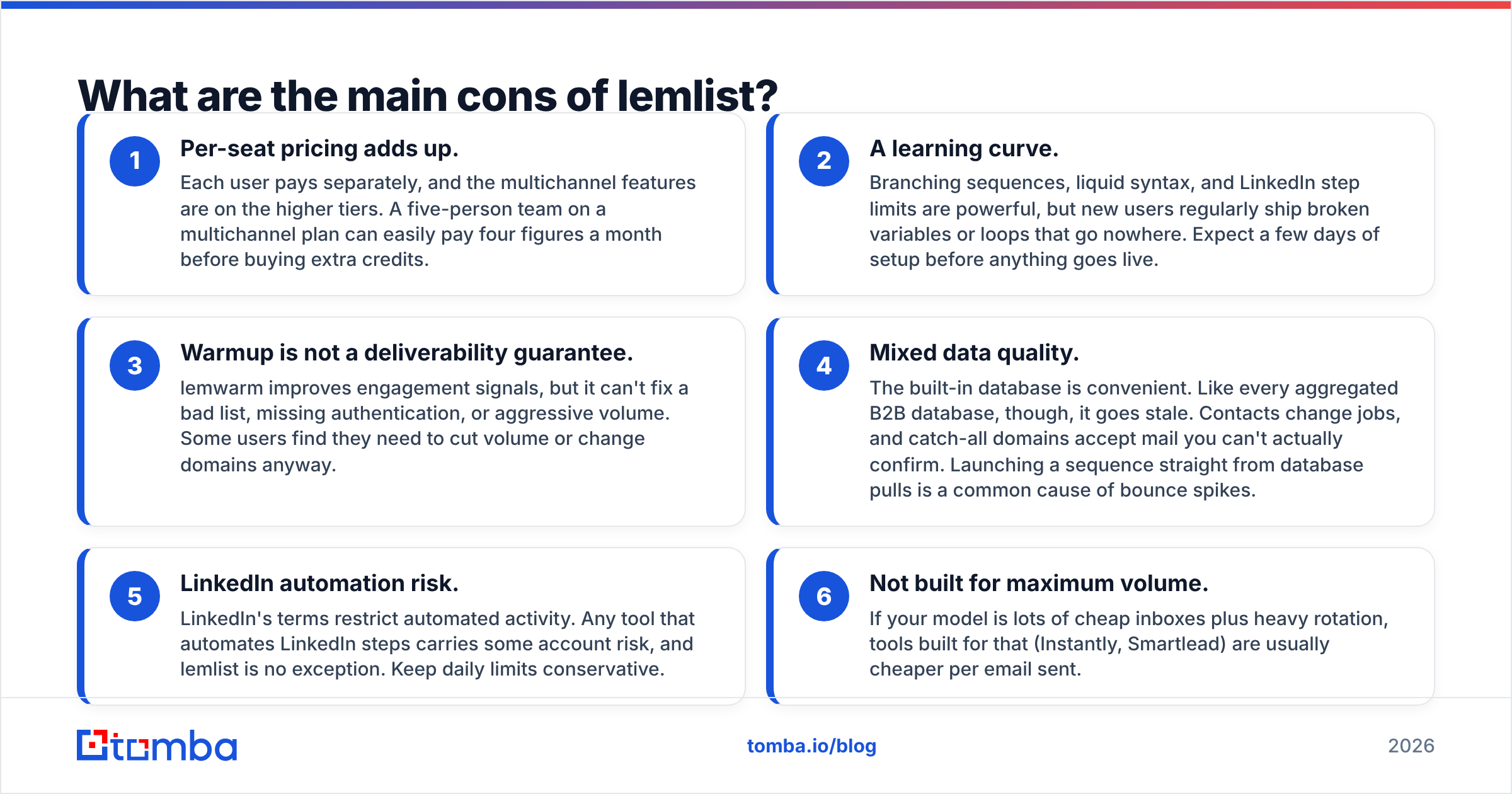
- Per-seat pricing adds up. Each user pays separately, and the multichannel features are on the higher tiers. A five-person team on a multichannel plan can easily pay four figures a month before buying extra credits.
- A learning curve. Branching sequences, liquid syntax, and LinkedIn step limits are powerful, but new users regularly ship broken variables or loops that go nowhere. Expect a few days of setup before anything goes live.
- Warmup is not a deliverability guarantee. lemwarm improves engagement signals, but it can't fix a bad list, missing authentication, or aggressive volume. Some users find they need to cut volume or change domains anyway.
- Mixed data quality. The built-in database is convenient. Like every aggregated B2B database, though, it goes stale. Contacts change jobs, and catch-all domains accept mail you can't actually confirm. Launching a sequence straight from database pulls is a common cause of bounce spikes.
- LinkedIn automation risk. LinkedIn's terms restrict automated activity. Any tool that automates LinkedIn steps carries some account risk, and lemlist is no exception. Keep daily limits conservative.
- Not built for maximum volume. If your model is lots of cheap inboxes plus heavy rotation, tools built for that (Instantly, Smartlead) are usually cheaper per email sent.

How much does lemlist cost in 2026?#
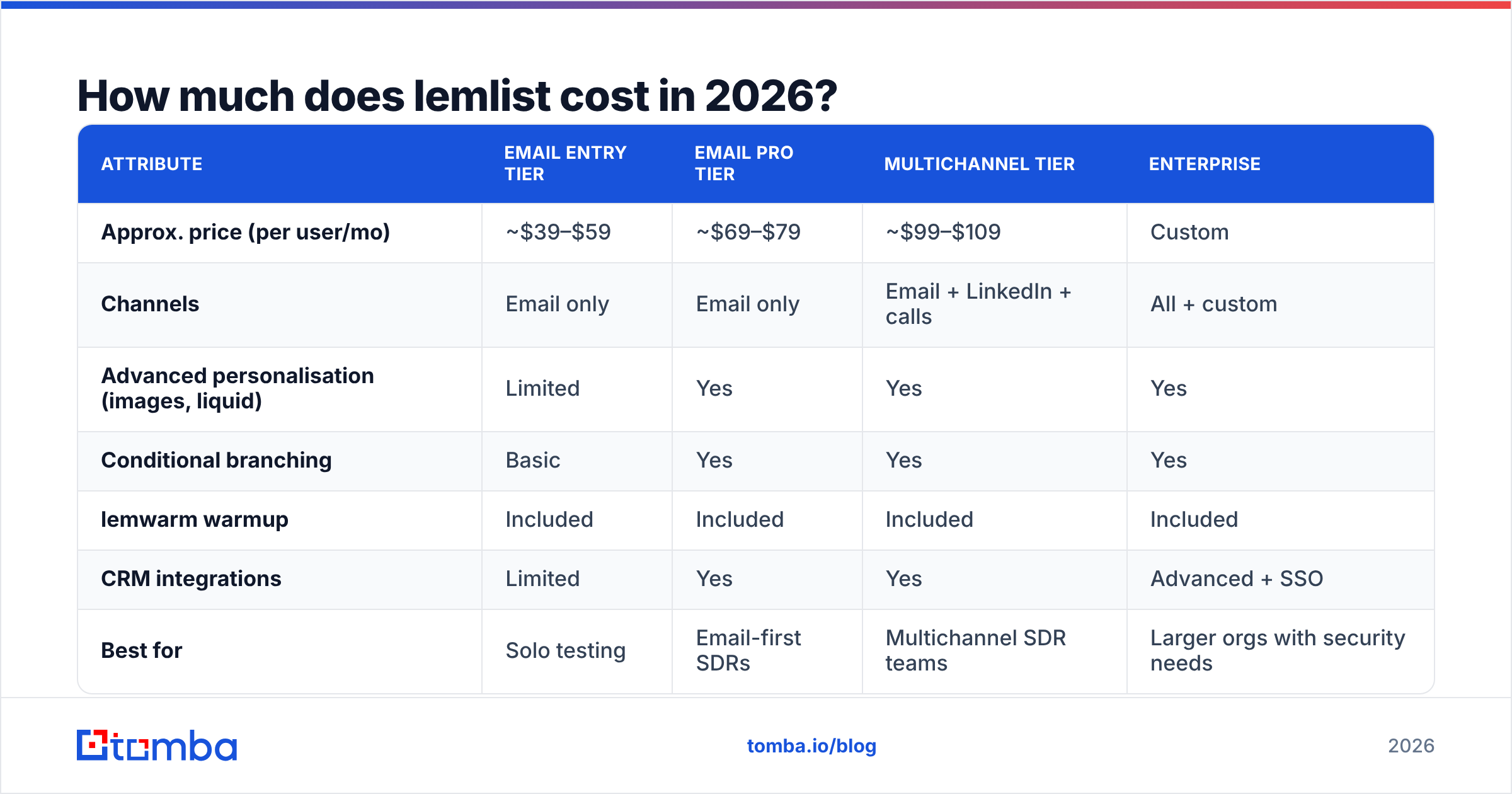
Lemlist changes its packaging often, so check the official pricing page before you budget. The shape has stayed fairly stable: an entry email-only plan, a fuller email plan, a multichannel plan, and custom enterprise pricing. Annual billing gets a discount, and credits for finding and verifying contacts are consumed on top of the plan.
The table shows how the tiers typically differ. Treat the prices as approximate ranges, not quotes.
| Attribute | Email entry tier | Email pro tier | Multichannel tier | Enterprise |
|---|---|---|---|---|
| Approx. price (per user/mo) | ~$39–$59 | ~$69–$79 | ~$99–$109 | Custom |
| Channels | Email only | Email only | Email + LinkedIn + calls | All + custom |
| Advanced personalisation (images, liquid) | Limited | Yes | Yes | Yes |
| Conditional branching | Basic | Yes | Yes | Yes |
| lemwarm warmup | Included | Included | Included | Included |
| CRM integrations | Limited | Yes | Yes | Advanced + SSO |
| Best for | Solo testing | Email-first SDRs | Multichannel SDR teams | Larger orgs with security needs |
The hidden cost is usually credits and mailboxes, not the seat fee. If you pull 3,000 contacts a month from the database and verify them, credit spend becomes a real line item. Each extra sending mailbox also means more Google Workspace or Microsoft 365 seats, plus domains.
Is lemlist good for email deliverability?#
Mostly, if you do the basics. Lemlist gives you the tools a sender needs: warmup, sending schedules, daily caps, custom tracking domains, and the option to turn off open tracking. What it can't do is fix a problem upstream of the send button.
Three things decide whether your lemlist campaigns reach the inbox:
- Authentication. SPF, DKIM, and DMARC must be set up on every sending domain. Google's email sender guidelines spell out the requirements. Bulk senders that ignore them get throttled or rejected.
- List quality. Hard bounces are the fastest way to damage sender reputation. Most deliverability consultants put the safe ceiling around 2–3%, and less is better.
- Volume discipline. Keep new inboxes to low daily sends and ramp up slowly. Spread volume across secondary domains instead of pushing one inbox hard.
Here's where the "all-in-one" pitch meets reality. Lemlist's built-in verification works, but many teams add a second check before any large launch, especially for catch-all domains. Running a list through a dedicated email verifier costs little compared with the cost of a burned domain.
How does lemlist compare to its main alternatives?#
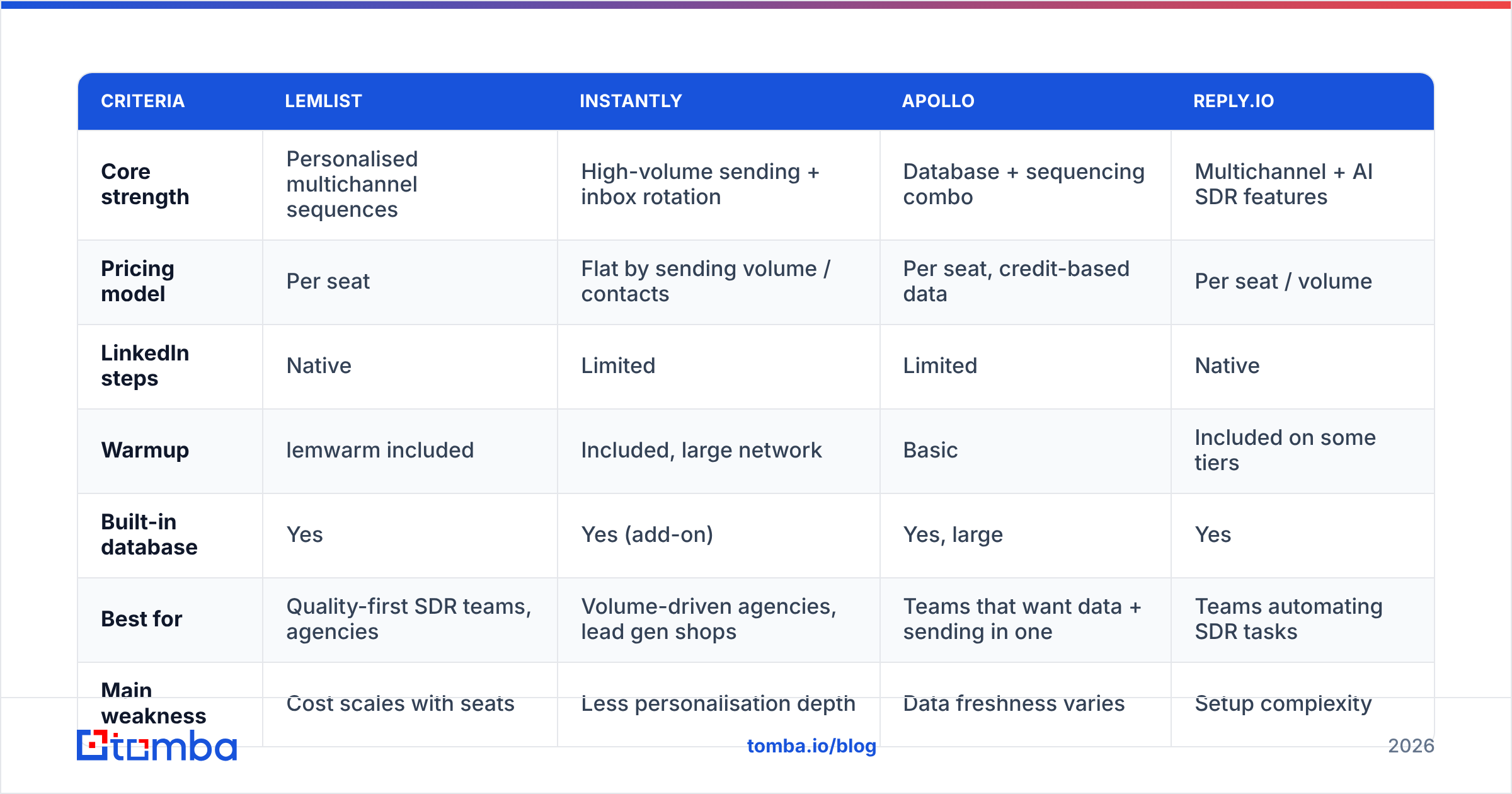
The fair comparison isn't "which tool is best." It's "which tool fits how you prospect." The table below compares lemlist with the tools buyers most often shortlist alongside it.
| Criteria | lemlist | Instantly | Apollo | Reply.io |
|---|---|---|---|---|
| Core strength | Personalised multichannel sequences | High-volume sending + inbox rotation | Database + sequencing combo | Multichannel + AI SDR features |
| Pricing model | Per seat | Flat by sending volume / contacts | Per seat, credit-based data | Per seat / volume |
| LinkedIn steps | Native | Limited | Limited | Native |
| Warmup | lemwarm included | Included, large network | Basic | Included on some tiers |
| Built-in database | Yes | Yes (add-on) | Yes, large | Yes |
| Best for | Quality-first SDR teams, agencies | Volume-driven agencies, lead gen shops | Teams that want data + sending in one | Teams automating SDR tasks |
| Main weakness | Cost scales with seats | Less personalisation depth | Data freshness varies | Setup complexity |
A few practical takeaways:
- Lemlist vs Instantly: Instantly wins on cost per email and managing many inboxes. Lemlist wins on personalisation and native LinkedIn steps. If you're weighing the two, Tomba's Instantly alternative breakdown covers the volume side in more detail.
- Lemlist vs Apollo: Apollo's database is the reason to buy it, and its sequencer is adequate. Lemlist's sequencer is better, but its database is secondary. Some teams use Apollo or another data source for leads and lemlist for sending.
- Lemlist vs Reply.io: They are close on features. The choice usually comes down to UI preference and how much you lean on AI features.

Who should use lemlist, and who should skip it?#
Choose lemlist if:
- Your deals are high-value enough that personalised first touches pay off
- You want email and LinkedIn steps in one sequence without extra tools
- You have 1–15 reps and send moderate volume (roughly 30–80 emails per inbox per day)
- You're an agency that needs client-ready, polished campaigns
Skip or reconsider lemlist if:
- You're a solo founder on a tight budget who only needs basic email sequences
- Your strategy is high volume across dozens of cheap inboxes
- You mainly need data, not sending. A dedicated data tool plus a lighter sequencer may cost less.
- Your team won't put time into setup, because the advanced features go unused
How do you get the most out of lemlist if you buy it?#
If you go ahead, these habits separate teams that get replies from teams that get flagged:
- Build and verify your list before it touches lemlist. Use domain search to map the decision-makers at each target account, then verify every address. Remove unknowns and handle catch-alls separately.
- Warm every new inbox for 2–3 weeks before real sends, and keep lemwarm running afterwards at a low level.
- Limit personalised images to one step, usually the second or third touch, not the opener.
- Branch on behaviour, not on opens. Apple Mail Privacy Protection inflates open data. Use replies, link clicks, and LinkedIn acceptance as triggers instead.
- Keep LinkedIn limits conservative. Roughly 15–25 invites a day per profile is a common safe range.
- Review sequence stats weekly. Pause any step with a reply rate near zero instead of letting it keep sending.
What's the final verdict on lemlist pros and cons?#
Lemlist is still one of the best tools for personalised, multichannel outbound in 2026. Its sequencer, branching logic, and bundled warmup make it a solid core for an SDR team that cares about quality over quantity. The trade-offs are real, though: per-seat costs rise quickly, the learning curve is steep, and no warmup network can save a campaign built on stale data.
The pattern that works for most teams: use lemlist for what it does best (sequencing and personalisation), and get clean, verified contacts before they reach it. Get the data layer right and lemlist's strengths show up in your reply rates. Get it wrong and you'll mostly remember the cons.
If list quality is the weak link in your outbound, start there. Tomba Email Finder finds professional email addresses by name, domain, or company and verifies them before export, so the CSV you upload to lemlist is one you can trust. The free tier gives you 25 searches a month to test it on your next target list, and paid plans start at $49/mo. See Tomba pricing for the full breakdown.
Related guides#
// get started
Find, verify and enrich your first contacts today
Start on the free plan with 25 searches a month, then scale when your team is ready.
Free plan · No credit card required · GDPR & CCPA
// about the author