Lemlist vs Smartlead (2026): Which Cold Email Tool Wins?
Lemlist is built for personalized multichannel outreach, and Smartlead is built to run cold email across many inboxes. Here's how pricing, deliverability and scaling compare, and how to decide which one fits your team.
- Pick Lemlist if you're a small sales team or founder-led team. It suits you if you want personalized, multichannel sequences (email, LinkedIn, calls) and a built-in lead database in one tool, and you're fine paying per seat.
- Pick Smartlead if you're an agency or high-volume outbound team. It lets you rotate dozens or hundreds of inboxes, and you want unlimited email accounts and warmup at a flat monthly price.
- The pricing models are very different. Lemlist charges per user. Smartlead charges by active leads and monthly email volume. The cheaper tool depends on how many people send and how many inboxes they use.
- Neither tool fixes bad data. Bounce rates decide deliverability on both platforms, so verify every list before you upload it.
What are Lemlist and Smartlead, and why compare them?#
Lemlist and Smartlead both come up when a team outgrows sending cold emails by hand from Gmail. They were built to answer different questions, though.
Lemlist started with personalization. It became known for custom images and videos with the prospect's name or website in them. Since then it has grown into a multichannel outreach platform with email, LinkedIn steps, calling, a built-in B2B lead database, and its own warmup network (lemwarm).
Smartlead started with infrastructure. It's built to connect many sending inboxes, rotate them automatically, warm them all up, and bring every reply into one master inbox. Lead-gen agencies and outbound teams that send tens of thousands of cold emails a month use it heavily.
So you're really choosing between two approaches:
- Depth per prospect. You send fewer, more personalized messages across several channels. That's Lemlist.
- Volume across inboxes. You spread a lot of sending across many domains and mailboxes so no single inbox gets overloaded. That's Smartlead.
Which one fits depends more on your outbound model than on any feature checklist.
How do Lemlist and Smartlead compare feature by feature?#
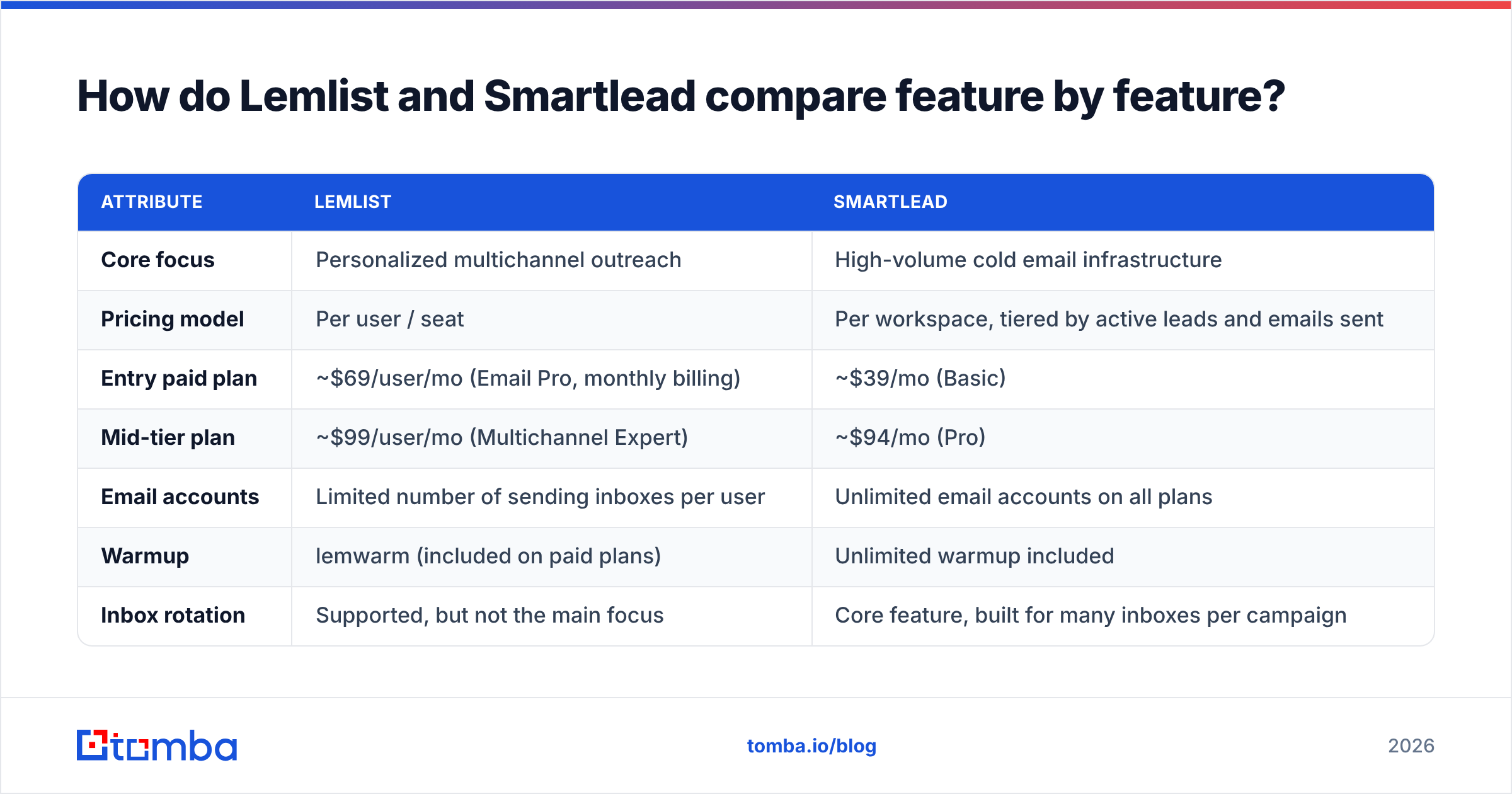
Here's the comparison that matters for most buyers. Pricing reflects public list prices at the time of writing and changes often, so check each vendor's pricing page before you buy.
| Attribute | Lemlist | Smartlead |
|---|---|---|
| Core focus | Personalized multichannel outreach | High-volume cold email infrastructure |
| Pricing model | Per user / seat | Per workspace, tiered by active leads and emails sent |
| Entry paid plan | ~$69/user/mo (Email Pro, monthly billing) | ~$39/mo (Basic) |
| Mid-tier plan | ~$99/user/mo (Multichannel Expert) | ~$94/mo (Pro) |
| Email accounts | Limited number of sending inboxes per user | Unlimited email accounts on all plans |
| Warmup | lemwarm (included on paid plans) | Unlimited warmup included |
| Inbox rotation | Supported, but not the main focus | Core feature, built for many inboxes per campaign |
| LinkedIn steps | Native (visits, invites, messages) | Not native; needs third-party tools |
| Cold calling | Built-in dialer on higher tiers | Not a core feature |
| Built-in lead database | Yes, large B2B database with email finding | No native prospecting database |
| Personalized images/video | Yes, a signature feature | Basic text personalization and spintax |
| Unified inbox | Yes | Yes (master inbox across all accounts) |
| White-label / client management | Limited | Strong: client workspaces, white-label on higher plans |
| API and webhooks | Yes | Yes |
| Best for | SDR teams, founders, SMB sales | Agencies, lead-gen shops, volume outbound |
The table shows the gap clearly. Lemlist puts more features into each seat. Smartlead puts more sending capacity into each dollar.
Which is cheaper: Lemlist or Smartlead?#
It depends on two numbers: how many people send, and how many inboxes they send from.
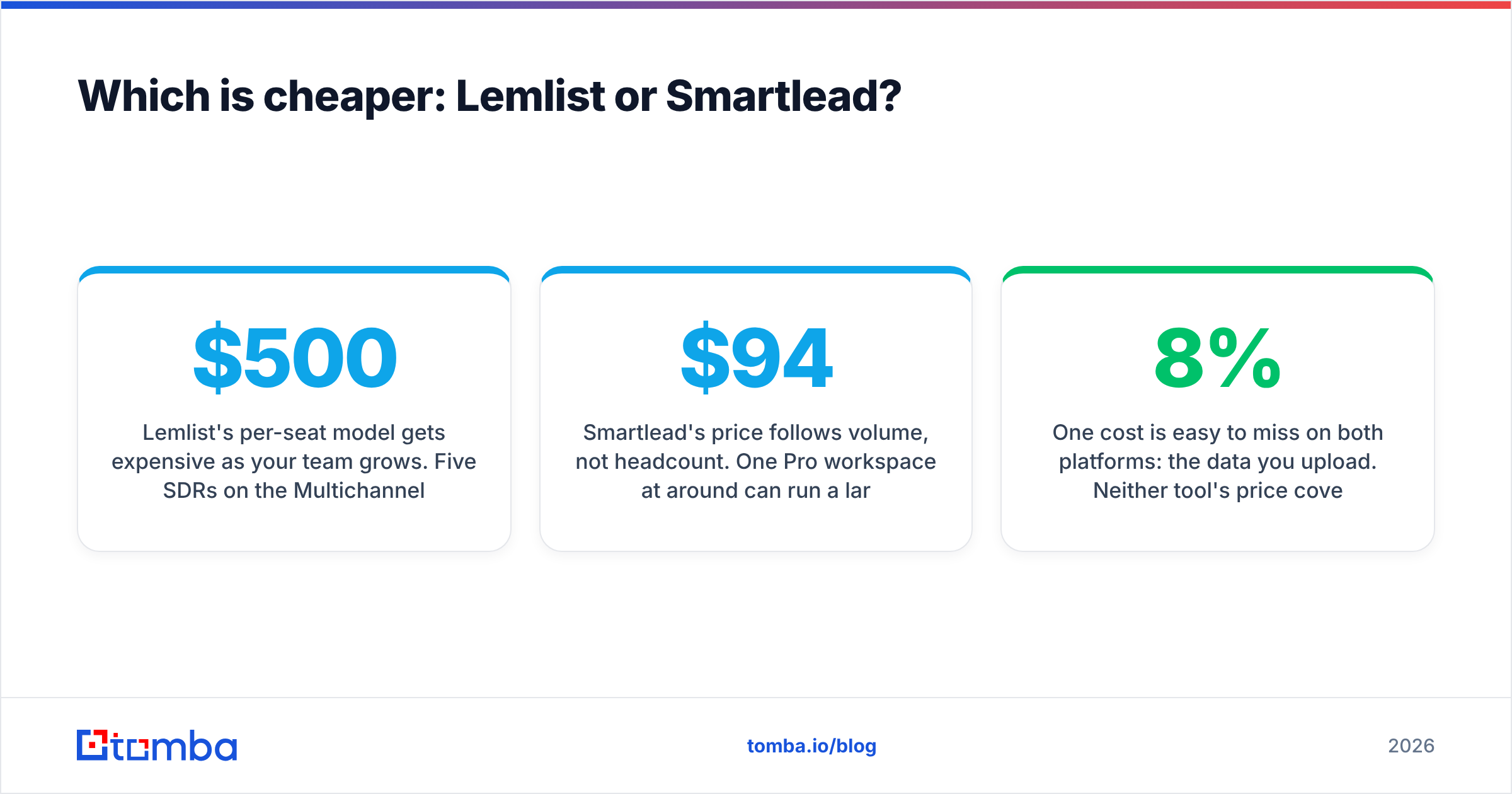
Lemlist's per-seat model gets expensive as your team grows. Five SDRs on the Multichannel Expert tier cost roughly $500/month before add-ons. In return, each of them gets email, LinkedIn automation, calling and database access, which would otherwise mean paying for three or four separate tools.
Smartlead's price follows volume, not headcount. One Pro workspace at around $94/month can run a large number of mailboxes, and several team members can work inside it. For an agency running campaigns for ten clients across 150 inboxes, that pricing is hard to beat.
Here's a quick way to think about cost:
- 1–2 people, fewer than 10 inboxes, want LinkedIn as well. Lemlist is usually better value because it replaces other tools.
- 1–3 people, 20+ inboxes, email only. Smartlead is much cheaper per inbox.
- 5+ SDRs working their own accounts. Compare Lemlist's seat cost against Smartlead plus a separate LinkedIn tool plus a data provider. The gap is often smaller than it first looks.
- Agency with client workspaces. Smartlead, clearly.
One cost is easy to miss on both platforms: the data you upload. Neither tool's price covers what happens when 8% of your list bounces. You pay for that in damaged domains and new inboxes. Budget for list verification alongside the sequencer.

How do Lemlist and Smartlead handle deliverability?#
The two tools take different approaches to deliverability, and this is the most important section if you care about reply rates.
Smartlead's approach is to spread the load. It assumes you'll send from many inboxes across several secondary domains, each at a low daily volume (usually 30–50 cold emails per inbox per day). Its main deliverability features follow from that:
- Automatic inbox rotation spreads a campaign across all connected mailboxes.
- Unlimited warmup keeps every inbox's sender reputation healthy between campaigns.
- Per-inbox sending limits and random delays make sending look like a person, not a script.
- Spintax and conditional text reduce the "same email sent 10,000 times" fingerprint.
Lemlist's approach is to protect each sender. It assumes each rep sends from their own domain in smaller, more targeted batches. Its deliverability features include:
- lemwarm, a warmup network that also gives you setup guidance and scoring.
- Deliverability checks on DNS setup (SPF, DKIM, DMARC) and on content before you launch.
- Multichannel sequencing, which is an underrated deliverability benefit. When a LinkedIn touch or a call replaces a third follow-up email, you send less email in total, and that helps your domain.
Neither approach is better in every case. Smartlead's setup is stronger when volume is the plan. Lemlist's setup is enough for, and suited to, teams sending a few hundred personalized emails a day.
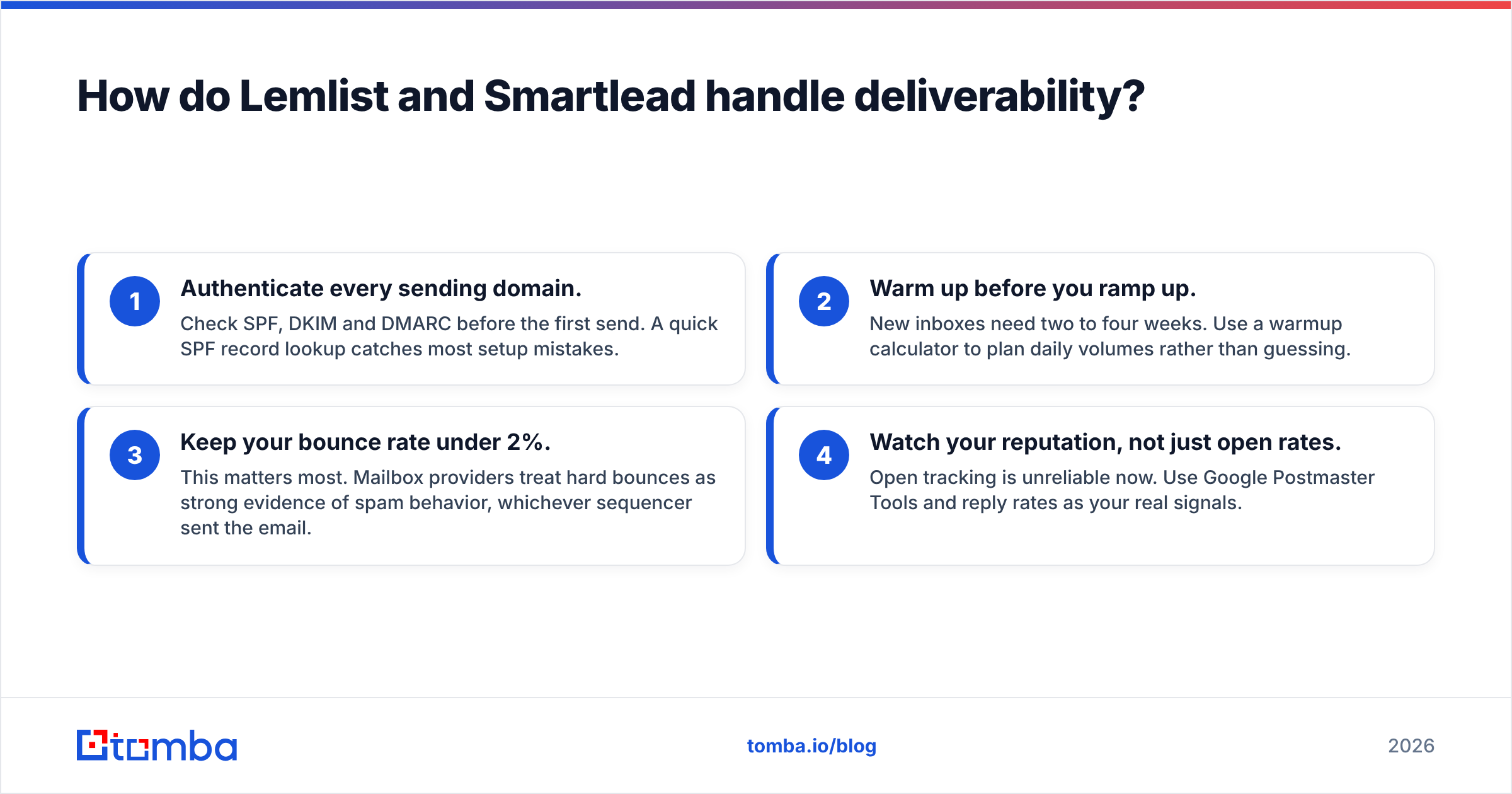
Whichever tool you pick, a few basics decide inbox placement more than the software does:
- Authenticate every sending domain. Check SPF, DKIM and DMARC before the first send. A quick SPF record lookup catches most setup mistakes.
- Warm up before you ramp up. New inboxes need two to four weeks. Use a warmup calculator to plan daily volumes rather than guessing.
- Keep your bounce rate under 2%. This matters most. Mailbox providers treat hard bounces as strong evidence of spam behavior, whichever sequencer sent the email.
- Watch your reputation, not just open rates. Open tracking is unreliable now. Use Google Postmaster Tools and reply rates as your real signals.
Is Lemlist better than Smartlead for personalization?#
Yes, if you mean personalization beyond text.
Lemlist's custom landing pages, personalized images (a prospect's logo on a whiteboard photo, their website in a browser frame) and video thumbnails are still its main selling point. It also has AI-assisted writing that can draft icebreakers from a prospect's LinkedIn or website. For account-based outreach to a few hundred high-value accounts, these touches get more replies.
Smartlead handles text personalization well: custom variables, spintax, conditional blocks, and AI-assisted categorization of replies. It doesn't try to compete on visual personalization. Its view is that at 20,000 emails a month, the list and the offer matter more than a custom image. For volume campaigns that's broadly true.
A useful rule: if a rep would hand-check every prospect before they enter the sequence, Lemlist's personalization tools pay off. If prospects go in by the thousand, Smartlead's variables and spintax are enough.
Which tool scales better for agencies?#
Smartlead, and it isn't close.
Agencies have specific needs that Smartlead was designed around:
- Client workspaces keep each customer's campaigns, inboxes and reporting separate.
- White-label options on higher tiers let an agency present the platform under its own brand.
- Unlimited mailboxes mean onboarding a new client with 20 fresh inboxes doesn't trigger a price jump.
- Master inbox lets one SDR team handle replies across every client from one screen.
Lemlist can run multi-client work, but its per-seat pricing and single-team design make it awkward past a handful of clients. Agencies that start on Lemlist usually move to Smartlead (or a similar volume-first sender) once they manage 5–10 active clients.
For a dedicated in-house SDR team selling one product, the agency features mostly don't matter. That's where Lemlist's multichannel features and built-in data hold up better.
What do real users say about each tool?#
Reviews on G2 and similar sites show consistent patterns for both products.
Lemlist users often praise:
- An intuitive sequence builder that combines email, LinkedIn and call steps
- Personalization features that are hard to find elsewhere
- Having the lead database, enrichment and sending in one place
Lemlist users often complain about:
- Per-seat pricing growing quickly with team size
- LinkedIn automation limits (a LinkedIn policy constraint, not only a Lemlist one)
- Database coverage being uneven outside core markets
Smartlead users often praise:
- Unlimited inboxes and warmup at a flat price
- Inbox rotation that "just works" at scale
- Agency-friendly client management
Smartlead users often complain about:
- A busier, less polished interface
- A learning curve around setting up campaigns and mailboxes
- No native LinkedIn or calling, so a multichannel setup needs extra tools
Neither tool gets consistent complaints about deliverability itself. When deliverability problems come up in reviews, the cause is almost always list quality or domain setup, not the sequencer.

Should you switch from Lemlist to Smartlead (or vice versa)?#
Before you switch, check whether you've actually outgrown your current tool. Signs that you have:
Move from Lemlist to Smartlead if:
- You're adding secondary domains and inboxes every month, and the seat model no longer fits
- LinkedIn and calling steps have dropped out of your sequences
- You now run campaigns for several clients or business units
Move from Smartlead to Lemlist if:
- Reply rates are falling and you think volume has replaced relevance
- Your team is moving toward account-based, multi-touch outreach
- You're paying for separate LinkedIn automation, a dialer and a data provider, and want to combine them
Stay where you are if the real problem is list quality. Moving to a new sequencer won't fix a 6% bounce rate or a list full of catch-all domains. It only moves the damage to new inboxes.
When you migrate, export your suppression lists (unsubscribes, bounces, "not interested" replies) and import them first. Emailing people who already opted out is the fastest way to ruin a fresh setup.
Where does lead data fit into the Lemlist vs Smartlead decision?#
This is the part most comparisons leave out. Neither Lemlist nor Smartlead decides whether your emails reach real people. Your list does.
Lemlist includes a lead database, which is convenient, but many teams still bring in outside data to fill gaps in coverage. Smartlead has no database at all, so every contact you send to comes from somewhere else. In both cases, the workflow that protects your domains is the same:
- Find contacts from reliable sources, by name plus company or by domain. A domain search is the quickest way to map decision-makers at a target account.
- Verify every address before upload. Run the list through an email verifier and remove invalid and risky results.
- Handle catch-alls separately. Put catch-all addresses in their own low-volume campaign rather than mixing them into your main sequences.
- Enrich with the fields your sequences use (title, company size, tech stack) so your personalization variables don't render blank.
- Upload and send in Lemlist or Smartlead.
Teams that skip steps 1–4 usually end up blaming their sequencer for a data problem.
So, Lemlist vs Smartlead: which should you choose?#
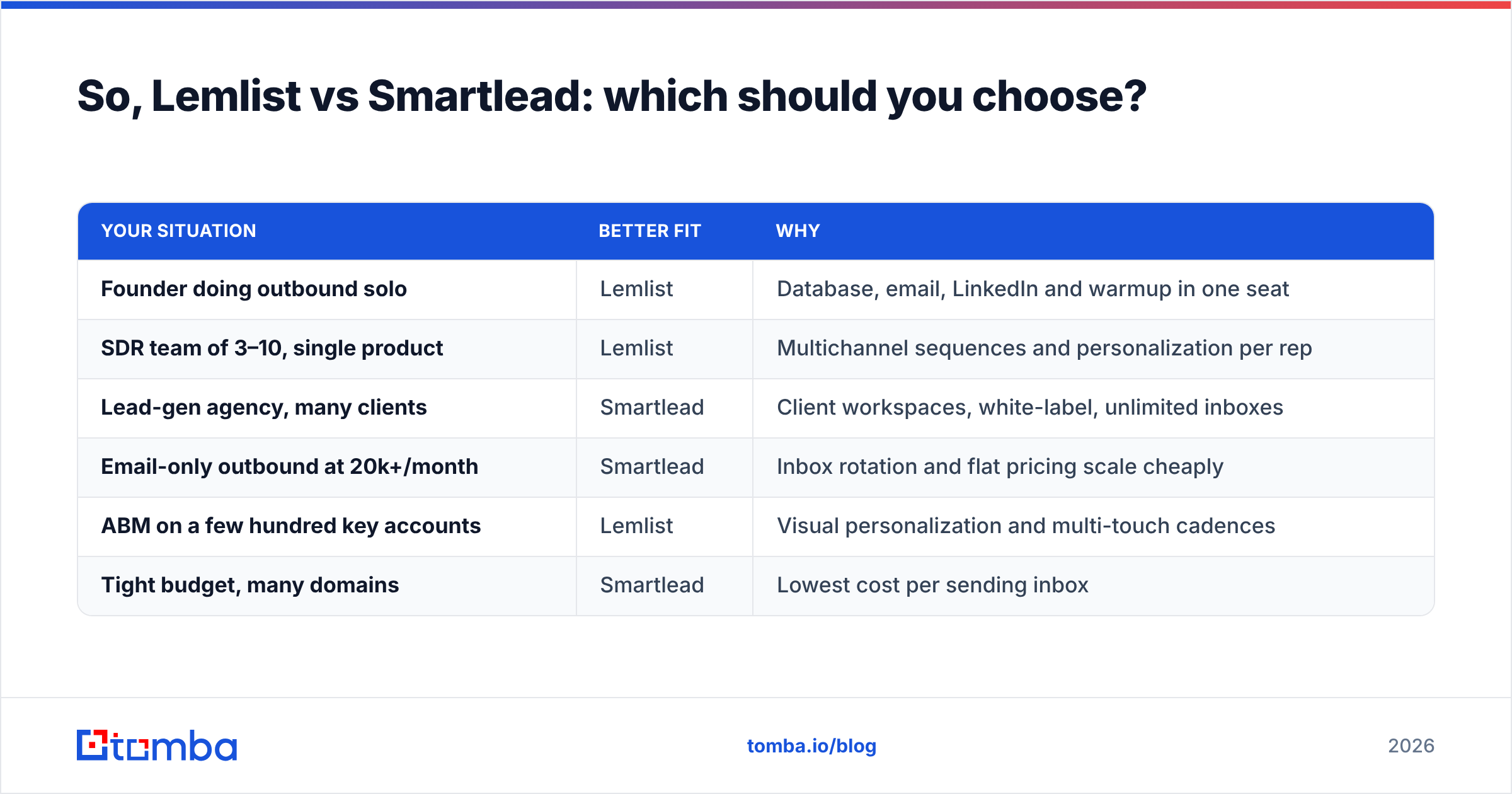
Here's a summary by use case:
| Your situation | Better fit | Why |
|---|---|---|
| Founder doing outbound solo | Lemlist | Database, email, LinkedIn and warmup in one seat |
| SDR team of 3–10, single product | Lemlist | Multichannel sequences and personalization per rep |
| Lead-gen agency, many clients | Smartlead | Client workspaces, white-label, unlimited inboxes |
| Email-only outbound at 20k+/month | Smartlead | Inbox rotation and flat pricing scale cheaply |
| ABM on a few hundred key accounts | Lemlist | Visual personalization and multi-touch cadences |
| Tight budget, many domains | Smartlead | Lowest cost per sending inbox |
Our pick: For most in-house sales teams under ten reps, Lemlist is the more complete product. For agencies and anyone whose plan depends on sending volume across many inboxes, Smartlead is better value and better built for it. Both are solid products. The wrong choice is usually the one that doesn't match your outbound model, not a "worse" tool.
How do you get better results from whichever tool you pick?#
Your sequencer only works as well as the addresses you load into it. Before your next Lemlist or Smartlead campaign, build the list with the Tomba Email Finder. It finds professional addresses by name, company or domain, and it works alongside built-in verification, so you upload contacts that won't bounce. You can start on the free tier with 25 searches a month and move to a paid plan when your outbound volume grows. See Tomba pricing for the Starter, Growth and Pro plans.
Related guides#
// get started
Find, verify and enrich your first contacts today
Start on the free plan with 25 searches a month, then scale when your team is ready.
Free plan · No credit card required · GDPR & CCPA
// about the author