LetsExtract vs Zintlr: Scraper or Sales Intelligence in 2026?
LetsExtract scrapes emails from the open web for a one-time fee. Zintlr sells verified contacts with personality insights on a subscription. Here is which one fits your pipeline, and when you need neither.
LetsExtract vs Zintlr comes down to one question: do you need a big, cheap list or a short list of the right people? This guide compares both tools side by side.
TL;DR
- LetsExtract is a Windows desktop toolkit. It scrapes email addresses from websites, search results, social pages and files. You pay once. It is built for volume, not precision.
- Zintlr is a cloud sales tool with a LinkedIn Chrome extension. It sells contact data by the credit. It also adds DISC-style personality notes for each prospect.
- Choose LetsExtract for cheap, large lists of generic or small-business addresses you'll check yourself. Choose Zintlr for named decision-makers, mostly in India and APAC.
- Neither tool is good at finding one person's work email from a name and a domain. That job belongs to a dedicated email finder.
- Whichever tool you pick, verify every address before it goes into a sequence.
What is LetsExtract?#
LetsExtract is a desktop app for Windows. It crawls the web and pulls out anything that looks like an email address. You enter keywords or a list of URLs. It then queries search engines, visits the pages it finds and collects contact data at scale. The suite has four parts: an extractor for keywords and websites, extractors for Facebook, Twitter and Yelp, an extractor for local files, and on higher tiers an email verifier and a bulk email sender.
Think of it as a fishing trawler. It pulls up everything in the net, and sorting the catch is your job. Say you scrape 5,000 plumbing contractors in Texas. You will mostly get info@, office@ and contact@ addresses. You'll also get some personal Gmail accounts and a fair share of dead addresses from old pages.
Price is the main reason people buy it. Third-party listings such as SoftwareSuggest show one-time licenses: Basic at $39, Pro at $59 (adds unlimited verification) and Ultimate at $79 (adds the email sender). Check current pricing on the official LetsExtract site before you buy. Desktop software vendors change bundles often.
What is Zintlr?#
Zintlr is a B2B sales tool based in India. It works like a curated directory, not a crawler. You look up a prospect, usually on LinkedIn through its Chrome extension or in its search screen. Then you spend a credit to unlock that person's verified email and phone number.
Its best-known feature is personality profiling. Zintlr adds DISC-style notes to contact records. For example, it may say whether someone prefers data-heavy or relationship-led messages, and suggest how to approach them. It also offers modules for local-business discovery and account research (listed as zBizLocator and zScout in its plans).
Pricing is based on subscriptions and credits. Plan names and prices vary across review sites. Recent listings show a free tier with limited credits, a Lite plan from about $49/mo (2 seats, lookup credits included) and a Plus plan from about $179/mo (5 seats, more credits and exports). Confirm current numbers on Zintlr's website or its Capterra listing. Published tiers have shifted over the past year.
LetsExtract vs Zintlr: how do they differ at their core?#
They don't compete for the same job. LetsExtract finds whatever addresses are public on the web. Zintlr returns one person's contact details, plus context about that person. Most buying mistakes come from expecting one tool to do the other's job.
Here are the five differences that matter in practice:
- Data origin. LetsExtract collects live data from the pages it crawls. Zintlr serves records from its own database, which it keeps updated.
- Unit of output. LetsExtract gives you a mass list of addresses, many of them role-based. Zintlr gives you one named contact per credit, with title, company, email and often a phone number.
- Cost model. LetsExtract costs one payment up front. Your volume is limited mainly by your machine and proxies. Zintlr charges a monthly fee, and credits cap your volume.
- Where it runs. LetsExtract is Windows desktop software. Zintlr runs in the browser, with a Chrome extension inside LinkedIn.
- Personalization layer. LetsExtract gives you only the address. Zintlr adds personality cues for each contact.
How do LetsExtract and Zintlr compare feature by feature?#
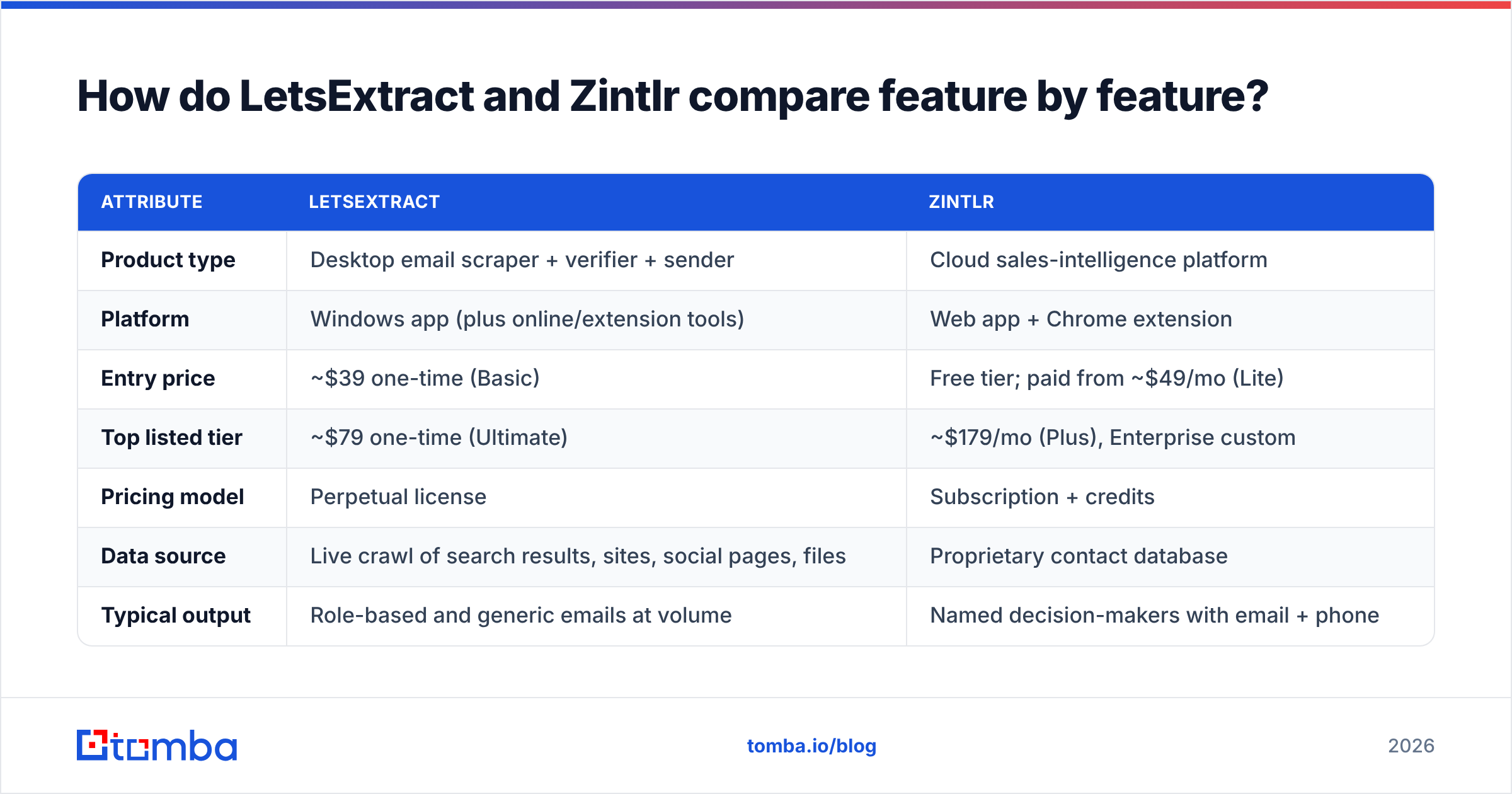
The table below uses the most recent public plans. Treat prices as reference points, not quotes.
| Attribute | LetsExtract | Zintlr |
|---|---|---|
| Product type | Desktop email scraper + verifier + sender | Cloud sales-intelligence platform |
| Platform | Windows app (plus online/extension tools) | Web app + Chrome extension |
| Entry price | ~$39 one-time (Basic) | Free tier; paid from ~$49/mo (Lite) |
| Top listed tier | ~$79 one-time (Ultimate) | ~$179/mo (Plus), Enterprise custom |
| Pricing model | Perpetual license | Subscription + credits |
| Data source | Live crawl of search results, sites, social pages, files | Proprietary contact database |
| Typical output | Role-based and generic emails at volume | Named decision-makers with email + phone |
| Built-in verification | Yes, on Pro and Ultimate | Contacts pre-verified before reveal |
| Personality / DISC insights | No | Yes |
| LinkedIn workflow | Limited | Core use case via extension |
| Best geographic fit | Anywhere with public websites | Strongest in India and APAC |
| Built-in sending | Yes, on Ultimate | No (export to your sequencer) |
| Compliance burden | High: you own the scraping and consent decisions | Lower: vendor manages sourcing, but you still own outreach compliance |

Is LetsExtract accurate enough for cold outreach?#
Yes, but only if you add a verification step. Finding an address on a page means the scraper worked. It doesn't mean the address still gets mail, or that a real buyer reads it. Old "Contact Us" pages, archived team bios and forum signatures all end up in the output.
In practice, a raw LetsExtract list has three kinds of problems:
- Dead addresses from old pages. These cause hard bounces and hurt your sender reputation.
- Role accounts such as
info@andsales@. They deliver fine but rarely reach the decision-maker. Many providers also filter them more strictly. - Spam traps, which are sometimes placed on pages on purpose to catch scrapers.
The Pro license includes an unlimited verifier. It catches syntax errors and many invalid mailboxes. Treat it as a first pass. Before a scraped list goes into a live campaign, run it through a dedicated email verifier that handles catch-all domains well. Those domains produce "valid-looking" addresses that bounce anyway.
Is Zintlr's data worth the subscription?#
Zintlr is worth it when each contact is valuable. Say you sell a five-figure product to heads of HR at Indian mid-market firms. One credit buys the right person's direct email, phone number and a note that she likes short, data-first messages. That is cheap next to the deal size.
Credit caps become a problem at high volume. A few hundred unlocks a month suits an account-based SDR. It's a real limit for a founder who wants to send 3,000 cold emails a week. Coverage is also uneven outside Zintlr's core markets. Reviews generally say its Indian data is stronger than its US or European data. If most of your territory is the US, test the free tier before you commit.
Treat the personality notes as a starting point, not proof. They help you pick an opening angle. They don't replace real research into the account.
Which tool fits your use case?#
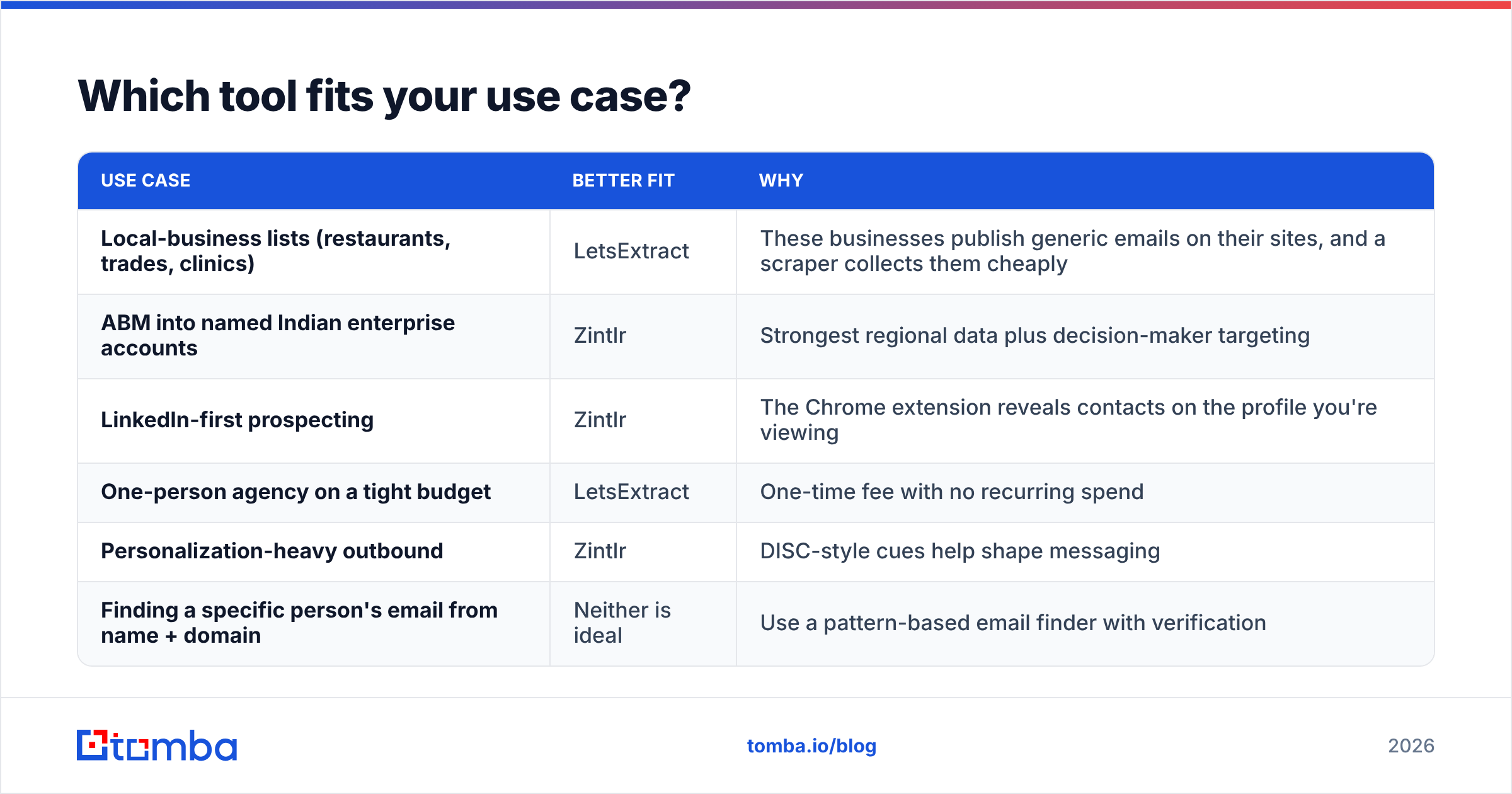
Match the tool to how you sell, not to the feature list.
| Use case | Better fit | Why |
|---|---|---|
| Local-business lists (restaurants, trades, clinics) | LetsExtract | These businesses publish generic emails on their sites, and a scraper collects them cheaply |
| ABM into named Indian enterprise accounts | Zintlr | Strongest regional data plus decision-maker targeting |
| LinkedIn-first prospecting | Zintlr | The Chrome extension reveals contacts on the profile you're viewing |
| One-person agency on a tight budget | LetsExtract | One-time fee with no recurring spend |
| Personalization-heavy outbound | Zintlr | DISC-style cues help shape messaging |
| Finding a specific person's email from name + domain | Neither is ideal | Use a pattern-based email finder with verification |
Many teams end up using two tools anyway. One handles discovery (which companies and people). The other handles resolution (the exact, deliverable email address). Don't try to make one tool do both jobs.
What are the pros and cons of each?#
LetsExtract pros
- Very low cost of entry with a one-time license
- Can process large volumes without per-contact fees
- Extraction, verification and sending in one suite
- Good fit for SMB and local-business lists
LetsExtract cons
- Windows-only desktop app for the core product
- Output is mostly generic or role-based addresses
- You carry the full compliance and deliverability risk of scraped data
- No enrichment beyond the address itself
Zintlr pros
- Named contacts with emails and phone numbers
- Behavioral insights for tailoring outreach
- Fits naturally into LinkedIn research
- Free tier for testing coverage
Zintlr cons
- Credits limit volume, so costs grow with headcount and output
- Coverage is uneven outside its core regions
- Published pricing changes often and needs checking
- No native sending, so you still need a sequencer
How does Tomba fit alongside LetsExtract and Zintlr?#
Tomba covers the step that sits between them. Sometimes you already know the person and the company, from a Zintlr search, a LinkedIn list or an event sheet. In that case, the Tomba Email Finder returns the likely work email from a name and domain, with a confidence score and sources. When you know only the company, domain search lists the public emails tied to that domain. That is a more targeted option than crawling the whole web.
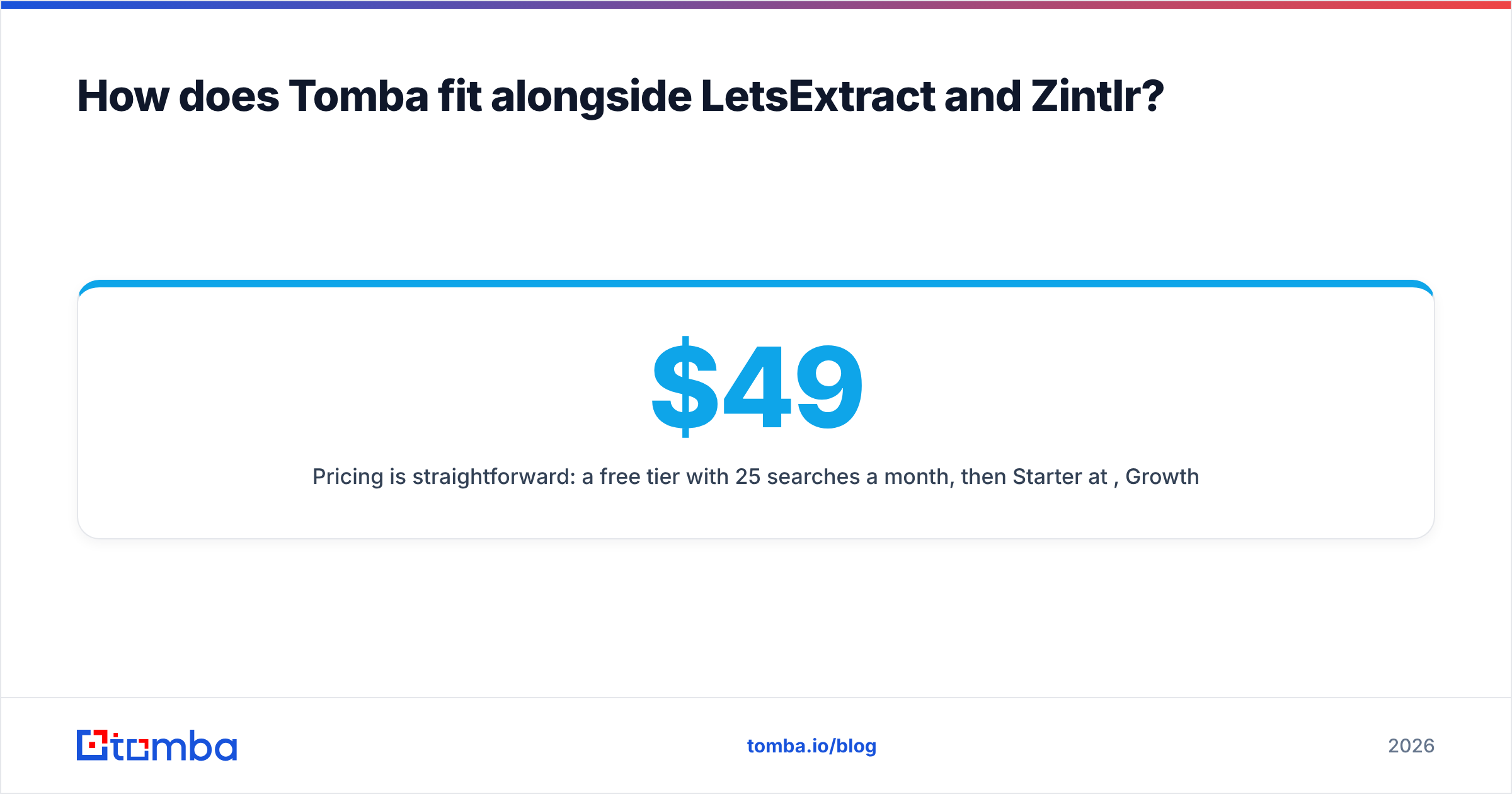
Pricing is simple: a free tier with 25 searches a month, then Starter at $49/mo, Growth at $99/mo and Pro at $249/mo, with Enterprise on request. See Tomba pricing for credit details. Tomba doesn't copy Zintlr's personality layer or LetsExtract's desktop scraping. Its strength is turning a name into a deliverable address, and verifying addresses you got elsewhere.

Should you pick LetsExtract or Zintlr?#
The LetsExtract vs Zintlr choice depends on who you sell to and how many contacts you need.
Pick LetsExtract if your targets are small businesses that publish generic contact emails and your budget is close to zero. You must also be fine owning verification, list hygiene and compliance. It's a volume tool. It works when you treat its output as raw material.
Pick Zintlr if you sell to named decision-makers, especially in India or APAC, and work mainly from LinkedIn. It also helps if you want context to write a better first line. It's a precision tool, and you pay for that precision every month.
Pick neither on its own if your main problem is "I know who I want to reach but not their email address." Neither tool is built for that. Forcing either one into that role wastes money or damages your domain.
Whatever you choose, the deliverability rules don't change. Verify before you send. Remove role accounts from personalized sequences. Never let an unverified scraped list reach a sending domain you care about. A burned domain costs far more than any license fee.
If you already have a target list and need the exact, verified work email for each person, start with the Tomba Email Finder. Enter a name and a company domain, and you get a scored, source-backed address in seconds. Your first 25 searches each month are free. That lets you test it against your LetsExtract vs Zintlr results before you pay for anything.
Related guides#
// get started
Find, verify and enrich your first contacts today
Start on the free plan with 25 searches a month, then scale when your team is ready.
Free plan · No credit card required · GDPR & CCPA
// about the author