Lead for Business (LFBBD) vs LimeLeads: B2B Lead Data Compared
One sells custom-built lead lists with a person behind every order. The other is a self-serve US database you filter yourself. Here is how LFBBD Lead for Business and LimeLeads compare on price, coverage, and workflow.
TL;DR
- Lead for Business (LFBBD) is a data vendor and lead-generation agency. You describe the audience, and it builds a list for you, covering B2B, eCommerce, and Amazon sellers. Pricing is quoted per project.
- LimeLeads is a self-serve SaaS database of US B2B contacts. Public plans run $99, $150, and $400 per month, with about 35% off on annual billing.
- Pick LFBBD for niche segments (Shopify store owners, Amazon sellers, international markets) or if you want a person to do the list building.
- Pick LimeLeads for a predictable monthly bill, US-only targeting, and the ability to filter and export whenever you want.
- With either one, verify every email before you send. Bought lists decay, and one bounce-heavy campaign can damage your sender domain.
What is the real difference between LFBBD Lead for Business and LimeLeads?#
Most "LFBBD Lead for Business vs LimeLeads" searches assume these are two versions of the same product. They aren't. The two companies sell data in different ways, and that affects cost, turnaround, and how much control you have more than any feature list does.
Lead for Business (domain: lfbbd.com) describes itself as a lead-generation company offering B2B, eCommerce, and Amazon seller data with contact emails and direct dials. Its Datarade provider profile claims 250M+ contacts and around 50M business profiles worldwide, split into roughly 200M B2B contacts, 4M eCommerce leads, and 200K+ Amazon seller contacts. The usual process is to ask for a sample, share your ideal customer profile, get a quote, and receive a file. Its researchers pull from LinkedIn, company websites, and social media to fill gaps.
LimeLeads is a web app. You log in, filter by job title, industry, company size, revenue, location, or technology, and spend credits to unlock contacts. It focuses on US companies, and the product is designed around fast self-serve prospecting. The LimeLeads listing on Capterra shows the three-tier subscription model.
In short, one is a service that delivers data and the other is software that holds data.
How do the two approaches compare at a glance?#
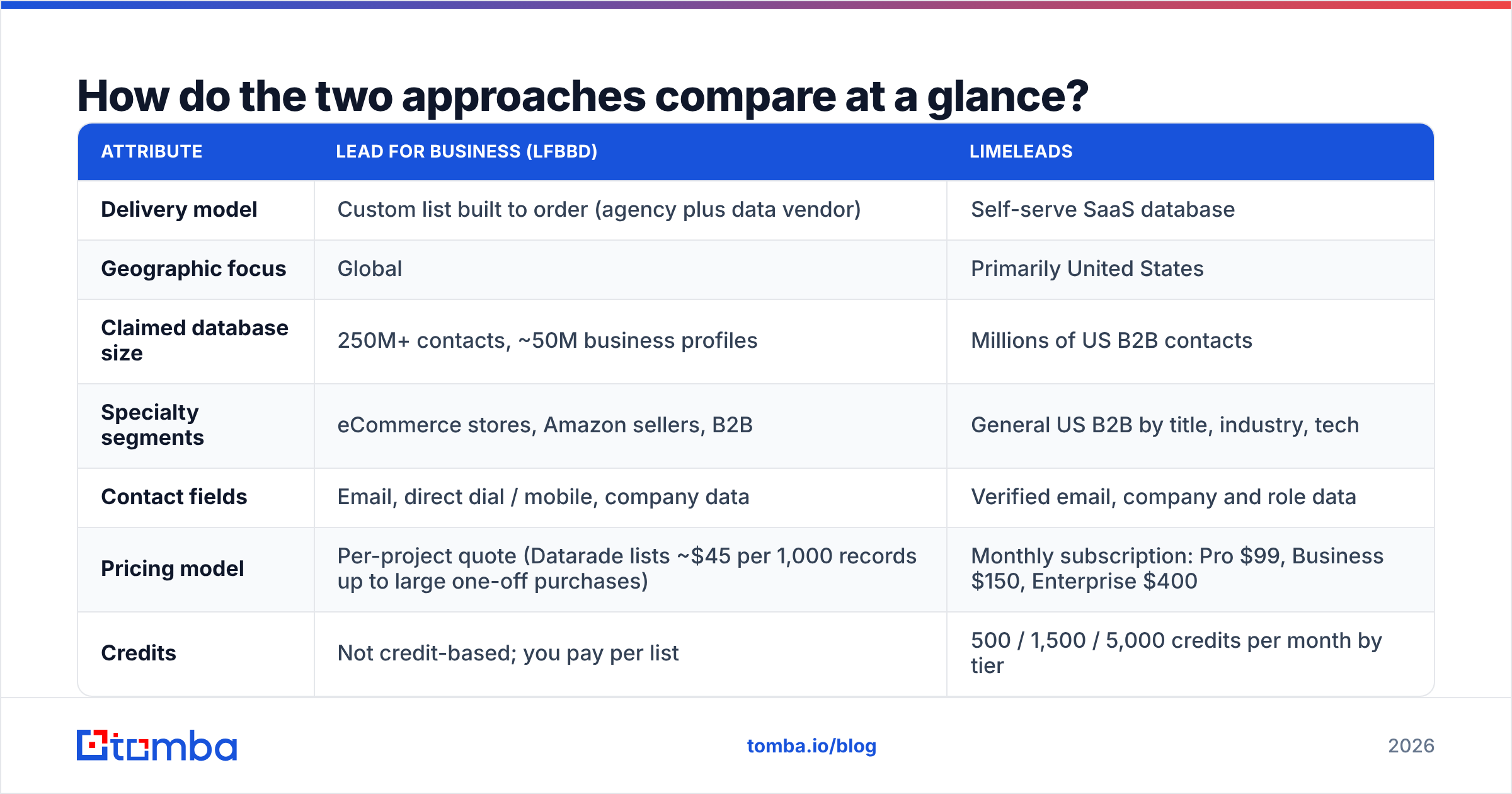
This is the main comparison. Figures come from public listings at the time of writing. LFBBD quotes each project individually, so check current terms with both vendors before you commit.
| Attribute | Lead for Business (LFBBD) | LimeLeads |
|---|---|---|
| Delivery model | Custom list built to order (agency plus data vendor) | Self-serve SaaS database |
| Geographic focus | Global | Primarily United States |
| Claimed database size | 250M+ contacts, ~50M business profiles | Millions of US B2B contacts |
| Specialty segments | eCommerce stores, Amazon sellers, B2B | General US B2B by title, industry, tech |
| Contact fields | Email, direct dial / mobile, company data | Verified email, company and role data |
| Pricing model | Per-project quote (Datarade lists ~$45 per 1,000 records up to large one-off purchases) | Monthly subscription: Pro $99, Business $150, Enterprise $400 |
| Credits | Not credit-based; you pay per list | 500 / 1,500 / 5,000 credits per month by tier |
| Annual discount | Negotiated | ~35% off |
| Samples / trial | Free samples on request | Try-before-you-buy options vary; check the site |
| Turnaround | Hours to days, depending on list complexity | Instant export |
| Best for | Niche or international audiences, teams without list-building time | US outbound teams that prospect every week |
The pricing model row is the one that matters most. LimeLeads' cost per contact drops as you move up tiers, from about $0.20 per credit on Pro to about $0.08 on Enterprise, according to published breakdowns. LFBBD's cost depends on how hard your segment is to build. A broad "US SaaS companies, 50-200 employees" list is cheap. A list like "Amazon sellers in Germany doing more than €1M GMV, with a direct dial for the founder" costs more.
Which one has better data coverage?#
It depends on who you sell to.
LFBBD is broader in scope. Its eCommerce and Amazon seller datasets are the main reason to consider it. Most self-serve B2B databases, LimeLeads included, organize data by company firmographics such as industry, headcount, and revenue. That works for selling to a 200-person software company. It works poorly for finding a solo Shopify merchant or a private-label Amazon brand, because those businesses often have no LinkedIn presence, no standard employee count, and a contact address listed on a storefront instead of a company domain. LFBBD builds lists specifically for those segments.
LimeLeads goes deeper in a narrower area. If your ICP is "US companies, filtered by role and industry," you get finer control, and you can re-run searches whenever your targeting changes. Filtering by technology is useful when you're displacing a competitor's tool.
The practical rule:
- Selling to US mid-market B2B? LimeLeads covers it, and you can iterate on filters without waiting for someone else.
- Selling to eCommerce operators or Amazon sellers? LFBBD's dedicated datasets fit better.
- Selling outside the US? LFBBD's global coverage is the safer bet. Confirm the country depth with a sample first.
- Need direct dials for a calling motion? LFBBD lists direct dial and mobile numbers as core fields, so ask for phone coverage rates in your sample.
- Need weekly fresh pulls? A subscription database suits recurring prospecting better than repeated one-off orders.
How accurate is the data from each provider?#
No vendor's "99% accurate" claim will hold for your specific list. Accuracy is a property of a particular record on a particular day, and B2B contact data decays steadily as people change jobs, companies rebrand, and domains lapse.
Here is what each vendor's public materials say:
- LimeLeads advertises verified emails and high email accuracy. Because the database is queried live, you get whatever verification state the record had when it was last refreshed.
- LFBBD describes its data as real-time verified and backs that with manual research. Reviews on its Trustpilot page mostly praise data quality and support. The review count is small, so treat it as a directional signal only.
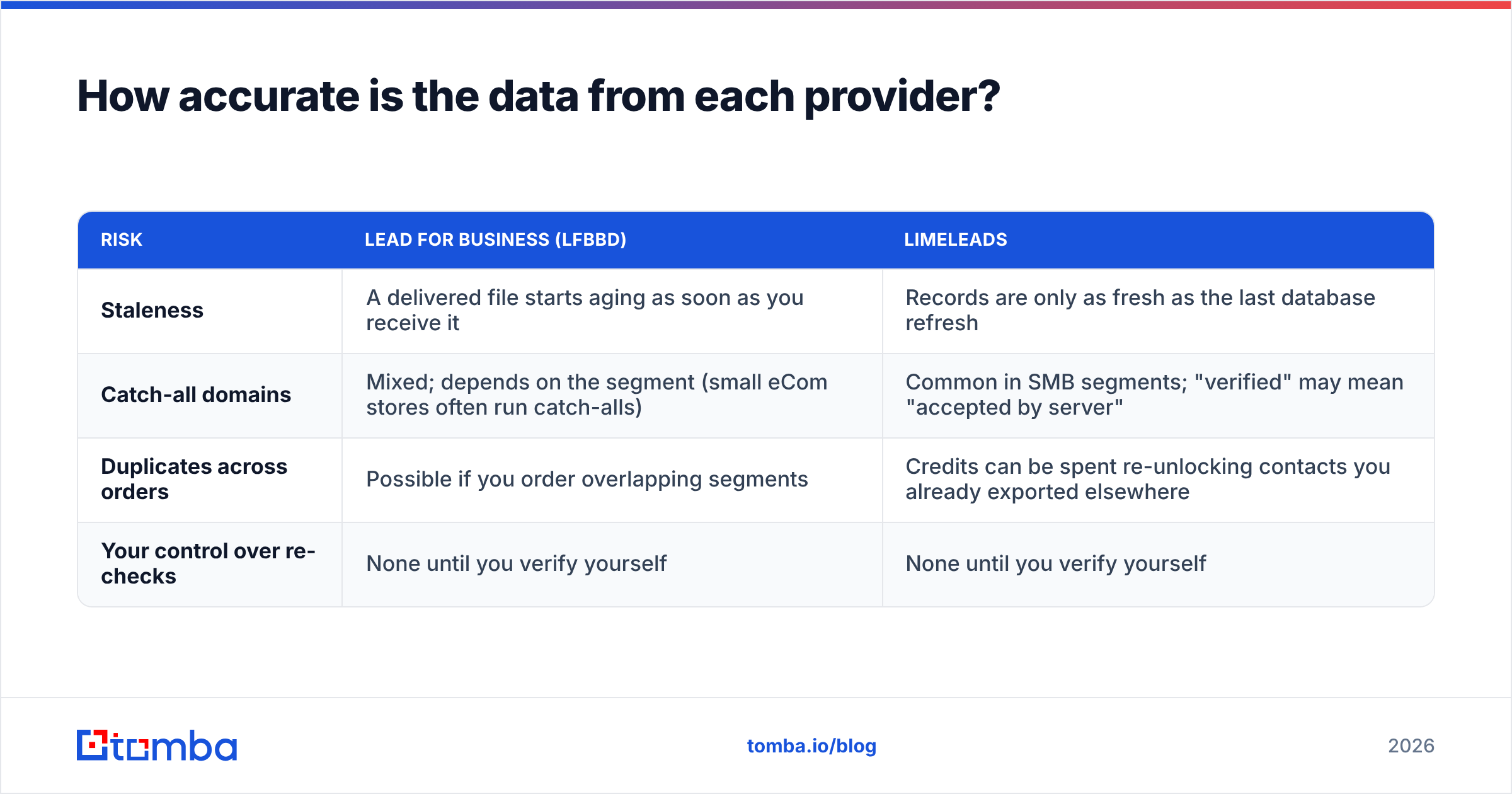
The risks differ between the two:
| Risk | Lead for Business (LFBBD) | LimeLeads |
|---|---|---|
| Staleness | A delivered file starts aging as soon as you receive it | Records are only as fresh as the last database refresh |
| Catch-all domains | Mixed; depends on the segment (small eCom stores often run catch-alls) | Common in SMB segments; "verified" may mean "accepted by server" |
| Duplicates across orders | Possible if you order overlapping segments | Credits can be spent re-unlocking contacts you already exported elsewhere |
| Your control over re-checks | None until you verify yourself | None until you verify yourself |
Both rows end the same way: whichever vendor you pick, run the list through your own email verifier right before the campaign, not when you first buy it. A list that verified clean in March can bounce 8-15% by June. Bounce rates at that level damage sender reputation, and mailbox providers like Gmail and Outlook enforce this more strictly every year.
What does each one cost in practice?#
The sticker prices aren't directly comparable, so here is a concrete scenario: you need 1,500 net-new US contacts per month.
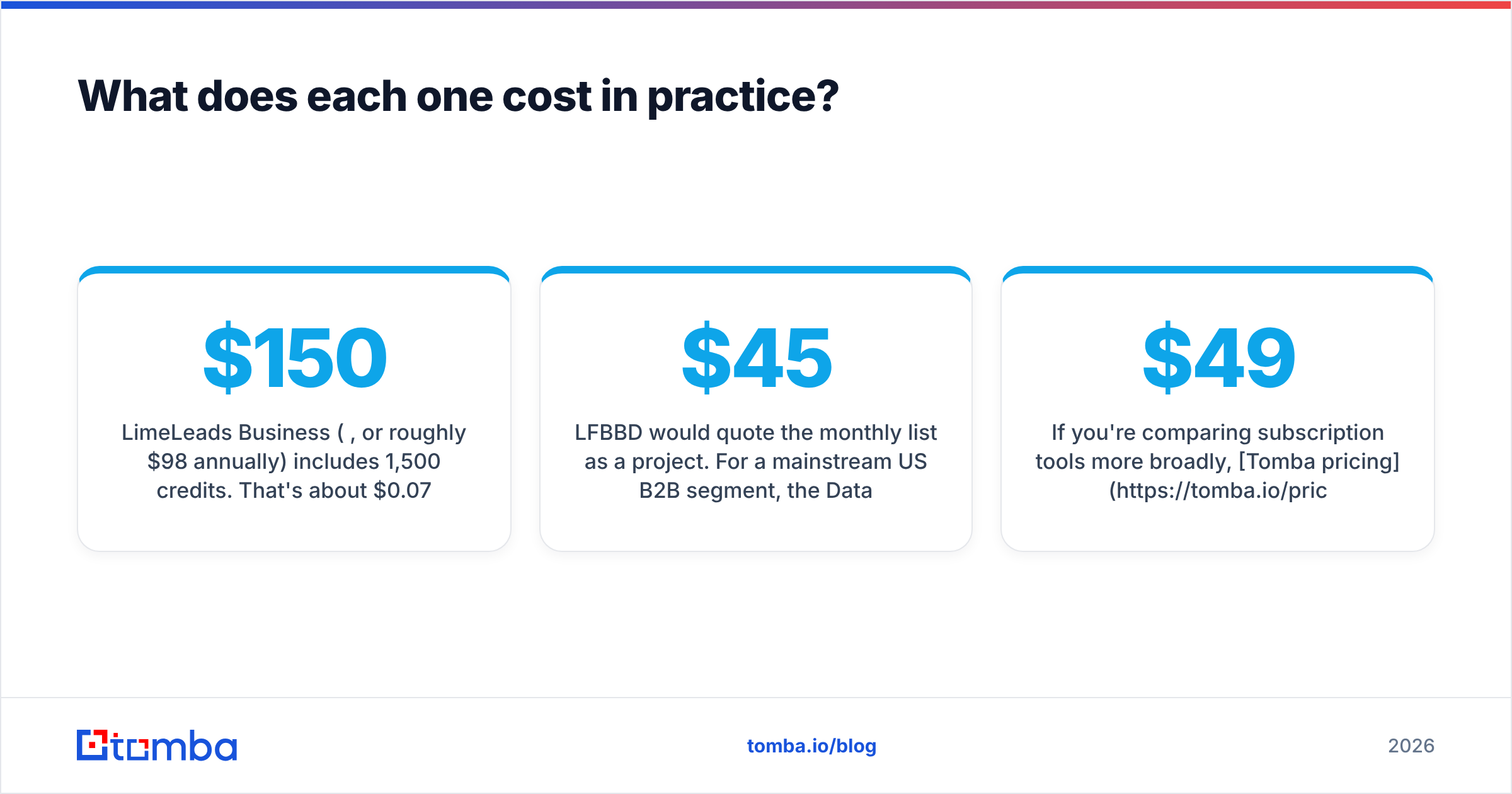
- LimeLeads Business ($150/mo, or roughly $98/mo annually) includes 1,500 credits. That's about $0.07 to $0.10 per contact, depending on billing. Unused credits roll over, which smooths out slow months.
- LFBBD would quote the monthly list as a project. For a mainstream US B2B segment, the Datarade price range (from about $45 per 1,000 records) suggests it could cost less per record for a single bulk order. For harder segments or phone-heavy lists, expect it to cost more. The cost is also less predictable, because each order is its own negotiation.
Two hidden costs apply to both:
- Verification spend. Budget for re-verifying every list. It costs far less than a burned domain.
- Enrichment gaps. Some records will be missing a direct email or a phone number. Filling those in needs another tool, whether that's a domain search to find the right person at the company or a phone lookup.
If you're comparing subscription tools more broadly, Tomba pricing is a useful reference: a free tier with 25 searches a month, then Starter at $49/mo, Growth at $99/mo, and Pro at $249/mo. Tomba is a different kind of product, though. It finds and verifies emails on demand rather than selling pre-built lists.
Which workflow fits your team?#
This is often the deciding factor, and it's about how your team works, not about the data.
Pick Lead for Business if:
- You don't have an SDR or ops person with time to build lists.
- Your ICP is unusual enough that standard filters can't express it ("DTC skincare brands on Shopify Plus with 10+ SKUs").
- You run campaigns in batches, such as a quarterly push or a product launch, rather than prospecting every day.
- You want phone numbers as a first-class field for a calling team.
Pick LimeLeads if:
- You prospect every week and adjust targeting often.
- Your market is the US and your ICP maps cleanly to title, industry, and size.
- Finance wants a fixed monthly line item.
- You want to see and filter the data yourself before paying for a contact.
Consider neither, or pair one with a finder, if:
- You already have a target account list and just need the right emails at those companies. In that case you're paying for a whole database when you need a lookup tool. A bulk email finder that works from names and domains is often cheaper and fresher.
Is either one a good fit for cold email at scale?#
Yes, as long as the list is treated as raw material rather than something ready to send. A setup that works with either vendor:
- Source: pull or order the segment.
- Dedupe against your CRM and previous campaigns.
- Verify within a few days of sending. Flag catch-alls separately and send to them at lower volume.
- Fill gaps: for high-value accounts where the vendor's contact is missing or invalid, look up the correct decision-maker directly.
- Send from warmed domains with conservative daily volume.
- Feed bounces back: tell the vendor which records failed. LFBBD's service model makes this easier to raise as a support conversation, while LimeLeads handles it through its standard support.
Skipping step 3 is the most common way teams lose a sending domain, whichever vendor they bought from.

What are the pros and cons of each?#
| Lead for Business (LFBBD) | LimeLeads | |
|---|---|---|
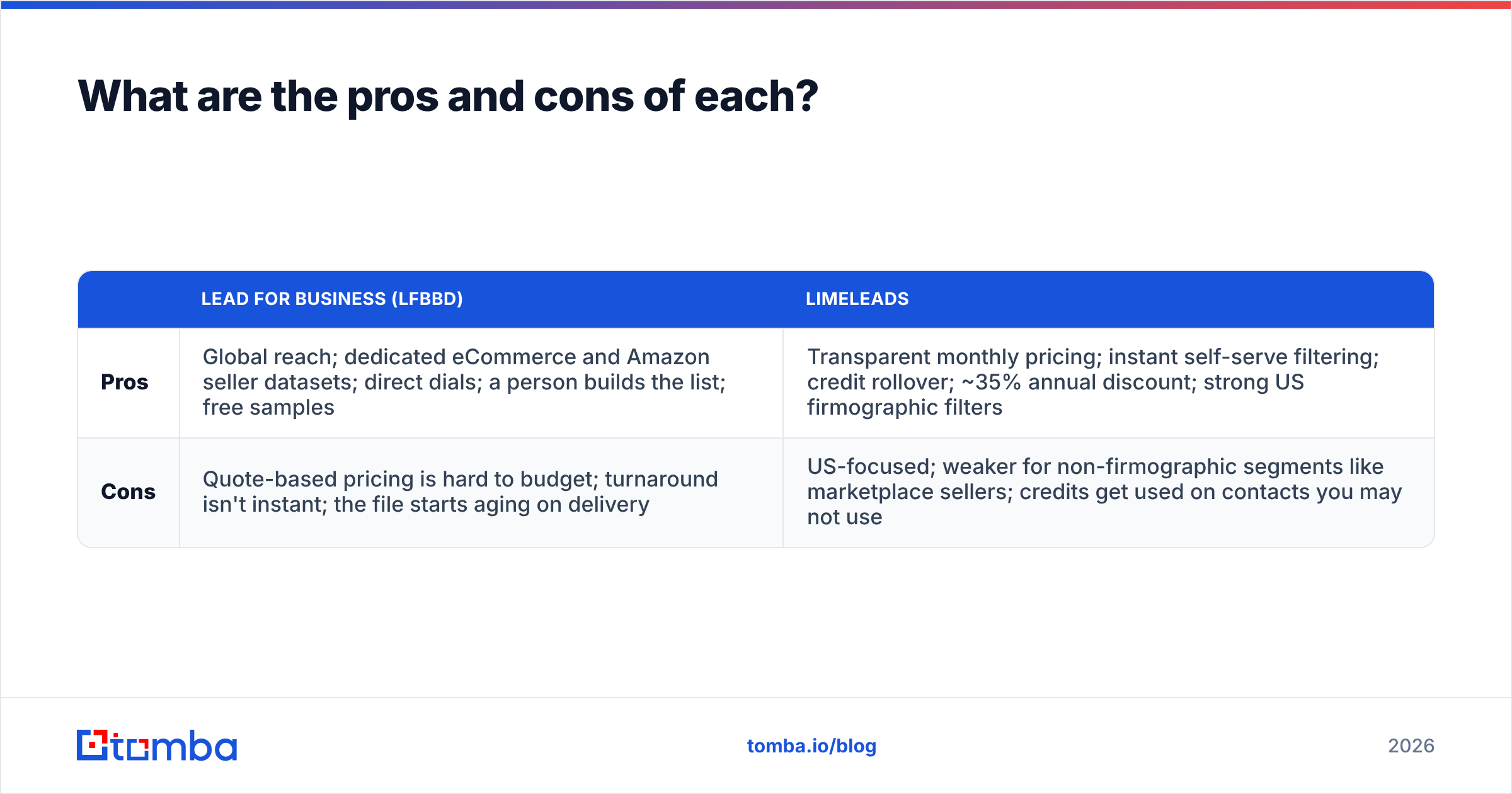
| Pros | Global reach; dedicated eCommerce and Amazon seller datasets; direct dials; a person builds the list; free samples | Transparent monthly pricing; instant self-serve filtering; credit rollover; ~35% annual discount; strong US firmographic filters |
| Cons | Quote-based pricing is hard to budget; turnaround isn't instant; the file starts aging on delivery | US-focused; weaker for non-firmographic segments like marketplace sellers; credits get used on contacts you may not use |
So which should you choose?#
For most US-focused B2B SaaS and services teams that prospect every week, LimeLeads is the more practical default. The pricing is predictable, it's self-serve, and the filters match how those ICPs are defined.
For teams selling to eCommerce merchants, Amazon sellers, or international markets, or teams that want someone else to do the list building, Lead for Business is the better fit. Its specialty datasets cover segments that general databases don't handle well. Ask for a sample in your exact segment and check it before you place a full order.
Whichever you choose, the deciding factor is what you do after the data arrives. Verify it, fill the gaps, and don't send a purchased list straight into your sequencer.
Need fresh emails for the accounts you already know?#
Buying lists is one way to fill a pipeline. If you already know which companies you want, and a vendor list is missing, stale, or wrong for the key contacts, Tomba Email Finder finds professional email addresses from a name plus a domain or company, then checks them so you only send to addresses that exist. It works alongside LFBBD or LimeLeads to patch the gaps, or on its own when you don't need a whole database. Start with the free tier's 25 searches a month and scale up as your outbound grows.
Related guides#
// get started
Find, verify and enrich your first contacts today
Start on the free plan with 25 searches a month, then scale when your team is ready.
Free plan · No credit card required · GDPR & CCPA
// about the author