LFBBD Lead For Business vs ListKit: Which B2B Data Source Wins?
LFBBD sells custom-built B2B, eCommerce and Amazon seller lists. ListKit is a self-serve lead builder with triple-verified emails. Here's which one fits your outbound, and what to check before you pay for either.
TL;DR
- LFBBD (Lead For Business) is a London-based data vendor that builds custom lists: B2B, eCommerce and Amazon seller contacts, with emails and direct dials. You buy it as a dataset or a custom order and get a spreadsheet back.
- ListKit is a self-serve SaaS lead builder. You search and filter the database yourself, then export triple-verified emails with credits. Plans start at $97/mo.
- Pick LFBBD if you sell to eCommerce brands or Amazon sellers, or you want a one-off list without a subscription.
- Pick ListKit if you run ongoing cold email to B2B decision-makers and want to rebuild lists every week without emailing a vendor.
- Whichever you choose, check deliverability and enrich contacts before a list goes into a sequence. A list is only worth what it holds on the day you send.
What is LFBBD Lead For Business?#
LFBBD – Lead For Business is a data provider based in London. It sells B2B contact data, eCommerce store data and Amazon seller data, and each record usually includes a contact person's email and, where available, a direct dial or mobile number. Its public materials describe a database of 250M+ business contacts. Its Amazon seller dataset lists 1M+ active sellers, with 200K+ verified emails and 50K+ mobile numbers.
The buying model matters more than the headcount. LFBBD works like a data vendor, not a prospecting app. You describe the list you need (industry, geography, store platform, seller category, job title), request a sample, and receive a file. Its listing on Datarade shows prices from about $0.01 per contact for bulk data up to $14,999/year for larger dataset licenses, and it offers custom quotes and free samples.
LFBBD's Trustpilot profile is small but positive. The reviews mention reasonable prices, quick delivery and good-quality Amazon store owner lists. It's a small sample, so treat it as a signal, not proof.
Where LFBBD is strong:
- Niche verticals that general B2B tools cover poorly: Shopify and WooCommerce store owners, Amazon FBA sellers, DTC brands
- One-off or quarterly list purchases with no monthly commitment
- A human who builds the list for you, which helps if you don't want to learn a filter UI
What is ListKit?#
ListKit is a self-serve B2B lead list platform built for cold email teams and agencies. You log in, filter a database of roughly 700M+ contacts by title, industry, headcount, location, technology and intent signals, and export. Every exported email goes through ListKit's "triple verification", so you don't have to buy a separate verifier for basic bounce protection.
ListKit has grown past list building. Its product now includes daily-refreshed intent data, phone number lookups and a done-for-you "Email Engine" that sets up cold email infrastructure and manages campaigns. On G2 it scores around 4.9/5 across hundreds of reviews, mostly from agencies and outbound SDR teams.
Where ListKit is strong:
- Fast, repeatable list building for B2B cold email
- Verification built into every export
- Clear credit-based pricing that scales with volume
- Good fit for agencies running many client campaigns at once
How do LFBBD and ListKit compare side by side?#
The main difference is vendor vs platform. With LFBBD you order a product. With ListKit you use a tool. That one difference drives pricing, speed, freshness and who each fits.
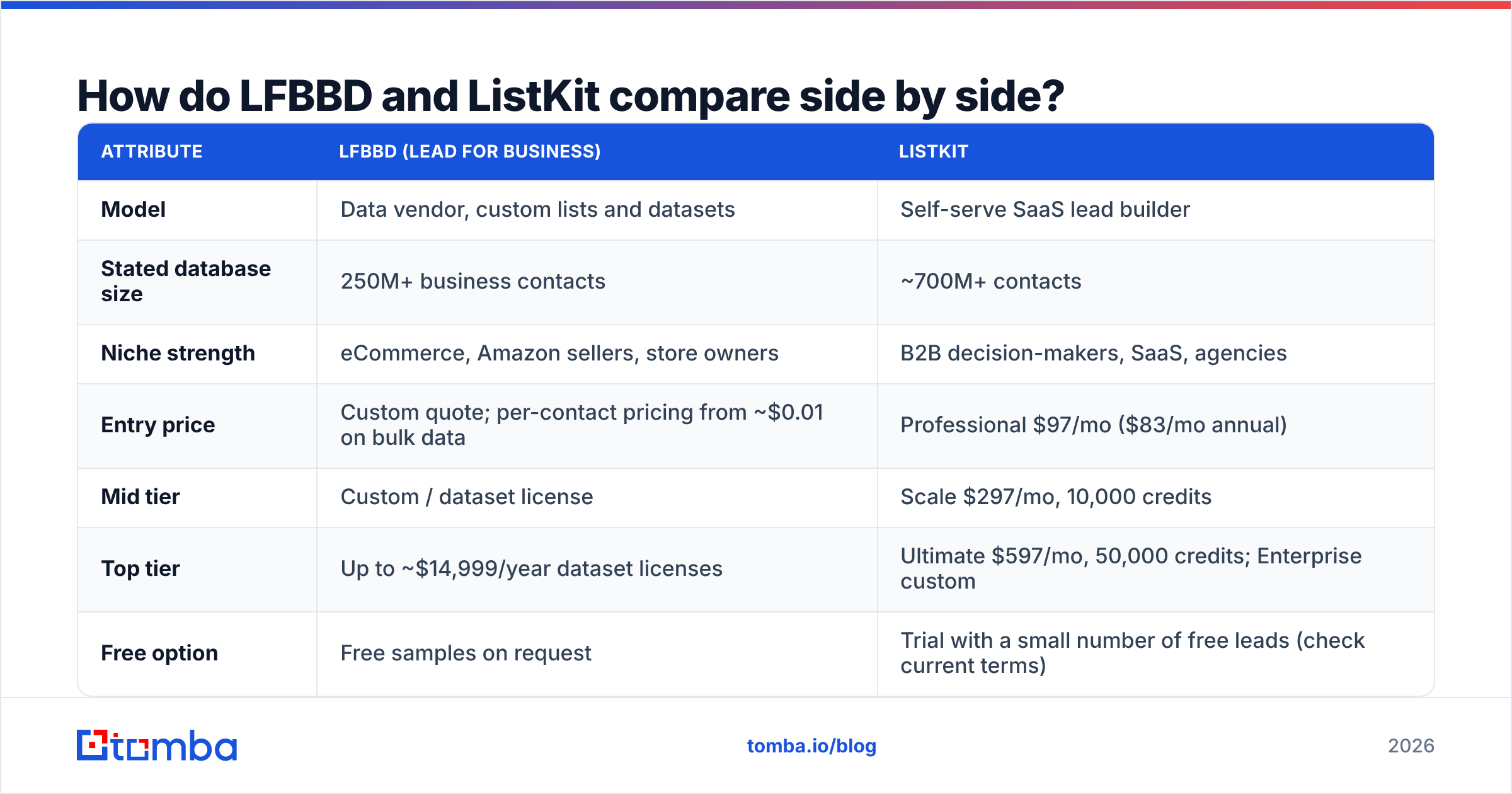
| Attribute | LFBBD (Lead For Business) | ListKit |
|---|---|---|
| Model | Data vendor, custom lists and datasets | Self-serve SaaS lead builder |
| Stated database size | 250M+ business contacts | ~700M+ contacts |
| Niche strength | eCommerce, Amazon sellers, store owners | B2B decision-makers, SaaS, agencies |
| Entry price | Custom quote; per-contact pricing from ~$0.01 on bulk data | Professional $97/mo ($83/mo annual) |
| Mid tier | Custom / dataset license | Scale $297/mo, 10,000 credits |
| Top tier | Up to ~$14,999/year dataset licenses | Ultimate $597/mo, 50,000 credits; Enterprise custom |
| Free option | Free samples on request | Trial with a small number of free leads (check current terms) |
| Email verification | Verified at delivery | Triple-verified on every export |
| Phone numbers | Direct dials / mobiles where available | Phone lookups at extra credit cost |
| Refresh cadence | At time of order | On demand, every export |
| Delivery | Spreadsheet file | In-app export, CSV, integrations |
| Best for | One-off niche lists, eCommerce outreach | Ongoing B2B cold email programs |

How does ListKit pricing actually work?#
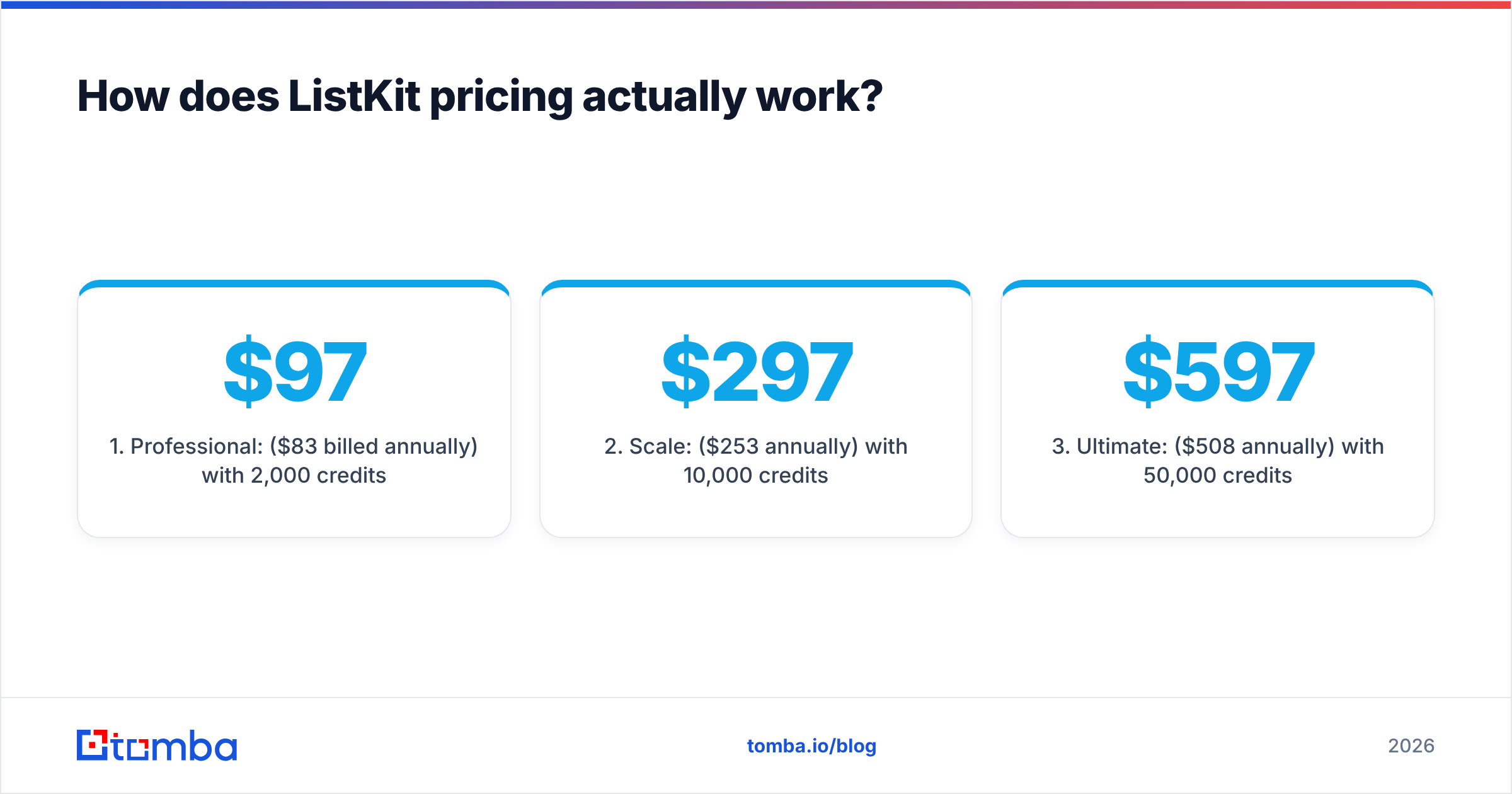
ListKit charges in credits, and the credit cost changes with how much enrichment you want. The public 2026 tiers are:
- Professional: $97/mo ($83/mo billed annually) with 2,000 credits per month.
- Scale: $297/mo ($253/mo annually) with 10,000 credits per month.
- Ultimate: $597/mo ($508/mo annually) with 50,000 credits per month.
- Enterprise: custom, for teams that need higher limits or contract terms.
A verified business email costs 1 credit, so 2,000 credits on Professional gets you about 2,000 email-only leads. Add a phone number and each lead costs more. Independent breakdowns estimate that full enrichment with a mobile number runs 8–10 credits per lead, which cuts Professional down to roughly 200–250 fully enriched contacts a month.
For email-only outbound, ListKit's cost per lead is competitive. For phone-heavy outbound, work out the real per-lead cost before you pick a tier.
How does LFBBD pricing work?#
LFBBD doesn't publish self-serve tiers the way ListKit does. Pricing depends on:
- Volume. Bulk datasets get the lowest per-contact prices.
- Niche. Amazon seller and eCommerce data are specialist products and are priced that way.
- Fields. Email only, email plus direct dial, or the full firmographic record.
- Licensing. A one-time purchase vs an annual dataset license.
This suits a buyer who wants 15,000 Amazon sellers in the home-and-kitchen category and no monthly bill afterward. It suits less well a team that wants 300 new VP-of-Sales contacts every Monday. You'd end up re-ordering constantly or working from an ageing file.
Is LFBBD better than ListKit for eCommerce and Amazon seller outreach?#
Yes, in most cases. This is LFBBD's home ground. General B2B databases, ListKit included, index companies through LinkedIn-style firmographics: employees, titles, headcount bands. Many Amazon sellers and small Shopify brands barely show up that way. They might be two founders with no company LinkedIn page, trading under a brand name that differs from the legal entity.
A dedicated seller database can segment by marketplace, category, storefront and estimated revenue. Those filters decide whether a campaign to agencies, 3PLs, PPC consultants, packaging suppliers or SaaS tools for sellers gets a reply. If your ICP is "Amazon sellers doing $1M+ in the supplements category", LFBBD is the more natural first call.
Is ListKit better than LFBBD for B2B cold email?#
Yes, for recurring B2B outbound. ListKit is built around how a cold email team works week to week:
- Filter by role and firmographics in the app, with no back-and-forth with a vendor.
- Export verified emails that are ready to load into a sequencer.
- Rebuild lists on demand when a campaign angle changes or a segment runs out.
- Add intent signals so you reach accounts that are actually researching.
- Plug into infrastructure through its Email Engine if you'd rather outsource inbox setup.
The speed matters. B2B contact data decays fast. People change jobs, companies rebrand, domains move. A list you pull the day you send is fresher than a file bought last quarter.
What should you check before trusting either list?#
Both vendors say their data is verified. Neither can promise that an address that was valid on delivery day is still valid on send day. Before any list goes into a sequence, run through this:
- Re-verify before sending. If a list sat for more than two to three weeks, run it through an email verifier again. Hard bounces above ~2% start to damage your sender reputation.
- Handle catch-all domains separately. Many SMB and eCommerce domains accept every address, so "valid" means very little on them. A catch-all verifier separates the risky ones from the likely-deliverable ones.
- Fill in missing fields. Niche lists often come back with a name and a generic inbox (info@, support@). Contact enrichment can find the decision-maker's direct address and role.
- Deduplicate against your CRM. Emailing current customers or open opportunities with a cold template is avoidable and embarrassing.
- Spot-check 50 records by hand. Open the LinkedIn profile or store page and confirm the person is still there in that role. It takes about 20 minutes and tells you more than any vendor's accuracy claim.
HubSpot's guidance on email deliverability gives more detail on why list hygiene, not only list size, decides inbox placement.
Which one should you choose?#
Base the decision on your ICP and how often you need new lists, not on database size.
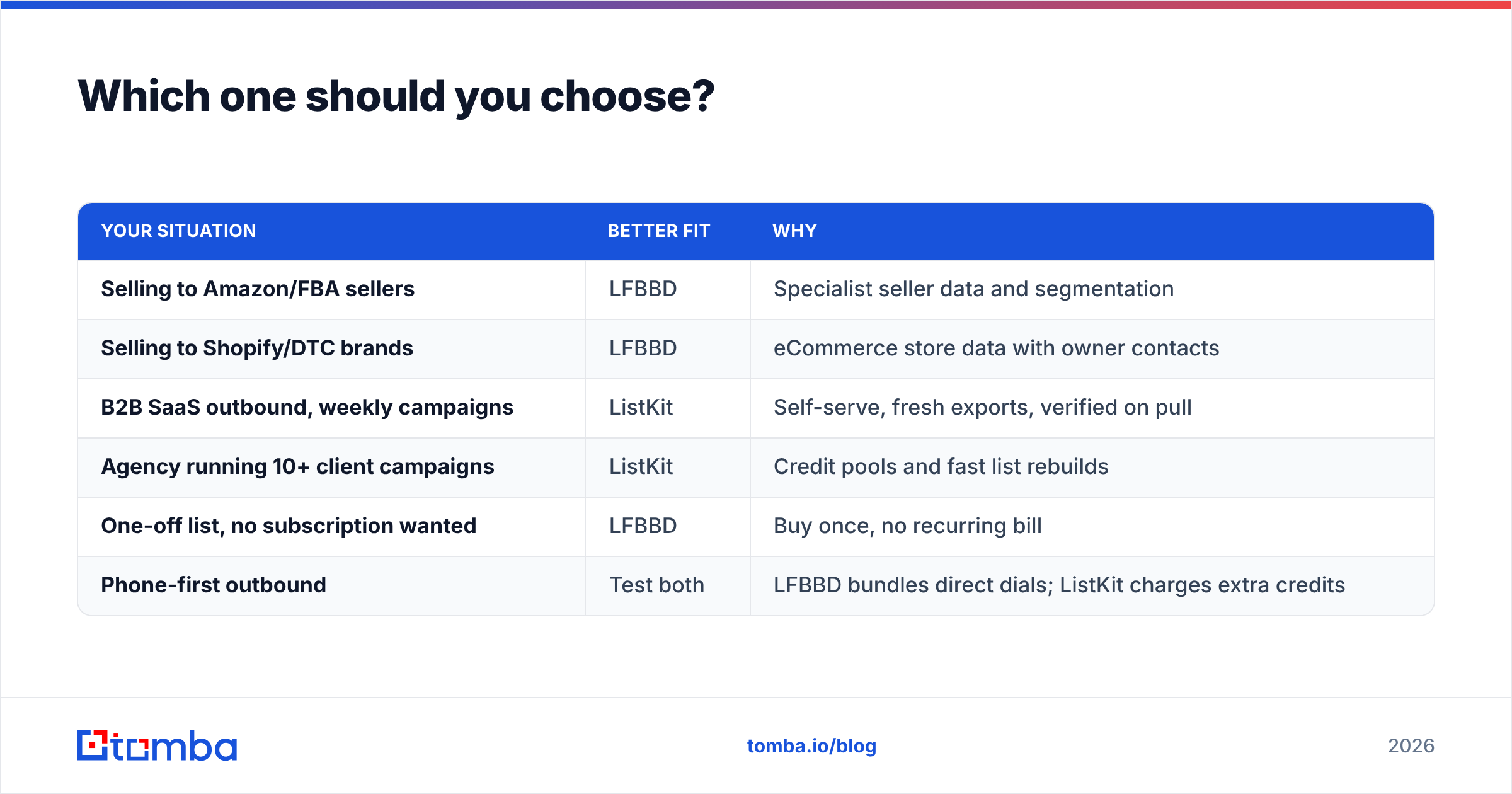
| Your situation | Better fit | Why |
|---|---|---|
| Selling to Amazon/FBA sellers | LFBBD | Specialist seller data and segmentation |
| Selling to Shopify/DTC brands | LFBBD | eCommerce store data with owner contacts |
| B2B SaaS outbound, weekly campaigns | ListKit | Self-serve, fresh exports, verified on pull |
| Agency running 10+ client campaigns | ListKit | Credit pools and fast list rebuilds |
| One-off list, no subscription wanted | LFBBD | Buy once, no recurring bill |
| Phone-first outbound | Test both | LFBBD bundles direct dials; ListKit charges extra credits |
Some teams use both. They buy a niche eCommerce dataset from LFBBD once a quarter and run ListKit for day-to-day B2B prospecting. That works well, provided both sources go through the same verification and dedupe step before they reach your sequencer.

Where does a live email finder fit alongside a list vendor?#
A list vendor and a lookup tool do different jobs. LFBBD and ListKit hand you a batch of contacts. An email finder answers one question at the moment you need it: "What is this specific person's work email right now?"
That helps in three situations that bulk lists handle badly:
- Account-based outreach. You have 40 named target accounts and three specific people in each. Searching a list database for them is slow. Looking them up directly is fast.
- Filling gaps. A purchased list returns a name and company but only a generic inbox. A finder looks up the named person's direct address.
- Checking old records. Before re-engaging a contact from a six-month-old file, confirm the address still resolves.
This isn't a replacement for either vendor. It fills the gaps list vendors leave, and it's cheap enough to run on every record that matters.
Final verdict: LFBBD Lead For Business vs ListKit#
LFBBD is the better option for eCommerce and Amazon seller data, and for buyers who want a custom list without a subscription. ListKit is the better option for recurring B2B cold email, where self-serve filtering, verification on export and fast rebuilds count most. Neither is better across the board. They serve different buyers.
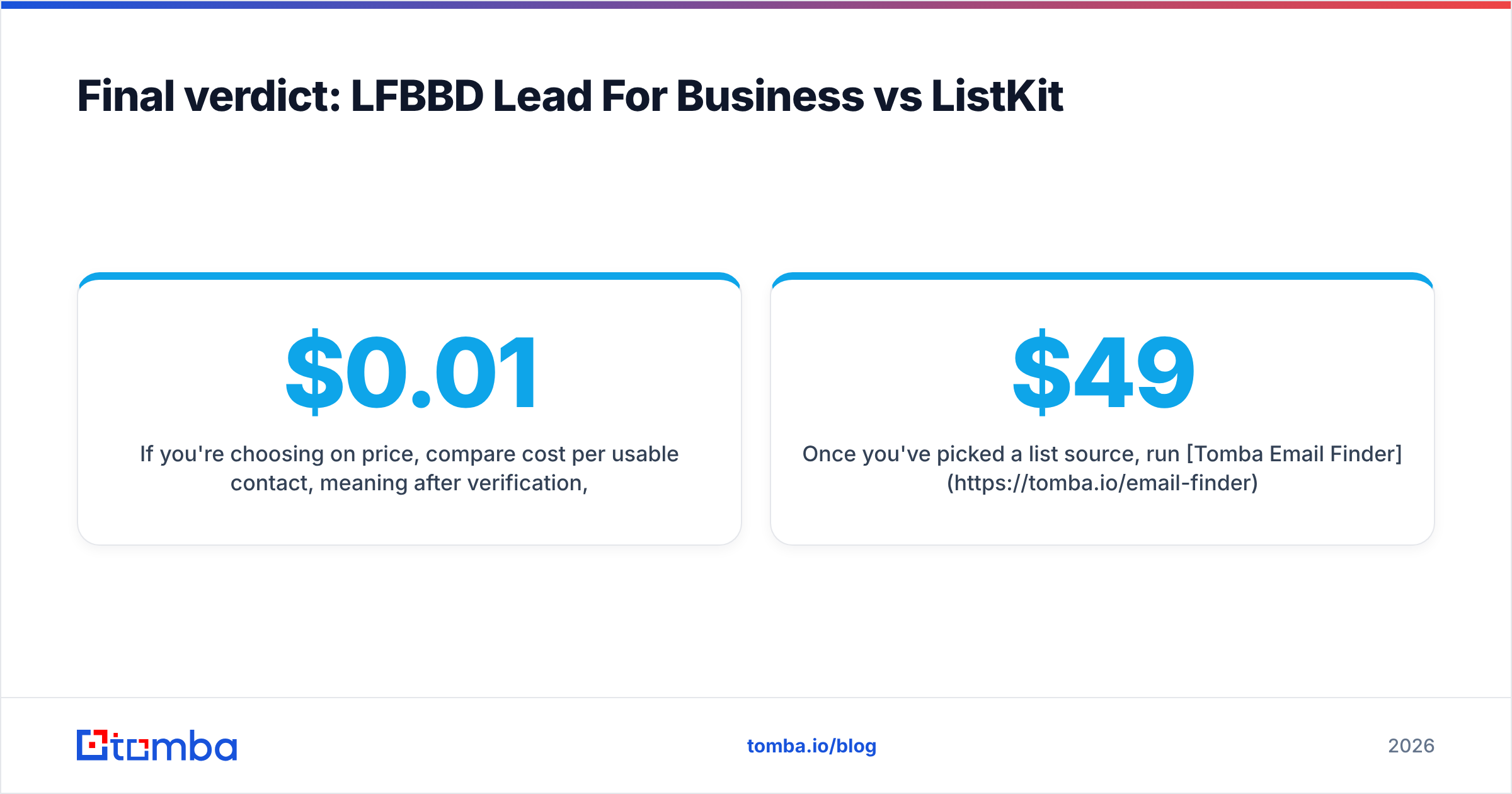
If you're choosing on price, compare cost per usable contact, meaning after verification, dedupe and catch-all filtering. Don't compare the price per raw row. A $0.01 contact that bounces costs more than a $0.05 contact that books a meeting.
Once you've picked a list source, run Tomba Email Finder on the contacts that matter most. Look up a decision-maker by name and domain, replace generic inboxes with direct addresses, and confirm old records before they reach your sequence. The free tier includes 25 searches a month, and paid plans start at $49/mo, so you can test it on your next LFBBD or ListKit export before you commit.
Related guides#
// get started
Find, verify and enrich your first contacts today
Start on the free plan with 25 searches a month, then scale when your team is ready.
Free plan · No credit card required · GDPR & CCPA
// about the author