Limeleads vs ListKit (2026): Pricing, Data Quality and Our Pick
Limeleads charges per contact. ListKit charges per data point. That one difference decides which list builder is cheaper for your outbound motion. Here is the math, the trade-offs, and our pick.
TL;DR
- Limeleads is a simple, US-focused B2B contact database. You pay per contact exported, emails are checked when you export, and it's hard to misconfigure. Paid plans start at $99/mo for 500 credits.
- ListKit is a list builder made for high-volume cold email. You pay per data point (email, verification, mobile), you get unlimited users, and the cost per verified email comes out lower once you're past a few hundred leads a month. Professional is about $97/mo monthly or $83/mo billed annually.
- Cheapest per verified email: ListKit, at roughly $0.10 against Limeleads' roughly $0.20 on entry plans. Simplest to budget: Limeleads, because one credit is one contact.
- Pick Limeleads if you're a small team exporting a few hundred targeted US contacts a month. Pick ListKit if you run outbound across several mailboxes and need thousands of triple-verified emails.
- Whichever you choose, check freshness right before you send. Neither static database replaces a live lookup on your highest-value accounts.
What are Limeleads and ListKit, and why compare them?#
Both tools do the same basic job. You set filters (industry, job title, company size, location), get back a list of decision-makers with work emails, and export it to your sequencer or CRM. That's where the similarity stops.
Limeleads is an older, deliberately plain B2B database with a strong lean toward North American companies. Its pitch is predictable: filter, preview, export, and the email gets verified as it leaves the platform. It's sold as one shared team account, and unused credits carry over to the next month.
ListKit is newer and built around the cold-email crowd: agencies, SDR teams and founders running Instantly- or Smartlead-style setups across many inboxes. Its selling points are "triple-verified" emails, AI-assisted company search, intent signals, unlimited seats, and a credit model where each data point has its own price.
So the real question is which pricing model and data workflow suits the way you prospect. Neither is objectively "better."
How do Limeleads and ListKit compare side by side?#
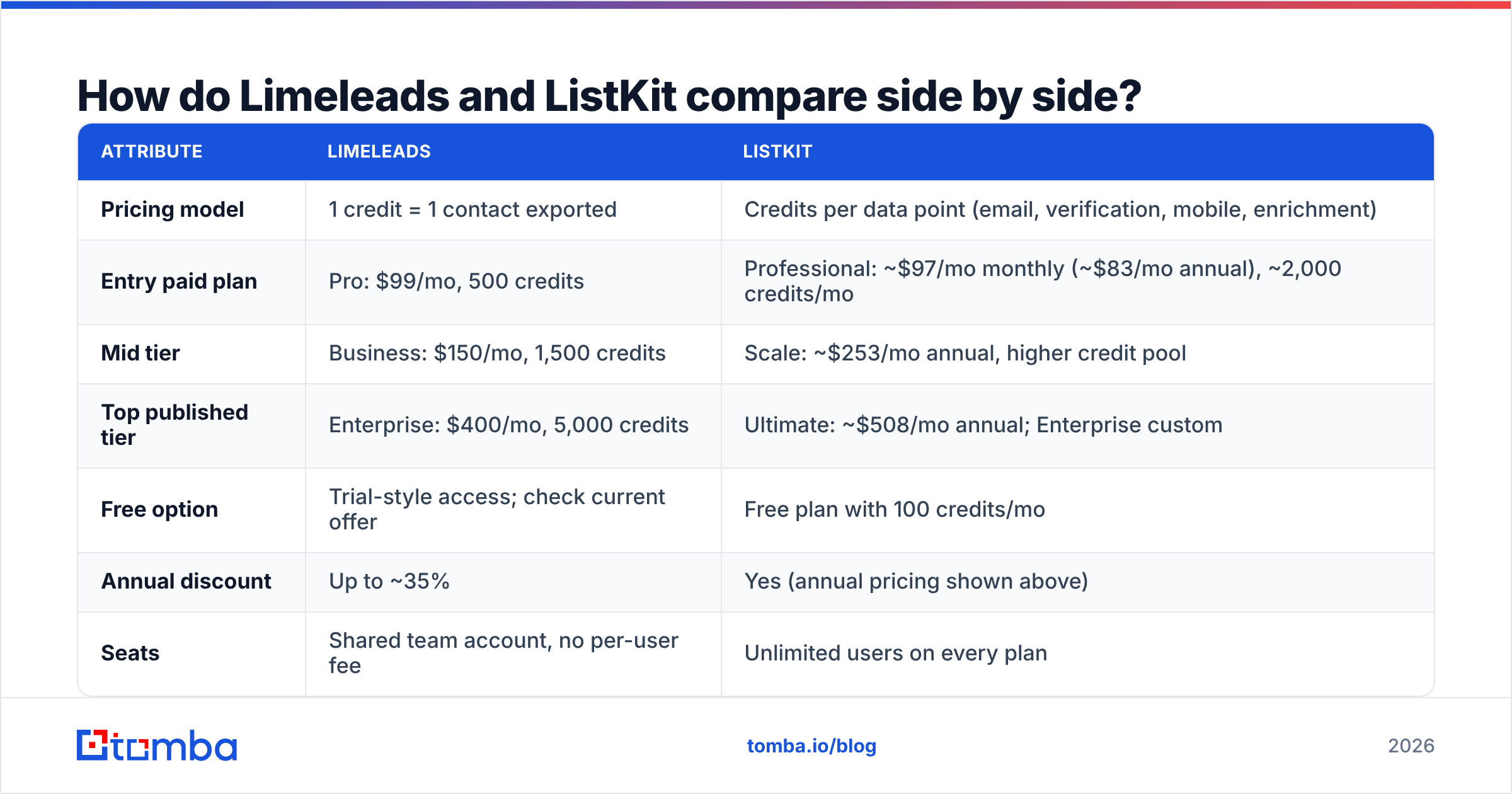
Here are the attributes that actually change what you pay and how many emails bounce. Prices are the published list prices at the time of writing. Both vendors change packaging often, so confirm on their pricing pages before you buy.
| Attribute | Limeleads | ListKit |
|---|---|---|
| Pricing model | 1 credit = 1 contact exported | Credits per data point (email, verification, mobile, enrichment) |
| Entry paid plan | Pro: $99/mo, 500 credits | Professional: |
| Mid tier | Business: $150/mo, 1,500 credits | Scale: ~$253/mo annual, higher credit pool |
| Top published tier | Enterprise: $400/mo, 5,000 credits | Ultimate: ~$508/mo annual; Enterprise custom |
| Free option | Trial-style access; check current offer | Free plan with 100 credits/mo |
| Annual discount | Up to ~35% | Yes (annual pricing shown above) |
| Seats | Shared team account, no per-user fee | Unlimited users on every plan |
| Credit rollover | Yes | Yes |
| Email verification | Verified at export | "Triple-verified" (costs +1 credit per email) |
| Mobile numbers | Included where available | Extra: ~5 credits per mobile |
| Geographic strength | US / North America | Broader, still strongest in US/English-speaking markets |
| Best for | Small teams, targeted US lists | High-volume cold email, agencies |
Sources for pricing: vendor pages plus the aggregated listings on Capterra and ListKit's own credit documentation.
How do the credit models actually work?#
This is where most buyers get caught out. The headline credit counts can't be compared directly.
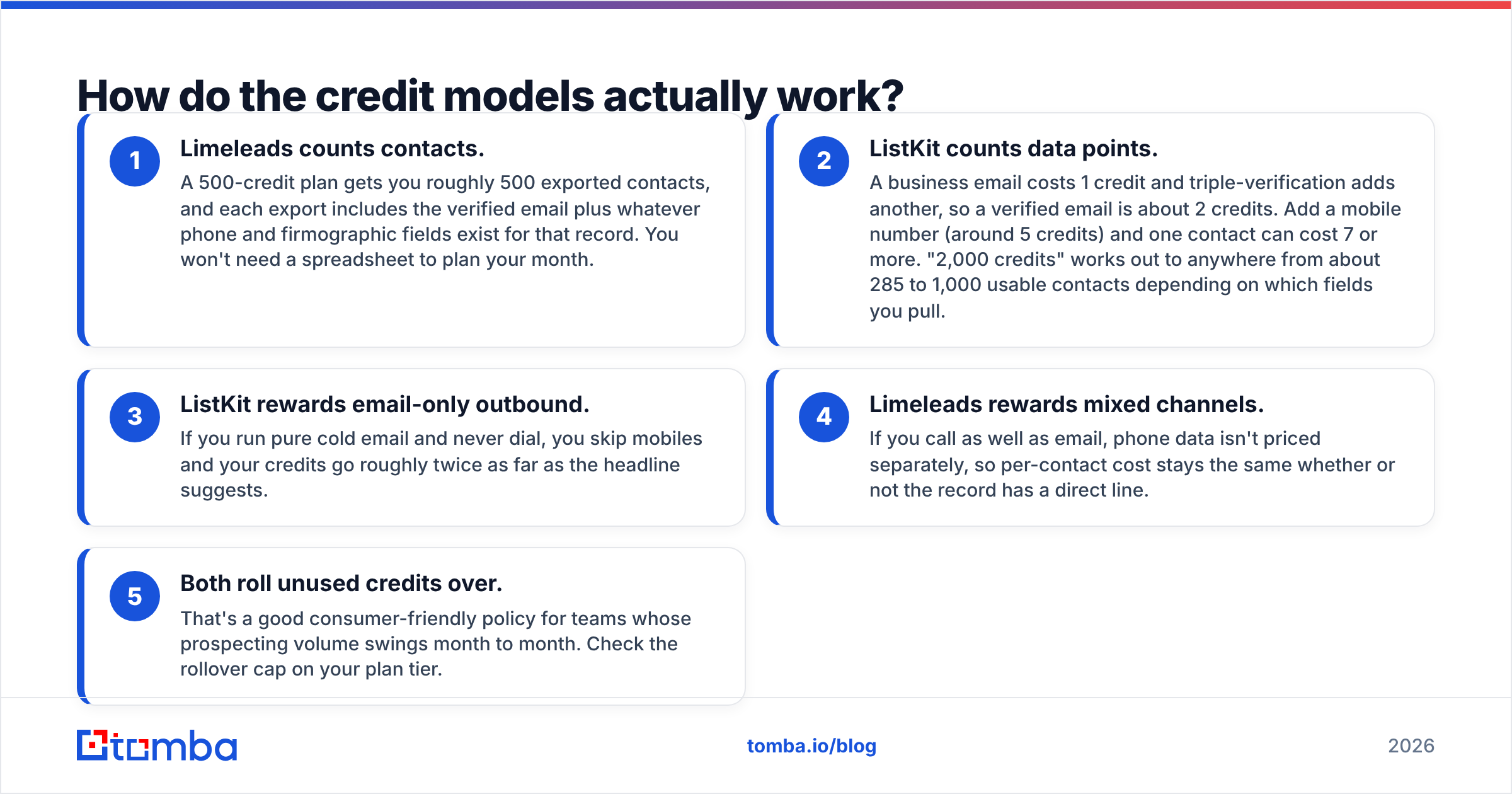
- Limeleads counts contacts. A 500-credit plan gets you roughly 500 exported contacts, and each export includes the verified email plus whatever phone and firmographic fields exist for that record. You won't need a spreadsheet to plan your month.
- ListKit counts data points. A business email costs 1 credit and triple-verification adds another, so a verified email is about 2 credits. Add a mobile number (around 5 credits) and one contact can cost 7 or more. "2,000 credits" works out to anywhere from about 285 to 1,000 usable contacts depending on which fields you pull.
- ListKit rewards email-only outbound. If you run pure cold email and never dial, you skip mobiles and your credits go roughly twice as far as the headline suggests.
- Limeleads rewards mixed channels. If you call as well as email, phone data isn't priced separately, so per-contact cost stays the same whether or not the record has a direct line.
- Both roll unused credits over. That's a good consumer-friendly policy for teams whose prospecting volume swings month to month. Check the rollover cap on your plan tier.
Which is cheaper per lead?#
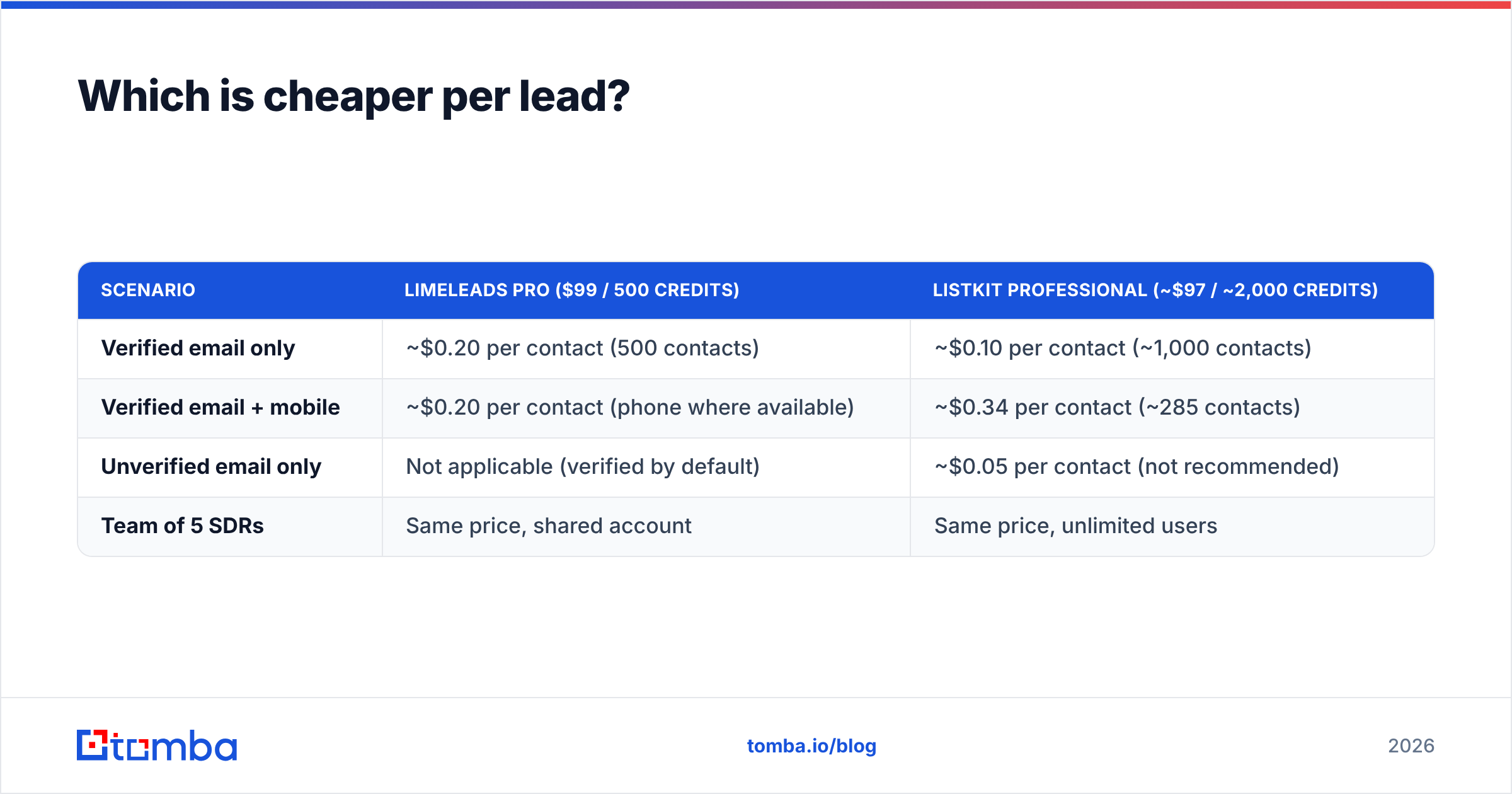
Here's what the entry plans work out to in real cost per usable contact:
| Scenario | Limeleads Pro ($99 / 500 credits) | ListKit Professional (~$97 / ~2,000 credits) |
|---|---|---|
| Verified email only | ~$0.20 per contact (500 contacts) | ~$0.10 per contact (~1,000 contacts) |
| Verified email + mobile | ~$0.20 per contact (phone where available) | ~$0.34 per contact (~285 contacts) |
| Unverified email only | Not applicable (verified by default) | ~$0.05 per contact (not recommended) |
| Team of 5 SDRs | Same price, shared account | Same price, unlimited users |
The pattern is clear. ListKit costs about half as much per contact for email-only outbound. Limeleads is cheaper once you need phone numbers. At higher tiers, Limeleads' per-credit price falls to about $0.10 on Business and $0.08 on Enterprise, so the gap narrows for teams willing to commit.
Don't skip ListKit's verification step to save a credit. An unverified list that bounces at 8-10% costs you more in sender reputation than you saved on the export.

Which has better data quality?#
Neither vendor publishes an independent, audited accuracy figure, so be skeptical of any review that quotes a precise bounce rate for either one. What you can compare is how each tool verifies and when.
Limeleads verifies the email at the moment you export. That matters, because a contact database is only as good as its last check, and B2B data decays by roughly 2-3% a month as people change jobs. A check at export time catches addresses that went bad since the record was added.
ListKit markets "triple verification": each email runs through multiple verification passes before it's released. In practice that's a stronger filter against risky and catch-all addresses, which is exactly what cold emailers care about when they're spreading volume across many inboxes. The catch is that it's a paid add-on per email, not a default.
Where each one tends to be weaker:
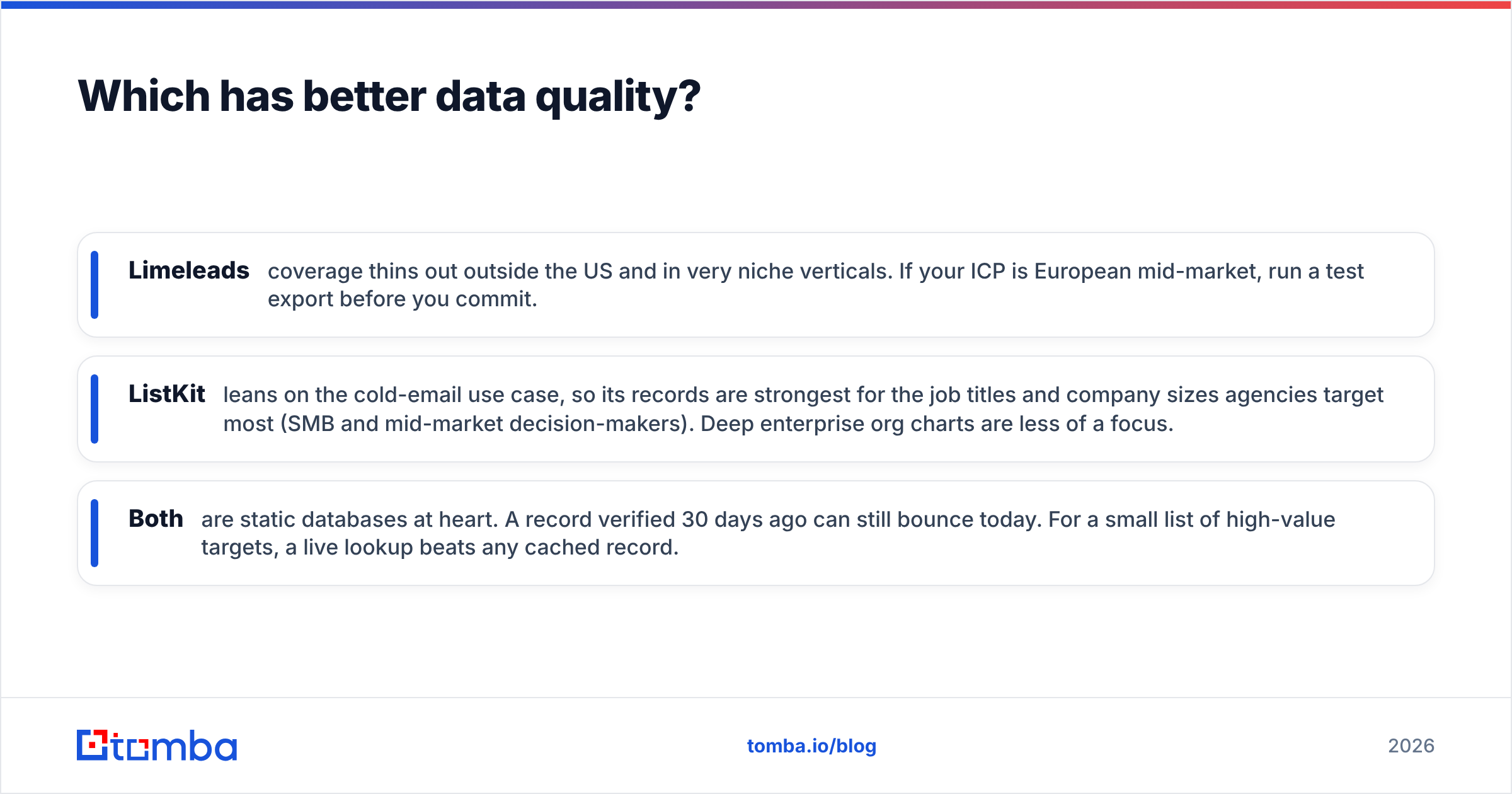
- Limeleads coverage thins out outside the US and in very niche verticals. If your ICP is European mid-market, run a test export before you commit.
- ListKit leans on the cold-email use case, so its records are strongest for the job titles and company sizes agencies target most (SMB and mid-market decision-makers). Deep enterprise org charts are less of a focus.
- Both are static databases at heart. A record verified 30 days ago can still bounce today. For a small list of high-value targets, a live lookup beats any cached record.
Your safest workflow with either tool: export, run the file through an independent email verifier right before the campaign goes live, and suppress anything flagged risky or catch-all.
How easy are they to use day to day?#
Limeleads is the more minimal of the two. The filter panel is a single screen (industry, title, seniority, headcount, revenue, location), results preview instantly, and export is a CSV. There's no workflow automation to learn. Anyone who has used a spreadsheet can build a list in five minutes. The trade-off is that there's little beyond list building: no intent data, no AI search, and a thinner integrations list.
ListKit has more going on. AI company search lets you describe your ICP in plain language ("B2B SaaS companies, 50-200 employees, hiring SDRs"), and intent filters narrow results to companies showing buying signals. Exports are formatted for the cold-email sequencers its users already run, and CRM integrations are included on every plan. The learning curve is steeper mainly because of credit budgeting. You'll want to decide up front which fields you actually need, or you'll burn credits on mobiles you never dial.
Which one should you choose?#
Decide on workflow, not features.
- Choose Limeleads if you're a founder, consultant or small sales team selling mostly into the US, you export a few hundred highly targeted contacts a month, you call as well as email, and you want a bill you can predict without a calculator.
- Choose ListKit if you're an agency or SDR team sending thousands of cold emails a month across many domains, your outbound is email-first, you want unlimited seats for a growing team, and you care most about the lowest cost per verified email.
- Consider neither as your only source if you target a short list of named accounts (ABM), sell outside North America, or need emails for specific people you already know. Filter databases are good at "find me 1,000 VPs of Ops" and weak at "find me the email of this one person at this one company."
For that last case, a live email finder or a domain search against the target company's website is usually faster and more accurate than filtering a static database and hoping the person is in it.

What do both tools get wrong about outbound?#
The shared weakness is timing. Both tools answer "who fits my ICP?" well. Neither can promise the address is still live on the day your sequence fires. That gap between export and send is where bounces, spam-folder placement and burned domains come from.
Three habits close most of the gap, whichever database you pick:
- Re-verify within 48 hours of sending. Not at export, and not last month. The closer to send time, the fewer surprises.
- Treat catch-all domains as a separate segment. Send to them at lower volume from your most-warmed inbox, or drop them entirely for new domains.
- Enrich your top tier live. For your 50 best-fit accounts, look up the decision-maker directly instead of trusting a database record. It takes minutes and it's the part of the list that actually books meetings.
For a broader view of how independent reviewers rate tools in this category, the G2 B2B data category is a useful sanity check. Weight recent reviews over old ones, since data vendors change quickly.
Frequently asked questions#
Is Limeleads or ListKit better for cold email? ListKit, for most high-volume cold emailers. It's cheaper per verified email and built around sequencer workflows. Limeleads is the better fit for lower-volume, US-targeted outreach that mixes email and phone.
Does Limeleads have a free plan? Limeleads has historically offered trial-style access rather than a permanent free tier. Check its site for the current offer. ListKit has an ongoing free plan with 100 credits a month.
How many leads do I actually get on ListKit Professional? Roughly 1,000 triple-verified emails a month if you pull email only, or about 285 contacts if you also add mobile numbers. It depends on which data points you export.
Do I still need an email verifier if I use one of these tools? Yes, if there's any delay between export and send. Verification is a snapshot. Re-checking right before launch protects your sender reputation.
Bottom line#
Limeleads vs ListKit comes down to the pricing unit. Limeleads sells contacts: simple, predictable, and good value when you want phones and a US focus. ListKit sells data points: about half the cost per verified email for email-first teams working at volume, with unlimited seats as a bonus. Both are respectable list builders. Neither removes the need for a fresh check before you hit send.
If your outbound depends on reaching specific decision-makers rather than broad filter lists, try the Tomba Email Finder. Enter a name and company domain, get a live-verified professional email, and use it on your highest-value accounts on top of whichever database you choose. The free plan covers 25 searches a month, and paid plans start at $49/mo (see Tomba pricing), so you can test it on your top 25 targets before you commit.
Related guides#
// get started
Find, verify and enrich your first contacts today
Start on the free plan with 25 searches a month, then scale when your team is ready.
Free plan · No credit card required · GDPR & CCPA
// about the author