LimeLeads vs Lusha: Pricing, Data Quality, and Which to Pick
LimeLeads sells cheap, filterable US contact lists. Lusha sells fast phone and email reveals inside LinkedIn and your CRM. Here is which one fits your team, what each costs per contact, and when neither is the right buy.
TL;DR
- LimeLeads is a filterable B2B contact database built for exporting lists in bulk. It is strongest on US small and mid-market companies and costs about $0.10–$0.20 per unlocked contact on its self-serve plans.
- Lusha is a prospecting tool that works where you already are (LinkedIn, Salesforce, HubSpot, Gmail). Its main strength is direct-dial phone numbers, but a phone reveal costs several times what an email reveal does.
- If you build outbound lists by the thousand, LimeLeads usually costs less per contact. If your reps call people and research one account at a time, Lusha fits the way they already work.
- Neither tool removes the need to verify emails before you send. Run an independent verification pass whichever one you pick.
- If you mostly need verified professional emails by domain or name, a dedicated email finder is often cheaper than either of these.
LimeLeads and Lusha both sell B2B contact data, but they suit different kinds of buyers. LimeLeads suits the ops person who wants a clean CSV of 2,000 HR directors at US SaaS companies. Lusha suits the SDR who has a prospect's LinkedIn profile open and wants a mobile number in two clicks. You'll pick the wrong tool if you compare them feature by feature without first asking how your team actually prospects.
This comparison covers pricing mechanics, data coverage, accuracy, workflow fit, and the cases where you shouldn't buy either one.
What is LimeLeads?#
LimeLeads is a B2B lead database that works like a search engine for contacts. You filter by job title, seniority, department, industry, company size, and location. The results show up as a list, and you spend credits to unlock and export the contacts you want.
A few traits define it:
- List-first workflow. The product is built around search, filter, and export. You don't prospect profile by profile. You build segments.
- Emails verified at export. LimeLeads says it checks email validity when you unlock a contact, so you're less likely to export addresses that died months ago.
- Credits roll over. Unused credits carry forward on paid plans. That matters if your prospecting is seasonal or campaign-based.
- US-weighted coverage. The database is strongest for North American companies, especially SMB and mid-market. If you sell into DACH, APAC, or LATAM, coverage gets thinner.
LimeLeads is not a sales engagement platform and doesn't try to be one. It has no sequencer, no dialer, and no intent data. It's a data source you feed into your CRM or your cold email tool.
What is Lusha?#
Lusha is a contact and company data platform that most people first meet as a Chrome extension. You open a LinkedIn profile or a company website, click the Lusha icon, and reveal a work email, a direct dial, or a mobile number.
It has since grown into a wider prospecting platform:
- Browser extension for LinkedIn, Sales Navigator, Gmail, and company websites
- Native CRM integrations with Salesforce, HubSpot, Pipedrive, and others, so reps can enrich records without leaving the CRM
- Prospecting search with filters for building lists inside the web app
- Enrichment of existing CRM records and CSV uploads
- Intent and job-change signals on higher tiers
- Compliance posture built around GDPR and CCPA, which enterprise legal teams tend to ask about
Lusha's reputation comes from phone numbers, particularly mobile direct dials for North American and European contacts. For teams that call as well as email, that's the reason to buy it.
How do LimeLeads and Lusha differ at the core?#
Before you look at prices, sort the two tools by the job they do. Most bad purchases in this category come from buying a list builder when you needed a prospecting assistant, or the other way around.
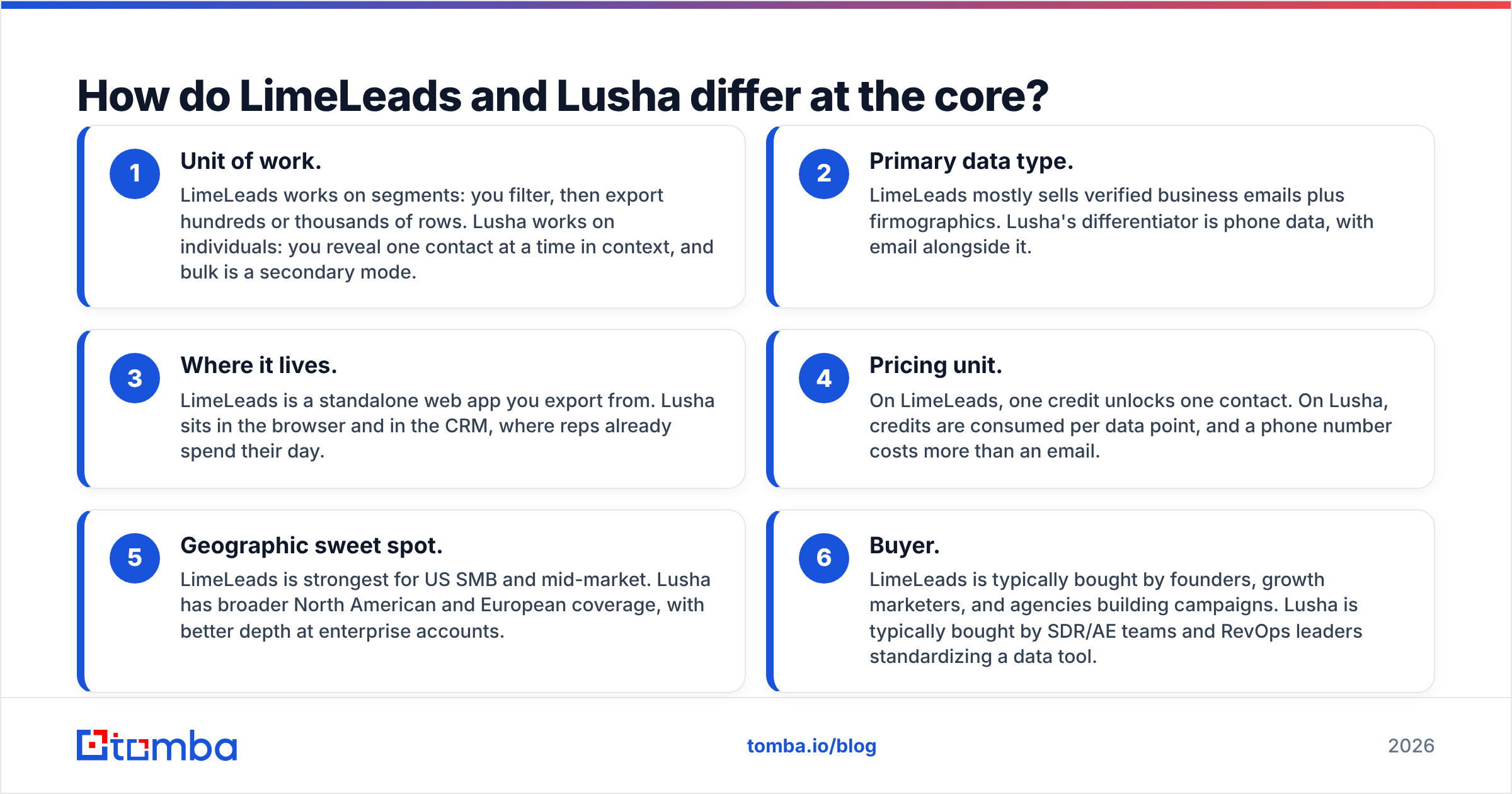
- Unit of work. LimeLeads works on segments: you filter, then export hundreds or thousands of rows. Lusha works on individuals: you reveal one contact at a time in context, and bulk is a secondary mode.
- Primary data type. LimeLeads mostly sells verified business emails plus firmographics. Lusha's differentiator is phone data, with email alongside it.
- Where it lives. LimeLeads is a standalone web app you export from. Lusha sits in the browser and in the CRM, where reps already spend their day.
- Pricing unit. On LimeLeads, one credit unlocks one contact. On Lusha, credits are consumed per data point, and a phone number costs more than an email.
- Geographic sweet spot. LimeLeads is strongest for US SMB and mid-market. Lusha has broader North American and European coverage, with better depth at enterprise accounts.
- Buyer. LimeLeads is typically bought by founders, growth marketers, and agencies building campaigns. Lusha is typically bought by SDR/AE teams and RevOps leaders standardizing a data tool.
Once you know which of these matters most, you've mostly made the decision.
How does LimeLeads pricing compare to Lusha pricing?#
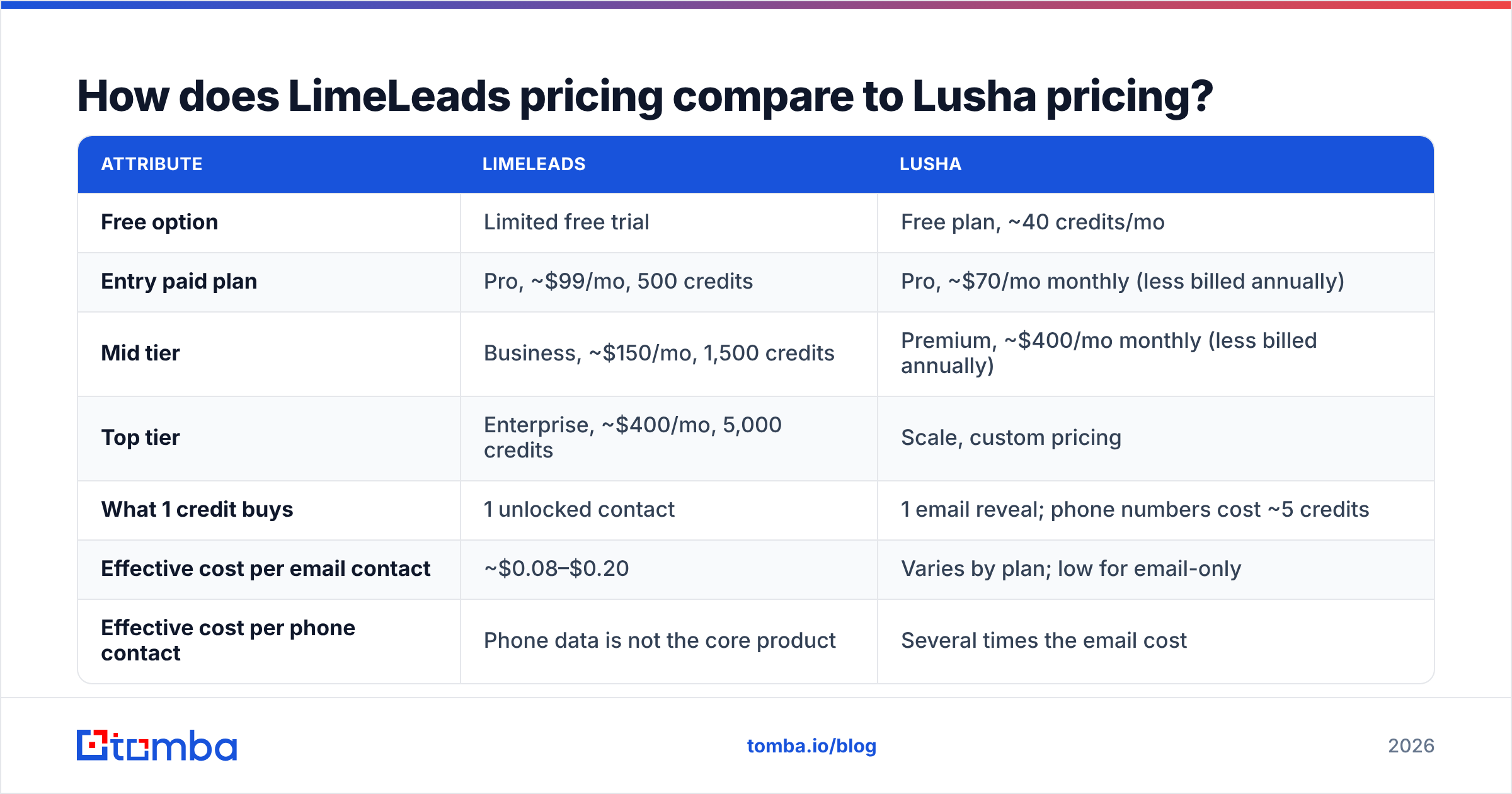
Both vendors change prices and run promotions often, so check their pricing pages before you buy. At the time of writing, their public list prices looked roughly like this:
| Attribute | LimeLeads | Lusha |
|---|---|---|
| Free option | Limited free trial | Free plan, ~40 credits/mo |
| Entry paid plan | Pro, ~$99/mo, 500 credits | Pro, ~$70/mo monthly (less billed annually) |
| Mid tier | Business, ~$150/mo, 1,500 credits | Premium, ~$400/mo monthly (less billed annually) |
| Top tier | Enterprise, ~$400/mo, 5,000 credits | Scale, custom pricing |
| What 1 credit buys | 1 unlocked contact | 1 email reveal; phone numbers cost ~5 credits |
| Effective cost per email contact | ~$0.08–$0.20 | Varies by plan; low for email-only |
| Effective cost per phone contact | Phone data is not the core product | Several times the email cost |
| Unused credits | Roll over | Depends on plan and billing |
| Annual discount | Yes (sizable) | Yes (~25%) |
| Seats | Account-based | Seats included per plan; more cost extra |
Three points the table doesn't make obvious:
Lusha's price depends on what you reveal. An email-only workflow on Lusha is reasonably priced. Once reps start revealing mobile numbers on every contact, the same credit pool runs out several times faster. Budget for your realistic phone-reveal ratio, not the headline credit count.
LimeLeads gets cheaper as you move up. The Pro plan's per-contact cost is roughly double the Business plan's. If you'll export more than about 500 contacts a month, the Pro tier is usually poor value.
Seats change the math for teams. LimeLeads prices mainly on credits. Lusha prices on credits and seats, which is fine for a two-person team and adds up quickly across a 15-rep SDR floor.
Buyer reviews on G2 back this up: Lusha users rate ease of use highly and complain most often about credit burn on phone numbers. LimeLeads reviews tend to praise per-contact value and mention thinner non-US coverage.
Which has better data accuracy: LimeLeads or Lusha?#
The honest answer is that it depends on the segment, and any vendor's accuracy figure describes an average over a population you may not be selling to.
Here's what you can reasonably expect:
- Email accuracy. Both tools verify emails, and both will give you some bounces. Catch-all domains, recent job changes, and small companies with irregular email patterns cause most of the misses. LimeLeads verifying at export helps with staleness. Lusha's in-context reveal means you're usually looking at a current LinkedIn profile, which helps with job changes.
- Phone accuracy. Lusha is clearly ahead here, since phone data is its core product. LimeLeads doesn't compete seriously on direct dials.
- Firmographic accuracy. Both are fine for filtering on industry and headcount. Neither should be treated as the source of truth for revenue figures at private companies.
- Freshness outside the US. Lusha's European coverage is generally deeper. LimeLeads is at its best on US SMB records.
Whatever you buy, don't send cold email straight from an export. Run the list through an independent email verifier first. A 3–5% bounce rate on a first-touch campaign is enough to hurt a new sending domain, and you can't reverse that damage after the fact.
The cheapest way to check accuracy is to pull 100 contacts from your real ICP on each tool's free plan or trial, verify all of them, and count bounces, invalids, and wrong-person hits. A 30-minute test on your own segment tells you more than any published benchmark.
Is Lusha better than LimeLeads for sales teams?#
For SDR and AE teams that call, yes, usually. Lusha's advantages add up in a day-to-day rep workflow:
- Reps don't leave LinkedIn or the CRM to get data, which cuts down on tab-switching.
- Direct dials and mobile numbers make multi-channel sequences possible.
- The CRM integrations write data back to the record, so RevOps doesn't have to reconcile a separate list.
- Admin controls and credit allocation per rep make the spend easier to govern.
LimeLeads isn't built for that. A rep can't comfortably use a list-export tool 40 times a day from a LinkedIn tab.
Where the answer changes: email-only outbound teams and agencies. If your team doesn't cold call, you're paying for Lusha's biggest strength without using it. In that case LimeLeads' flat one-credit-per-contact model is often the better deal.
Is LimeLeads better than Lusha for building cold email lists?#
For high-volume email campaigns aimed at US SMB and mid-market, often yes.
Say you're launching a campaign to 3,000 operations managers at 50–500 person logistics companies in the US. On LimeLeads you'd filter by title, industry, headcount, and country, export, verify, and load the list into your sequencer. At Business or Enterprise tier pricing, the cost per contact is hard to beat among self-serve tools, and rollover means a quiet month doesn't waste credits.
You can do the same thing in Lusha's prospecting search, but you'd probably pay more per usable contact once seats and plan limits are counted. And Lusha's phone data, which is much of what you're paying for, would go unused.
Pick LimeLeads for list-building when:
- Your ICP is mostly US-based SMB or mid-market
- Your outreach channel is email, maybe with LinkedIn touches
- You run campaigns in bursts and want credits to roll over
- You'd rather have one ops owner exporting lists than give every rep a seat
What do LimeLeads and Lusha each do badly?#
No tool in this category is complete, so it's worth knowing the weaknesses before you commit to an annual contract.
LimeLeads weaknesses
- Coverage outside North America is noticeably thinner.
- Phone data is not a strength.
- It has little workflow tooling: no browser-side reveal in the style Lusha offers and fewer native CRM push options.
- The Pro tier's per-contact price is high compared with its own higher tiers.
Lusha weaknesses
- Phone reveals use up credits quickly, so the realistic cost per contact is often well above the headline.
- Seat-based pricing gets expensive for large teams.
- Bulk list-building costs more per contact than dedicated list databases.
- The free plan is useful for testing and not much else, at roughly a handful of full contacts a month.
Shared weaknesses
- Both return some invalid or catch-all emails, so plan for a verification step.
- Both depend on aggregated data that goes stale as people change jobs. Expect decay of a few percent per quarter on any exported list.
- Neither is a replacement for a real CRM. Treat both as inputs, not systems of record.
Which should you choose: LimeLeads or Lusha?#
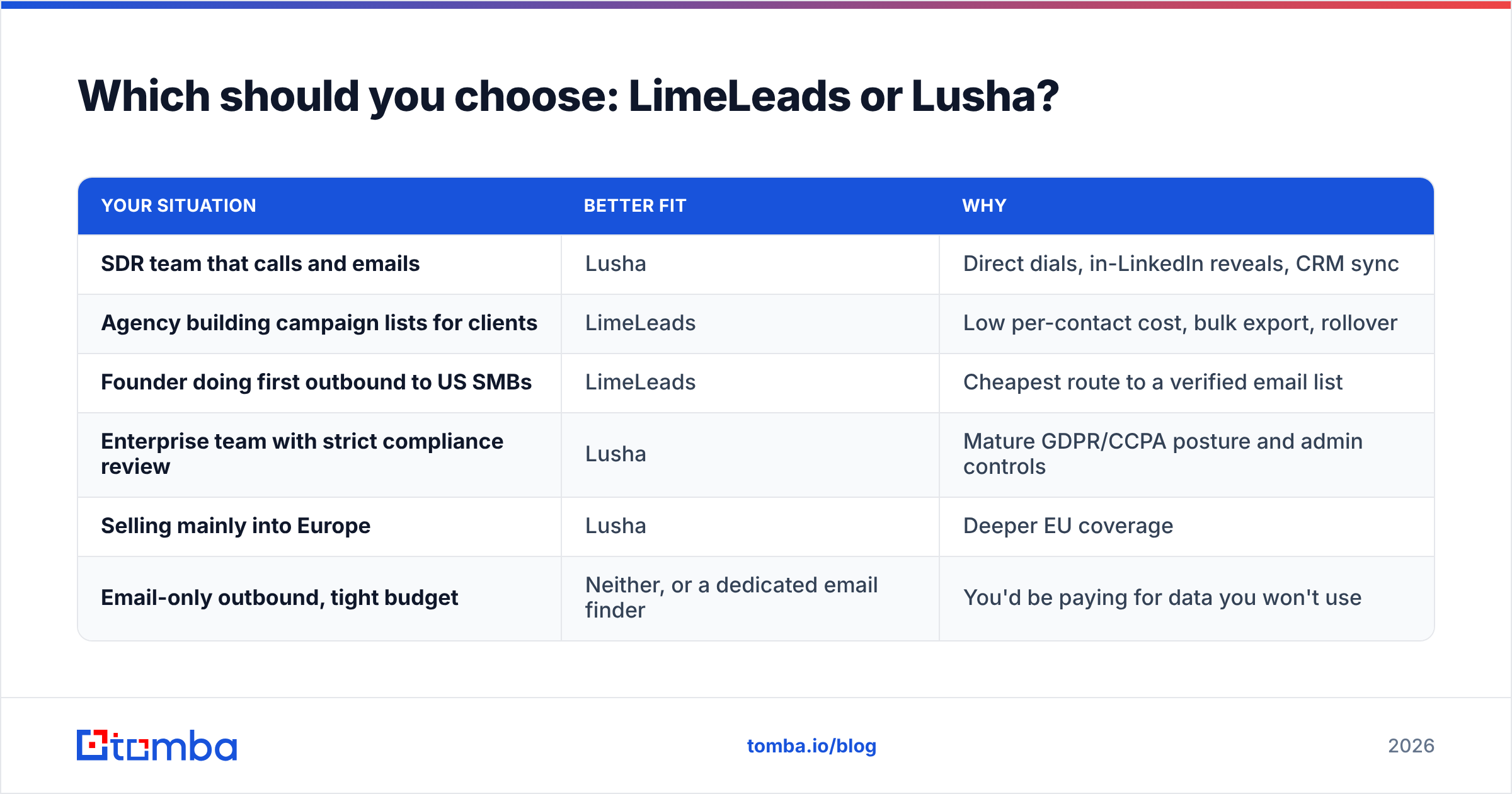
Use this as a shortcut:
| Your situation | Better fit | Why |
|---|---|---|
| SDR team that calls and emails | Lusha | Direct dials, in-LinkedIn reveals, CRM sync |
| Agency building campaign lists for clients | LimeLeads | Low per-contact cost, bulk export, rollover |
| Founder doing first outbound to US SMBs | LimeLeads | Cheapest route to a verified email list |
| Enterprise team with strict compliance review | Lusha | Mature GDPR/CCPA posture and admin controls |
| Selling mainly into Europe | Lusha | Deeper EU coverage |
| Email-only outbound, tight budget | Neither, or a dedicated email finder | You'd be paying for data you won't use |
If your team splits along these lines, with SDRs calling and marketing running email campaigns, it's reasonable to run both: Lusha seats for the callers and one LimeLeads account for list-building. That usually costs less than giving every rep a top-tier Lusha seat.
When should you skip both and use a dedicated email finder?#
Many teams comparing LimeLeads and Lusha don't need a full contact database. What they need is:
- The verified work email of a specific person at a specific company
- Every public email at a target domain
- A way to enrich a CSV they already have from LinkedIn, events, or their own CRM
For those jobs, a dedicated email finder is often more accurate on the email itself and cheaper per result, because you pay for emails, not bundled phone and firmographic data. Tomba, for example, lets you find emails by domain, look up individuals by name and company, and verify catch-all addresses, with plans starting at a free tier of 25 searches a month and paid plans from $49/mo (full breakdown on the Tomba pricing page). It doesn't replace Lusha's mobile numbers. If phone data matters, Tomba also has a separate phone finder, but its coverage depth by region is worth testing against Lusha on your own ICP before you switch.
The general principle: match the tool to the data point you actually use. If 90% of your outreach is email, don't pay phone-data prices for it.
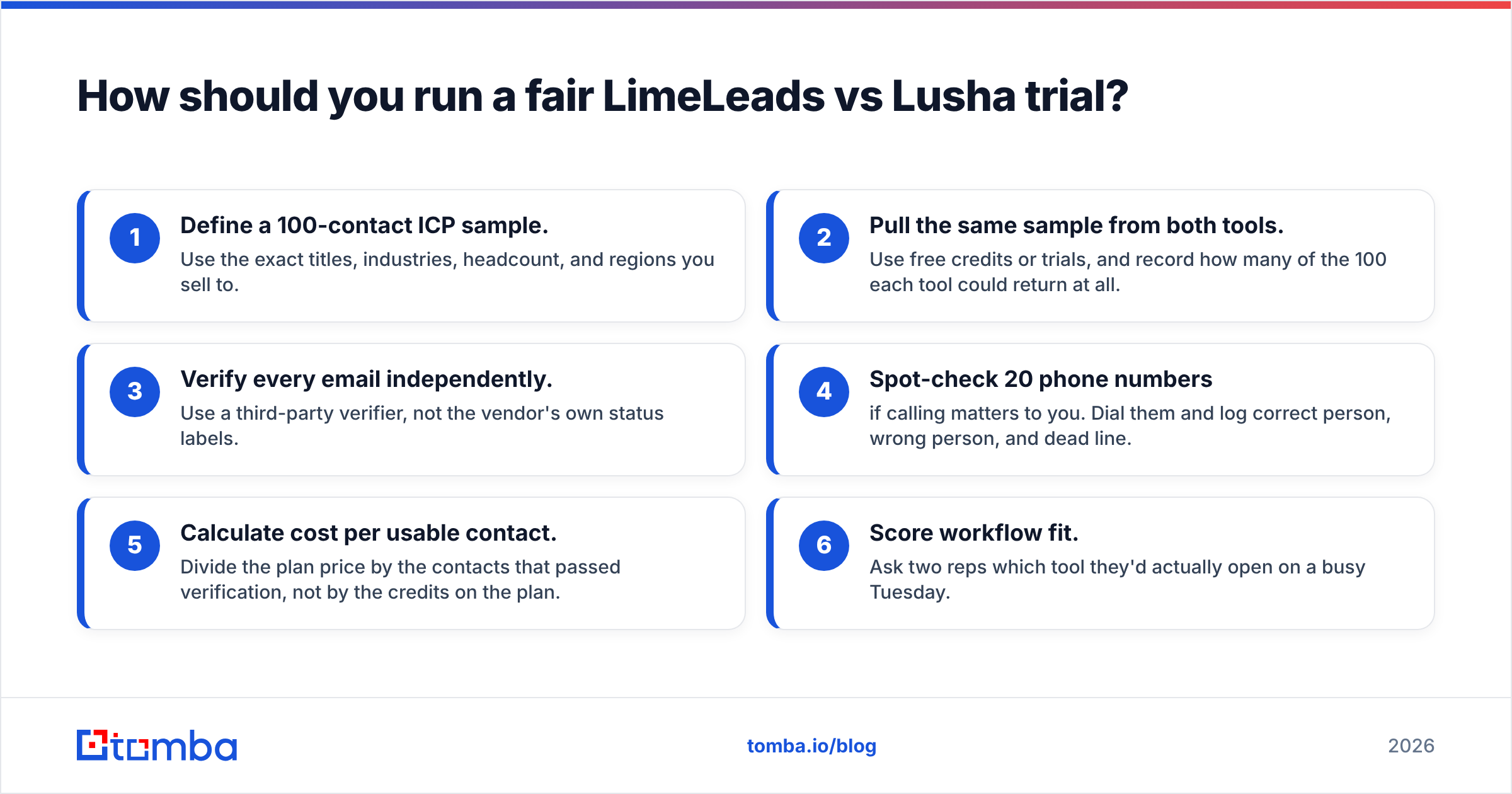
How should you run a fair LimeLeads vs Lusha trial?#
If you're still unsure, test both on your own data before you commit to annual pricing:
- Define a 100-contact ICP sample. Use the exact titles, industries, headcount, and regions you sell to.
- Pull the same sample from both tools. Use free credits or trials, and record how many of the 100 each tool could return at all.
- Verify every email independently. Use a third-party verifier, not the vendor's own status labels.
- Spot-check 20 phone numbers if calling matters to you. Dial them and log correct person, wrong person, and dead line.
- Calculate cost per usable contact. Divide the plan price by the contacts that passed verification, not by the credits on the plan.
- Score workflow fit. Ask two reps which tool they'd actually open on a busy Tuesday.
Cost per usable contact, plus whether your team will actually use the tool, is the only comparison that holds up after you've signed.
Final verdict#
LimeLeads and Lusha aren't really substitutes. LimeLeads is a low-cost, US-focused list builder that works best for email-first outbound and agencies. Lusha is a prospecting assistant built around phone data and in-context reveals, and it earns its higher effective price when your reps actually call. Decide based on your main channel and your main geography, then confirm the choice with a 100-contact test on your own ICP.
If your outbound is mostly email and you want verified professional addresses without paying for data you won't use, try Tomba Email Finder. You can look up anyone by name and company, pull every email at a domain, and verify catch-all addresses in the same workflow. The free plan gives you 25 searches a month, enough to run the accuracy test above on your own segment before you spend anything.
Related guides#
// get started
Find, verify and enrich your first contacts today
Start on the free plan with 25 searches a month, then scale when your team is ready.
Free plan · No credit card required · GDPR & CCPA
// about the author