Limeleads vs Trueverify (2026): Which Tool Do You Actually Need?
One sells you US B2B contacts. The other tells you whether an email will bounce. Here is how Limeleads and Trueverify really compare, what each costs, and when you should run both.
TL;DR
- Limeleads and Trueverify do different jobs. Limeleads is a US-focused B2B contact database you search and export from. Trueverify is an email verification service that checks whether addresses you already have will bounce.
- Pick Limeleads if your problem is "I don't have enough contacts." Its paid plans start at $99/mo for 500 credits, and annual billing cuts that price by roughly 35%.
- Pick Trueverify if your problem is "my list bounces." It runs pay-as-you-go verification with a real-time API, catch-all detection, and disposable-domain filtering.
- A lot of teams end up paying for both, because a database export still needs checking before it goes into a sequence. That means two logins, two bills, and a CSV handoff between them.
- If you want finding and verifying in one place, an all-in-one email finder with verification built in, such as Tomba starting at $49/mo, is usually cheaper than stacking the two.
What is the real difference between Limeleads and Trueverify?#
Most "X vs Y" posts compare two tools that do the same thing. This comparison is different, because Limeleads and Trueverify sit at two separate stages of the same workflow.
Think of a restaurant kitchen. Limeleads is the supplier that delivers the ingredients. Trueverify is the person who inspects each crate before it goes in the walk-in fridge. You can't cook without the supplier, and if nobody inspects the crates, spoiled produce ends up on plates.
In B2B terms:
- Limeleads is a lead source. You filter by job title, industry, company size, location, revenue, and technology, and then export contacts with emails and phone numbers. Coverage is mainly US businesses.
- Trueverify is a list hygiene tool. You upload a list or call its API, and it tells you which addresses are valid, invalid, risky, catch-all, or disposable.
So the answer to "Limeleads or Trueverify?" depends on which problem you're trying to solve. The table below lays out the split.
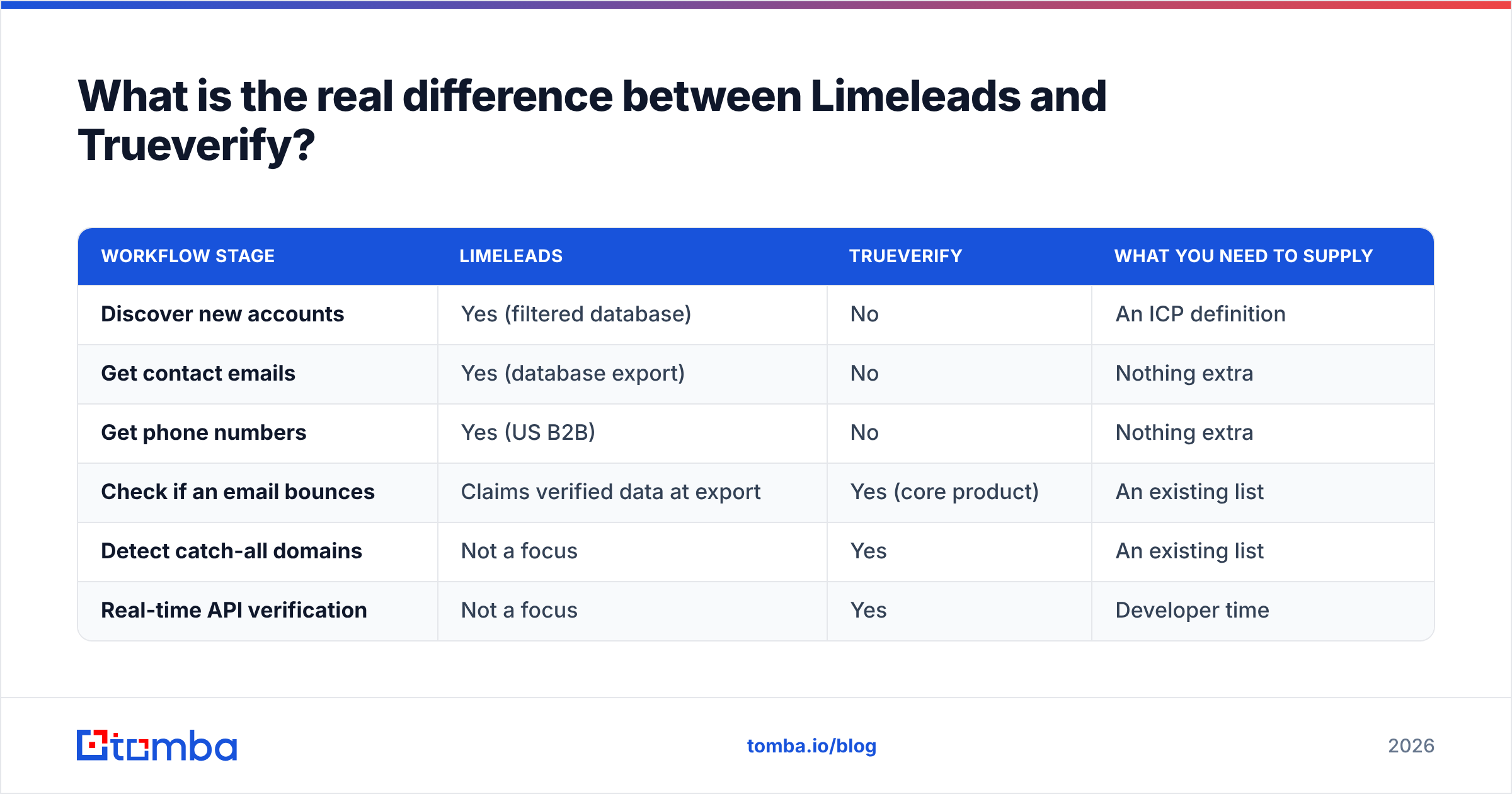
| Workflow stage | Limeleads | Trueverify | What you need to supply |
|---|---|---|---|
| Discover new accounts | Yes (filtered database) | No | An ICP definition |
| Get contact emails | Yes (database export) | No | Nothing extra |
| Get phone numbers | Yes (US B2B) | No | Nothing extra |
| Check if an email bounces | Claims verified data at export | Yes (core product) | An existing list |
| Detect catch-all domains | Not a focus | Yes | An existing list |
| Real-time API verification | Not a focus | Yes | Developer time |
How does Limeleads work?#
Limeleads is a prospecting database. You log in, set filters, preview matching contacts, and spend credits to reveal and export them. According to its Capterra listing, the product is aimed at small sales teams and agencies that want fresh US B2B contacts without enterprise-level contracts.
The things that matter in practice:
- US-first coverage. Limeleads is built around US companies. If you sell into the US mid-market, that focus helps. If your territory is EMEA or APAC, you'll hit the edges of the data quickly.
- Firmographic and technographic filters. You can combine job title, seniority, headcount, industry, revenue, location, and tech stack. That's enough to build a solid list for a well-defined ICP.
- Verified-at-export claims. Limeleads markets very high email accuracy (it cites 99%). Any database decays, though. B2B contact data goes stale as people change jobs, so a record that was verified last quarter isn't guaranteed to be valid today.
- Credit rollover. Unused credits carry over. That's useful if your outbound volume varies from month to month.
- Phone numbers included. If you mix cold calling with email, getting direct dials in the same export saves you a second vendor.
What does Limeleads cost?#
Published pricing at the time of writing:
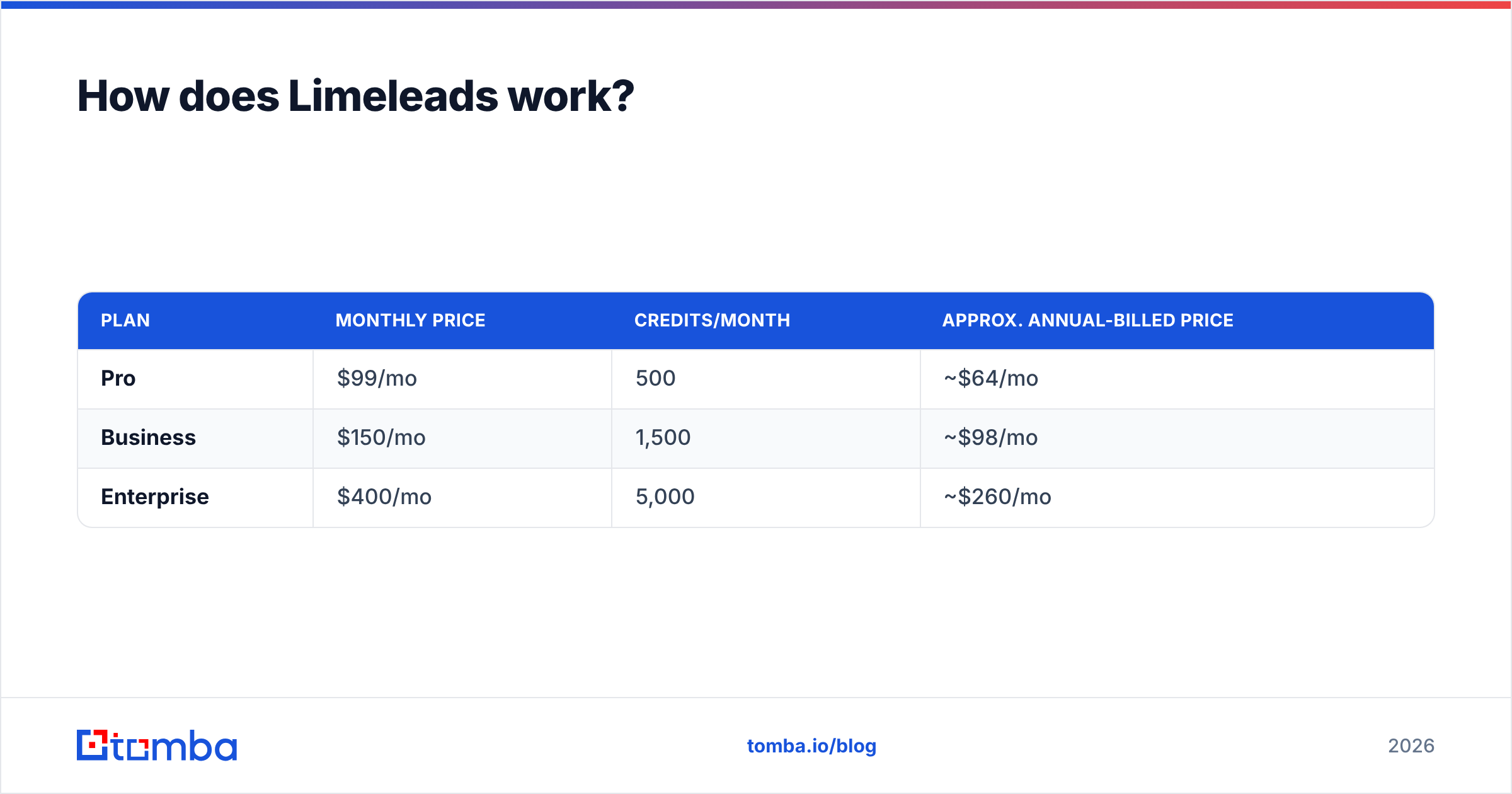
| Plan | Monthly price | Credits/month | Approx. annual-billed price |
|---|---|---|---|
| Pro | $99/mo | 500 | ~$64/mo |
| Business | $150/mo | 1,500 | ~$98/mo |
| Enterprise | $400/mo | 5,000 | ~$260/mo |
At Business tier on monthly billing, a contact costs you about $0.10. On annual billing it's closer to $0.065. That's competitive for a database with US phone numbers, but it only holds if you actually use the credits. Check the Limeleads homepage for current numbers before you buy, because database vendors change credit allowances often.

How does Trueverify work?#
Trueverify is a dedicated email verification tool. It doesn't find anyone. You give it addresses and it grades them.
What it offers, based on its own site and third-party coverage:
- Bulk list cleaning. Upload a CSV and get each address back tagged as valid, invalid, risky, or unknown.
- Real-time API. You can verify at the point of capture, for example on a signup form or while syncing leads into a CRM.
- Catch-all detection. It flags domains that accept mail for any address, where a simple SMTP check can't tell whether a mailbox exists.
- Disposable and spam-trap screening. It filters throwaway inboxes and known trap patterns that damage your sender reputation.
- Free starter credits. Third-party reviews report around 250 free checks to start, followed by pay-as-you-go pricing that typically lands somewhere between $5 and $20 per 1,000 verifications depending on volume. Confirm current rates on its pricing page, because this category reprices often.
The pay-as-you-go model is the main commercial difference from Limeleads. You pay nothing when you aren't sending, and your spend grows with list size, not with seats.
What Trueverify can't do#
Trueverify can't fill an empty pipeline. If you give it 200 addresses, you get back 200 grades. It won't suggest the VP of Operations you missed, and it won't turn "firstname at company" into a confirmed address. For that you need a lead source or an email finder.
Is Limeleads better than Trueverify?#
Neither one is better in general. They answer different questions. Here's a direct head-to-head on the attributes buyers usually compare:
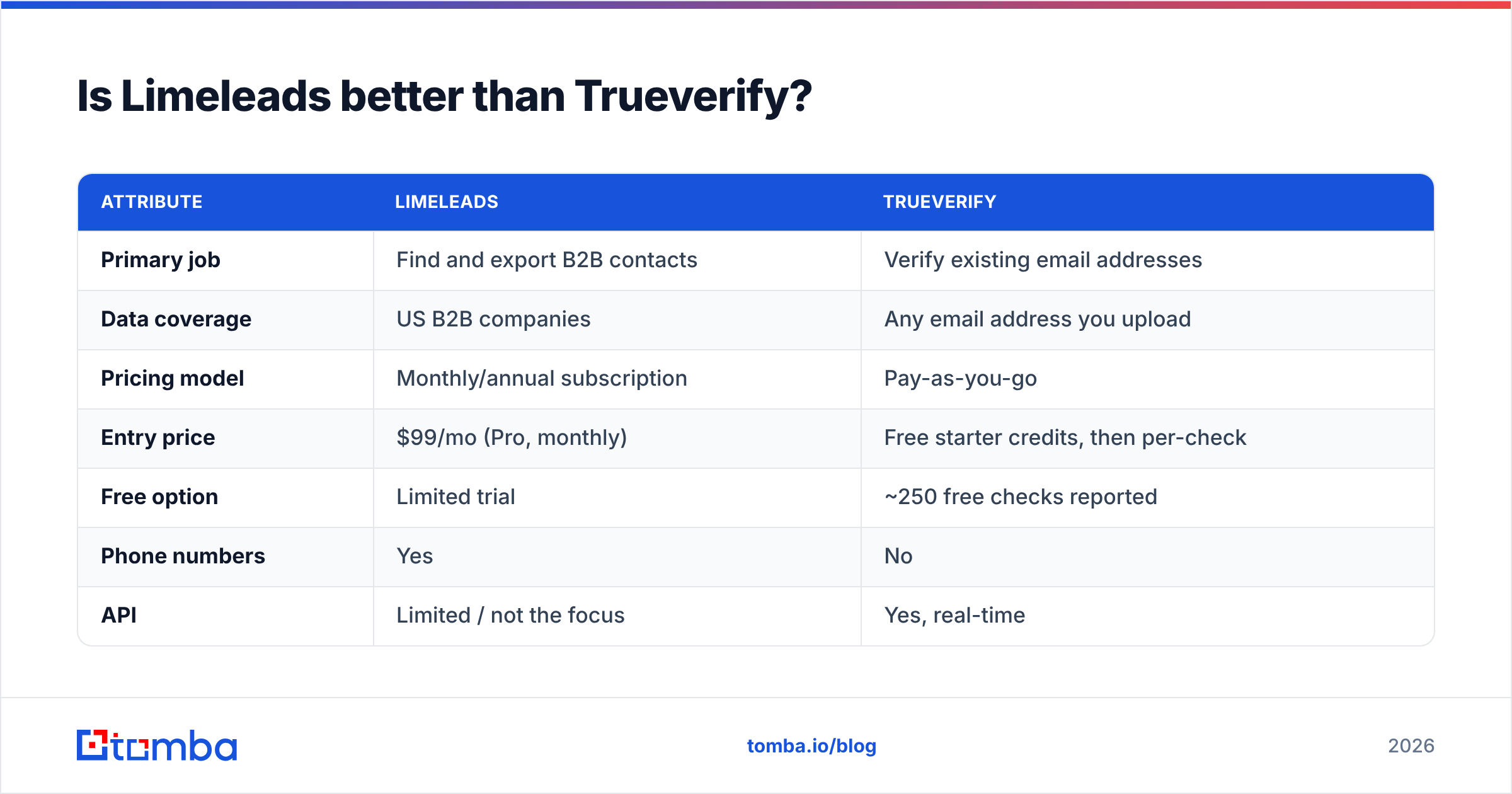
| Attribute | Limeleads | Trueverify |
|---|---|---|
| Primary job | Find and export B2B contacts | Verify existing email addresses |
| Data coverage | US B2B companies | Any email address you upload |
| Pricing model | Monthly/annual subscription | Pay-as-you-go |
| Entry price | $99/mo (Pro, monthly) | Free starter credits, then per-check |
| Free option | Limited trial | ~250 free checks reported |
| Phone numbers | Yes | No |
| API | Limited / not the focus | Yes, real-time |
| Catch-all handling | Not a stated focus | Dedicated detection |
| Best for | SDRs and agencies building US lists | Marketers and ops cleaning existing lists |
| Main limitation | Geographic scope, data decay | Can't generate new leads |
A simple way to decide:
- Your CRM is thin and your SDRs are hand-researching accounts: start with Limeleads.
- You have 20,000 contacts from events, old exports, and form fills, and your bounce rate is creeping up: start with Trueverify.
- You're doing both: keep reading, because the costs add up quickly.
Should you use Limeleads and Trueverify together?#
Many teams do, and the reasoning makes sense. A database's "verified" label reflects the date it was last checked. By the time a contact sits in your sequencer for three weeks, some of those addresses have gone bad. Running exports through a separate verifier before sending is standard practice, and mailbox providers keep tightening bulk-sender requirements. Google's sender guidelines are a good example of how little bounce and spam headroom you now have.
The stacked workflow looks like this:
- Filter in Limeleads for your ICP and spend credits to export.
- Download the CSV and clean up duplicates.
- Upload to Trueverify and wait for the bulk job.
- Drop invalid and risky rows, then decide what to do with catch-alls.
- Import the survivors into your sequencer or CRM.
It works, but there are three costs you should plan for.
- Paying twice for the same contact. You spend a Limeleads credit to reveal the record and then a Trueverify check to confirm it. If 8–10% come back invalid, you've paid twice for a record you can't use.
- CSV handoffs. Every manual export and import is a chance to lose columns, duplicate rows, or skip the verification step when you're busy.
- Catch-all limbo. Trueverify can tell you a domain is catch-all, but that doesn't make the address deliverable. You still need a policy for those rows, or a dedicated catch-all verifier that goes further than a plain flag.
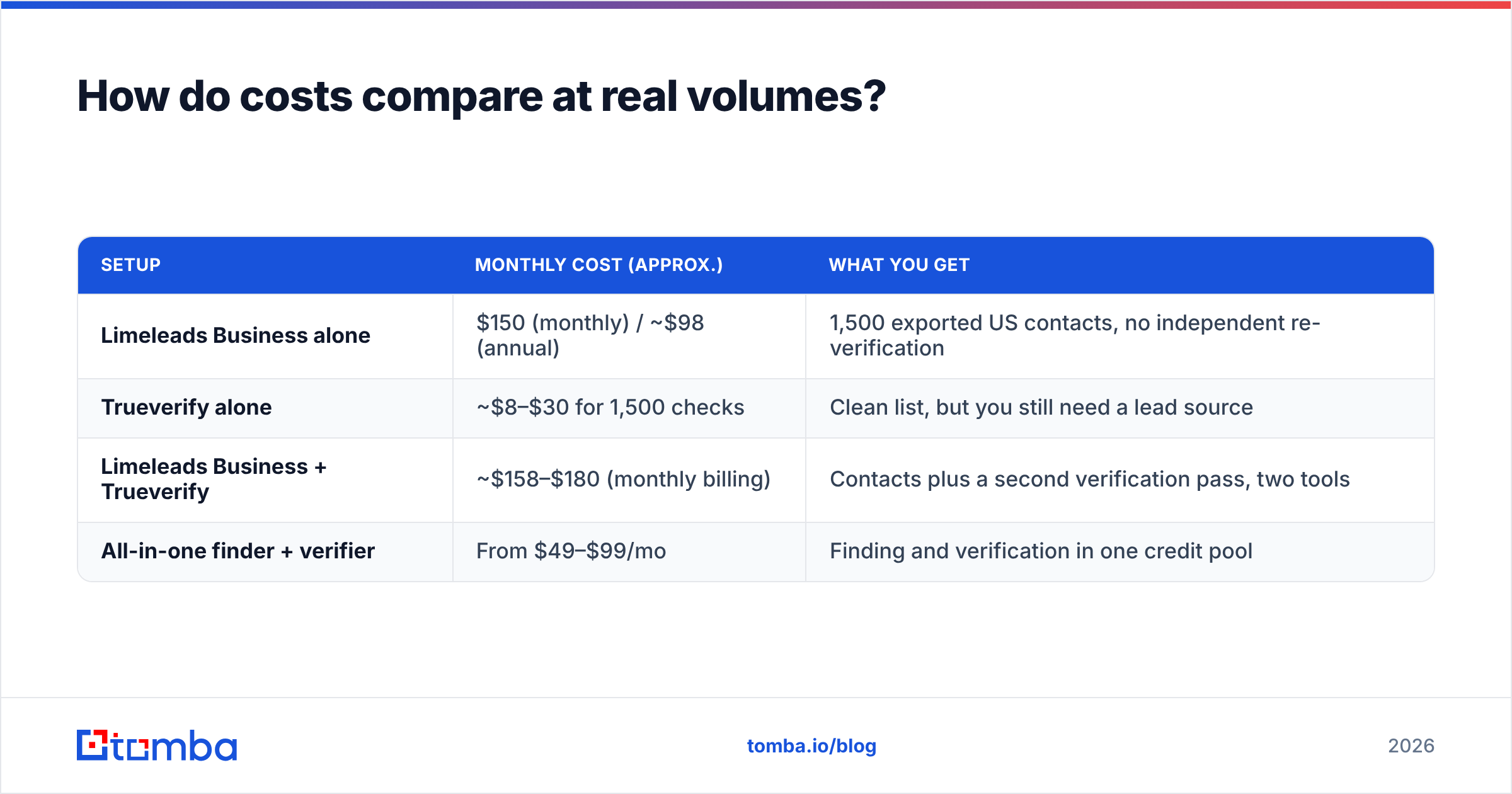
How do costs compare at real volumes?#
Say you send to 1,500 new contacts a month, a typical target for a two-SDR team.
| Setup | Monthly cost (approx.) | What you get |
|---|---|---|
| Limeleads Business alone | $150 (monthly) / ~$98 (annual) | 1,500 exported US contacts, no independent re-verification |
| Trueverify alone | ~$8–$30 for 1,500 checks | Clean list, but you still need a lead source |
| Limeleads Business + Trueverify | ~$158–$180 (monthly billing) | Contacts plus a second verification pass, two tools |
| All-in-one finder + verifier | From $49–$99/mo | Finding and verification in one credit pool |
Trueverify's line is cheap on its own. What really drives cost is how you source the contacts. If Limeleads' US database matches your ICP well and you use your credits every month, the stacked setup is reasonable. If you're paying $150 a month and exporting 600 contacts, you're paying for unused capacity. Rollover helps, but it doesn't fix a plan that's too big for your volume.
What about accuracy?#
Both vendors market accuracy claims of 99% or higher. You should treat those numbers as marketing, not as a benchmark.
- Database accuracy (Limeleads) measures how many exported records were valid when they were last checked. It falls over time as people change jobs.
- Verification accuracy (Trueverify) measures how well the tool classifies an address right now. It's limited by catch-all domains, greylisting, and mail servers that block SMTP probing.
The only number that matters for your outbound is your own bounce rate on your own sends. Test before you commit. Take 300 contacts from your real ICP, push them through whatever setup you're evaluating, send a low-volume campaign from a warmed domain, and measure hard bounces. Neutral review sites such as G2 help you shortlist tools, but they won't tell you how a tool performs on your segment.

Who should choose which?#
Here's the short version by buyer type:
- US-focused agency building lists for clients: Limeleads, with a verification pass before each campaign. The phone numbers and US filters justify the subscription.
- Marketing ops team with a large, ageing database: Trueverify. You don't need new contacts, you need to stop hurting your domain with the ones you have.
- Developer adding verification to a signup form: Trueverify's real-time API is the right shape for that job. Limeleads isn't built for it.
- SDR team outside the US, or selling globally: neither is ideal on its own. Limeleads' coverage will feel thin, and Trueverify can't give you contacts. Look at a finder with global domain coverage.
- Lean team that wants one tool and one bill: an all-in-one finder with built-in verification, so every address is checked at the moment you find it.
Is there a simpler alternative to stacking both?#
Yes. If what you need is "find the right person's email and know it won't bounce," a single platform that combines finding and verification removes the CSV handoff and the double payment.
That's the approach Tomba takes. You can find emails by name and company or run a domain search across a whole company. Every result comes back with a verification status, and you can re-check any list with the email verifier before a campaign goes out. Pricing starts with a free tier (25 searches/month), then Starter at $49/mo, Growth at $99/mo, and Pro at $249/mo. See Tomba pricing for credit details.
To be fair about it: Tomba isn't a filtered US database with direct dials in the same way Limeleads is. If your team specifically needs "every VP of Finance at US SaaS companies with 50–200 employees, with phone numbers," Limeleads has a real advantage in that search experience. And if you already have a lead source you like and only need hygiene, a pure verifier like Trueverify is a lean, low-cost choice.
What's the verdict on Limeleads vs Trueverify?#
- Choose Limeleads when your bottleneck is finding US contacts and you'll consistently use a 500–1,500 credit monthly allowance.
- Choose Trueverify when your bottleneck is list quality and you want to pay per check, not per seat.
- Stack them only if your volume justifies both, and make verification a required step, not an optional one.
- Consolidate into a finder with built-in verification if you'd rather have one tool, one credit pool, and no spreadsheet handoffs.
Whichever you choose, measure bounce rate on your own sends before you scale. That number tells you more than any vendor's accuracy claim.
Ready to find and verify in one step?#
If you're about to pay for a database and a verifier separately, try the combined workflow first. Tomba Email Finder looks up professional email addresses by name, company, or domain, and verifies each result before you export it. That means fewer bounces, no CSV handoff, and one bill starting at $49/mo. Start on the free tier with 25 searches and run it against your real ICP before you commit to either Limeleads or Trueverify.
Related guides#
// get started
Find, verify and enrich your first contacts today
Start on the free plan with 25 searches a month, then scale when your team is ready.
Free plan · No credit card required · GDPR & CCPA
// about the author