Lindy Pricing Reviews: Pros and Cons, Real Costs and Verdict (2026)
Lindy's plans start at $29.99 per seat, but its credits are what set your real bill. Here is what the plans cost, what reviewers praise and complain about, and who should pay for it in 2026.
TL;DR
- In September 2026, Lindy sells three self-serve plans, each priced per seat: Plus at $29.99, Pro at $99.99 and Max at $199.99 per user per month. Enterprise pricing is quoted by sales.
- Each seat adds credits (3,000, 15,000 or 35,000) to one pool that the whole workspace shares. When the pool runs out, top-ups cost $10 per 1,000 credits.
- Reviews are strongly positive on ease of use and range of automation. The most common complaint is that the real monthly bill is higher than the plan price.
- The free plan and the old Pro ($49.99) and Business ($299) tiers ended in early 2026. Many older reviews quote prices that no longer exist.
- Lindy runs agents. It does not supply contact data. For AI-driven outbound, you still need a separate email finder and verifier to feed it.
What is Lindy, and what are you actually paying for?#
Lindy is a no-code platform for building AI agents. Lindy calls them "Lindies." They handle tasks like triaging your inbox, taking meeting notes, drafting follow-ups, qualifying inbound leads, updating your CRM and even making phone calls. You describe the job in plain English or build it in a visual flow editor, connect your apps, and the agent runs on triggers.
Think of it like hiring a virtual assistant who is paid per task. The seat price gets the assistant into the office. The credits pay for each thing they do. A two-line email reply costs very little. A multi-step research task that browses the web, reads a PDF and writes a CRM note costs a lot more.
That second part matters most for your budget. Lindy's own guidance says an everyday task can use anywhere from about 2 to 250 credits, depending on the model, the number of steps and the tools it calls. A credit is worth roughly one cent at top-up prices. So the gap between a cheap task and an expensive one is about 100x.
If you're new to this category, Tomba's glossary entry on sales automation explains where agent platforms fit next to sequencers and CRMs.
How much does Lindy cost in 2026?#
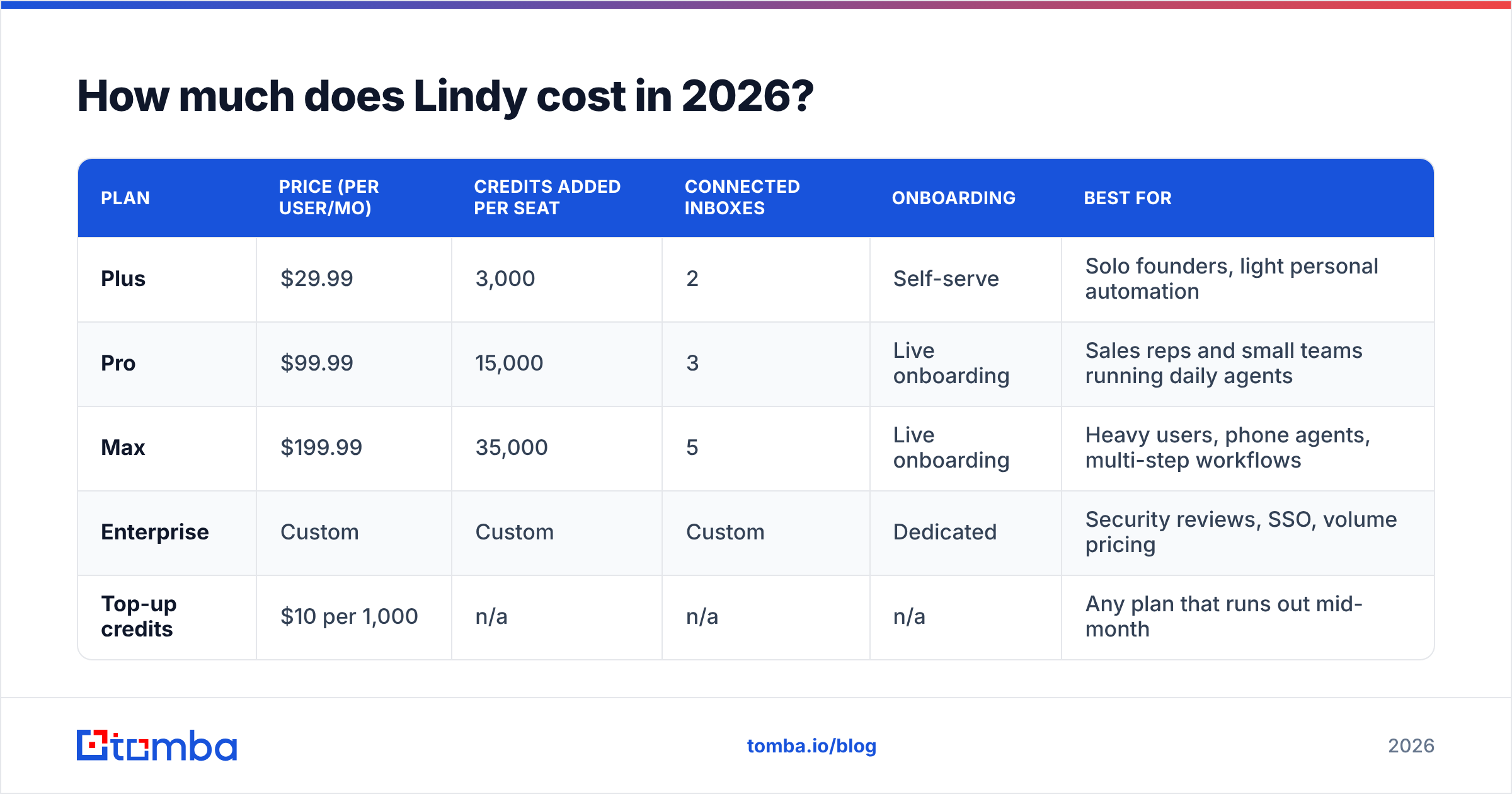
These are the plans listed on Lindy's pricing page in September 2026, confirmed against several third-party breakdowns:
| Plan | Price (per user/mo) | Credits added per seat | Connected inboxes | Onboarding | Best for |
|---|---|---|---|---|---|
| Plus | $29.99 | 3,000 | 2 | Self-serve | Solo founders, light personal automation |
| Pro | $99.99 | 15,000 | 3 | Live onboarding | Sales reps and small teams running daily agents |
| Max | $199.99 | 35,000 | 5 | Live onboarding | Heavy users, phone agents, multi-step workflows |
| Enterprise | Custom | Custom | Custom | Dedicated | Security reviews, SSO, volume pricing |
| Top-up credits | $10 per 1,000 | n/a | n/a | n/a | Any plan that runs out mid-month |
A few details the pricing page doesn't make obvious:
- Credits pool across the workspace. A three-seat Pro team gets 45,000 shared credits. One power user can use up the whole team's allowance.
- There is no free plan anymore. Lindy used to offer 400 free credits a month. That ended when the plans were restructured between January and March 2026. Teammates who join through Slack get a 7-day trial.
- Old prices are still everywhere. Many 2025 reviews mention a $49.99 Pro tier with 5,000 credits and a $299 Business tier with 30,000 credits. Those plans no longer exist, so check the date on any review you read.
- Overage is linear. At $10 per 1,000 credits there is no volume discount on top-ups. If you top up often, upgrading a seat is usually cheaper.
What does Lindy really cost per month?#
The sticker price is the minimum you'll pay. Here are three illustrative scenarios based on Lindy's published credit ranges. Your actual usage will vary.
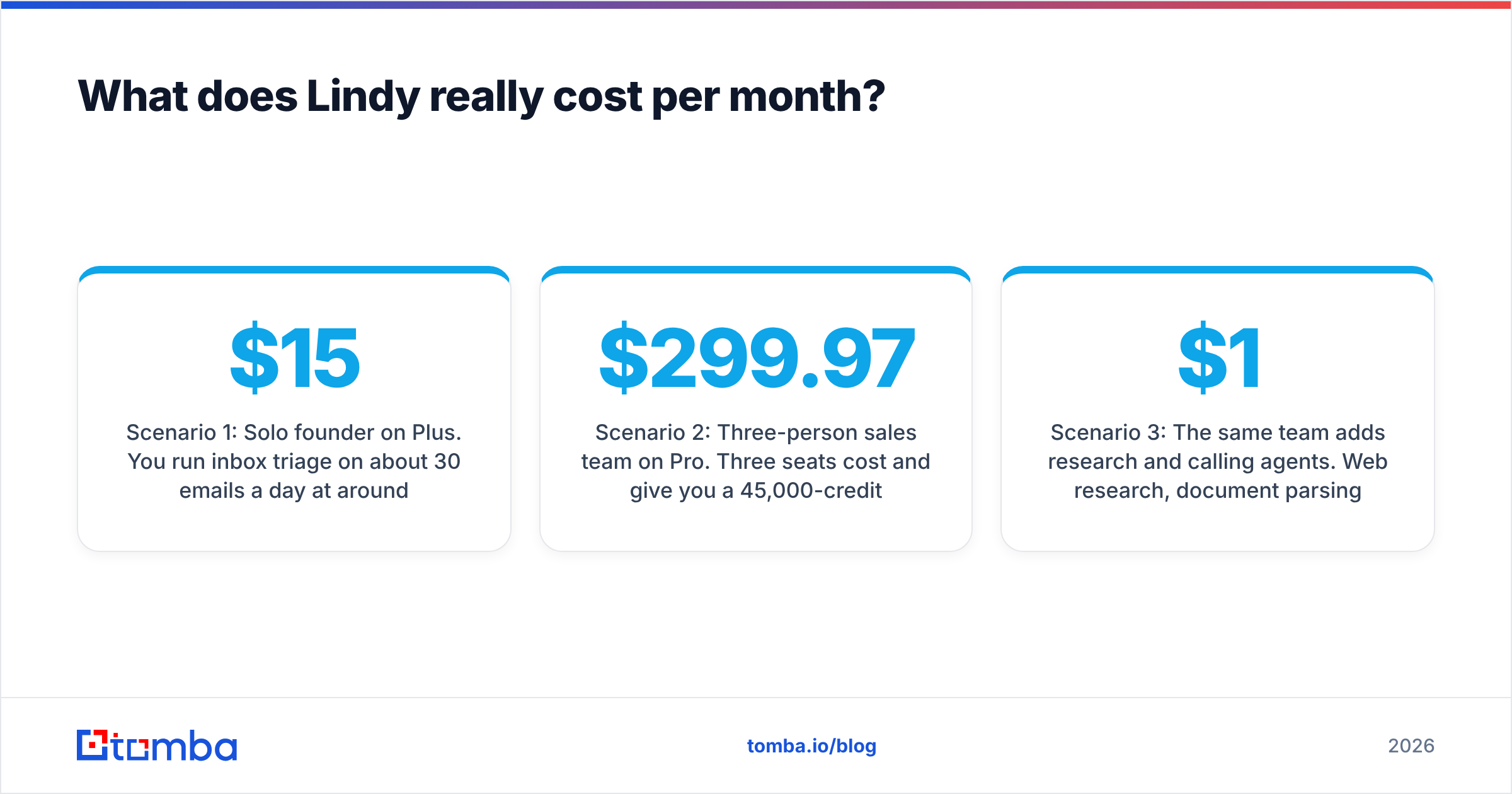
Scenario 1: Solo founder on Plus. You run inbox triage on about 30 emails a day at around 5 credits each, which is roughly 4,500 credits a month. Plus gives you 3,000. You'll buy about 1,500 credits in top-ups ($15), so your real cost is about $45/month, not $29.99.
Scenario 2: Three-person sales team on Pro. Three seats cost $299.97 and give you a 45,000-credit pool. If the team runs 1,500 agent tasks a month at an average of 25 credits (lead qualification, meeting notes, CRM updates), that's 37,500 credits, which fits. Your bill stays at about $300/month.
Scenario 3: The same team adds research and calling agents. Web research, document parsing and phone calls push the average task toward 100 credits. At 1,500 tasks that's 150,000 credits. You're 105,000 over, which is $1,050 in top-ups, for a total of about $1,350/month. Moving everyone to Max (105,000 pooled credits for $599.97) plus 45,000 in top-ups ($450) brings it to about $1,050.

Scenario 3 is where most "expensive" reviews come from. Nobody was misled about the rate. The problem is that it's hard to guess how many credits an agent will use until it's been running for a few weeks.
What do Lindy reviews say? The pros#
In September 2026, Lindy holds a 4.9/5 rating on G2 from around 170 reviews. Reviewers praise these things again and again:
- Fast setup. Non-technical users say they built a working agent in under an hour. Plain-English prompts combined with a visual editor lower the learning curve compared with node-based tools.
- Range of use cases. One platform covers email, meetings, calendar, CRM updates, lead qualification, web research and voice calls. Reviewers like not needing four separate tools.
- Lots of integrations. Lindy connects to Gmail, Outlook, Slack, HubSpot, Salesforce, Notion and thousands of other apps. Most sales stacks are covered.
- Good at inbox and meeting work. Email triage, draft replies and meeting-note agents get the most consistent praise. For many buyers they justify the Plus plan on their own.
- Responsive support. Many reviews mention quick help, and live onboarding on Pro and above shortens time-to-value for teams.
What do Lindy reviews say? The cons#
The same review set has a clear pattern of complaints. G2's own summary counts dozens of mentions of "expensive" and more about credit limits:
- Bills are hard to predict. This is the number-one complaint. Because the plan price and the real monthly cost can differ by a factor of three or more, finance teams struggle to budget for Lindy.
- Opaque credit use. Reviewers say it's hard to know in advance what a workflow will cost. A small prompt change, like adding a web search step or switching to a stronger model, can multiply the credits per run.
- Frequent pricing changes. The 2026 restructuring removed the free tier and changed every plan name. Some long-time users felt the ground shift under them.
- Agents still need checking. Like every LLM-based tool, Lindy agents sometimes misread instructions or hallucinate details. You'll want human review on anything customer-facing, especially outbound email.
- No data of its own. Lindy can write and send a cold email, but it can't tell you who to email. If your contact list is thin or out of date, the agent automates bounces.
Is Lindy better than other AI agent and automation platforms?#
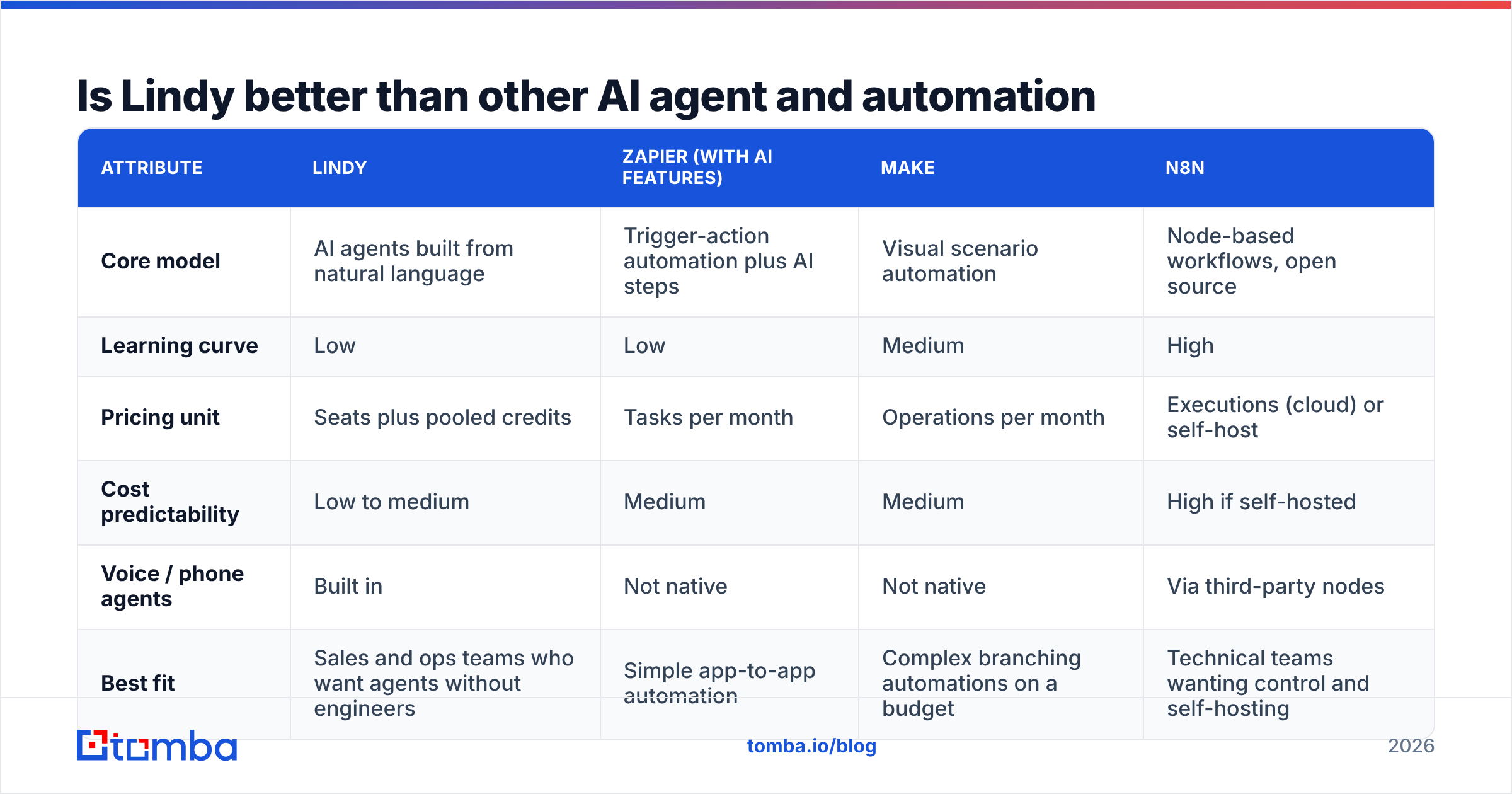
It depends on who builds and maintains your workflows. Here's how Lindy compares with the tools buyers most often weigh it against:
| Attribute | Lindy | Zapier (with AI features) | Make | n8n |
|---|---|---|---|---|
| Core model | AI agents built from natural language | Trigger-action automation plus AI steps | Visual scenario automation | Node-based workflows, open source |
| Learning curve | Low | Low | Medium | High |
| Pricing unit | Seats plus pooled credits | Tasks per month | Operations per month | Executions (cloud) or self-host |
| Cost predictability | Low to medium | Medium | Medium | High if self-hosted |
| Voice / phone agents | Built in | Not native | Not native | Via third-party nodes |
| Best fit | Sales and ops teams who want agents without engineers | Simple app-to-app automation | Complex branching automations on a budget | Technical teams wanting control and self-hosting |
In short, Lindy is the most "hire an assistant"-like option. Zapier and Make are more predictable for deterministic workflows, and n8n is cheapest at scale if you have engineers. If your automations mostly do "when X happens, do Y" with no reasoning involved, you're paying an AI premium you don't need.
Who should pay for Lindy, and who shouldn't?#
Lindy is worth it if:
- You live in your inbox and calendar. Triage, drafts and meeting notes alone can save a founder or AE several hours a week. At $29.99 to $45 a month, that pays for itself quickly.
- You need agents but have no engineers. Lindy's biggest strength is that ops and sales people can build and change agents themselves.
- Your volume is predictable. Teams with steady task counts can size their seats correctly and rarely top up.
- You want voice agents without a separate vendor. Built-in phone agents save you from adding another tool.
Skip it or pilot carefully if:
- Finance needs a fixed number. If "it depends on usage" won't get through procurement, a task-based tool or a self-hosted option will be easier.
- Your workflows are simple rules. You don't need an LLM to copy a form submission into a spreadsheet.
- You plan heavy research or calling agents at scale. Model the credits before you commit, because this is where Scenario 3 happens.
- Your real bottleneck is lead data. An AI SDR agent is only as good as the contact list you give it.

How do you keep Lindy costs under control?#
If you go ahead, these habits keep the credit pool in check:
- Start one tier lower than you think you need. Watch real usage for two to three weeks before adding seats or upgrading.
- Use cheaper models for routine steps. Save premium models for reasoning-heavy work. Classification and short replies rarely need the most expensive option.
- Remove unnecessary tool calls. Every web search, scrape or document read adds credits. Cache results or pass data in directly when you can.
- Set trigger filters. Don't let an agent fire on every incoming email. Filter by sender, label or keyword first.
- Feed agents clean data. An outbound agent that researches and writes to invalid addresses wastes credits twice: once on the research and once on the bounce. Run lists through an email verifier before they reach the agent.
That last point is the easiest to overlook. For every contact you remove before the agent runs, you save both the credits and the damage to your sender reputation.
Where does Tomba fit alongside Lindy?#
Tomba doesn't compete with Lindy, and the two work well together. Lindy is the worker, and Tomba supplies the contact data it works with. A typical AI outbound setup looks like this:
- Find the people. Use an email finder or domain search to build a list of decision-makers at your target accounts.
- Verify and enrich. Confirm deliverability and add role, company and phone data with data enrichment.
- Hand off to the agent. Lindy researches each account, drafts a personalised email, logs the activity to your CRM and schedules follow-ups.
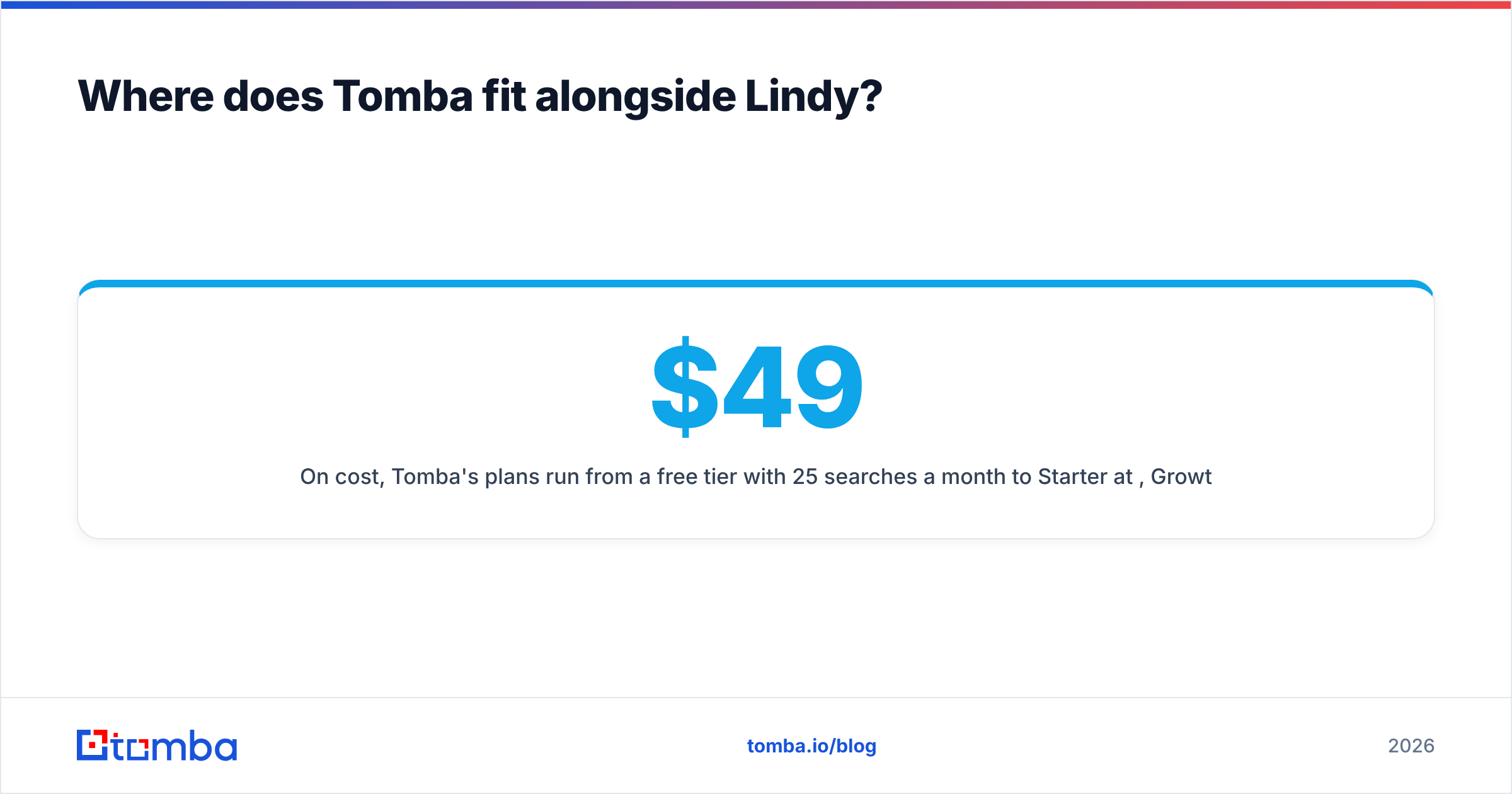
On cost, Tomba's plans run from a free tier with 25 searches a month to Starter at $49/mo, Growth at $99/mo and Pro at $249/mo. The full breakdown is on Tomba pricing. Unlike agent credits, a search costs the same every time, so this part of your stack is easy to budget.
The verdict: is Lindy worth the price in 2026?#
For inbox, meeting and lead-qualification work, yes. Lindy is one of the easiest ways to put real AI agents in front of a sales or ops team without writing code, and its G2 scores reflect that. The Plus plan is a sensible entry point for individuals, and Pro is the right starting tier for most teams.
The catch is predictability. The seat price is only the minimum. Credits set your real bill, and heavy research or calling agents can multiply it several times over. Pilot for a month, track credits per workflow, and only then scale seats.
Also remember what Lindy doesn't do: it doesn't know who your buyers are or whether their inboxes exist. Before you pay for an agent to write outbound, give it contacts worth writing to. Tomba Email Finder finds verified professional email addresses by name, domain or company, and its free tier lets you test data quality before your Lindy agents send anything.
Related guides#
// get started
Find, verify and enrich your first contacts today
Start on the free plan with 25 searches a month, then scale when your team is ready.
Free plan · No credit card required · GDPR & CCPA
// about the author