Lindy vs Zapier: AI Agents or Rule-Based Automation for Sales?
Lindy runs AI agents that make decisions. Zapier runs predictable workflows across 8,000+ apps. Here's how they compare on pricing, reliability, and real sales use cases, and which one fits your team.
TL;DR
- Lindy is an AI-agent platform. You describe a job in plain English ("triage my inbox, qualify inbound leads, book meetings") and an agent reasons its way through it. It works best for messy, judgment-heavy tasks.
- Zapier is a deterministic workflow engine with the largest integration library on the market (8,000+ apps). It has also added its own AI Agents product, which is billed separately. It works best for high-volume, rule-based automation that has to behave the same way every time.
- Pricing models differ: Lindy charges per seat and gives each seat a pool of credits. Zapier charges by task volume, so its cost grows with how often your workflows run.
- For most B2B sales teams the answer is both: Zapier moves data reliably and Lindy handles the steps that need judgment. Either way, the results depend on clean, verified contact data going in.
What is the real difference between Lindy and Zapier?#
Think of Zapier as a conveyor belt and Lindy as a junior assistant.
A conveyor belt does exactly what it was built to do, thousands of times a day, and never improvises. Zapier works the same way. A trigger fires ("new form submission in HubSpot"), then a fixed sequence of actions runs ("add to Google Sheet, post to Slack, create a deal"). If the input is unexpected, the Zap fails or does the wrong thing. It will not adapt.
An assistant reads the situation and decides. Lindy's agents use a large language model to interpret incoming information, such as an email, a meeting transcript, or a lead record, and pick what to do next. You can tell a Lindy agent, "If the reply sounds like a pricing objection, draft a response using our objection-handling doc. If it's an unsubscribe request, remove them from the sequence," and it handles the branching without you mapping every path.
That difference drives everything else in this comparison: pricing, reliability, setup time, and which sales workflows each tool fits.
Both products have been moving toward each other. Zapier now ships AI steps, Copilot, and a standalone Zapier Agents product. Lindy connects to thousands of apps and supports trigger-based workflows. The defaults are still different, though. Zapier starts from determinism and adds AI on top. Lindy starts from AI and adds structure around it.
How do Lindy and Zapier compare feature by feature?#
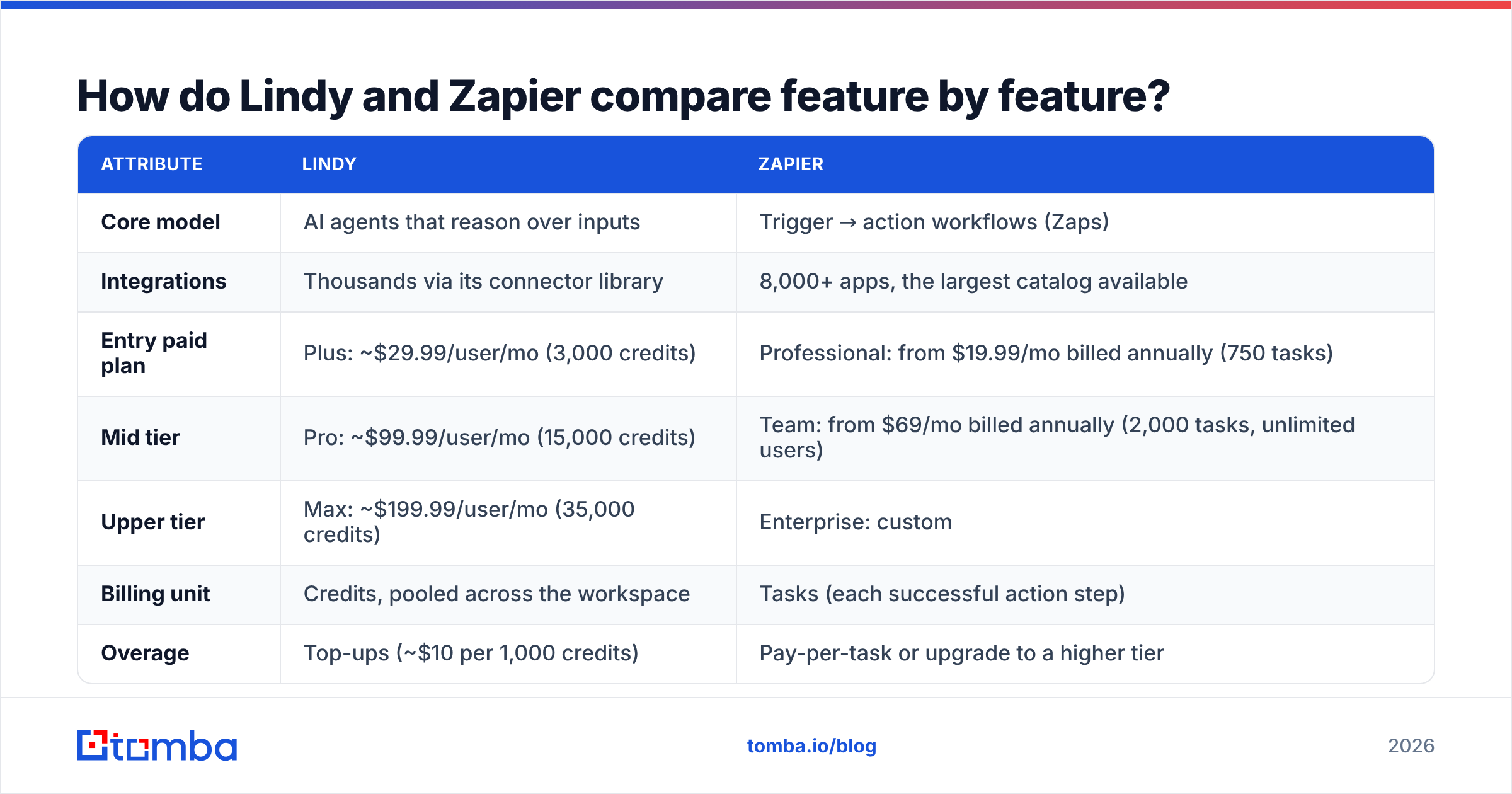
The table below reflects each vendor's public positioning and pricing at the time of writing (September 2026). Pricing in this category changes often, so confirm on Lindy's site and Zapier's pricing page before you buy.
| Attribute | Lindy | Zapier |
|---|---|---|
| Core model | AI agents that reason over inputs | Trigger → action workflows (Zaps) |
| Integrations | Thousands via its connector library | 8,000+ apps, the largest catalog available |
| Entry paid plan | Plus: ~$29.99/user/mo (3,000 credits) | Professional: from $19.99/mo billed annually (750 tasks) |
| Mid tier | Pro: ~$99.99/user/mo (15,000 credits) | Team: from $69/mo billed annually (2,000 tasks, unlimited users) |
| Upper tier | Max: ~$199.99/user/mo (35,000 credits) | Enterprise: custom |
| Billing unit | Credits, pooled across the workspace | Tasks (each successful action step) |
| Overage | Top-ups (~$10 per 1,000 credits) | Pay-per-task or upgrade to a higher tier |
| AI agents | Native, the core product | Zapier Agents, billed separately from Zaps |
| Predictability | Variable, since LLM output can differ run to run | High, with the same input producing the same output |
| Setup style | Natural-language instructions plus a visual flow builder | Visual step builder plus Copilot |
| Best for | Inbox triage, lead qualification, meeting follow-ups, research | Data sync, CRM hygiene, notifications, high-volume routing |
The pricing models reward different behavior. Zapier's task-based billing punishes chatty workflows: a 10-step Zap that runs 500 times a month uses 5,000 tasks. Lindy's credits track how much "thinking" an agent does, so a long email summarization costs more than a quick classification. If you model your costs on the wrong unit, you'll be surprised by the first invoice.
Which one should you pick for common sales workflows?#
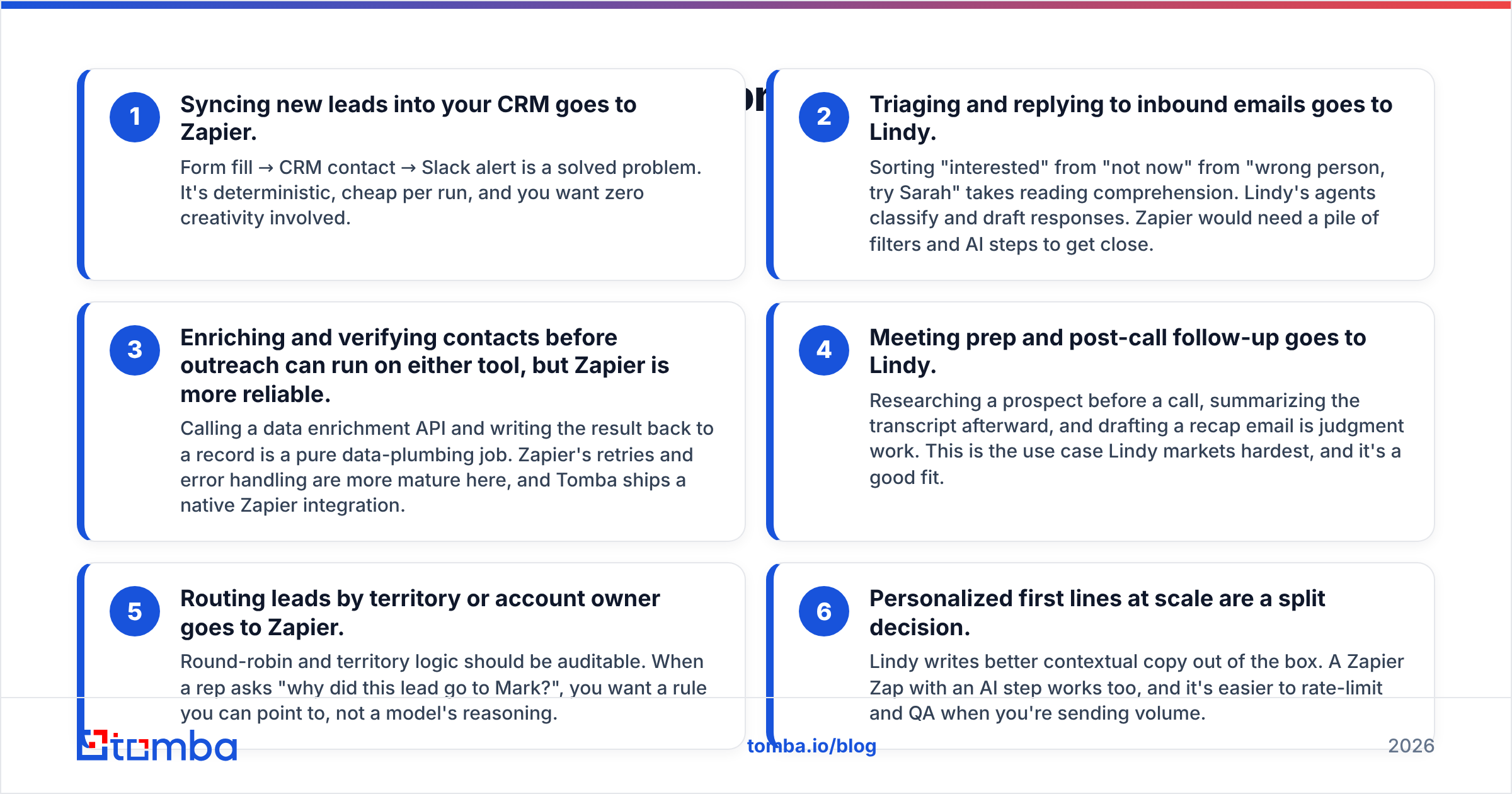
Here is where each tool fits, workflow by workflow:
- Syncing new leads into your CRM goes to Zapier. Form fill → CRM contact → Slack alert is a solved problem. It's deterministic, cheap per run, and you want zero creativity involved.
- Triaging and replying to inbound emails goes to Lindy. Sorting "interested" from "not now" from "wrong person, try Sarah" takes reading comprehension. Lindy's agents classify and draft responses. Zapier would need a pile of filters and AI steps to get close.
- Enriching and verifying contacts before outreach can run on either tool, but Zapier is more reliable. Calling a data enrichment API and writing the result back to a record is a pure data-plumbing job. Zapier's retries and error handling are more mature here, and Tomba ships a native Zapier integration.
- Meeting prep and post-call follow-up goes to Lindy. Researching a prospect before a call, summarizing the transcript afterward, and drafting a recap email is judgment work. This is the use case Lindy markets hardest, and it's a good fit.
- Routing leads by territory or account owner goes to Zapier. Round-robin and territory logic should be auditable. When a rep asks "why did this lead go to Mark?", you want a rule you can point to, not a model's reasoning.
- Personalized first lines at scale are a split decision. Lindy writes better contextual copy out of the box. A Zapier Zap with an AI step works too, and it's easier to rate-limit and QA when you're sending volume.
The pattern: anything that moves data goes to Zapier, and anything that needs interpretation goes to Lindy. Mixing those up is the most common mistake teams make with either tool.
Is Lindy better than Zapier for AI sales agents?#
For agent-first workflows, yes, mostly. Lindy was built around agents from the start. Its agents keep memory across a thread, can be handed a knowledge base (your pricing doc, ICP definition, objection list), and can hand off to other agents. Setting up "an SDR assistant that qualifies inbound leads and books meetings" takes an afternoon of prompt tuning, not a week of building branching logic.
Zapier Agents has closed some of that gap, and it has one big structural advantage: it sits on top of the largest integration catalog in automation. If your agent needs to touch a niche tool, such as a regional e-signature app or an industry-specific ERP, Zapier is more likely to have a pre-built connector. Zapier Agents is priced and metered separately from Zaps, though, so budget for two line items if you use both.
Where Lindy's approach costs you:
- Non-determinism. The same inbound email can get slightly different handling on different days. For drafting that's fine. For anything touching billing, contracts, or deal stages, put a human approval step in the loop.
- Credit burn is hard to forecast. One agent that reads long email threads can use far more credits than you expect. Start on a lower tier and watch real usage for two weeks before committing.
- Debugging is fuzzier. When a Zap fails, you get a clear error on a specific step. When an agent makes a bad call, you're reading its reasoning trace to work out why.
Independent reviews on G2 show the same split: Lindy users praise how quickly they can automate judgment-heavy tasks, and Zapier users praise reliability and breadth.
Is Zapier cheaper than Lindy?#
At low volume, usually yes. At high volume with complex logic, it depends.
Two teams, worked through on each pricing model:
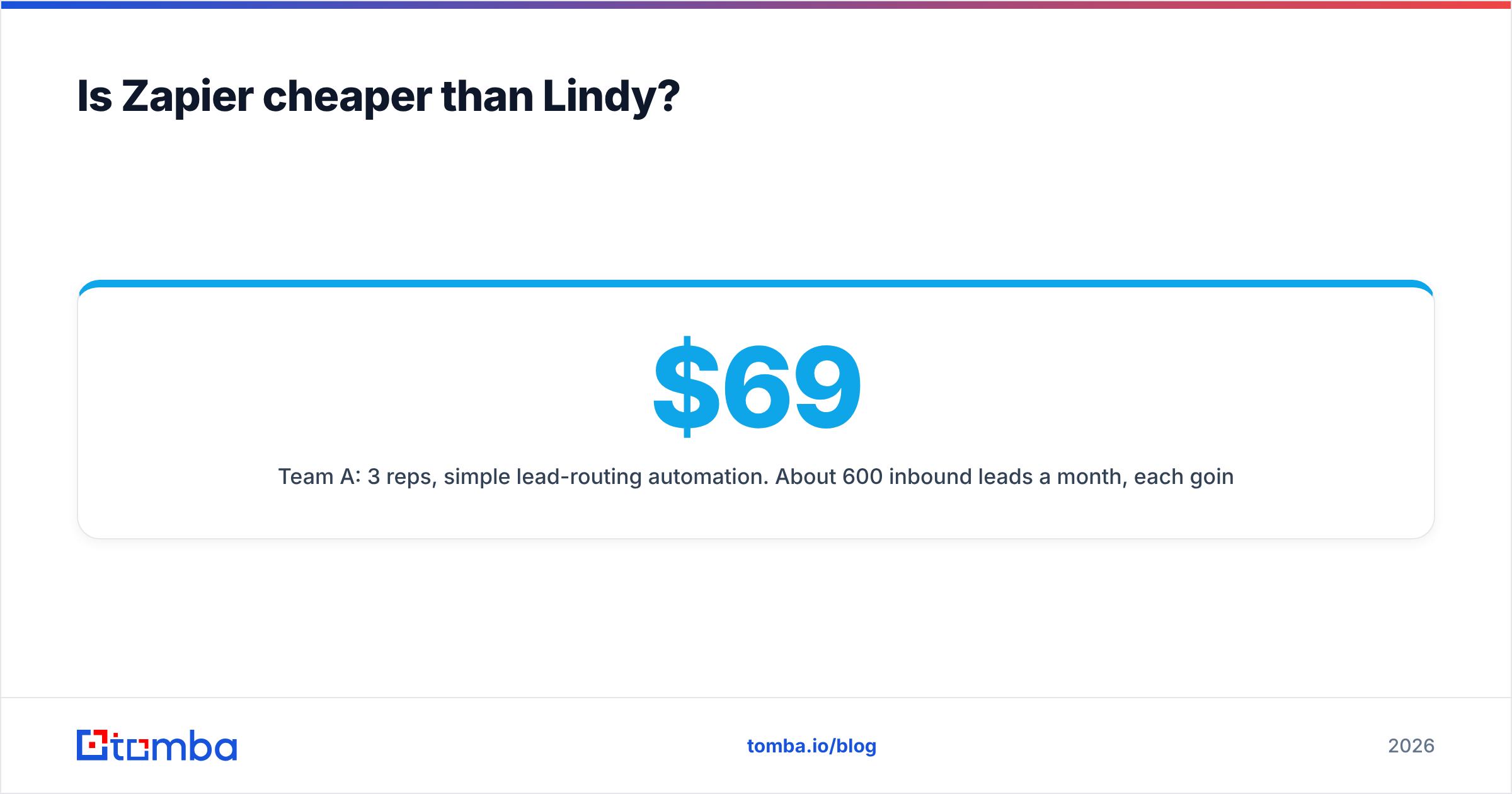
Team A: 3 reps, simple lead-routing automation. About 600 inbound leads a month, each going through a 4-step Zap (create contact, enrich, assign owner, Slack alert). That's roughly 2,400 tasks. Zapier Team (from $69/mo annual, 2,000 tasks) plus a small overage, or the next task tier, covers it for well under $150/mo. The same work on Lindy's Plus tier at ~$29.99/user for 3 users is ~$90/mo, but you're paying for agent intelligence you don't need. Zapier is the better fit, and it's more predictable.
Team B: 3 reps, inbox triage plus follow-up drafting. Around 1,500 emails a month need classification and about 400 need drafted replies. On Zapier, each email is a multi-step Zap with AI steps, plus you're maintaining a large filter tree. On Lindy, one agent handles it, and 3 Plus seats (9,000 pooled credits) or a Pro seat likely covers it. Lindy is cheaper in total cost of ownership once you count the hours spent maintaining Zapier logic.
The hidden cost in both cases is bad input data. Every bounced email, wrong contact, or duplicate record still uses a Zapier task or a Lindy credit. If your agent spends credits drafting follow-ups to addresses that were never valid, you're paying twice: once for the automation and again in damage to your sender reputation.
How hard is each tool to set up and maintain?#
Zapier has the gentler start. Pick a trigger app, pick an action app, map fields, and turn it on. Copilot can draft a Zap from a sentence. Maintenance gets harder as you grow: teams with 80+ Zaps often end up with undocumented logic that only one person understands. Zapier's folders, shared connections, and version history on Team and Enterprise tiers help, but governance is your job.
Lindy feels easier on day one because you're writing instructions, not mapping fields. The work shifts to prompt tuning. Your first version of "qualify this lead" will be too loose or too strict, and you'll iterate. Plan for a week of watching agent decisions and adjusting instructions before you trust it unsupervised.
A practical setup rule for either tool: document the data contract. Write down, in one place, which fields each automation reads and writes. When your CRM schema changes, both tools break silently unless someone knows what depends on what.
Can you use Lindy and Zapier together?#
Yes, and many RevOps teams do. A common architecture:
- Zapier as the backbone: captures leads from forms, ads, and webinars. It calls an enrichment API, runs the result through an email verifier, dedupes, and writes clean records to the CRM.
- Lindy as the brain: watches the inbox and CRM for events that need judgment, like replies, meeting bookings, and stalled deals, and acts on them: drafts replies, preps briefs, nudges reps.
- Humans as the final gate: reps approve anything customer-facing before it sends, at least until the agent has earned trust.
This split also keeps costs sane. Zapier handles the high-volume, low-intelligence work at a low per-task cost. Lindy's credits go only to the steps that need reasoning.
If you're building on revenue operations best practices, this also gives you auditability where it matters (routing, data writes) and flexibility where it helps (conversations).

What are the pros and cons of each?#
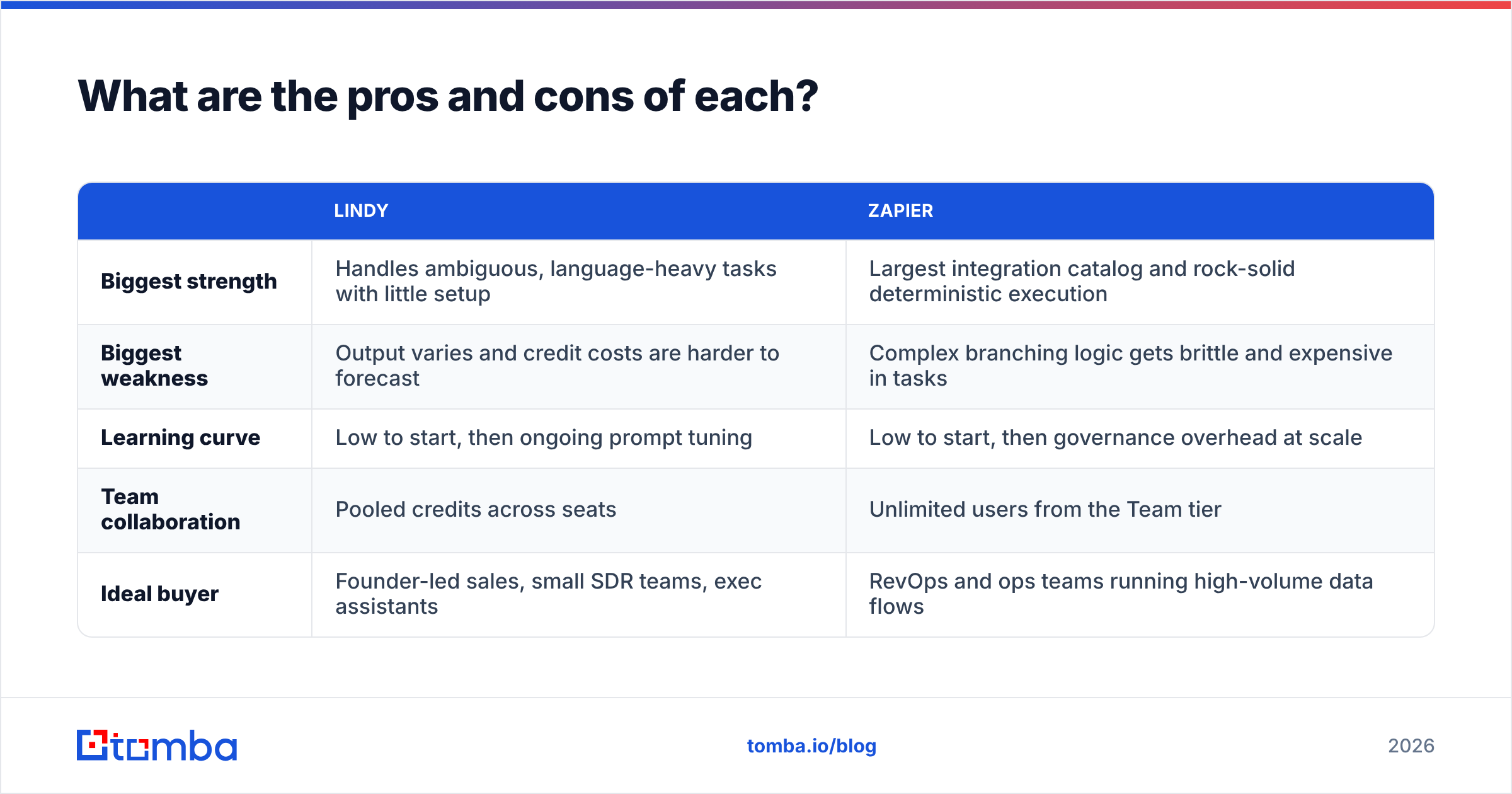
| Lindy | Zapier | |
|---|---|---|
| Biggest strength | Handles ambiguous, language-heavy tasks with little setup | Largest integration catalog and rock-solid deterministic execution |
| Biggest weakness | Output varies and credit costs are harder to forecast | Complex branching logic gets brittle and expensive in tasks |
| Learning curve | Low to start, then ongoing prompt tuning | Low to start, then governance overhead at scale |
| Team collaboration | Pooled credits across seats | Unlimited users from the Team tier |
| Ideal buyer | Founder-led sales, small SDR teams, exec assistants | RevOps and ops teams running high-volume data flows |
So, Lindy vs Zapier: which should you choose?#
Pick Zapier if your main problem is moving data between tools reliably: lead capture, CRM sync, enrichment, routing, alerts. It's the safer default for ops-heavy teams and the only realistic choice if you depend on niche integrations.
Pick Lindy if your main problem is that reps spend hours on work that needs reading and judgment: inbox triage, meeting prep, follow-up drafting, first-pass lead qualification. It automates what Zapier can't easily express as rules.
Pick both if you have more than a handful of reps and a real RevOps function. Use Zapier for plumbing and Lindy for thinking.
Whichever you choose, the tool is only as good as the contact data you feed it. An AI agent that drafts a strong follow-up to an invalid address is still producing a bounce. A Zap that creates a CRM record with the wrong email is still creating bad data at machine speed.
Put clean contact data at the start of every automation#
Before you wire up Lindy agents or Zapier workflows, make sure the emails going in are real. Tomba Email Finder finds professional email addresses from a name and company domain. It connects to Zapier natively and to any agent platform through the Tomba API, so every lead that enters your automation arrives with a verified, deliverable address. You can start on the free tier (25 searches a month) and move to Starter at $49/mo once your workflows are running at volume.
Related guides#
// get started
Find, verify and enrich your first contacts today
Start on the free plan with 25 searches a month, then scale when your team is ready.
Free plan · No credit card required · GDPR & CCPA
// about the author