LionDesk Pricing, Reviews, Pros and Cons: The 2026 Verdict
LionDesk was cheap, text-friendly, and loved by solo agents. Then Lone Wolf wound it down. Here's what it cost, what reviewers said, and where to move your contacts in 2026.
TL;DR
- LionDesk was a low-cost real estate CRM. Its last listed plans were Starter at $30/mo, Pro+ at $49/mo and Elite at $99/mo, and each plan came with a 14-day free trial.
- Reviews were mostly positive. Capterra shows about 4.1/5 from roughly 95 reviews. Agents liked the drip campaigns, texting and price, and complained most about support (3.6/5) and glitchy syncing.
- The big caveat: Lone Wolf Technologies announced in May 2025 that it would wind LionDesk down. It stayed operational through September 2025, and users were moved toward Lone Wolf's newer CRM, Relationships.
- In 2026 the useful question is where your contacts go next and whether that data is still clean. LionDesk itself is no longer a buying decision.
- Before you import an old LionDesk export anywhere, verify the emails. Lists that sat unused for years bounce hard, and bounces damage the reputation of your new sending domain.
What is LionDesk?#
LionDesk was a CRM built for real estate agents and small teams. Most agents knew it as the cheap CRM that could text. It combined contact management, email and SMS drip campaigns, video texts and emails, a lead-distribution engine and basic transaction tracking, at a price well below Follow Up Boss or kvCORE.
Lone Wolf Technologies bought LionDesk in 2021 and folded it into its brokerage software suite. In May 2025 Lone Wolf said it would wind down LionDesk. The platform stayed live through September 2025 so customers had time to migrate. The recommended destination was Lone Wolf Relationships, a simpler contact manager in the Lone Wolf Foundation bundle.
Many review and pricing pages still don't mention the shutdown, which is why this page exists. If you've arrived from one of them, the plan grid you just read is historical.
How much did LionDesk cost?#
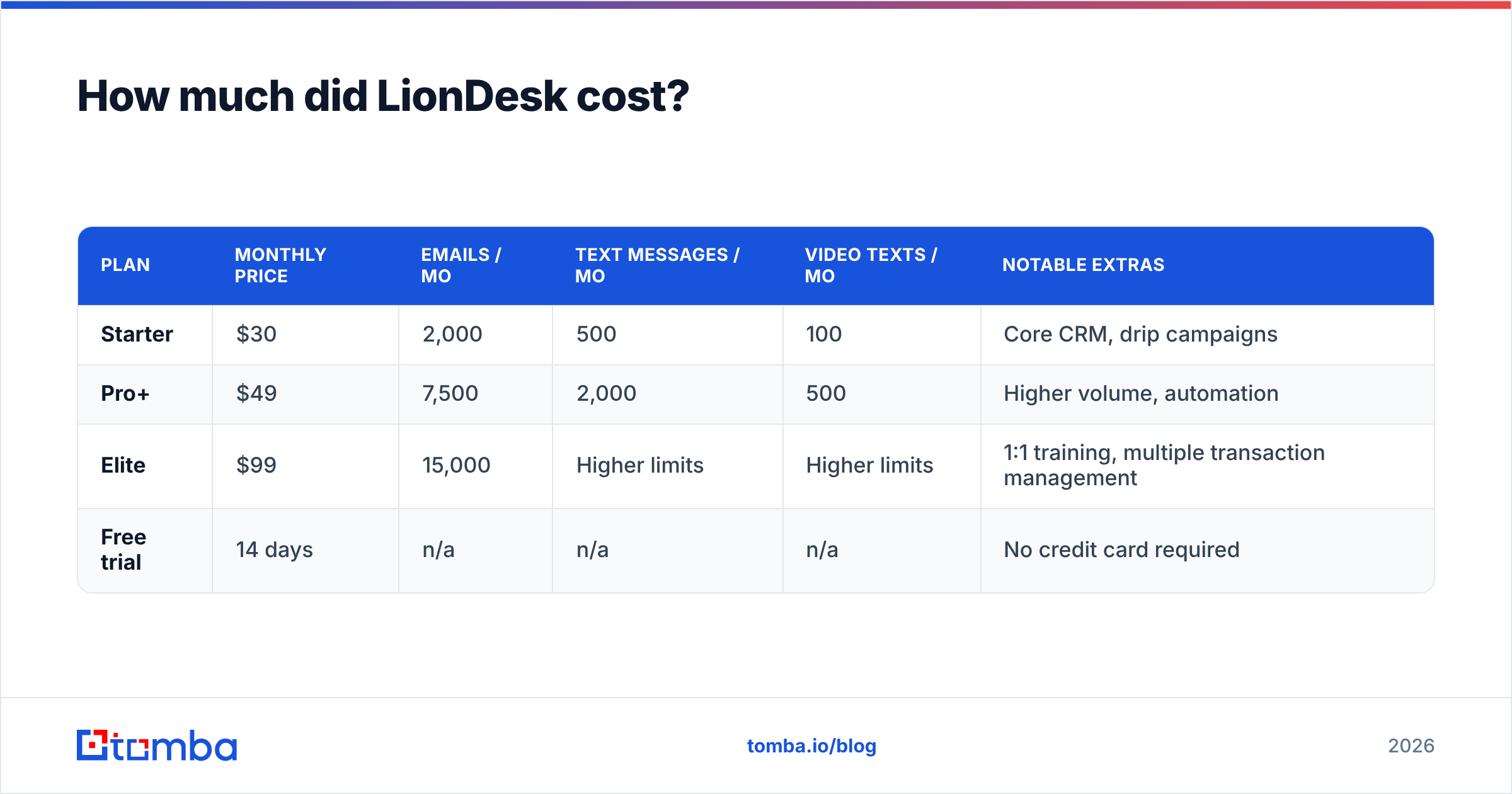
LionDesk used a three-tier model priced for solo agents, with most limits based on message volume rather than seats. These are the plans as last listed on third-party directories such as Capterra:
| Plan | Monthly price | Emails / mo | Text messages / mo | Video texts / mo | Notable extras |
|---|---|---|---|---|---|
| Starter | $30 | 2,000 | 500 | 100 | Core CRM, drip campaigns |
| Pro+ | $49 | 7,500 | 2,000 | 500 | Higher volume, automation |
| Elite | $99 | 15,000 | Higher limits | Higher limits | 1:1 training, multiple transaction management |
| Free trial | 14 days | n/a | n/a | n/a | No credit card required |
A few pricing points that the headline numbers hid:
- Message caps set the real price. Agents who ran heavy SMS drips outgrew Starter's 500 texts within weeks. For most active users, $49 was the effective entry price.
- Features were split across tiers. Training and multi-transaction tracking only came with Elite, so a small team that needed both paid $99 per account.
- Integrations cost extra indirectly. LionDesk connected to IDX sites, Zillow and lead portals. Many of those connections needed a paid tool on the other side or a Zapier plan to work.
- Migration is the hidden cost now. The subscription is gone, but moving your data still takes hours. Contacts have to be cleaned, tags remapped and drips rebuilt somewhere else.
For comparison, SelectHub lists Lone Wolf Relationships from about $25/mo. That's slightly below LionDesk's old Starter price. Confirm current pricing with Lone Wolf, though, because Relationships is often sold inside a bundle.
What did reviewers say about LionDesk?#
Reviewers liked LionDesk more than its support team. On Capterra, LionDesk has an overall rating of around 4.1 out of 5 from about 95 verified reviews, and roughly 75% of them are positive. The category scores show where the problems were: ease of use 3.9 and customer service 3.6.
The feedback falls into clear themes.
What agents praised
- Drip campaigns that were easy to build. Solo agents without an ops person could set up a 12-touch nurture sequence in an afternoon.
- Texting built in. Two-way SMS and video texts came standard at a time when rival CRMs charged extra for them.
- Price. Many reviews compared it directly with competitors that cost two or three times as much.
- Lead routing. Small teams used the lead-distribution rules to spread portal leads across agents without a separate tool.
What agents complained about
- Support quality. Several reviewers described support as slow or poorly informed about the product. One said they received different phone numbers for account help.
- Sync reliability. Contacts and leads sometimes failed to sync from integrations, which is a serious problem in a CRM.
- An inconsistent mobile app and dialer. Teams described mobile features and the dialer as harder to learn and less reliable than the desktop app.
- Feature sprawl. Transaction management, video, AI assistant and dialer all sat in one interface. Some users found the result cluttered rather than powerful.

What were LionDesk's pros and cons?#
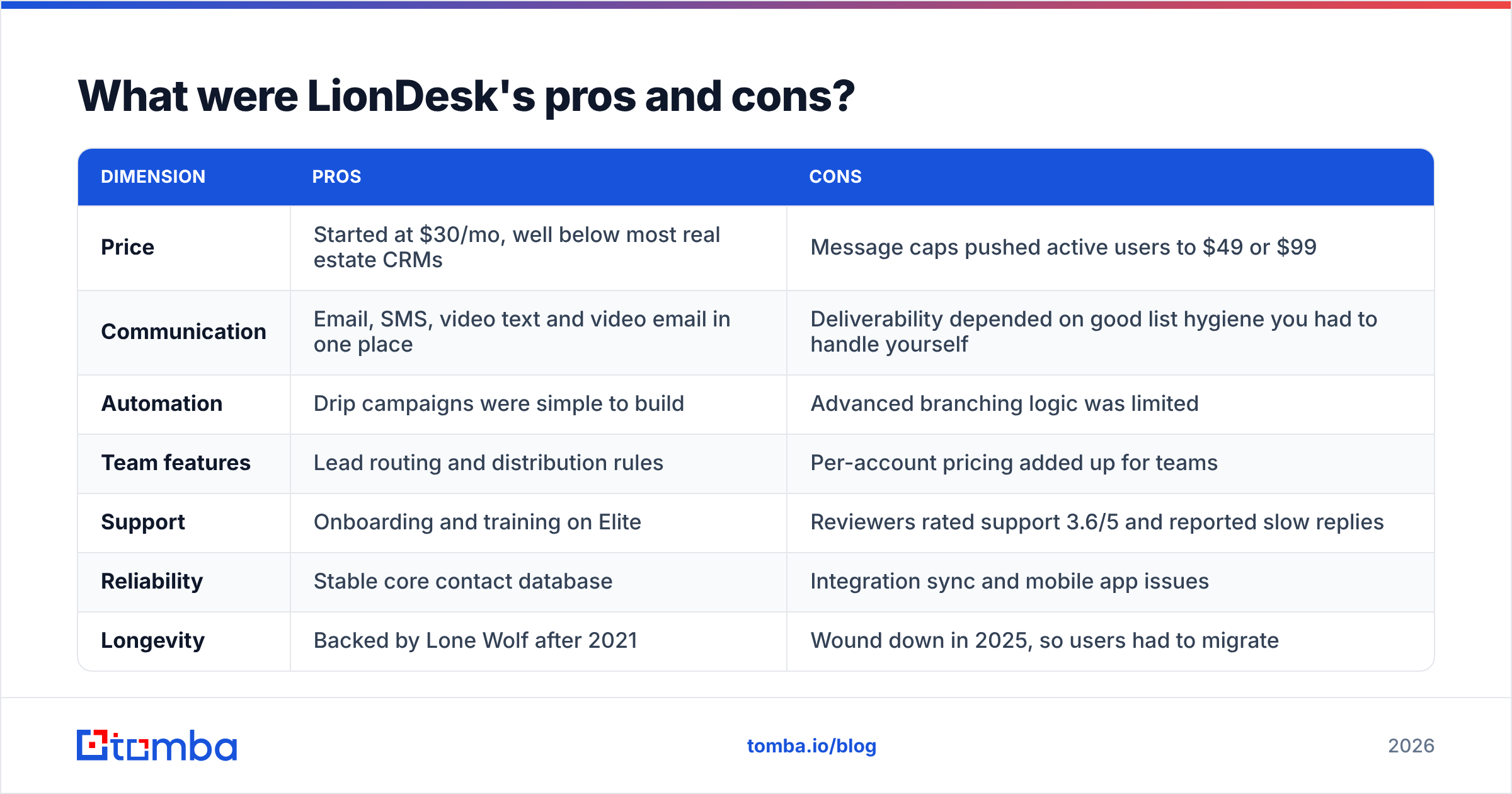
The table below summarizes the review data and the pricing model. Use it to decide what to look for in a replacement, since you can no longer buy LionDesk itself.
| Dimension | Pros | Cons |
|---|---|---|
| Price | Started at $30/mo, well below most real estate CRMs | Message caps pushed active users to $49 or $99 |
| Communication | Email, SMS, video text and video email in one place | Deliverability depended on good list hygiene you had to handle yourself |
| Automation | Drip campaigns were simple to build | Advanced branching logic was limited |
| Team features | Lead routing and distribution rules | Per-account pricing added up for teams |
| Support | Onboarding and training on Elite | Reviewers rated support 3.6/5 and reported slow replies |
| Reliability | Stable core contact database | Integration sync and mobile app issues |
| Longevity | Backed by Lone Wolf after 2021 | Wound down in 2025, so users had to migrate |
The last row matters most. Any CRM can be acquired and retired. What protects you is data you own and can export cleanly, including emails, tags, notes and activity history. It also helps to keep that data fresh enough that it works in the next tool.
Is LionDesk still worth it in 2026?#
No, because you can't sign up for it anymore. LionDesk was wound down and kept running only through September 2025. If a sales rep or reseller offers you "LionDesk" today, ask exactly which product you're getting, because it is almost certainly Lone Wolf Relationships or another Lone Wolf product.
The better question is whether moving to Relationships makes sense, or whether you should use the forced migration to move somewhere else.
- Stay in the Lone Wolf ecosystem if your brokerage already runs transactions, back office or forms on Lone Wolf. Relationships is built for that setup, and the migration tooling moves your contacts in directly.
- Move elsewhere if you're an independent agent or small team, you want stronger automation, or you never used the rest of the Lone Wolf suite. You're rebuilding your drips either way, so pick the CRM you'd choose starting from scratch.
What are the best LionDesk alternatives?#
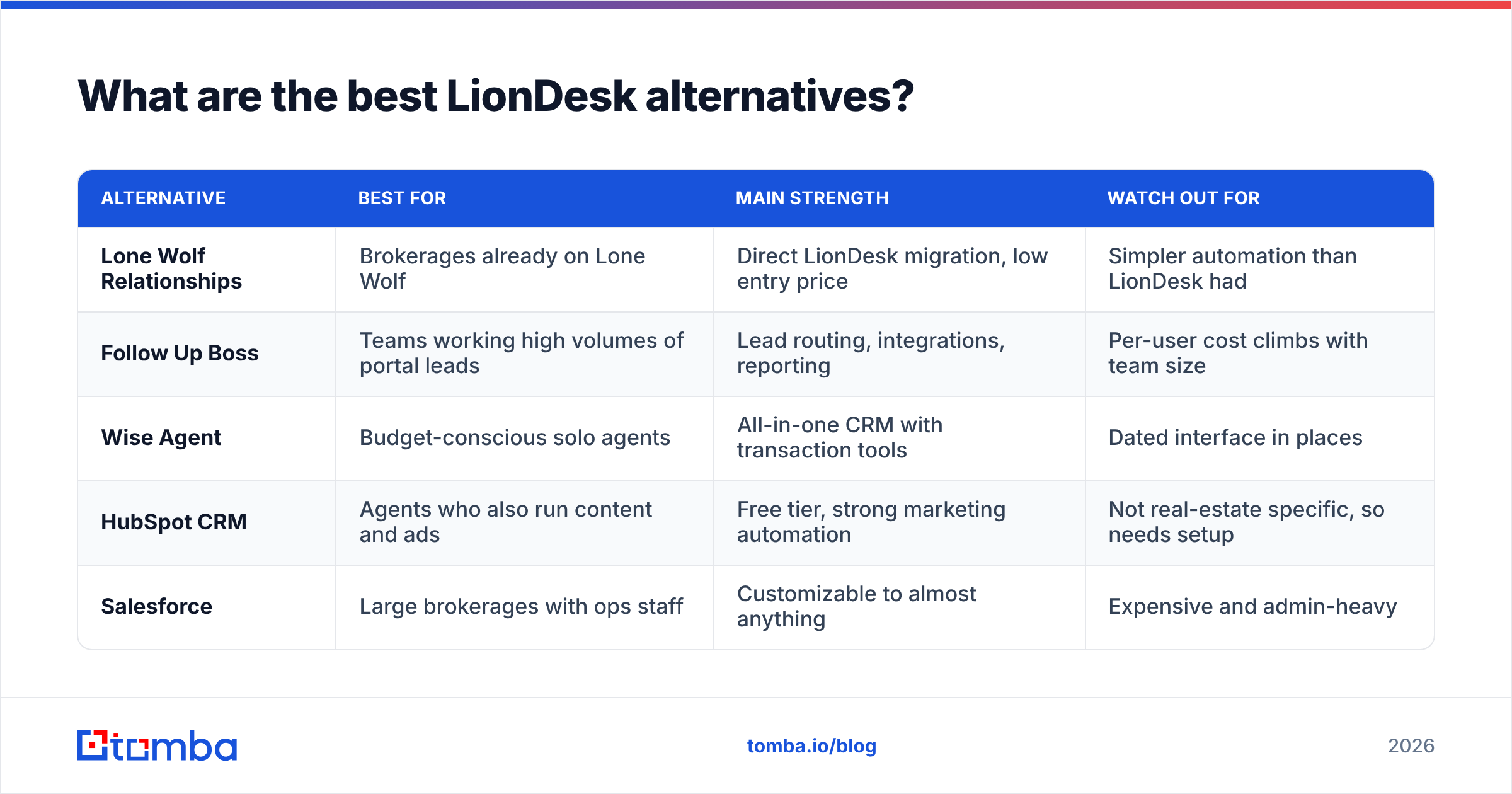
Your choice depends on what you actually used LionDesk for. The table compares the usual replacements by fit rather than list price, because real estate CRM pricing changes often and depends on team size and bundles.
| Alternative | Best for | Main strength | Watch out for |
|---|---|---|---|
| Lone Wolf Relationships | Brokerages already on Lone Wolf | Direct LionDesk migration, low entry price | Simpler automation than LionDesk had |
| Follow Up Boss | Teams working high volumes of portal leads | Lead routing, integrations, reporting | Per-user cost climbs with team size |
| Wise Agent | Budget-conscious solo agents | All-in-one CRM with transaction tools | Dated interface in places |
| HubSpot CRM | Agents who also run content and ads | Free tier, strong marketing automation | Not real-estate specific, so needs setup |
| Salesforce | Large brokerages with ops staff | Customizable to almost anything | Expensive and admin-heavy |
If you're moving to a general CRM like HubSpot or Salesforce, HubSpot's CRM overview is a good starting point for comparing what the free tier includes against paid hubs. You can also connect Tomba to HubSpot so new contacts arrive already enriched.
How do you migrate off LionDesk without wrecking deliverability?#
Most migrations go wrong here, and the CRM isn't the cause. A LionDesk export is often years of contacts: open-house sign-ins, portal leads, past clients and cold imports. A good share of those addresses are now dead. People change jobs, abandon Gmail accounts and let domains expire.
If you import that list into a new CRM and restart drips, you'll send to thousands of invalid addresses from a new account. Hard bounces tell mailbox providers you don't maintain your list, and your sender reputation drops before the new setup has proven anything.
A clean migration looks like this:
- Export everything, including tags and notes. Don't export only names and emails. Tags carry your segmentation and notes carry the context of each relationship.
- Deduplicate before anything else. LionDesk accounts that used several lead sources often hold the same person two or three times. Run the file through a remove-duplicates tool first.
- Verify every email address. Put the whole list through an email verifier. Remove invalid addresses, set catch-all and risky addresses aside for a slower send, and keep valid ones for your first campaigns.
- Re-find contacts worth keeping. When a high-value past client or referral partner's email bounces, don't delete them. Look up their current address with an email finder using their name and new company domain.
- Warm up before you restart drips. Send first to your most engaged segment at low volume, then open up the full list over a few weeks.
- Rebuild automations, don't copy them. Old drips were written for old lead sources. Cut any sequence that was performing below your average response rate.

What should you learn from the LionDesk shutdown?#
Three lessons apply to any CRM you pick next.
Own your data, not just your subscription. Export your full contact base, with activity notes, every quarter. When LionDesk's wind-down was announced, agents with recent exports migrated in days. Agents who had never exported lost weeks.
Cheap CRMs are cheap for a reason, and that's fine. LionDesk's $30 entry price was real value for solo agents. Budget tools also get consolidated when a larger parent buys them, so treat low cost as a trade-off you accept knowingly.
List quality moves with you. Tool quality doesn't. Your drips, templates and automations have to be rebuilt in each new CRM. A verified and current contact list is the one asset that works in any system. Spending an hour on hygiene before each migration costs less than a damaged domain.
Frequently asked questions#
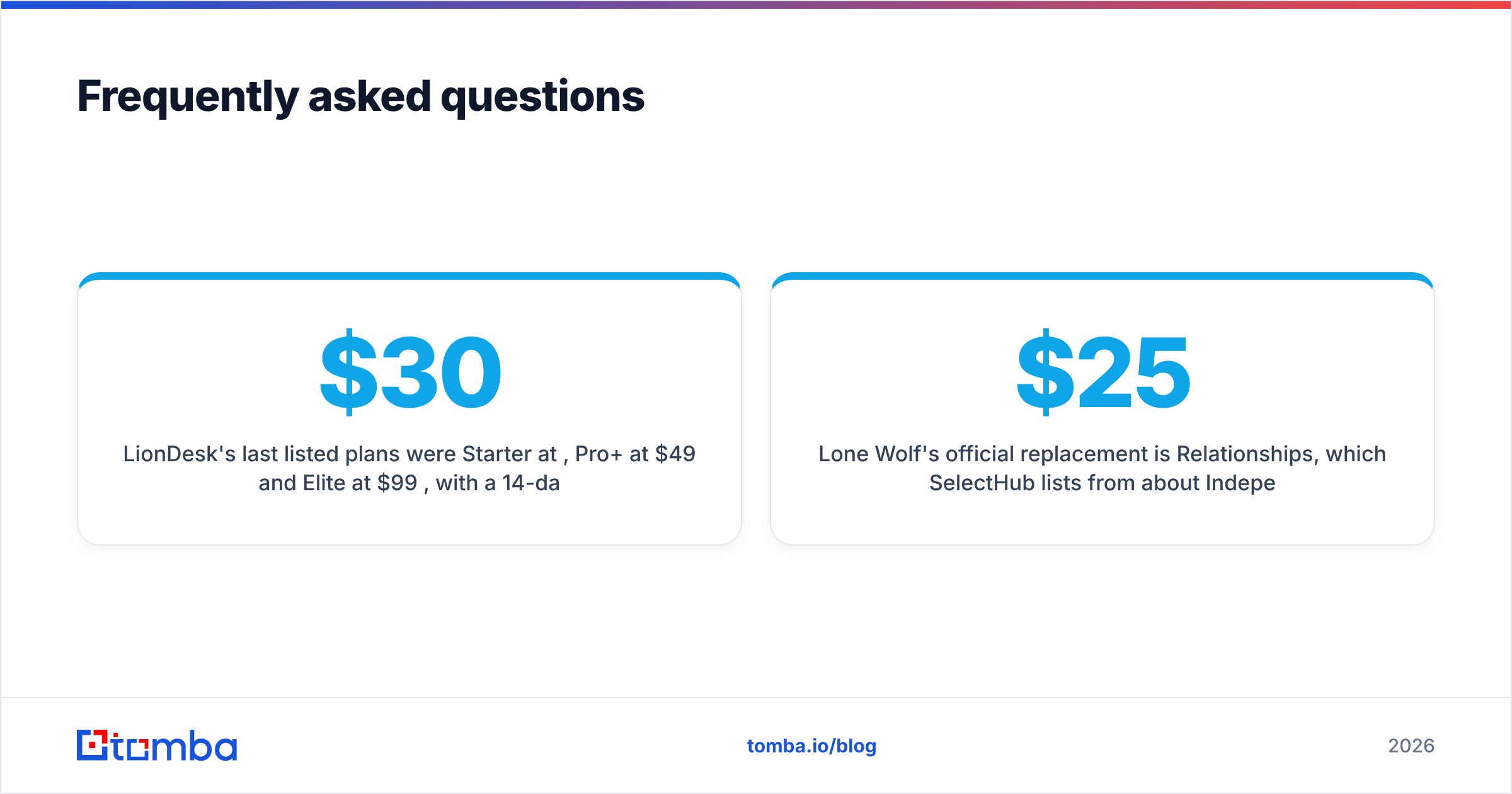
How much did LionDesk cost per month? LionDesk's last listed plans were Starter at $30/mo, Pro+ at $49/mo and Elite at $99/mo, with a 14-day free trial. The main difference between tiers was message volume.
Is LionDesk shut down? Yes. Lone Wolf Technologies announced the wind-down in May 2025 and kept LionDesk operational through September 2025. Customers were offered migration to Lone Wolf Relationships.
What replaced LionDesk? Lone Wolf's official replacement is Relationships, which SelectHub lists from about $25/mo. Independent agents often switch to Follow Up Boss, Wise Agent or HubSpot instead.
Were LionDesk reviews good? Mostly. Capterra shows about 4.1/5, with positive comments on drip campaigns, texting and price, and negative comments on customer support and sync reliability.
Can I still import my LionDesk contacts into a new CRM? Yes, if you exported them. Deduplicate and verify the list before importing, because old real estate contact lists usually carry a high share of dead addresses.
Where should you rebuild your contact list?#
LionDesk's plan grid is history. Your contact list isn't, and its quality decides whether your next CRM works from the first campaign. Before you restart drips in Relationships, Follow Up Boss, HubSpot or anything else, find current addresses for the past clients, referral partners and investors whose emails have gone stale. Tomba Email Finder finds professional email addresses from a name and company domain. It starts with a free tier of 25 searches a month and paid plans from $49/mo. Clean your export and re-find your best contacts before the migration.
Related guides#
// get started
Find, verify and enrich your first contacts today
Start on the free plan with 25 searches a month, then scale when your team is ready.
Free plan · No credit card required · GDPR & CCPA
// about the author