List of Email Domains (2026): Free, Disposable & Business
A copy-ready list of email domains (free webmail, ISP, regional and disposable), plus when to block them on B2B forms and why a static list alone will let bad leads through.
TL;DR
- A list of email domains sorts addresses into free webmail (gmail.com, outlook.com), ISP and regional providers (comcast.net, web.de, qq.com), disposable services (mailinator.com), and business domains (acme.com).
- B2B teams use these lists to flag personal signups, block throwaway addresses, and send leads to the right place in the CRM. The copy-ready lists below cover 100+ domains.
- Blocking every free domain on a form costs you real buyers. Freelancers, founders, and small-business owners often sign up with Gmail. In most cases, flag and enrich those leads instead of rejecting them.
- Static lists go stale every week. Pair them with real-time email verification so you catch new disposable domains, typos like gmial.com, and catch-all servers.
What is a list of email domains, and why do B2B teams need one?#
An email domain is everything after the "@". In jane@acme.com, the domain is acme.com. A list of email domains is a reference set that groups those domains by who runs them and what they tell you about the sender.
A domain works a bit like a return address on an envelope. A letter from "Acme Corp, 200 Market St." tells you it came from a company. A letter from a P.O. box tells you almost nothing. A letter from an address that stops existing next week should make you suspicious.
For B2B go-to-market teams, that difference changes how you treat a lead:
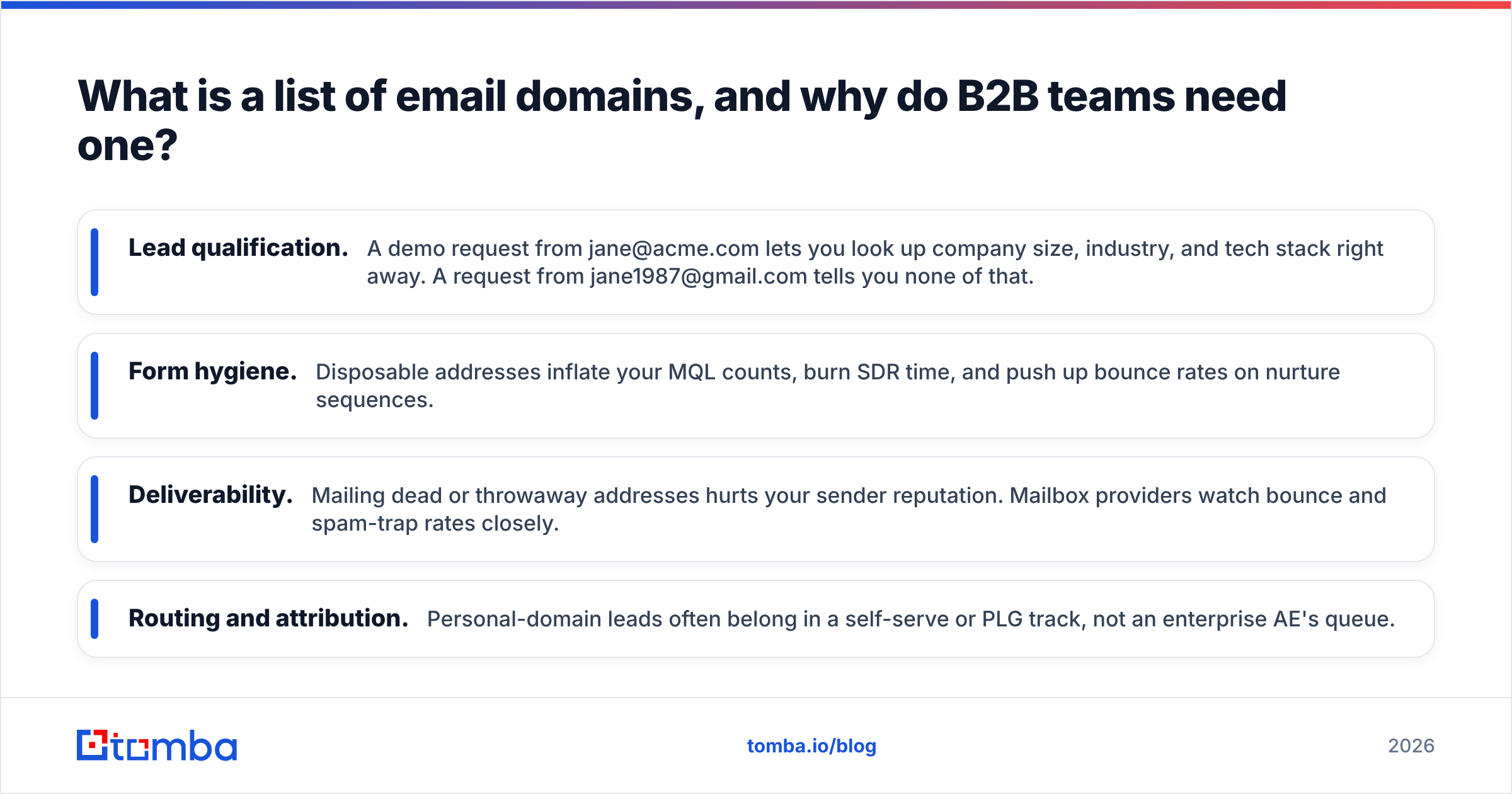
- Lead qualification. A demo request from jane@acme.com lets you look up company size, industry, and tech stack right away. A request from jane1987@gmail.com tells you none of that.
- Form hygiene. Disposable addresses inflate your MQL counts, burn SDR time, and push up bounce rates on nurture sequences.
- Deliverability. Mailing dead or throwaway addresses hurts your sender reputation. Mailbox providers watch bounce and spam-trap rates closely.
- Routing and attribution. Personal-domain leads often belong in a self-serve or PLG track, not an enterprise AE's queue.
What are the main types of email domains?#
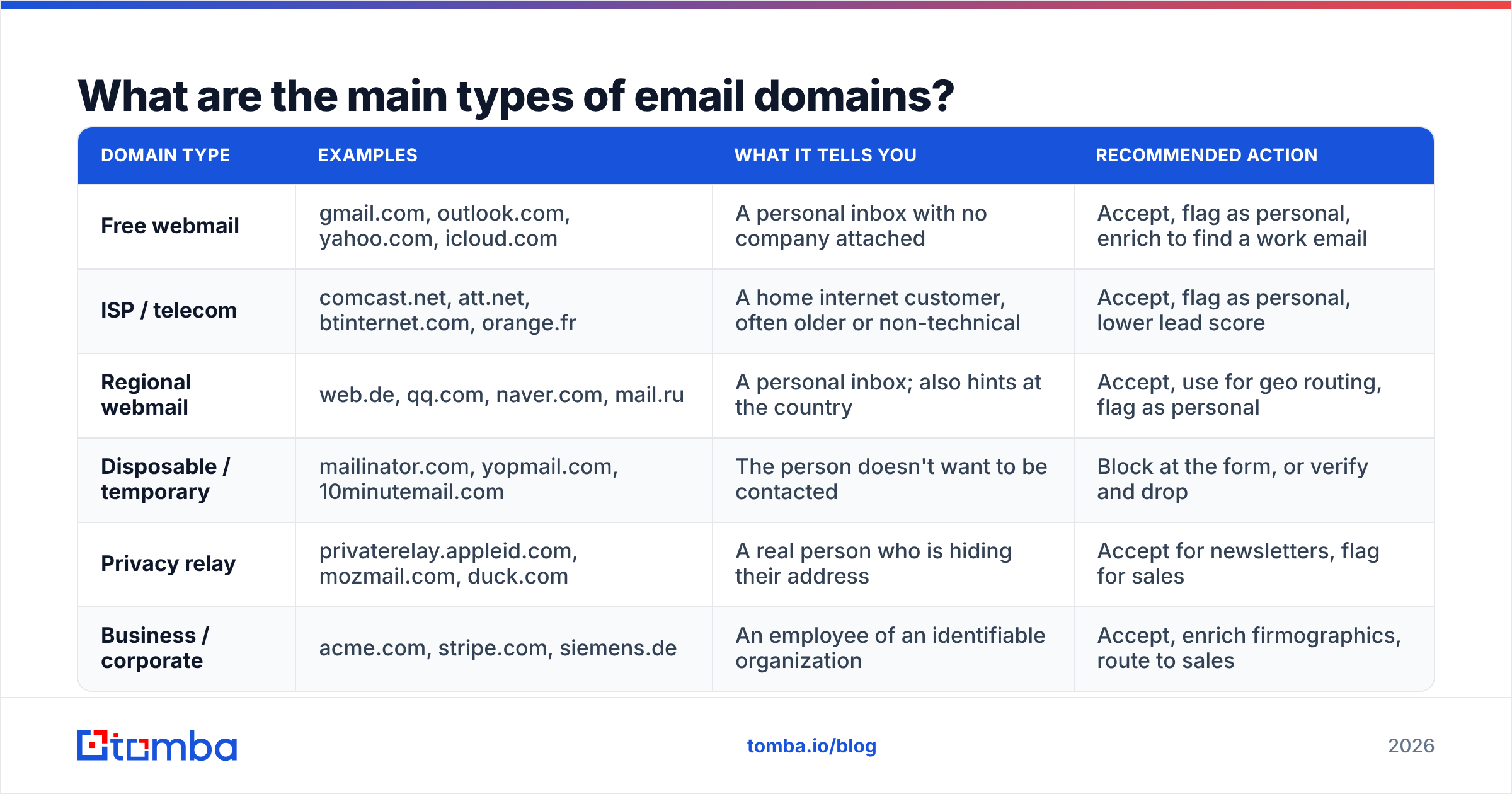
Almost every address you collect falls into one of five buckets. Knowing which one a domain belongs to tells you what to do with the lead.
| Domain type | Examples | What it tells you | Recommended action |
|---|---|---|---|
| Free webmail | gmail.com, outlook.com, yahoo.com, icloud.com | A personal inbox with no company attached | Accept, flag as personal, enrich to find a work email |
| ISP / telecom | comcast.net, att.net, btinternet.com, orange.fr | A home internet customer, often older or non-technical | Accept, flag as personal, lower lead score |
| Regional webmail | web.de, qq.com, naver.com, mail.ru | A personal inbox; also hints at the country | Accept, use for geo routing, flag as personal |
| Disposable / temporary | mailinator.com, yopmail.com, 10minutemail.com | The person doesn't want to be contacted | Block at the form, or verify and drop |
| Privacy relay | privaterelay.appleid.com, mozmail.com, duck.com | A real person who is hiding their address | Accept for newsletters, flag for sales |
| Business / corporate | acme.com, stripe.com, siemens.de | An employee of an identifiable organization | Accept, enrich firmographics, route to sales |
The privacy-relay row trips up a lot of teams. Apple's Hide My Email, Firefox Relay, and DuckDuckGo Email Protection forward to a real, working inbox. They are not disposable in the "gone in 10 minutes" sense. If you block them, you lose real customers, especially on iOS.
Which free email domains should you know?#
These are the global consumer webmail providers you'll see most often in form fills and list uploads. Remember the aliases and legacy domains too. Google still serves googlemail.com, and Microsoft still runs hotmail.com and live.com next to outlook.com.
| Provider | Domains |
|---|---|
| gmail.com, googlemail.com | |
| Microsoft | outlook.com, hotmail.com, live.com, msn.com, hotmail.co.uk, hotmail.fr, outlook.fr, live.co.uk |
| Yahoo | yahoo.com, ymail.com, rocketmail.com, yahoo.co.uk, yahoo.fr, yahoo.de, yahoo.ca |
| Apple | icloud.com, me.com, mac.com |
| AOL | aol.com, aim.com |
| Proton | protonmail.com, protonmail.ch, proton.me, pm.me |
| Tuta | tutanota.com, tutanota.de, tuta.io, tuta.com, keemail.me |
| Zoho (free tier) | zohomail.com, zoho.com |
| GMX / Mail.com | gmx.com, gmx.net, gmx.de, gmx.at, gmx.ch, mail.com, email.com |
| Other | fastmail.com, hey.com, hushmail.com, mailfence.com |
For a wider view of providers and their features, Wikipedia keeps a comparison of webmail providers that's worth checking when you expand your list.
One caveat: Zoho, Fastmail, and Proton also sell custom-domain business mail. The free-tier domains above are personal, but a company running Zoho Mail on acme.com is a normal business domain. Classify by the domain itself, not by who hosts it.
Which ISP and regional email domains show up most?#
Regional providers matter as soon as you sell outside the US. A European or Asian list full of "unknown" domains usually turns out to be local webmail, not business addresses.
| Region | Common personal domains |
|---|---|
| United States | comcast.net, att.net, sbcglobal.net, verizon.net, cox.net, charter.net, bellsouth.net, earthlink.net, rr.com |
| Canada | shaw.ca, rogers.com, sympatico.ca |
| United Kingdom | btinternet.com, sky.com, virginmedia.com, talktalk.net |
| Germany | web.de, t-online.de, freenet.de |
| France | orange.fr, wanadoo.fr, free.fr, sfr.fr, laposte.net |
| Italy | libero.it, virgilio.it, tiscali.it, alice.it |
| Poland / Czechia | wp.pl, o2.pl, onet.pl, interia.pl, seznam.cz |
| Russia | yandex.ru, yandex.com, ya.ru, mail.ru, inbox.ru, list.ru, bk.ru |
| China | qq.com, 163.com, 126.com, yeah.net, sina.com, sohu.com, aliyun.com |
| South Korea | naver.com, daum.net, hanmail.net |
| Japan | yahoo.co.jp, nifty.com, docomo.ne.jp, ezweb.ne.jp, softbank.ne.jp |
| India | rediffmail.com |
| Brazil | uol.com.br, bol.com.br, terra.com.br, ig.com.br |
| Australia | bigpond.com, optusnet.com.au |
A practical tip: regional domains are a free geo signal. A qq.com or 163.com signup almost certainly comes from mainland China, and a web.de signup is very likely German. Use that for time-zone-aware routing and language preferences, even if you score the lead as personal.
Which disposable email domains should you block?#
Disposable services hand out an inbox that expires in minutes or hours. People use them to grab a gated asset without being followed up. You can't nurture these contacts, and mailing them later hurts your email deliverability.
The most common ones:
mailinator.com, guerrillamail.com, sharklasers.com, grr.la,
10minutemail.com, temp-mail.org, yopmail.com, trashmail.com,
maildrop.cc, dispostable.com, throwawaymail.com, getnada.com,
mintemail.com, mohmal.com, emailondeck.com
The hard part is that disposable services spin up new domains all the time, often dozens per provider, specifically to get around blocklists. Wikipedia's article on disposable email addresses explains the model. The community-maintained disposable-email-domains repository on GitHub tracks thousands of them and is a solid free baseline.
Should you block free email domains on B2B forms?#
Only in narrow cases. Blocking free domains is the most common reaction to a messy lead list, and it usually costs more than it saves.
Block free domains when:
- The form is a high-intent enterprise demo request and your ICP is 500+ employee companies.
- Your SDR team is overwhelmed and needs a hard filter while you fix scoring.
- The gated asset is aimed at a specific corporate audience (for example, a compliance benchmark for banks).
Don't block free domains when:
- You sell to SMBs, agencies, consultants, or founders. Many of them run their business on Gmail.
- You run a free trial or PLG motion. Personal signups often become paid team accounts later.
- You sell into regions where personal webmail is normal for business contact.
The better default is flag, don't block. Accept the signup, tag it as email_type = personal, and then try to find the person's work address from their name and the company they typed in. That keeps the lead and gives sales something they can act on.
How do static domain lists compare with real-time verification?#
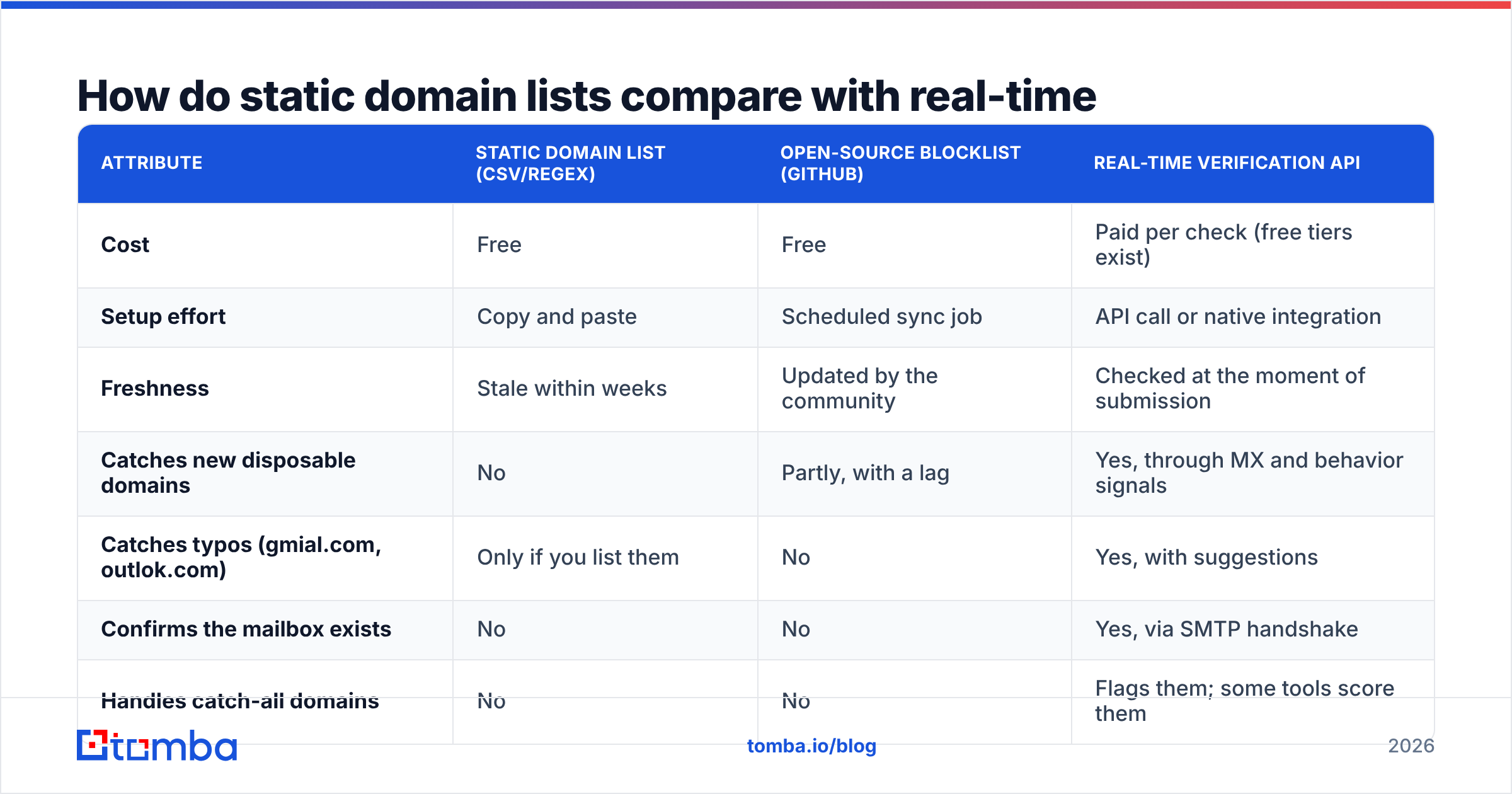
A domain list tells you what kind of domain an address uses. It can't tell you whether the mailbox exists. That difference matters. A business-domain address with a typo in the local part will still bounce, and a brand-new disposable domain won't be on any list yet.
| Attribute | Static domain list (CSV/regex) | Open-source blocklist (GitHub) | Real-time verification API |
|---|---|---|---|
| Cost | Free | Free | Paid per check (free tiers exist) |
| Setup effort | Copy and paste | Scheduled sync job | API call or native integration |
| Freshness | Stale within weeks | Updated by the community | Checked at the moment of submission |
| Catches new disposable domains | No | Partly, with a lag | Yes, through MX and behavior signals |
| Catches typos (gmial.com, outlok.com) | Only if you list them | No | Yes, with suggestions |
| Confirms the mailbox exists | No | No | Yes, via SMTP handshake |
| Handles catch-all domains | No | No | Flags them; some tools score them |
| Best for | Personal-vs-business tagging | Blocking known throwaways | Form validation and list cleaning |
In practice, you want all three layers. Use a static list for cheap classification, the open-source list as a disposable baseline, and an email verifier at the point of capture so bad addresses never reach your CRM. Business domains that accept every address (catch-all servers) need their own check. A catch-all verifier tells you whether jane@acme.com is a real person or just a server that says yes to everything.
How do you use an email domain list in your stack?#
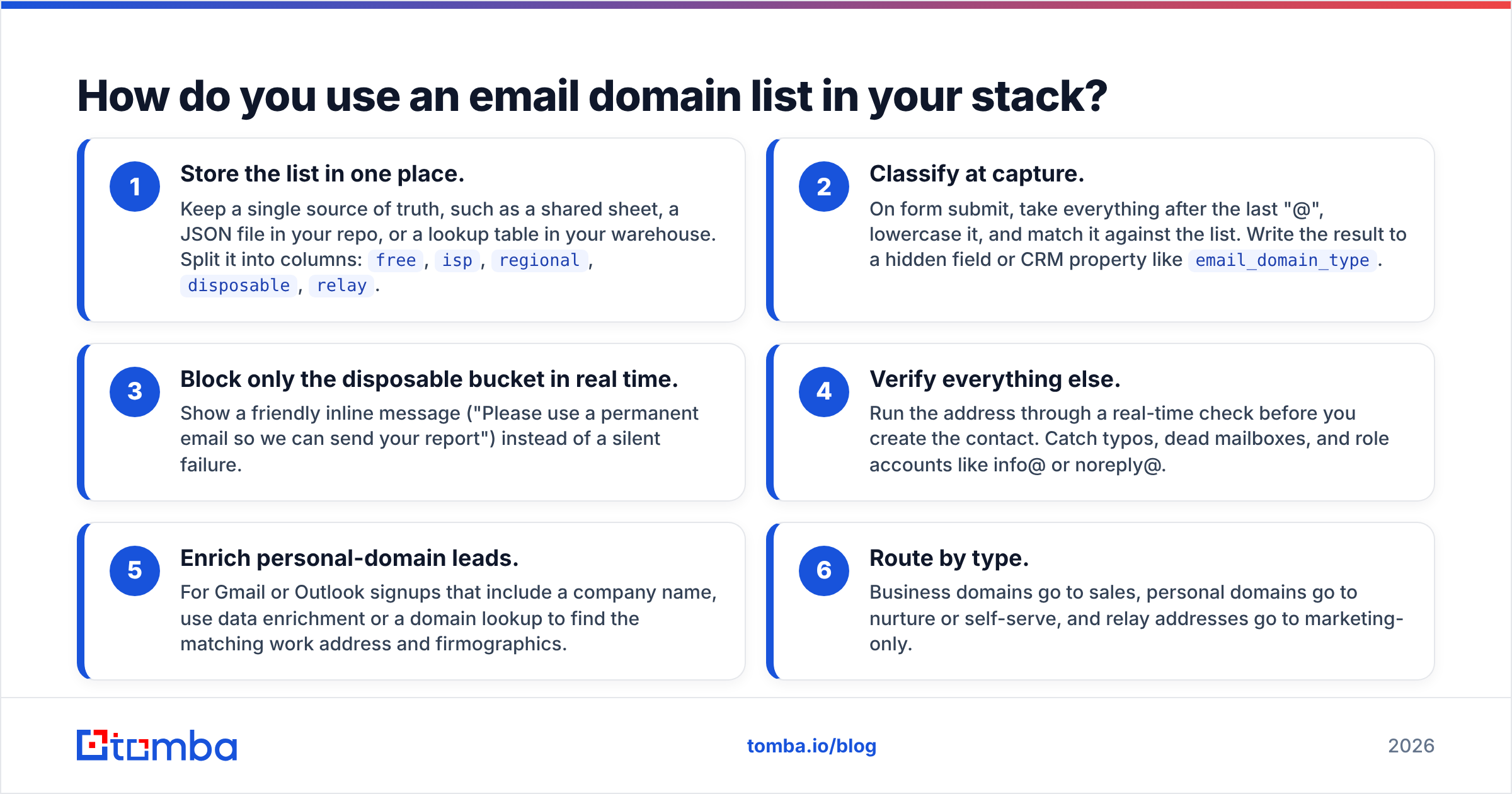
Here's a practical setup most RevOps teams can run in an afternoon:
- Store the list in one place. Keep a single source of truth, such as a shared sheet, a JSON file in your repo, or a lookup table in your warehouse. Split it into columns:
free,isp,regional,disposable,relay. - Classify at capture. On form submit, take everything after the last "@", lowercase it, and match it against the list. Write the result to a hidden field or CRM property like
email_domain_type. - Block only the disposable bucket in real time. Show a friendly inline message ("Please use a permanent email so we can send your report") instead of a silent failure.
- Verify everything else. Run the address through a real-time check before you create the contact. Catch typos, dead mailboxes, and role accounts like info@ or noreply@.
- Enrich personal-domain leads. For Gmail or Outlook signups that include a company name, use data enrichment or a domain lookup to find the matching work address and firmographics.
- Route by type. Business domains go to sales, personal domains go to nurture or self-serve, and relay addresses go to marketing-only.
Most marketing automation platforms support steps 2 and 3 natively. HubSpot, for example, lets you block specific domains on forms and build segments on email domain properties. The pattern works the same in Marketo, Pardot, or a custom form backend.
What mistakes do teams make with email domain lists?#
Forgetting aliases and country variants. Blocking gmail.com but not googlemail.com, or yahoo.com but not yahoo.co.uk and yahoo.fr, leaves obvious gaps. Microsoft alone has dozens of country-specific hotmail and live domains.
Treating relay services as disposable. privaterelay.appleid.com addresses belong to real iPhone users who chose "Hide My Email". They read their mail. Blocking them quietly cuts out a large share of mobile signups.
Matching on substrings. A rule like "contains yahoo" will flag yahooligans-agency.com. A rule like "contains mail" will flag mailchimp.com and every company with "mail" in its name. Always match the exact domain after the "@".
Never updating the list. Disposable providers add domains weekly, and ISPs merge or retire theirs. Verizon, for example, moved its consumer email over to AOL. If nobody owns the list, it decays.
Assuming business domain means valid. jane.doe@acme.com can still bounce if Jane left, if the format is actually jdoe@, or if acme.com is catch-all. Domain type is one signal, not proof. A free email checker is a quick way to spot-check suspicious addresses before you mail them.
Ignoring typo domains. gmial.com, gnail.com, hotmial.com, and yaho.com show up constantly on mobile. Some typo domains are registered by third parties to collect misdirected mail, so a typo doesn't just bounce. It can leak data. Suggest a correction inline instead of accepting it.
What else do people ask about email domains?#
How many free email domains are there?#
Thousands, if you count every regional ISP and vanity domain. Mail.com alone offers well over a hundred personal domain options. For most B2B teams, the 100–150 domains in this guide cover the large majority of personal signups. The long tail is better handled by verification than by a longer list.
Is outlook.com a business email domain?#
No. outlook.com, hotmail.com, and live.com are Microsoft's consumer domains. Companies that use Microsoft 365 send mail from their own domain (like acme.com), even though Microsoft hosts it.
Can I tell a company's email format from its domain?#
Not from the domain alone, but you can infer it from known addresses at that domain. Most companies use a pattern such as first.last@ or flast@. A domain search shows the public addresses and the dominant pattern for any company domain.
Should I delete existing contacts on free domains?#
Usually not. Tag them, verify that they're deliverable, and try to enrich them with a work address. Delete only the ones that are disposable, invalid, or have bounced.
What's the fastest way to turn personal-domain leads into sales-ready contacts?#
A list of email domains helps you sort leads. It doesn't fix the Gmail signups sitting in your CRM with a name and a company but no work address. That's where an email finder fits. If you have "Jane Doe, Acme Corp" from a form fill, Tomba Email Finder can look up her professional address from her name and company domain, and it checks deliverability as part of the result. The free tier gives you 25 searches a month to test it on your own personal-domain leads, and paid plans start at $49/mo if you need to run it at scale through the Chrome extension, Google Sheets, or the API.
Related guides#
// get started
Find, verify and enrich your first contacts today
Start on the free plan with 25 searches a month, then scale when your team is ready.
Free plan · No credit card required · GDPR & CCPA
// about the author