List Quality: How to Build a B2B Email List That Actually Lands
A 50,000-contact list with a 9% bounce rate will do more damage than a 5,000-contact list that's clean. Here's how to measure list quality, what the thresholds are, and how to fix a list that's failing.
TL;DR
- List quality is how accurate, current, relevant, and deliverable your contacts are. Size doesn't measure it.
- Six metrics matter most: hard bounce rate, catch-all share, role-address share, data age, ICP fit, and duplicate rate.
- Keep hard bounces under 2% and spam complaints under 0.1%. Gmail and Yahoo now enforce complaint thresholds on bulk senders.
- Where your contacts come from has the biggest effect on quality. Purchased and scraped lists usually fail before a single email goes out.
- The fix is a repeatable workflow: source, dedupe, verify, handle catch-alls separately, enrich, and re-verify anything older than 90 days.
Most outbound teams judge a list by how many rows it has. That's the wrong number. Your sending infrastructure, your domain reputation, and your reply rate all respond to how many of those contacts are real, reachable, and relevant.
This guide covers what list quality means in practice, how to measure it, what "good" looks like in 2026, and how to fix a list that's quietly wrecking your campaigns.
What is list quality?#
List quality is how well a contact list matches reality and your targeting. A high-quality B2B list has four properties:
- Accurate. The email address exists and the mailbox accepts mail.
- Current. The person still works there, in the same role.
- Relevant. The contact fits your ideal customer profile (ICP) by company, seniority, function, and need.
- Permissible. You have a lawful basis to contact them, and they haven't opted out.
Missing any one of these costs you something. Inaccurate addresses bounce. Stale contacts go to inboxes nobody reads. Irrelevant contacts mark you as spam. Impermissible contacts create legal exposure.
Think of your list as a pantry. A full shelf doesn't help if half the jars expired last year. A smaller, fresher shelf makes a better dinner.
Why does list quality matter more in 2026 than it used to?#
Mailbox providers stopped being lenient. In February 2024, Google and Yahoo started enforcing sender requirements for bulk senders: authenticated mail (SPF, DKIM, DMARC), one-click unsubscribe, and a spam complaint rate below 0.3%. Google recommends staying under 0.1%. You can read the rules in Google's email sender guidelines and Yahoo's sender best practices.
These thresholds are calculated per sending domain, so a poor list can hurt deliverability for your whole company, including your AEs' one-to-one emails and your transactional mail.
Bad list quality damages three things in sequence:
- Bounces tell providers you don't know who you're emailing. Hard bounces (a bounce message with a permanent 5xx code) are a strong negative signal.
- Irrelevant sends bring complaints and low engagement, which push you toward the spam folder.
- Spam placement lowers open and reply rates, which makes the next campaign look worse, which lowers your placement further.
Once your domain is in that loop, you can't copywrite your way out of it. You fix it at the list level.
What are the 6 metrics that define list quality?#
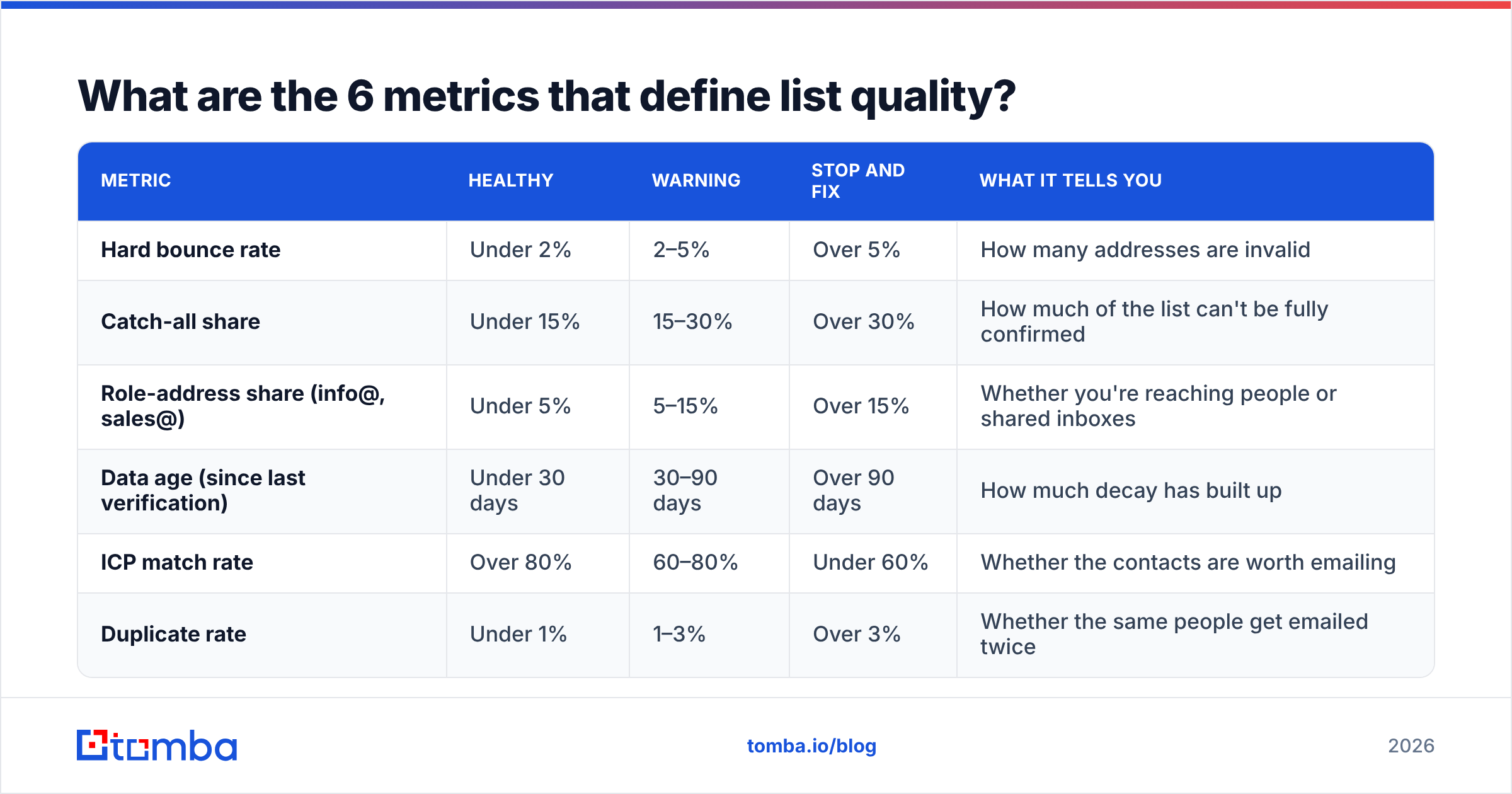
Measure these six before any list goes into a sequence. Together they tell you whether the list is safe to send and whether it's worth sending.
| Metric | Healthy | Warning | Stop and fix | What it tells you |
|---|---|---|---|---|
| Hard bounce rate | Under 2% | 2–5% | Over 5% | How many addresses are invalid |
| Catch-all share | Under 15% | 15–30% | Over 30% | How much of the list can't be fully confirmed |
| Role-address share (info@, sales@) | Under 5% | 5–15% | Over 15% | Whether you're reaching people or shared inboxes |
| Data age (since last verification) | Under 30 days | 30–90 days | Over 90 days | How much decay has built up |
| ICP match rate | Over 80% | 60–80% | Under 60% | Whether the contacts are worth emailing |
| Duplicate rate | Under 1% | 1–3% | Over 3% | Whether the same people get emailed twice |
These are working thresholds that outbound teams commonly use. Mailbox providers don't publish them. Your own numbers will vary by industry and sending volume, but if a list lands in the right-hand column on two or more metrics, don't send it.
1. Hard bounce rate#
This is the most important one and the easiest to measure. Run the list through an email verifier before sending and remove anything marked invalid. After a campaign, compare the actual bounce rate with what the verifier predicted. A large gap means your verification step isn't good enough or your data went stale between verifying and sending.
2. Catch-all share#
A catch-all domain accepts mail for any address, so standard SMTP checks can't tell whether jane.doe@company.com exists. Catch-all rates are high among enterprise and mid-market companies. Treat these contacts as a separate segment: send to them at lower volume, or run them through a dedicated catch-all verifier that uses extra signals beyond the SMTP handshake.
3. Role-address share#
Addresses like info@, hello@, and sales@ are often monitored by several people, filtered heavily, and more likely to report you as spam. They aren't always bad, since at a five-person company hello@ may reach the founder, but they shouldn't make up a meaningful share of an outbound list.
4. Data age#
B2B contact data decays all the time as people change jobs, get promoted, or leave companies that get acquired or shut down. Industry estimates commonly put annual B2B data decay at around 20–30%. Whatever the exact rate at your company, a list verified six months ago isn't the list you have today. Record the verification date on every contact.
5. ICP match rate#
A perfectly deliverable list can still be a bad list. If 40% of your contacts are interns, consultants at the wrong firm size, or companies outside your market, you're paying for sends that bring complaints and no pipeline. Take a sample of 50 rows and score them by hand against your ICP. It takes 20 minutes and it's the most honest audit you can run.
6. Duplicate rate#
Duplicates show up when you merge exports from several tools. Sending the same person two sequences makes you look careless, and it doubles your complaint risk on your most engaged prospects. Dedupe on email address and on name plus domain, because the same person can appear under two formats.
Where does list quality actually come from?#
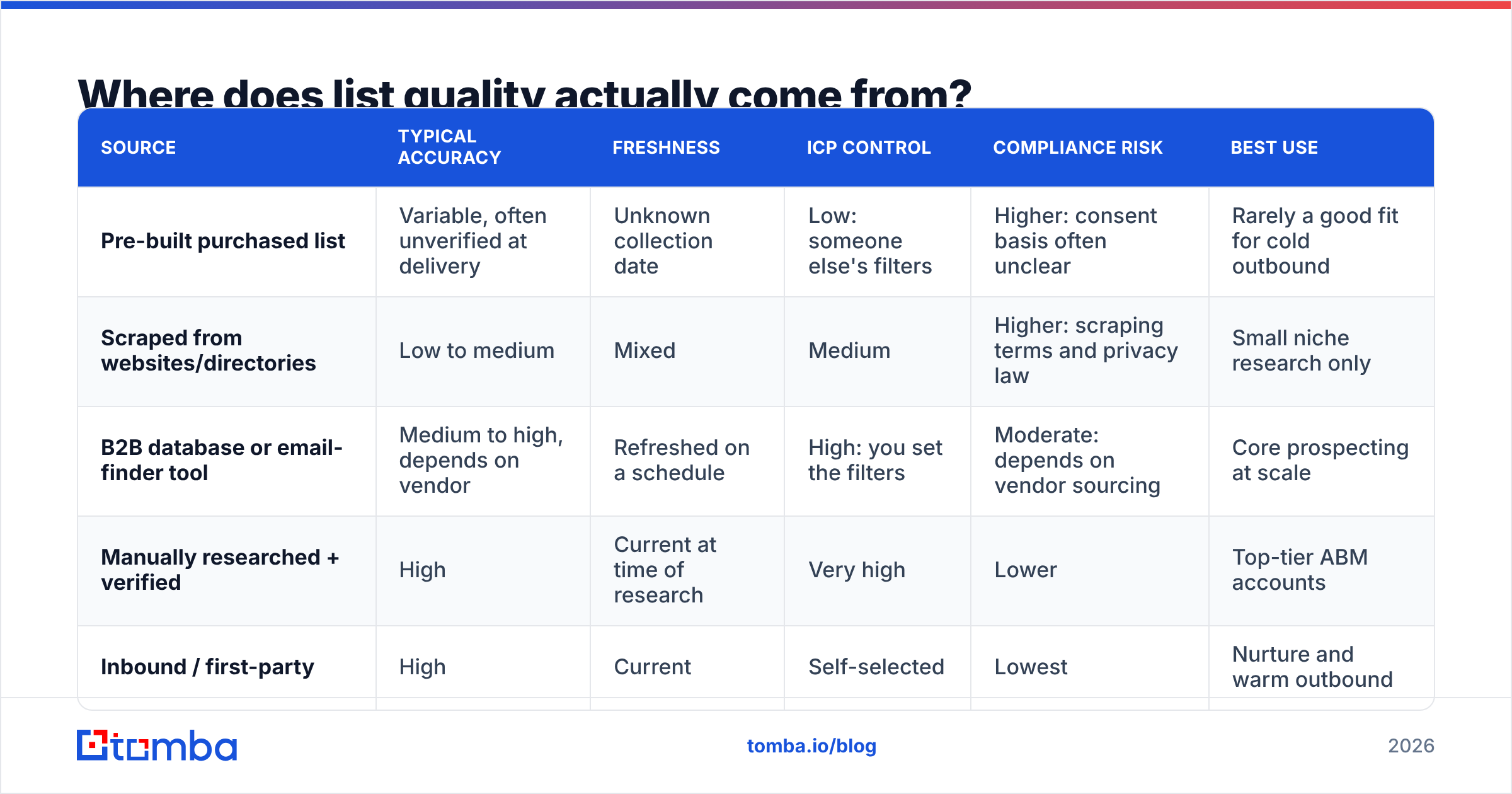
Your source sets the ceiling for your quality. Verification can clean a list but it can't make an irrelevant contact relevant. This is how the common sources compare:
| Source | Typical accuracy | Freshness | ICP control | Compliance risk | Best use |
|---|---|---|---|---|---|
| Pre-built purchased list | Variable, often unverified at delivery | Unknown collection date | Low: someone else's filters | Higher: consent basis often unclear | Rarely a good fit for cold outbound |
| Scraped from websites/directories | Low to medium | Mixed | Medium | Higher: scraping terms and privacy law | Small niche research only |
| B2B database or email-finder tool | Medium to high, depends on vendor | Refreshed on a schedule | High: you set the filters | Moderate: depends on vendor sourcing | Core prospecting at scale |
| Manually researched + verified | High | Current at time of research | Very high | Lower | Top-tier ABM accounts |
| Inbound / first-party | High | Current | Self-selected | Lowest | Nurture and warm outbound |
What sets the good sources apart is that they let you apply your own targeting and verify close to send time. Any source that hands you a finished file you can't audit is betting your domain on someone else's standards.
If you're evaluating data vendors, ask each one three things: how they source the data, how often they re-verify it, and whether they'll show you verification status per contact. G2's email verification category is a reasonable place to start a shortlist.
How do you audit an existing list?#
If you already have a list and aren't sure it's safe to send, work through this before any campaign goes out:
- Export and snapshot. Export the full list with source and date-added fields. Keep the original untouched so you can compare before and after.
- Dedupe. Remove exact duplicate emails, then fuzzy-match on first name, last name, and domain.
- Strip obvious junk. Remove role addresses (unless you deliberately keep them), disposable domains, obvious typos like
gmial.com, and anyone on your suppression or unsubscribe list. - Verify everything. Run the whole list through verification. Put each result into a bucket: valid, invalid, catch-all, unknown.
- Sample for ICP fit. Pull 50 random valid contacts and score them by hand. If fewer than 80% fit, fix your targeting before you worry about deliverability.
- Segment by risk. Valid and ICP-fit contacts go into the main sequence. Catch-alls and unknowns go into a smaller, slower test segment. Invalid contacts get deleted, not archived in a place where someone might reimport them.
When you're done, you'll probably have a list 20–50% smaller than when you started. That's the result you want: you're now sending only to people who can receive the email and have a reason to care.
How do you keep list quality high over time?#
A one-time cleanup lasts about a quarter. You maintain list quality by building checks into how contacts enter your system and how long they stay there:
- Verify at capture. Every contact added from any source gets verified before it reaches your CRM or sequencer. Nothing unverified gets in.
- Re-verify on a clock. Anything older than 90 days gets re-verified before it goes into a new campaign. Automate this if your tools allow it.
- Enrich, don't guess. Use data enrichment to confirm title, company, and seniority instead of trusting a stale job title from an old export. Title changes are an early sign that a contact is about to go stale.
- Feed bounces back. Every hard bounce should automatically suppress that address everywhere, across your sequencer, CRM, and marketing platform.
- Watch complaint rate weekly. Google Postmaster Tools shows your domain's spam rate. If it moves toward 0.1%, pause and check which list segment caused it.
- Record the source on every contact. When one source keeps producing bounces or complaints, you want to be able to cut it off completely.

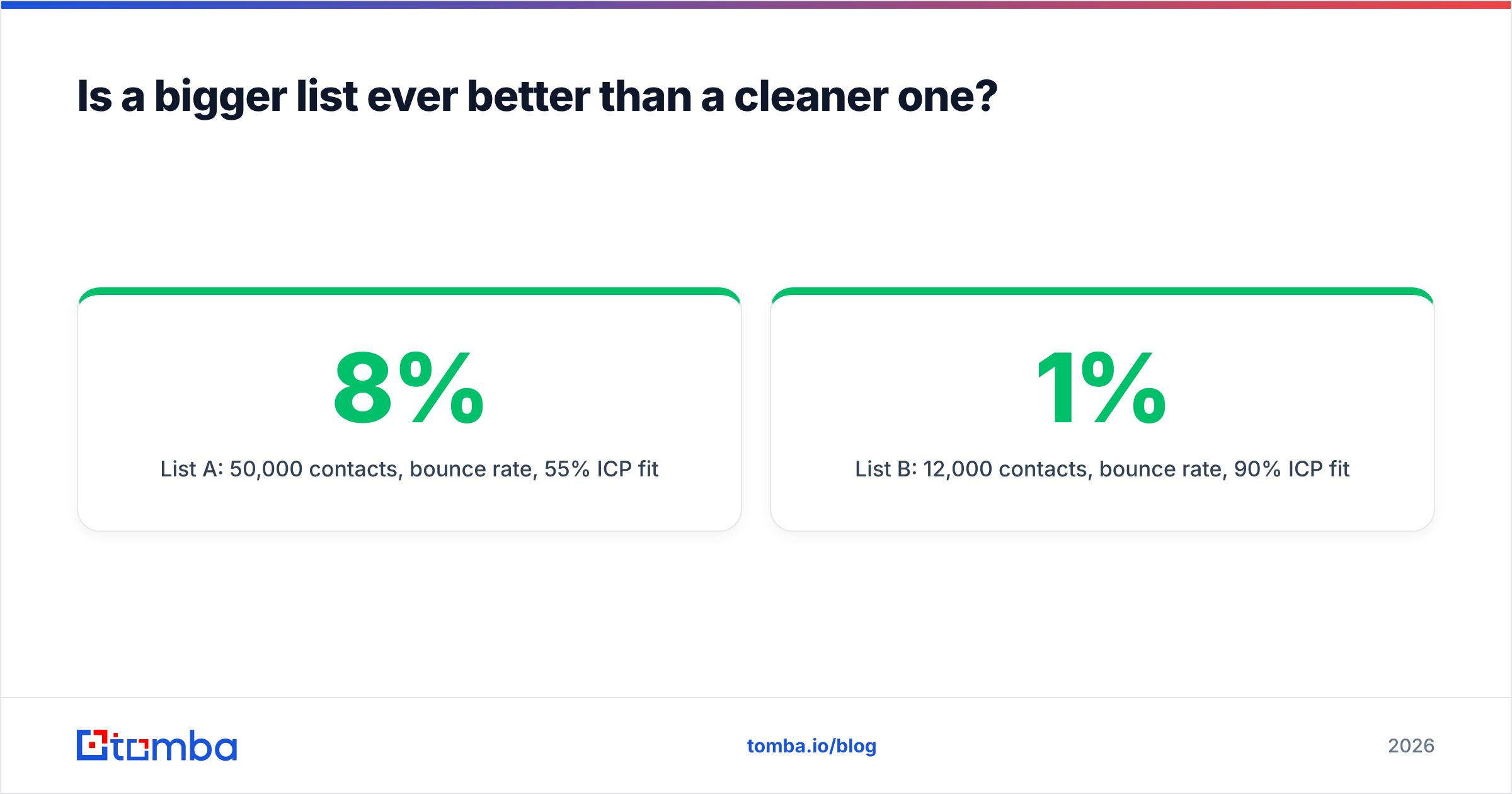
Is a bigger list ever better than a cleaner one?#
Almost never for cold outbound. The math is straightforward. Suppose you have two lists:
- List A: 50,000 contacts, 8% bounce rate, 55% ICP fit.
- List B: 12,000 contacts, 1% bounce rate, 90% ICP fit.
List A sends 4,000 emails into hard bounces, which is enough to damage a sending domain on its own, and about 22,500 emails to people who aren't a fit. List B sends 120 bounces and reaches about 10,800 relevant contacts with a domain that still reaches the inbox.
List A has more real prospects on paper (about 27,500 vs 10,800). But after inbox placement drops, more of A's emails go to spam, and more irrelevant recipients mean more complaints, so the realistic reply count from List A often ends up lower. List A also degrades your domain for next month, while List B leaves it healthy.
The one exception is top-of-funnel awareness through channels that don't touch your email reputation, such as paid social audiences, where match-rate math works differently. For email, clean beats big.
What tools help with list quality?#
You don't need a big stack. Most teams need three capabilities, which one or two tools can cover:
- Sourcing with your own filters. An email finder or B2B database that lets you search by domain, name, role, and company attributes, so the list starts close to your ICP.
- Verification that handles catch-alls. Standard SMTP verification plus a separate method for catch-all domains, which is usually where the unknowns cluster.
- Enrichment and dedupe. Fresh firmographic and role data, plus a deduplication step before import.
Whatever tools you use, judge them on the metrics in this guide rather than on database size. Ask for a trial, run 500 of your own target contacts through it, send a small test campaign, and measure the actual bounce rate. That number tells you more than any vendor's accuracy claim.
Frequently asked questions#
What is a good bounce rate for a B2B email list?#
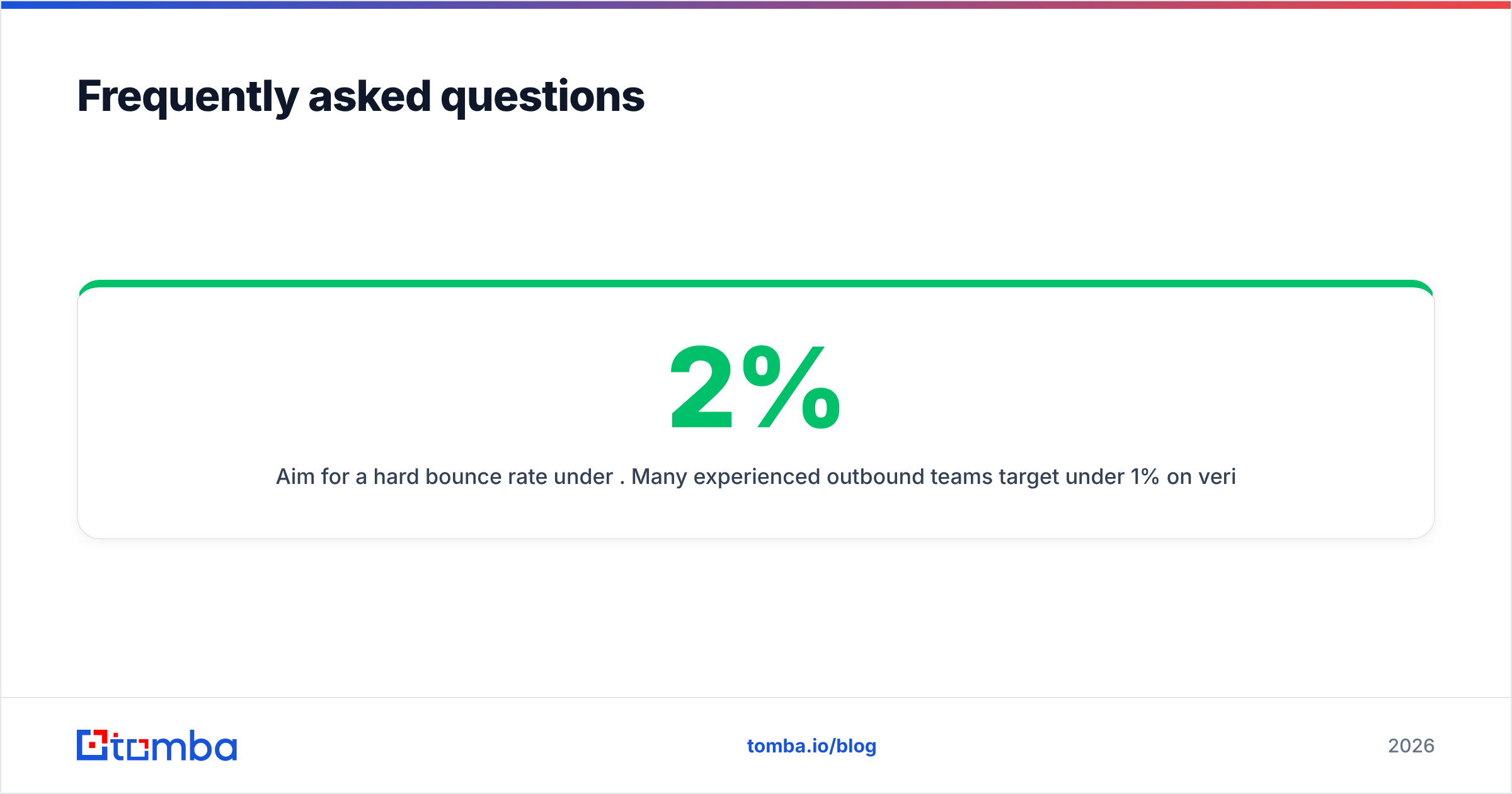
Aim for a hard bounce rate under 2%. Many experienced outbound teams target under 1% on verified lists. Anything above 5% on a single send is a sign to stop and re-verify before continuing.
How often should I verify my email list?#
Verify at the point of capture, then re-verify any contact that's more than 90 days past its last check before using it in a new campaign. For high-volume senders, re-verifying every 30 days is safer.
Should I remove catch-all emails from my list?#
Not necessarily, since catch-all domains include many legitimate companies. Segment them, send at lower volume, and watch bounces closely. Remove individual addresses as soon as they bounce.
Does list quality affect reply rates or only deliverability?#
Both. Deliverability decides whether your email reaches the inbox. ICP fit decides whether the person who reads it has a reason to reply. A deliverable but irrelevant list still brings complaints and low replies.
Where should you start?#
Start at the source. Most list quality problems begin when contacts are pulled with loose filters and never checked. If you build your list from targeted searches and verify every address before it reaches your sequencer, most of the cleanup work above goes away.
Tomba Email Finder lets you find professional email addresses by domain, name, or company, and it works alongside Tomba's verifier and catch-all tools. That means you can source, verify, and segment in one pass instead of stitching exports together. The free tier includes 25 searches a month. Test it on your own target accounts, compare the bounce rate with what you get now, and let the result decide.
Related guides#
// get started
Find, verify and enrich your first contacts today
Start on the free plan with 25 searches a month, then scale when your team is ready.
Free plan · No credit card required · GDPR & CCPA
// about the author