Listclean vs SignalHire: Email Verifier or Contact Finder in 2026?
Listclean cleans email lists you already have. SignalHire finds emails and phone numbers you don't have yet. Here's how they compare on pricing and accuracy, and when you should use both.
TL;DR
- Listclean is an email verifier. You upload a list you already have and it removes invalid, risky, and disposable addresses. It's pay-as-you-go and cheap: around $5 for 10,000 checks at the time of writing.
- SignalHire is a contact finder. It turns LinkedIn profiles and names into emails and phone numbers through a Chrome extension, a web app, and an API. Paid plans start at roughly $69/mo.
- They solve different problems. In most cases the question isn't which one to pick. It's whether you need finding, verifying, or both.
- If you need both, the usual stack is SignalHire (or another finder) followed by Listclean. The alternative is one platform that does both, so you have one login and one bill.
- Pick Listclean if your lists already exist and bounce rates are hurting you. Pick SignalHire if you're recruiting or selling to people you can't reach yet, especially by phone.
What is the real difference between Listclean and SignalHire?#
"Listclean vs SignalHire" is a common search, but the two tools do different jobs.
Think of a restaurant. SignalHire is the supplier that brings in ingredients: new contacts you didn't have. Listclean is the kitchen inspector who checks what's already in the fridge and throws out anything spoiled. You need both for a working kitchen, but you'd never hire an inspector to supply ingredients.
In technical terms:
- Listclean runs syntax, domain, MX, and SMTP-level checks on email addresses you give it. It returns a status such as valid, invalid, or unknown, so you can suppress bad addresses before a campaign. It doesn't find new contacts.
- SignalHire searches its own contact database and web sources to return a person's professional email, personal email, and phone number. Most people use it from a LinkedIn profile or through a bulk search. It verifies emails before it shows them to you, but it isn't a list-hygiene tool.
If you're comparing them head to head, the useful question is: which of your problems costs you more right now, missing contacts or bad contacts?
How do Listclean and SignalHire compare feature by feature?#
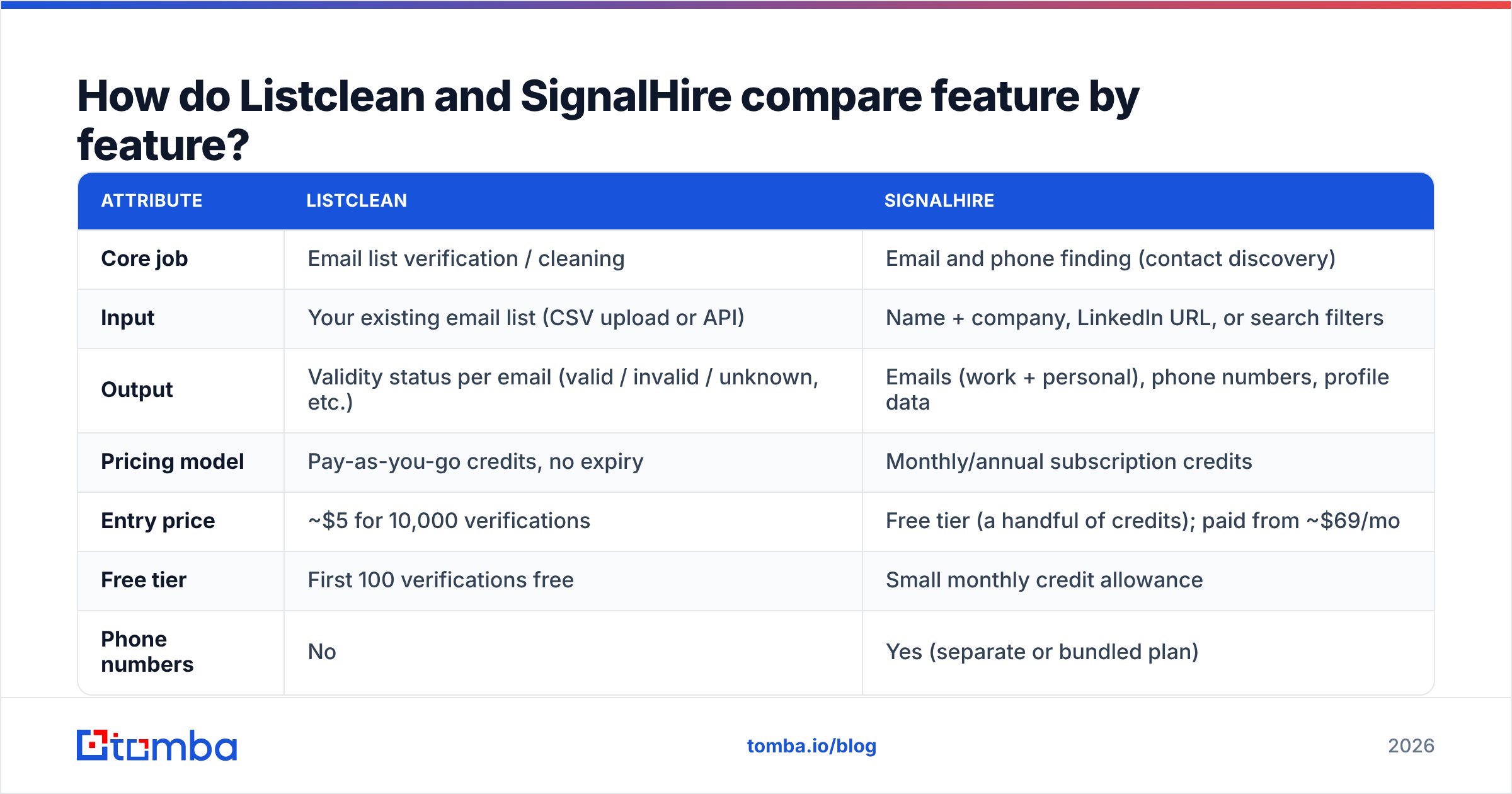
Here's the side-by-side. Pricing is based on public listings at the time of writing. Both vendors change plans, so check their pricing pages before you buy.
| Attribute | Listclean | SignalHire |
|---|---|---|
| Core job | Email list verification / cleaning | Email and phone finding (contact discovery) |
| Input | Your existing email list (CSV upload or API) | Name + company, LinkedIn URL, or search filters |
| Output | Validity status per email (valid / invalid / unknown, etc.) | Emails (work + personal), phone numbers, profile data |
| Pricing model | Pay-as-you-go credits, no expiry | Monthly/annual subscription credits |
| Entry price | ~$5 for 10,000 verifications | Free tier (a handful of credits); paid from ~$69/mo |
| Free tier | First 100 verifications free | Small monthly credit allowance |
| Phone numbers | No | Yes (separate or bundled plan) |
| Chrome extension | No | Yes (LinkedIn, GitHub, and more) |
| API | Yes | Yes |
| Best for | Email marketers, agencies, cold emailers with existing data | Recruiters, SDRs, account-based prospecting |
Two details matter here. Listclean says it doesn't charge for "unknown" results or duplicates, which makes the per-email cost even lower on messy lists (Listclean pricing on G2). SignalHire's plans are split by data type: emails only, phones only, or both. If you need both, you'll likely end up on the bundled tier.
Which workflow does each tool fit?#
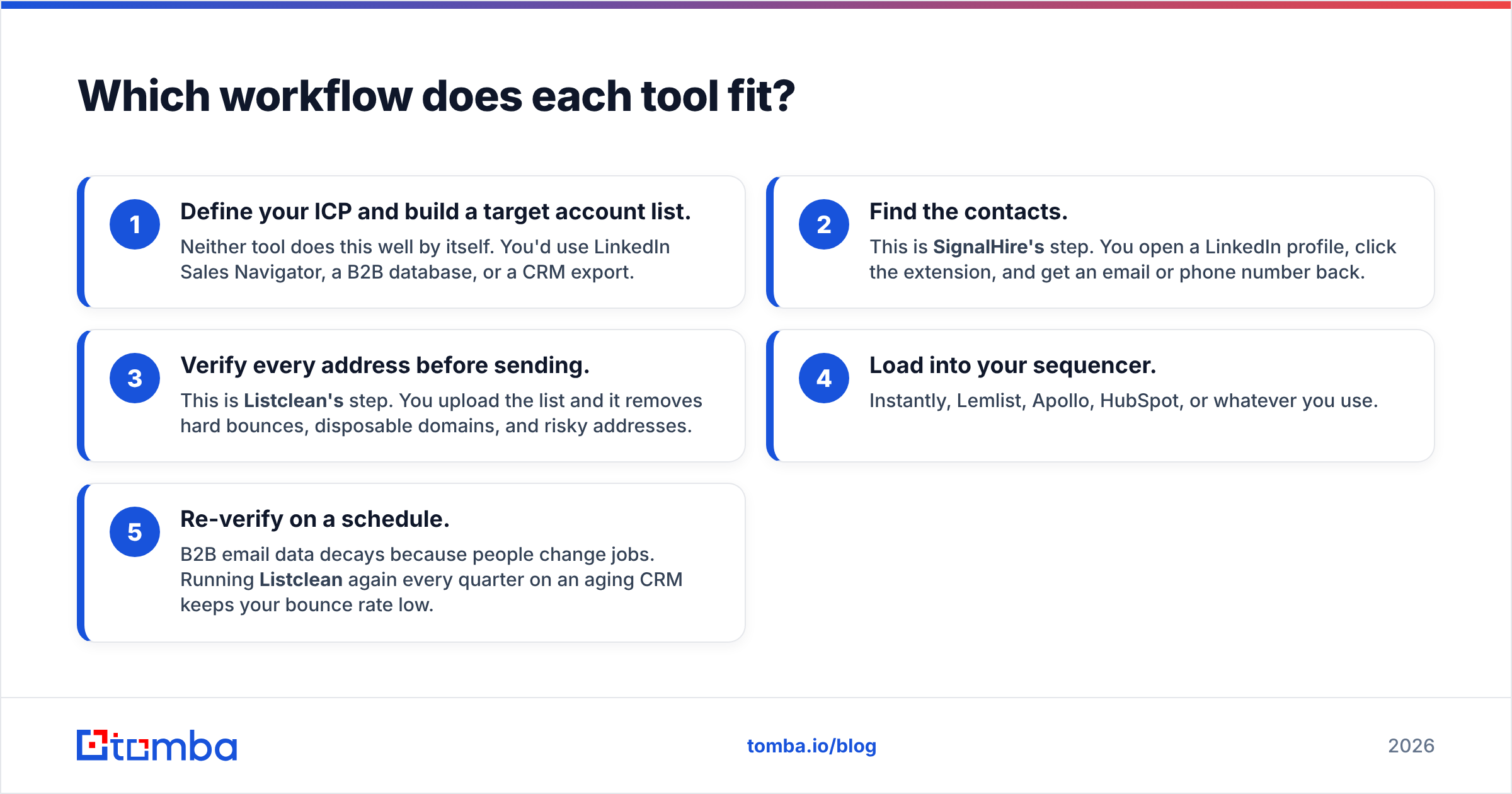
This part is more useful than a winner/loser verdict. Each tool plugs into a specific step of the outbound pipeline:
- Define your ICP and build a target account list. Neither tool does this well by itself. You'd use LinkedIn Sales Navigator, a B2B database, or a CRM export.
- Find the contacts. This is SignalHire's step. You open a LinkedIn profile, click the extension, and get an email or phone number back.
- Verify every address before sending. This is Listclean's step. You upload the list and it removes hard bounces, disposable domains, and risky addresses.
- Load into your sequencer. Instantly, Lemlist, Apollo, HubSpot, or whatever you use.
- Re-verify on a schedule. B2B email data decays because people change jobs. Running Listclean again every quarter on an aging CRM keeps your bounce rate low.
If you do steps 2 and 3 with separate tools, you're paying two vendors and moving CSVs back and forth between them. That's workable at low volume and annoying at high volume.

How much does Listclean cost vs SignalHire?#
Pricing is where the two differ most, because they charge for different units of work.
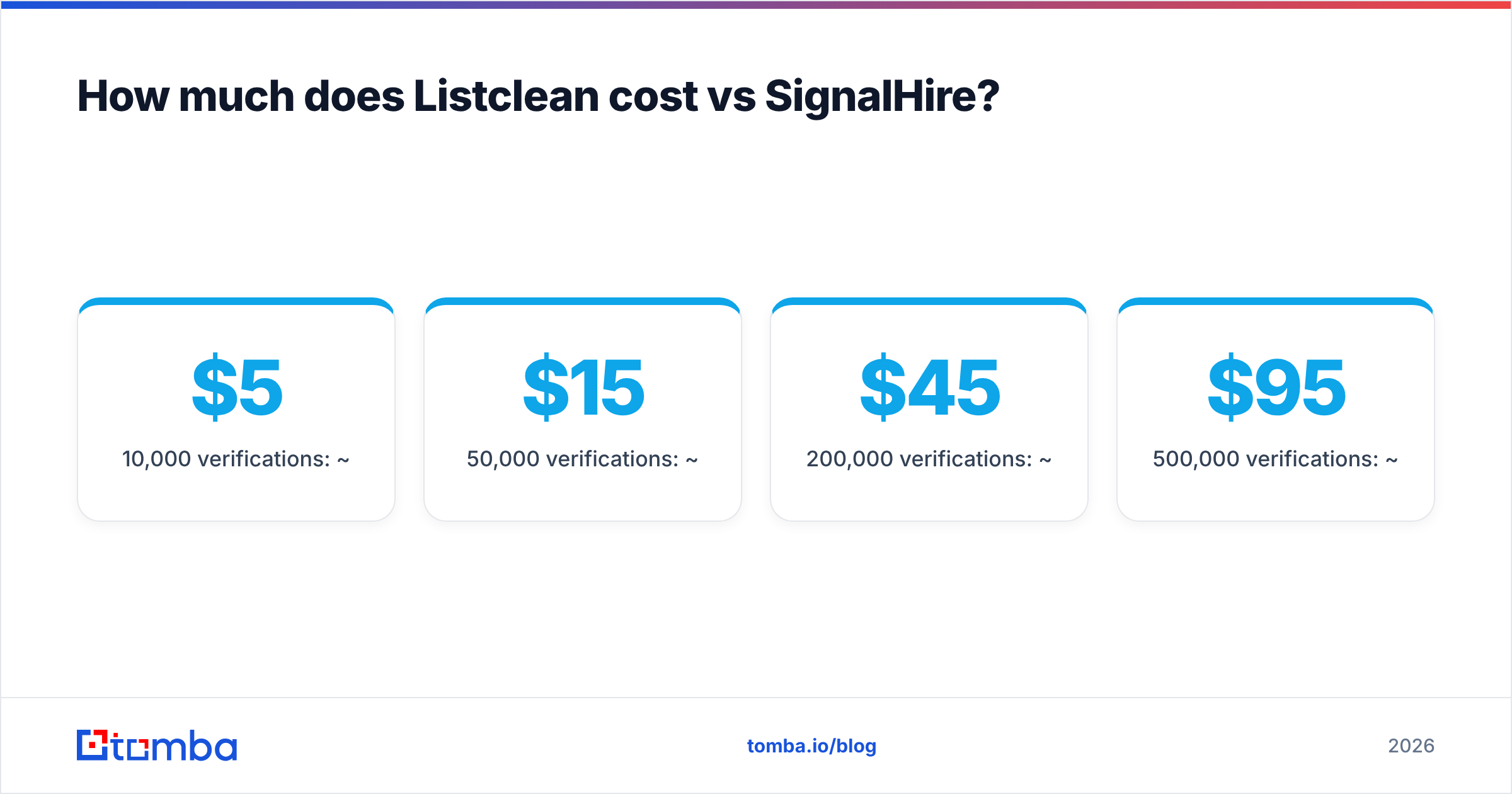
Listclean charges per verification in one-off credit packs that don't expire. Based on current listings (Capterra's ListClean pricing page), the tiers look roughly like this:
- 10,000 verifications: ~$5
- 50,000 verifications: ~$15
- 200,000 verifications: ~$45
- 500,000 verifications: ~$95
- 1,000,000 verifications: ~$145
That works out to fractions of a cent per email, which puts Listclean among the cheapest verifiers available.
SignalHire charges for revealed contacts, which cost much more to produce than a verification check. Public listings show:
- Free: a few credits to try it out
- Emails: ~$69/mo for around 1,000 email credits (cheaper per month on annual billing)
- Phones: ~$69/mo for a few hundred phone credits
- Emails & Phones: ~$99/mo bundle with fair-use limits
- Scale: custom
So a direct price comparison doesn't tell you much. A SignalHire credit gets you a contact you didn't have. A Listclean credit tells you whether a contact you already have is safe to email. The better question is what one bounced email costs you in sender reputation, compared with what one found decision-maker is worth to your pipeline.
Is SignalHire accurate enough to skip verification?#
Often, no. That's the main reason people search for both tools together.
SignalHire verifies emails before it shows them, and like most finders it assigns confidence to its results. But three things cause bounces anyway:
- Catch-all domains. Many companies accept all mail at the SMTP level, so no finder can fully confirm the mailbox exists. Those results are a best guess.
- Data decay. An address that was valid when you exported it may bounce 90 days later after the person leaves.
- Personal vs work emails. SignalHire often returns personal addresses too. They're valid, but sending cold sales email to them brings deliverability and compliance risk, depending on your region.
In practice, experienced cold emailers run any finder's output through a separate verifier before a campaign. Keeping bounces under roughly 2% protects your sender reputation, and fixing a damaged domain costs far more than a verification pass. At Listclean's prices, that extra pass costs pennies.
If you'd rather not run a second tool, a combined platform can handle it. For example, Tomba's email verifier sits next to its finder, so found addresses can be verified in the same workflow.
When should you choose Listclean?#
Choose Listclean if most of these apply to you:
- You already have the data. Newsletter subscribers, event attendees, CRM exports, or a purchased list you need to clean.
- Volume is high and budget is tight. Verifying hundreds of thousands of emails for under $100 is hard to beat.
- You send irregularly. Credits that don't expire suit teams that clean lists before quarterly campaigns rather than every week.
- You don't need phones or enrichment. Listclean does one job and doesn't try to do more.
Where it falls short: it won't help you grow a list. If your pipeline problem is "we don't know who to email," Listclean doesn't solve it.
When should you choose SignalHire?#
Choose SignalHire if most of these apply to you:
- You live on LinkedIn. Recruiters and SDRs who work profile by profile get a lot out of the extension.
- You need phone numbers. Direct dials and mobile numbers are a big reason teams pick SignalHire over email-only finders.
- You're recruiting. SignalHire started in talent sourcing and still supports that well, including personal emails and ATS integrations.
- You have several seats. Public listings say paid plans don't charge per seat, which helps team budgets.
Where it falls short: the credit model gets expensive for large-scale email-only campaigns, and fair-use caps apply on "unlimited" tiers. You should still verify before bulk sending. You can check current plan details on SignalHire's official site.

Is there an alternative that covers both finding and verifying?#
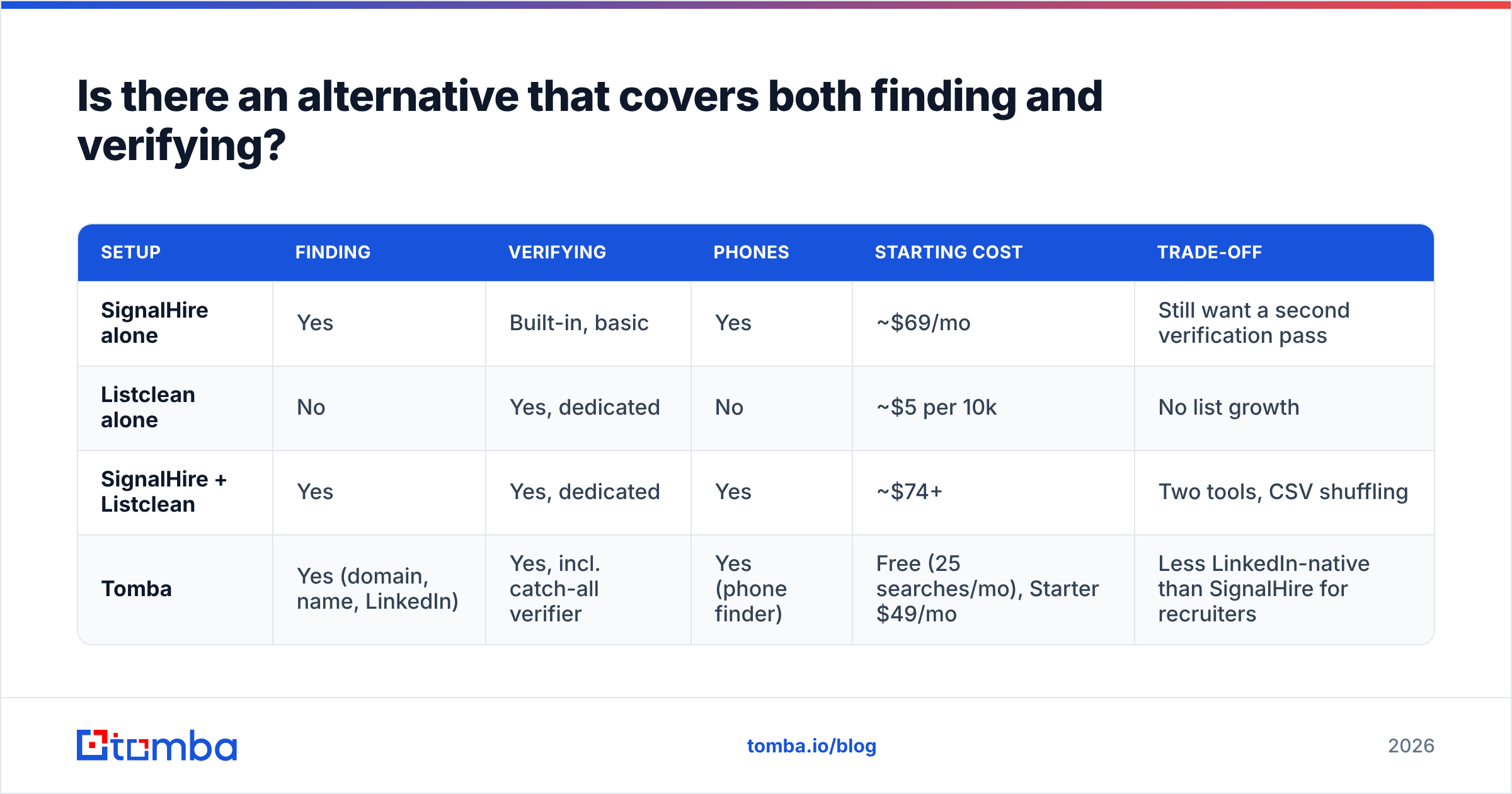
Yes. If you'd otherwise need both tools, an all-in-one platform can be simpler. Here's how a two-tool stack compares with a single platform:
| Setup | Finding | Verifying | Phones | Starting cost | Trade-off |
|---|---|---|---|---|---|
| SignalHire alone | Yes | Built-in, basic | Yes | ~$69/mo | Still want a second verification pass |
| Listclean alone | No | Yes, dedicated | No | ~$5 per 10k | No list growth |
| SignalHire + Listclean | Yes | Yes, dedicated | Yes | ~$74+ | Two tools, CSV shuffling |
| Tomba | Yes (domain, name, LinkedIn) | Yes, incl. catch-all verifier | Yes (phone finder) | Free (25 searches/mo), Starter $49/mo | Less LinkedIn-native than SignalHire for recruiters |
Tomba's paid plans run Starter $49/mo, Growth $99/mo, and Pro $249/mo, with Enterprise on custom pricing. The Tomba pricing page has the credit breakdown. It works well for B2B sales teams that prospect by company domain as well as by LinkedIn profile. Domain search finds everyone at an account, the email finder targets specific people, and the verifier and catch-all verifier check results before export. For high-volume jobs, the bulk email finder runs finding and verification on whole spreadsheets in one pass.
To be fair: if you're a recruiter who works mostly inside LinkedIn and needs personal emails and mobile numbers, SignalHire's extension is built for that. And if all you need is a cheap cleaner for a large existing list, Listclean's per-check pricing is very hard to beat.
How should you decide between Listclean and SignalHire?#
Use this quick decision list:
- "I have 200,000 emails and my bounce rate is 8%." Use Listclean. You have a hygiene problem, not a sourcing problem.
- "I need to reach 300 VPs of Engineering by phone and email this quarter." Use SignalHire, then verify the emails before sending.
- "I need new contacts every week and can't afford bounces." Use a finder with built-in verification, or pair SignalHire with Listclean.
- "I prospect by company, not by person." Use a domain-search tool. Neither Listclean nor SignalHire is designed for account-level email discovery.
- "I'm a recruiter sourcing passive candidates." Use SignalHire. That's its home ground.
The main mistake to avoid is buying SignalHire to clean a list or Listclean to build one. Each is good at its own job and useless at the other's.
What's the bottom line on Listclean vs SignalHire?#
Listclean and SignalHire aren't really competitors. Listclean is a low-cost, pay-as-you-go verifier for lists you already own. SignalHire is a contact finder built around LinkedIn, with strong phone coverage. Choose based on your bottleneck: bad data points to Listclean, missing data points to SignalHire, and if you have both problems you'll need either both tools or one platform that covers both.
If your bottleneck is finding the right B2B contacts and you want them checked before they reach your sequencer, try the Tomba Email Finder. Search by domain, name, or company, verify each result in the same workflow, and start on the free tier with 25 searches a month before committing to a paid plan.
Related guides#
// get started
Find, verify and enrich your first contacts today
Start on the free plan with 25 searches a month, then scale when your team is ready.
Free plan · No credit card required · GDPR & CCPA
// about the author