ListKit vs Kitt AI: List Builder or Email Finder for 2026?
ListKit sells you ready-made lead lists. Kitt AI finds and verifies emails you already have names for. We compare pricing, cost per 1,000 emails, catch-all handling, and which one fits your outbound stack.
TL;DR
- ListKit and Kitt AI solve different problems. ListKit is a B2B lead database and list builder. Kitt AI is an email finder and verifier that works from a name and a domain you already have.
- Pick ListKit if you don't have a list yet. You filter a database of 700M+ contacts (vendor figure), then export leads with triple-verified emails. Annual plans start at $83/mo.
- Pick Kitt AI if you already have the list. It's free for individual users. Pay-as-you-go runs about $0.005 per email found and $0.0015 per verification, which makes it one of the cheapest per-record options available.
- Catch-all domains are where the two really differ. Kitt AI checks addresses against enterprise identity servers instead of relying only on SMTP pings. ListKit bundles its verification into the export credit.
- Plenty of teams need both jobs done. A tool that combines domain search, email finding, and catch-all verification in one plan can take the place of both.
What is the real difference between ListKit and Kitt AI?#
The "ListKit vs Kitt AI" question comes up a lot, but the two tools sit at different points in the prospecting workflow. Comparing them is a bit like comparing a grocery store with a kitchen knife: both help you make dinner, but you'd never buy one expecting it to do the other's job.
ListKit (listkit.io) is a lead list builder. You describe your ICP by industry, headcount, job title, location, or through its plain-English AI company search. ListKit returns matching contacts from its database, and you export them with emails that have been verified three times. Cold email agencies and SDR teams use it to fill sequencers with fresh leads.
Kitt AI (trykitt.ai) is an email finder and verifier. You give it a first name, last name, and company domain, and it returns a verified work email. You can also give it an existing address and it tells you whether that address is deliverable. It has no prospect database to browse. It assumes you already know who you want to reach.
That changes how you should evaluate them. ListKit is priced and judged on list quality and filtering. Kitt AI is priced and judged on find rate, verification accuracy, and cost per record.
How do the two workflows compare step by step?#
This is where each tool fits in a standard outbound pipeline:
- Define the ICP. ListKit handles this with filters and AI company search. Kitt AI doesn't cover this step, so you bring your own targeting from LinkedIn Sales Navigator, a CRM, or a scraped list.
- Build the contact list. ListKit pulls names, titles, and companies from its database. With Kitt AI, you arrive with names and domains already in hand.
- Find the email address. ListKit includes the email in the export. Kitt AI generates candidate addresses and confirms the right one, which is its core job.
- Verify before sending. ListKit's triple verification runs before export. Kitt AI verifies in real time and adds identity-server checks for catch-all domains.
- Push to your sequencer or CRM. ListKit exports CSVs and integrates with common cold email tools. Kitt AI offers CSV upload, a Chrome extension, an API, and native integrations with Salesforce, HubSpot, and Clay.
If your bottleneck is step 2 (you don't know who to email), ListKit is the relevant tool. If your bottleneck is step 3 or 4 (you have names but no reliable addresses, or your bounce rate is too high), Kitt AI is the better fit.

How accurate are ListKit and Kitt AI?#
Neither vendor has published an independent third-party benchmark, so treat every accuracy number below as a vendor claim until you've tested it on your own list.
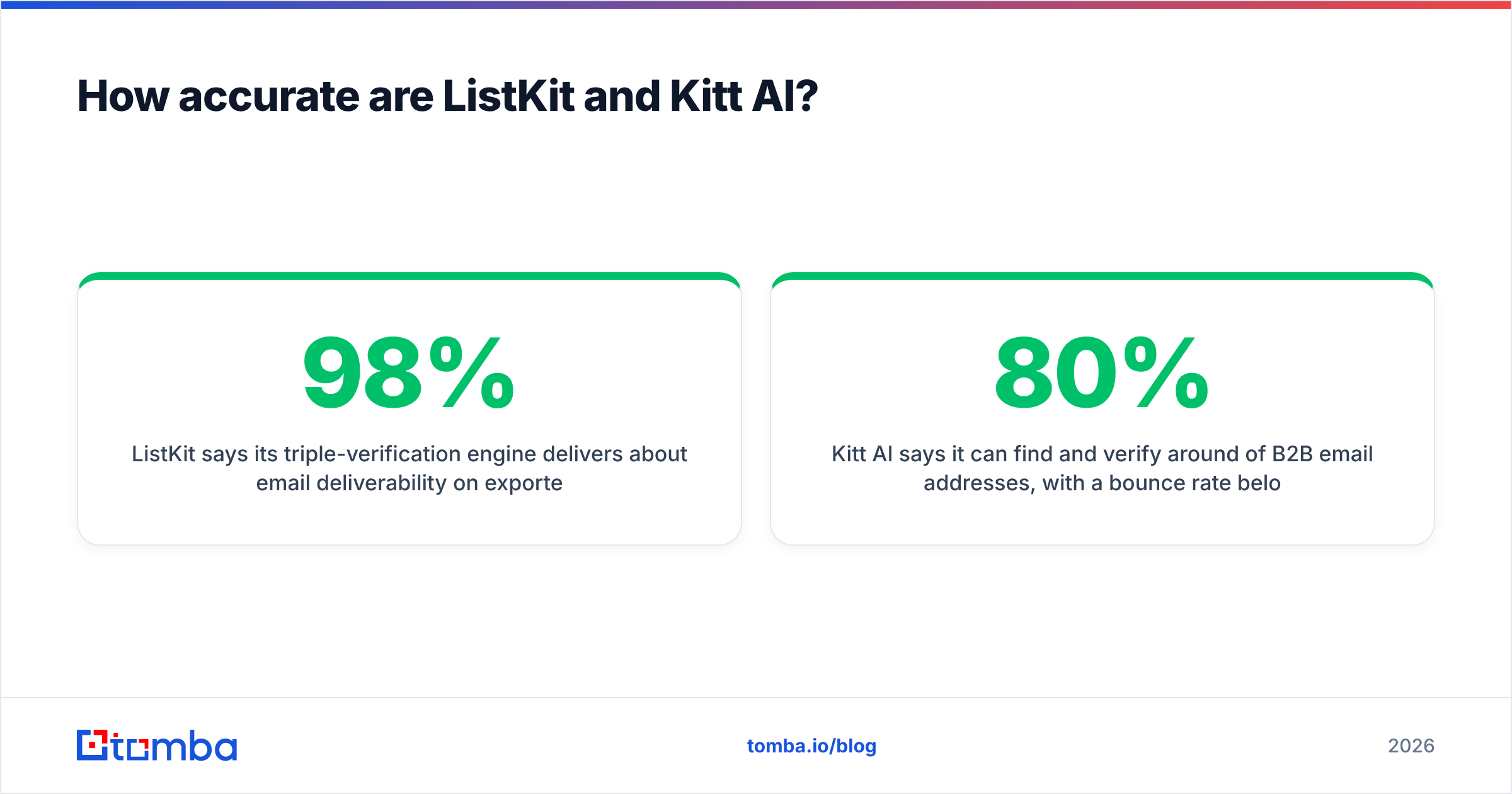
- ListKit says its triple-verification engine delivers about 98% email deliverability on exported leads. In practice, deliverability depends heavily on how old a record is. Database contacts decay as people change jobs, so a record verified six months ago can bounce today. ListKit verifies at export time, which helps.
- Kitt AI says it can find and verify around 80% of B2B email addresses, with a bounce rate below 0.1%, and that it runs 2-5x faster than guess-and-check tools. Its main technical claim is that it checks addresses against enterprise identity servers such as Microsoft 365 and Google Workspace, not just SMTP handshakes. That approach is meant to resolve catch-all domains and detect job changes that SMTP pinging misses.
The catch-all point matters more than most buyers expect. On a catch-all domain, the mail server accepts every address, so a plain SMTP check marks anything@company.com as valid. Many mid-market and enterprise companies run catch-all configurations. If a large share of your list sits on those domains, a basic verifier gives you false confidence and your bounce rate rises anyway. A dedicated catch-all verifier or an identity-server approach like Kitt AI's is how you close that gap.
For an honest read on accuracy, run a 200-500 contact test: take a sample where you already know the true emails (for example, past customers or replied prospects), run it through each tool, and compare find rate, false positives, and bounce rate after a small send.
How much do ListKit and Kitt AI cost?#
The pricing models are as different as the products.
ListKit sells credits on subscription plans. Every plan includes the same features, so you're paying for volume, not access. Per the ListKit credits documentation and current published pricing:
- Free: 100 credits total, all features
- Professional: $83/mo billed annually, 24,000 credits per year
- Scale: $253/mo billed annually, 120,000 credits per year
- Ultimate: $508/mo billed annually, 600,000 credits per year
- A verified business email costs 1 credit. Phone numbers cost more credits and are charged only when found.
- Monthly billing costs more and includes noticeably fewer credits than annual.
Kitt AI is free forever for individual users. Higher-volume users pay as they go, per the Kitt AI pricing page:
- Email found: about $0.005 per success
- Verification: about $0.0015 per check
- Extra user seats: $5 each
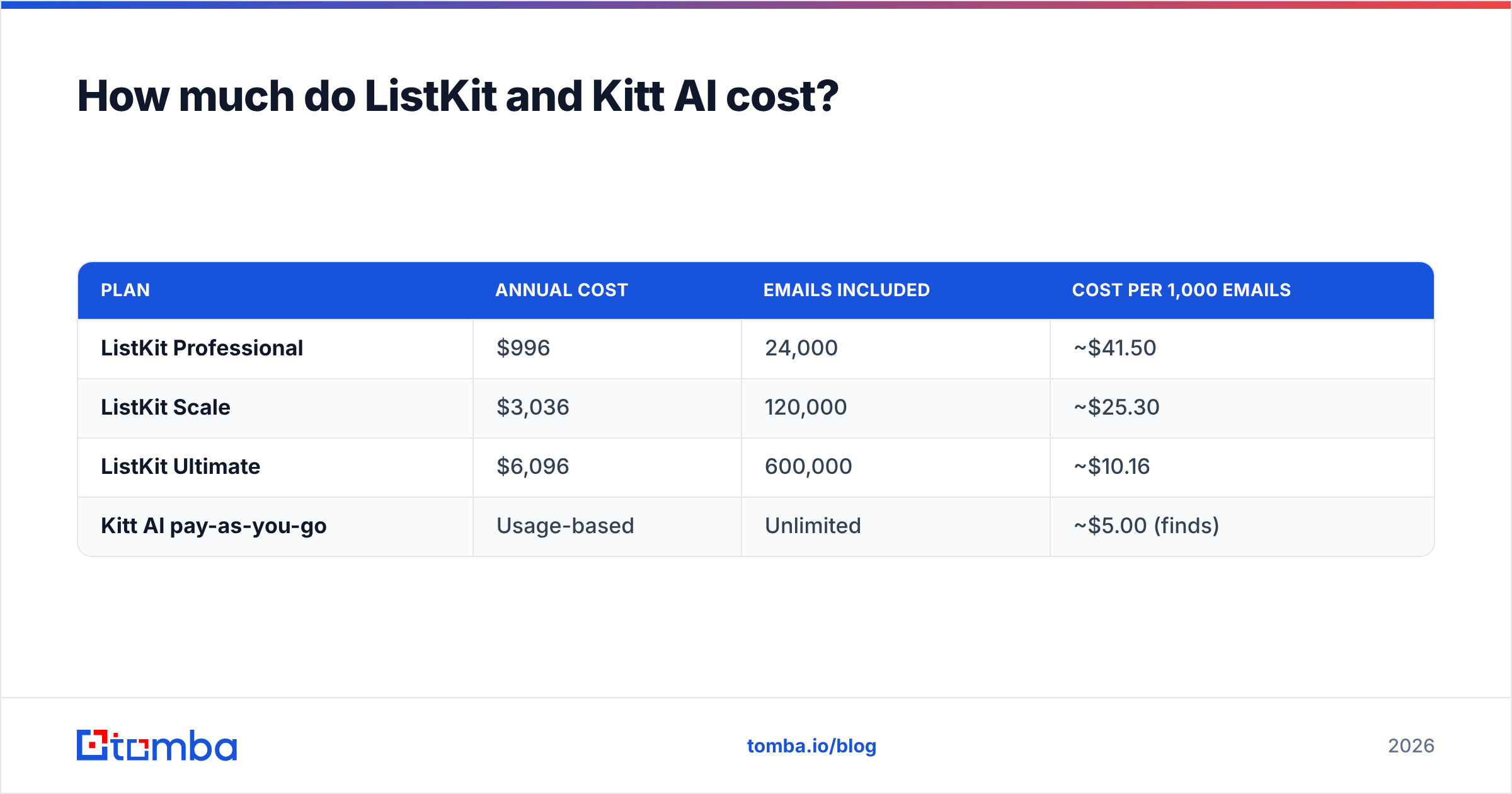
Converted to cost per 1,000 verified emails (ListKit assumes the full annual credit pool is used):
| Plan | Annual cost | Emails included | Cost per 1,000 emails |
|---|---|---|---|
| ListKit Professional | $996 | 24,000 | ~$41.50 |
| ListKit Scale | $3,036 | 120,000 | ~$25.30 |
| ListKit Ultimate | $6,096 | 600,000 | ~$10.16 |
| Kitt AI pay-as-you-go | Usage-based | Unlimited | ~$5.00 (finds) |
At first glance Kitt AI looks four to eight times cheaper. That's misleading. ListKit's credit also pays for the lead itself: the name, title, company, and firmographics from its database. Kitt AI's $5 buys only the email for a person you've already identified. If you pay separately for Sales Navigator or another data source to build the list, add that cost to Kitt AI's side before you compare.

Watch out for annual lock-in. ListKit's best per-credit rates come with yearly billing, so budget for the whole commitment, not the monthly figure. Unused credits on an annual plan are money you've already spent.
How do ListKit and Kitt AI compare feature by feature?#
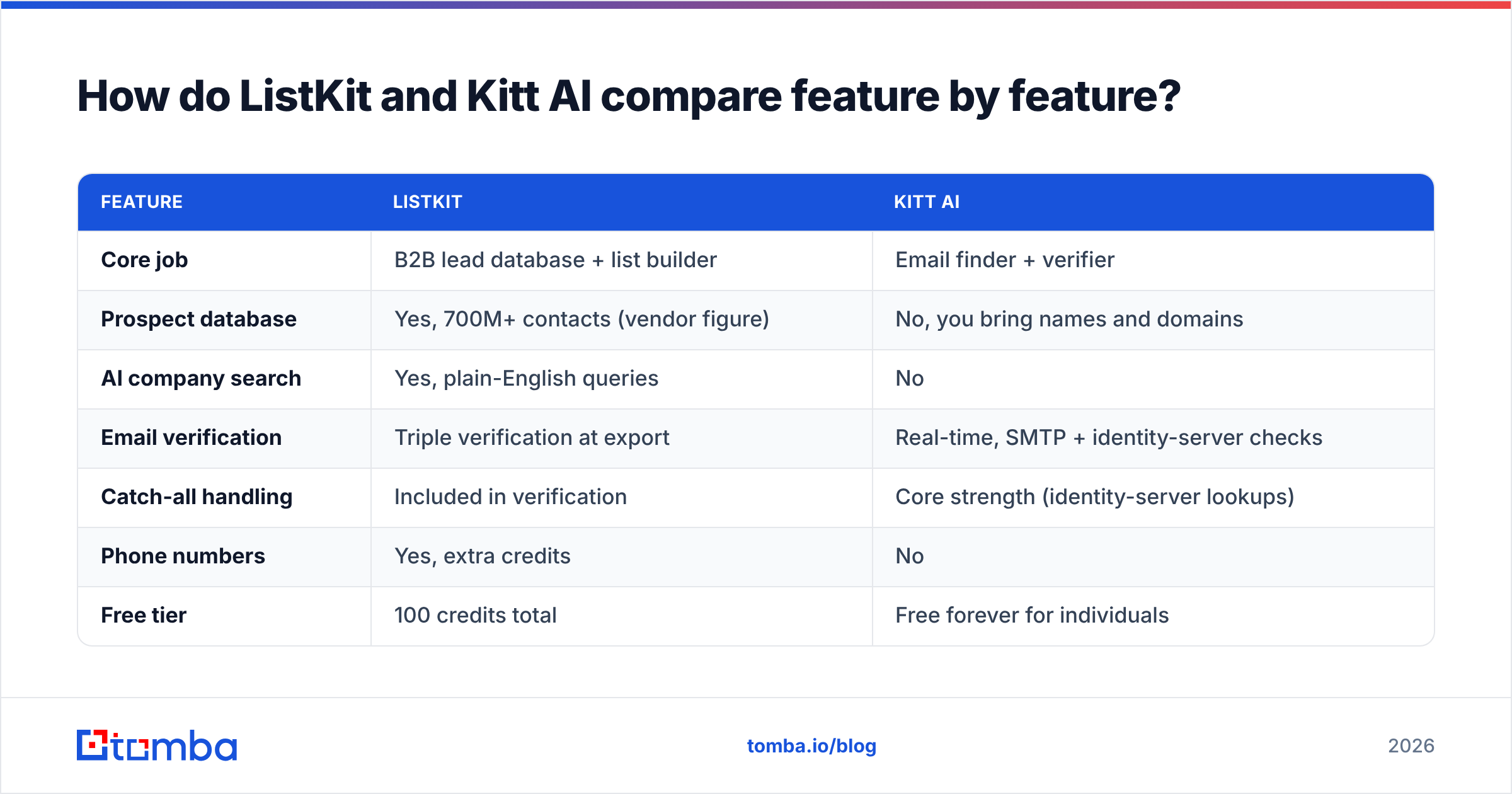
| Feature | ListKit | Kitt AI |
|---|---|---|
| Core job | B2B lead database + list builder | Email finder + verifier |
| Prospect database | Yes, 700M+ contacts (vendor figure) | No, you bring names and domains |
| AI company search | Yes, plain-English queries | No |
| Email verification | Triple verification at export | Real-time, SMTP + identity-server checks |
| Catch-all handling | Included in verification | Core strength (identity-server lookups) |
| Phone numbers | Yes, extra credits | No |
| Free tier | 100 credits total | Free forever for individuals |
| Paid entry point | $83/mo (annual) | Pay-as-you-go, ~$0.005/find |
| API | Available | Yes, plus an MCP server for AI assistants |
| Integrations | CSV + cold email tools | Salesforce, HubSpot, Clay, Chrome extension, CSV |
| Best for | Agencies needing fresh lists fast | Teams enriching lists they already own |
| Main drawback | Annual commitment for the best rates | No targeting or discovery |
Is ListKit better than Kitt AI?#
ListKit is the better choice when:
- You run a cold email agency and need thousands of new, filtered leads every month for different clients.
- You don't have a data source yet and want targeting and emails in one purchase.
- You want phone numbers alongside emails for multichannel sequences.
- Predictable, flat credit budgeting matters more to you than the lowest cost per record.
ListKit's weaknesses: the lowest prices require annual billing, the data is only as fresh as the last verification, and you're limited to the contacts ListKit has already indexed. Niche verticals, very small companies, and non-US markets often have thinner coverage in any database, and you won't know how thin until you search.
Is Kitt AI better than ListKit?#
Kitt AI is the better choice when:
- Your targeting already comes from Sales Navigator, a scraped conference attendee list, event registrants, or your CRM.
- Your campaigns hit a lot of enterprise or catch-all domains where SMTP-only verifiers fail.
- You're a solo founder or SDR who can use the free individual tier.
- You're building automated enrichment in Clay, a CRM workflow, or an AI agent through its API or MCP server.
Kitt AI's weaknesses: it has no discovery layer, no phone data, and its accuracy claims haven't been independently verified yet. Review coverage on sites like G2 is also much thinner than for older tools, so you'll depend more on your own testing.
Can you use ListKit and Kitt AI together?#
Yes, and some agencies do. The pattern works like this:
- Build the list in ListKit to get targeting and baseline emails.
- Re-verify the risky segment with Kitt AI. Catch-all domains and records older than 60-90 days are the usual candidates.
- Suppress anything that fails before it reaches your sequencer.
This layered approach protects your sender reputation, but it also means two vendors, two bills, and a data handoff between them. A single platform that covers both jobs is usually cheaper and simpler to run once your volume settles down.
Where does Tomba fit in the ListKit vs Kitt AI decision?#
To be fair, Tomba doesn't try to be ListKit. If you want a massive filterable contact database with AI company search as your main workflow, a dedicated list builder is built for that job.
Where Tomba overlaps with both tools is the middle ground many teams actually need:
- Domain-first discovery. Domain search returns the known email addresses for a company, which fills the gap Kitt AI leaves when you know the account but not the people.
- Name + domain finding. The email finder covers the same job Kitt AI does, with source URLs attached to results so you can see where an address was found.
- Verification that handles catch-alls. A standard email verifier plus a dedicated catch-all verifier, so risky domains don't slip through as "valid."
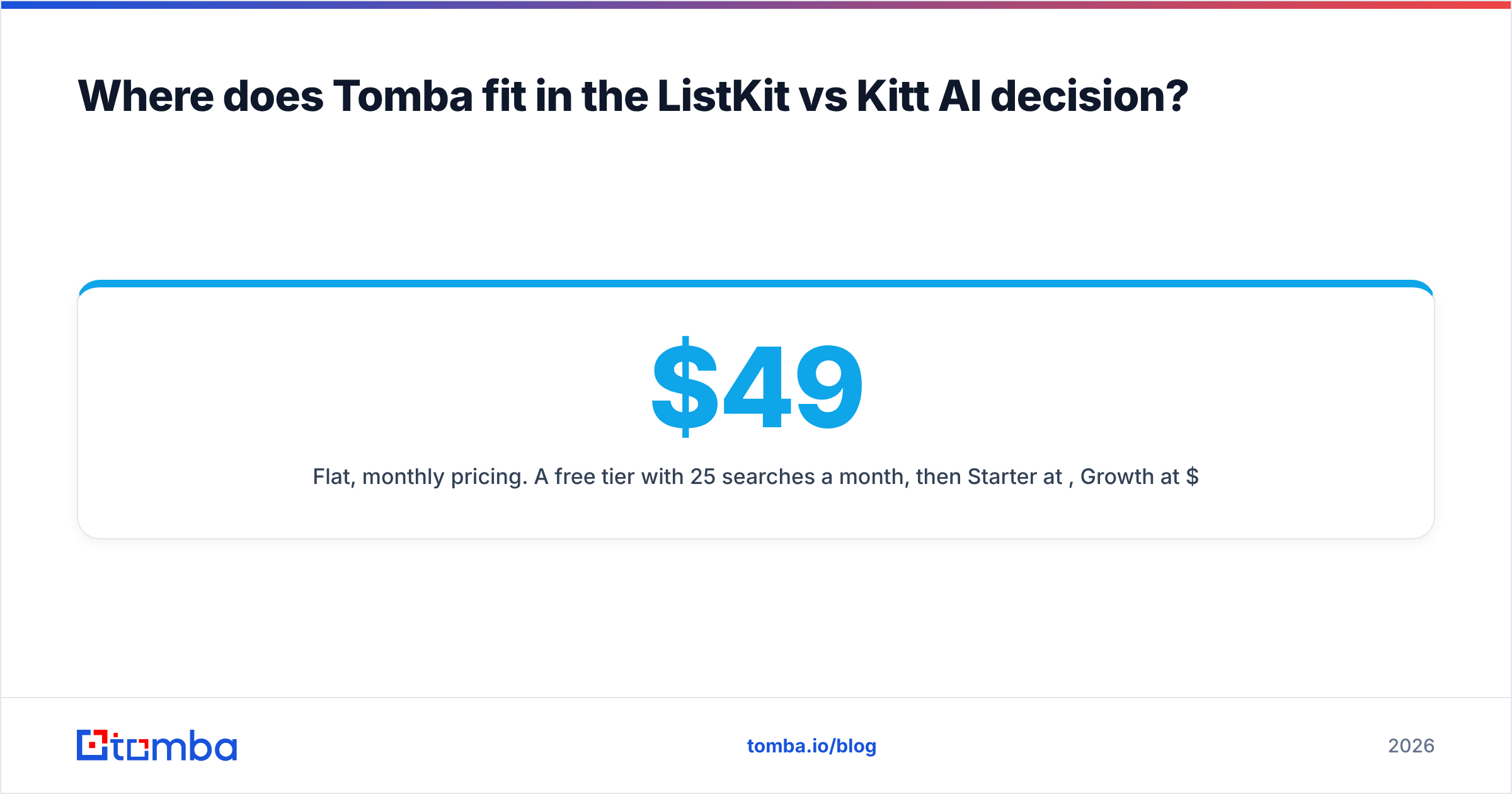
- Flat, monthly pricing. A free tier with 25 searches a month, then Starter at $49/mo, Growth at $99/mo, and Pro at $249/mo, with no annual lock-in required. Full breakdown on the Tomba pricing page.
If you're choosing between ListKit and Kitt AI because you need discovery plus finding plus verification, that's one purchase decision, not two.
Which should you choose: ListKit or Kitt AI?#
Choose based on where your pipeline breaks, not on headline features:
- No list, need volume fast: ListKit. Take the annual plan only if you're confident about monthly usage.
- Have names, need accurate emails cheaply: Kitt AI, especially for catch-all-heavy enterprise lists.
- High bounce rate on an existing database: run a Kitt AI or catch-all verification pass before switching data vendors.
- Need accounts, contacts, and verification in one tool without an annual commitment: a combined finder-plus-verifier platform.
Whichever you choose, run a sample test before committing. Take 300 contacts, send a small warm-up batch, and measure real bounces. Vendor accuracy percentages are marketing until your own inbox confirms them.
If you've narrowed the decision down to finding and verifying the right work emails for the accounts you already target, try the Tomba Email Finder. You can start with the free 25 monthly searches, test it against your own known-good contacts, and move to Starter at $49/mo only after the find rate holds up on your data.
Related guides#
// get started
Find, verify and enrich your first contacts today
Start on the free plan with 25 searches a month, then scale when your team is ready.
Free plan · No credit card required · GDPR & CCPA
// about the author