ListKit vs Mailshunt: Lead Database or Lean Email Finder in 2026?
ListKit builds verified lead lists from a large B2B database. Mailshunt finds and checks emails one domain at a time. Here's which one fits your outbound workflow, what each really costs per lead, and where both come up short.
- ListKit is a list-building platform. You filter a large B2B contact database by title, industry, headcount and intent, then export leads that have been verified at the moment you export them. It fits agencies and SDR teams that send cold email at volume.
- Mailshunt is a lightweight email finder and verifier. It offers domain search, name-plus-domain lookup, a verifier and browser extensions. It fits freelancers and founders who already know which companies they want to reach.
- Price gap: third-party pricing roundups list ListKit's paid plans at roughly $83/mo and up on annual billing. Mailshunt's paid plans reportedly start around $19/mo. The cheaper tool also does much less.
- Our pick: choose ListKit if you need someone to build the list for you. Choose Mailshunt if you only need to find a handful of addresses. If you need both jobs done at a mid-range price, a dedicated finder like Tomba sits between them.
What is the real difference between ListKit and Mailshunt?#
These two tools don't solve the same problem, and that matters more than any feature checklist. You open ListKit when you don't yet know who to contact. You open Mailshunt when you already have a name and a company and just need the address.
An analogy helps. ListKit is a wholesale supplier: you order 2,000 VP-level contacts at Series B fintech companies in Germany and get a packaged, verified batch back. Mailshunt is a locksmith: you give it one door (a domain plus a person's name) and it tries to open it.
That split drives everything else, including pricing, credit logic, verification depth and who ends up happy with each tool.
ListKit (listkit.io) markets itself on a database of hundreds of millions of B2B contacts. Third-party reviews cite a figure above 700M. On top of that database it adds AI-assisted company search, intent filters, CRM integrations and what it calls "triple verification," a multi-step check that runs when you export. It also sells cold email infrastructure and coaching as add-ons, so it leans toward being an outbound agency toolkit.
Mailshunt is a much smaller product. Its core pieces are an Email Finder (name + domain), a Domain Search that lists addresses it has indexed for a company, an Email Verifier, and Chrome and Firefox extensions. It has historically described its index as "more than 20 million" addresses. That is small next to list-building databases, but a narrow index can still work if your targets are mostly tech and startup domains.
How do ListKit and Mailshunt compare feature by feature?#
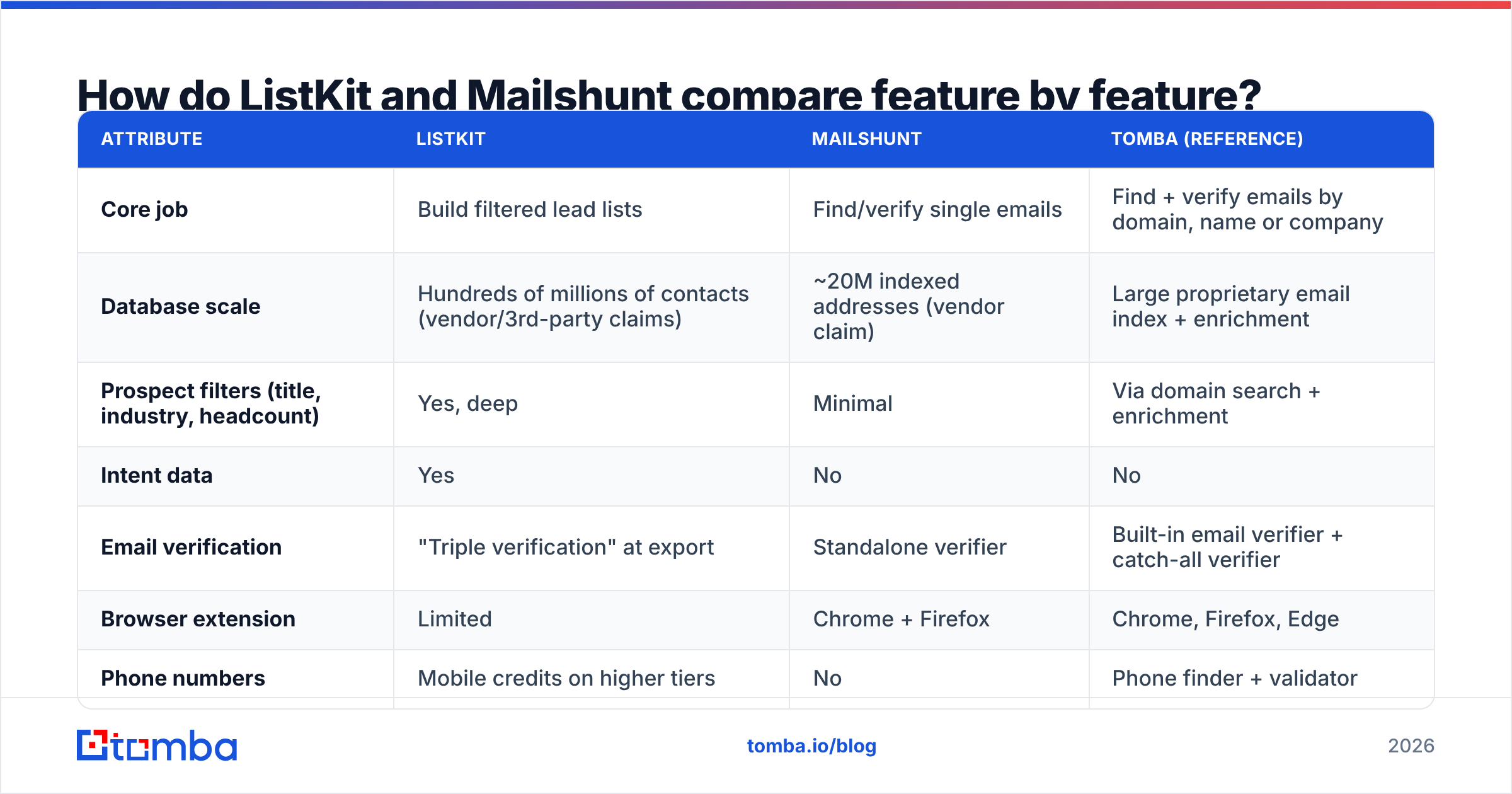
Here is the head-to-head. We use Tomba as a reference column because most buyers comparing these two are also weighing a dedicated finder in the middle. Pricing for ListKit and Mailshunt comes from public listings and third-party roundups, and both vendors change tiers often, so confirm on their sites before you buy.
| Attribute | ListKit | Mailshunt | Tomba (reference) |
|---|---|---|---|
| Core job | Build filtered lead lists | Find/verify single emails | Find + verify emails by domain, name or company |
| Database scale | Hundreds of millions of contacts (vendor/3rd-party claims) | ~20M indexed addresses (vendor claim) | Large proprietary email index + enrichment |
| Prospect filters (title, industry, headcount) | Yes, deep | Minimal | Via domain search + enrichment |
| Intent data | Yes | No | No |
| Email verification | "Triple verification" at export | Standalone verifier | Built-in email verifier + catch-all verifier |
| Browser extension | Limited | Chrome + Firefox | Chrome, Firefox, Edge |
| Phone numbers | Mobile credits on higher tiers | No | Phone finder + validator |
| API | Available | Limited public docs | Full REST API, CLI, MCP |
| Free tier | ~100 credits | Free with limits | 25 searches/mo |
| Entry paid price | ~$83/mo annual (3rd-party listings) | ~$19/mo (3rd-party listings) | $49/mo Starter |
| Best for | Agencies, SDR teams at volume | Solo founders, occasional lookups | SMB sales teams, developers, RevOps |

How does each tool actually work in a prospecting workflow?#
Credit models and interfaces shape what your week looks like, so it's worth walking through what you'd actually do in each tool.
- Define your target (ListKit wins). In ListKit you start from the ICP: job titles, seniority, industry, location, company size, and optionally intent topics. Mailshunt has no real equivalent. You need to bring your own account list from LinkedIn, a CRM export or a spreadsheet.
- Pull contacts (depends on input). ListKit returns people who match your filters. Mailshunt needs a domain, or a domain plus a name, for each lookup. If you have 50 named targets, Mailshunt's model is simple. If you have 5,000 anonymous targets, it doesn't fit.
- Verify (ListKit is automatic, Mailshunt is manual). ListKit verifies at export, and third-party reviews quote a ~98% deliverability figure from the vendor. With Mailshunt you run the verifier yourself, which is fine for small batches and tedious for large ones.
- Spend credits (different math). Reviewers report that ListKit charges 1 credit for a business email, more for LinkedIn URLs or intent signals, and around 8–10 credits for full enrichment with a mobile number. Mailshunt charges per search or verification within a monthly cap.
- Push to your sequencer (ListKit is more integrated). ListKit exports straight to CRMs and cold email tools. Mailshunt works best as a copy-paste or CSV step.
The structure above explains most of the online reviews. People who praise ListKit talk about speed to a sendable list. People who like Mailshunt talk about quick lookups from the browser without a big subscription.
Which is more accurate: ListKit or Mailshunt?#
Neither vendor publishes an independent third-party accuracy audit, so be skeptical of any single number, including the ones in this post.
What you can say with confidence:
- ListKit's verification is structurally stronger for bulk. Verifying at export means the data you download was checked recently, not whenever it was last scraped. That matters because B2B contact data decays quickly as people change jobs, companies rebrand and mailboxes get deactivated.
- Mailshunt's accuracy depends on coverage. A smaller index means more "not found" results. Every miss costs you either a credit or a manual guess. For well-known tech domains it can work well. For mid-market manufacturers or non-US companies, expect gaps.
- Catch-all domains hurt both. When a company's mail server accepts every address, standard SMTP checks can't confirm a specific mailbox exists. ListKit's pipeline flags these to some degree. Mailshunt's verifier returns a risky or unknown status. If a large share of your market runs catch-all servers, you need a dedicated catch-all verifier or you should accept a higher bounce risk.
Whichever tool you pick, test before you commit. Take 200 contacts you already have confirmed addresses for, run them through the tool, and measure found rate, correct rate and bounce rate on a small real send. That test tells you more than any vendor's accuracy claim.
What do ListKit and Mailshunt really cost per lead?#
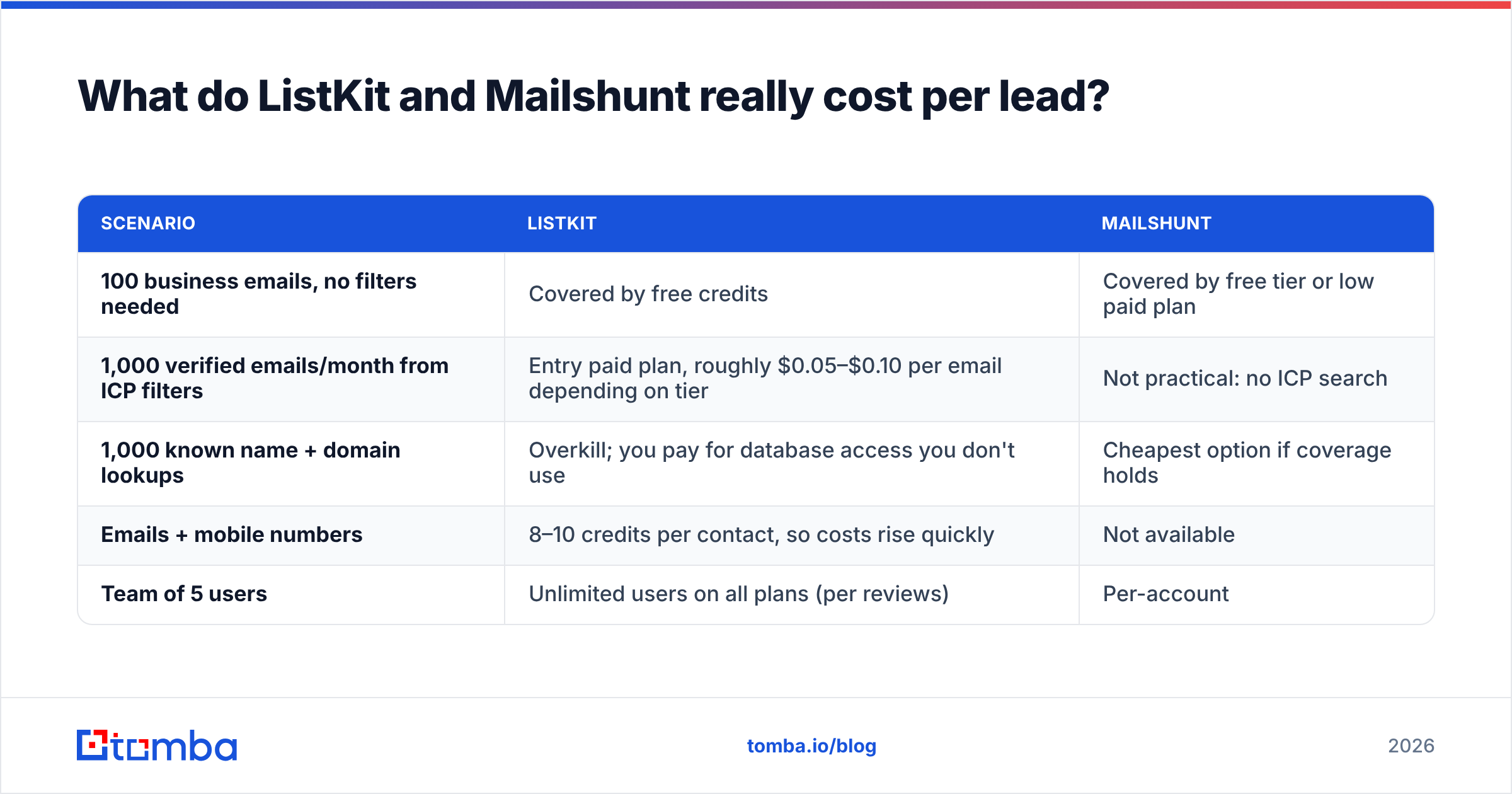
Sticker price is misleading because the two tools charge for different units. A rough per-lead view looks like this:
| Scenario | ListKit | Mailshunt |
|---|---|---|
| 100 business emails, no filters needed | Covered by free credits | Covered by free tier or low paid plan |
| 1,000 verified emails/month from ICP filters | Entry paid plan, roughly $0.05–$0.10 per email depending on tier | Not practical: no ICP search |
| 1,000 known name + domain lookups | Overkill; you pay for database access you don't use | Cheapest option if coverage holds |
| Emails + mobile numbers | 8–10 credits per contact, so costs rise quickly | Not available |
| Team of 5 users | Unlimited users on all plans (per reviews) | Per-account |
Two things stand out.
First, ListKit's value depends on how often you use the list builder. If you only use it for simple lookups, you are paying for filters and intent data you never touch. Its unlimited-user model helps agencies, since everyone on the team shares one credit pool.
Second, Mailshunt's low price assumes you already did the research. Your SDR's time spent building account lists in LinkedIn or a spreadsheet is the hidden cost. At a loaded cost of $40–$60/hour, a few hours a week of manual list building costs more than the gap between the two subscriptions.
Who should choose ListKit?#
Pick ListKit if most of these describe you:
- You send 1,000+ cold emails per month and need fresh, filtered lists every week.
- You run an agency with several client ICPs and want unlimited seats on one plan.
- You care about intent signals and want to prioritize accounts researching a topic.
- You'd rather pay more per month than spend SDR hours building lists by hand.
- You want coaching and done-for-you infrastructure from the same vendor.
The trade-offs: pricing is higher, mobile numbers use credits quickly, and like every large database, some records will be stale in niche verticals. User reviews on G2 are mostly positive about ease of use and verification, with the usual complaints about credit burn and coverage in specific regions.
Who should choose Mailshunt?#
Mailshunt is reasonable if:
- You're a solo founder, freelancer, recruiter or journalist doing a few dozen lookups a month.
- You already know exactly who you want to reach and only need the address.
- You want a browser extension for lookups while you browse company sites.
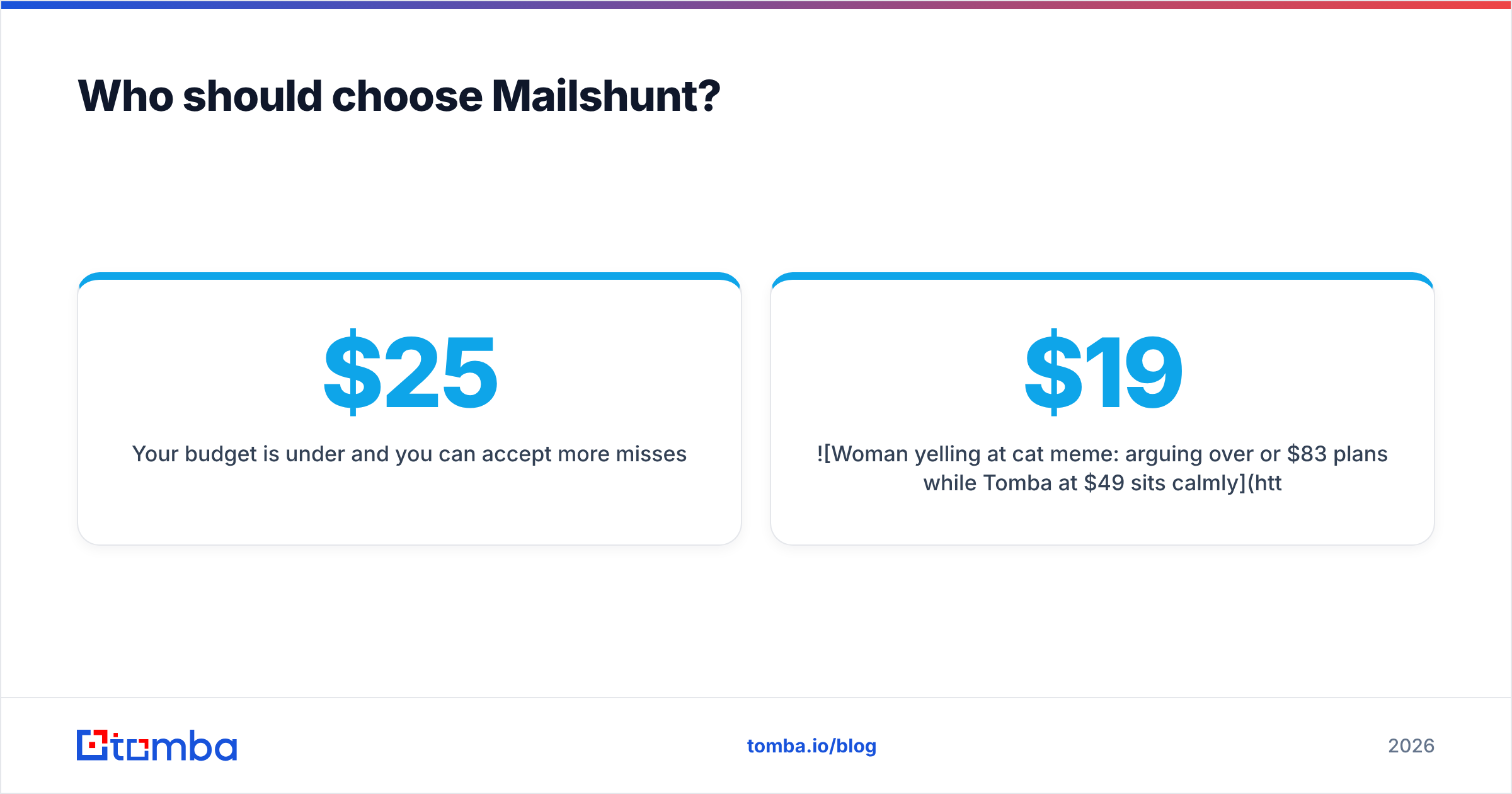
- Your budget is under $25/month and you can accept more misses.
The trade-offs are real, though. The index is small, public documentation is thin, integrations are few, and there is no prospect search. Public information about the product is also limited compared with larger vendors, so run a proper trial before you rely on it for pipeline.

Is there a middle option between ListKit and Mailshunt?#
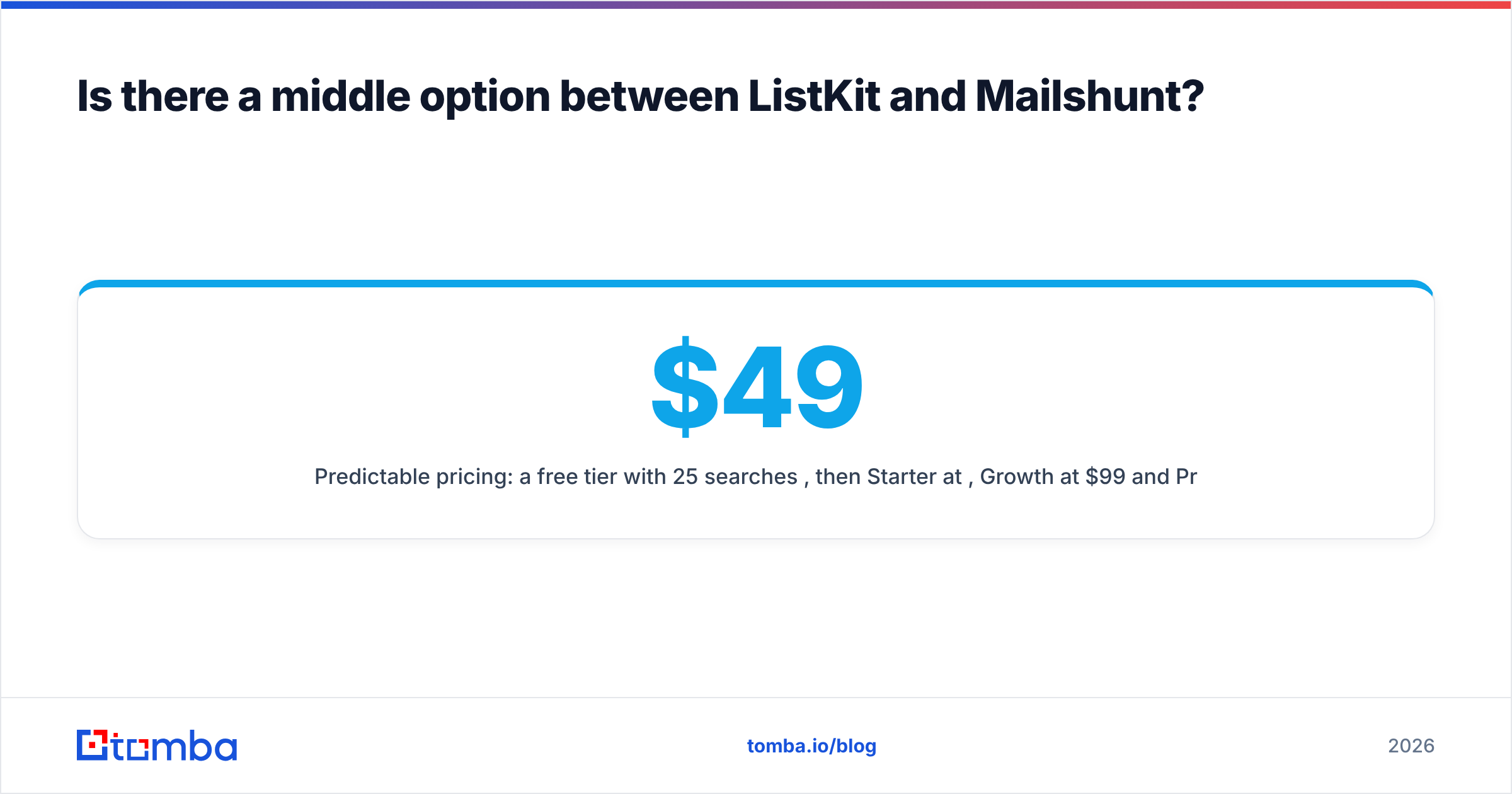
Yes, and for many teams it's the practical answer. ListKit and Mailshunt sit at opposite ends: a full list builder at a list-builder price, and a minimal finder at a minimal price. Plenty of B2B teams need something in between: reliable finding and verification at scale, plus bulk and API access, without paying for intent data they won't use.
That middle ground is where dedicated finders like Tomba fit:
- Domain-first discovery. A domain search returns the known addresses at a company along with sources, so you can see why an email was suggested.
- Name + company lookups in the web app, extension, Google Sheets, or through the API.
- Verification in the same workflow, including catch-all handling, so you don't need a second verification vendor.
- Bulk jobs for CSVs of thousands of rows, which covers the gap Mailshunt leaves.
- Predictable pricing: a free tier with 25 searches/month, then Starter at $49/mo, Growth at $99/mo and Pro at $249/mo. See Tomba pricing for credit details.
What Tomba doesn't try to be is a full ICP list builder with intent data. If filtering millions of contacts by buying signals is your main job, ListKit's model fits better. You can also combine the two: use ListKit to build the list and a separate finder/verifier to fill gaps and re-verify older records before a send.
ListKit vs Mailshunt: what's the final verdict?#
The short version:
| If your main need is... | Choose |
|---|---|
| Building targeted lists from scratch at volume | ListKit |
| A few dozen one-off lookups on a tiny budget | Mailshunt |
| Finding + verifying emails for known accounts at scale, with API/bulk | A dedicated finder (e.g. Tomba) |
| Intent-driven account prioritization | ListKit |
| Browser-based lookups while browsing sites | Mailshunt or Tomba extension |
ListKit is the stronger product overall, with a larger database, better bulk verification and deeper integrations. You pay for that depth, and it only pays off if you use it. Mailshunt is fine for light use but hits its limits as soon as outbound becomes a real channel for you. Before committing to either, run the 200-contact test described above. Your own bounce rate is the only accuracy number that counts.
If you already know which companies you're going after and want accurate addresses without paying list-builder prices, try the Tomba Email Finder. Start on the free tier with 25 searches a month, test it against your own known contacts, and move up to Starter at $49/mo when the found rate proves itself on your market. You get domain search, name lookups, built-in verification and bulk processing in one place.
Related guides#
// get started
Find, verify and enrich your first contacts today
Start on the free plan with 25 searches a month, then scale when your team is ready.
Free plan · No credit card required · GDPR & CCPA
// about the author