ListKit vs Null Bounce: Lead Database or Email Verifier in 2026?
ListKit builds lead lists with pre-verified emails. Null Bounce cleans lists you already own. Here is what each one costs, where each one falls short, and which fits your outbound stack.
TL;DR
- ListKit and Null Bounce do different jobs. ListKit is a B2B lead database that exports contacts after verifying them three times. Null Bounce is an email verifier that cleans lists you already have.
- ListKit is a subscription. At the time of writing, third-party reviews list the Professional plan at $97/mo for 2,000 triple-verified email credits and Scale at $297/mo for 8,000. You're only charged for emails that pass verification.
- Null Bounce is pay-as-you-go. One-time packs start at about $5, duplicate emails aren't charged, and you get catch-all, role-based and disposable detection plus an API.
- Pick ListKit if you have no list yet. Pick Null Bounce if you already have one. Plenty of teams need both jobs done, and that's where an all-in-one finder plus verifier is worth a look.
- Check live pricing before you buy. Both vendors change plans, and the figures here come from public listings as of 2026.
What is the real difference between ListKit and Null Bounce?#
Most "ListKit vs Null Bounce" searches come from people who assume the two tools compete. They mostly don't, because they sit at opposite ends of an outbound workflow.
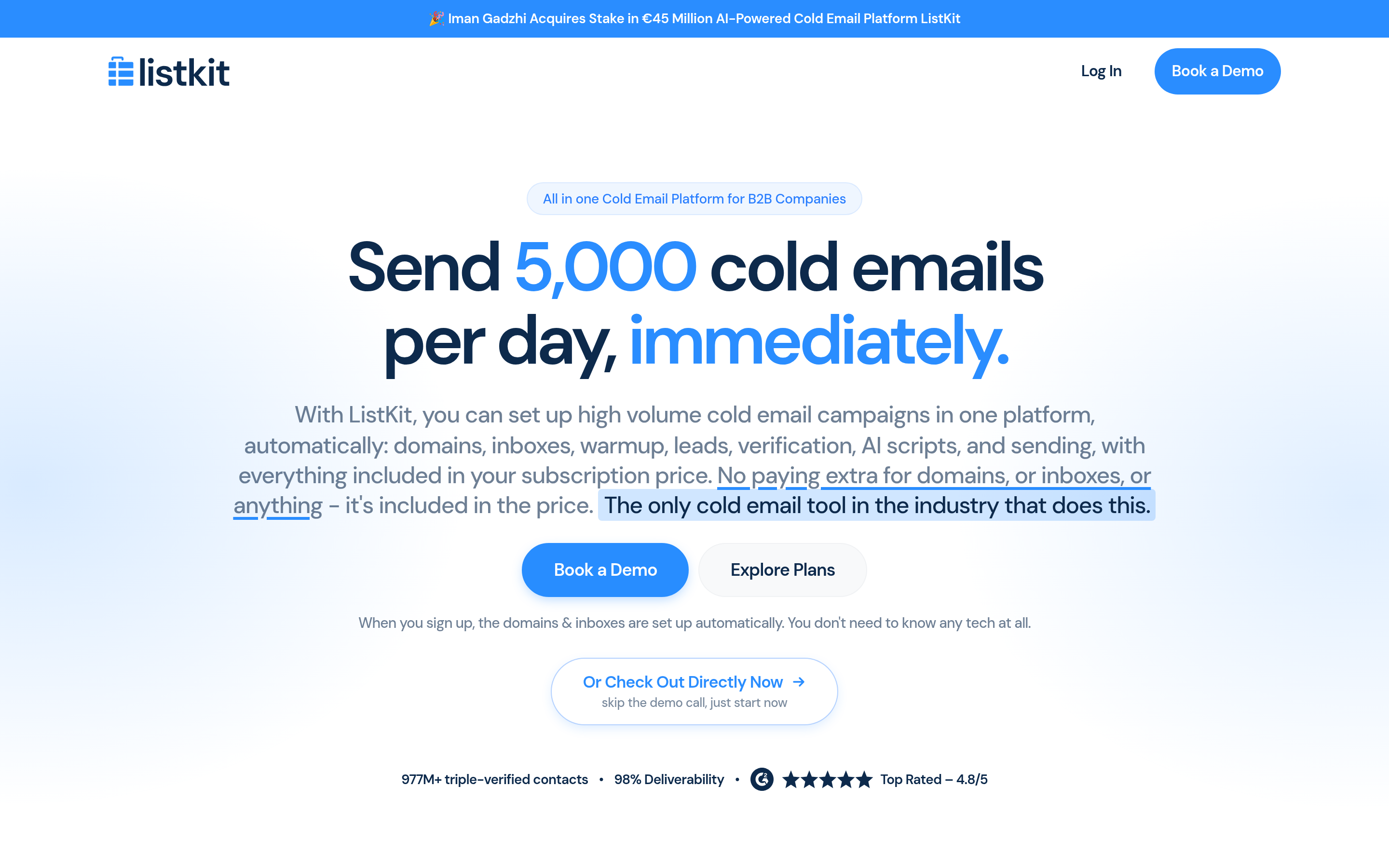
ListKit is a list-building platform. You filter by industry, headcount, job title, technology or intent signals, and ListKit gives you contacts whose emails have already gone through three verification passes. You pay for data you don't have yet.
Null Bounce is an email verification service. You upload a CSV or call its API, and it tells you which addresses are valid, invalid, risky, catch-all, role-based or disposable. It doesn't find anyone. It only checks addresses you already hold.
So the question to ask first is whether your problem is having no contacts or having contacts you don't trust. Everything else follows from that.
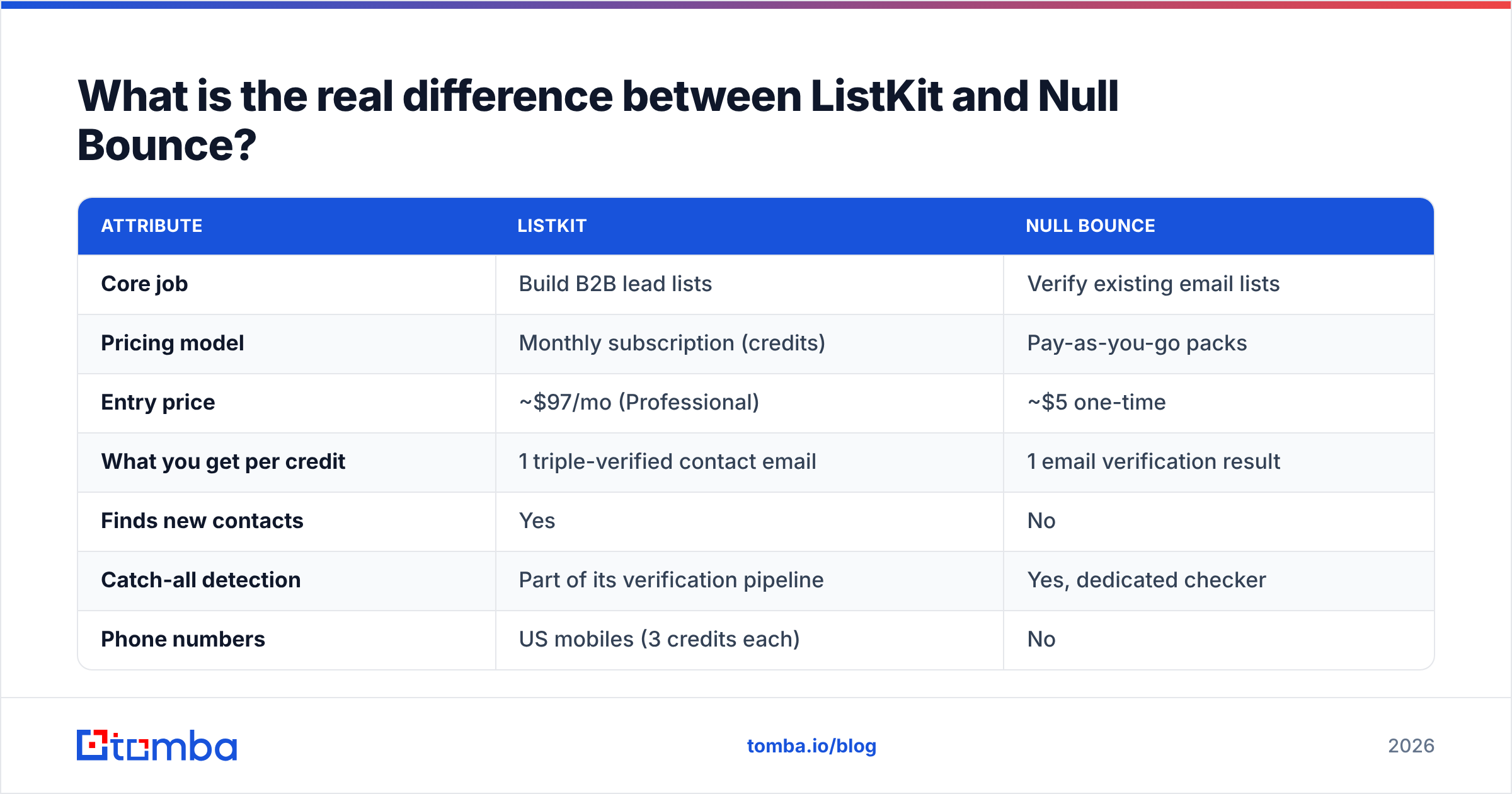
| Attribute | ListKit | Null Bounce |
|---|---|---|
| Core job | Build B2B lead lists | Verify existing email lists |
| Pricing model | Monthly subscription (credits) | Pay-as-you-go packs |
| Entry price | ~$97/mo (Professional) | ~$5 one-time |
| What you get per credit | 1 triple-verified contact email | 1 email verification result |
| Finds new contacts | Yes | No |
| Catch-all detection | Part of its verification pipeline | Yes, dedicated checker |
| Phone numbers | US mobiles (3 credits each) | No |
| API | CRM integrations, enrichment | Yes, real-time API for forms and apps |
| Best fit | Agencies and SDR teams starting from zero | Marketers and ops teams with existing lists |
How does ListKit work?#
ListKit is built for cold outbound teams, and agencies especially, who need a fresh, filtered list every week. The workflow looks like this:
- Search. Use filters or AI Company Search to describe your ideal customer profile.
- Preview. You see matching companies and contacts before you spend anything.
- Export. Each email you export goes through three verification checks first. According to ListKit's credit documentation, you're charged 1 credit per successfully verified email, so failures don't cost you.
- Push to your tools. Send the list to your CRM or sequencer.
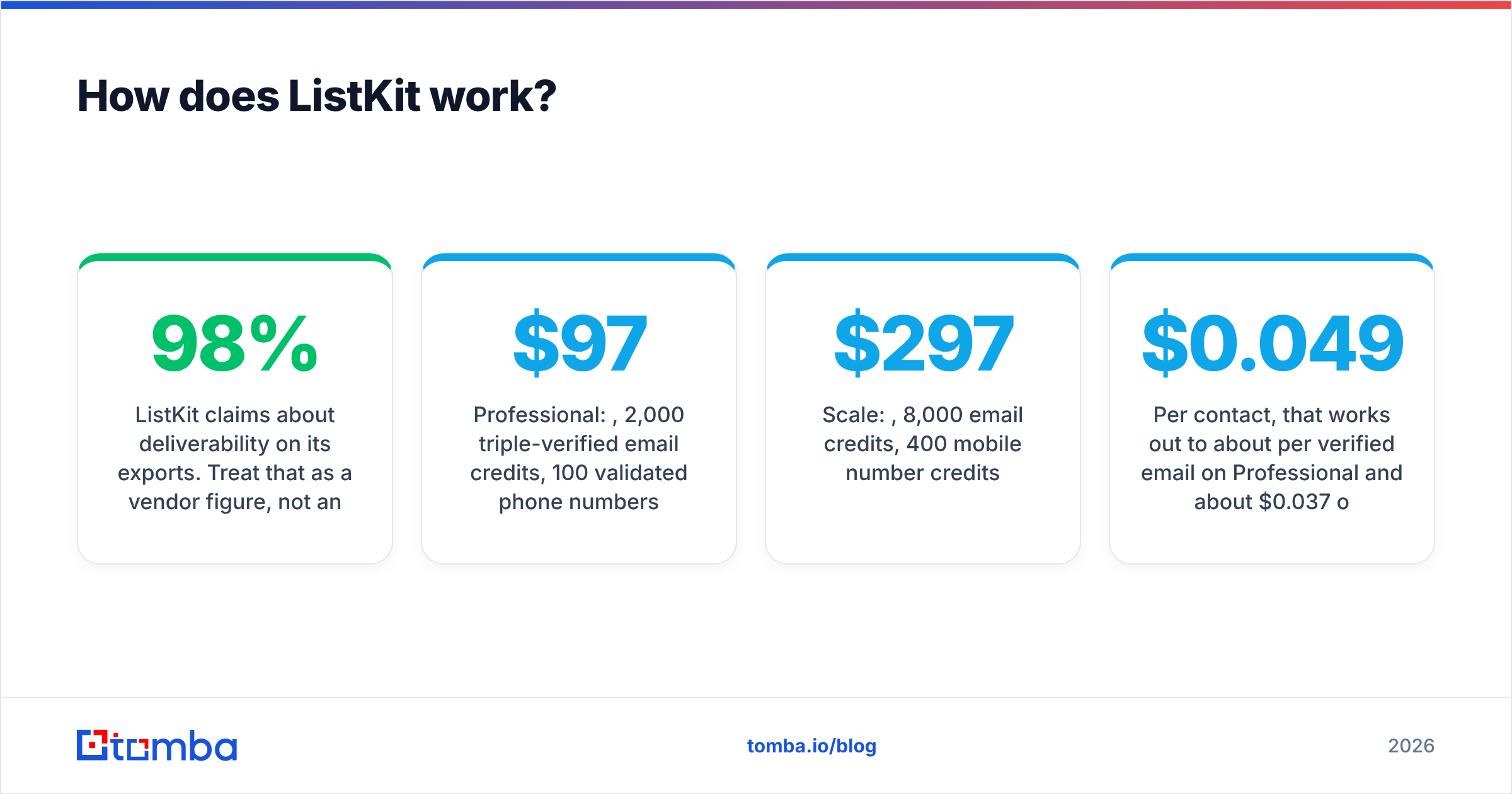
ListKit claims about 98% deliverability on its exports. Treat that as a vendor figure, not an independent benchmark. It's plausible for clean corporate domains but much harder to guarantee on catch-all domains, which accept every address at the SMTP level.
ListKit pricing in 2026#
Third-party reviews published this year list these plans:
- Professional: $97/mo, 2,000 triple-verified email credits, 100 validated phone numbers
- Scale: $297/mo, 8,000 email credits, 400 mobile number credits
- Enterprise: custom pricing
Per contact, that works out to about $0.049 per verified email on Professional and about $0.037 on Scale, if you use every credit. Most teams don't. That makes the subscription model a double-edged sword. It's cheap when you prospect every week and expensive when you prospect in bursts.
How does Null Bounce work?#
Null Bounce does one thing: tell you whether an address will bounce before you send to it.
- SMTP validation plus provider-specific methods. Null Bounce says it combines standard SMTP handshakes with checks tuned to specific mailbox providers. That matters because big providers often block or blur plain SMTP probes.
- Catch-all domain checker. It flags domains that accept everything, so you can decide how to handle those addresses instead of treating them as valid.
- Role, disposable and free-email detection. It separates
info@andsales@inboxes, throwaway addresses and personal Gmail accounts from real B2B contacts. - Free duplicates. Duplicate rows in an upload aren't charged, which helps when you merge several exports.
- API access. You can put it on sign-up forms to block bad addresses in real time.
Reviews on G2 and similar directories describe Null Bounce as a lightweight, low-cost verifier rather than a full data platform. That matches what it is.
Null Bounce pricing in 2026#
Null Bounce sells one-time credit packs starting at about $5, and a free trial is available. The model rewards irregular use: you verify 3,000 emails in March, nothing in April, and you haven't paid for an idle subscription. Check the live pricing page for per-email rates at your volume, because packs are tiered.

Is ListKit better than Null Bounce?#
It's better for a different job. Here's the honest breakdown by scenario.
Scenario 1: You're launching outbound for a new client and have no contacts. ListKit wins outright, because Null Bounce can't give you a single lead. Paying a verifier to check a list you don't have gets you nothing.
Scenario 2: You have 40,000 contacts in HubSpot from events, webinars and old campaigns. Null Bounce wins. The list is already paid for, and what you need is to clean it before a re-engagement campaign wrecks your sender reputation. Re-buying those contacts through ListKit would be wasteful.
Scenario 3: You bought a list from somewhere else, or scraped one. Null Bounce. Bought and scraped lists are exactly where verification pays for itself, since hard-bounce rates on unverified data often run well into double digits.
Scenario 4: You need a steady flow of new leads every week and you're sending at volume. ListKit. The verification is built into the credit price, so you aren't paying twice.
Scenario 5: You run a SaaS signup form and want to stop fake signups. Null Bounce's real-time API. ListKit isn't built for this.
Which one handles catch-all emails better?#
This is where "verified" gets fuzzy, and both tools deserve scrutiny.
A catch-all (accept-all) domain returns "250 OK" for any address, including asdf123@company.com. An SMTP check alone can't tell a real mailbox from a fake one on those domains. Every verifier has three options:
- Mark it "catch-all/unknown" and let you decide
- Mark it valid and risk bounces
- Run extra signals (provider-specific checks, historical engagement data, pattern confidence) to estimate whether the mailbox exists
Null Bounce takes option 1 by default, with a dedicated catch-all checker, and adds provider-specific methods on top. You get transparency, but you still end up with a bucket of "unknown" addresses to deal with.
ListKit's triple verification is designed to reduce that bucket before export. It doesn't publish the details of each pass, though, so you're trusting the 98% claim. If catch-all-heavy segments like mid-market manufacturing or European SMBs make up a big share of your ICP, run a test batch and measure your actual bounce rate before you commit to an annual plan.
If catch-alls are your main pain point, look at a tool built specifically to verify catch-all addresses. A generic valid/invalid result isn't enough there.
How do the costs compare at real volumes?#
Pricing pages tell you the rate per unit. What matters is what you pay for the way your team actually works.
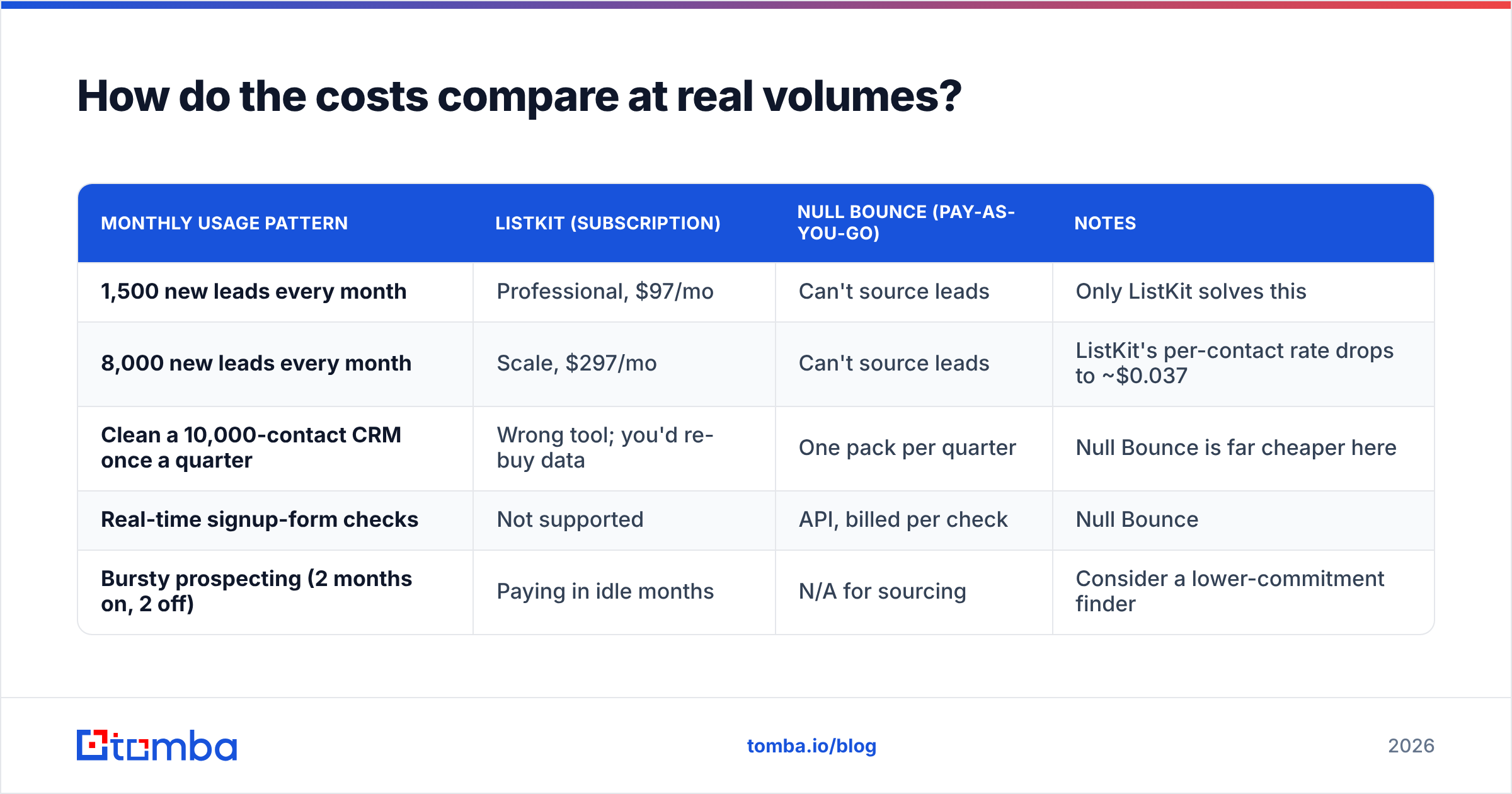
| Monthly usage pattern | ListKit (subscription) | Null Bounce (pay-as-you-go) | Notes |
|---|---|---|---|
| 1,500 new leads every month | Professional, $97/mo | Can't source leads | Only ListKit solves this |
| 8,000 new leads every month | Scale, $297/mo | Can't source leads | ListKit's per-contact rate drops to ~$0.037 |
| Clean a 10,000-contact CRM once a quarter | Wrong tool; you'd re-buy data | One pack per quarter | Null Bounce is far cheaper here |
| Real-time signup-form checks | Not supported | API, billed per check | Null Bounce |
| Bursty prospecting (2 months on, 2 off) | Paying in idle months | N/A for sourcing | Consider a lower-commitment finder |
The row most people ignore is the last one. Subscription credits you don't use are sunk cost. If your outbound is seasonal or project-based, that should shape your choice as much as the headline price does.
What are the pros and cons of each?#
ListKit#
Pros
- Finds and verifies in one step
- You're only charged for emails that pass verification
- Includes US mobile numbers, intent data and CRM integrations
- Built with agencies' workflows in mind
Cons
- Starts at ~$97/mo, which is a real commitment for small teams
- Verification internals aren't published, so the 98% figure is vendor-reported
- Mobile numbers are US only
- Adds nothing when you already have contacts to clean
Null Bounce#
Pros
- Very low entry cost (~$5)
- Pay-as-you-go with no idle subscription
- Duplicates are free
- Catch-all, role and disposable detection plus a real-time API
Cons
- Doesn't find leads
- Catch-all results still leave you with an "unknown" bucket to handle
- Smaller brand with fewer public reviews than the big verifiers
- No enrichment beyond verification status

Do you need both, or is there a middle ground?#
Many outbound teams end up paying for both categories: a lead source for new contacts and a separate verifier for everything else, like event lists, inbound leads, CRM records and partner referrals. That's a reasonable setup, but it means two vendors, two billing models and two sets of results to reconcile.
The middle ground is a platform that handles finding and verifying under one account. You can find email addresses by name and domain when you need new contacts, and run the same account's email verifier on lists you already own. Tomba is one option here. The Free tier includes 25 searches a month, Starter is $49/mo, Growth $99/mo and Pro $249/mo (full pricing details), and domain search, catch-all verification and enrichment sit on the same account.
To be fair about the trade-offs: ListKit's filter-first, ICP-driven list building is its strength. If you mostly want to type "Series B fintech, 50–200 employees, VP Sales" and export a clean list, it's designed for exactly that. And if all you ever need is cheap, occasional list hygiene, Null Bounce's pay-as-you-go model is hard to beat on price.
How should you decide? A quick checklist#
- Do you have contacts already? If not, start with ListKit or another finder. If you do, start with a verifier.
- How regular is your volume? Steady volume suits a subscription. Bursty volume suits pay-as-you-go.
- How much of your ICP sits on catch-all domains? If a lot, test both tools on a sample and measure real bounces, not dashboard labels.
- Do you need phones? ListKit gives you US mobiles. Null Bounce has no phone data.
- Do you need real-time checks? Null Bounce's API covers signup forms. ListKit doesn't.
- Would you rather have one vendor? Look at a combined finder and verifier to avoid paying twice for the same verification.
For broader context on why bounce rates matter beyond "it's annoying," HubSpot's guidance on email bounce rates is a good primer on how repeated hard bounces hurt inbox placement.
Final verdict: ListKit vs Null Bounce#
- Choose ListKit if you need new B2B contacts every month, prospect at steady volume, and want verification included so you only pay for emails that pass.
- Choose Null Bounce if you already have lists (CRM exports, events, inbound, purchased data) and want cheap, flexible verification with catch-all and role detection plus an API.
- Choose a combined platform if you do both jobs regularly and would rather not pay two vendors for overlapping verification.
Neither tool is a bad buy. Each is a strong fit for its own job and a poor fit for the other's.
If you want to find contacts and check them in the same place, try the Tomba Email Finder. Search by name, domain or company, then run results through Tomba's built-in verification before they go anywhere near your sequencer. The free tier gives you 25 searches a month to see whether the data holds up on your own ICP before you pay for anything.
Related guides#
// get started
Find, verify and enrich your first contacts today
Start on the free plan with 25 searches a month, then scale when your team is ready.
Free plan · No credit card required · GDPR & CCPA
// about the author