Listkit vs Nymeria (2026): List Builder or Email Finder?
Listkit sells you bulk, verified lead lists. Nymeria finds the contact details of one specific person you've already picked out. We compare pricing, data, credits and workflow fit so you can choose without buying both.
TL;DR
- Listkit builds lists. You set filters (industry, title, headcount, location), and it exports verified B2B emails in bulk for cold email campaigns. Paid plans start at about $83/mo billed yearly, or $97/mo billed monthly.
- Nymeria enriches people. You bring a LinkedIn, GitHub or X profile, or a name plus a company, and it returns work emails, personal emails and phone numbers. Paid plans start around $39/mo.
- They don't really compete. Listkit is a prospecting database. Nymeria is a lookup and enrichment tool that recruiters love. Most teams need one or the other, not both.
- Credits work differently. On Listkit, an email costs 1 credit and a phone number costs 5. Nymeria only charges when a lookup succeeds.
- Middle ground: if you need domain search, single-person lookups and verification in one place at a lower entry price, Tomba starts at $49/mo and has a free tier.
What is the real difference between Listkit and Nymeria?#
The simplest way to see it: Listkit is a fishing trawler and Nymeria is a spear. Listkit pulls in thousands of contacts that match a profile. Nymeria finds the one person you've already picked.
Listkit is a B2B lead database made for outbound teams. You filter by job title, industry, company size, tech stack and location, preview the matching records, and export contacts whose emails Listkit says are triple-verified. The usual next step is a CSV import into Instantly, Smartlead or a similar sender. Listkit is built for filling sequences.
Nymeria starts from the opposite end. You already know who you want to reach, usually because you're looking at their LinkedIn or GitHub profile. The browser extension (Chrome, Edge, Firefox) or the API returns their emails and phone numbers. It covers personal addresses as well as work ones, which is why it's so popular with technical recruiters and sourcers.
So the question isn't which one is "better". It's which job you're hiring the tool to do:
- Building a net-new outbound list from scratch. Listkit fits.
- Getting contact details for specific people you've already found. Nymeria fits.
- Recruiting candidates who don't read their work inbox. Nymeria fits, because of its personal email coverage.
- Filling a 5,000-contact cold email campaign this week. Listkit fits.
- Enriching an existing CRM or ATS through an API. Nymeria fits better. Listkit is export-first.
How do Listkit and Nymeria compare feature by feature?#
Here's the side-by-side on the things that change your day-to-day workflow.
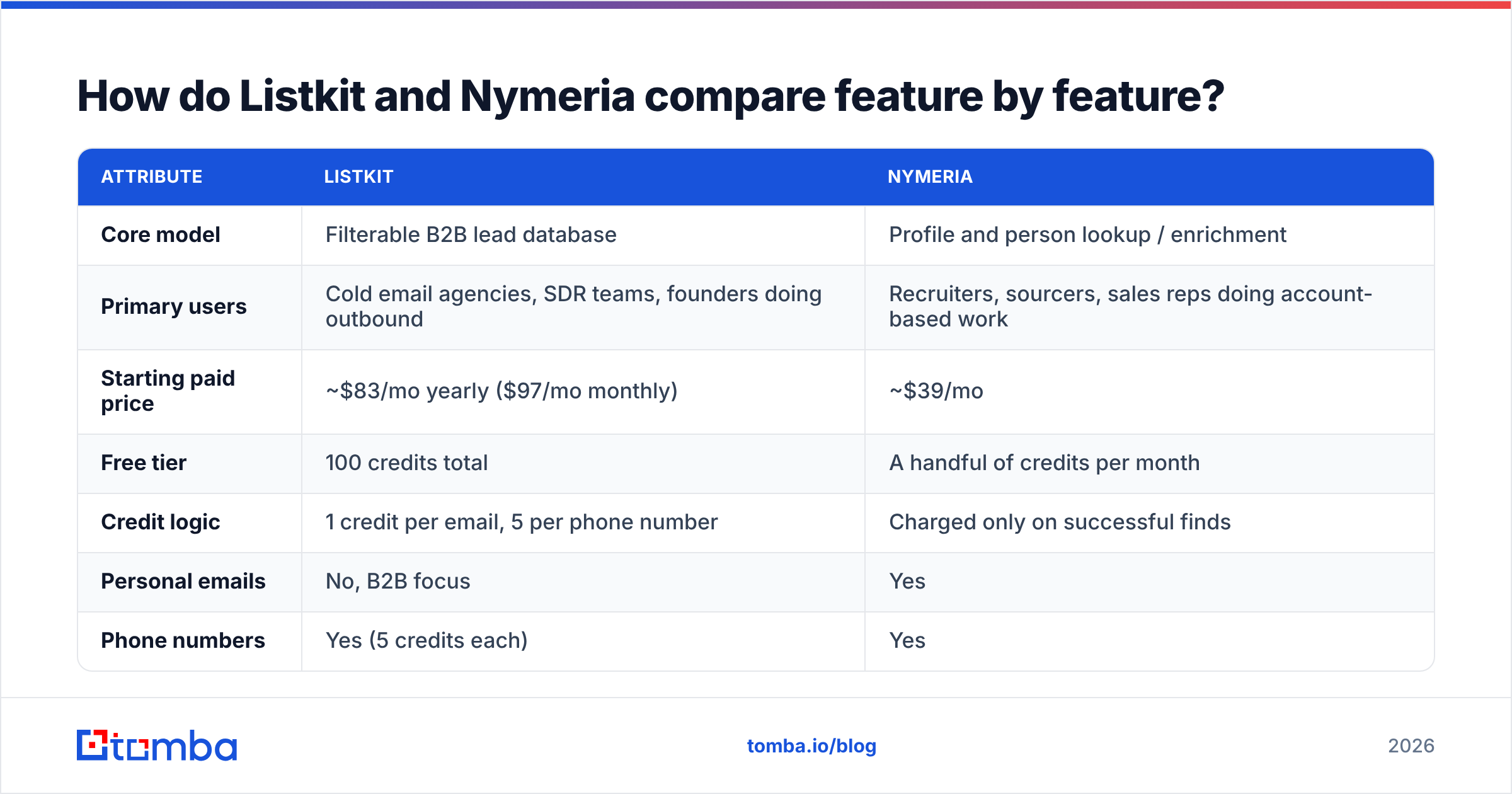
| Attribute | Listkit | Nymeria |
|---|---|---|
| Core model | Filterable B2B lead database | Profile and person lookup / enrichment |
| Primary users | Cold email agencies, SDR teams, founders doing outbound | Recruiters, sourcers, sales reps doing account-based work |
| Starting paid price | ~$83/mo yearly ($97/mo monthly) | ~$39/mo |
| Free tier | 100 credits total | A handful of credits per month |
| Credit logic | 1 credit per email, 5 per phone number | Charged only on successful finds |
| Personal emails | No, B2B focus | Yes |
| Phone numbers | Yes (5 credits each) | Yes |
| Browser extension | Not the core workflow | Chrome, Edge, Firefox (LinkedIn, GitHub, X, Facebook) |
| API | Limited, export-first | Yes, developer API |
| Bulk workflow | Filter, then export thousands | CSV upload enrichment |
| Team seats | All features on every plan | Unlimited team members on paid plans |
| Best at | Volume list building | Precision lookups on known people |
Two rows are worth a closer look.
Personal email coverage. This is Nymeria's standout feature and the reason it shows up in so many recruiting stacks. If you're sourcing engineers, their work inbox is often the worst way to reach them. Sales teams, on the other hand, should be careful: sending cold B2B pitches to personal addresses can create GDPR and CAN-SPAM problems depending on where the recipient lives. Listkit avoids this by sticking to business emails.
Credit logic. Listkit charges per record you export. Nymeria charges only when it actually finds something. For small, targeted lookups, Nymeria's model wastes less money. For bulk outbound, Listkit's cost per contact comes out lower because you're buying at database scale.

How much do Listkit and Nymeria actually cost?#
Listkit charges more at the entry level and less per contact. Nymeria is cheaper to start and gets expensive if you use it like a list builder.
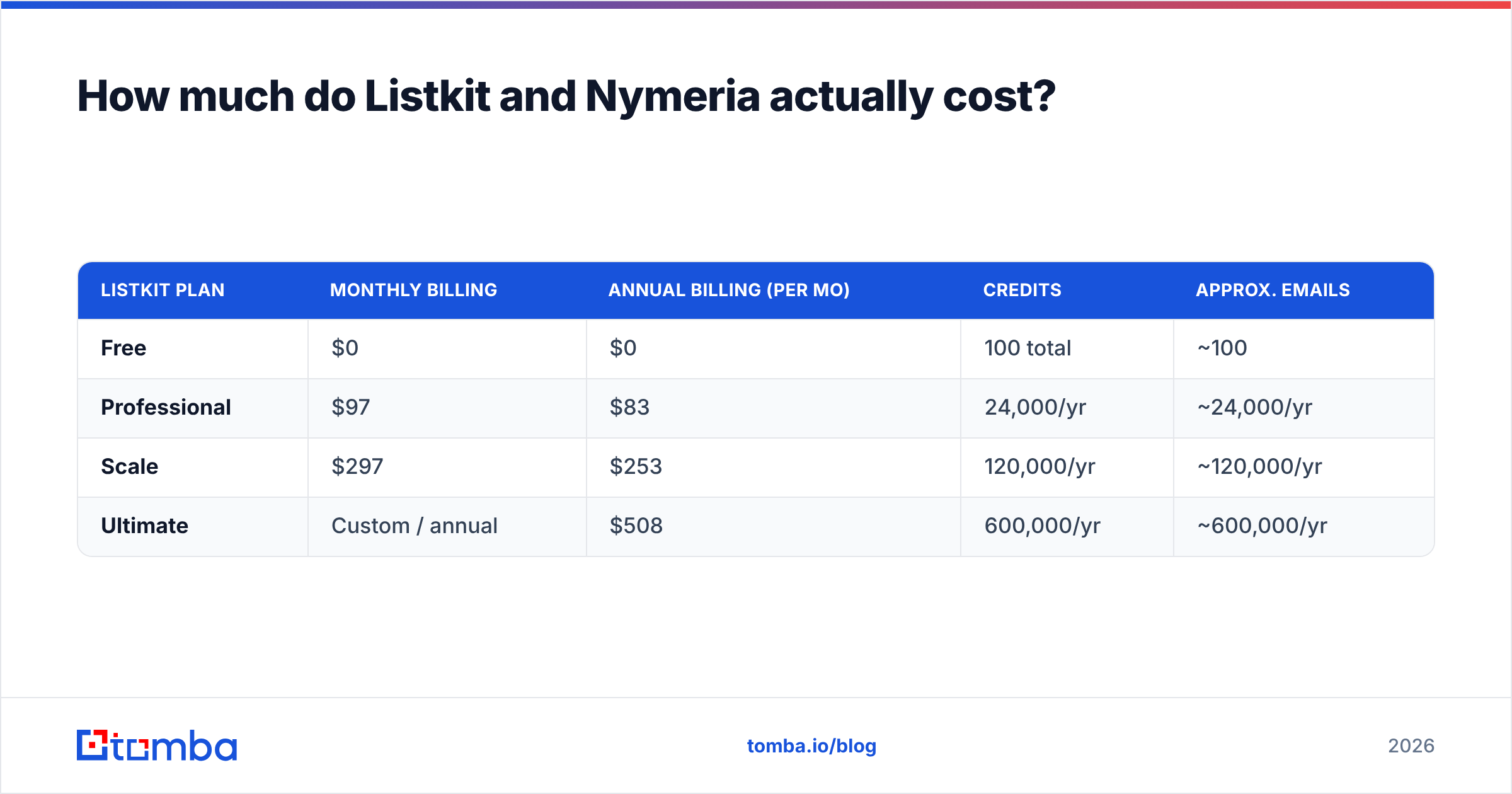
Listkit's published tiers, per its own billing docs and third-party reviews, look roughly like this:
| Listkit plan | Monthly billing | Annual billing (per mo) | Credits | Approx. emails |
|---|---|---|---|---|
| Free | $0 | $0 | 100 total | ~100 |
| Professional | $97 | $83 | 24,000/yr | ~24,000/yr |
| Scale | $297 | $253 | 120,000/yr | ~120,000/yr |
| Ultimate | Custom / annual | $508 | 600,000/yr | ~600,000/yr |
Every plan includes every feature, so what you're paying for is credits. If phone numbers matter to you, remember that each one costs 5 credits, so the email-only figures above drop quickly once you add direct dials.
Nymeria's self-serve plans run from about $39/mo to about $159/mo, with custom enterprise pricing above that. Third-party sites don't agree on the plan names, so check the current tiers on Nymeria's G2 pricing page or its own site before you buy. Two things hold on every tier: you pay only for successful lookups, and paid plans include unlimited team members. For a recruiting team of five that shares a credit pool, that seat policy saves real money compared with per-seat tools.
Rule of thumb:
- Under ~500 contacts a month, all specific people: Nymeria is cheaper.
- Over ~2,000 contacts a month, filter-based: Listkit is cheaper per contact.
- Somewhere in between, and you need both modes: look at a hybrid tool (more on that below).

Which tool has better data accuracy?#
Neither vendor publishes an independent, audited bounce-rate benchmark. Treat any single accuracy number you see as a marketing claim until you've tested it on your own ICP.
Here's what we can say.
Listkit says its emails are triple-verified before export. That matters for cold email, because a list with a 5-8% bounce rate will damage a fresh sending domain within days. Triple verification catches invalid mailboxes. It doesn't fully solve catch-all domains, where the server accepts every address and verifiers can't confirm whether a specific inbox exists. Listkit's own help docs discuss catch-alls, and you should expect a share of every export to be "risky" rather than "valid".
Nymeria pulls from a single proprietary index of hundreds of millions of profiles. When a record is in the index, results for tech and startup profiles are generally strong, which fits its recruiting user base. When a record isn't there, there's no fallback source. Hit rates therefore vary a lot by segment. Engineers in SaaS usually do well. Plant managers in mid-market manufacturing tend to come back thinner.

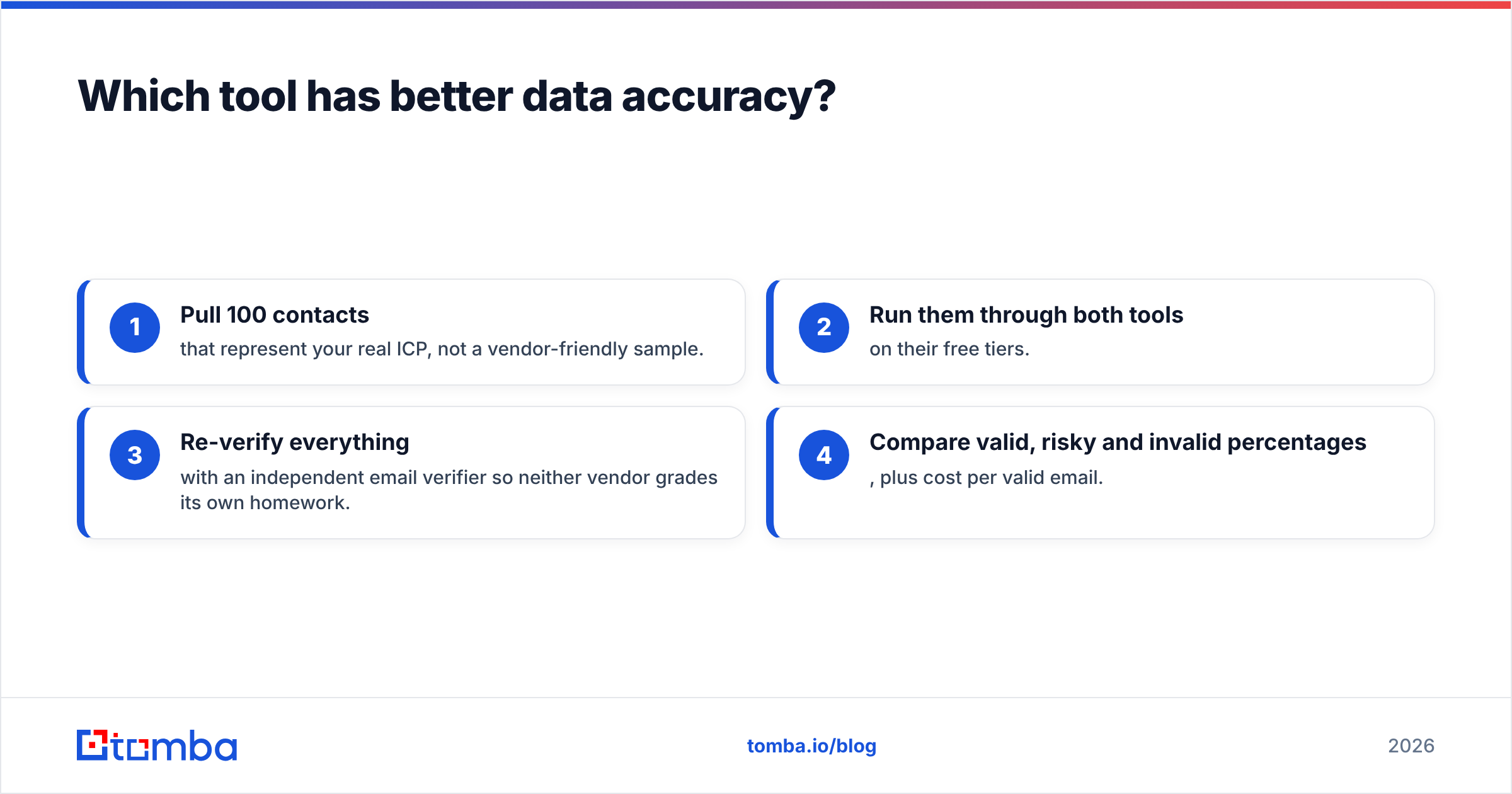
The honest test takes about an hour:
- Pull 100 contacts that represent your real ICP, not a vendor-friendly sample.
- Run them through both tools on their free tiers.
- Re-verify everything with an independent email verifier so neither vendor grades its own homework.
- Compare valid, risky and invalid percentages, plus cost per valid email.
Whichever tool wins that test for your segment is the one to buy, whatever any review (including this one) says.
Is Listkit better than Nymeria for cold email?#
For volume cold email, yes. Listkit was designed around that workflow.
The typical agency or SDR flow looks like this:
- Filter Listkit down to, say, "VP Sales, B2B SaaS, 50-200 employees, US".
- Export 3,000 verified contacts.
- Split them across several warmed inboxes in your sending tool.
- Run a 3-4 step sequence.
Nymeria can technically support this through CSV enrichment, but you'd need to source the names somewhere else first, for example a LinkedIn Sales Navigator export. At that point you're paying two vendors to do what Listkit does in one.
Where Nymeria wins in outbound is account-based selling. If you have 40 target accounts and you're mapping the buying committee by hand on LinkedIn, clicking the extension on each profile is quicker and more precise than filtering a database and hoping the right people appear.
Is Nymeria better than Listkit for recruiting?#
Yes, and by a wide margin.
Recruiting reverses most outbound assumptions:
- You want personal emails because candidates often ignore work inboxes, and some employers monitor them.
- You start from profiles (LinkedIn, GitHub, X), not from firmographic filters.
- Volume is lower and precision matters more. One missed senior engineer is worse than 50 missed SDR prospects.
- Shared credit pools across a sourcing team matter, and Nymeria's unlimited seats handle that well.
Listkit's filters are built around companies and buying roles, not skills, repositories or career history. A recruiter using Listkit would be fighting the tool.
What are the pros and cons of each?#
Listkit pros
- Very low cost per contact at volume on the Scale and Ultimate tiers
- Triple-verified emails, built with sending-domain health in mind
- Every feature available on every plan, with no feature gating
- Built for the cold email workflow (filter, export, send)
Listkit cons
- Entry price is steep if you only need a few hundred contacts
- Phone numbers eat credits at 5x the email rate
- No personal emails, so a poor fit for recruiting
- Weaker for "find this specific person" lookups
Nymeria pros
- Personal and work emails plus phone numbers from a single lookup
- Extensions for Chrome, Edge and Firefox that work on LinkedIn, GitHub, X and Facebook
- Pay only for successful finds
- Unlimited team members on paid plans, plus a developer API
Nymeria cons
- A single-source index with no fallback when a record is missing
- Not a list builder, so you have to source names elsewhere
- Using personal emails for B2B sales carries compliance risk
- Per-contact cost adds up quickly if you try to run volume outbound through it

Is there a tool that does both jobs?#
Partly, and this is where a hybrid email finder is worth a look.
Many teams sit in the middle. They run some filter-based prospecting, some single-person lookups on LinkedIn, and they need to verify whatever they bring in from elsewhere. Paying for Listkit's database and Nymeria's extension to cover that is overkill.
Tools like Tomba sit in that middle lane:
- Domain search returns every public work email at a company, which is useful for account-based lists.
- Single-person lookups by name and company, or from LinkedIn through a browser extension.
- Built-in verification, including catch-all handling, so you're not buying a separate verifier.
- Bulk CSV processing through the bulk email finder for mid-sized lists.
- An API for CRM and ATS enrichment.
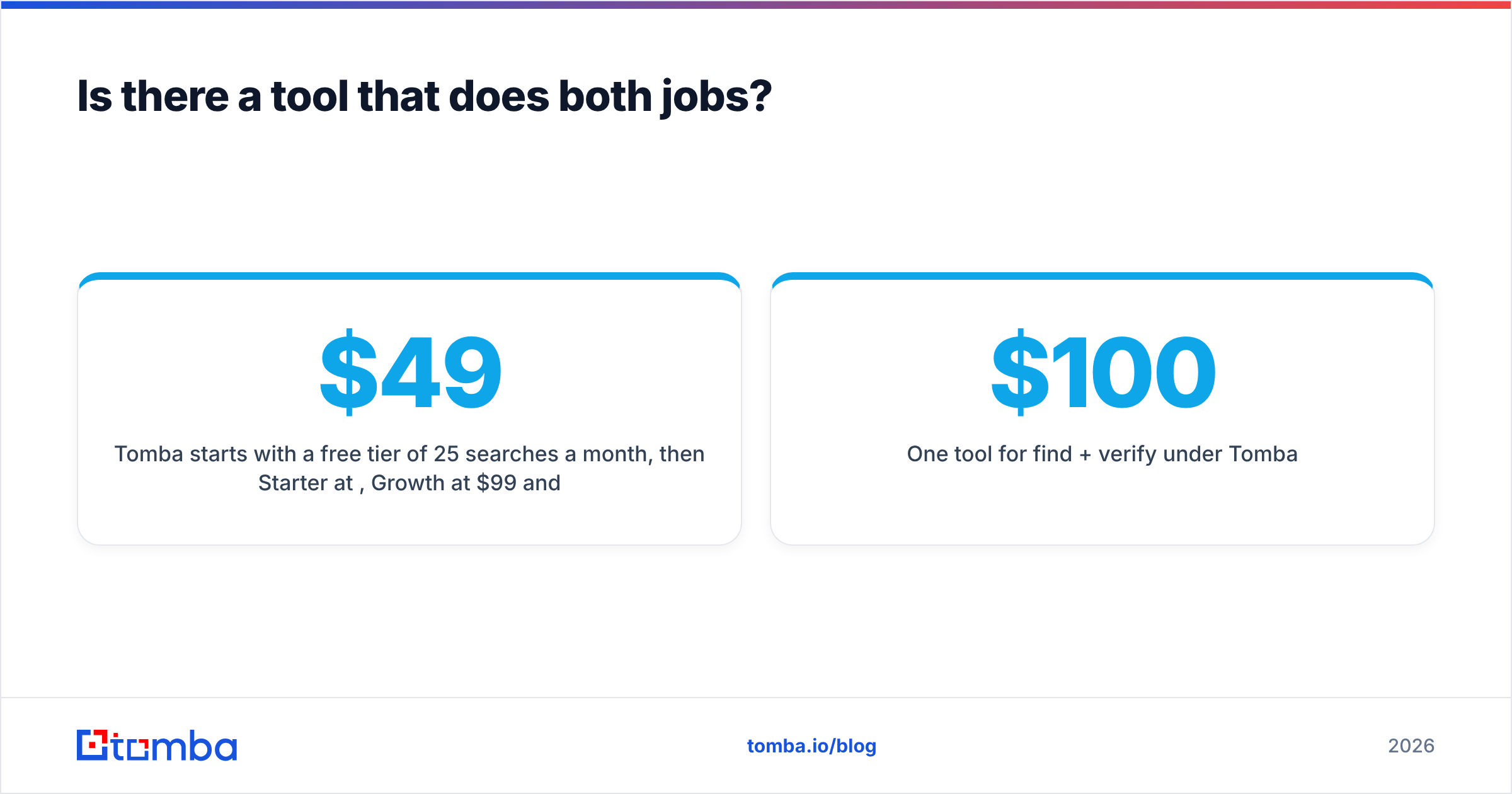
Tomba starts with a free tier of 25 searches a month, then Starter at $49/mo, Growth at $99/mo and Pro at $249/mo, with Enterprise on custom pricing. The full breakdown is on the Tomba pricing page. It won't beat Listkit on raw cost per contact at 100,000 exports a year, and it isn't aimed at personal email sourcing like Nymeria. It does cover both modes on one bill, and for most small-to-mid outbound teams that's the actual need.
| Use case | Best pick |
|---|---|
| 50k+ cold email contacts per year | Listkit |
| Technical recruiting, personal emails | Nymeria |
| Account-based selling, mixed lookups | Tomba or Nymeria |
| One tool for find + verify under $100/mo | Tomba |
| API enrichment for an ATS | Nymeria or Tomba |
Listkit vs Nymeria: which should you choose?#
Pick based on your workflow, not on feature lists.
- Choose Listkit if you run cold email at volume, your ICP fits clean firmographic filters, and you want verified B2B emails exported straight into your sender. The per-contact economics are hard to beat once you're on Scale or above.
- Choose Nymeria if you're a recruiter or sourcer, you start from profiles rather than filters, and you need personal emails and phone numbers. Its unlimited seats and pay-on-success credits suit shared sourcing teams.
- Choose a hybrid finder if you need a bit of both, want verification built in, and don't want two subscriptions.
Before you commit, run the 100-contact test described above on your own ICP. It's the only accuracy figure that matters for your pipeline.
If you'd rather have one tool that finds emails by domain, name or LinkedIn profile and verifies them before they reach your sequence, try the Tomba Email Finder. The free tier gives you 25 searches a month to run your own head-to-head against Listkit or Nymeria, and paid plans start at $49/mo when you're ready to scale.
Related guides#
// get started
Find, verify and enrich your first contacts today
Start on the free plan with 25 searches a month, then scale when your team is ready.
Free plan · No credit card required · GDPR & CCPA
// about the author