ListKit vs SalesQL: Pricing, Data Quality and Best Use Cases
ListKit builds verified lead lists from filters. SalesQL pulls emails and phones from LinkedIn profiles. Here's how their pricing, data and workflows compare, and which one fits your outbound motion.
TL;DR
- ListKit is a filter-based list builder. You pick an ICP (industry, headcount, title, location) and export a list of contacts whose emails have been verified three times. It suits cold email teams that send at volume.
- SalesQL is a LinkedIn-first contact finder. Its Chrome extension shows emails and phone numbers on LinkedIn and Sales Navigator profiles, and it can bulk-enrich whole search results.
- Pricing math is different. ListKit's best value comes from yearly plans with big credit pools. SalesQL uses smaller monthly credit bundles, and one credit covers one enriched prospect.
- Pick ListKit if you build lists from firmographic filters. Pick SalesQL if your prospecting already starts in LinkedIn or Sales Navigator.
- Whichever you choose, verify every contact before you send. Neither vendor's "verified" label replaces checking catch-all domains yourself.
What are ListKit and SalesQL, in one sentence each?#
ListKit is a B2B lead database: you search by filters and export ready-to-send lists. SalesQL is a contact enrichment tool that sits on top of LinkedIn and turns profiles into emails and phone numbers.
On paper they overlap, because both hand you a name plus an email. In practice they fit different workflows, and that difference matters more than any per-credit comparison.
- ListKit is built for outbound agencies and SDR teams who think in lists. You define a segment, say "Heads of Marketing at 50–200 person SaaS companies in the US", preview the count, and export a CSV to your sequencer. The big selling point is triple verification: each exported email has gone through several validation passes before you get it.
- SalesQL is built for people who think in profiles. You're already on LinkedIn looking at a prospect or a Sales Navigator search. SalesQL's extension shows their work email, personal email and direct dial, and you push the result to your CRM or a list.
Think of it this way. ListKit is a wholesale warehouse where you order 5,000 units by spec. SalesQL is a personal shopper who comes with you to the store and grabs the item you point at.
How do ListKit and SalesQL work differently?#
The workflow is where the choice gets made. Here's how each tool handles the five steps of a typical outbound build:
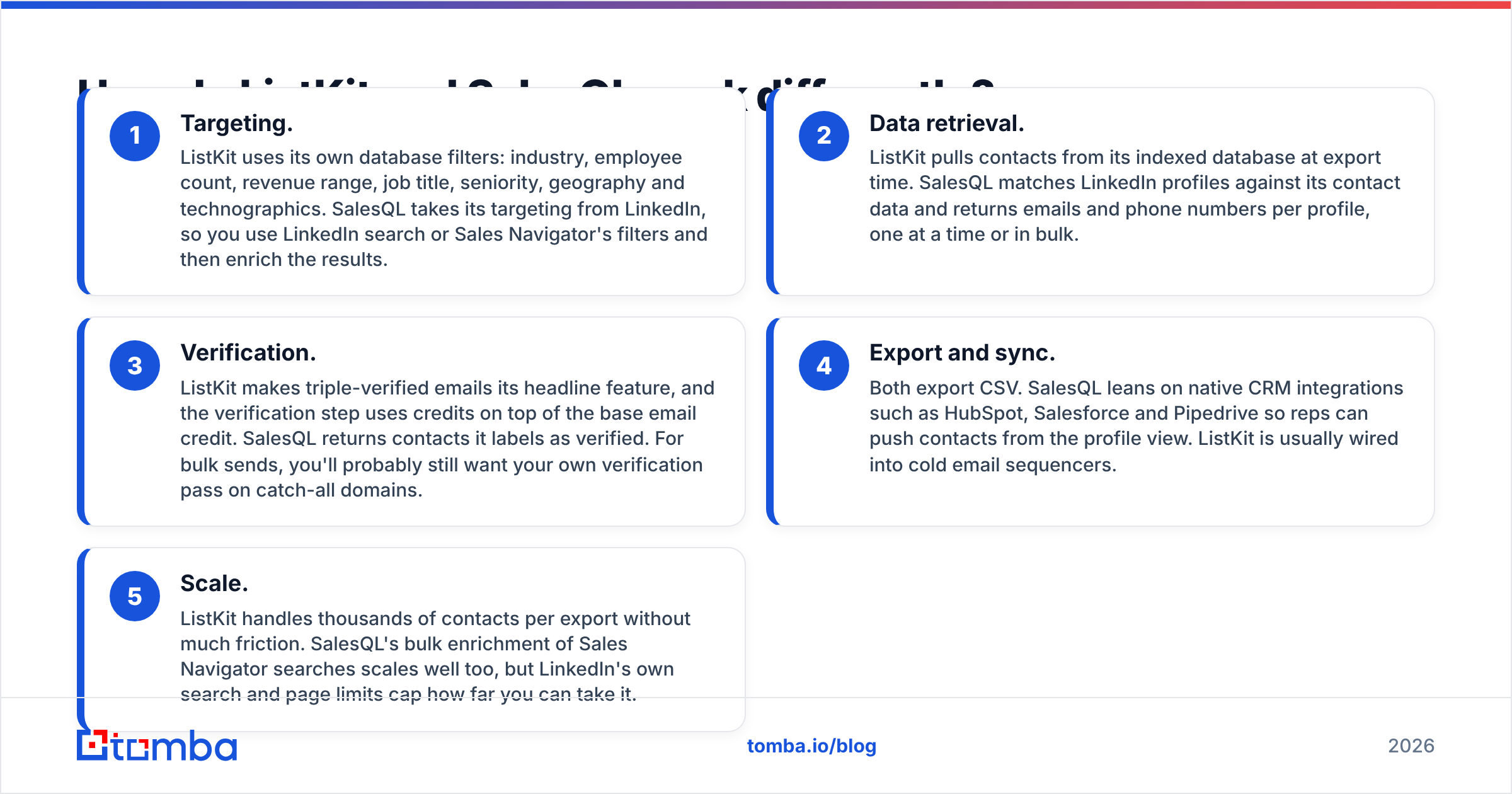
- Targeting. ListKit uses its own database filters: industry, employee count, revenue range, job title, seniority, geography and technographics. SalesQL takes its targeting from LinkedIn, so you use LinkedIn search or Sales Navigator's filters and then enrich the results.
- Data retrieval. ListKit pulls contacts from its indexed database at export time. SalesQL matches LinkedIn profiles against its contact data and returns emails and phone numbers per profile, one at a time or in bulk.
- Verification. ListKit makes triple-verified emails its headline feature, and the verification step uses credits on top of the base email credit. SalesQL returns contacts it labels as verified. For bulk sends, you'll probably still want your own verification pass on catch-all domains.
- Export and sync. Both export CSV. SalesQL leans on native CRM integrations such as HubSpot, Salesforce and Pipedrive so reps can push contacts from the profile view. ListKit is usually wired into cold email sequencers.
- Scale. ListKit handles thousands of contacts per export without much friction. SalesQL's bulk enrichment of Sales Navigator searches scales well too, but LinkedIn's own search and page limits cap how far you can take it.
If your team already spends most of the day inside Sales Navigator, SalesQL feels native. If your team starts from a spreadsheet of target segments and ends in Instantly or Smartlead, ListKit fits better.

How much do ListKit and SalesQL cost in 2026?#
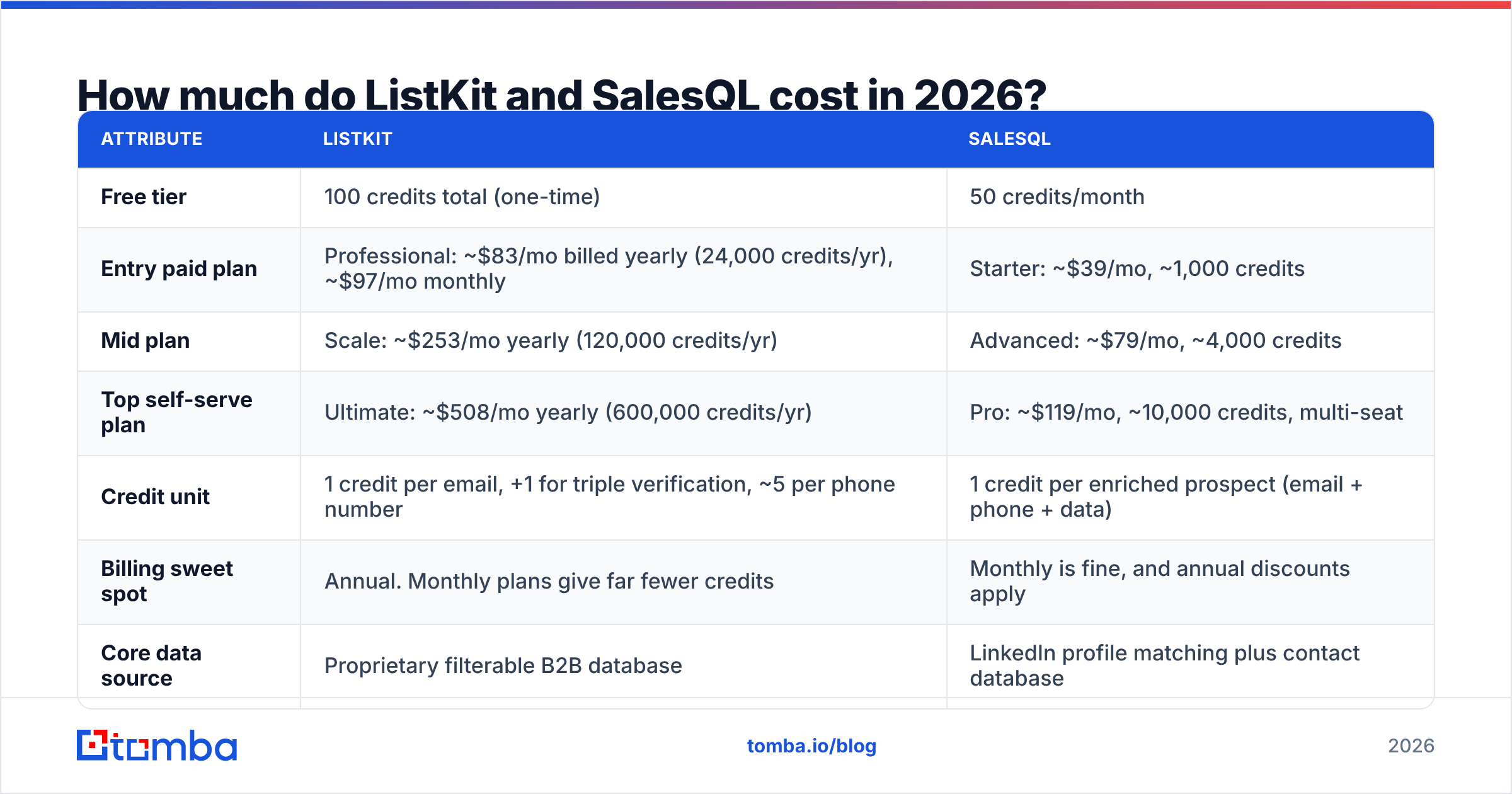
The cheapest-looking plan is rarely the cheapest per usable contact. Here's what each vendor publishes at the time of writing. Both change pricing often, so check the live pages before you buy.
| Attribute | ListKit | SalesQL |
|---|---|---|
| Free tier | 100 credits total (one-time) | 50 credits/month |
| Entry paid plan | Professional: ~$83/mo billed yearly (24,000 credits/yr), ~$97/mo monthly | Starter: ~$39/mo, ~1,000 credits |
| Mid plan | Scale: ~$253/mo yearly (120,000 credits/yr) | Advanced: ~$79/mo, ~4,000 credits |
| Top self-serve plan | Ultimate: ~$508/mo yearly (600,000 credits/yr) | Pro: ~$119/mo, ~10,000 credits, multi-seat |
| Credit unit | 1 credit per email, +1 for triple verification, ~5 per phone number | 1 credit per enriched prospect (email + phone + data) |
| Billing sweet spot | Annual. Monthly plans give far fewer credits | Monthly is fine, and annual discounts apply |
| Core data source | Proprietary filterable B2B database | LinkedIn profile matching plus contact database |
| Best for | High-volume cold email list building | LinkedIn / Sales Navigator prospecting |
Pricing sourced from SalesQL's pricing page and ListKit's published plans. Treat these as approximate and confirm before committing.
What does a verified contact actually cost?#
Take the realistic unit: one verified email you'd actually send to.
- ListKit (Professional, yearly): 24,000 credits a year is about 2,000 credits a month. At 2 credits per triple-verified email, that's roughly 1,000 verified contacts a month for about $83, or around $0.08 each. Phone numbers cost much more per contact.
- SalesQL (Starter): about 1,000 credits for $39. If one credit returns email plus phone for one prospect, you pay roughly $0.04 per enriched profile. The catch is that not every lookup returns a usable business email, so your effective cost per sendable contact goes up with your miss rate.
For email-only volume, ListKit's yearly plans get very cheap per contact once you're past a few thousand leads a month. For phone-heavy or mixed workflows, SalesQL's "one credit covers the whole profile" model is often cheaper, because ListKit charges extra for phones.
Which tool has better data quality?#
Neither vendor is clearly ahead across the board. Quality depends on your segment.
ListKit's strengths:
- Triple verification means fewer hard bounces straight out of the export, which protects sender reputation on a new cold email domain.
- Filter-based pulls give you consistent firmographic data (industry, headcount), which makes segmentation and personalisation easier.
ListKit's weaknesses:
- A database is a snapshot. Job changes between the last refresh and your send date turn into bounces or wrong-person emails.
- Coverage outside North America and Western Europe tends to be thinner. That's common for filter-first databases.
SalesQL's strengths:
- LinkedIn is the most current public record of who works where. Because SalesQL starts from the live profile, the person-to-company match is usually fresh.
- Returns personal emails and direct dials alongside work emails, which helps for recruiting and phone-first sales.
SalesQL's weaknesses:
- The email itself still comes from SalesQL's data, not LinkedIn, so a fresh profile doesn't guarantee a fresh email.
- You're tied to LinkedIn's interface and limits. If LinkedIn changes something, your workflow feels it first.
User reviews on G2 give both tools solid marks for ease of use. The recurring complaints are the ones you'd expect: ListKit users mention credit math on monthly plans, and SalesQL users mention match rates varying by region and seniority.
Neither tool can fully solve catch-all domains. A catch-all server accepts mail for any address, so a standard SMTP check can't confirm the mailbox exists. For those contacts, run a dedicated catch-all verifier before they reach your sequencer, or segment them into a lower-volume send.
Is ListKit better than SalesQL for cold email?#
Usually, yes, if cold email is your main channel and you send more than a few thousand emails a month.
The reasons are practical:
- Volume economics. Yearly ListKit plans bring the cost per verified email below what most LinkedIn-first tools charge at scale.
- Workflow fit. A cold email operator wants a CSV of 3,000 contacts matching a segment, not 3,000 individual profile lookups.
- Bounce protection. Triple verification is designed for people sending from warmed-up secondary domains, where every bounce hurts deliverability.
SalesQL wins cold email in one scenario: account-based campaigns where you've hand-picked 50–300 accounts and want the exact buying committee at each. Sales Navigator's account and lead filters, plus SalesQL enrichment, give you a more precise list than any firmographic filter.
Is SalesQL better than ListKit for LinkedIn prospecting?#
Yes, clearly. That's the job it was built for.
If your reps do multichannel outreach (connection request, then email, then call), SalesQL fits naturally. They look at a profile, see the email and phone right there, and push the contact to HubSpot or Salesforce without leaving the tab. ListKit has no equivalent in-profile experience, because it isn't trying to be a LinkedIn tool.
SalesQL is also the better pick for:
- Recruiters, who value personal emails and direct dials.
- Founder-led sales, where one person prospects a few dozen high-value leads a week.
- Enterprise AEs, who need specific people at named accounts rather than volume.
If you want LinkedIn-first lookups without committing to one vendor's LinkedIn dependency, a LinkedIn finder that takes a profile URL and returns a verified email works with any workflow, including API and spreadsheet flows.

What are the pros and cons side by side?#
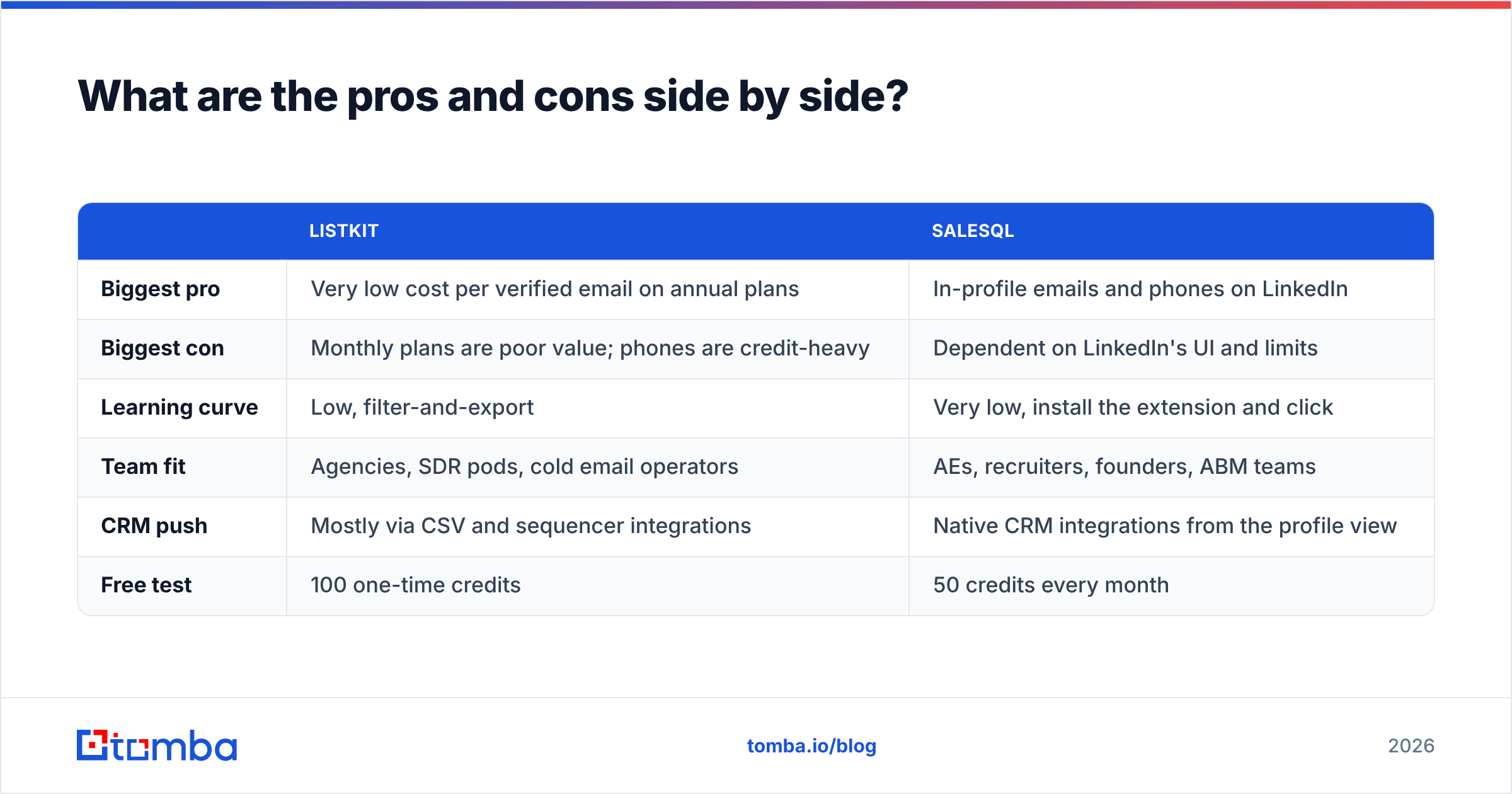
| ListKit | SalesQL | |
|---|---|---|
| Biggest pro | Very low cost per verified email on annual plans | In-profile emails and phones on LinkedIn |
| Biggest con | Monthly plans are poor value; phones are credit-heavy | Dependent on LinkedIn's UI and limits |
| Learning curve | Low, filter-and-export | Very low, install the extension and click |
| Team fit | Agencies, SDR pods, cold email operators | AEs, recruiters, founders, ABM teams |
| CRM push | Mostly via CSV and sequencer integrations | Native CRM integrations from the profile view |
| Free test | 100 one-time credits | 50 credits every month |
How should you decide between ListKit and SalesQL?#
Answer three questions and the choice mostly makes itself:
- Where does prospecting start? In a spreadsheet of segments, pick ListKit. On LinkedIn, pick SalesQL.
- How many contacts per month? Above ~2,000 sendable emails, ListKit's annual pricing usually wins. Below ~1,000, especially with phone numbers, SalesQL's monthly bundles are easier to justify.
- Do you need phones? If yes, SalesQL's all-in-one credit is better value than paying multiple ListKit credits per number.
Some teams run both. SalesQL handles the top 10% of named accounts and ListKit handles volume segments. That works, but you then have two data sources to dedupe and two credit budgets to manage.
Where does Tomba fit alongside either tool?#
Tomba isn't a like-for-like replacement for ListKit's list builder or SalesQL's LinkedIn overlay. It fills the gaps both leave open.
- Domain-first discovery. When you have a target company's website but no LinkedIn URL, Tomba's domain search returns the known emails at that domain along with the company's email pattern.
- Independent verification. Run ListKit or SalesQL exports through an email verifier as a second opinion, especially for catch-all-heavy segments.
- Programmatic workflows. Tomba's API, Google Sheets add-on and integrations let you enrich inside the tools you already use, without being tied to a single UI.
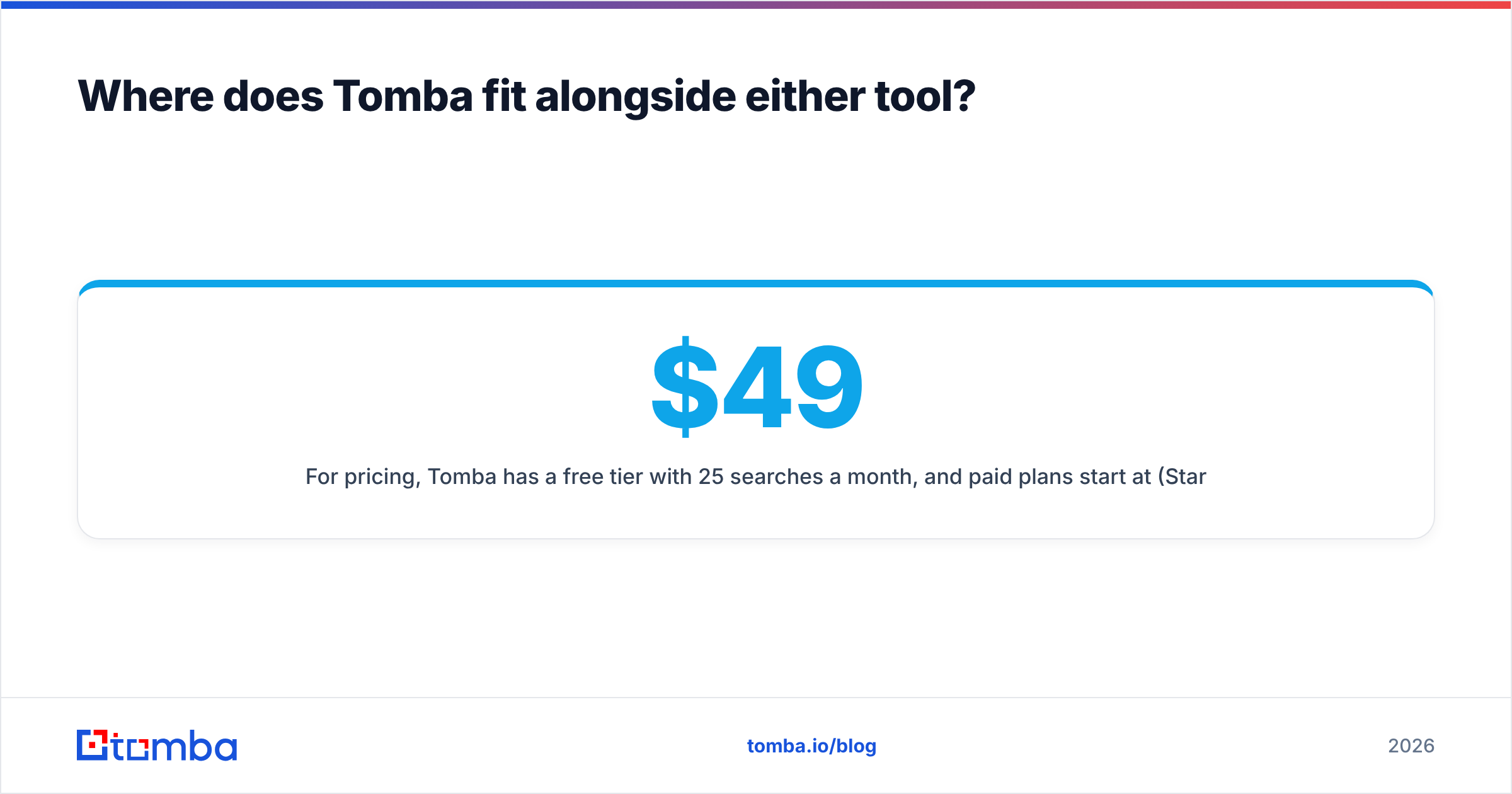
For pricing, Tomba has a free tier with 25 searches a month, and paid plans start at $49/mo (Starter), with Growth at $99/mo and Pro at $249/mo. Full pricing details are public if you want to model the cost against the numbers above.
Final verdict: ListKit vs SalesQL#
ListKit is the better pick for cold email teams that build lists from filters and send at volume. On yearly billing, its cost per triple-verified email is hard to beat.
SalesQL is the better pick for LinkedIn-native sellers, recruiters and ABM teams who need the right person at the right account, with a phone number, in one click.
Neither is a bad choice. They solve different problems, and the wrong one feels expensive only because it's used against its grain. Match the tool to where your prospecting starts, test both free tiers on the same 50 target accounts, and compare how many sendable, non-bouncing contacts each one returns.
If you want a flexible way to find and verify professional emails from a domain, a name or a company, without committing to a large annual credit pool or a LinkedIn-only workflow, try the Tomba Email Finder. Start on the free tier, run it on the same test list you use for ListKit or SalesQL, and compare the results yourself.
Related guides#
// get started
Find, verify and enrich your first contacts today
Start on the free plan with 25 searches a month, then scale when your team is ready.
Free plan · No credit card required · GDPR & CCPA
// about the author