ListKit vs SMTP Ghost (2026): Which Cold Email Stack Wins?
ListKit sells you verified leads. SMTP Ghost sends your emails. We compare data quality, deliverability, real costs and team fit, so you can tell which one your outbound stack is missing, or whether you need both.
TL;DR
- ListKit and SMTP Ghost start from opposite ends. ListKit began as a B2B lead database with triple-verified emails and later added sending infrastructure. SMTP Ghost began as a cold email sending platform and later added lead generation and verification.
- Choose ListKit if your problem is data. If you can send but can't fill a list with accurate contacts, it's the stronger fit.
- Choose SMTP Ghost if your problem is sending. If you have contacts but need cheap, flat-priced sending with warmup and no per-seat fees, SMTP Ghost is the better value.
- Budget ranges differ a lot. SMTP Ghost has a free tier and low entry pricing. ListKit's data plans cost more, and its done-for-you inbox infrastructure costs far more.
- Many teams use both, or neither. A focused email finder plus a sending tool often beats buying one platform that tries to do everything.
What are ListKit and SMTP Ghost, really?#
"ListKit vs SMTP Ghost" searches often start from the wrong assumption: that the two tools do the same job. They overlap now, but each is still strongest at the thing it launched with. Before you compare prices, get clear on what each one actually is.
- ListKit is data-first. ListKit is a B2B lead database. It advertises 700M+ contact profiles and "triple-verified" emails, meaning each address goes through several verification passes before you can export it. You filter by title, industry, headcount and similar fields, then spend credits to export.
- SMTP Ghost is sending-first. SMTP Ghost is a cold email platform. You connect your mailboxes (including through Google OAuth), warm them up, build sequences, run A/B tests and track replies. Lead generation and verification were added around that sending core.
- ListKit sells infrastructure as a service. ListKit also offers a "Cold Email Setup" product: private sending infrastructure with pre-built domains and inboxes. It's done for you and priced like an agency service, not like a SaaS seat.
- SMTP Ghost prices by account, not by seat. SMTP Ghost doesn't charge per user or per connected email account. Five users or fifty, the price is the same. For agencies and growing SDR teams, that's the main reason to pick it.
- Neither one replaces a dedicated email finder. ListKit's database only covers the contacts it already holds. SMTP Ghost's lead features are an add-on. If your ICP is niche, such as a named account list, a specific author or a local company, you'll still need a way to find specific people outside either tool.
Put simply, ListKit is the grocery store and SMTP Ghost is the kitchen. Some stores now sell a kitchen and some kitchens now stock groceries, but you should know which one you're mainly paying for.
How do ListKit and SMTP Ghost compare feature by feature?#
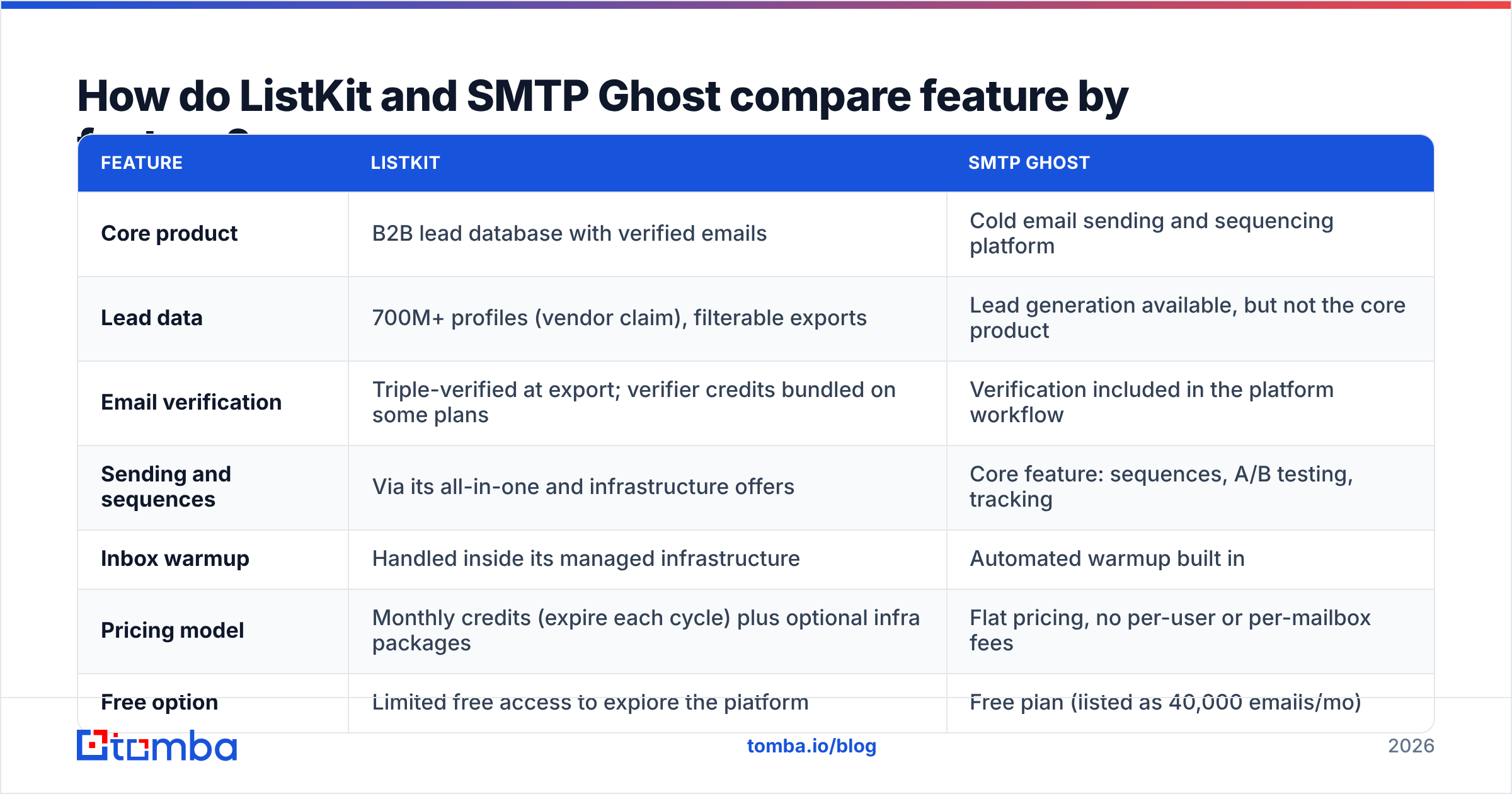
Here's the side-by-side on the features that matter most in a cold email stack. Vendor plans change often, so check both pricing pages before you buy.
| Feature | ListKit | SMTP Ghost |
|---|---|---|
| Core product | B2B lead database with verified emails | Cold email sending and sequencing platform |
| Lead data | 700M+ profiles (vendor claim), filterable exports | Lead generation available, but not the core product |
| Email verification | Triple-verified at export; verifier credits bundled on some plans | Verification included in the platform workflow |
| Sending and sequences | Via its all-in-one and infrastructure offers | Core feature: sequences, A/B testing, tracking |
| Inbox warmup | Handled inside its managed infrastructure | Automated warmup built in |
| Pricing model | Monthly credits (expire each cycle) plus optional infra packages | Flat pricing, no per-user or per-mailbox fees |
| Free option | Limited free access to explore the platform | Free plan (listed as 40,000 emails/mo) |
| Best for | Teams that can send but lack good contacts | Teams that have contacts but need affordable sending |

The table points to the main takeaway: these tools compete at the edges, not at the core. A pure ListKit vs SMTP Ghost fight only makes sense if you're choosing between ListKit's all-in-one bundle and SMTP Ghost's platform with its lead add-ons.
Which tool has better lead data?#
ListKit wins on data, clearly. That's its whole business.
ListKit's pitch rests on verification depth. Emails are checked more than once before they reach your CSV, and you're charged per successfully verified email, not per row you try to export. For an outbound team, that billing model matters: you don't pay for addresses that would bounce.
There are a few trade-offs to weigh:
- Credits expire. Unused ListKit credits don't roll over. If you export in bursts, for example one big campaign a quarter, you'll lose paid capacity in quiet months.
- Enrichment costs more credits. A basic email export costs 1 credit per lead. Mobile numbers, according to ListKit's help docs, cost several credits each, and are charged only when a number is found.
- Coverage follows the database. If your target accounts aren't well covered (small regional firms, very new startups, non-English markets), no amount of filtering fixes it.
SMTP Ghost's lead features are convenient for a team that wants one login. But the product is built around sending. If you're serious about data quality, treat SMTP Ghost's lead tools as a supplement, not your primary source.
Whichever tool your contacts come from, run them through an independent email verifier before a large send. "Verified at export" means verified on that day, and B2B data decays every month as people change jobs.
Which is better for sending and deliverability?#
SMTP Ghost is the better self-serve sending tool. ListKit is the better choice if you want someone else to build the infrastructure for you.
SMTP Ghost's sending model. You bring your own Google Workspace or Microsoft 365 mailboxes, connect them and let the platform warm them up automatically. Because there's no per-mailbox fee, you can spread volume across many inboxes at low daily volume each, which is how cold email stays out of spam in 2026. SMTP Ghost reports a 93% deliverability rate across its users. Treat that as a vendor claim, not an independent benchmark.
ListKit's sending model. ListKit's Cold Email Setup gives you private infrastructure: tiers of 30, 60 or 90 inboxes on ListKit-managed IPs, with domains and DNS handled for you. You're paying so you don't have to set up SPF, DKIM, DMARC, warmup and rotation yourself.
Either way, the same rules apply. Google's email sender guidelines require authentication, a low spam-complaint rate and easy unsubscribes for bulk senders. No tool can protect a domain from a bad list. The strongest predictor of inbox placement is still your bounce rate, and your bounce rate depends on the quality of the data you import. Learn the basics of email deliverability before you pay for any infrastructure.
A quick rule:
- If someone on your team is comfortable with DNS and wants control, SMTP Ghost is cheaper and more flexible.
- If nobody wants to touch DNS and you'd pay to skip that work, ListKit's managed setup saves the time, at a price.
How much do ListKit and SMTP Ghost really cost?#
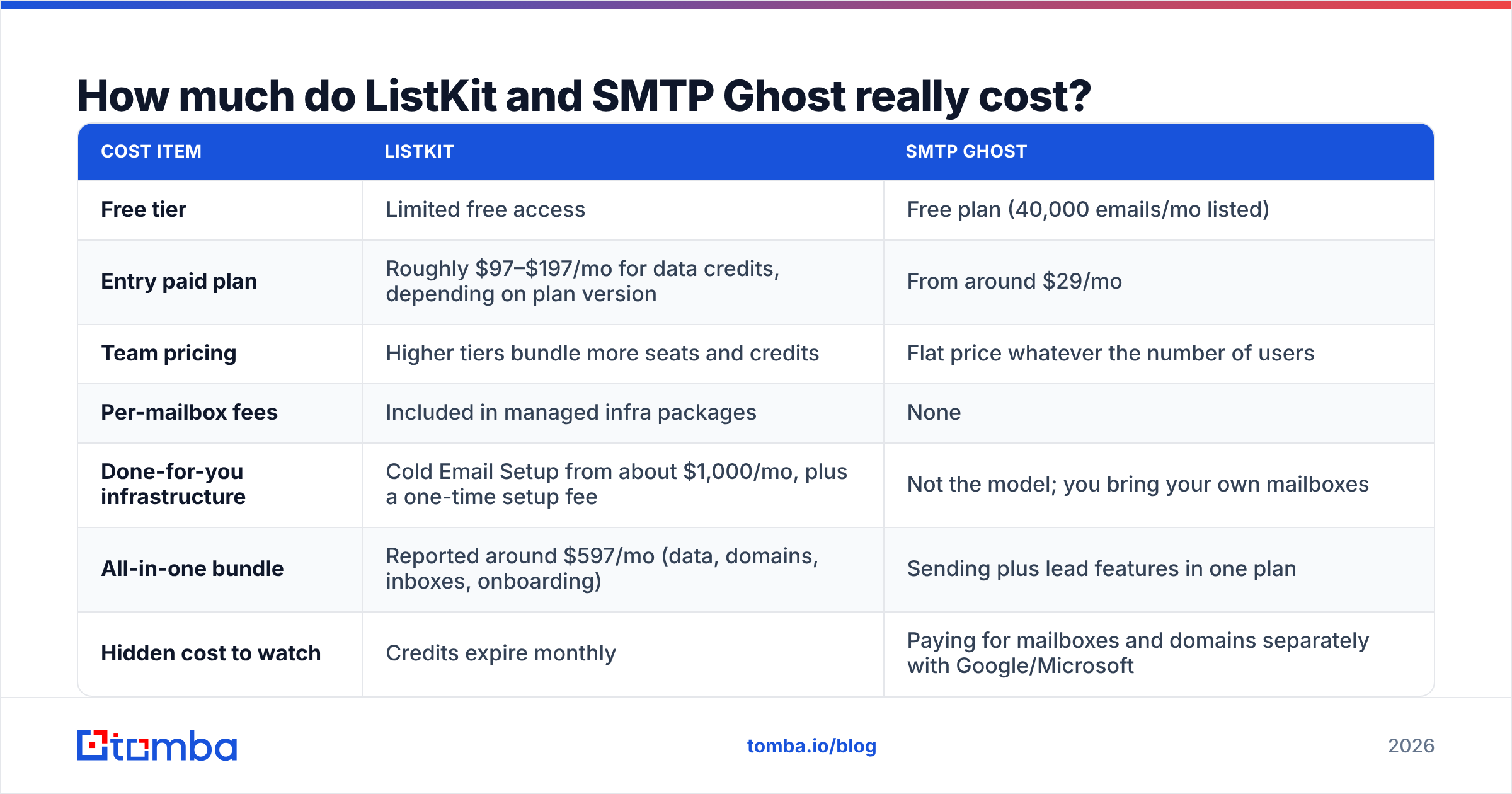
Cost is where the two tools differ most. Figures below come from each vendor's public pricing and recent third-party reviews. Both vendors have revised their plans over the past year, so treat these as ranges, not quotes.
| Cost item | ListKit | SMTP Ghost |
|---|---|---|
| Free tier | Limited free access | Free plan (40,000 emails/mo listed) |
| Entry paid plan | Roughly $97–$197/mo for data credits, depending on plan version | From around $29/mo |
| Team pricing | Higher tiers bundle more seats and credits | Flat price whatever the number of users |
| Per-mailbox fees | Included in managed infra packages | None |
| Done-for-you infrastructure | Cold Email Setup from about $1,000/mo, plus a one-time setup fee | Not the model; you bring your own mailboxes |
| All-in-one bundle | Reported around $597/mo (data, domains, inboxes, onboarding) | Sending plus lead features in one plan |
| Hidden cost to watch | Credits expire monthly | Paying for mailboxes and domains separately with Google/Microsoft |
What this means in practice:
- A solo founder or small team sending a few thousand emails a month will spend far less with SMTP Ghost plus a separate data source than with any ListKit bundle.
- A funded team that values time over money may find ListKit's all-in-one bundle simpler: one invoice, one onboarding call, no DNS work.
- Agencies running many client domains usually prefer SMTP Ghost's flat pricing. Per-seat and per-mailbox fees are what makes most sending tools expensive at agency scale.
Before you trust either vendor's framing, check independent reviews on G2. Look for comments about support response times and billing surprises, not just feature lists.
Can you use ListKit and SMTP Ghost together?#
Yes, and for many teams that's the best setup. Each tool does its core job:
- Build and export your target list in ListKit.
- Re-verify the export right before launch, especially if it's been sitting for a few weeks.
- Import into SMTP Ghost, connect your warmed mailboxes and run sequences.
- Feed replies and bounces back into your CRM so the next export skips dead contacts.
The weakness of this setup is coverage gaps. When a key account isn't in ListKit, or the database has the company but not the decision-maker you need, you need a way to find that one person's address directly: by name and domain, from a LinkedIn profile or from an article byline. That's a job for a dedicated finder, not a database filter.

Where does an email finder like Tomba fit in this stack?#
A focused finder covers the gaps that database-first and sending-first tools both leave open. It's a different job, and it helps to see it that way instead of as a replacement for either tool.
- Targeted lookups. A database is good for "all VPs of Sales at 50–200 person SaaS companies." A finder is good for "the Head of Partnerships at this specific company." With Tomba you can find email addresses by name and domain, pull every public address on a domain, or get an address from a LinkedIn profile.
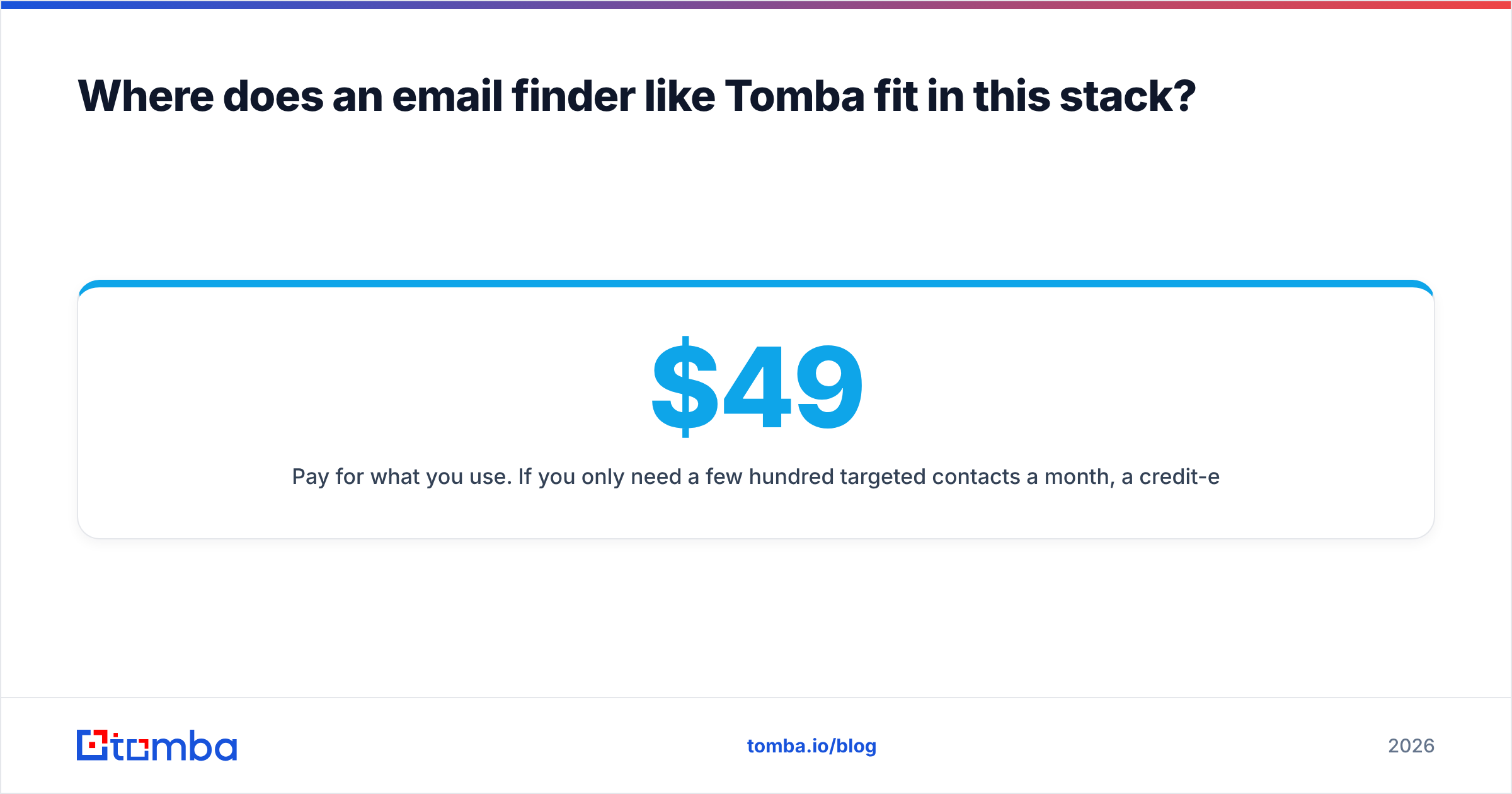
- Pay for what you use. If you only need a few hundred targeted contacts a month, a credit-expiring database plan can be overkill. Compare Tomba pricing: a free tier with 25 searches a month, then Starter at $49/mo, Growth at $99/mo and Pro at $249/mo.
- Catch-all domains. Many B2B domains accept every address, so standard verification can't confirm them. A dedicated catch-all verifier helps you decide which "accept-all" contacts are safe to send to, which matters a lot when you're protecting brand-new inboxes on SMTP Ghost.
- Feeds straight into sending. Tomba exports cleanly into any sequencer, so a Tomba + SMTP Ghost pairing is a lean alternative to ListKit's bundle for teams with a tight, account-based list.
To be fair: if you need tens of thousands of contacts filtered by firmographics every month, ListKit's database model is built for that volume. A finder is the precision tool, and a database is the bulk tool.
Which should you choose: ListKit or SMTP Ghost?#
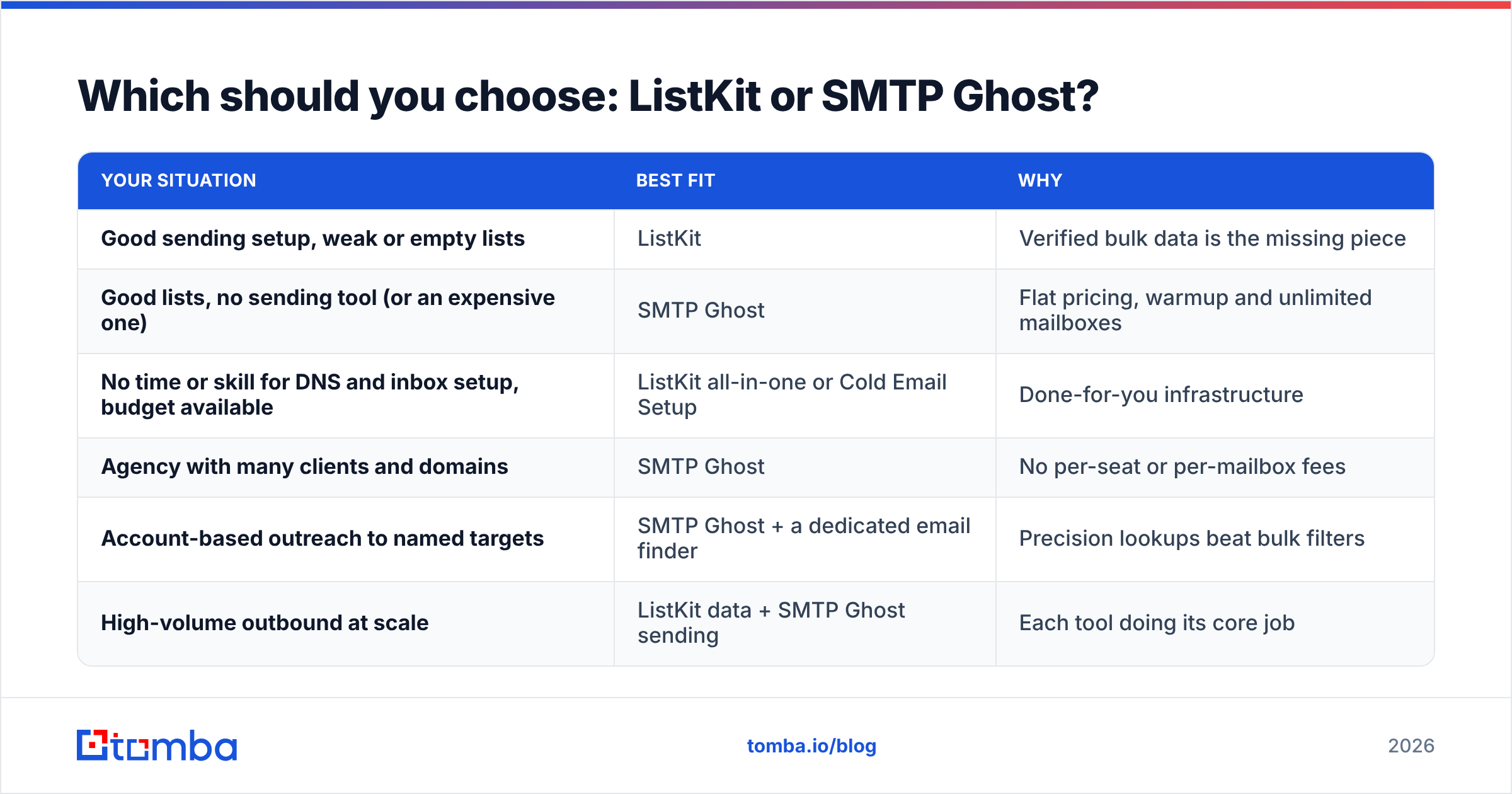
Pick based on your constraint, not on the feature list.
| Your situation | Best fit | Why |
|---|---|---|
| Good sending setup, weak or empty lists | ListKit | Verified bulk data is the missing piece |
| Good lists, no sending tool (or an expensive one) | SMTP Ghost | Flat pricing, warmup and unlimited mailboxes |
| No time or skill for DNS and inbox setup, budget available | ListKit all-in-one or Cold Email Setup | Done-for-you infrastructure |
| Agency with many clients and domains | SMTP Ghost | No per-seat or per-mailbox fees |
| Account-based outreach to named targets | SMTP Ghost + a dedicated email finder | Precision lookups beat bulk filters |
| High-volume outbound at scale | ListKit data + SMTP Ghost sending | Each tool doing its core job |
If you remember one thing: ListKit solves "who do I email?" and SMTP Ghost solves "how do I send it?" Figure out which question is actually blocking your pipeline and buy for that.
Frequently asked questions#
Is SMTP Ghost a replacement for ListKit?#
Only partly. SMTP Ghost has lead generation features, but its strength is sending. If data quality drives your results, SMTP Ghost's lead tools shouldn't be your only source.
Is ListKit a replacement for SMTP Ghost?#
Only if you buy ListKit's all-in-one or infrastructure packages. Its core data plans give you contacts, not a sequencer, so you'd still need a sending tool.
Which is cheaper, ListKit or SMTP Ghost?#
SMTP Ghost is cheaper to start, with a free plan and low-cost paid tiers. ListKit costs more because you're paying for verified data and, on higher tiers, managed infrastructure.
Do I still need to verify ListKit's triple-verified emails?#
For fresh exports sent right away, verification risk is low. For lists older than a few weeks, or anything headed to newly warmed inboxes, re-verify. Job changes make any static list less accurate over time.
Fill the gaps before you hit send#
If ListKit's database doesn't cover your target accounts, or you're pairing SMTP Ghost with a lean data source instead of a big credit plan, Tomba Email Finder is the precision layer your stack is missing. Find the exact person by name and domain, check the address before it touches a warmed inbox, and export straight into your sequencer. Start on the free tier with 25 searches a month and upgrade only when your outbound volume needs it.
Related guides#
// get started
Find, verify and enrich your first contacts today
Start on the free plan with 25 searches a month, then scale when your team is ready.
Free plan · No credit card required · GDPR & CCPA
// about the author