Listkit vs Vulcan7 (2026): B2B Lead Lists or Real Estate Seller Leads?
Listkit and Vulcan7 both sell leads, but to very different buyers. We compare data, pricing, dialers and workflows so you can tell which one fits your market before you spend a dollar.
TL;DR
- Listkit and Vulcan7 are not direct competitors. Listkit builds B2B contact lists (decision-makers at companies). Vulcan7 delivers real estate seller leads (expired listings, FSBOs, FRBOs, pre-foreclosures) to agents.
- Pick Listkit if you run cold email or outbound against businesses and want verified work emails filtered by title, industry and headcount.
- Pick Vulcan7 if you're a listing agent who prospects homeowners by phone every morning and needs a dialer and CRM in the same place.
- Pricing models are different. Listkit charges by credits (roughly $83–$97/mo entry depending on billing). Vulcan7 is a flat monthly subscription, reported between $250 and $359/mo depending on plan.
- If you only need B2B emails on demand, a pay-as-you-go email finder is often cheaper than either full platform.
What is the real difference between Listkit and Vulcan7?#
The short answer: they sell to different people who are trying to reach different people.
Listkit is a B2B lead list builder. You filter a database of companies and contacts by job title, industry, company size, location and similar firmographic attributes, then export contacts with emails that Listkit says are triple-verified at export time. The typical buyer is an agency, SDR team or founder running cold email campaigns.
Vulcan7 is a real estate prospecting platform. It gives agents a daily feed of homeowners who are likely to sell: expired listings, For Sale By Owner (FSBO), For Rent By Owner (FRBO) and pre-foreclosure properties. It adds skip-traced phone numbers and emails, a power dialer and a built-in CRM. The typical buyer is a listing agent or small real estate team that makes calls every morning.
Search for "listkit vs vulcan7" and you'll get pages that line up the two feature lists as if they did the same job. They don't. The useful question is not which tool is better. It's which market you prospect into.
How do Listkit and Vulcan7 compare side by side?#
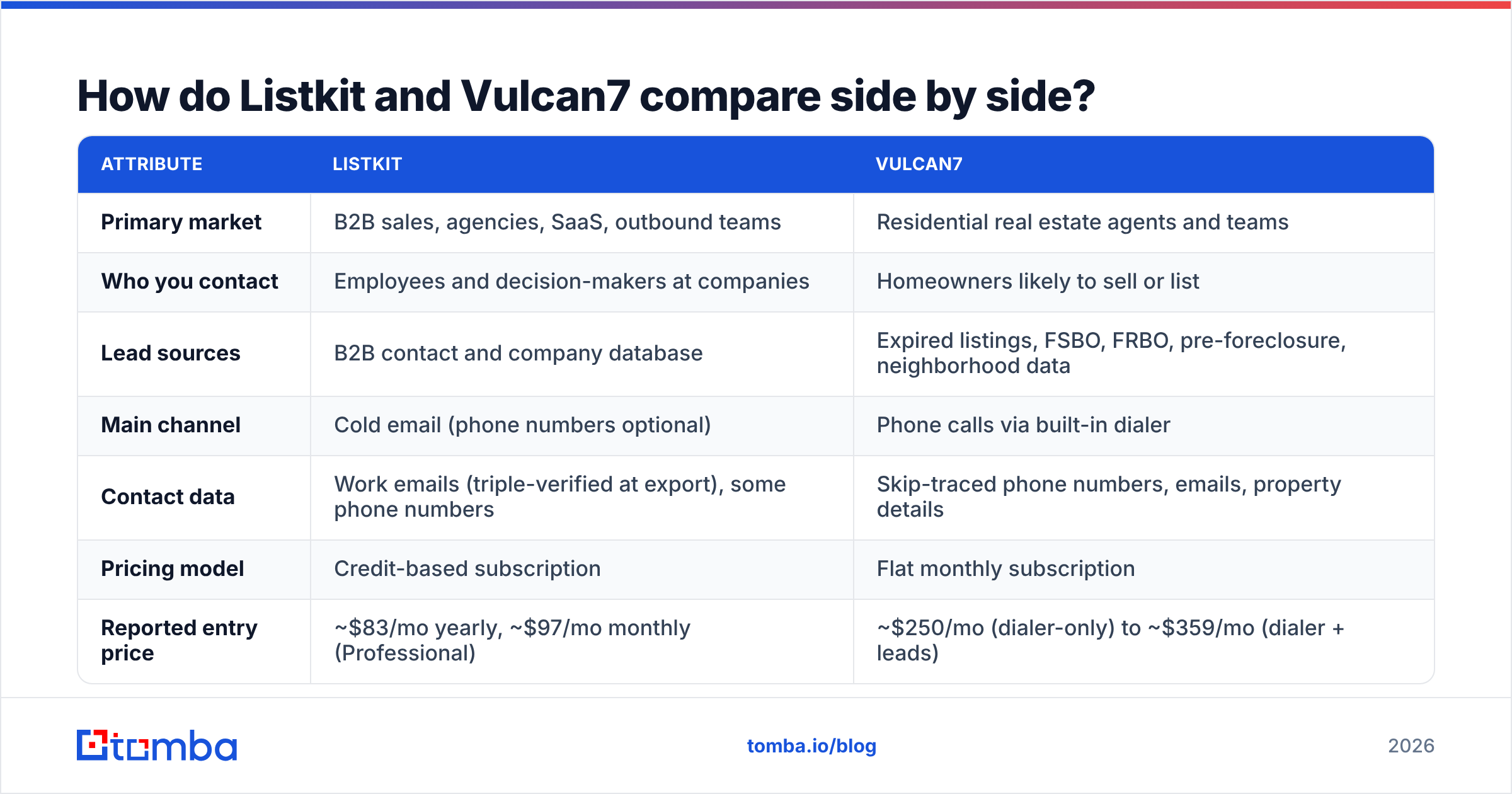
Here is the comparison on the attributes that actually drive the buying decision.
| Attribute | Listkit | Vulcan7 |
|---|---|---|
| Primary market | B2B sales, agencies, SaaS, outbound teams | Residential real estate agents and teams |
| Who you contact | Employees and decision-makers at companies | Homeowners likely to sell or list |
| Lead sources | B2B contact and company database | Expired listings, FSBO, FRBO, pre-foreclosure, neighborhood data |
| Main channel | Cold email (phone numbers optional) | Phone calls via built-in dialer |
| Contact data | Work emails (triple-verified at export), some phone numbers | Skip-traced phone numbers, emails, property details |
| Pricing model | Credit-based subscription | Flat monthly subscription |
| Reported entry price | ~$83/mo yearly, ~$97/mo monthly (Professional) | ~$250/mo (dialer-only) to ~$359/mo (dialer + leads) |
| Dialer | No native power dialer | Yes, power dialer included |
| CRM | Exports to your CRM or sequencer | Built-in CRM for agents |
| Data refresh | Verification at time of export | Expireds updated daily, lead status checked nightly |
| Best for | Building cold email lists fast | Daily call blocks to motivated sellers |
Pricing figures come from third-party reviews and vendor pages as of 2026 and change often. Check Listkit's G2 page and Vulcan7's Capterra listing for current numbers and user reviews before you commit.
How does each tool fit into a real prospecting workflow?#
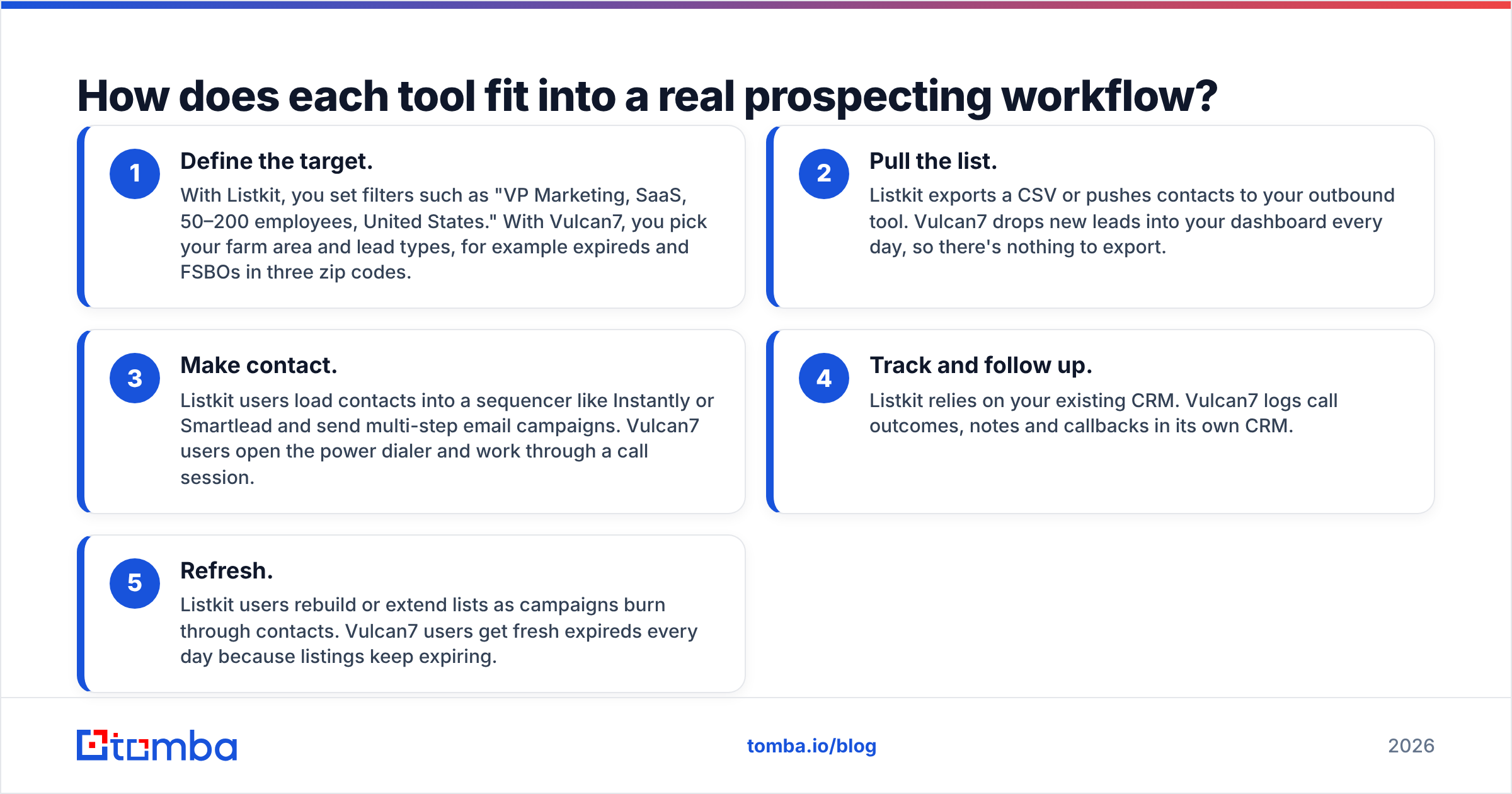
Tools look similar on a feature page and very different on a Tuesday morning. Here's what a working day looks like with each one.
- Define the target. With Listkit, you set filters such as "VP Marketing, SaaS, 50–200 employees, United States." With Vulcan7, you pick your farm area and lead types, for example expireds and FSBOs in three zip codes.
- Pull the list. Listkit exports a CSV or pushes contacts to your outbound tool. Vulcan7 drops new leads into your dashboard every day, so there's nothing to export.
- Make contact. Listkit users load contacts into a sequencer like Instantly or Smartlead and send multi-step email campaigns. Vulcan7 users open the power dialer and work through a call session.
- Track and follow up. Listkit relies on your existing CRM. Vulcan7 logs call outcomes, notes and callbacks in its own CRM.
- Refresh. Listkit users rebuild or extend lists as campaigns burn through contacts. Vulcan7 users get fresh expireds every day because listings keep expiring.
The pattern is clear. Listkit is a list-building step you plug into a larger outbound stack. Vulcan7 is closer to an all-in-one daily operating system for agents who work the phones.

How much do Listkit and Vulcan7 cost in 2026?#
The two pricing models reward different behaviors, so comparing sticker prices alone will mislead you.
Listkit pricing#
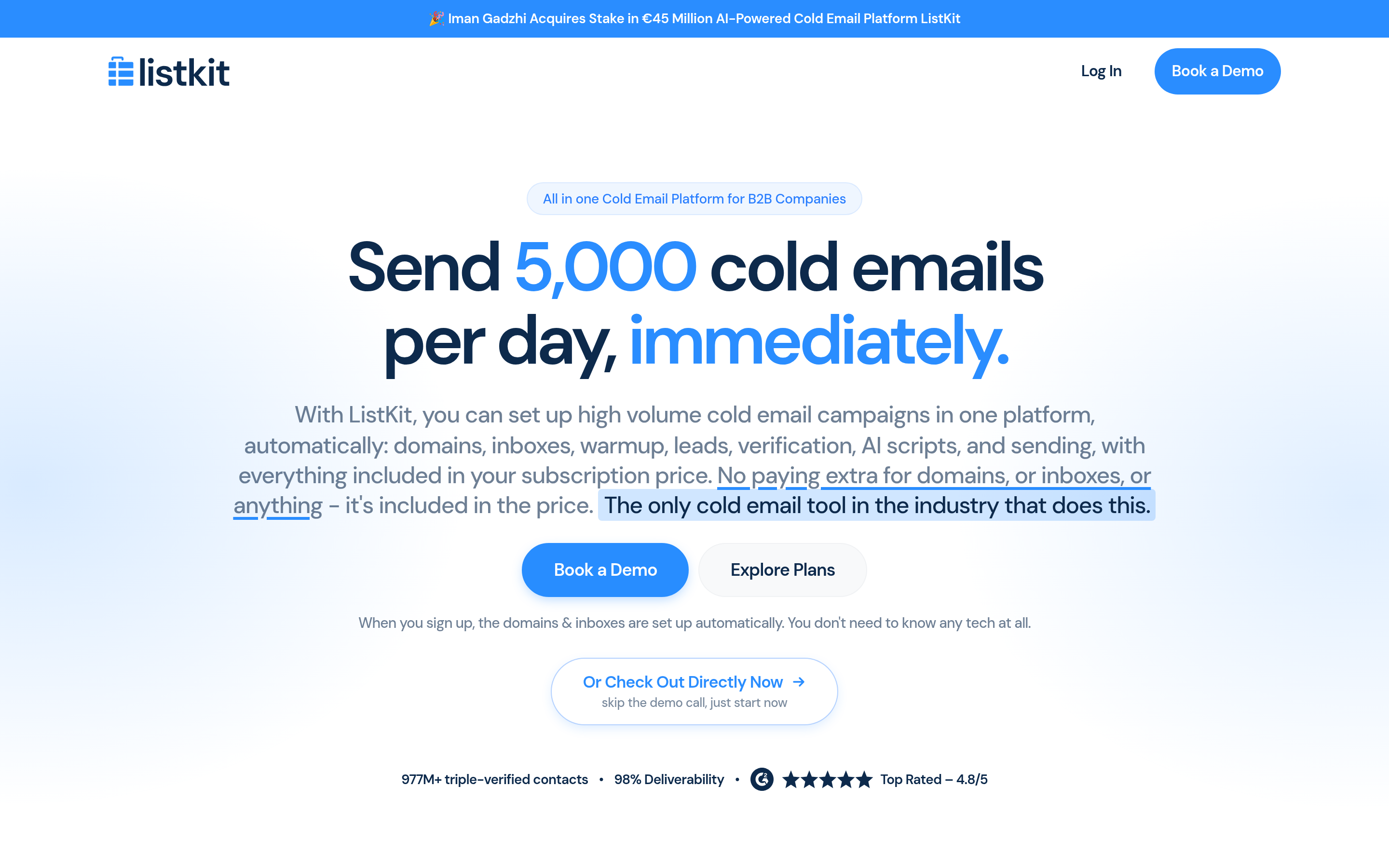
Listkit uses credits. Based on 2026 reviews and its own help docs:
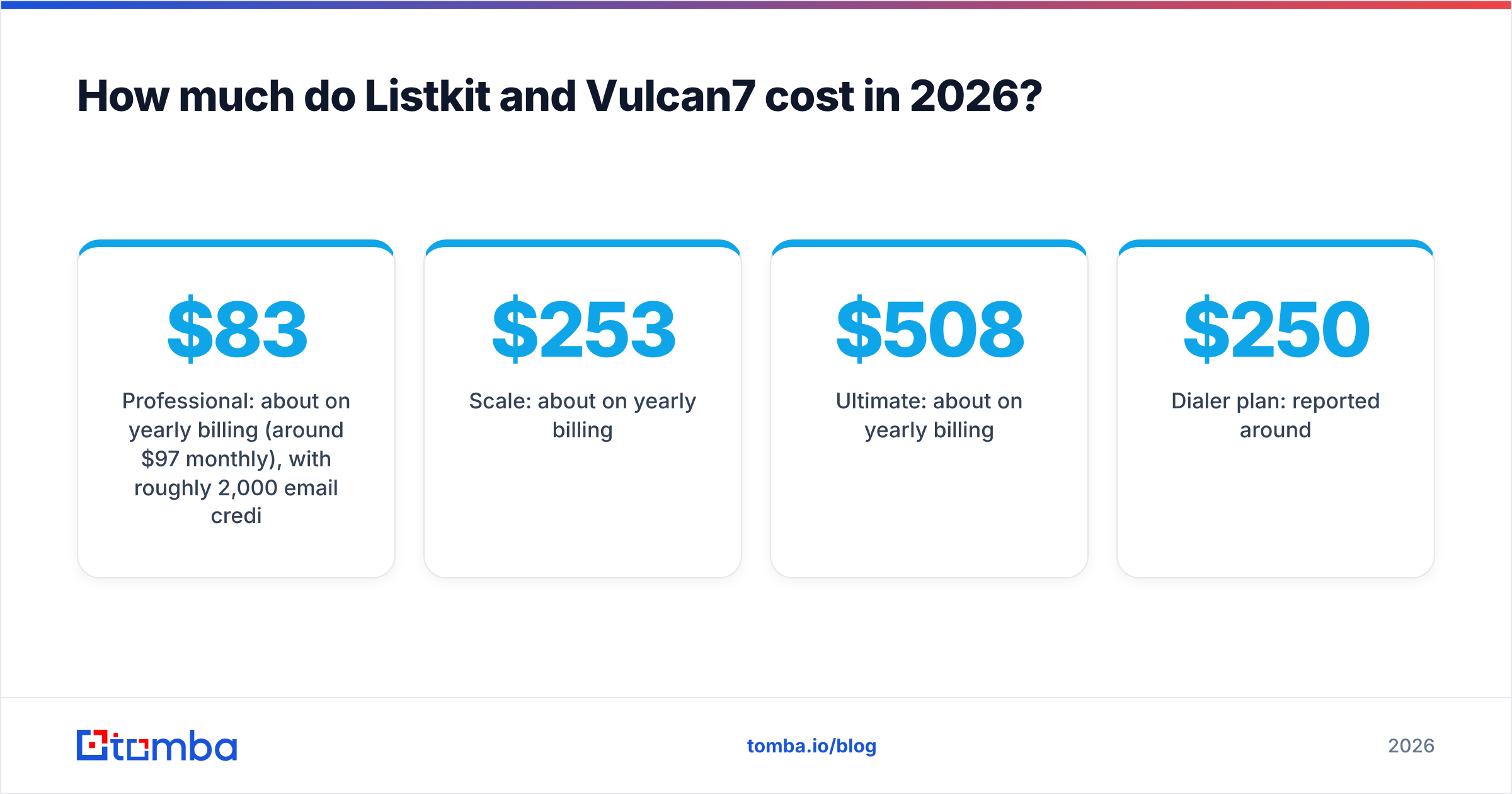
- Professional: about $83/mo on yearly billing (around $97/mo monthly), with roughly 2,000 email credits at the monthly tier.
- Scale: about $253/mo on yearly billing.
- Ultimate: about $508/mo on yearly billing.
- A small free plan (reported at 100 credits) lets you test data quality.
The catch is credit consumption. One verified email costs 1 credit, but phone numbers cost several credits each, and a fully enriched contact can cost up to 10. If you need phones as well as emails, 2,000 credits may cover only a few hundred leads. Yearly billing also gives noticeably more value than monthly, so budget accordingly.
Vulcan7 pricing#
Vulcan7 is a flat subscription, and published figures vary by source and plan:
- Dialer plan: reported around $250/mo.
- Dialer + Leads plan: reported around $359/mo.
- Some listings show a $299/mo flat rate bundling expireds, FSBO, FRBO, pre-foreclosures, neighborhood search, skip tracing, dialer, CRM and training.
With Vulcan7, you aren't paying per contact. You pay for access to a territory's daily lead flow plus the tools to call it. A single listing commission can cover a year of the subscription, which is how most agents justify the cost.
Which is cheaper?#
For low volume, Listkit's entry plan is cheaper in raw dollars. For an agent calling 50–100 homeowners a day, Vulcan7's flat fee is predictable and usually works out cheaper per conversation. For a B2B team that only needs a few hundred verified emails a month, both may be overkill. A dedicated email finder on a smaller plan often costs less.
Is Listkit's data better than Vulcan7's?#
They measure quality differently, so a head-to-head score doesn't mean much. What matters is how each vendor handles the failure mode that hurts in its own market.
For Listkit, the risk is bounces. In cold email, a bounce rate above 2–3% damages sender reputation and can push your whole domain into spam. Listkit's answer is verification at export, and it advertises roughly 98% deliverability. Treat that as a vendor claim. Run a sample through an independent email verifier before you load thousands of contacts into a sequence, especially on catch-all domains, which no verifier can fully confirm.
For Vulcan7, the risk is wrong numbers and stale status. Calling a homeowner who already relisted with another agent wastes time and annoys people. Vulcan7 says it updates expired data daily and verifies status nightly, and most leads come with two or three phone numbers. Your connect rate depends on how fresh the skip-trace data is in your market.
Compliance is different in each world. Cold B2B email falls under CAN-SPAM in the US and GDPR in Europe. Cold calling homeowners falls under TCPA rules and the National Do Not Call Registry. Whichever tool you choose, confirm how it flags DNC numbers or handles opt-outs, and don't assume the platform makes you compliant by default.
What are the pros and cons of each?#
Listkit#
Pros
- Fast B2B list building with firmographic filters
- Emails verified at export, which protects deliverability
- Credit model scales down for small teams
- Plugs into common cold email tools
Cons
- Phone numbers eat credits quickly
- Monthly billing is much weaker value than annual
- No native dialer or CRM
- Useless for consumer or homeowner prospecting
Vulcan7#
Pros
- Purpose-built for listing agents
- Daily expired, FSBO, FRBO and pre-foreclosure leads
- Power dialer and CRM in one subscription
- Includes prospecting scripts and training
Cons
- Higher fixed monthly cost
- Only useful for residential real estate
- Value depends heavily on your market's lead volume
- Less useful for teams that prospect mainly by email

Who should choose Listkit and who should choose Vulcan7?#
Use this as a quick decision guide.
Choose Listkit if:
- You sell to businesses and your main channel is cold email
- You need lists segmented by title, industry and company size
- You already use a sequencer and CRM and just need the data
- You run an agency building lists for several clients
Choose Vulcan7 if:
- You're a residential agent who wants more listings
- You prospect by phone and want a dialer built in
- You want new expired and FSBO leads in your area every day
- You'd rather have one subscription than stitch several tools together
Choose neither if:
- You sell to businesses and already know which accounts you want. You don't need a list builder. You need a way to find and verify the right person's email at a known company.
- You're a commercial real estate or B2B-facing agent. Your prospects are companies, not homeowners, which puts you back in B2B data territory.
What about B2B teams that only need emails on demand?#
Many B2B teams compare Listkit and Vulcan7 because they want "leads," but what they actually need is narrower: verified email addresses for specific people at specific companies.
In that case, a lookup tool beats a list platform. You already have account lists from your CRM, LinkedIn or event attendee sheets. You enter a name and a domain, get the address, verify it and send. You pay for the lookups you use, not a database subscription built around bulk exports.
Here's how the options stack up for that use case:
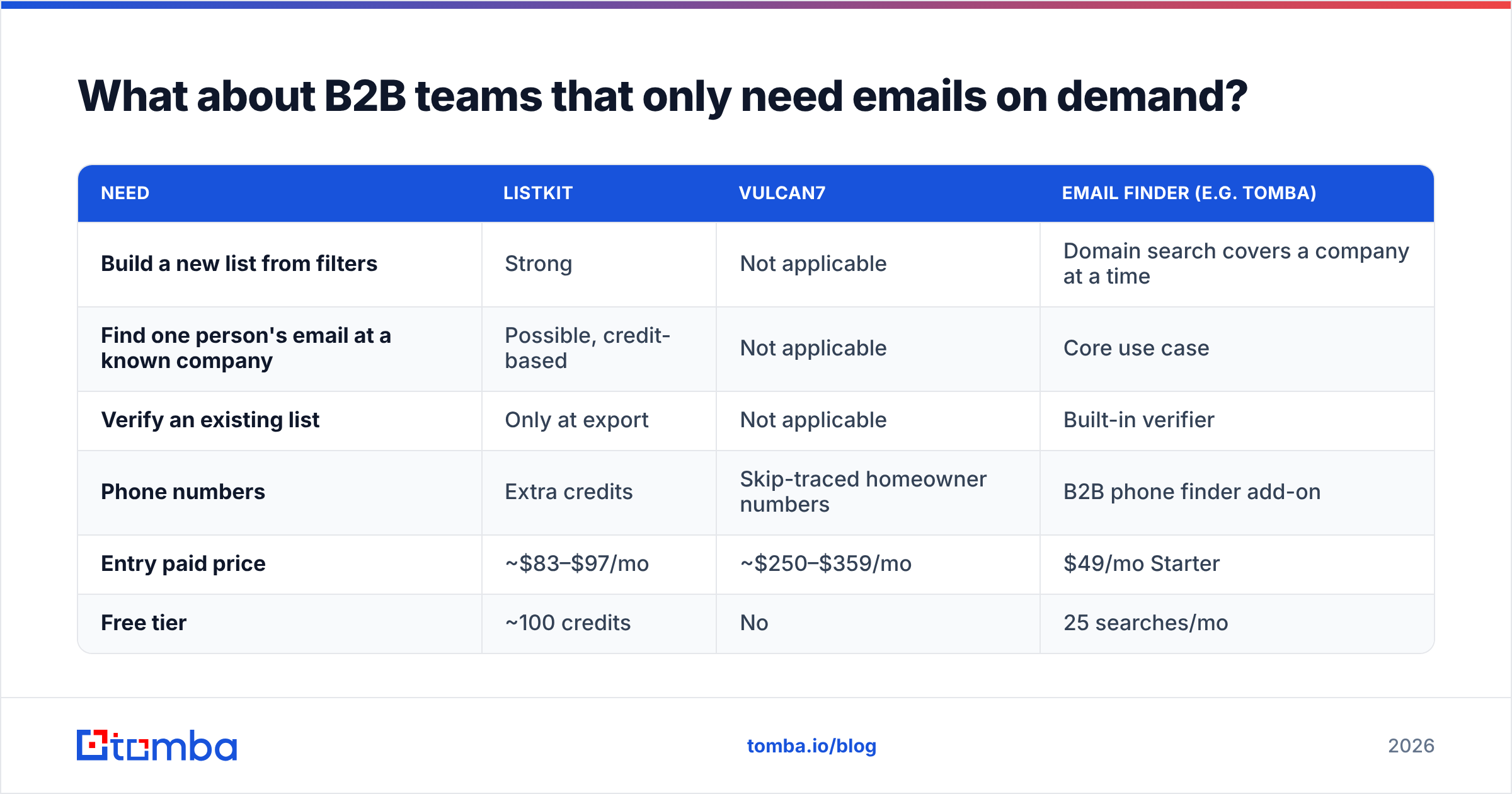
| Need | Listkit | Vulcan7 | Email finder (e.g. Tomba) |
|---|---|---|---|
| Build a new list from filters | Strong | Not applicable | Domain search covers a company at a time |
| Find one person's email at a known company | Possible, credit-based | Not applicable | Core use case |
| Verify an existing list | Only at export | Not applicable | Built-in verifier |
| Phone numbers | Extra credits | Skip-traced homeowner numbers | B2B phone finder add-on |
| Entry paid price | ~$83–$97/mo | ~$250–$359/mo | $49/mo Starter |
| Free tier | ~100 credits | No | 25 searches/mo |
Tomba's plans run from a free tier (25 searches a month) to Starter at $49/mo, Growth at $99/mo and Pro at $249/mo, with custom Enterprise pricing. See Tomba pricing for credit details. If you also need direct dials for B2B contacts, the phone finder covers that without switching to a real estate-focused dialer.
So, Listkit vs Vulcan7: which one wins?#
Neither wins overall because they don't compete for the same buyer.
- Listkit wins for B2B outbound. If your campaign starts with "find me every Head of Operations at logistics companies with 50–500 employees," Listkit is the right shape of tool.
- Vulcan7 wins for residential listing agents. If your day starts with a call block to homeowners whose listings just expired, Vulcan7 gives you the leads, numbers and dialer in one place.
- A focused email finder wins for account-based B2B prospecting. If you already know your target accounts and just need accurate, verified emails, you'll likely pay less and get cleaner data with a lookup-first tool.
Before you buy, run a small pilot. With Listkit, export 100 contacts in your ICP and check the bounce rate. With Vulcan7, work one week of leads in your farm and track connect rates. Real numbers from your market beat any review, this one included.
Ready to find verified B2B emails without a list-platform bill?#
If you're on the B2B side of this comparison and want the emails of specific decision-makers rather than a bulk database subscription, try Tomba Email Finder. Enter a name and company domain, get a verified professional address with source data, and start on the free plan with 25 searches a month before moving up to Starter at $49/mo. It works from the web app, a browser extension, Google Sheets or the API, so it fits the outbound stack you already use.
Related guides#
// get started
Find, verify and enrich your first contacts today
Start on the free plan with 25 searches a month, then scale when your team is ready.
Free plan · No credit card required · GDPR & CCPA
// about the author