Listly Pricing, Reviews, Pros and Cons: An Honest 2026 Breakdown
Listly turns web pages into spreadsheets in one click, but URL credits, proxy fees and plan caps decide what you actually pay. Here is what each tier gets you, where it falls short, and what to pair it with for outbound.
TL;DR
- Listly is a browser-extension web scraper. It turns lists and tables on web pages into Excel, CSV, JSON or Google Sheets files. It does not find or verify email addresses.
- Pricing in 2026: Free ($0, 10 URLs/month), Light ($30/mo or $25/mo billed annually, 500 URLs), Business ($90/mo or $75/mo billed annually, 1,000 URLs plus a datacenter proxy), and custom Enterprise. Extra URLs cost $10 per 1,000.
- The pros are the fast one-click extraction, clean spreadsheet exports, a scheduler and an API on the server plans. The cons are a URL-credit model that is easy to underestimate, extra charges for residential proxies, and few public reviews.
- It works well for scraping directories, marketplaces and listings. For outbound sales you still need a separate tool to turn scraped companies into verified contacts.
If you're looking at Listly, you probably want structured data from websites without writing a scraper: supplier directories, event exhibitor lists, SaaS marketplaces, job boards, review pages. Listly does that job well. The pricing page is less clear, though, because what you pay depends on how many "URLs" your workflow uses, not on the plan label.
This breakdown covers each tier, what users say, the real pros and cons, and whether Listly fits a B2B prospecting stack.
What is Listly and who is it for?#
Listly is a web data extraction tool from a Korean company. It runs as an extension for Chrome, Edge and Whale, plus a server-side "Databoard" for scheduled and bulk jobs. You open a page, click the extension, and Listly finds repeating structures such as product cards, table rows and directory entries. It then turns them into columns you can download.
According to its Capterra listing, the product is used for lead generation, product sourcing, review collection and price tracking. In practice, users fall into three groups:
- Growth and sales ops teams that scrape directories, marketplaces (for example, app store partner listings) and event pages to build account lists.
- E-commerce and market researchers who track competitor prices, catalog changes and reviews.
- Analysts and agencies who need a quick table from a site that has no export button.
The core idea is simple: Listly handles page-to-rows. It can't identify the decision-maker at a scraped company or get their work email. That gap matters later in this article.
How does Listly pricing work in 2026?#
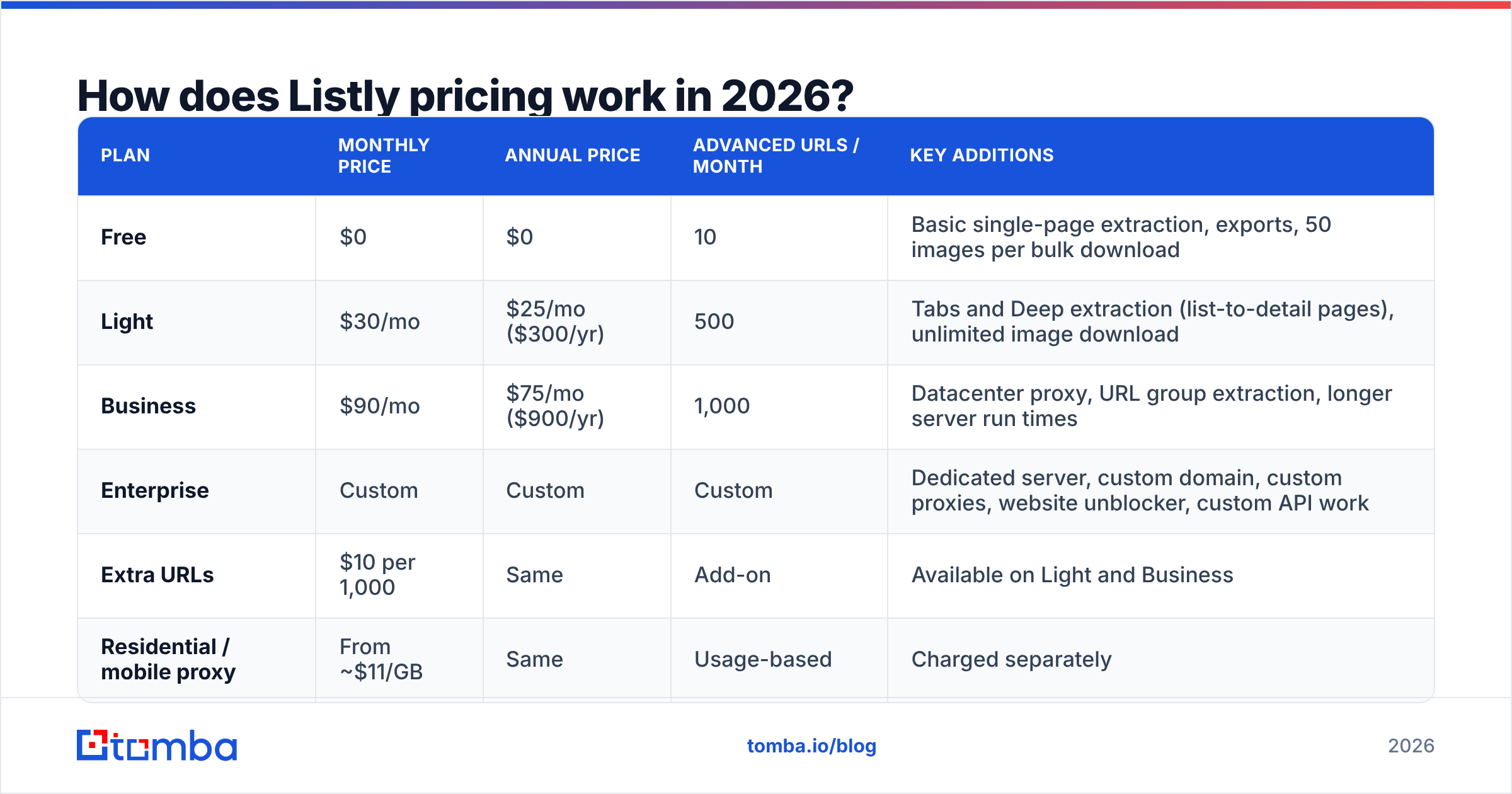
Listly sells subscriptions metered in URLs. One page processed counts as one URL. Single-page "basic" extraction from the browser is unlimited on paid plans. Multi-page runs (Tabs, Deep extraction, Group extraction, pagination) use one URL per page. So a 40-page directory costs 40 URLs every time you run it, and a daily scheduled job on that directory costs about 1,200 URLs a month.
Here's the current lineup from Listly's pricing page, checked in September 2026:
| Plan | Monthly price | Annual price | Advanced URLs / month | Key additions |
|---|---|---|---|---|
| Free | $0 | $0 | 10 | Basic single-page extraction, exports, 50 images per bulk download |
| Light | $30/mo | $25/mo ($300/yr) | 500 | Tabs and Deep extraction (list-to-detail pages), unlimited image download |
| Business | $90/mo | $75/mo ($900/yr) | 1,000 | Datacenter proxy, URL group extraction, longer server run times |
| Enterprise | Custom | Custom | Custom | Dedicated server, custom domain, custom proxies, website unblocker, custom API work |
| Extra URLs | $10 per 1,000 | Same | Add-on | Available on Light and Business |
| Residential / mobile proxy | From ~$11/GB | Same | Usage-based | Charged separately |
A few details on the pricing page change your real cost:
- URLs refill monthly and don't roll over. If you use 200 of your 500 Light URLs, you lose the other 300.
- Runs keep going after you run out. Listly lets a job finish and holds the results until you top up. That's convenient, but it also makes it easy to go over budget without noticing.
- Data retention is 6 months while you're subscribed and 7 days after cancellation. If you cancel, export everything first.
- Team plans are separate versions of Light and Business with shared boards, member management and team-only share links.
What do Listly reviews actually say?#
There aren't many public reviews, and that's worth knowing before you commit to an annual plan. At the time of writing, Listly has only a single review on G2. It's positive (4.5 stars) and praises how it "converts messy, unorganized data into organized sheets." The one complaint in that review is about privacy controls. The Capterra and GetApp listings also have little written feedback.
Across the reviews, Chrome Web Store comments and third-party write-ups, the same themes come up:
- Speed to first result. Non-technical users get a clean table in under a minute on well-structured pages.
- Export quality. Column detection is usually good, and renaming columns in the Databoard is easy.
- Learning curve on advanced runs. Deep extraction, auto-click, pagination and action scripts take real setup time. They also break when a site changes its layout.
- Bot-protected sites. Pages behind Cloudflare-style protection often fail unless you pay for proxies or the Enterprise unblocker.
With so few reviews, don't treat review scores as proof either way. Run a trial on your three most important target sites. That tells you more than any rating.

What are the pros and cons of Listly?#
Here's the short version before the details.
| Pros | Cons |
|---|---|
| One-click extraction from the browser with no code | URL metering makes monthly cost hard to predict |
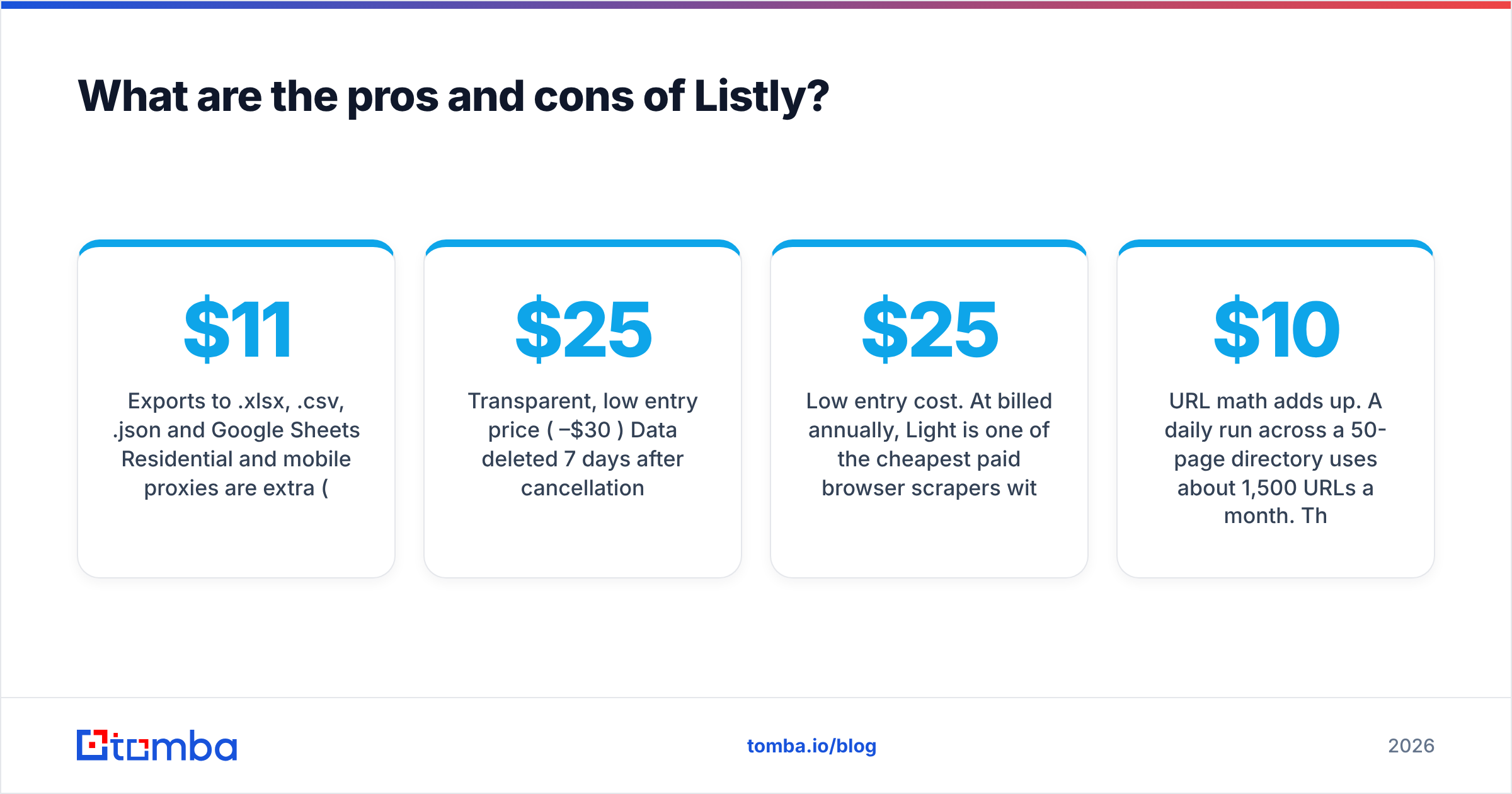
| Exports to .xlsx, .csv, .json and Google Sheets | Residential and mobile proxies are extra (from ~$11/GB) |
| Scheduler from minutely to monthly on server runs | Very few public reviews to validate reliability |
| API for task status, results and refreshes | Advanced runs break when target sites redesign |
| Built-in LLM tools to summarize, classify and transform data | No contact data: no emails, phones or verification |
| Transparent, low entry price ($25–$30/mo) | Data deleted 7 days after cancellation |
The strengths in more detail#
Low entry cost. At $25/mo billed annually, Light is one of the cheapest paid browser scrapers with a real server component. If you need a few hundred detail pages a month, it's hard to spend less.
List-to-detail in one run. Deep extraction follows every item on a list page into its detail page, for example 100 products into 100 product pages. That's the workflow most people actually need, and many free extensions can't do it.
Automation on the server side. Scheduling, auto-retry, fail screenshots and a task API mean you can put Listly behind a dashboard or a Google Sheet that refreshes itself.
Newer LLM features. The Databoard can now summarize, find, classify and transform extracted data. That's useful for tagging scraped companies by industry before import.
The weaknesses in more detail#
URL math adds up. A daily run across a 50-page directory uses about 1,500 URLs a month. That's already more than Business includes. The overage is cheap ($10 per 1,000), but you should know it's coming.
Proxies cost extra. Business includes a datacenter proxy. Many sites that matter to B2B teams, such as LinkedIn-adjacent pages, large marketplaces and review sites, block datacenter IPs. Residential or mobile IPs are billed per GB on top of your plan.
It's a scraper, not a data provider. Listly gives you whatever is on the page. If the directory lists "Acme Corp, acme.com, Austin TX," that's all you get. There's no person, no title, and no verified inbox.
Is Listly good for B2B lead generation?#
Listly is good for the account-list step of lead generation. It isn't enough on its own for the contact step. That's where most sales teams get disappointed.
A realistic outbound workflow using Listly looks like this:
- Scrape the account source. Pull company names and domains from a directory, partner marketplace, trade-show exhibitor list or niche review site with Listly.
- Clean and dedupe. Remove duplicates and normalize domains in Sheets. Listly's LLM classify feature can tag industry or size here.
- Find the decision-makers. Run each domain through a domain search to see who works there and which email pattern the company uses.
- Get specific contacts. Use an email finder with first name, last name and domain to get the address for the exact person you want.
- Verify before sending. Run the list through an email verifier so you don't damage your sender reputation with bounces.
- Push to your CRM or sequencer. Import the enriched, verified list into HubSpot, Salesforce or your outbound tool.
Listly handles step 1 very well and step 2 reasonably well. Steps 3 to 5 need a dedicated email-finding and verification tool. If you try to scrape emails directly from web pages instead, you mostly get generic inboxes like info@ and sales@, which rarely lead to meetings.
How does Listly compare with other scraping options?#
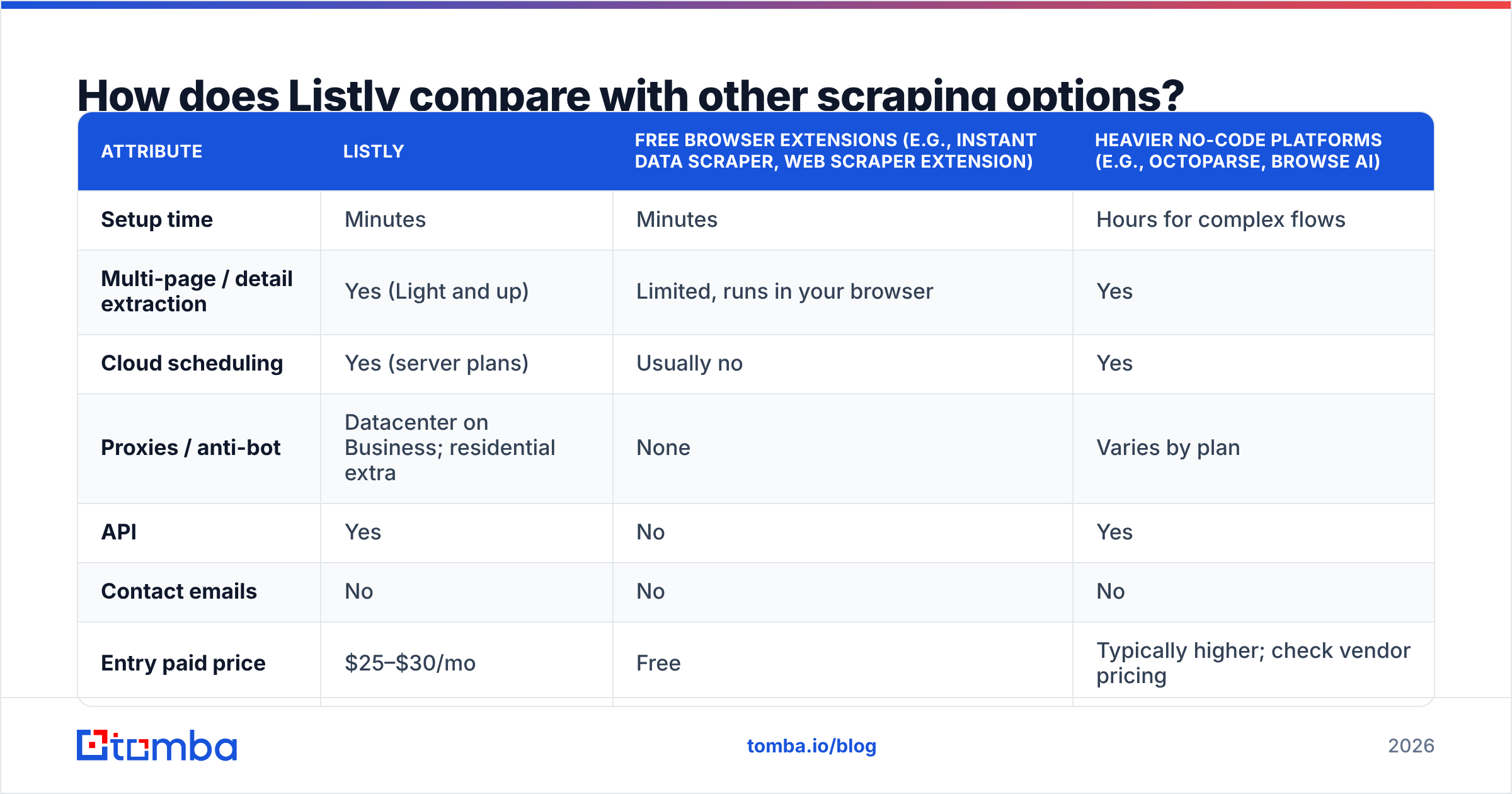
If you're comparing tools, the real choice is usually between Listly, a free extension, or a heavier no-code scraping platform. Here's how they differ on the attributes that matter for sales and research teams:
| Attribute | Listly | Free browser extensions (e.g., Instant Data Scraper, Web Scraper extension) | Heavier no-code platforms (e.g., Octoparse, Browse AI) |
|---|---|---|---|
| Setup time | Minutes | Minutes | Hours for complex flows |
| Multi-page / detail extraction | Yes (Light and up) | Limited, runs in your browser | Yes |
| Cloud scheduling | Yes (server plans) | Usually no | Yes |
| Proxies / anti-bot | Datacenter on Business; residential extra | None | Varies by plan |
| API | Yes | No | Yes |
| Contact emails | No | No | No |
| Entry paid price | $25–$30/mo | Free | Typically higher; check vendor pricing |
What stands out is the "Contact emails" row. No general-purpose scraper gives you verified business contacts. They extract what's publicly on the page. So the question isn't which scraper finds emails. It's which scraper is cheapest and most reliable for your account sources, and which contact tool you pair it with.
What does a Listly + contact data stack really cost?#
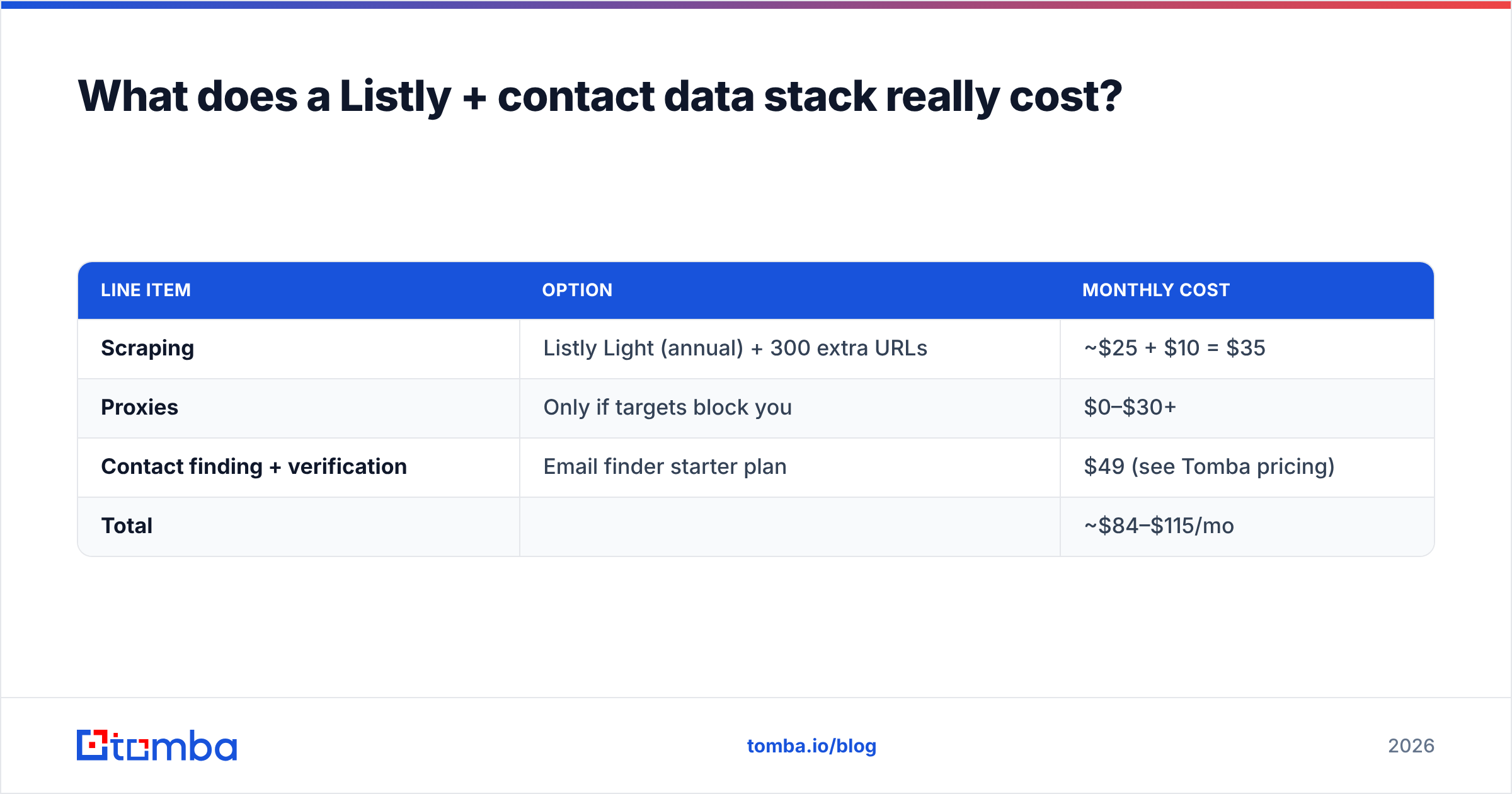
Here's the monthly cost for a small outbound team scraping about 800 detail pages a month and turning them into roughly 300 verified contacts:
| Line item | Option | Monthly cost |
|---|---|---|
| Scraping | Listly Light (annual) + 300 extra URLs | ~$25 + $10 = $35 |
| Proxies | Only if targets block you | $0–$30+ |
| Contact finding + verification | Email finder starter plan | $49 (see Tomba pricing) |
| Total | ~$84–$115/mo |
That's much cheaper than all-in-one sales intelligence suites, and you control the account source. The trade-off is that you manage the workflow yourself: two tools, one spreadsheet, and a little cleanup work.
Which Listly plan should you choose?#
Pick based on how many pages you process per month, not on which features sound nice.
- Stay on Free if you only need an occasional single-page table. Ten advanced URLs is really a trial.
- Choose Light if you run a few list-to-detail jobs a month (under ~500 pages) from your own browser and don't need proxies. This is the best-value tier for most solo operators.
- Choose Business if you need scheduled server runs, group extraction across many URLs, or the included datacenter proxy. Plan for overage packs if you schedule daily jobs.
- Talk to sales about Enterprise if you scrape bot-protected sites at scale, need a dedicated server, or want Listly to build custom API endpoints.
Pay monthly for the first month or two. Once you know your real URL usage, switch to annual billing to save the equivalent of two months.
Is Listly worth it?#
For its price, yes. Listly is an honest, low-cost tool for getting structured data out of websites. It has more depth than free extensions and costs far less than enterprise scraping platforms. The one-click experience is real, the export options cover everything a sales or research team uses, and the scheduler and API make it useful beyond one-off jobs.
It's not worth it if you expect it to give you contacts. Budget for the URL metering, test your hardest target sites before paying annually, and treat the thin review record as a reason to trial it properly rather than as a warning sign.
If you use Listly to build account lists, the next step is turning those domains into people you can actually email. Tomba Email Finder takes the company domains you scraped and returns the work emails of the decision-makers behind them, with verification built in. Start on the free tier (25 searches a month), upload a small Listly export, and see how many accounts turn into reachable contacts before you scale up.
Related guides#
// get started
Find, verify and enrich your first contacts today
Start on the free plan with 25 searches a month, then scale when your team is ready.
Free plan · No credit card required · GDPR & CCPA
// about the author