Listmint vs SignalHire (2026): Verifier vs Contact Finder
Listmint and SignalHire get compared a lot, but they solve different problems. One cleans lists and catch-alls, the other finds emails and phone numbers. Here's how to pick, or when to use both.
TL;DR
- Listmint and SignalHire aren't direct competitors. Listmint verifies email lists, and it's especially focused on catch-all addresses. SignalHire finds contact data (emails and phone numbers), mostly from LinkedIn profiles.
- Listmint pricing uses two credit pools. Starter is $99/mo for 20,000 standard and 5,000 catch-all credits. Agency is $187/mo for 50,000 standard and 10,000 catch-all credits.
- SignalHire pricing (as reported for 2026) starts around $69/mo for 1,000 email credits. There is also a phone plan and a combined emails-and-phones tier at about $99/mo.
- Choose by the job you need done. If you already have a list and your bounce rate is hurting you, you want a verifier. If you have names but no contact details, you want a finder. Plenty of outbound teams end up paying for both.
- Want one tool for both? A finder with built-in verification, such as Tomba, covers both steps on one bill.
What is the real difference in Listmint vs SignalHire?#
The short version: SignalHire answers "what is this person's email or phone number?" Listmint answers "is this email safe to send to?"
Think of a restaurant. SignalHire is the supplier who delivers the ingredients. Listmint is the inspector who checks them before they go into the dish. You need both jobs done, but you wouldn't ask the inspector to supply the food.
That's why "Listmint vs SignalHire" searches can mislead people. Buyers often land on this comparison because both tools come up in cold-email tool roundups. They sit at different stages of the pipeline, though:
- Sourcing is where SignalHire works. You open a LinkedIn profile or run a search, and SignalHire shows an email and/or phone number for a credit.
- Hygiene is where Listmint works. You upload a CSV or call the API, and each address comes back labelled deliverable, risky or invalid. Listmint does extra work on catch-all domains, which most verifiers mark "unknown" and leave alone.
- Sending happens in your sequencer (Instantly, Smartlead, Outreach and so on), which neither tool replaces.
Once you see it that way, the question shifts from "which is better?" to "which gap do I have right now?"
What does Listmint do?#
Listmint is an email verification service built around a problem most verifiers avoid: catch-all domains.
A catch-all (or "accept-all") domain accepts mail for any address, so anything@company.com returns a positive SMTP response. Standard verifiers can't tell whether jane.doe@company.com really exists. They label it "catch-all" or "unknown," and you're left to guess. In B2B lists, especially mid-market and enterprise companies behind Microsoft 365 or security gateways, catch-alls can make up a large share of your contacts.
According to its G2 listing, Listmint says it verifies both standard and catch-all emails in one place and targets a bounce rate under 1%. Pricing is split into two pools:
- Standard credits for normal SMTP-level verification.
- Catch-All credits for the harder check that tries to resolve accept-all addresses to valid or invalid.
The upside of this setup is that you can see exactly what you pay for catch-all resolution. Many tools either don't offer catch-all resolution or hide its cost inside a blended per-check rate.
What Listmint does not do: it doesn't position itself as a contact database or an email finder. If you don't already have an address, Listmint has nothing to check.
What does SignalHire do?#
SignalHire is a contact-discovery tool. It started with recruiters and is now widely used by sales teams too. Its main workflow is a browser extension: you're on a LinkedIn profile (or another supported site), you click, and SignalHire returns work email, personal email and/or phone numbers when it has them.
Beyond the extension, SignalHire offers a searchable people database, bulk lookups and an API for teams that want to enrich records programmatically.
Credits are only used when a result comes back, which is fair for a finder. You also get phone numbers, which pure verifiers never provide. If your outreach includes cold calling or SMS, that matters.
What SignalHire does not do: it isn't built to be your list-hygiene layer. Finders run internal checks on the emails they return, but deep catch-all resolution on a 50,000-row list you imported from somewhere else is a different job.

How do Listmint and SignalHire compare side by side?#
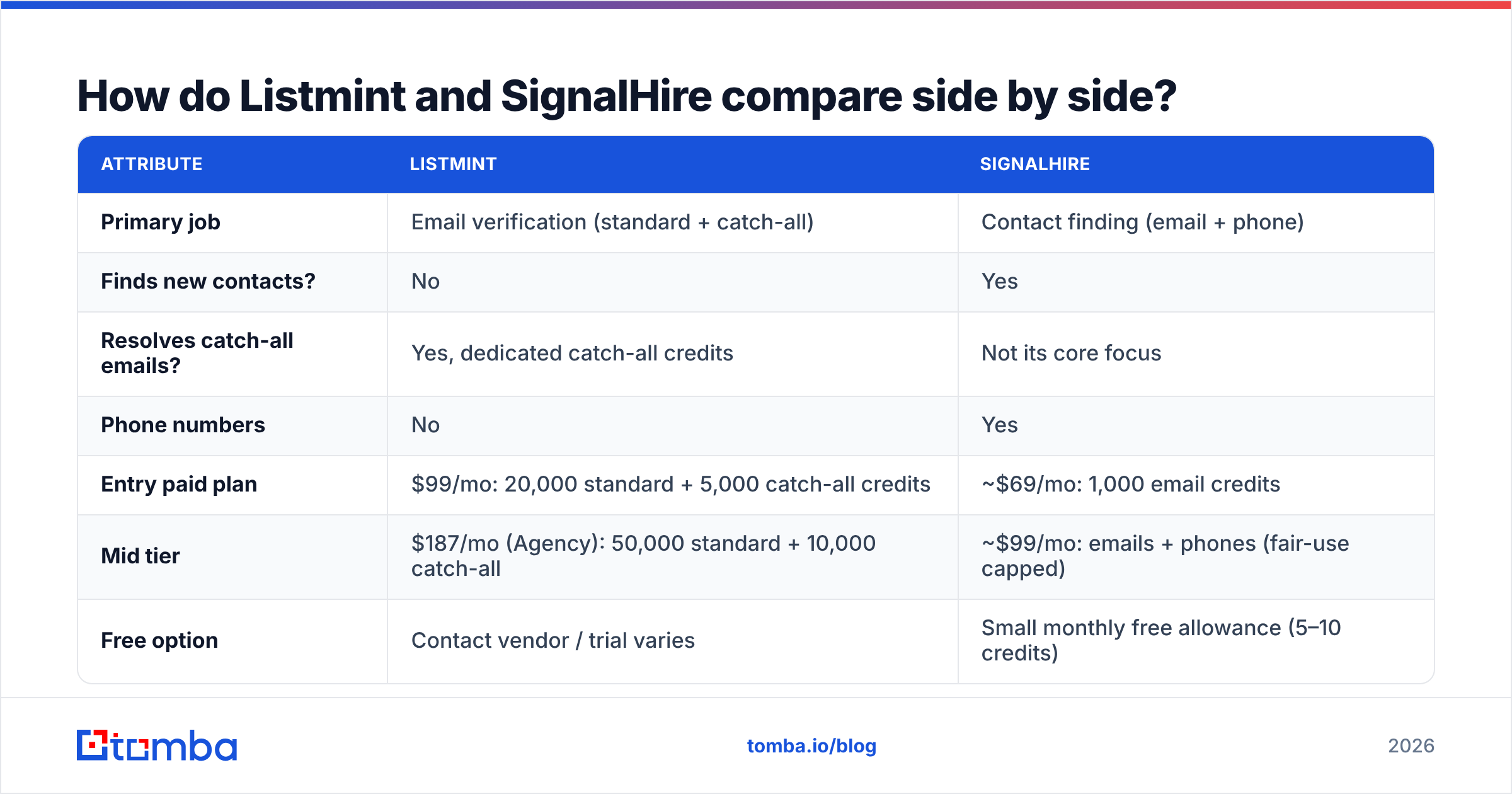
Here is the head-to-head. SignalHire pricing is based on figures widely reported for 2026. Credit sizes change often, so check both vendors' pricing pages before you buy.
| Attribute | Listmint | SignalHire |
|---|---|---|
| Primary job | Email verification (standard + catch-all) | Contact finding (email + phone) |
| Finds new contacts? | No | Yes |
| Resolves catch-all emails? | Yes, dedicated catch-all credits | Not its core focus |
| Phone numbers | No | Yes |
| Entry paid plan | $99/mo: 20,000 standard + 5,000 catch-all credits | ~$69/mo: 1,000 email credits |
| Mid tier | $187/mo (Agency): 50,000 standard + 10,000 catch-all | ~$99/mo: emails + phones (fair-use capped) |
| Free option | Contact vendor / trial varies | Small monthly free allowance (5–10 credits) |
| Main interface | CSV upload + API | Chrome extension, web search, API |
| Best for | Agencies and senders cleaning large lists | Recruiters and SDRs sourcing individual prospects |
| Main limitation | Needs a list you already have | Volume per dollar is low for list cleaning |
A quick cost comparison shows how different they are. With Listmint, a catch-all check works out to roughly $0.02 on either plan. With SignalHire, a revealed email costs roughly $0.07, and a phone number costs more. The work behind each price is different, which is why the prices are too. Comparing them directly is like comparing the price of a delivery with the price of an inspection.
Which tool gives better deliverability?#
If deliverability is the metric you're judged on, Listmint has the more direct impact, because list hygiene is its whole product.
Bounces hurt your sender reputation, and mailbox providers take reputation into account for every message you send afterwards. Google's bulk-sender rules and Microsoft's Outlook requirements have both made sending to bad addresses more costly. Hard bounces above roughly 2% are a common warning sign in cold email.
Catch-alls are where teams lose the most. Suppose you remove every catch-all, and they make up 30% of your list. You've just discarded a third of your total addressable market. Suppose you send to all of them instead. Some share will bounce, and you won't know which ones in advance. Listmint's dedicated catch-all pool is built for exactly this trade-off.
SignalHire affects deliverability less directly. The emails it returns go through its own checks, so they should be sendable. Still, any finder's output benefits from a final verification pass before a large campaign. That's standard practice however good the finder is.
Which tool is better for prospecting?#
For prospecting, SignalHire wins by default, because Listmint doesn't prospect.
SignalHire is strongest when:
- You work one profile at a time. SDRs building hand-picked account lists on LinkedIn get quick reveals without leaving the page.
- You need phone numbers. Recruiters and phone-first sales teams get mobile and direct dials in the same lookup.
- Your volume is moderate. A few hundred to a thousand reveals a month fits the plan structure well.
It's less suited to mass list building. At 1,000 email credits a month, a team trying to source 20,000 contacts a quarter will hit the ceiling fast.
When should you buy both?#
Using both is common among agencies and outbound-heavy teams:
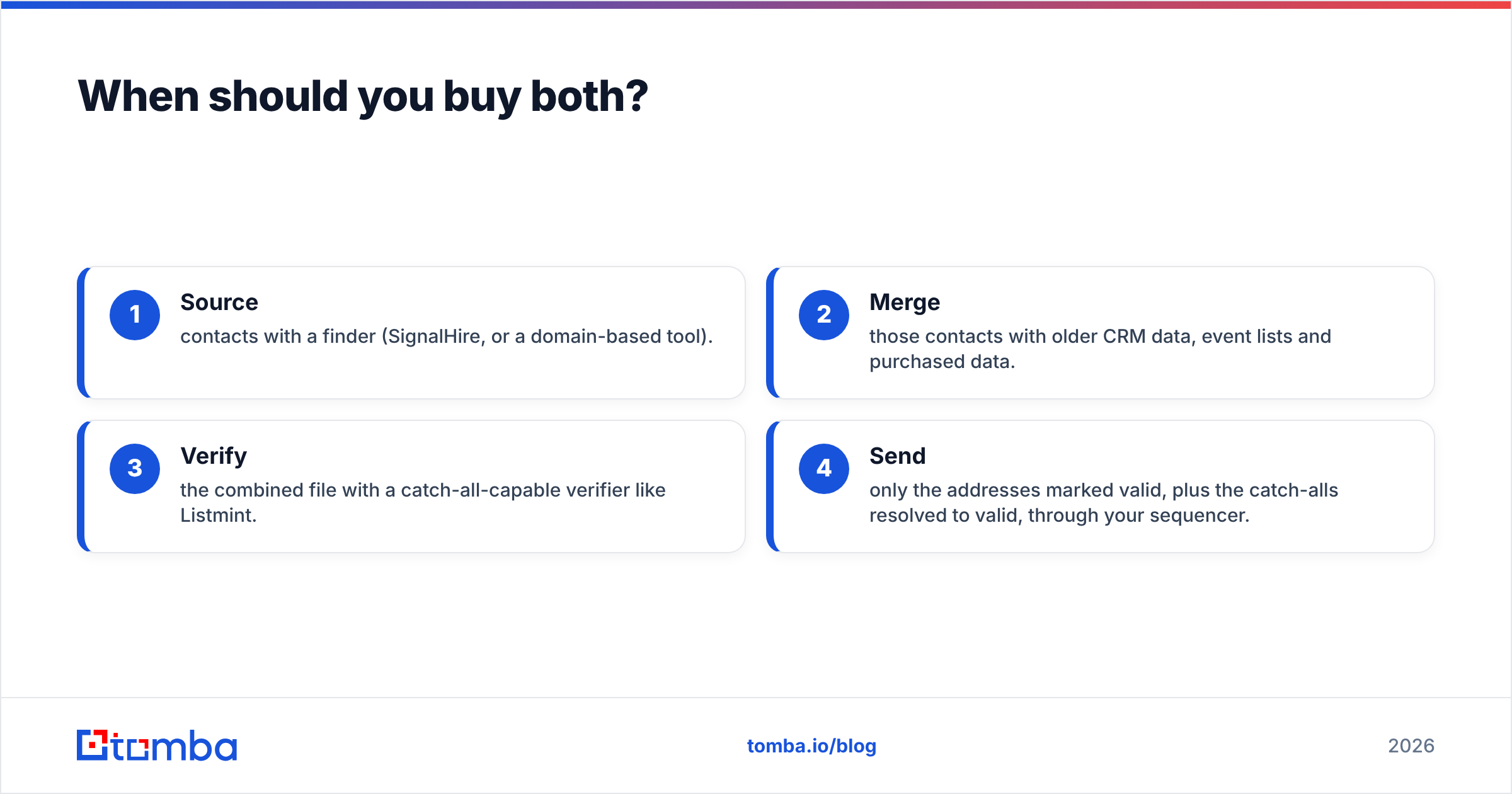
- Source contacts with a finder (SignalHire, or a domain-based tool).
- Merge those contacts with older CRM data, event lists and purchased data.
- Verify the combined file with a catch-all-capable verifier like Listmint.
- Send only the addresses marked valid, plus the catch-alls resolved to valid, through your sequencer.
The downside is overhead: two vendors, two credit systems, two sets of CSV exports and two invoices to justify at renewal. For an agency verifying hundreds of thousands of emails a month, a specialist verifier is worth that overhead. For a five-person SDR team, it often isn't.
Is there a single tool that finds and verifies?#
Yes. Several email finders now build verification, including catch-all handling, into the lookup itself. Tomba is one of them. The email finder returns addresses by name + domain or company. The email verifier and a dedicated catch-all verifier sit on the same account and the same credits.
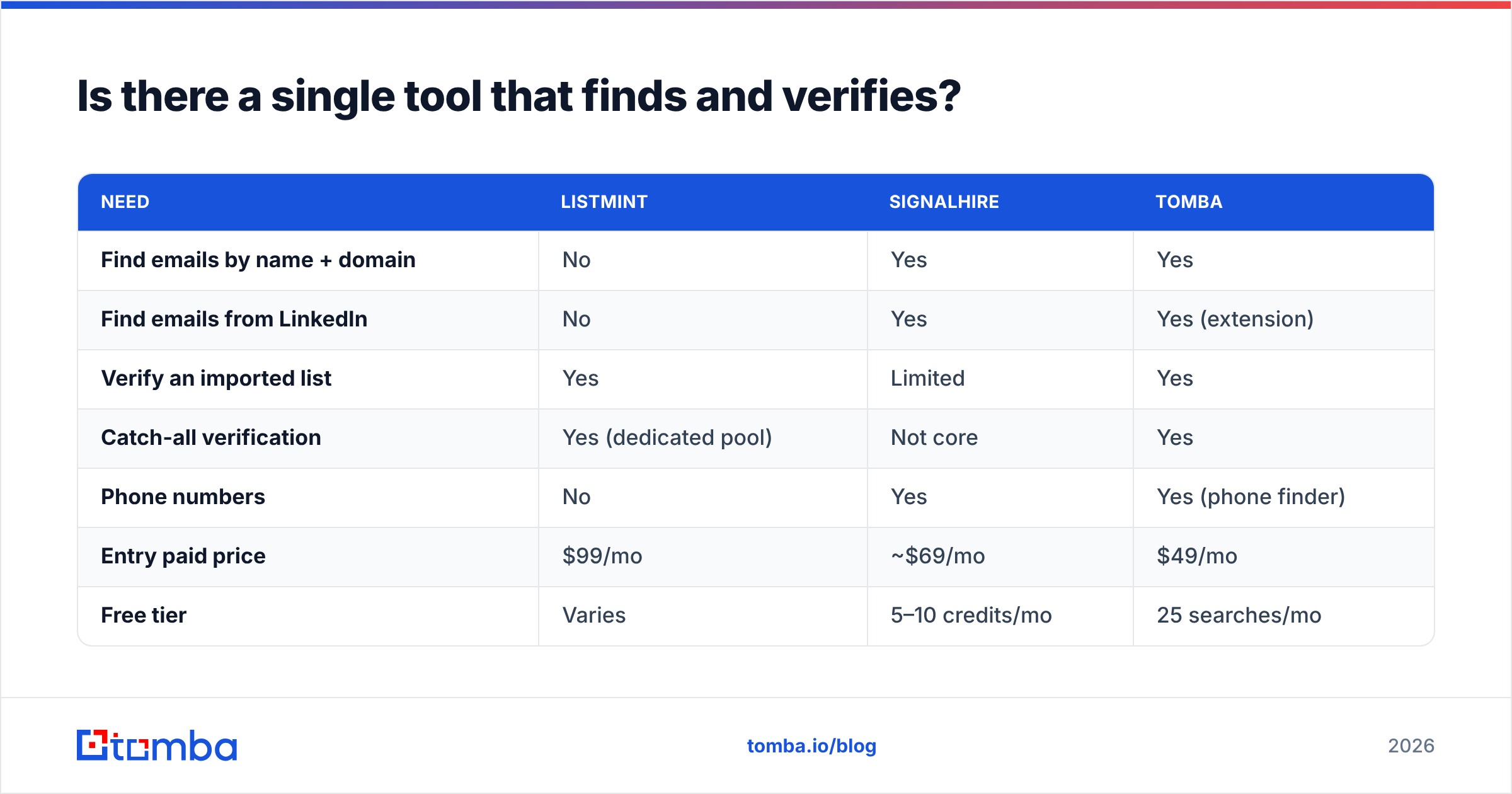
Here's how the three options stack up for a typical outbound team:
| Need | Listmint | SignalHire | Tomba |
|---|---|---|---|
| Find emails by name + domain | No | Yes | Yes |
| Find emails from LinkedIn | No | Yes | Yes (extension) |
| Verify an imported list | Yes | Limited | Yes |
| Catch-all verification | Yes (dedicated pool) | Not core | Yes |
| Phone numbers | No | Yes | Yes (phone finder) |
| Entry paid price | $99/mo | ~$69/mo | $49/mo |
| Free tier | Varies | 5–10 credits/mo | 25 searches/mo |
To be fair to both vendors: an all-in-one tool isn't automatically the right choice. If you run a verification-heavy agency sending millions of emails, a specialist like Listmint, with large catch-all pools, can beat a finder's bundled verifier on cost at that scale. If you're a recruiter who mainly needs mobile numbers from LinkedIn, SignalHire's workflow is designed around you. Tomba's case is strongest for teams in between, who need both steps done well without running two tools. Tomba pricing runs from a free tier of 25 searches a month through Starter at $49/mo, Growth at $99/mo and Pro at $249/mo.

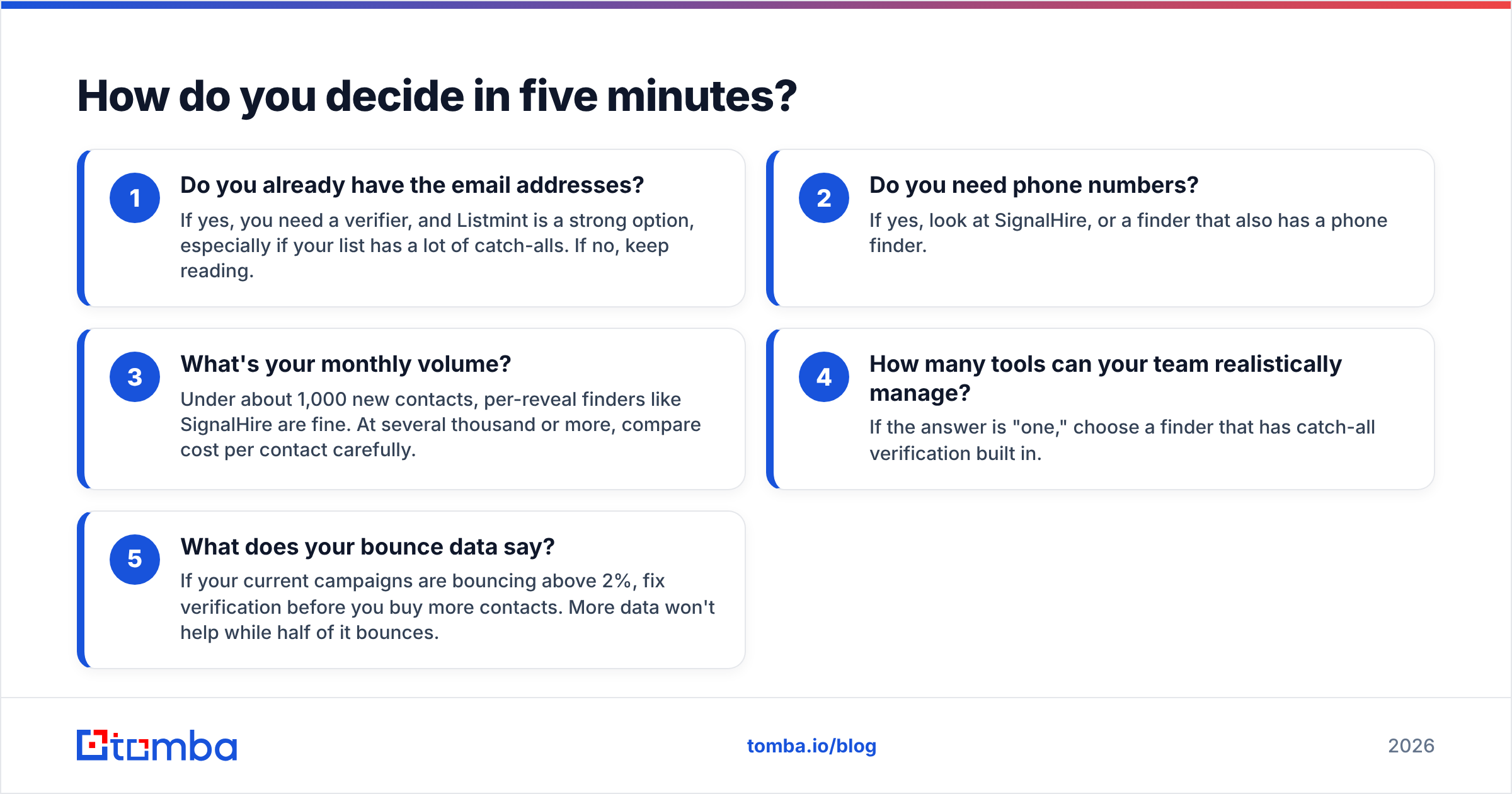
How do you decide in five minutes?#
Answer these questions in order:
- Do you already have the email addresses? If yes, you need a verifier, and Listmint is a strong option, especially if your list has a lot of catch-alls. If no, keep reading.
- Do you need phone numbers? If yes, look at SignalHire, or a finder that also has a phone finder.
- What's your monthly volume? Under about 1,000 new contacts, per-reveal finders like SignalHire are fine. At several thousand or more, compare cost per contact carefully.
- How many tools can your team realistically manage? If the answer is "one," choose a finder that has catch-all verification built in.
- What does your bounce data say? If your current campaigns are bouncing above 2%, fix verification before you buy more contacts. More data won't help while half of it bounces.
What are the pros and cons of each?#
Listmint
- Pro: Dedicated catch-all credits make the hardest part of verification visible and budgetable.
- Pro: High credit volumes at the Starter and Agency tiers suit bulk list cleaning.
- Con: It doesn't source contacts, so you still need a finder or database.
- Con: The $99/mo entry point is steep if you only verify a few thousand emails a month.
SignalHire
- Pro: Fast LinkedIn-based reveals through the browser extension.
- Pro: Returns phone numbers as well as emails.
- Pro: Credits are only charged when a result comes back.
- Con: Credit volumes are small for bulk list building.
- Con: Not designed to deep-clean lists imported from other sources.
Final verdict: Listmint or SignalHire?#
Pick Listmint if you already have plenty of contacts and bounces, especially from catch-all domains, are what's hurting your campaigns.
Pick SignalHire if you're short on contacts, work heavily from LinkedIn, and need phone numbers alongside emails.
Buy both if you run an agency or a high-volume outbound team where sourcing and hygiene are separate workflows with separate owners.
If you'd rather not split the job across two vendors, try Tomba Email Finder. It finds professional emails by name, domain or company, and it verifies them on the same account, including catch-all checks and phone lookups. Start on the free plan with 25 searches, run your hardest prospect list through it, and compare the bounce rate against your current setup before you commit to any vendor.
Related guides#
// get started
Find, verify and enrich your first contacts today
Start on the free plan with 25 searches a month, then scale when your team is ready.
Free plan · No credit card required · GDPR & CCPA
// about the author