LiteMail Pricing, Reviews, Pros and Cons: 2026 Buyer's Guide
LiteMail sells cold email inboxes from about $2.50 each, but that isn't what you'll really pay. Here is the per-inbox math, what reviewers say, the limits, and when building it yourself costs less.
TL;DR
- LiteMail sells ready-made Google Workspace and Microsoft 365 inboxes for cold email. Fresh inboxes come in bundles of 10, 30, 100 or 300. That works out to roughly $2.80–$3.70 per inbox per month. Pre-warmed inboxes cost more, and third-party reviews list figures between $4.99 and $8 per inbox.
- The smallest package is about $37/month for 10 inboxes. Domains are billed separately, from about $9.99–$15/year each.
- Reviews are positive but few. Trustpilot scores sit in the 4.2–4.5 range, and most comments praise onboarding speed and support. Independent long-term deliverability data is thin.
- LiteMail saves the most time for agencies and teams running 30+ inboxes. If you only need 3–5 mailboxes, setting up Google Workspace yourself is often cheaper and gives you full control.
- Good inboxes can't rescue a bad list. Verify every address before it enters a sequence, or cheap inboxes will burn quickly.
What is LiteMail, and what are you actually paying for?#
LiteMail is a cold email infrastructure provider. It doesn't send your emails and it doesn't find leads. It sells the mailboxes your sending tool (Instantly, Smartlead, Lemlist and similar) connects to.
Think of it as renting a fleet of delivery vans rather than buying and registering each one yourself. You get a working vehicle with plates on day one. You still choose what goes in the van and where it's going.
What the subscription covers:
- Google Workspace and Microsoft 365 inboxes provisioned on your domains, or on domains you buy through LiteMail
- Automated DNS setup: SPF, DKIM and DMARC records configured for you, so you don't have to edit DNS by hand
- Fresh or pre-warmed options: fresh inboxes need warmup before you send at volume, while pre-warmed inboxes arrive with some sending history
- US and EU IPs, according to the vendor
- Direct connection to sequencers: LiteMail says its inboxes work with Instantly, Smartlead and Lemlist
What it does not cover: lead data, email copy, list hygiene or sending logic. Keep that in mind when comparing prices. A $3 inbox and a $3 contact record are completely different purchases.
How much does LiteMail cost in 2026?#
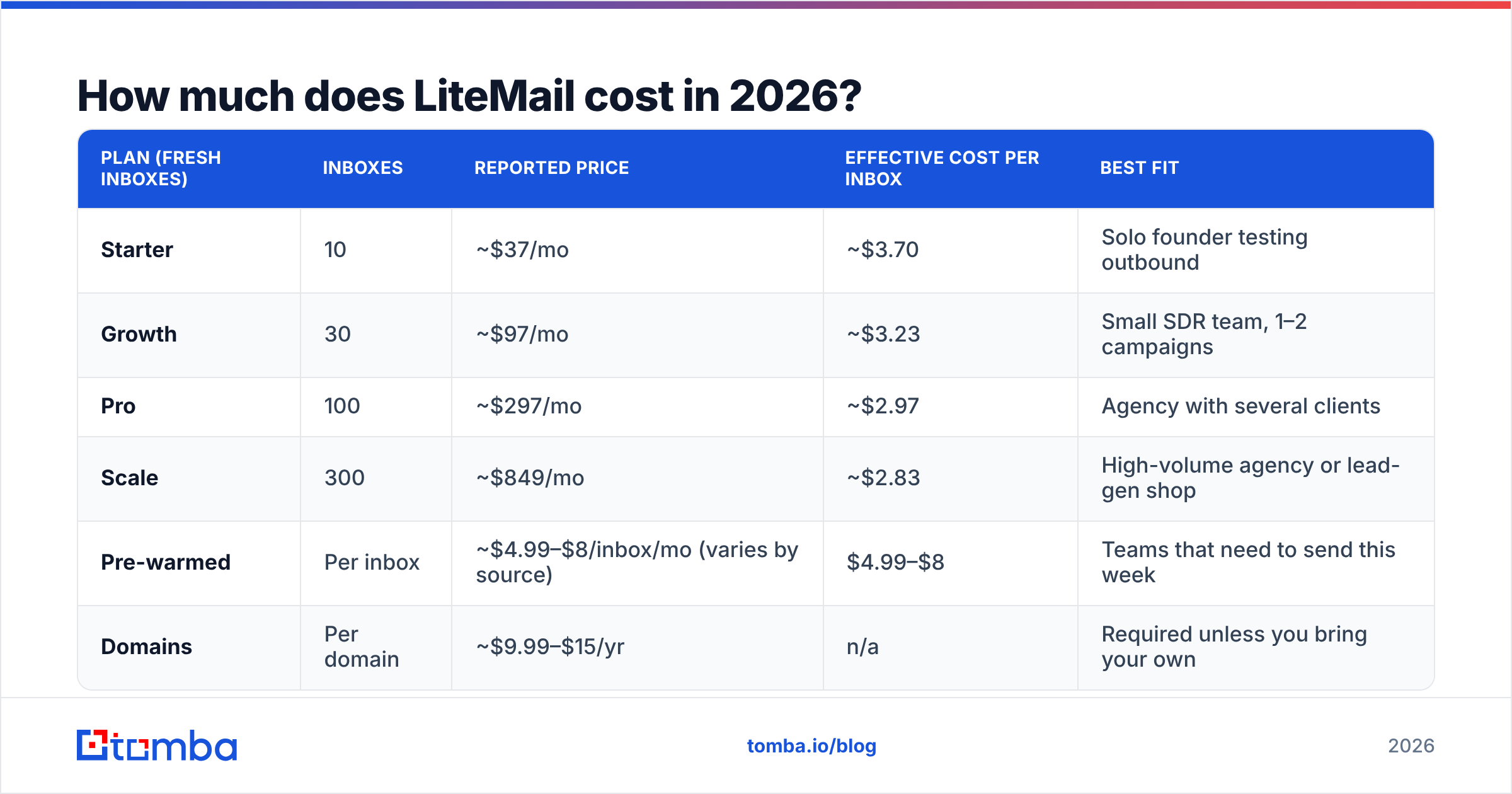
LiteMail's fresh-inbox pricing is sold in fixed bundles. Pricing has been reported differently across sources over the past year. Some pages say "from $2.50/inbox" and others list bundle prices. The table below uses the bundle figures cited most consistently by LiteMail's own pages and third-party reviews such as Capterra. Check the live pricing page before you buy.
| Plan (fresh inboxes) | Inboxes | Reported price | Effective cost per inbox | Best fit |
|---|---|---|---|---|
| Starter | 10 | ~$37/mo | ~$3.70 | Solo founder testing outbound |
| Growth | 30 | ~$97/mo | ~$3.23 | Small SDR team, 1–2 campaigns |
| Pro | 100 | ~$297/mo | ~$2.97 | Agency with several clients |
| Scale | 300 | ~$849/mo | ~$2.83 | High-volume agency or lead-gen shop |
| Pre-warmed | Per inbox | ~$4.99–$8/inbox/mo (varies by source) | $4.99–$8 | Teams that need to send this week |
| Domains | Per domain | ~$9.99–$15/yr | n/a | Required unless you bring your own |
Some LiteMail pages also mention annual billing at the same headline numbers, so check the billing period at checkout. It can make a big difference to your budget.
What are the hidden costs of LiteMail?#
The inbox price is only part of the bill. Budget for three more items:
- Domains. Most setups use 2–3 inboxes per domain to spread risk. At 30 inboxes that's 10–15 domains, or roughly $100–$225/year in domain fees.
- Your sending tool. LiteMail inboxes need a sequencer on top. That's a separate subscription, and often the largest line item.
- Warmup time. Fresh inboxes are cheaper, but they need 2–4 weeks of warmup before you can send at full volume. That time costs pipeline even if it doesn't show up on the invoice. The warmup calculator estimates your ramp schedule.

What do LiteMail reviews say?#
Public reviews are generally positive, but there aren't many of them. At the time of writing, LiteMail's Trustpilot profile shows a TrustScore around 4.2. Regional mirrors show between 6 and 16 reviews, and some display ratings closer to 4.5.
Themes that come up repeatedly:
- Onboarding is fast. Several reviewers say they went from purchase to connected inboxes in one sitting. This matches the vendor's "set up in 5 minutes" claim.
- Support is responsive. Multiple reviews name the support team and describe quick answers before and after purchase.
- Pre-warmed inboxes help teams that need to launch now. Reviewers running time-sensitive campaigns mention skipping the warmup wait.
What's missing is equally important:
- Little long-term deliverability evidence. Most reviews are written in the first weeks. Inbox placement at month three or six is what matters, and that's rarely covered.
- Small sample size. Fewer than 20 reviews on any one regional page is too few to draw firm conclusions.
- Competitor-written reviews. Some "honest review" articles come from rival inbox providers. Read them as sales pages, not neutral analysis.
In short, the reviews support what LiteMail does well on day one. They don't tell you much about how your sender reputation will hold up months later.
What are the pros and cons of LiteMail?#
| Pros | Cons |
|---|---|
| Low entry price (~$37/mo for 10 inboxes) | Bundle pricing forces jumps (10 → 30 → 100) |
| Google and Microsoft inboxes from one dashboard | Domains billed separately |
| Automated SPF, DKIM and DMARC | Less control than managing your own Workspace tenant |
| Pre-warmed option for fast launches | Pre-warmed inboxes can cost 2x as much as fresh ones |
| Integrates with major sequencers | No lead data or list verification included |
| No long-term contract required, per vendor | Limited independent reviews on long-term performance |
Where LiteMail clearly wins#
Speed at scale. Setting up 100 inboxes by hand means dozens of DNS edits, dozens of user accounts, and a lot of room for a typo in a DKIM record. LiteMail turns that afternoon of work into a checkout flow. For an agency onboarding a new client every week, the time saved easily covers the cost.
Mixing Google and Microsoft inboxes. Many experienced senders split volume between Google Workspace and Microsoft 365 so their reputation doesn't depend on one provider. LiteMail sells both at the same price in one place.
Where LiteMail is the wrong tool#
Very small setups. If you need 3 inboxes, a direct Google Workspace subscription costs about the same per seat. You also own the tenant outright and can reach Google support directly.
Teams that already have a deliverability engineer. If someone on your team already handles DNS, warmup and tenant setup, you mostly pay LiteMail for convenience you don't need.
Is LiteMail cheaper than setting up inboxes yourself?#
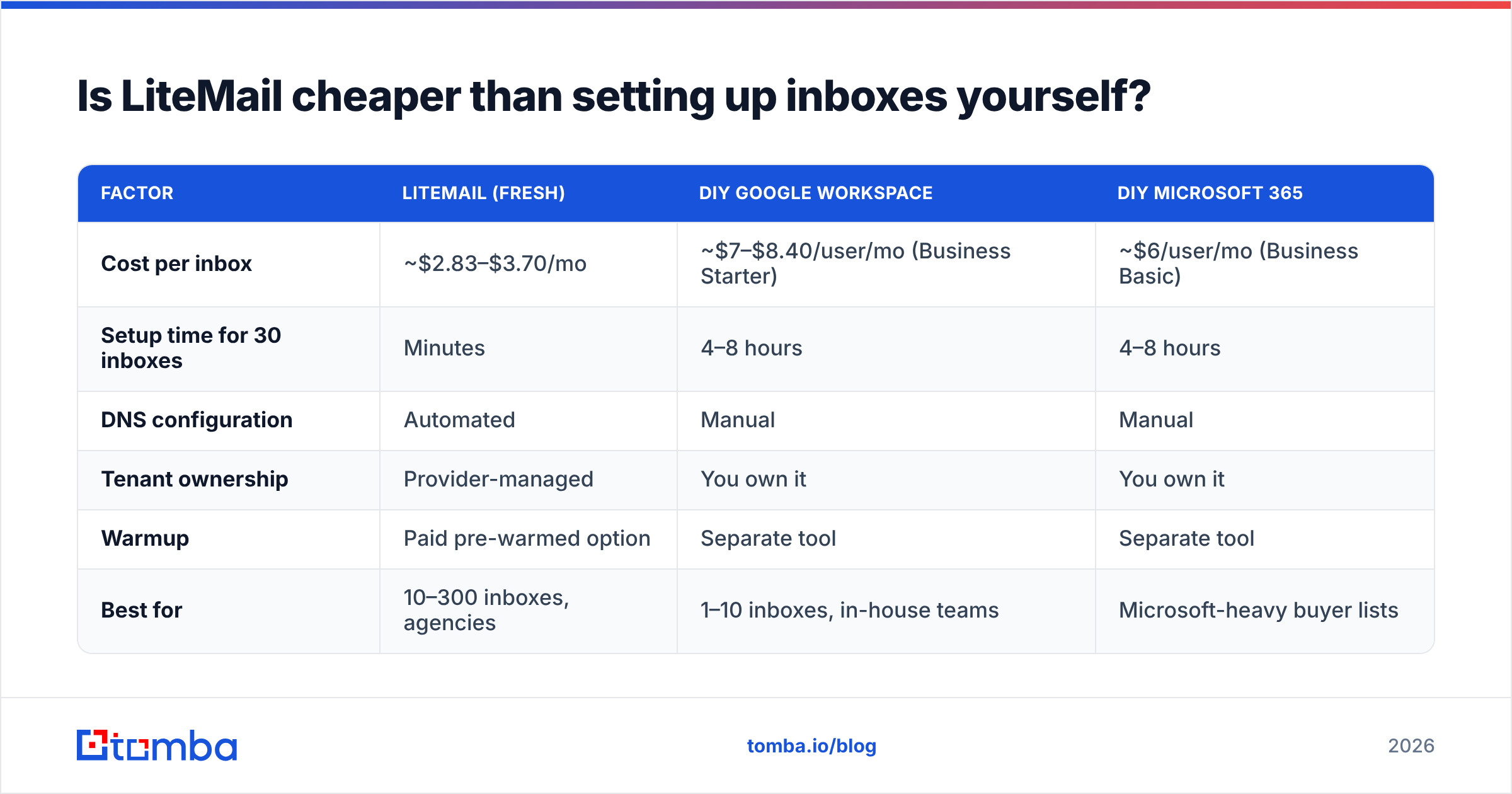
It depends on how many inboxes you need and what your team's time is worth.
| Factor | LiteMail (fresh) | DIY Google Workspace | DIY Microsoft 365 |
|---|---|---|---|
| Cost per inbox | ~$2.83–$3.70/mo | ~$7–$8.40/user/mo (Business Starter) | ~$6/user/mo (Business Basic) |
| Setup time for 30 inboxes | Minutes | 4–8 hours | 4–8 hours |
| DNS configuration | Automated | Manual | Manual |
| Tenant ownership | Provider-managed | You own it | You own it |
| Warmup | Paid pre-warmed option | Separate tool | Separate tool |
| Best for | 10–300 inboxes, agencies | 1–10 inboxes, in-house teams | Microsoft-heavy buyer lists |
The per-inbox price favors LiteMail at every volume. The ownership column is the real trade-off. With your own tenant, you control account recovery, security policies and what happens if the vendor changes its terms. With a managed provider, you get speed and give up some of that control.
A practical rule of thumb:
- Under 10 inboxes: DIY usually makes sense.
- 10–50 inboxes: LiteMail or a similar provider saves real hours each month.
- 50+ inboxes: a managed provider is almost always worth it, but compare against per-tenant pricing models, which can be cheaper at high volume.
Does LiteMail fix your deliverability?#
No. It removes one of several risks.
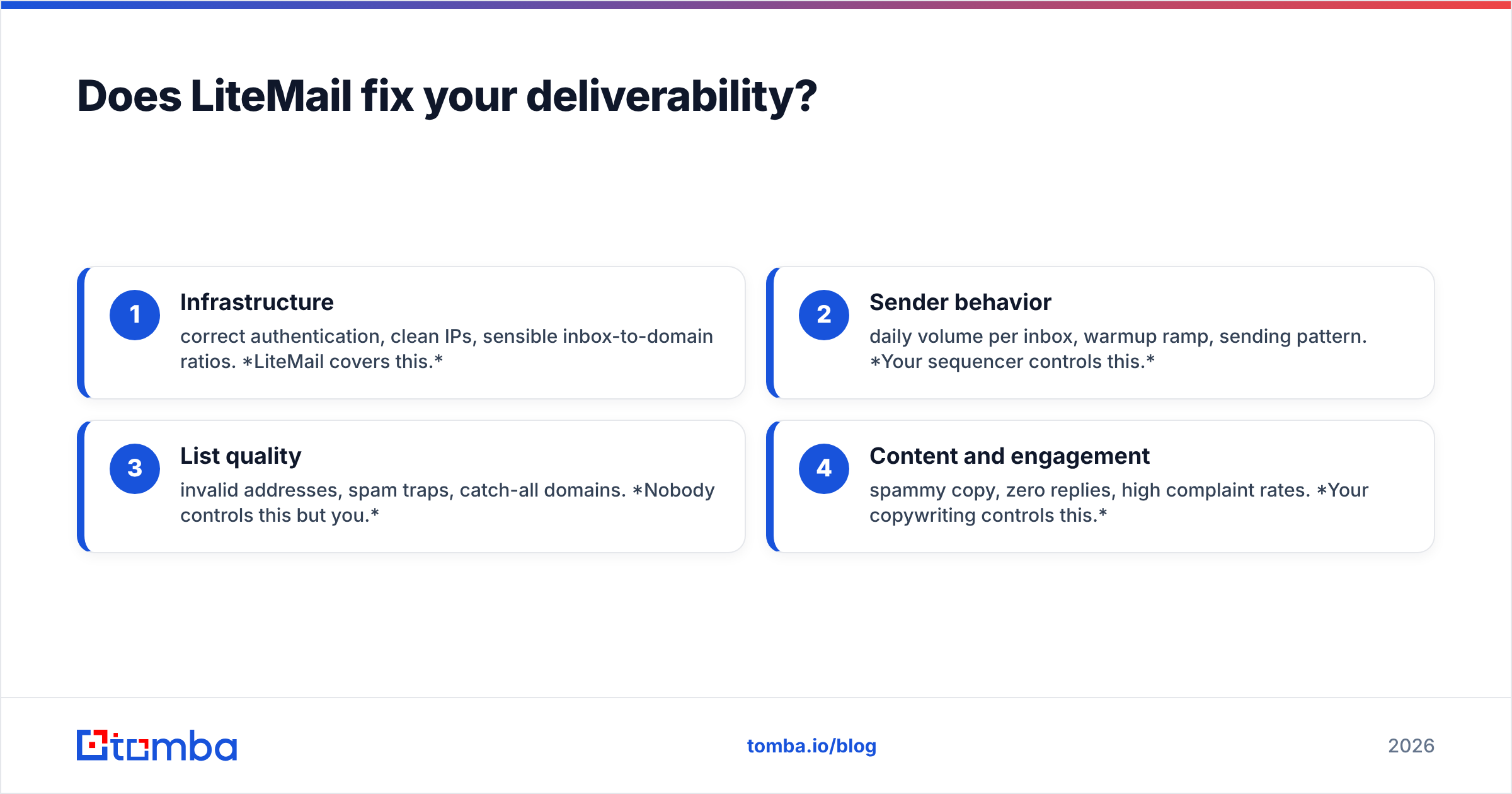
Email deliverability depends on four things, and LiteMail handles only the first:
- Infrastructure: correct authentication, clean IPs, sensible inbox-to-domain ratios. LiteMail covers this.
- Sender behavior: daily volume per inbox, warmup ramp, sending pattern. Your sequencer controls this.
- List quality: invalid addresses, spam traps, catch-all domains. Nobody controls this but you.
- Content and engagement: spammy copy, zero replies, high complaint rates. Your copywriting controls this.
The third point causes most failures. If your bounce rate goes above about 2–3%, mailbox providers begin to downgrade your reputation. It doesn't matter how professionally the DNS was set up. Buying 30 clean inboxes and then sending to an unverified scraped list is the most common way teams waste their LiteMail spend in the first month.
Before any list reaches a LiteMail-connected inbox, run it through an email verifier. Separate catch-all domains into their own lower-volume segment. If you're building lists from scratch, start with an email finder that returns confidence scores and sources, so you're not sending to guessed addresses.

Who should buy LiteMail?#
Good fit:
- Cold email agencies onboarding several clients a month, where each client needs 20–60 dedicated inboxes
- Lead-gen shops that rotate domains often and treat inboxes as disposable infrastructure
- SDR teams launching this week that can justify paying for pre-warmed inboxes
- Teams without a technical owner for DNS and tenant administration
Poor fit:
- Founders sending under 50 emails a day who can manage fine with 2–3 self-hosted inboxes
- Companies with strict IT or security policies that require owning every tenant
- Anyone whose real problem is lead quality. More inboxes only multiply the damage a bad list does.
What should you check before buying LiteMail?#
Use this checklist on any cold email infrastructure provider, not just LiteMail:
- Confirm the billing period. Monthly and annual pricing have both been shown at similar headline numbers, so make sure you know which one you're committing to.
- Ask who owns the tenant and the domains. Find out what happens to your inboxes and domains if you cancel.
- Check the inbox-per-domain ratio. Two or three inboxes per domain is the common safe range.
- Ask for placement data. Seed-test results beat testimonials. Run your own test in week one.
- Plan your list pipeline first. Decide how contacts will be found, verified and segmented before the inboxes go live.
The verdict: is LiteMail worth it in 2026?#
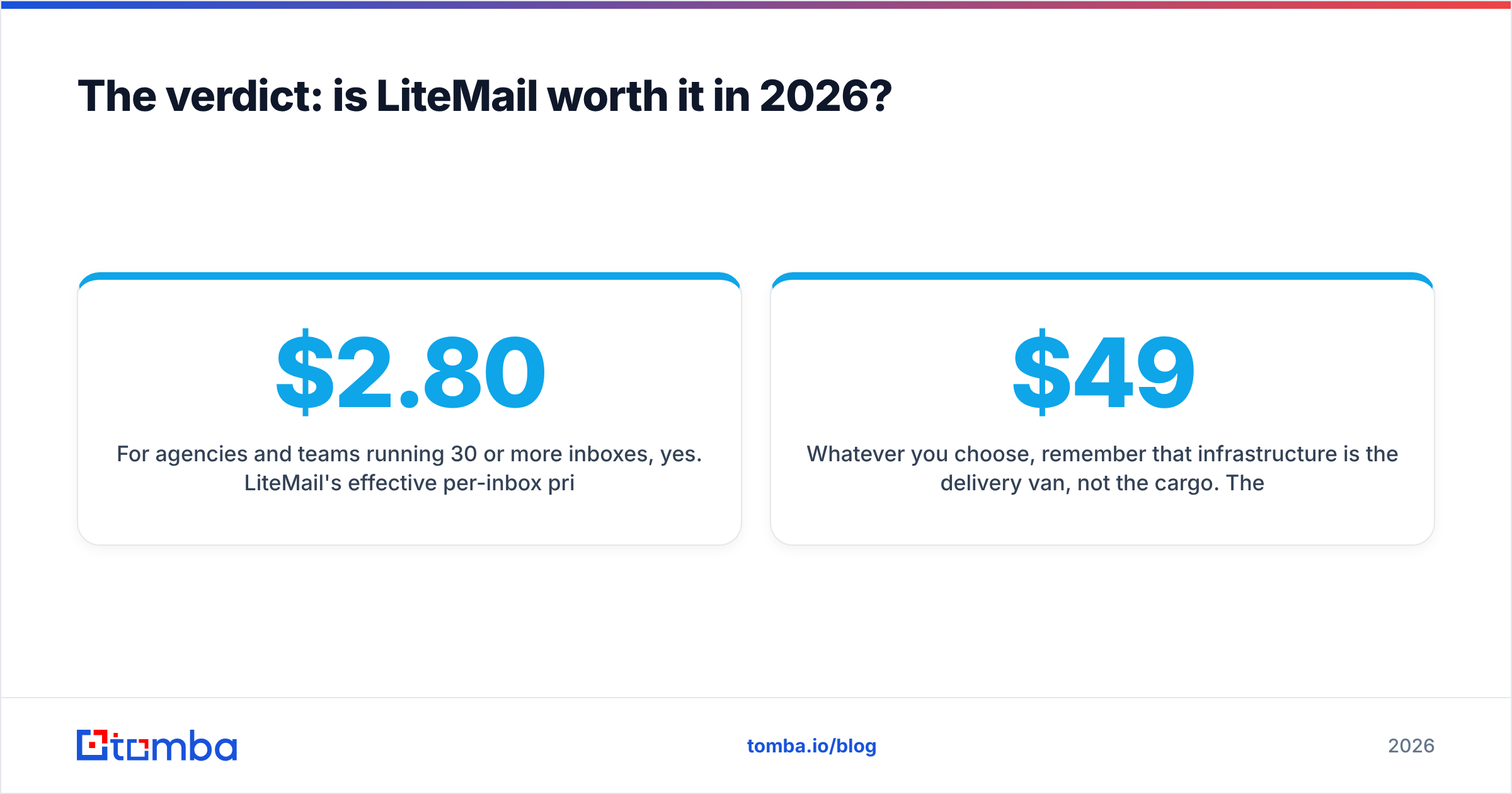
For agencies and teams running 30 or more inboxes, yes. LiteMail's effective per-inbox price of roughly $2.80–$3.70 is well below list-price Google Workspace. Automated DNS removes a common source of configuration errors, and reviewers consistently describe fast onboarding and helpful support. The main caveats are the bundle jumps, separate domain fees, the premium for pre-warmed inboxes, and the lack of independent long-term deliverability evidence.
For solo senders with fewer than 10 inboxes, the savings are small. Owning your own Google Workspace or Microsoft 365 tenant is usually the simpler choice.
Whatever you choose, remember that infrastructure is the delivery van, not the cargo. The contacts you send to decide whether those inboxes last months or weeks. Tomba Email Finder finds professional email addresses by name, company or domain, and returns a confidence score and source for each one. Built-in verification means only valid addresses reach your new inboxes. The free tier includes 25 searches a month, and paid plans start at $49/mo. See the Tomba pricing page for full details.
Related guides#
// get started
Find, verify and enrich your first contacts today
Start on the free plan with 25 searches a month, then scale when your team is ready.
Free plan · No credit card required · GDPR & CCPA
// about the author