Locating an Email Address in 2026: 7 Methods Compared
Guessing an email address costs you bounces and sender reputation. Here are seven ways to find one, compared on accuracy, cost, and speed, plus a workflow for getting it right the first time.
TL;DR
- Locating an email address comes down to three steps: find the company's email pattern, generate the likely address, then verify it before you hit send.
- Manual methods like the company website, LinkedIn, and Google search operators are free, but they're slow and hit or miss for anyone beyond the first few names on your list.
- Guessing with a permutator is fine for one-off lookups. It's risky at scale because catch-all domains will accept an address that doesn't actually exist.
- A dedicated email finder with built-in verification is the fastest reliable option once you need more than about 10 addresses a week.
- Always verify. A 5% bounce rate can do more damage to your sender reputation than a week of no outreach at all.
What does "locating an email address" actually mean?#
Locating an email address means finding the working inbox of a specific person, usually at a specific company, so you can contact them directly. In B2B sales, recruiting, PR, and partnerships, that almost always means a professional address like jane.doe@acme.com and not a personal Gmail.
The difference matters for two reasons. First, work addresses follow predictable patterns, so you can often work them out without a database. Second, work addresses change. People switch jobs, companies rebrand domains, and IT teams shut down old mailboxes. An address that was valid 18 months ago may bounce today.
So "locating" is really two problems in one:
- Discovery: what is the most likely address for this person?
- Confirmation: does that address accept mail right now, and is it really theirs?
Most people get stuck because they solve only the first one.
How do email addresses get structured at most companies?#
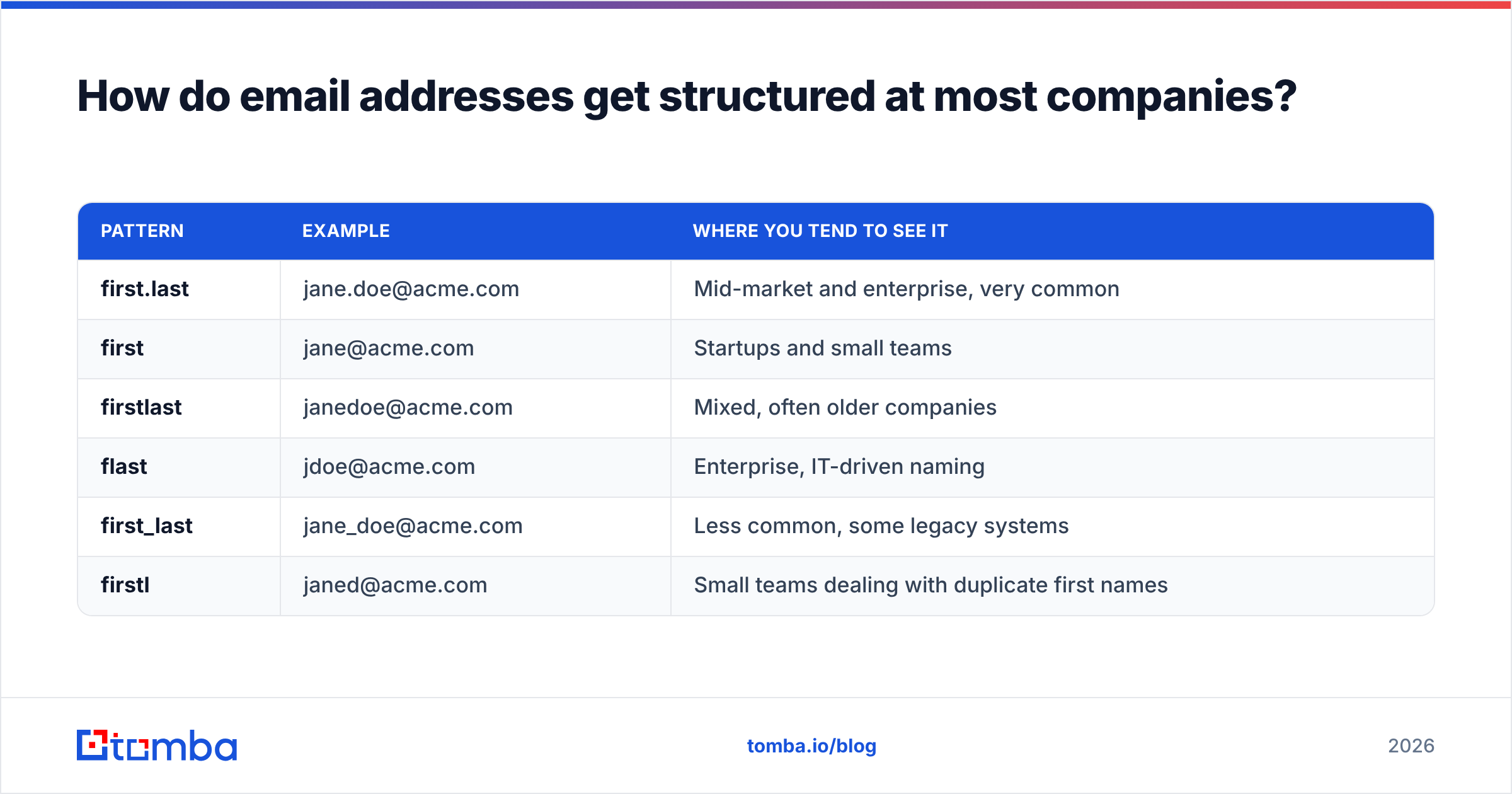
Before you pick a method, it helps to know what you're looking for. An email address has a local part (before the @) and a domain. The domain is usually easy to find because it's the company website. The local part follows an internal naming convention, and most companies use one of a small set of formats:
| Pattern | Example | Where you tend to see it |
|---|---|---|
| first.last | jane.doe@acme.com | Mid-market and enterprise, very common |
| first | jane@acme.com | Startups and small teams |
| firstlast | janedoe@acme.com | Mixed, often older companies |
| flast | jdoe@acme.com | Enterprise, IT-driven naming |
| first_last | jane_doe@acme.com | Less common, some legacy systems |
| firstl | janed@acme.com | Small teams dealing with duplicate first names |
Once you know the pattern for one employee, you usually know it for all of them. That's why the most efficient way to locate an address starts with the company and not the person. If you already have a confirmed address from someone at the company, the pattern is right there. Tools like Tomba's domain search automate this by returning the known addresses and the dominant pattern for a domain in one lookup.
What are the 7 main methods for locating an email address?#
Here are the methods practitioners actually use, roughly from most manual to most automated:
- Check the company website. Look at the About, Team, Contact, Press, and Careers pages. Press releases often list a media contact whose address reveals the naming pattern. Legal pages and PDF whitepapers sometimes include staff emails too.
- Use Google search operators. Queries like
"@acme.com" "Jane Doe"orsite:acme.com "email"bring up addresses in public documents, conference speaker lists, and GitHub commits. It's free, but results are inconsistent. - Check LinkedIn and social profiles. Some people list their email in the Contact Info section. Many more drop hints in their bios, featured posts, or personal websites linked from their profile.
- Generate permutations and test them. Build the 6 to 10 likely combinations with an email permutator, then check each one. This works well on domains that reject invalid recipients. It fails on catch-all domains.
- Use an email finder tool. Enter a name and a company domain and get back the most likely address with a confidence score. The good ones combine pattern data, public sources, and live verification.
- Buy or query a B2B contact database. Useful when you need to build lists by role, industry, and company size instead of looking up known names. Data freshness varies widely by vendor.
- Ask for it. A mutual connection, a LinkedIn message, or a call to the company switchboard still works, especially for senior people whose addresses are deliberately kept off the public web.
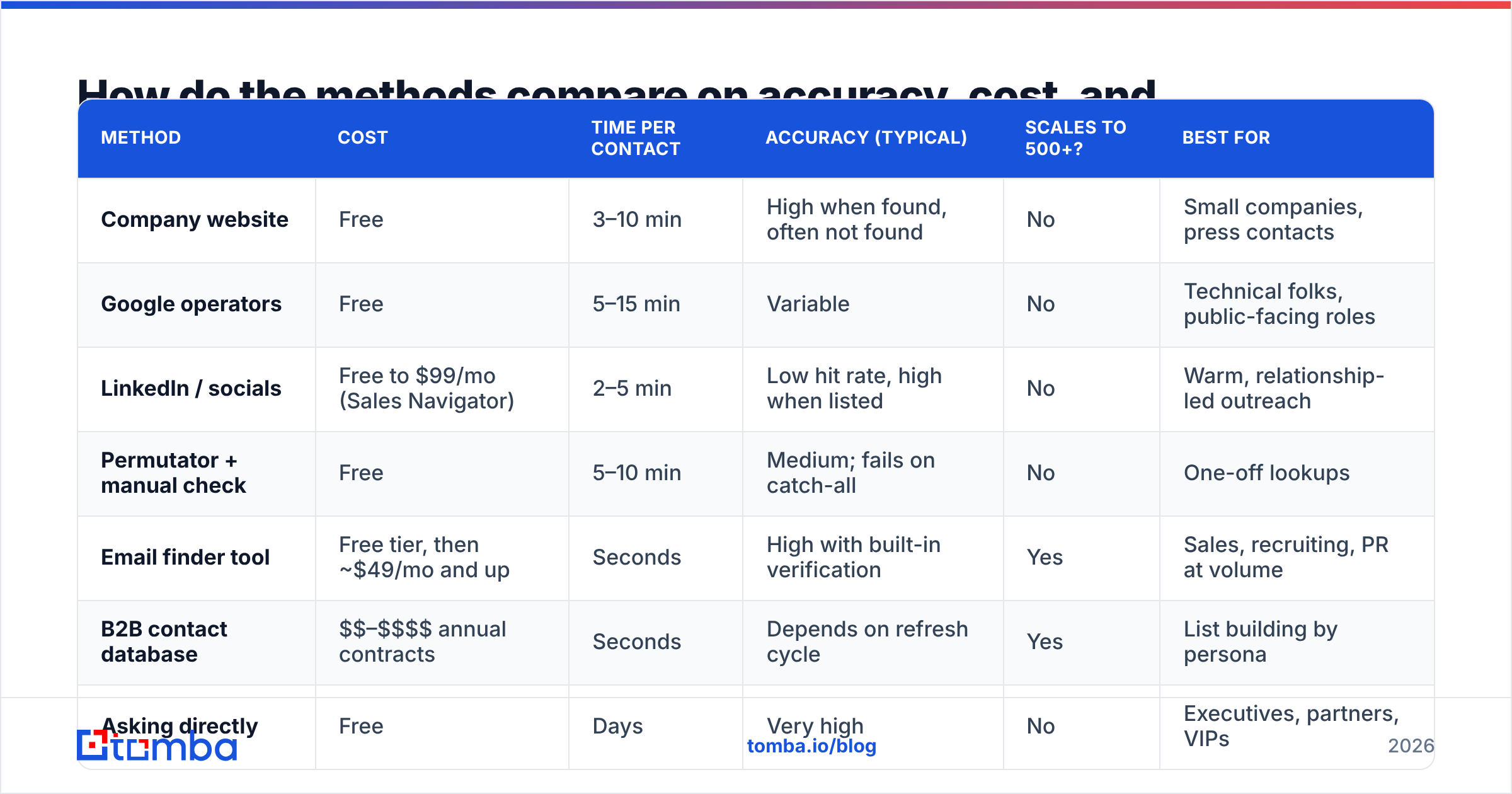
Each method trades off time, cost, and accuracy. The table below puts them side by side.
How do the methods compare on accuracy, cost, and speed?#
| Method | Cost | Time per contact | Accuracy (typical) | Scales to 500+? | Best for |
|---|---|---|---|---|---|
| Company website | Free | 3–10 min | High when found, often not found | No | Small companies, press contacts |
| Google operators | Free | 5–15 min | Variable | No | Technical folks, public-facing roles |
| LinkedIn / socials | Free to $99/mo (Sales Navigator) | 2–5 min | Low hit rate, high when listed | No | Warm, relationship-led outreach |
| Permutator + manual check | Free | 5–10 min | Medium; fails on catch-all | No | One-off lookups |
| Email finder tool | Free tier, then ~$49/mo and up | Seconds | High with built-in verification | Yes | Sales, recruiting, PR at volume |
| B2B contact database | $$–$$$$ annual contracts | Seconds | Depends on refresh cycle | Yes | List building by persona |
| Asking directly | Free | Days | Very high | No | Executives, partners, VIPs |
A pattern shows up quickly. Free methods cost you time, and paid methods save it. The accuracy gap between them is smaller than you might expect when the free method works, but the free methods fail silently much more often.

Why is guessing an email address so risky?#
Guessing feels harmless. You send to jane.doe@acme.com, and if it bounces, you try jdoe@acme.com. The problem is that every bounce is recorded against your sending domain.
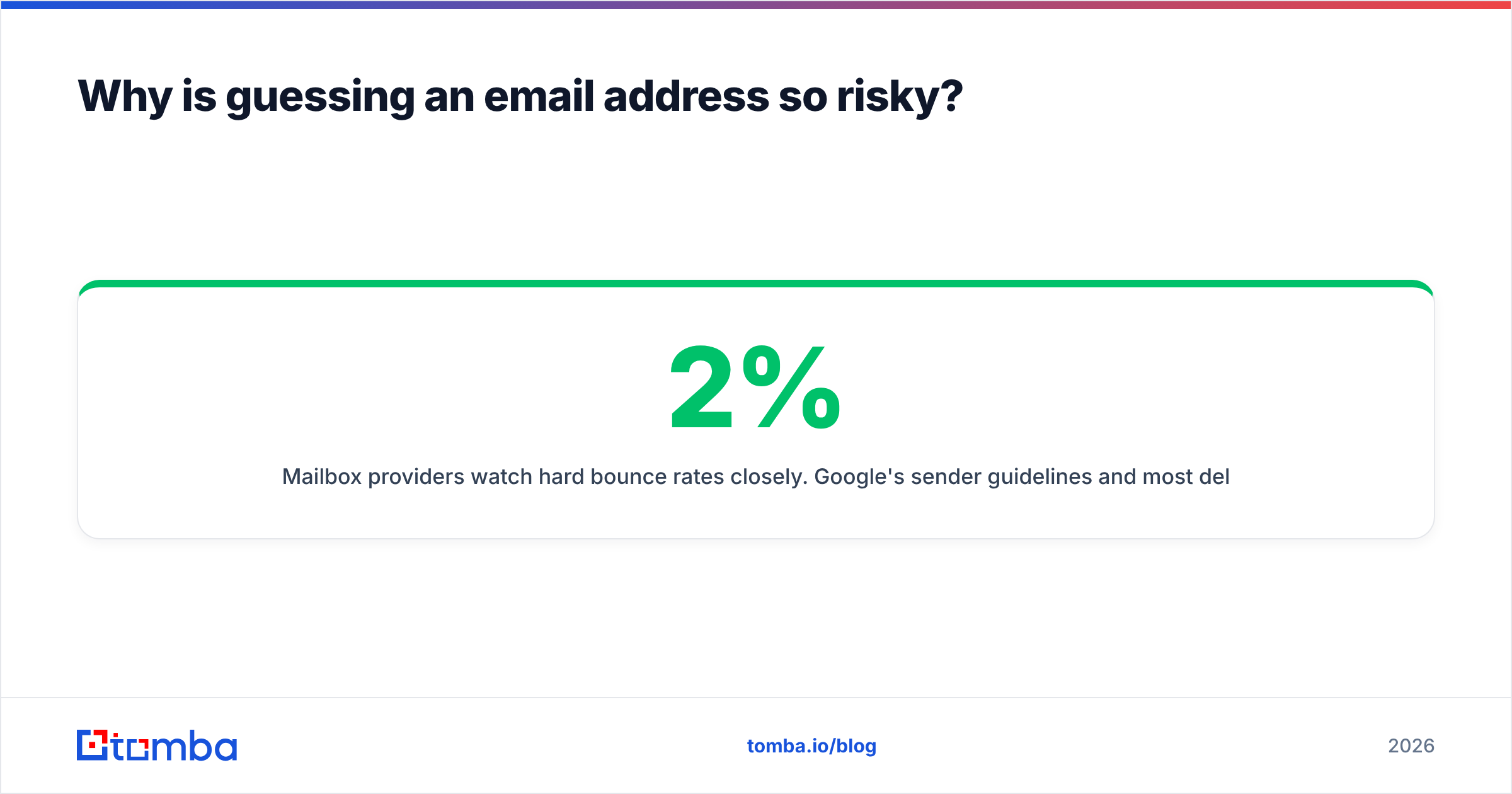
Mailbox providers watch hard bounce rates closely. Google's sender guidelines and most deliverability consultants agree that you should keep bounces under about 2%, and many teams aim for under 1%. If you're guessing on a list of 200 prospects and 30% of your guesses are wrong, you're sending 60 bounces. That can be enough to push new campaigns into spam folders for weeks.
There are three specific ways guessing fails:
- Catch-all domains. Some mail servers accept every message sent to the domain, whether or not the mailbox exists. Your guess looks "valid" and doesn't bounce, but nobody ever reads it. You'll never know it failed.
- Aliases and exceptions. The CEO might be
jane@even though everyone else isfirst.last@. Executives, early employees, and people with common names are the usual exceptions. - Stale addresses. The person left six months ago. The address may bounce, or worse, forward to a manager who now sees your pitch meant for someone else.
This is where email verification earns its keep. A verifier opens a conversation with the recipient's mail server using the same SMTP handshake a real send would use, checks whether the mailbox is accepted, and stops before delivering any message. It also flags catch-all domains, disposable addresses, and role accounts like info@ or sales@.
What is the fastest reliable workflow for locating an email address?#
If you only take one thing away from this guide, make it this workflow. It works whether you're using free methods, paid tools, or a mix.
Step 1: Start with the domain, not the person. Confirm the company's primary email domain. Watch out for companies that use a different domain for email than for their website (for example, acme.io for the site and acmecorp.com for mail), and for subsidiaries that kept their own domain after an acquisition.
Step 2: Identify the pattern. Find two or three confirmed addresses at that domain. If they all follow first.last, you can be fairly confident. If they conflict, the company may have changed conventions over time, so newer hires follow the newer pattern.
Step 3: Generate the candidate address. Apply the pattern to your target's name. Handle edge cases carefully: hyphenated surnames, accented characters, nicknames (Bill vs William), and middle initials.
Step 4: Verify before sending. Run the candidate through a verifier. You'll get one of four results:
- Valid: send it.
- Invalid: try the next most likely pattern.
- Catch-all / accept-all: treat it as unconfirmed. Send only if you have supporting evidence such as a public source or a strong pattern match, and keep these addresses in a separate, lower-volume send.
- Unknown: the server didn't respond clearly. Retry later or use a different method.
Step 5: Record the source and date. Note where the address came from and when you verified it. Re-verify anything older than about 90 days before a new campaign.
An email finder collapses steps 1 through 4 into a single lookup. A free-methods workflow lets you do the same thing by hand. It's just slower.
When should you switch from manual methods to an email finder?#
Here's a rough rule of thumb from teams that have made the switch: if you're locating more than 10 addresses a week, the time cost of manual research usually outweighs the cost of a tool.
Do the math for your own team. Say manual lookup takes 7 minutes per contact, including verification. That's more than an hour per 10 contacts. At 50 contacts a week, one rep spends almost six hours on research that doesn't involve talking to anyone. An entry-level plan from most email finders costs less than one of those hours at a typical SDR's loaded cost.
Other signals that it's time to switch:
- Your bounce rate is creeping above 2%.
- Reps are building their own spreadsheets of "patterns we figured out."
- You're hitting lots of catch-all domains and have no way to separate real addresses from dead ones.
- You need addresses pushed straight into your CRM or sequencer instead of copied and pasted.
If you're comparing tools, independent review sites such as G2 are a reasonable starting point for user-reported accuracy and support quality. Always run your own test on 50 to 100 contacts from your real target market before you commit. Accuracy varies a lot by region and company size.
How do different email finders approach the problem?#
Not all finders work the same way, and that affects which one suits your use case.
- Pattern-plus-verification finders (Tomba, Hunter, and similar) find a domain's pattern from public sources, generate the address, and verify it live. They're strong for known-name lookups and transparent about where data comes from.
- Database-first platforms (Apollo, ZoomInfo, BookYourData, and others) keep large pre-built contact records you can filter by title, industry, and company size. They're strong for building lists from scratch. Check how often records are refreshed.
- LinkedIn-native extractors work inside LinkedIn or Sales Navigator and pull addresses for profiles you're viewing. They're convenient for social-selling workflows.
- Waterfall enrichment tools query several providers in sequence and return the first verified hit. They're good for coverage, but costs add up across providers.
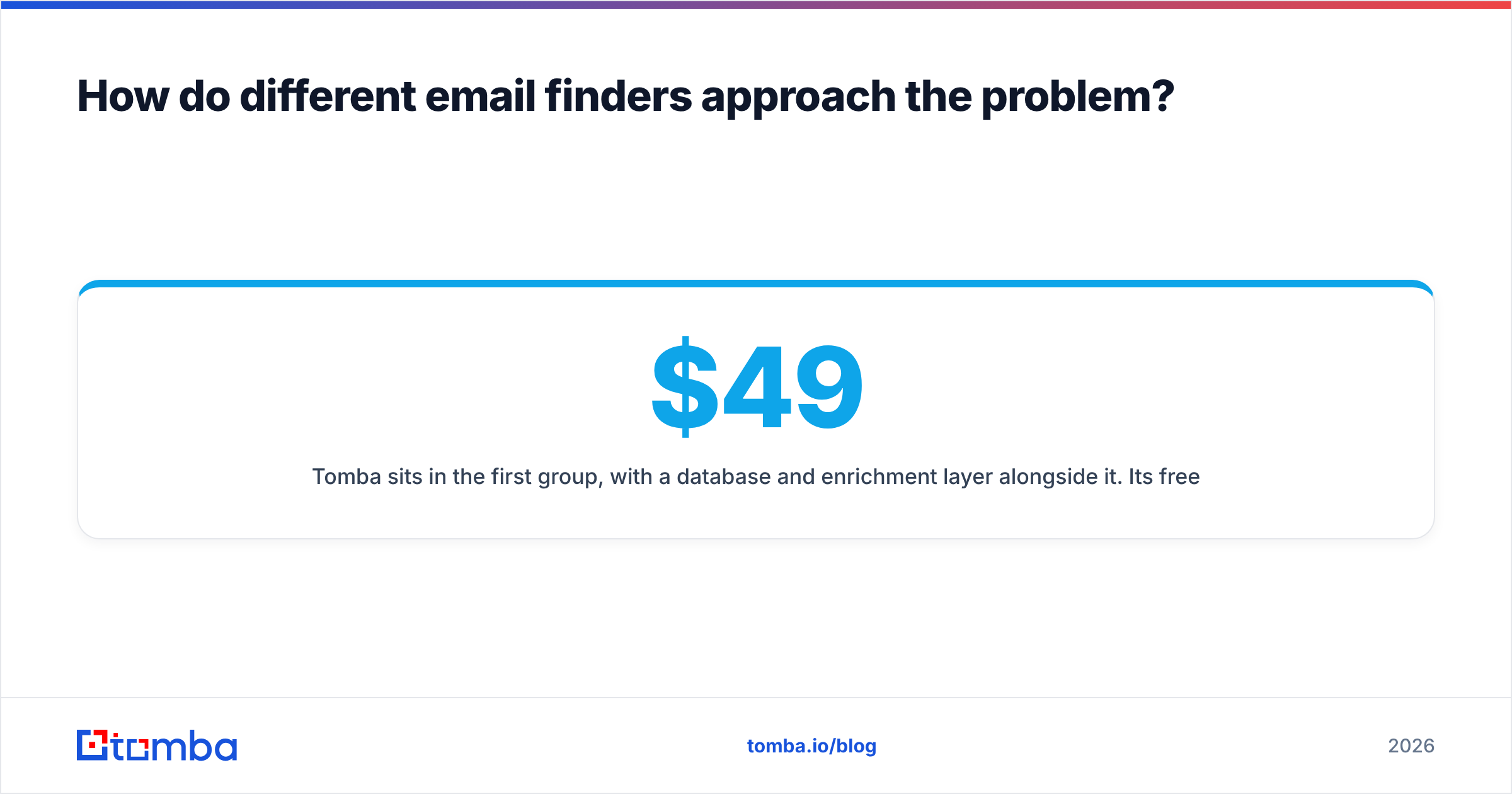
Tomba sits in the first group, with a database and enrichment layer alongside it. Its free tier covers 25 searches a month, and paid plans start at $49/mo (Starter), then $99/mo (Growth) and $249/mo (Pro), with custom Enterprise pricing. That's enough to test it against your current method before you pay anything.
Is locating someone's email address legal?#
Generally yes, finding a publicly inferable business email address is legal. What you do with it is what's regulated.
- In the EU and UK, GDPR treats a named work email as personal data. B2B cold outreach usually relies on "legitimate interest," which means your message must be relevant to the person's role, you must tell them where you got their data if asked, and you must honour opt-outs immediately.
- In the US, CAN-SPAM allows unsolicited commercial email but requires accurate headers, a physical address, and a working unsubscribe.
- In Canada, CASL is stricter and generally requires some form of consent, although there are exceptions for conspicuously published business addresses.
This isn't legal advice. The practical rule is simple: contact people about things relevant to their job, identify yourself honestly, and make it easy to say no.
What are the most common mistakes when locating an email address?#
A few errors come up again and again:
- Trusting the first result. A Google hit from a 2019 conference PDF isn't a verified address. Always check freshness.
- Treating catch-all as valid. "Didn't bounce" doesn't mean "delivered to a human." Segment catch-all addresses and watch their reply rates separately.
- Ignoring role accounts.
info@andhello@inboxes are shared, filtered, and rarely reach decision-makers. Use them only when there's no named alternative. - Skipping name normalization. "José Álvarez-Núñez" may be
jose.alvarez@,jose.alvareznunez@, orjalvarez@. Test the variants. - Not re-verifying. B2B contact data decays steadily as people change roles. A list you verified last quarter needs another pass before this quarter's campaign.
- Scaling before testing. Send to a small verified batch first, check bounces and replies, and only then roll out to the full list.
So what's the best way to locate an email address?#
The best method depends on your volume:
- 1 to 5 contacts a month: company website, Google operators, and a free permutator plus a free verifier are enough.
- 10 to 100 contacts a month: a free-tier email finder with built-in verification will save you hours and protect your domain.
- 100+ contacts a month: a paid finder, integrated with your CRM or sequencer, is the only approach that scales without wrecking deliverability.
Whatever route you take, the principle doesn't change: find the pattern, generate the address, verify it, then send.
If you're past the stage where manual lookups make sense, try the Tomba Email Finder. Enter a name and a company domain and you'll get the most likely address with a confidence score and live verification, including catch-all detection, in seconds. The free plan gives you 25 searches a month, which is enough to benchmark it against whatever method you use today before you spend a dollar.
Related guides#
// get started
Find, verify and enrich your first contacts today
Start on the free plan with 25 searches a month, then scale when your team is ready.
Free plan · No credit card required · GDPR & CCPA
// about the author