Lodago Pricing Reviews Pros and Cons: A 2026 Buyer's Guide
Lodago starts at about $10,000 a year, and you only get a real quote after a demo. This guide covers what that money buys, what reviewers say, where the platform is strong, where it falls short, and how to check whether your trade show calendar can justify the cost.
This Lodago pricing reviews pros and cons guide is for B2B teams that exhibit at trade shows. It covers what the platform costs, what users say, and when it pays off.
TL;DR
- Lodago is a trade show platform for B2B exhibitors. It handles meeting scheduling, badge and business-card scanning, event registration, booth staffing, follow-up and analytics. It is not an email finder or a contact database.
- Current pricing is modular and starts from about $10,000 per year. It includes unlimited users and unlimited events. Older third-party listings show $24–$28 per license per month, but they don't match the vendor's current model.
- There is no free trial and no self-serve checkout. You get a number only after you tell sales about your event calendar.
- Public reviews are thin. G2 and Capterra have almost no reviews, so treat any star rating you see with caution.
- It makes sense if you exhibit at several shows a year and book meetings there. If you do one or two events a year, it's hard to justify.
What is Lodago, and who is it built for?#
Lodago calls itself an AI-powered trade show platform for exhibitors. Organizers are not the target customer. The users are the sales, marketing and event teams that rent a booth, fly reps to a show, and then have to prove the trip paid off.
The problem it tackles is familiar to anyone who has worked a trade fair. Meetings get booked through a mix of personal calendars, spreadsheets and WhatsApp. Leads land on paper or in a badge-scanner app that the organizer rents out per show. Follow-up starts three days late, and by then half the leads have gone cold.
Lodago puts that whole cycle into one tool, from pre-show booking to post-show reporting. The pitch, on its homepage, is more qualified meetings before, during and after the event, with the data synced to your CRM.
Keep one thing in mind for the rest of this post. Lodago runs your events. It does not find new contacts for you. If you compare it to Apollo or ZoomInfo, you're comparing the wrong things.
What do you actually get? The Lodago modules#
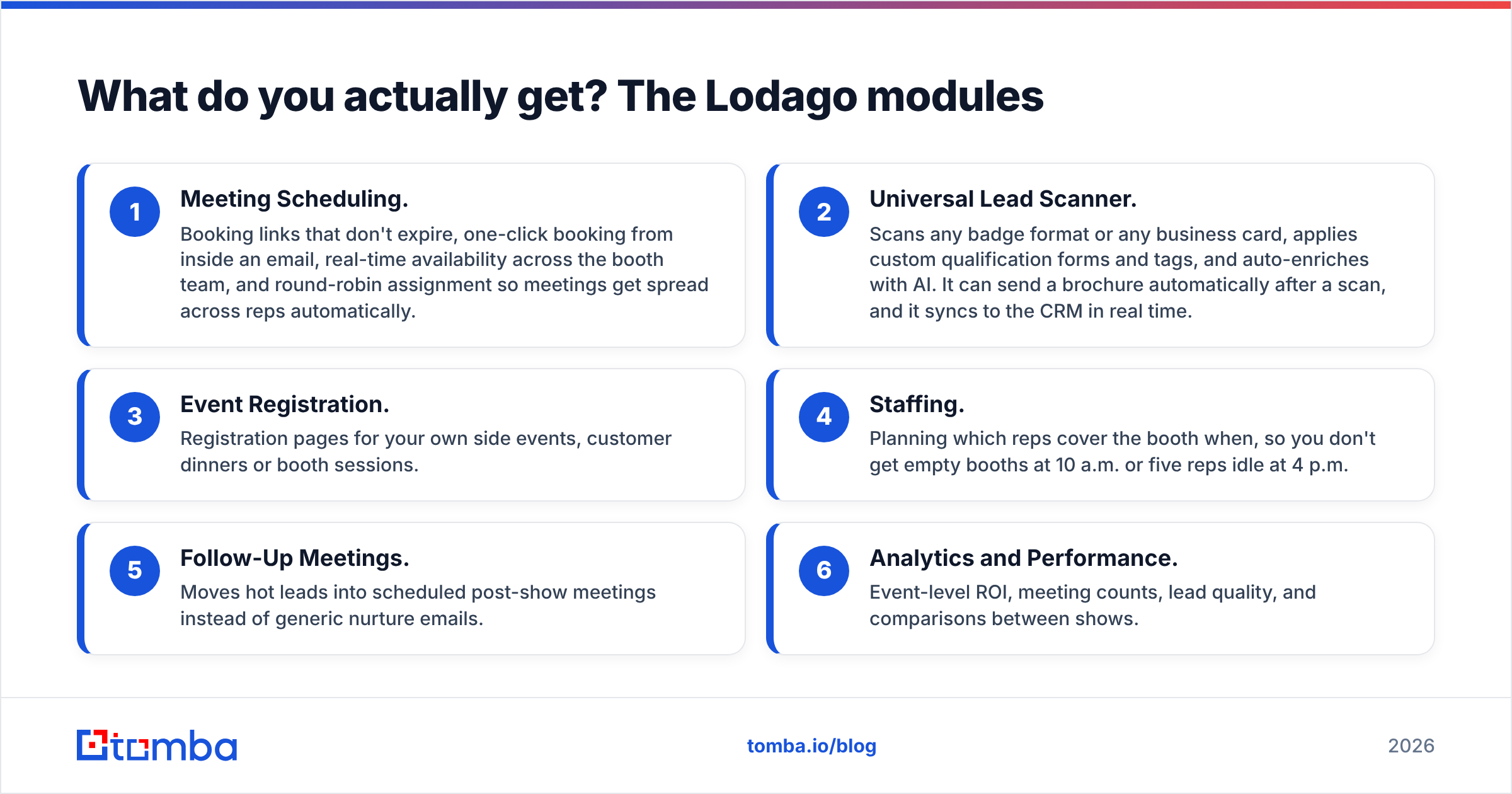
Pricing depends on which modules you buy, so you need to know what they are before a quote makes sense. Based on Lodago's own product pages, the core modules are:
- Meeting Scheduling. Booking links that don't expire, one-click booking from inside an email, real-time availability across the booth team, and round-robin assignment so meetings get spread across reps automatically.
- Universal Lead Scanner. Scans any badge format or any business card, applies custom qualification forms and tags, and auto-enriches with AI. It can send a brochure automatically after a scan, and it syncs to the CRM in real time.
- Event Registration. Registration pages for your own side events, customer dinners or booth sessions.
- Staffing. Planning which reps cover the booth when, so you don't get empty booths at 10 a.m. or five reps idle at 4 p.m.
- Follow-Up Meetings. Moves hot leads into scheduled post-show meetings instead of generic nurture emails.
- Analytics and Performance. Event-level ROI, meeting counts, lead quality, and comparisons between shows.
Calendar integrations cover Google Calendar and Office 365/Outlook, plus video conferencing tools. Lodago also has a listing in the Zendesk Sell marketplace. If your team lives in Salesforce, HubSpot or Dynamics, confirm the exact CRM connector and field mapping during the demo. Don't assume it works the way you want.
How much does Lodago cost in 2026?#
The short answer is from about $10,000 per year, and the final figure depends on your event calendar.
The vendor's current model is modular. You pick the modules you need, and the price scales with how many events and meetings you run. Every package includes unlimited users, unlimited events and the essential integrations. Adding booth staff or an extra admin doesn't raise the bill.
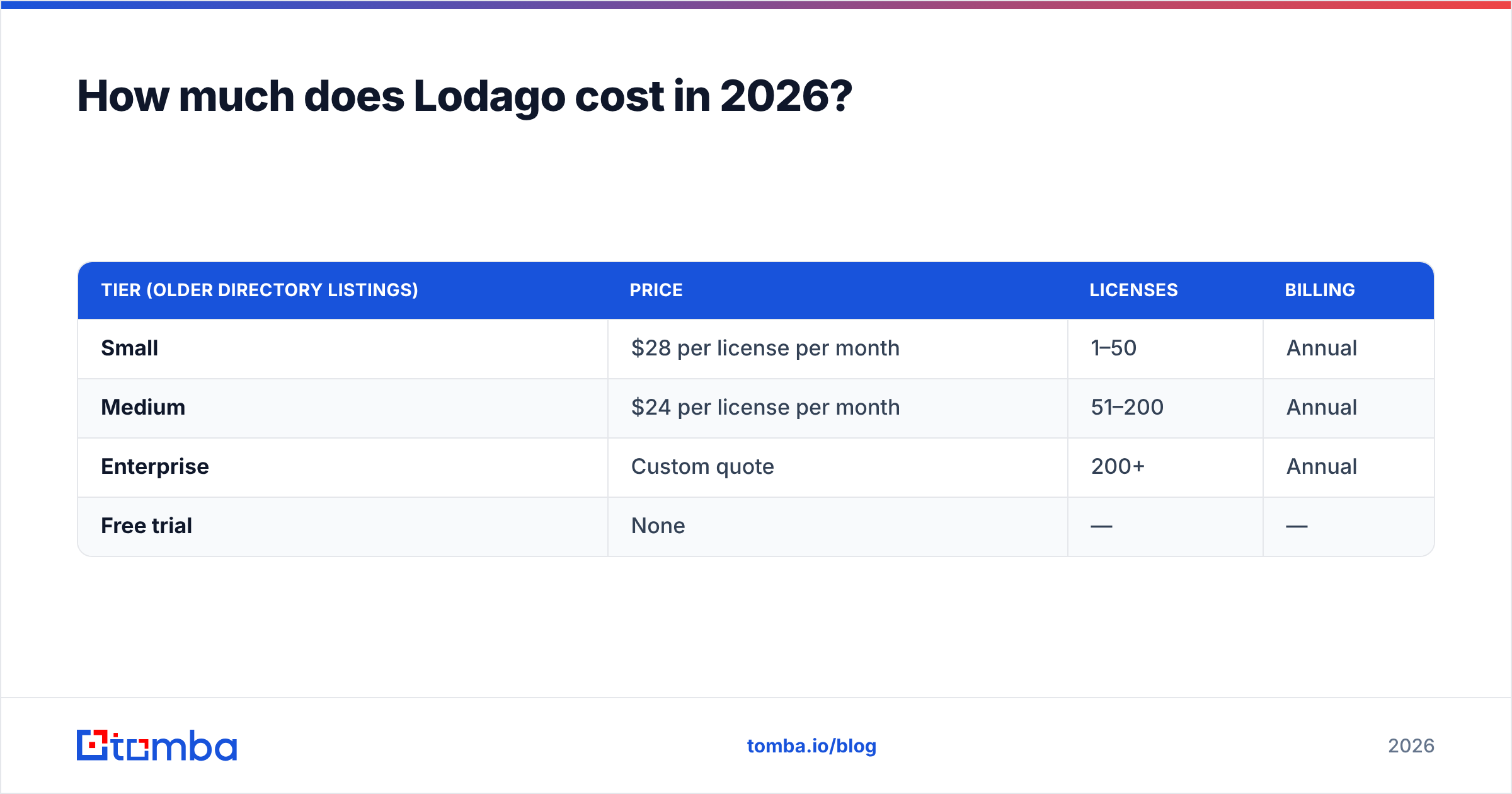
Some software directories still show an older per-license structure:
| Tier (older directory listings) | Price | Licenses | Billing |
|---|---|---|---|
| Small | $28 per license per month | 1–50 | Annual |
| Medium | $24 per license per month | 51–200 | Annual |
| Enterprise | Custom quote | 200+ | Annual |
| Free trial | None | — | — |
Those numbers are worth a look because they show how the pricing has changed. Here's the math under that older model:
- 20 licenses × $28 × 12 months = $6,720 per year
- 50 licenses × $28 × 12 months = $16,800 per year
- 100 licenses × $24 × 12 months = $28,800 per year
Now compare that with a $10,000 per year starting point with unlimited users. For a 10-person event team, the modular model probably costs more than the old per-seat math would have. For a 60-person field team that all shows up at the big shows, it's probably cheaper. The switch to unlimited seats favors large teams and makes it harder for small teams to justify.
Which costs aren't on the pricing page?#
Nothing here is hidden in a shady sense. These costs just don't show up in the headline number:
- Your time in the sales process. No self-serve checkout means a discovery call, a demo and probably a scoping call. Plan on two or three weeks before you see a signed quote.
- Annual commitment. Every tier we could find is billed yearly. If your event budget gets cut in Q3, you're still paying.
- CRM plumbing. Real-time sync is only as good as your field mapping. If your CRM admin has to build custom objects for "event meeting" or "booth scan", that's internal cost.
Two more costs tend to show up once you're at the show:
- Organizer lead-retrieval fees. Some shows push their own scanner app. Lodago reads any badge. But check what the show's badge QR codes carry. Some hold full contact data. Others hold just an ID that only the official app can decode. In that case, you may pay the organizer anyway.
- Data gaps after scanning. A badge usually gives you a name, company and maybe a title. It often lacks a working email address. Or it holds a personal Gmail typed at registration. Somebody still has to fill those gaps before follow-up goes out.
What do Lodago reviews actually say?#
Here's the honest answer: there aren't enough public reviews to form a statistically meaningful opinion. Lodago has a very small footprint on Capterra and G2. Directory sites such as SpotSaaS, SaaSworthy and TechImply list the product, but they mostly reuse vendor copy.
So look at the signals you can actually check:
- Onboarding speed. Lodago says most teams onboard in under 48 hours. That's believable for a scheduling-and-scanning tool, and you can hold them to it in a pilot.
- Competitive positioning. Lodago publishes comparison pages against Jifflenow, Popl and Calendly. Competitors such as Knowhere and BoothMaven publish pages against Lodago. That kind of back-and-forth is normal in a young category. Read all of those pages as marketing.
- Team background. The company describes itself as built by event professionals for exhibitors. The product design reflects that. It's organized around the show-floor workflow, not a generic sales workflow.
If you're shortlisting Lodago, ask for two reference customers whose event calendar looks like yours. Pick references with a similar number of shows, a similar region and a similar CRM. One 20-minute call with a peer will tell you more than any star rating currently on the web.
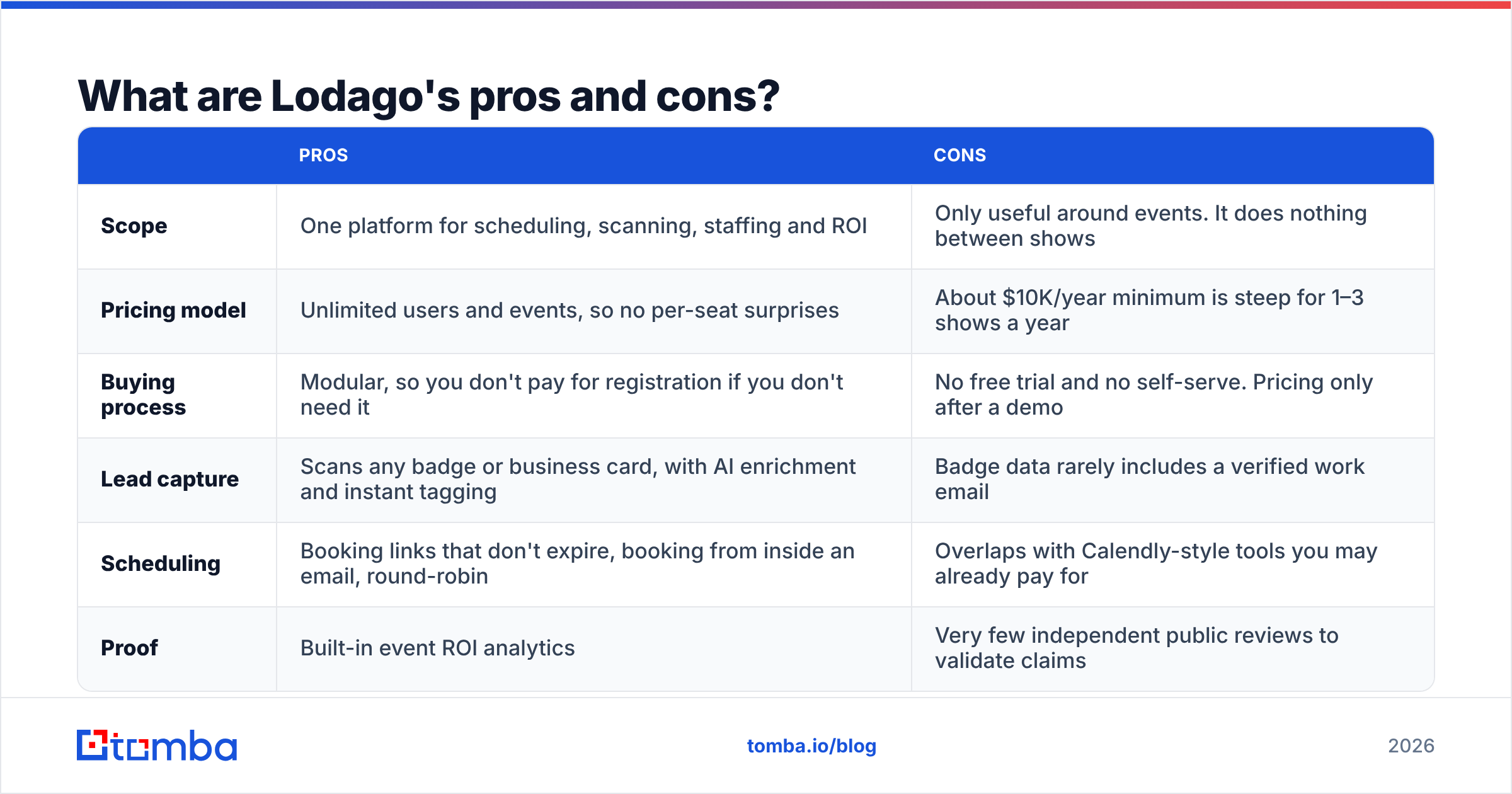
Lodago pricing reviews pros and cons: the full breakdown#
| Pros | Cons | |
|---|---|---|
| Scope | One platform for scheduling, scanning, staffing and ROI | Only useful around events. It does nothing between shows |
| Pricing model | Unlimited users and events, so no per-seat surprises | About $10K/year minimum is steep for 1–3 shows a year |
| Buying process | Modular, so you don't pay for registration if you don't need it | No free trial and no self-serve. Pricing only after a demo |
| Lead capture | Scans any badge or business card, with AI enrichment and instant tagging | Badge data rarely includes a verified work email |
| Scheduling | Booking links that don't expire, booking from inside an email, round-robin | Overlaps with Calendly-style tools you may already pay for |
| Proof | Built-in event ROI analytics | Very few independent public reviews to validate claims |
Where Lodago is genuinely strong#
Pre-booked meetings are where trade show ROI actually comes from. Walk-up traffic is random. Meetings booked two weeks out with named accounts are pipeline. Lodago's scheduling module is built around that. Links stay live for weeks, prospects book without leaving the email, and meetings get assigned across the booth team automatically. A generic scheduler can do parts of this, but it doesn't know that "Booth B42, Hall 3, Tuesday" is a location with five reps sharing it.
Unlimited users removes friction. Per-seat pricing makes teams ration licenses, and the rep without a license goes back to paper. When everyone on the booth has access, you get cleaner data.
Show-over-show analytics. Most exhibitors can't say which of their eight shows produced pipeline. If Lodago's reporting gets you that answer, the tool can pay for itself by getting one underperforming show cut.
Where Lodago falls short#
The entry price is a real barrier. At about $10K per year, a company doing two regional shows is paying $5K per event before booth, travel and swag. For that team, a scheduler, a scanner app and a spreadsheet will get 80% of the value.
Captured contacts aren't the same as reachable contacts. This applies to every trade show tool, not only Lodago. A scanned badge often gives you "Jane Doe, Acme GmbH, Procurement". It doesn't give you jane.doe@acme.de verified and ready to send. AI enrichment helps, but if follow-up goes to bounced or personal addresses, you damage your sender reputation right when the event pipeline is hottest.
How does Lodago compare to the alternatives?#
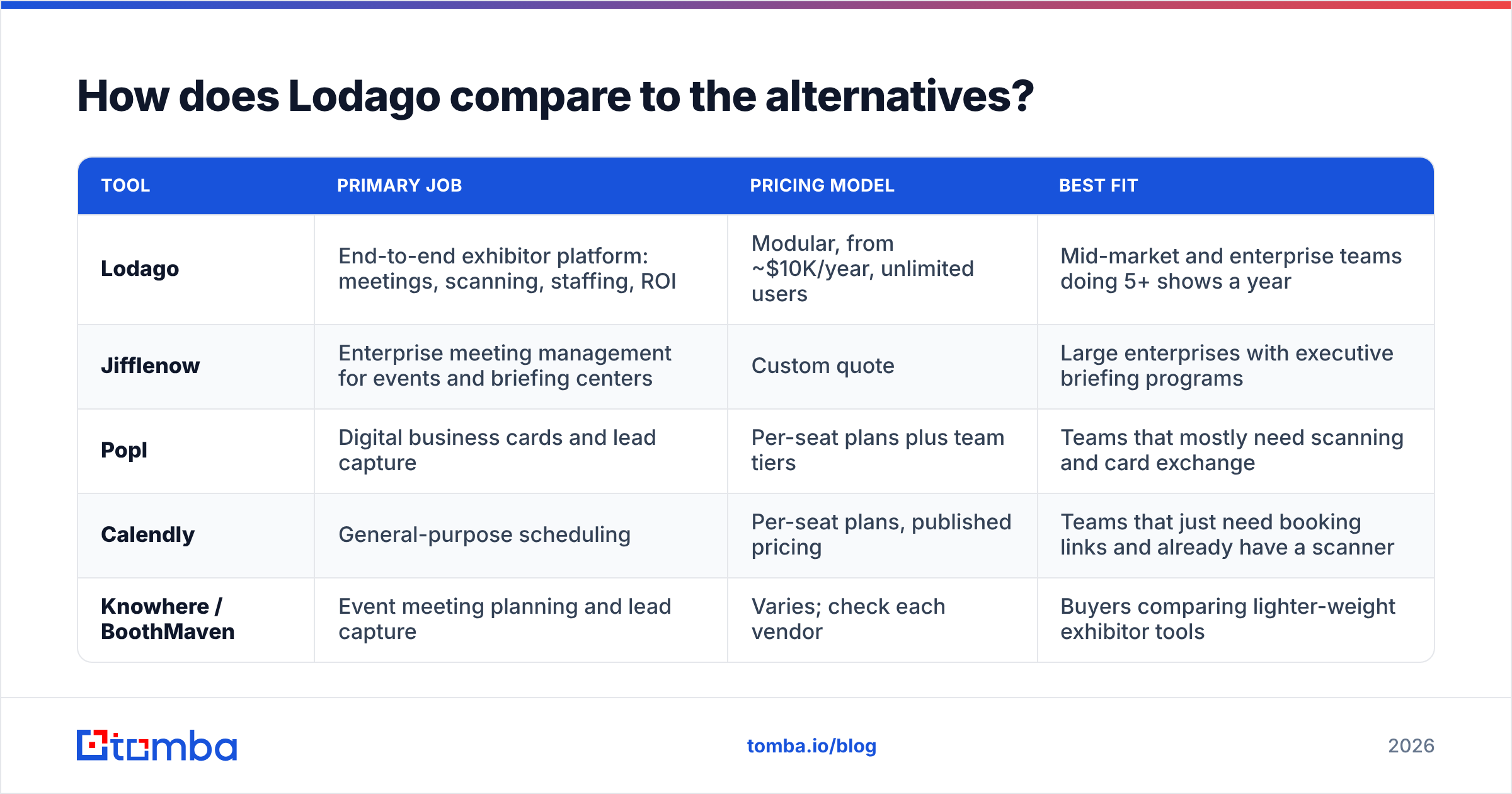
| Tool | Primary job | Pricing model | Best fit |
|---|---|---|---|
| Lodago | End-to-end exhibitor platform: meetings, scanning, staffing, ROI | Modular, from ~$10K/year, unlimited users | Mid-market and enterprise teams doing 5+ shows a year |
| Jifflenow | Enterprise meeting management for events and briefing centers | Custom quote | Large enterprises with executive briefing programs |
| Popl | Digital business cards and lead capture | Per-seat plans plus team tiers | Teams that mostly need scanning and card exchange |
| Calendly | General-purpose scheduling | Per-seat plans, published pricing | Teams that just need booking links and already have a scanner |
| Knowhere / BoothMaven | Event meeting planning and lead capture | Varies; check each vendor | Buyers comparing lighter-weight exhibitor tools |
The real decision isn't really Lodago vs. Calendly. It's this: do you want one event system of record, or a set of point tools you already partly own?
- One or two shows a year, small team: a scheduler plus a scanner app is enough. Put the savings into better follow-up data.
- Five or more shows, multiple regions, meetings as the main KPI: this is Lodago's market. The unlimited-user model and ROI reporting start to pay off.
- Enterprise with executive briefing centers as well as events: put Jifflenow and Lodago side by side in a proper RFP.
How do you get more value out of any trade show platform?#
Whichever tool you pick, what happens after the show affects ROI more than what happens on the floor. Run this sequence within 48 hours of the show closing:
- Export and deduplicate every scan. Reps scan the same person twice, and badge data has typos. Fix it before it reaches your CRM.
- Fill in missing work emails. For every scan with a name and company but no work address, run a lookup. An email finder that works from name and domain fills most of these gaps in minutes.
- Verify everything before the first send. Registration forms are full of typos, personal addresses and catch-all domains. Run the list through an email verifier so your post-show sequence doesn't bounce.
- Enrich for routing. Add title, seniority and company size so the right rep follows up. Contact enrichment does this in bulk.
- Sync to CRM with an event tag. Whether you use Lodago's native sync or a HubSpot integration, tag every record with the show name so the analytics module can attribute pipeline.
This workflow sits next to Lodago and doesn't replace it. Lodago tells you who you met. Tools like Tomba make sure your follow-up actually reaches them.
Is Lodago worth the money in 2026?#
Yes, if events are a core pipeline channel for you. No, if they're an occasional line item. That is the bottom line of this Lodago pricing reviews pros and cons breakdown.
A rough break-even test: take your average deal size and your historical close rate on event-sourced opportunities. If Lodago needs to produce fewer than three or four extra closed deals a year to cover about $10K plus internal setup time, and you do enough shows for pre-booked meetings to add up, the numbers work. If you can't currently attribute any closed deals to events, sort out your attribution first. Lodago's analytics can help with that, but they can't create pipeline that isn't there.
Before you sign:
- Ask for a pilot on one upcoming show with a clear success metric, such as pre-booked meetings versus last year.
- Get the CRM connector demoed on your own instance, not a sandbox.
- Confirm renewal terms and price caps, since billing is annual.
- Ask two reference customers with a calendar like yours.
Frequently asked questions#
Does Lodago have a free plan or free trial?#
No. Lodago does not offer a free trial or a free tier. Pricing comes through a sales conversation, and onboarding is usually quick once you sign.
Is Lodago priced per user?#
Not under the current model. Packages include unlimited users and events, and the price is set by the modules you choose and the size of your event calendar. Some directories still show an older per-license structure ($24–$28 per license per month), but treat that as historical.
Can Lodago find email addresses for my prospects?#
Not in the way an email finder does. Lodago captures and enriches contact data from badges and business cards at events. To find and verify work emails for contacts you haven't scanned, or to fill gaps in scans, you need a dedicated tool.
Who are Lodago's main competitors?#
Jifflenow, Popl and Calendly are the tools Lodago positions itself against directly. Knowhere and BoothMaven also compete for exhibitors looking for event meeting and lead capture tools.
Make every badge scan reachable#
Lodago and similar platforms get you in front of the right people at the show. The deal still depends on whether your follow-up email reaches their inbox. Tomba Email Finder takes a name and company domain from your scan list and returns a professional email address, with verification built in, so your post-show sequence goes out to real inboxes within 48 hours. Start on the free tier with 25 searches a month, or see Tomba pricing for plans from $49/mo when your event calendar gets busy.
Related guides#
// get started
Find, verify and enrich your first contacts today
Start on the free plan with 25 searches a month, then scale when your team is ready.
Free plan · No credit card required · GDPR & CCPA
// about the author