Logvalid vs SignalHire: Which Tool Fits Your Outbound Stack in 2026?
Logvalid cleans email lists. SignalHire finds emails and phone numbers. We compare pricing, credit limits, accuracy trade-offs and workflows so you know which one to buy, or whether you need both.
TL;DR
- These tools do different jobs. Logvalid is an email verification tool: it checks whether addresses you already have are deliverable. SignalHire is a contact finder: it gets emails and phone numbers for people you have identified on LinkedIn or the web.
- Logvalid is very cheap for list hygiene. Its Capterra listing shows a free plan with 500 verification credits and paid usage starting around $1 for 2,000 credits. It won't find a single new contact, though.
- SignalHire starts at $69/month for email-only or phone-only credits, and $99/month for emails plus phones. The "unlimited" annual plans come with a fair-usage cap, so check it before you commit.
- Pick by bottleneck. If your bounce rate is the problem, choose Logvalid. If you don't have enough contacts, choose SignalHire. If you have both problems, a single platform that finds and verifies saves you a second login and a CSV round-trip.
- Verify prices yourself. Both vendors change plans often, so confirm current numbers on their sites before you buy.
What is the real difference between Logvalid and SignalHire?#
The short version is that Logvalid tells you whether an email works, and SignalHire tells you what the email is.
Most "Logvalid vs SignalHire" searches come from people who think they are comparing two email tools that do the same thing. They don't. It's like comparing a metal detector with a shovel. Both belong in a treasure hunter's kit, but they solve different problems, and buying the wrong one leaves you stuck.
Logvalid is a verification layer. You upload a list, or call its API at signup, and it checks syntax, domain and MX records, disposable domains and spam-trap indicators. You get back a verdict for each address. Its product listing describes real-time validation, bulk verification, API integration and list-health reports. It does not search for people.
SignalHire is a contact data platform with a browser extension. You open a LinkedIn profile, a company page or a search result, and it reveals the person's work email, personal email and phone numbers when it has them. It runs its own checks before returning results, but its main job is discovery, not cleaning lists you already have.
So the useful question is which of the two jobs is holding your pipeline back.
How do Logvalid and SignalHire compare feature by feature?#
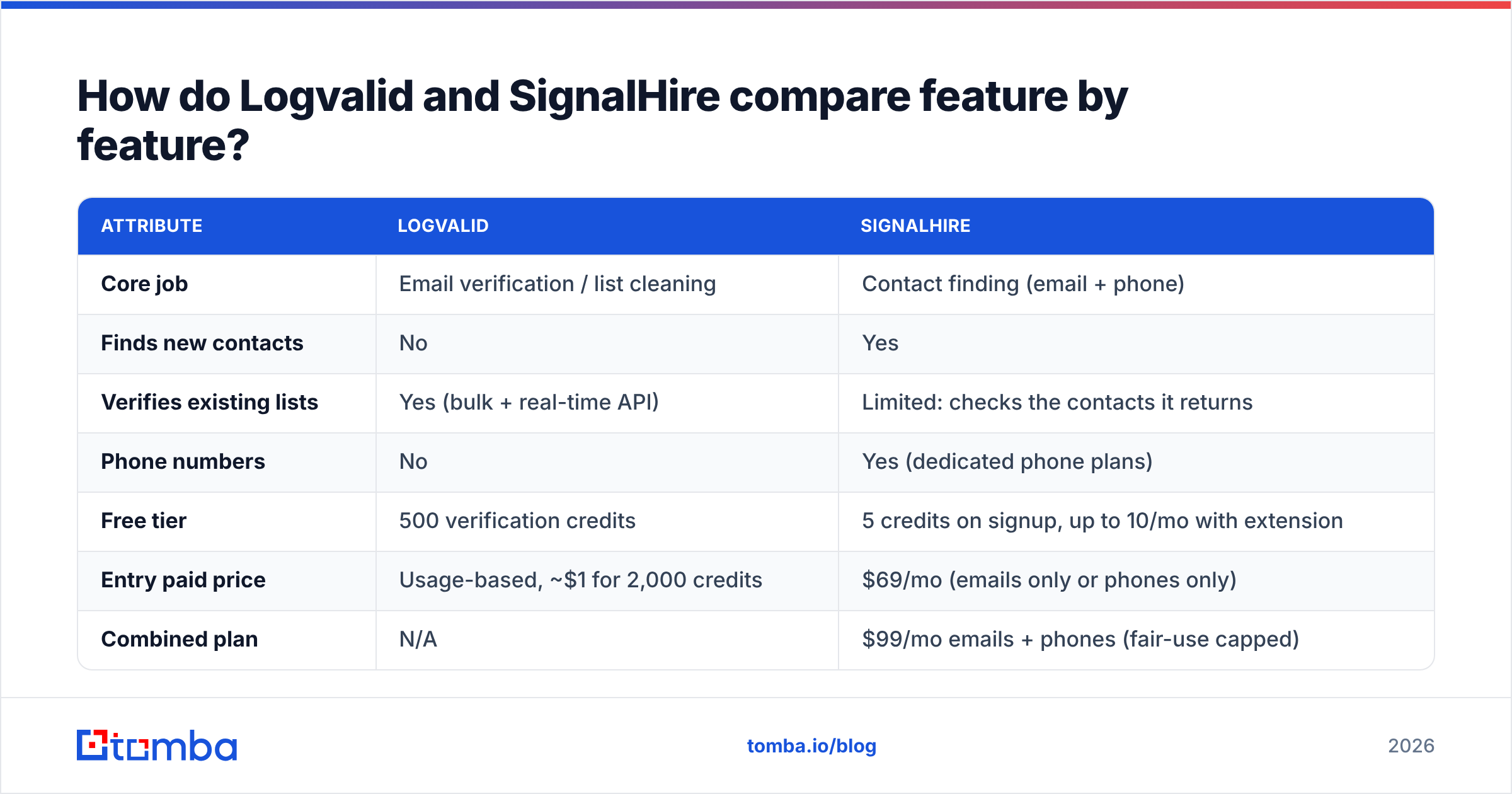
Here's the side-by-side view. Prices come from each vendor's public listings at the time of writing and can change.
| Attribute | Logvalid | SignalHire |
|---|---|---|
| Core job | Email verification / list cleaning | Contact finding (email + phone) |
| Finds new contacts | No | Yes |
| Verifies existing lists | Yes (bulk + real-time API) | Limited: checks the contacts it returns |
| Phone numbers | No | Yes (dedicated phone plans) |
| Free tier | 500 verification credits | 5 credits on signup, up to 10/mo with extension |
| Entry paid price | Usage-based, ~$1 for 2,000 credits | $69/mo (emails only or phones only) |
| Combined plan | N/A | $99/mo emails + phones (fair-use capped) |
| Browser extension | Not a core feature | Yes, a core workflow (LinkedIn, web) |
| API | Yes | Yes, on paid tiers |
| Seats | Account-based | Unlimited users on paid tiers |
| Best for | Marketers, SaaS signup forms, list hygiene | Recruiters, SDRs, founders prospecting |
The table makes the split clear. There's almost no overlap. The only shared ground is that SignalHire checks what it returns, and a verifier would re-check it again before a large send.

How does each tool actually work in a daily workflow?#
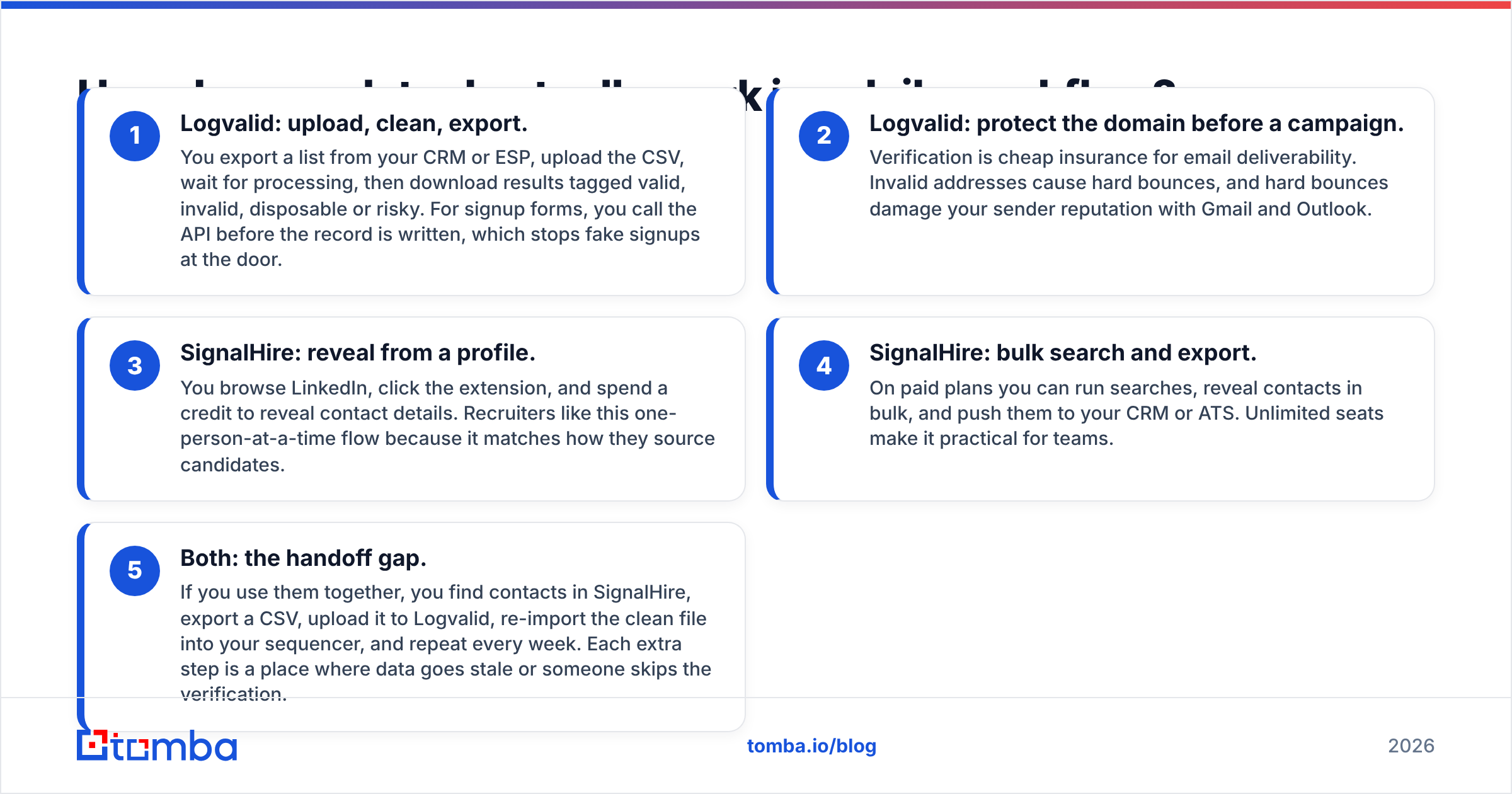
A tool's value shows up in the everyday routine, not on the pricing page. Here is how each one fits into a typical week.
- Logvalid: upload, clean, export. You export a list from your CRM or ESP, upload the CSV, wait for processing, then download results tagged valid, invalid, disposable or risky. For signup forms, you call the API before the record is written, which stops fake signups at the door.
- Logvalid: protect the domain before a campaign. Verification is cheap insurance for email deliverability. Invalid addresses cause hard bounces, and hard bounces damage your sender reputation with Gmail and Outlook.
- SignalHire: reveal from a profile. You browse LinkedIn, click the extension, and spend a credit to reveal contact details. Recruiters like this one-person-at-a-time flow because it matches how they source candidates.
- SignalHire: bulk search and export. On paid plans you can run searches, reveal contacts in bulk, and push them to your CRM or ATS. Unlimited seats make it practical for teams.
- Both: the handoff gap. If you use them together, you find contacts in SignalHire, export a CSV, upload it to Logvalid, re-import the clean file into your sequencer, and repeat every week. Each extra step is a place where data goes stale or someone skips the verification.
That fifth point is why many teams eventually move to one tool for both jobs. We come back to it below.
Is SignalHire's pricing worth it compared to Logvalid?#
The two pricing models are built differently, so comparing them directly is misleading. You need to compare cost per useful outcome.
Logvalid's model is usage-based and very cheap per check. Its listing shows paid pricing starting at about $1 for 2,000 credits, with 500 free credits to test. For a marketer cleaning a 50,000-row newsletter list, that's hard to beat. The catch is that verification only makes sense if you already have the list.
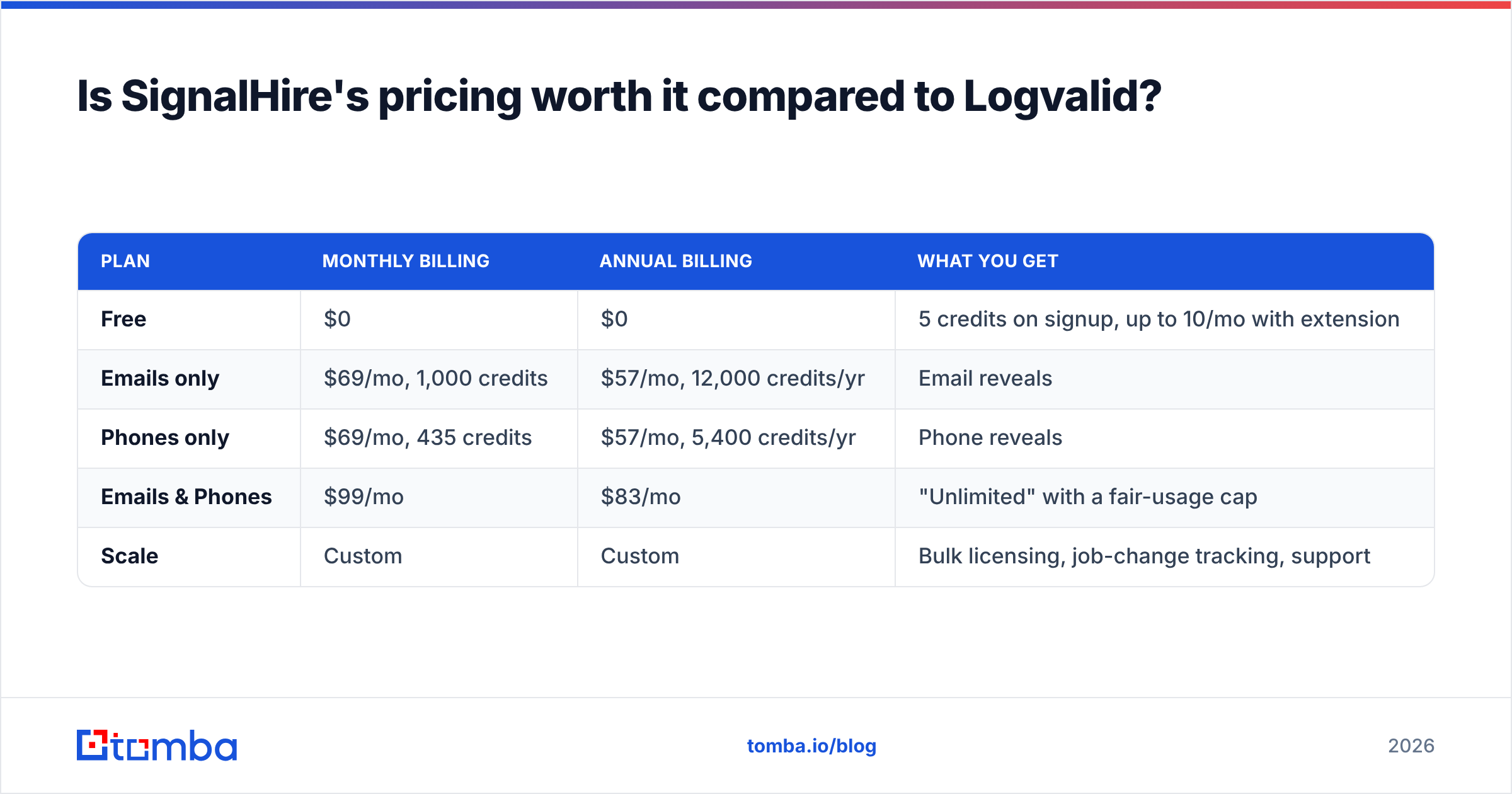
SignalHire's model is a monthly subscription:
| Plan | Monthly billing | Annual billing | What you get |
|---|---|---|---|
| Free | $0 | $0 | 5 credits on signup, up to 10/mo with extension |
| Emails only | $69/mo, 1,000 credits | $57/mo, 12,000 credits/yr | Email reveals |
| Phones only | $69/mo, 435 credits | $57/mo, 5,400 credits/yr | Phone reveals |
| Emails & Phones | $99/mo | $83/mo | "Unlimited" with a fair-usage cap |
| Scale | Custom | Custom | Bulk licensing, job-change tracking, support |
Two things to watch on SignalHire:
- The "unlimited" plans have a limit. Third-party reviews report a fair-usage policy of roughly 5,000 credits a month on the annual unlimited tier, mentioned only in tooltip text. If you plan around truly unlimited reveals, confirm the cap with sales first.
- Phone credits cost more. 435 phone credits for $69 works out to about $0.16 per reveal, compared with about $0.07 per email reveal. That's typical for the category, because direct dials are harder to source, but it adds up for cold-calling teams.
You can see current plans on the SignalHire website and Logvalid's details on its Capterra listing.
The practical verdict on price: Logvalid wins on cost per check, and SignalHire is the only one of the two that produces contacts. They aren't substitutes, so "cheaper" only matters within the job you're hiring the tool for.
Which one should you choose for your use case?#
Use this decision list. Pick the line that describes your team today, not the team you plan to have in six months.
- You run email marketing to opt-in subscribers. Choose Logvalid. You already have the addresses, and you need to prune bounces and disposables before each send.
- You collect signups on a SaaS product or lead form. Choose Logvalid's real-time API. Blocking fake emails at signup keeps your CRM clean and your onboarding emails landing.
- You are a recruiter sourcing candidates on LinkedIn. Choose SignalHire. The extension-first workflow and personal-email coverage fit recruiting well.
- You are an SDR who needs direct dials. Choose SignalHire on a phones plan. Logvalid doesn't touch phone data.
- You run cold email at volume. You need both finding and verification. Cold outreach to unverified addresses is the fastest way to burn a sending domain, and a verifier alone gives you nothing to send to.
- You are a solo founder testing outbound. Start with free tiers only. SignalHire's 5–10 free credits won't get you far, so look for a platform with a larger free allowance that covers both jobs.
Most B2B outbound teams land on "you need both." That's where the stack question matters.
What are the pros and cons of each tool?#
Logvalid pros
- Very low cost per verification
- Generous 500-credit free plan for testing
- Real-time API for signup-form validation
- Focused product with little to learn
Logvalid cons
- Doesn't find contacts, so you still need a separate data source
- No phone data
- Smaller review footprint than long-established verifiers, so run your own test on a known list before trusting it with a big send
SignalHire pros
- Emails and phone numbers from one extension
- Unlimited users on paid plans, with no per-seat pricing
- Personal-email coverage that recruiters value
- API and CRM/ATS integrations on paid tiers
SignalHire cons
- $69/month minimum for meaningful volume
- "Unlimited" plans carry a fair-usage cap
- Phone credits are much more expensive than email credits
- You will likely still want an independent verification pass before large cold campaigns

Do you need both tools, or one platform that does both?#
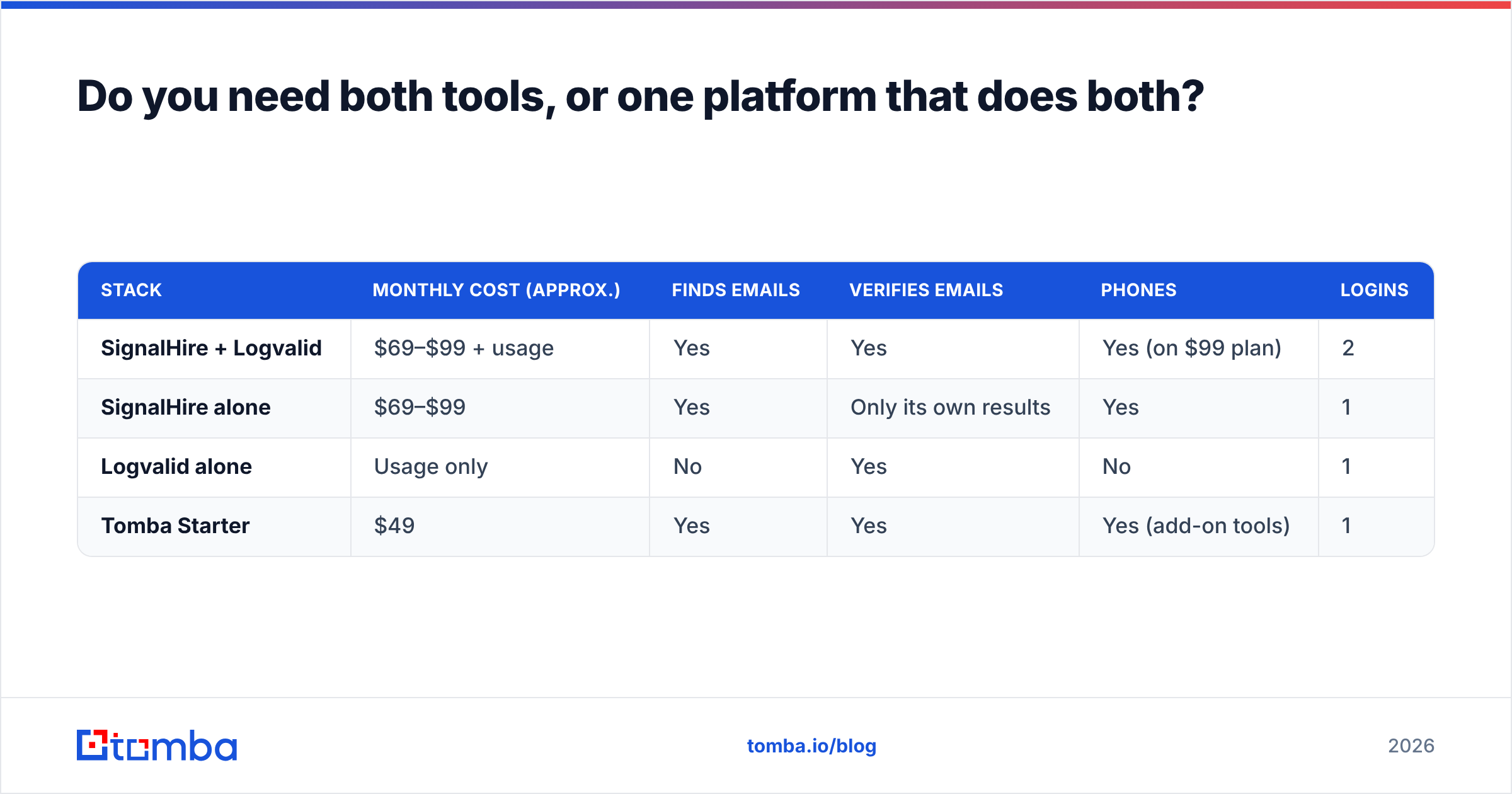
This is the question worth your time, because the real cost of a two-tool stack is operational, not the subscription fees.
Here's a rough monthly setup for a small outbound team:
| Stack | Monthly cost (approx.) | Finds emails | Verifies emails | Phones | Logins |
|---|---|---|---|---|---|
| SignalHire + Logvalid | $69–$99 + usage | Yes | Yes | Yes (on $99 plan) | 2 |
| SignalHire alone | $69–$99 | Yes | Only its own results | Yes | 1 |
| Logvalid alone | Usage only | No | Yes | No | 1 |
| Tomba Starter | $49 | Yes | Yes | Yes (add-on tools) | 1 |
A two-tool stack works, and plenty of teams run it. What it costs you:
- CSV round-trips. Every export and import is a chance to lose columns, create duplicates, or push unverified rows by mistake.
- Stale data. If you find contacts on Monday and verify on Friday, some of them will have changed jobs in between.
- Split budgets. Two subscriptions mean two renewals, two sets of credits to track, and two vendors to escalate to when numbers look wrong.
A combined platform removes the handoff. With Tomba, for example, you can find email addresses by name and domain and run them through the built-in email verifier in the same session. For lists you already own, bulk verify handles the Logvalid-style cleanup job. Tomba also has a phone finder, so the SignalHire-style phone reveal lives in the same account. It won't beat Logvalid on raw cost per verification. What it removes is the glue work.
For context on plan sizes, see Tomba pricing: a free tier with 25 searches a month, Starter at $49/month, Growth at $99/month, Pro at $249/month, and custom Enterprise.
How accurate are Logvalid and SignalHire?#
There's no neutral, public, head-to-head accuracy benchmark between these two tools, and because they do different jobs, a single "accuracy" number wouldn't mean much anyway. Here is what to test instead:
- For Logvalid, test on a known list. Take 500 addresses where you know the outcome (recent bounces plus confirmed opens). Run them through and count false valids, which are addresses marked deliverable that actually bounced. That is the number that hurts your domain.
- Watch catch-all handling. Many B2B domains accept all mail at the server, so a basic SMTP check can't confirm individual mailboxes. Ask how each tool labels catch-all results, because "valid" and "accept-all" are not the same risk. A dedicated catch-all verifier exists for this reason.
- For SignalHire, test on your ICP. Coverage varies a lot by region and industry. Reveal 50 contacts from your actual target list and track the bounce rate and the connect rate on phones. A tool that performs well for US tech recruiters may be thin for European manufacturing buyers.
- Always verify before volume. Whatever finder you use, run a verification pass before a large cold send. Gartner-style guidance on data quality consistently puts B2B contact data decay in the range of 20–30% a year, so a list that was clean last quarter isn't clean now.
So, Logvalid vs SignalHire: which one wins?#
Neither wins overall, because they aren't competing for the same job.
- Logvalid wins for list hygiene. It's cheap, focused, and has a usable free tier. If you already own your contacts, it's a sensible buy.
- SignalHire wins for contact discovery, especially if you need phone numbers or recruit from LinkedIn. Budget for $69–$99 a month and read the fair-use terms.
- For B2B outbound, you usually need both capabilities. Then the choice is between a two-tool stack with manual handoffs and a single platform that finds and verifies in one pass.
Where does Tomba fit if you need finding and verification together?#
If this comparison showed that you need both halves, finding contacts and checking them before you hit send, try Tomba Email Finder. Search by name and company domain, verify each result inline, and export a clean list straight to your CRM or sequencer. There's no second tool and no CSV round-trip. The free tier gives you 25 searches a month to test it on your own target accounts, and Starter is $49/month when you're ready to scale.
Related guides#
// get started
Find, verify and enrich your first contacts today
Start on the free plan with 25 searches a month, then scale when your team is ready.
Free plan · No credit card required · GDPR & CCPA
// about the author