Logvalid vs Skrapp: Email Verifier or Email Finder in 2026?
Logvalid cleans lists you already have. Skrapp finds emails you don't have yet. Compare pricing, features, and workflows so you can tell which one your outbound stack is missing.
TL;DR
- Logvalid and Skrapp aren't really competitors. Logvalid is a low-cost email verifier. Skrapp is an email finder that also includes verification.
- Logvalid wins on cost per check. Its entry pricing is listed from around $1, with a free allowance for testing. That makes it a good fit for cleaning newsletter lists, signup forms, and old CRM exports.
- Skrapp wins when you need new contacts. It finds emails from LinkedIn, Sales Navigator, and company domains. Paid plans start at $39/mo month-to-month ($30/mo billed annually) for 1,000 credits.
- Pick based on what you have. If you already have the addresses, Logvalid is enough. If you only have names and companies, you need Skrapp or another finder.
- Want both in one tool? An all-in-one platform like Tomba handles finding, verifying, and catch-all checks from a single credit pool.
What is the real difference between Logvalid and Skrapp?#
"Logvalid vs Skrapp" is really a question about which job you need done.
Think of it like a building. Logvalid is the security guard at the door. It checks whether each email address that shows up is real, deliverable, and safe to send to. Skrapp is the recruiter. It goes out and brings back contacts you didn't have before, then runs a quick ID check on each one.
In practice:
- Logvalid takes a list of addresses and returns a status for each one: valid, invalid, disposable, spam trap risk, and so on. It doesn't generate new contacts. According to its Capterra listing, its main features are real-time validation, disposable and fake email detection, spam-trap screening, an API, and list-health reports.
- Skrapp takes a name plus a company, a domain, or a LinkedIn profile and returns a professional email address. Its Chrome extension works on LinkedIn and Sales Navigator. It also offers domain search, bulk finding, and a verifier, all drawing on the same credit balance.
If you compare them feature for feature as if they were the same kind of tool, you'll end up with the wrong one. Start with your input. Do you have addresses or only names? That tells you which tool you're shopping for.
How do Logvalid and Skrapp compare side by side?#
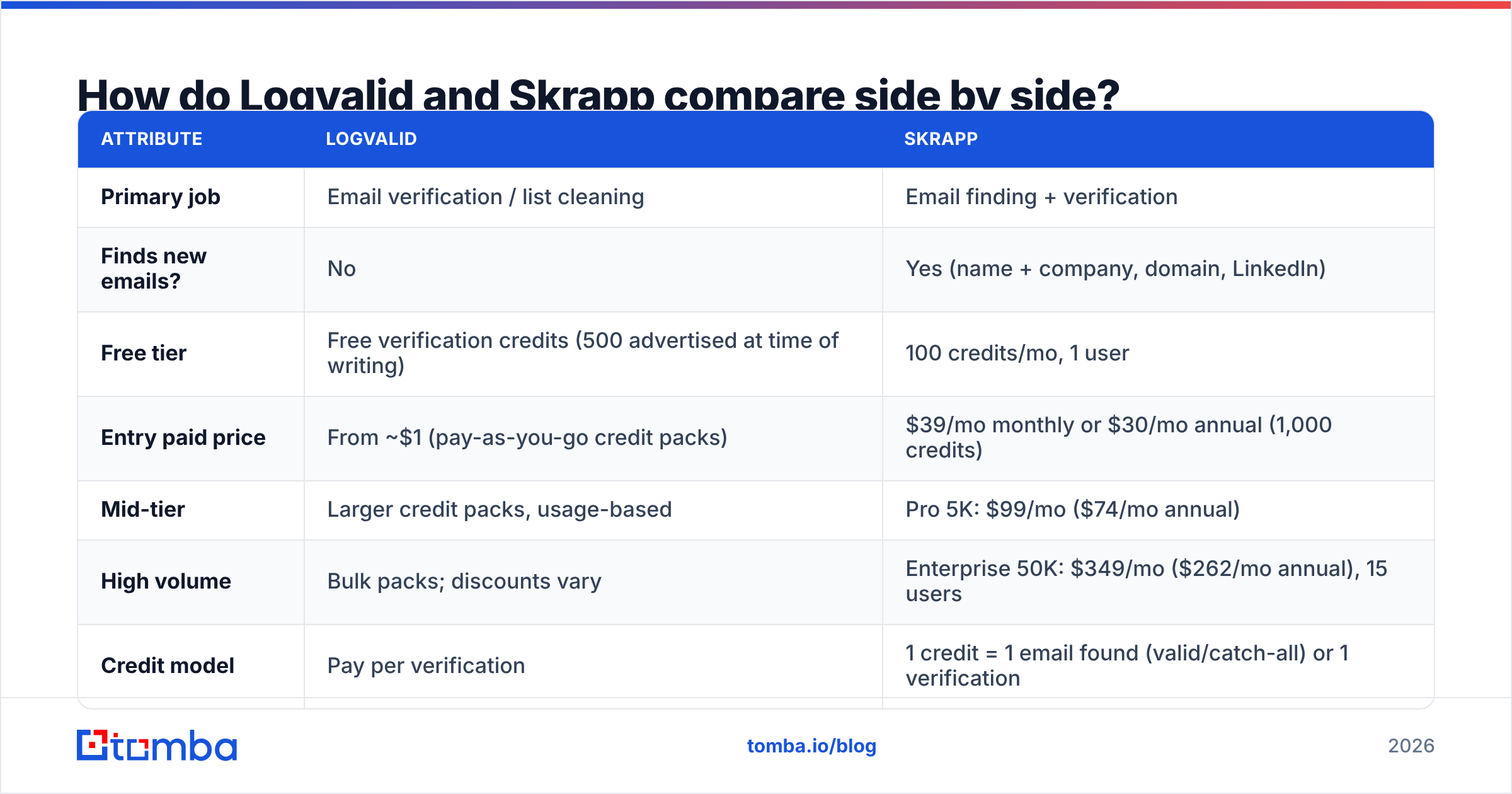
| Attribute | Logvalid | Skrapp |
|---|---|---|
| Primary job | Email verification / list cleaning | Email finding + verification |
| Finds new emails? | No | Yes (name + company, domain, LinkedIn) |
| Free tier | Free verification credits (500 advertised at time of writing) | 100 credits/mo, 1 user |
| Entry paid price | From ~$1 (pay-as-you-go credit packs) | $39/mo monthly or $30/mo annual (1,000 credits) |
| Mid-tier | Larger credit packs, usage-based | Pro 5K: $99/mo ($74/mo annual) |
| High volume | Bulk packs; discounts vary | Enterprise 50K: $349/mo ($262/mo annual), 15 users |
| Credit model | Pay per verification | 1 credit = 1 email found (valid/catch-all) or 1 verification |
| Unused credits | Pack-based | Roll over on paid plans |
| Chrome extension | No prospecting extension | Yes: LinkedIn, Sales Navigator, websites |
| API | Yes (real-time signup validation, bulk) | Yes |
| Best for | Marketers, product teams, list hygiene | SDRs, founders, recruiters doing outbound |
Skrapp's pricing comes from its public tiers as tracked on G2's Skrapp pricing page and similar aggregators. Logvalid publishes less detail, so confirm the current pack sizes on its site before you commit to a large volume.
What does Logvalid do well?#
Logvalid is a single-purpose tool, and that focus is the whole reason to use it.
- Low price per check. If you're cleaning a 50,000-row newsletter export, cost per verification matters more than anything else. Logvalid's pay-as-you-go pricing sits at the bottom of the market.
- Real-time API validation. You can plug it into signup forms and reject typos (
gmial.com), disposable inboxes, and obvious fakes before they reach your database. That protects your sender reputation long before your first campaign goes out. - Disposable and spam-trap screening. These are the addresses that quietly hurt deliverability. Logvalid flags them so you can suppress them.
- A low-risk way to start. The free allowance lets you run a real sample of your list and judge the results before paying.
Where it falls short:
- It can't find anyone. If your list has 30% bounces and you want replacement contacts, Logvalid can tell you which addresses are dead but can't tell you who to email instead.
- It has little sales context. You won't get a LinkedIn extension, company search, or contact enrichment. It's hygiene infrastructure, not a prospecting tool.
- Catch-all domains stay unresolved. Like most budget verifiers, it can label a domain catch-all, but it gives you little help deciding whether a specific address on that domain is safe to send to. If your market is enterprise-heavy, that could be a large share of your list.

What does Skrapp do well?#
Skrapp is built for outbound prospecting. Its workflow assumes you start with a person or a company, not an address.
- It works inside LinkedIn and Sales Navigator. You open a profile or a search results page, click the extension, and pull emails into a lead list. For SDRs who build lists from Sales Navigator, this is the main reason to choose Skrapp.
- Domain search. Enter
acme.comand get the public professional emails Skrapp has indexed for that company, with names and titles where available. - Bulk finding. Upload a CSV of names and companies and get back found emails. This is the step Logvalid can't do.
- Built-in verification. Found emails are checked before you're charged, and you can also verify existing lists with the same credits. Skrapp only charges finder credits for deliverable or catch-all results, which keeps the cost fair.
- Credit rollover and team seats. Paid plans include multiple users (2 on Professional, up to 15 on Enterprise 50K), and unused credits carry forward.
Where it falls short:
- Verification is expensive at scale. If your main task is cleaning 200,000 existing addresses, using Skrapp credits at roughly $0.03–0.04 each costs far more than a dedicated verifier.
- Its data leans on LinkedIn. Coverage is strongest where LinkedIn coverage is strong. Niche industries, non-English markets, and small local businesses can return thinner results.
- You pay for seats you may not need. A solo founder on the Professional plan pays for a two-user allowance either way.
Is Logvalid cheaper than Skrapp?#
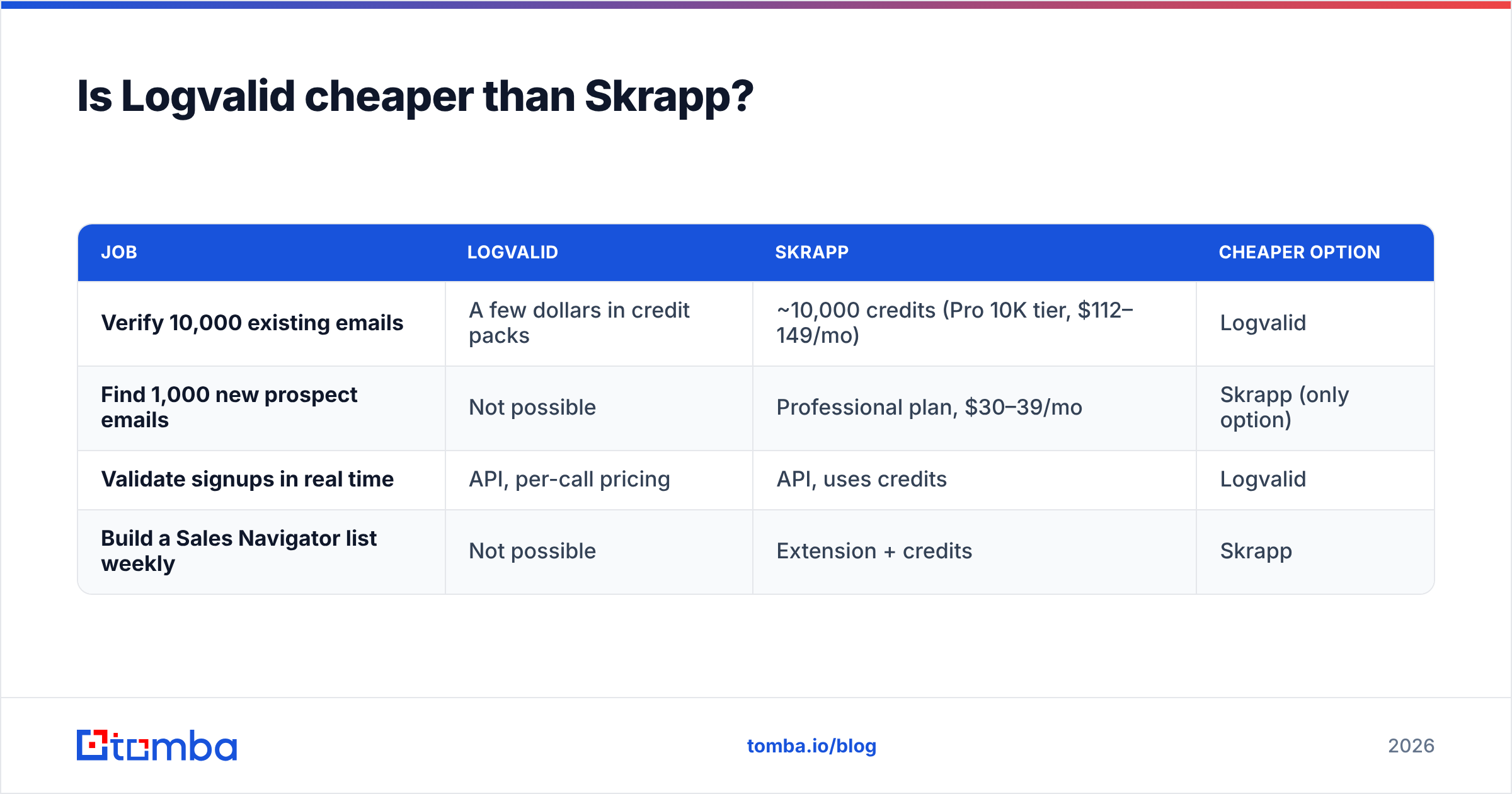
For verification alone, yes, by a wide margin. The two tools price completely different outcomes, so here's a comparison per job:
| Job | Logvalid | Skrapp | Cheaper option |
|---|---|---|---|
| Verify 10,000 existing emails | A few dollars in credit packs | ~10,000 credits (Pro 10K tier, $112–149/mo) | Logvalid |
| Find 1,000 new prospect emails | Not possible | Professional plan, $30–39/mo | Skrapp (only option) |
| Validate signups in real time | API, per-call pricing | API, uses credits | Logvalid |
| Build a Sales Navigator list weekly | Not possible | Extension + credits | Skrapp |
The pattern is simple. Logvalid is cheaper for anything it can do. Skrapp is the only option for the finding jobs Logvalid can't do. So "cheaper" only makes sense once you know which job you're paying for.
Which one should sales teams choose?#
Let your workflow decide. Use this checklist:
- You buy or import lists and just need to clean them. Choose Logvalid, and run it before every campaign upload.
- You build lists from LinkedIn and need emails. Choose Skrapp. The Chrome extension alone justifies the cost.
- You run outbound at volume (5,000+ sends a month). You probably need both functions: a finder to create contacts and a verifier to re-check them before sending. Stacking two tools works, but it means two credit systems, two exports, and two places where data goes stale.
- You're a marketer protecting a signup form. Choose Logvalid's API. Skrapp is overkill for this.
- Your market is heavy on catch-all domains (enterprise, finance, healthcare). Neither tool fully covers you. You'll want a dedicated catch-all verifier that scores individual addresses on accept-all domains, rather than just labeling the whole domain "risky."
For teams in the third group, the finder-plus-verifier stack is where costs and friction build up. Many teams using Skrapp end up re-verifying its output in a second tool anyway. That's not because Skrapp's checks are bad. It's because email data decays by roughly 2–3% a month, and a list found in January isn't clean in April. HubSpot's own guidance on email list hygiene makes the same point: verify close to send time, not just at capture.
How accurate are Logvalid and Skrapp?#
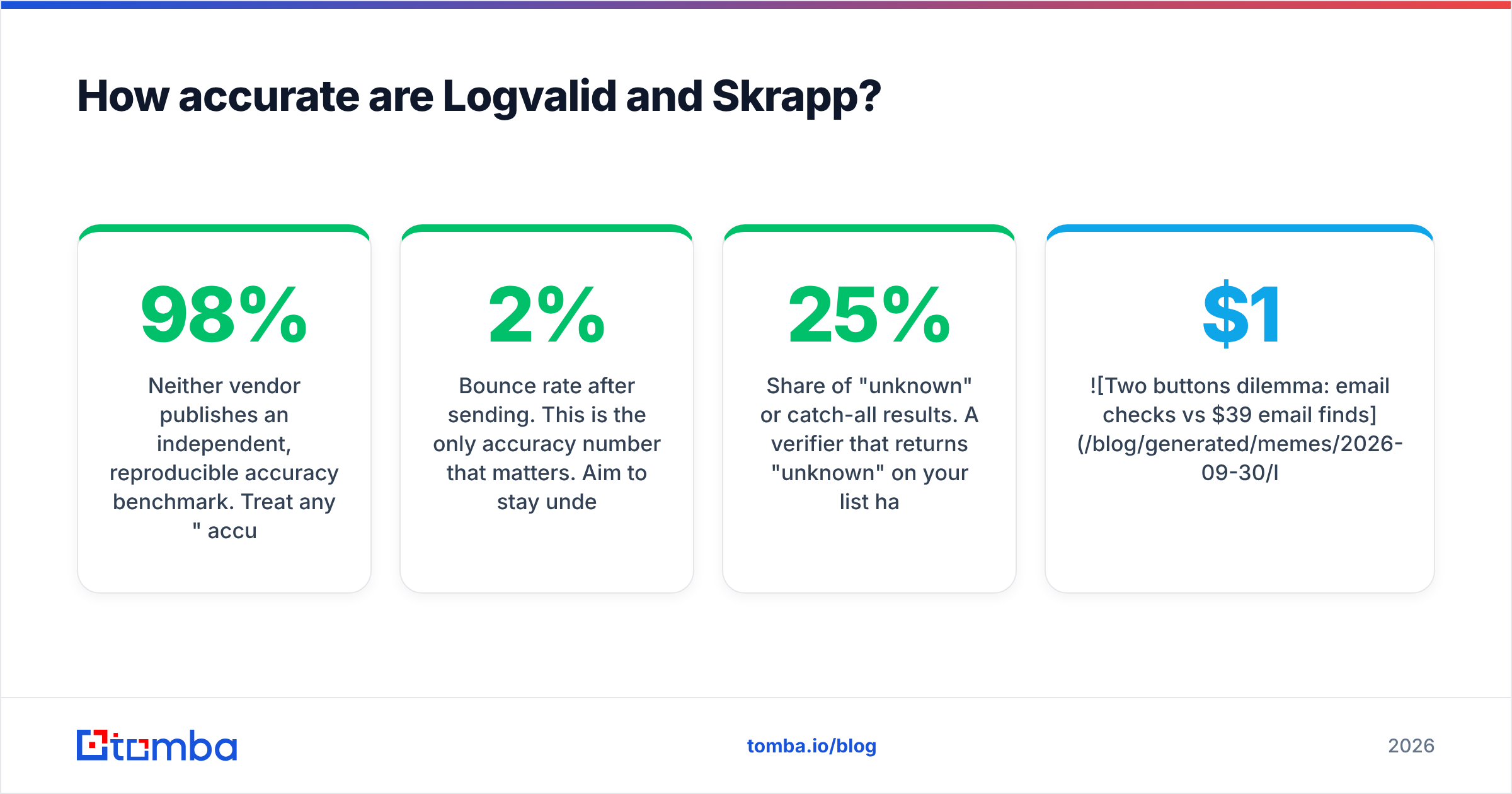
Neither vendor publishes an independent, reproducible accuracy benchmark. Treat any "98% accuracy" marketing claim as a ceiling, not a guarantee. What you can measure yourself:
- Bounce rate after sending. This is the only accuracy number that matters. Aim to stay under 2% hard bounces.
- Share of "unknown" or catch-all results. A verifier that returns 25% "unknown" on your list hasn't cleaned it. It has handed the risk back to you.
- Find rate (Skrapp only). Of 100 names you submit, how many come back with a deliverable email? Test with your real ICP, not a vendor demo list of SaaS companies.
Here's a practical test. Take 200 contacts from your real target market. Run them through Skrapp to find emails, then through Logvalid to verify, then send a low-stakes touch from a warmed domain. You'll learn more from that one test than from any comparison page, including this one.
Is there an alternative that combines both?#
If you've decided you need both finding and verification, running one platform usually beats stacking two. You get one credit pool, one export, and one API key.
Tomba is one option in this category. The Tomba Email Finder covers the jobs Skrapp handles: name plus company lookups, domain search, a LinkedIn extension, and bulk finding. It also includes a standalone email verifier for lists you already have, plus catch-all verification, which neither Logvalid nor Skrapp covers in depth.
To be fair about the trade-offs:
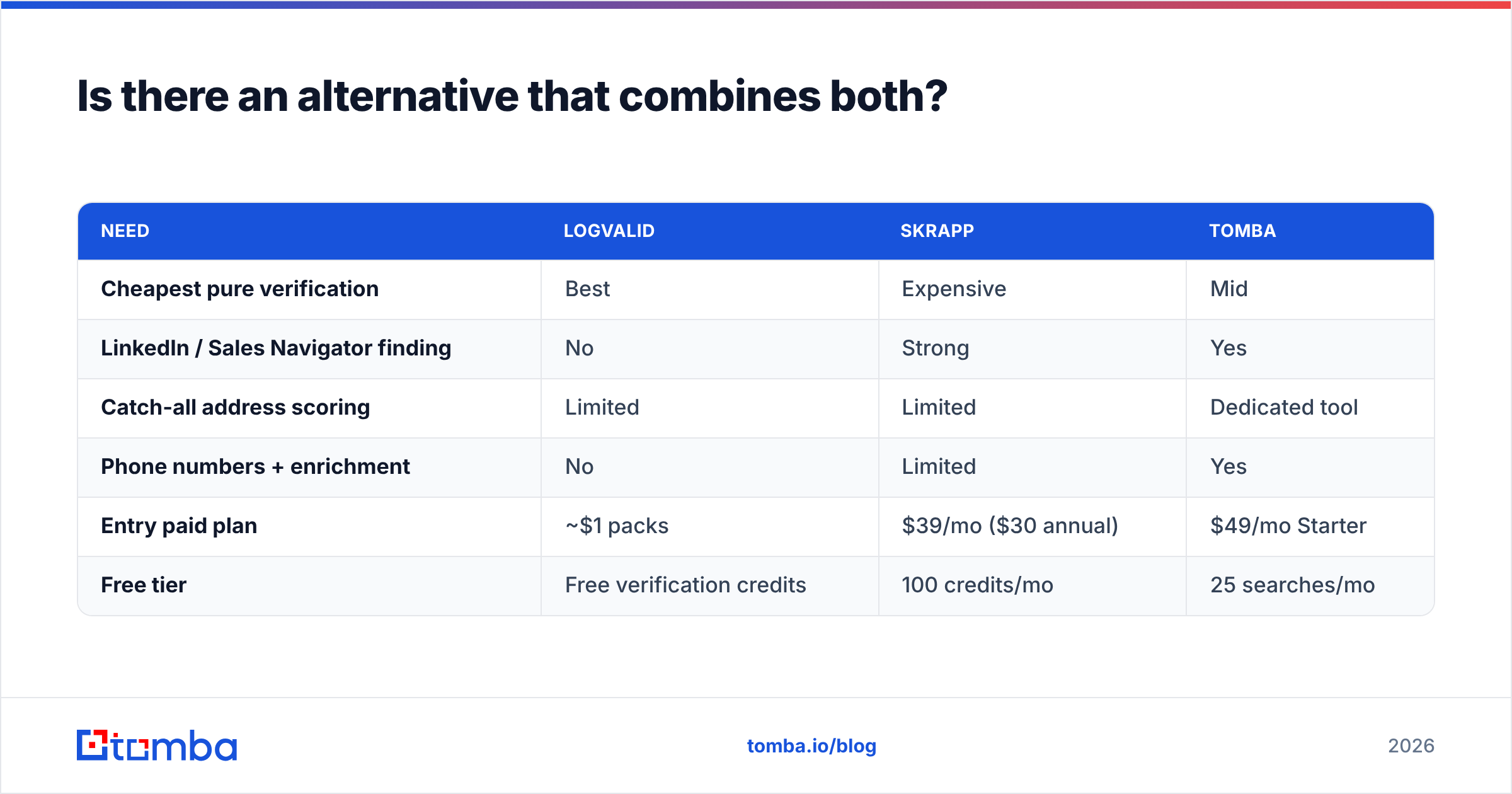
| Need | Logvalid | Skrapp | Tomba |
|---|---|---|---|
| Cheapest pure verification | Best | Expensive | Mid |
| LinkedIn / Sales Navigator finding | No | Strong | Yes |
| Catch-all address scoring | Limited | Limited | Dedicated tool |
| Phone numbers + enrichment | No | Limited | Yes |
| Entry paid plan | ~$1 packs | $39/mo ($30 annual) | $49/mo Starter |
| Free tier | Free verification credits | 100 credits/mo | 25 searches/mo |
If all you need is cheap list cleaning, Logvalid will beat Tomba on price per check, and you should use it. If all you need is Sales Navigator scraping on a small budget, Skrapp's $30 annual tier is hard to beat. The combined platform makes sense once you're paying for both and moving CSVs between them every week. Full tier details are on the Tomba pricing page.
What's the final verdict on Logvalid vs Skrapp?#
- Choose Logvalid if you already have the addresses and want the cheapest reliable way to keep them clean, especially for marketing lists and signup validation.
- Choose Skrapp if your pipeline starts on LinkedIn and you need a fast, affordable way to turn profiles into deliverable emails.
- Choose an all-in-one platform if you're doing both jobs every week and the tool-switching is costing you more than the credits.
This isn't a winner-takes-all matchup. Logvalid and Skrapp solve different halves of the same problem. Figure out which half you're missing, and the choice is easy.
Ready to find and verify from one place? Try the Tomba Email Finder. Start with the free tier's 25 monthly searches and run your own 200-contact test against your real ICP. If the find rate and bounce rate hold up, move to Starter at $49/mo and stop paying for two tools.
Related guides#
// get started
Find, verify and enrich your first contacts today
Start on the free plan with 25 searches a month, then scale when your team is ready.
Free plan · No credit card required · GDPR & CCPA
// about the author