Logvalid vs UpLead (2026): Email Verifier or B2B Contact Database?
Logvalid cleans email lists you already have. UpLead sells you new contacts. See how they differ on price, data, and accuracy, and which one your outbound stack is actually missing.
TL;DR
- Logvalid and UpLead do different jobs. Logvalid is a low-cost email verification tool: it checks addresses you already have. UpLead is a B2B contact database that sells you new, verified contacts.
- Logvalid wins on price by a wide margin. Its public pricing starts at roughly $1 for 2,000 verification credits, and the free tier includes 500 credits. UpLead's Essentials plan costs $99/mo, or $74/mo billed annually, for 170 contacts a month.
- UpLead wins on prospecting. You get search filters, firmographics, technographics on higher tiers, and mobile numbers. Logvalid won't find you a single new lead.
- Pick Logvalid if you already have lists from events, your CRM, or sign-up forms and need to cut bounces. Pick UpLead if you need to build target account lists from scratch.
- Tomba sits between them. It finds and verifies emails by domain or name, with a free tier and a $49/mo Starter plan.
What is the real difference between Logvalid and UpLead?#
"Logvalid vs UpLead" is a slightly odd matchup, because the two tools answer different questions.
- Logvalid asks: "Will this email address accept mail?"
- UpLead asks: "Who should I be emailing, and what's their address?"
Think of it like a kitchen. Logvalid is the person checking whether the ingredients in your fridge have gone off. UpLead is the grocery store. You can't cook dinner with just a freshness checker, and buying groceries without checking what's already spoiled wastes money.
That's why people search this comparison. Usually a team has a bounce problem, a lead shortage, or both, and wants to know which tool to buy first. This guide answers that directly.
What is Logvalid?#
Logvalid is a web-based email verification service. According to its Capterra listing, it validates addresses in real time and filters out invalid, disposable, and spam-trap emails to protect your sender reputation.
The core features:
- Real-time validation: checks syntax, domain, and mailbox deliverability for a single address.
- Bulk list verification: upload a CSV and get back a cleaned list with status labels.
- Disposable and spam-trap detection: flags throwaway inboxes and known traps.
- API access: lets you validate emails at the point of sign-up in your own forms or apps.
- List health reports: shows a breakdown of valid, invalid, and risky addresses.
Its main selling point is price. At the time of writing, Logvalid advertises a free plan with 500 verification credits, and paid usage starts at around $1 for 2,000 credits. That's far below most established verifiers.
What Logvalid does not do is equally important. It has no contact database, no search filters, no company data, and no way to generate new leads. Public listings also don't clearly document dedicated catch-all resolution, so if a large share of your list sits on catch-all domains, test that before you commit.
What is UpLead?#
UpLead is a B2B contact data platform. You search a database of companies and people by filters such as industry, headcount, location, job title, and on higher plans technology used. Then you spend credits to unlock contact details. The official site is uplead.com.
The core features:
- Prospector search: a filterable database of business contacts and companies.
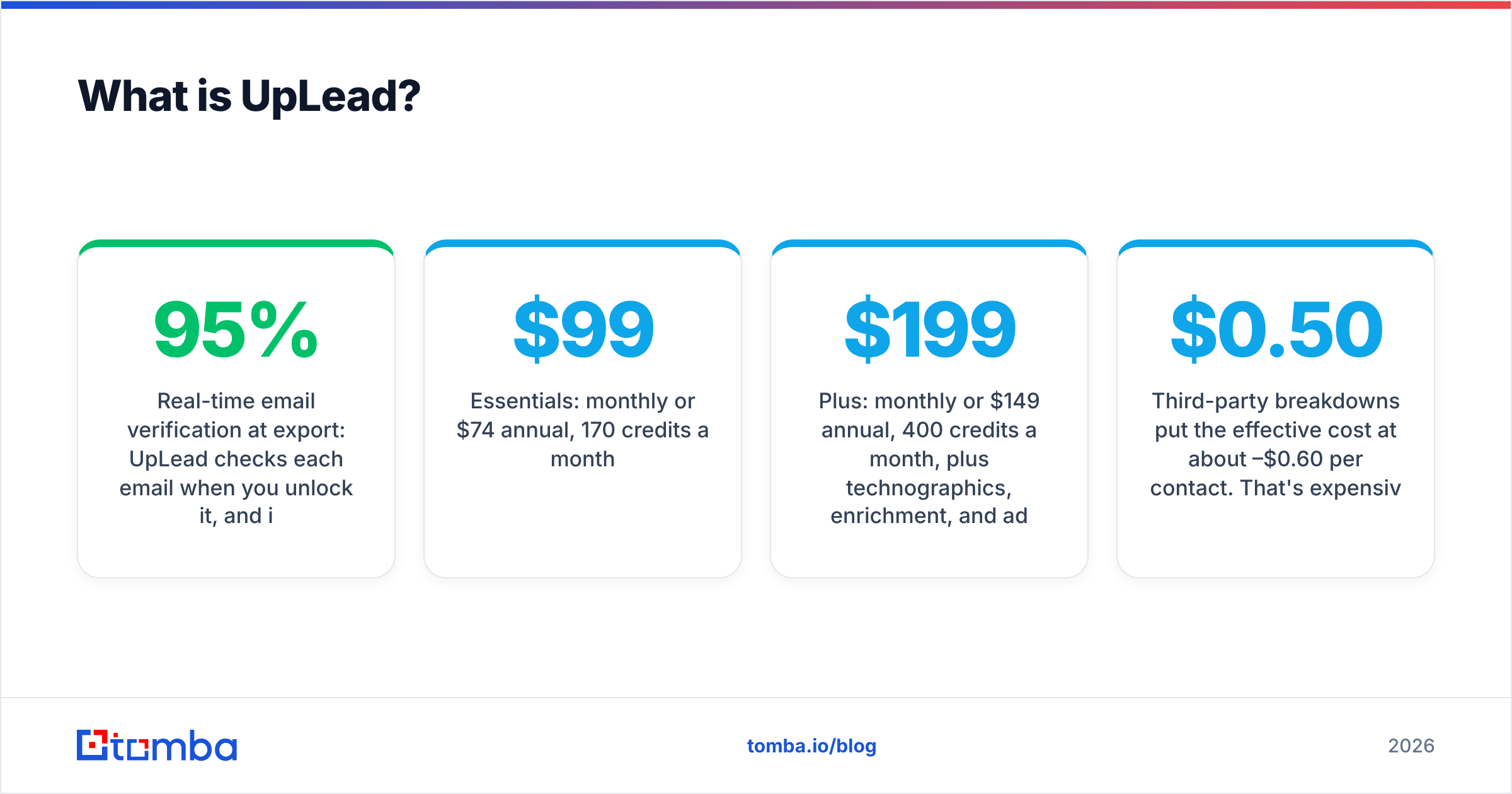
- Real-time email verification at export: UpLead checks each email when you unlock it, and it markets a 95% data accuracy guarantee.
- Mobile and direct dials: one credit unlocks the contact record, including a phone number where one is available.
- Technographics and intent data: on Plus and higher tiers.
- Data enrichment: upload a list and append missing fields.
- CRM integrations: push contacts into Salesforce, HubSpot, and outreach tools.
The catch is cost. UpLead's public 2026 pricing looks roughly like this:
- Free trial: 7 days, 5 credits.
- Essentials: $99/mo monthly or $74/mo annual, 170 credits a month.
- Plus: $199/mo monthly or $149/mo annual, 400 credits a month, plus technographics, enrichment, and advanced filters.
- Professional: custom annual contract.
Third-party breakdowns put the effective cost at about $0.50–$0.60 per contact. That's expensive per unit, but each credit gets you both a verified email and, when available, a phone number.
How do Logvalid and UpLead compare side by side?#
Here's the comparison across the attributes that actually affect your buying decision.
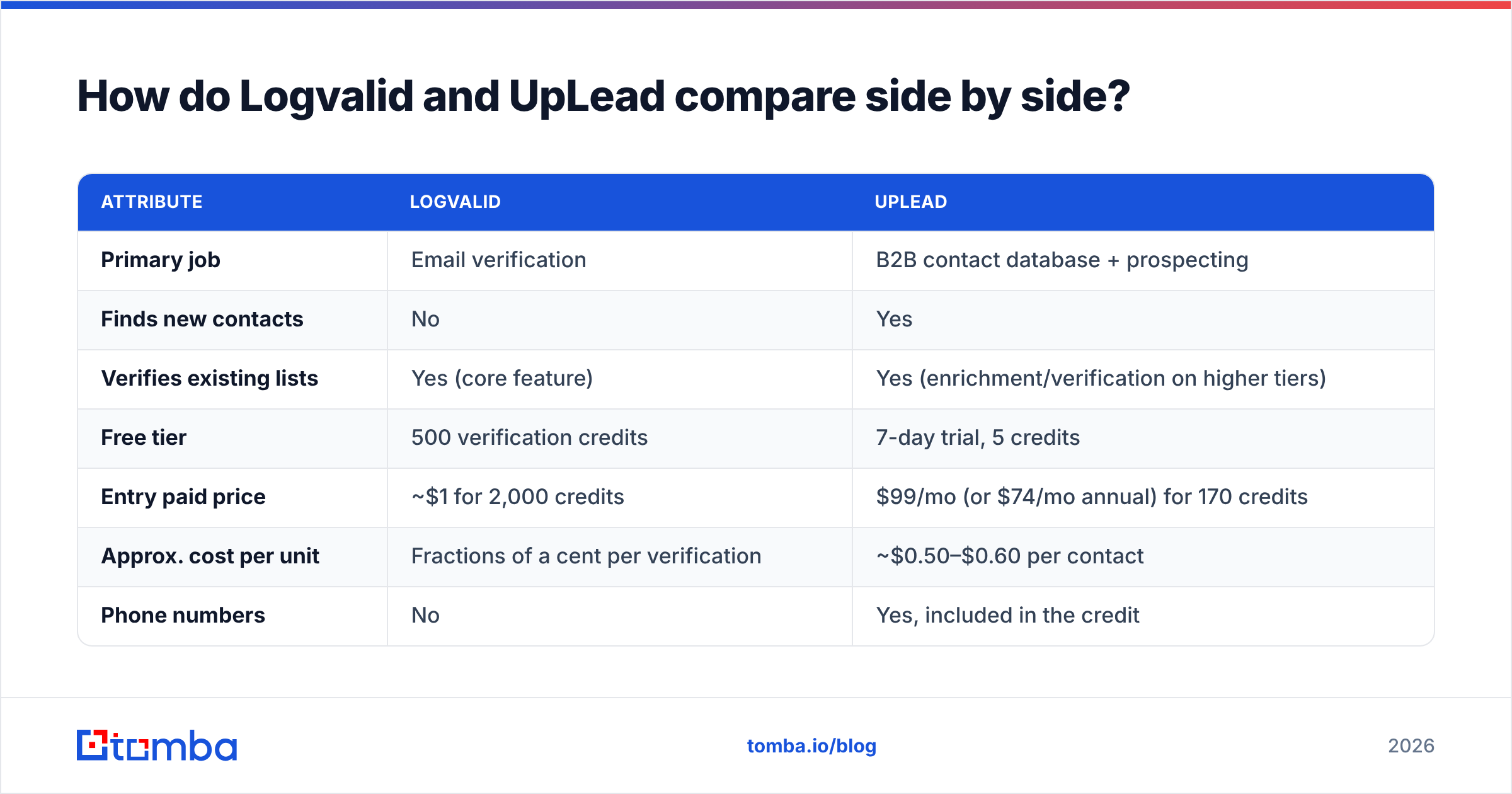
| Attribute | Logvalid | UpLead |
|---|---|---|
| Primary job | Email verification | B2B contact database + prospecting |
| Finds new contacts | No | Yes |
| Verifies existing lists | Yes (core feature) | Yes (enrichment/verification on higher tiers) |
| Free tier | 500 verification credits | 7-day trial, 5 credits |
| Entry paid price | ~$1 for 2,000 credits | $99/mo (or $74/mo annual) for 170 credits |
| Approx. cost per unit | Fractions of a cent per verification | ~$0.50–$0.60 per contact |
| Phone numbers | No | Yes, included in the credit |
| Firmographic / technographic filters | No | Yes (technographics on Plus+) |
| API | Yes | Yes (higher tiers) |
| Best for | Cleaning lists before a send | Building net-new target lists |
Bottom line: these tools compete for the same budget line, not the same job.

Which one is more accurate?#
Accuracy means different things for each tool, so compare them on their own terms.
Logvalid accuracy = verification correctness. The question is whether it labels a good address "valid" and a dead one "invalid." Every verifier runs the same basic checks: syntax, MX record lookup, and an SMTP handshake. They differ on the hard cases, which are catch-all domains, greylisting servers, and large providers that throttle probes. Logvalid publishes little in the way of independent benchmark data, so run your own test. Take 500 addresses whose outcome you already know from past sends, verify them, and compare.
UpLead accuracy = data freshness plus verification. People change jobs constantly, so a database is only as good as its refresh cycle. UpLead verifies at the moment of export, which is the right design, and backs it with its 95% accuracy guarantee. User reviews on G2 are generally positive about email quality. Coverage is thinner outside North America, and mobile number hit rates vary by region.
Here's a practical rule. If your bounce rate is above 3–5% on lists you already own, a verifier fixes that. If your bounce rate is fine but you don't have enough people to email, a verifier does nothing for you.
How much does each tool really cost at scale?#
Model your cost against your actual monthly volume instead of comparing sticker prices.
Scenario A: you have 20,000 existing contacts to clean each month.
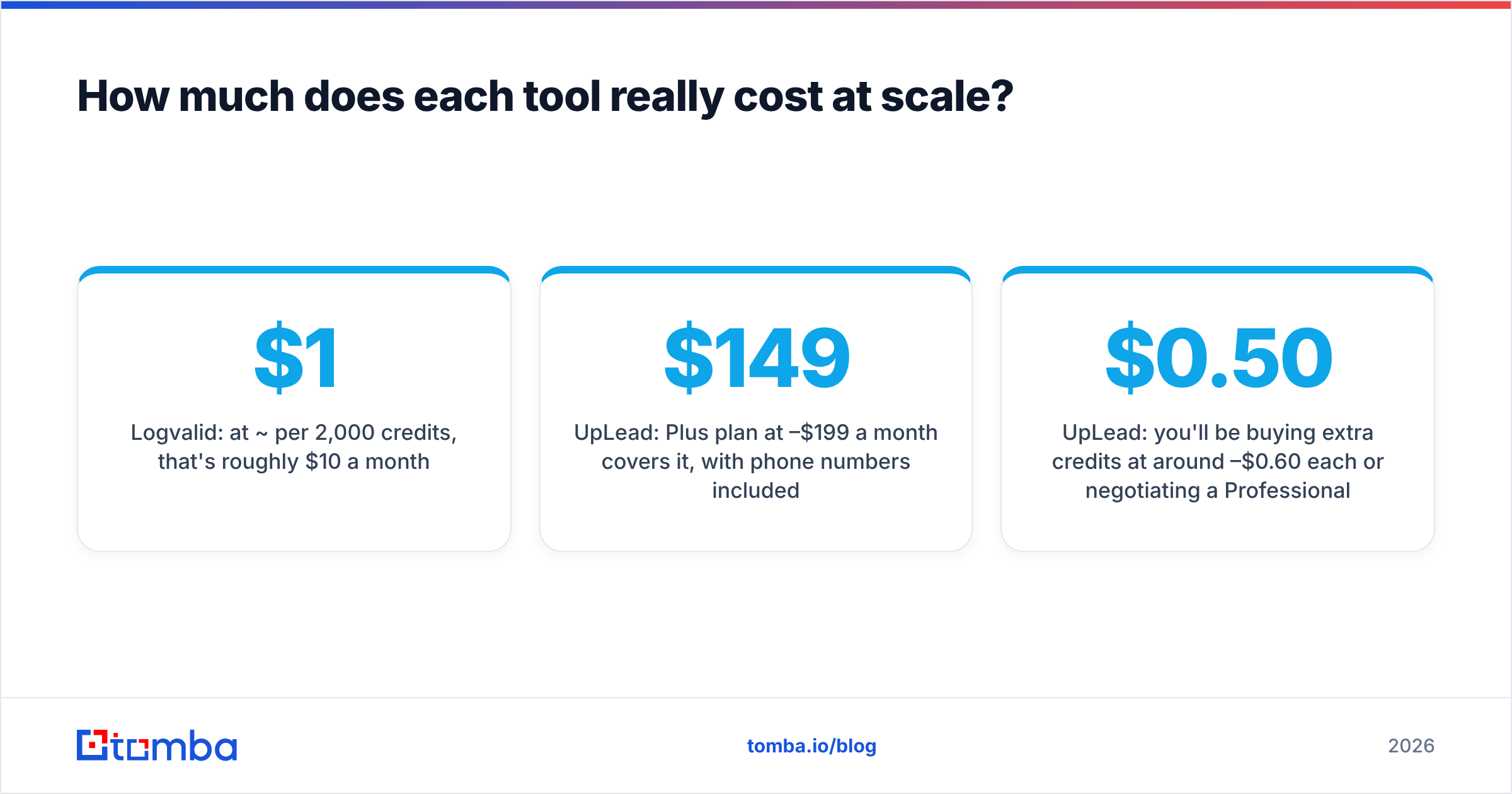
- Logvalid: at ~$1 per 2,000 credits, that's roughly $10 a month.
- UpLead: that isn't what the product is for. You'd be paying for database access you don't need.
Scenario B: you need 400 new, verified decision-maker contacts each month.
- Logvalid: can't do it.
- UpLead: Plus plan at $149–$199 a month covers it, with phone numbers included.
Scenario C: you need 1,000+ new contacts a month.
- UpLead: you'll be buying extra credits at around $0.50–$0.60 each or negotiating a Professional contract. Budget $500+ a month.
- This is where many teams look at a finder-plus-verifier setup instead of a full database.
Watch out for how credits roll over. UpLead's annual plans give you a yearly credit pool, so check whether unused credits expire before you commit. With Logvalid, check whether purchased credits have an expiry date as well.
When should you choose Logvalid?#
Choose Logvalid if:
- You already have the contacts. Webinar registrants, trade-show scans, old CRM records, inbound sign-ups.
- Your bounce rate is hurting deliverability. A cheap pre-send verification pass is the fastest way to protect your sender reputation.
- You need form-level validation. The API can block fake sign-ups before they reach your CRM.
- Budget is tight. Few verifiers are cheaper per check.
Skip it if you need lead generation, enrichment, or phone data, or if your list is heavy on catch-all domains and you need confident verdicts on them.
When should you choose UpLead?#
Choose UpLead if:
- You're building an ICP list from scratch. Filters by industry, size, and title make targeting fast.
- You call as well as email. One credit covering both email and phone is good value for SDR teams that dial.
- You need technographics. Targeting companies by the software they run is a strong outbound angle.
- You want one vendor for data and verification. Verification at export means you usually don't need a separate verifier for UpLead-sourced contacts.
Skip it if your volume is high and your budget is low, or if most of your targets are outside UpLead's strongest regions.
Can you use Logvalid and UpLead together?#
Yes, and some teams do. The typical workflow:
- Source net-new contacts from UpLead.
- Merge them with older CRM data and event lists.
- Run the combined list through Logvalid before each campaign, because data from three months ago has decayed since it was verified.
The downside is two vendors, two billing cycles, and a CSV hand-off between them. It also leaves a gap. When you already know the company and the person's name but not their email, which is common in account-based outbound, neither tool is ideal. UpLead may not have that exact person. Logvalid can only verify a guess you made yourself.
That gap is where a dedicated email finder comes in.
Where does Tomba fit in this comparison?#
Tomba isn't a like-for-like replacement for either tool, but it covers the overlap between them.
- Finding: enter a name and company domain, and Tomba returns the most likely professional email. Its domain search lists publicly associated emails for a company.
- Verifying: a built-in email verifier plus a catch-all verifier for the risky addresses basic SMTP checks can't resolve.
- Scale: bulk finding and verification, an API, a Chrome extension, and Google Sheets and CRM integrations.
- Pricing: a free tier with 25 searches a month, Starter at $49/mo, Growth at $99/mo, Pro at $249/mo, and custom Enterprise. See Tomba pricing for current credit allowances.
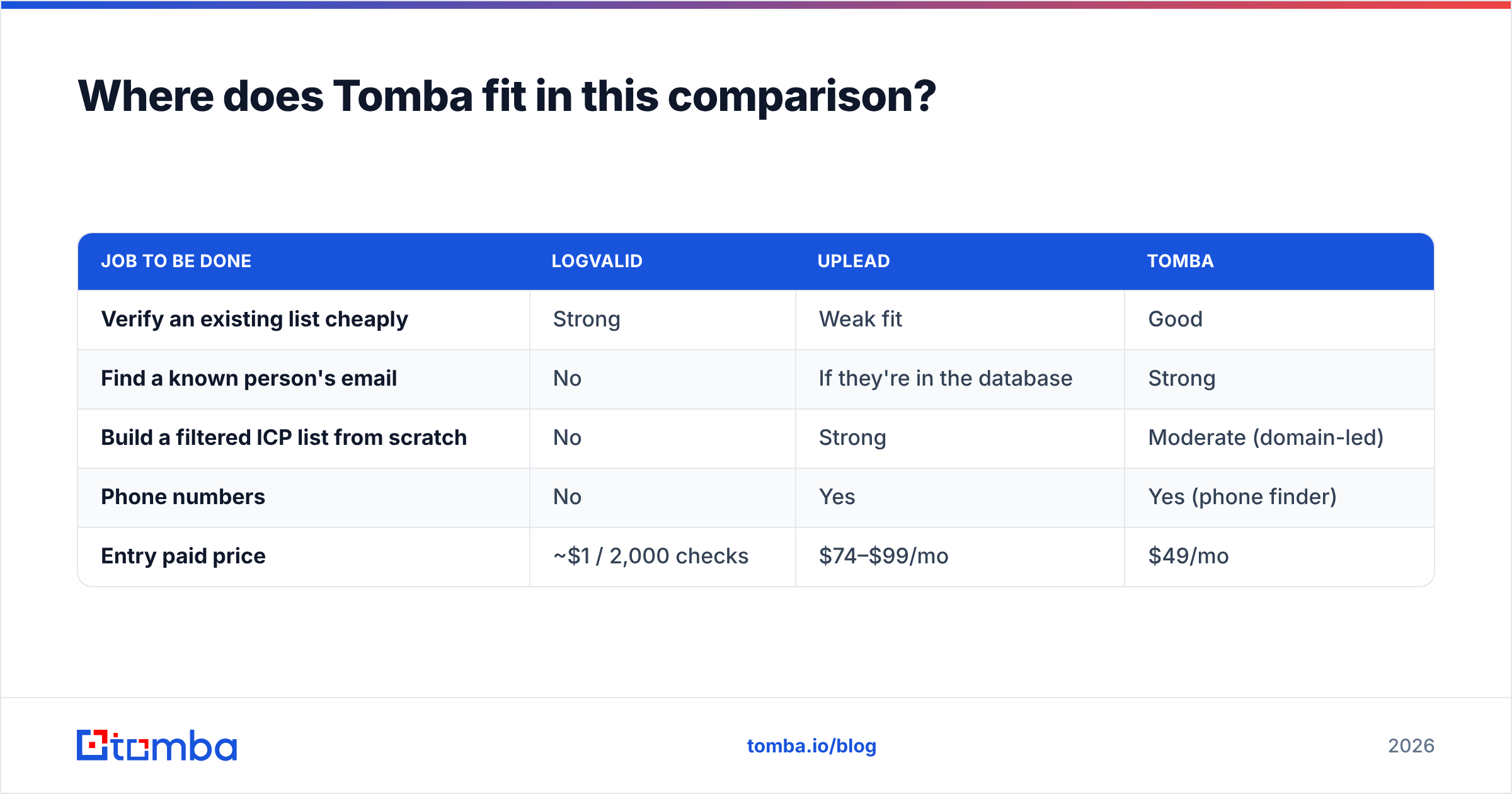
Here's how the three line up for the jobs covered in this post:
| Job to be done | Logvalid | UpLead | Tomba |
|---|---|---|---|
| Verify an existing list cheaply | Strong | Weak fit | Good |
| Find a known person's email | No | If they're in the database | Strong |
| Build a filtered ICP list from scratch | No | Strong | Moderate (domain-led) |
| Phone numbers | No | Yes | Yes (phone finder) |
| Entry paid price | ~$1 / 2,000 checks | $74–$99/mo | $49/mo |
Our honest take: if you need rich firmographic filtering and bundled phone data, UpLead earns its price. If you only need list hygiene, Logvalid is hard to beat on cost. If you're doing account-based outbound where you already know the accounts and the people, a finder with built-in verification is usually the most cost-efficient choice.
What is our verdict on Logvalid vs UpLead?#
- Winner for list cleaning and bounce reduction: Logvalid. It's cheap, simple, and does one job.
- Winner for prospecting and building new lists: UpLead. It's a real database with verified-at-export data and phone numbers.
- Winner for "I know who I want, I just need their email": neither. Use an email finder with verification built in.
Before you buy, ask yourself: is my problem bad data or no data? Bad data means a verifier. No data means a database. "I know the account but not the address" means a finder.
Ready to find and verify in one step?#
If your outbound starts with a target account and a name, you don't need to pay database prices per contact or pass CSVs between two tools. Tomba Email Finder returns professional emails by name and domain and verifies them in the same workflow. The free plan gives you 25 searches a month, and paid plans start at $49/mo. Run your next 25 target contacts through it free and compare the hit rate to what you're paying for now.
Related guides#
// get started
Find, verify and enrich your first contacts today
Start on the free plan with 25 searches a month, then scale when your team is ready.
Free plan · No credit card required · GDPR & CCPA
// about the author