LoneScale Pros and Cons: Is This Signal Platform Worth It in 2026?
LoneScale turns job changes and hiring activity into pipeline inside your CRM. Here is an honest look at where it earns its price, where it falls short, and which teams should skip it.
Weighing LoneScale pros and cons? This guide covers what the tool does well, where it falls short, and which teams should buy it.
TL;DR
- LoneScale is a CRM-native signal platform. It tracks job changes and hiring activity, then writes that data into Salesforce or HubSpot.
- Biggest pros: fresh job-change alerts, CRM-first workflows, fast setup, and strong support. G2 rates it about 4.8/5 at the time of writing.
- Biggest cons: pricing aimed at mid-market budgets (reviews cite the high hundreds to about $1,000/month), a narrow signal set, and no guaranteed verified inbox per alert.
- Buy it if you have a mature CRM, a large customer base, and RevOps time to act on alerts. Skip it if you're a small team that mostly needs contact data.
- Most teams that get value from LoneScale pair it with a separate email finder and verifier so every alert turns into a deliverable touch.
What is LoneScale?#
LoneScale is a sales-intelligence tool for signal-based prospecting. It doesn't give you a static database to search. It watches people and companies over time and tells your CRM when something changes that matters.
A useful comparison is a smoke detector versus a map. A contact database is the map: it shows where people are right now. LoneScale is the smoke detector. It goes off when your old champion moves to a new company, or when a target account starts hiring five SDRs and a Head of RevOps.
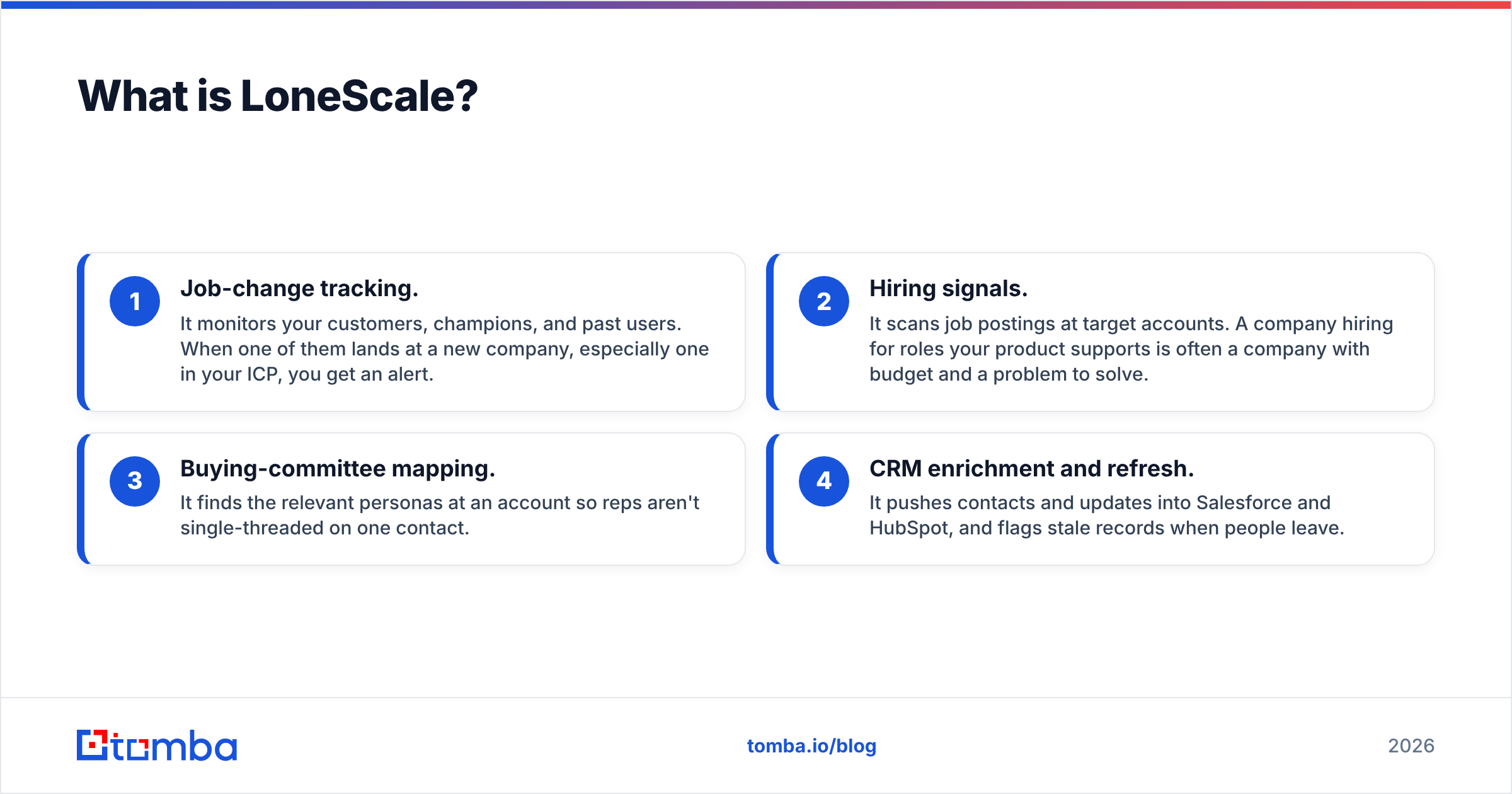
The platform is built around a few core jobs:
- Job-change tracking. It monitors your customers, champions, and past users. When one of them lands at a new company, especially one in your ICP, you get an alert.
- Hiring signals. It scans job postings at target accounts. A company hiring for roles your product supports is often a company with budget and a problem to solve.
- Buying-committee mapping. It finds the relevant personas at an account so reps aren't single-threaded on one contact.
- CRM enrichment and refresh. It pushes contacts and updates into Salesforce and HubSpot, and flags stale records when people leave.
LoneScale has an official listing on the HubSpot App Marketplace, and most of its users run it inside a CRM rather than as a standalone app. That design choice drives most of the pros and cons below.
What are the main LoneScale pros?#
The strengths show up most clearly for teams that already have a large installed base and an organized CRM.
1. Job-change alerts that turn into warm pipeline#
This is the feature people buy LoneScale for. A former champion who moves to a new company already knows your product. They have likely pitched it internally before. They also tend to have real influence in their first months in the role. Reviewers on G2's LoneScale page keep coming back to how fast and accurate these alerts are.
In practice this gives you a "follow the champion" motion. A few well-timed notes to people who already like you usually convert far better than a cold sequence to strangers.
2. CRM-native, not another tab#
LoneScale writes into Salesforce and HubSpot and doesn't ask reps to live in a separate dashboard. Alerts become CRM tasks, contacts get created or updated, and you can build workflows on top. For RevOps teams tired of tool sprawl, that's a real advantage. There's no CSV export and re-import, and no "go check the other tool."
3. Hiring signals as a buying proxy#
Job postings are public, fairly structured, and closely tied to spending. Say a company hires a Head of Demand Gen, three BDRs, and a Salesforce admin in the same quarter. It is building a sales engine, and it will buy tools. LoneScale surfaces those patterns so no one has to scrape job boards by hand.
4. CRM hygiene as a side effect#
Every job change LoneScale catches is also a stale record it can flag. B2B contact data decays quickly because people change roles, companies, and email addresses all the time. Automatic detection of "this person left" protects email deliverability and keeps reps from wasting touches on dead inboxes.
5. Setup and support#
In G2's head-to-head comparisons, reviewers rate LoneScale highly for ease of setup, administration, and ongoing support. Some comparison pages favor it over UserGems on those points. For a tool that touches your system of record, a hands-on onboarding team matters.

What are the main LoneScale cons?#
No signal tool covers everything. These are the limits that come up most often.
1. Pricing is built for mid-market and enterprise#
LoneScale doesn't publish self-serve pricing. Third-party reviews give different starting figures: some say "$500+/month," others cite about $1,000/month for a core plan, typically on annual contracts. Treat those as estimates and get a real quote. Whatever the exact number, a 3-person startup sending a few hundred emails a month will struggle to make that math work.
2. A narrow set of signals#
LoneScale focuses on people moves and hiring activity. By most reviewers' accounts it's not a full intent stack. Funding rounds, web-visit intent, technographic changes, and third-party research intent are outside its core focus. If your playbook depends on "account just raised a Series B" or "account is researching our category," you'll need other tools as well.
3. Value depends on your installed base#
Job-change tracking only helps if you have champions to track. A company with 40 customers and a few hundred contacts in its CRM won't see enough monthly movement to justify the spend. The ROI grows with the size of your customer and user base, which is why its reviewer base leans mid-market.
4. An alert is not a deliverable email#
This is the most practical gap. A signal says "Maria just joined Acme as VP Sales." It doesn't guarantee you have Maria's new, verified work address. Some enrichment is included, but most teams still run new contacts through a dedicated email finder and verifier before sending, because a bounce on the first touch to a warm champion wastes the best lead you'll get all month.
5. Some reviewers prefer competitors on usability#
On G2's Champify comparison page, reviewers gave Champify the edge on ease of use and roadmap direction. That doesn't make LoneScale weak. It means the category is competitive and you should demo more than one vendor.
How does LoneScale compare to other signal and data tools?#
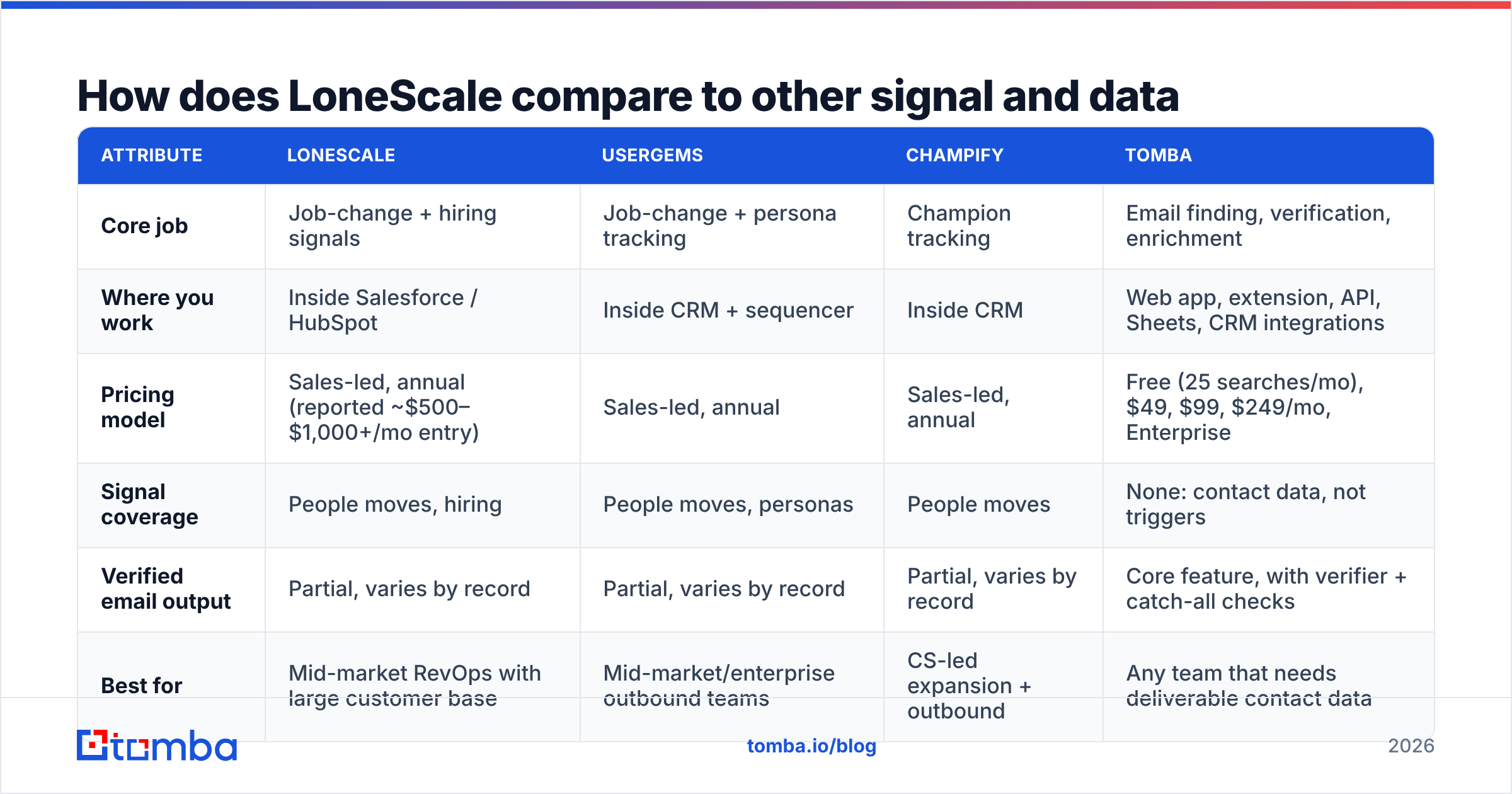
Here's how LoneScale fits next to the tools it's usually evaluated against. Competitor pricing changes often, so confirm on each vendor's site before you budget.
| Attribute | LoneScale | UserGems | Champify | Tomba |
|---|---|---|---|---|
| Core job | Job-change + hiring signals | Job-change + persona tracking | Champion tracking | Email finding, verification, enrichment |
| Where you work | Inside Salesforce / HubSpot | Inside CRM + sequencer | Inside CRM | Web app, extension, API, Sheets, CRM integrations |
| Pricing model | Sales-led, annual (reported ~$500–$1,000+/mo entry) | Sales-led, annual | Sales-led, annual | Free (25 searches/mo), $49, $99, $249/mo, Enterprise |
| Signal coverage | People moves, hiring | People moves, personas | People moves | None: contact data, not triggers |
| Verified email output | Partial, varies by record | Partial, varies by record | Partial, varies by record | Core feature, with verifier + catch-all checks |
| Best for | Mid-market RevOps with large customer base | Mid-market/enterprise outbound teams | CS-led expansion + outbound | Any team that needs deliverable contact data |
The main takeaway is that LoneScale and an email-data tool do different jobs. LoneScale answers "who should I contact now, and why?" A tool like Tomba answers "what is their verified address, and will it bounce?" Mature teams run both.
Who should actually buy LoneScale?#
Use this checklist. If you tick four or more, LoneScale is worth a demo.
- You have 200+ customers or thousands of product users whose job moves are worth tracking.
- Your CRM is reasonably clean and someone owns it, whether that's RevOps, a Salesforce admin, or a HubSpot power user.
- You already run outbound sequences and need better timing, not more volume.
- Your ACV justifies the spend. If a single closed deal pays for a year of the tool, the math works quickly.
- Your ICP hires visibly. Companies that post roles publicly make hiring signals more useful.
- You have a follow-up motion ready, with playbooks for "champion moved" and "account hiring X" that fire within days.
If you're early-stage, selling low-ACV deals, or still figuring out your ICP, you'll usually get more from good contact data and tight targeting first. Add signals once your base is big enough for them to matter.
How do you turn LoneScale signals into booked meetings?#
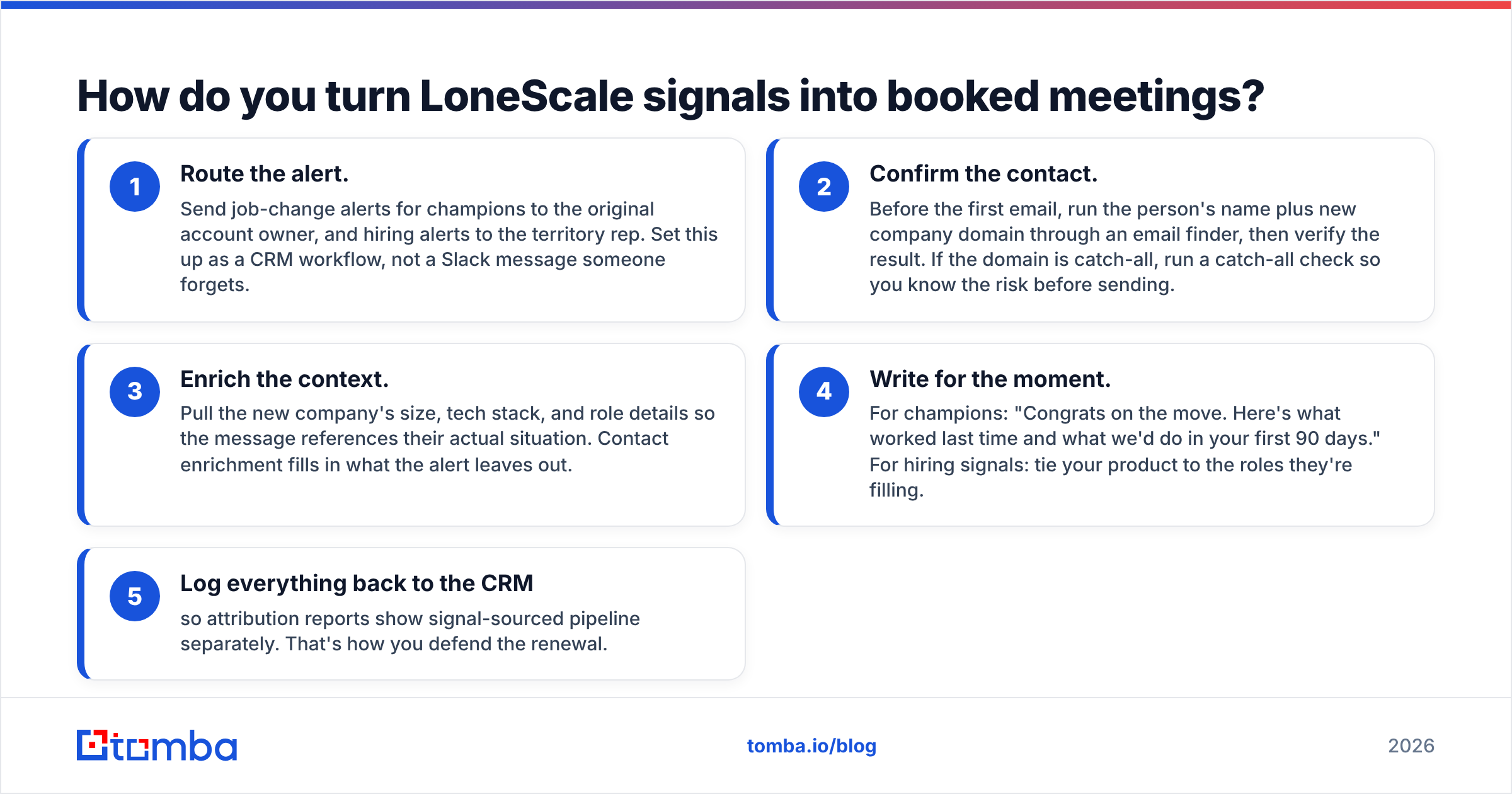
A signal is only worth something if a rep acts on it. Here's a workflow that works for teams running LoneScale:
- Route the alert. Send champion job-change alerts to the original account owner and hiring alerts to the territory rep. Build this as a CRM workflow, not a Slack message someone forgets.
- Confirm the contact. Before the first email, run the name and new company domain through an email finder, then verify the result. If the domain is catch-all, check that risk before sending.
- Enrich the context. Pull the new company's size, tech stack, and role details so the message references their actual situation. Contact enrichment fills in what the alert leaves out.
- Write for the moment. For champions: "Congrats on the move. Here's what worked last time and what we'd do in your first 90 days." For hiring signals, tie your product to the roles they're filling.
- Log everything back to the CRM so attribution reports show signal-sourced pipeline separately. That's how you defend the renewal.
If you're on HubSpot, the Tomba HubSpot integration lets you find and verify addresses on the same records LoneScale creates, so neither rep nor RevOps has to leave the CRM.
Is LoneScale worth it in 2026?#
For the right team, yes. For many teams, not yet.
LoneScale does one thing very well: it tells you when someone who already trusts you shows up somewhere new, or when a target account starts building a team your product supports. Those are some of the highest-converting triggers in B2B, and LoneScale delivers them inside the CRM with little friction.
The trade-offs are just as clear. Pricing is sales-led and sized for mid-market budgets, signal coverage is narrow, and the ROI depends on having a large installed base. An alert also isn't a verified address. You still need reliable contact data behind every signal, or your warmest leads bounce.
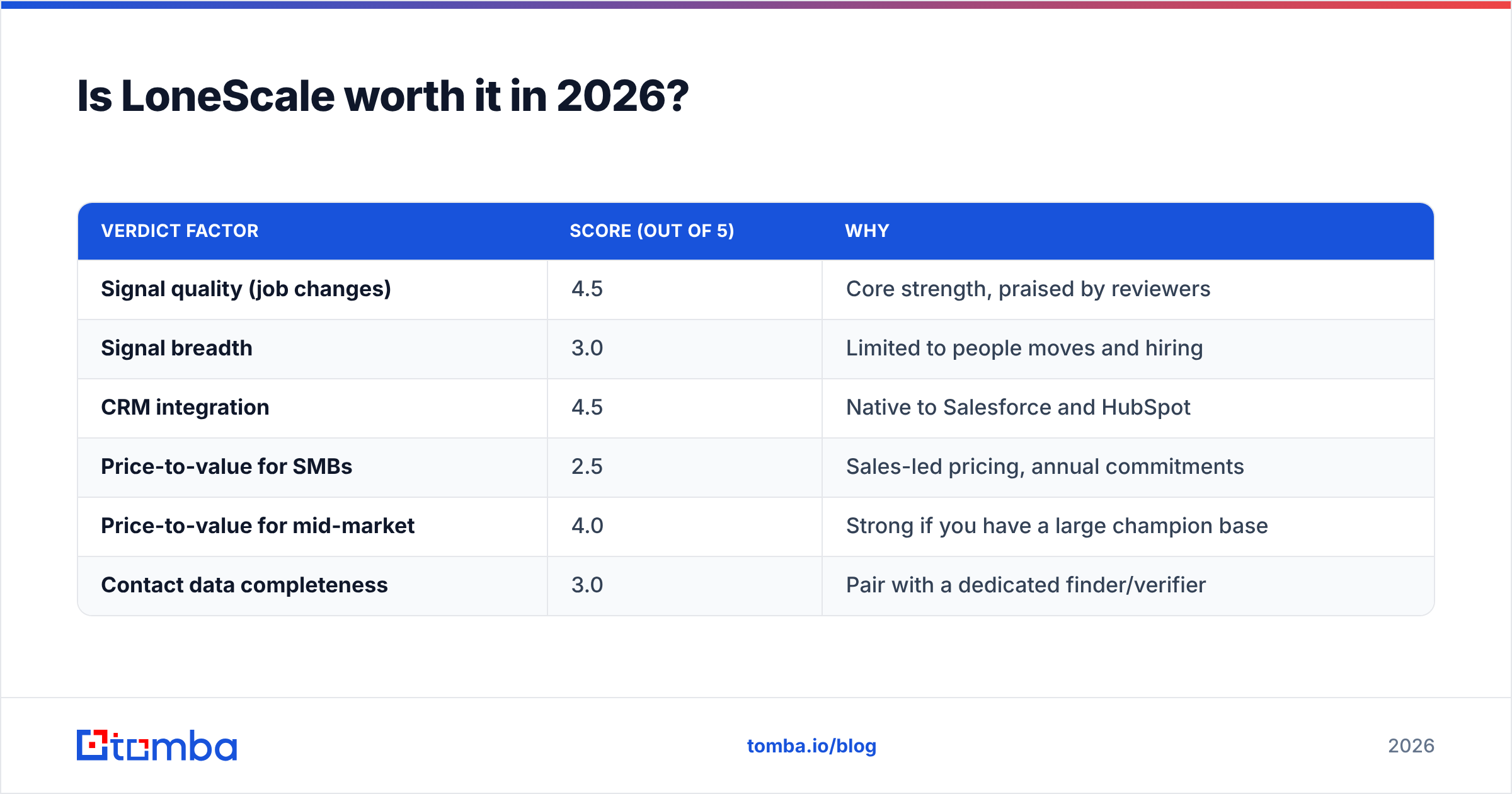
| Verdict factor | Score (out of 5) | Why |
|---|---|---|
| Signal quality (job changes) | 4.5 | Core strength, praised by reviewers |
| Signal breadth | 3.0 | Limited to people moves and hiring |
| CRM integration | 4.5 | Native to Salesforce and HubSpot |
| Price-to-value for SMBs | 2.5 | Sales-led pricing, annual commitments |
| Price-to-value for mid-market | 4.0 | Strong if you have a large champion base |
| Contact data completeness | 3.0 | Pair with a dedicated finder/verifier |
To test the LoneScale pros and cons against your own situation, get a demo and ask for a sample of alerts from your own CRM data. Then work out how many champion moves per month you'd realistically see. That number decides whether it's worth the price.
What is the bottom line on LoneScale pros and cons?#
The LoneScale pros and cons come down to this. The pros are timing, CRM-native workflows, and warm-pipeline generation. The cons are price, narrow signal coverage, and dependence on a large installed base. It works best as the "when" layer of your outbound stack, not the whole stack.
Whatever signal tool you choose, each alert still needs a verified address behind it before a rep sends anything. Tomba Email Finder finds professional emails by name and company domain, verifies them, and flags catch-all risk before you hit send. The free plan includes 25 searches a month, and paid plans start at $49/mo (see Tomba pricing). Run your next batch of job-change alerts through it and your warmest leads will reach an inbox instead of bouncing.
Related guides#
// get started
Find, verify and enrich your first contacts today
Start on the free plan with 25 searches a month, then scale when your team is ready.
Free plan · No credit card required · GDPR & CCPA
// about the author