LoneScale Reviews 2026: Signals, Pricing, Pros and Cons Compared
LoneScale turns job changes and hiring activity into CRM alerts. Here is what reviewers like about it, where it falls short, what it reportedly costs, and which teams will get their money back.
TL;DR
- LoneScale is a buying-signal platform that works inside your CRM. It tracks job changes, executive hires and hiring intent, then writes alerts and enriched contacts straight into Salesforce or HubSpot.
- Reviews on G2 are mostly positive (4.5+ stars). Users call out ease of use, CRM integration quality and the value of champion-tracking alerts.
- The usual complaints: the signal range is narrow (no native funding or tech-stack-change alerts), notifications and reporting are hard to customise, pricing is quote-based, and reported plans start around $1,000/month.
- It suits mid-market and enterprise RevOps teams with a clean CRM and an established outbound motion. Small teams and early-stage startups will struggle to justify the cost.
- A signal only helps if you can reach the person. Most teams run LoneScale alongside a separate email finder and verifier.
What is LoneScale?#
LoneScale describes itself as a CRM-native sales intelligence and buying-signal platform. It doesn't hand you a static contact database to search. It watches the market for changes that point to buying intent and puts those changes where your reps already work, which is inside the CRM.
It helps to think of it as a motion sensor for your account list. Contact databases are more like a phone book: accurate on the day it's printed, then slowly going stale. LoneScale is built to tell you when something changes at an account you care about.
The core signal types, based on the vendor's positioning and what reviewers describe:
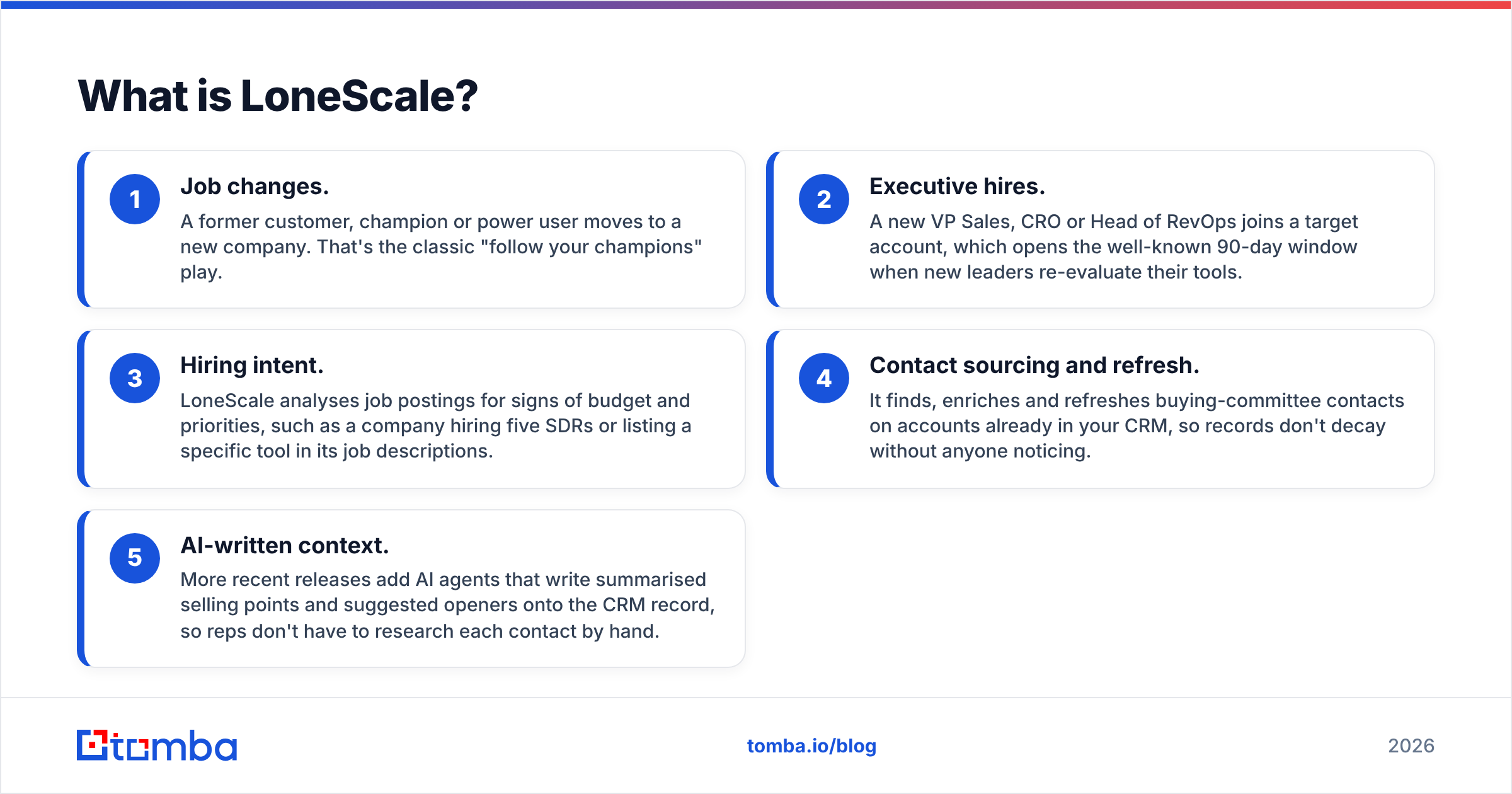
- Job changes. A former customer, champion or power user moves to a new company. That's the classic "follow your champions" play.
- Executive hires. A new VP Sales, CRO or Head of RevOps joins a target account, which opens the well-known 90-day window when new leaders re-evaluate their tools.
- Hiring intent. LoneScale analyses job postings for signs of budget and priorities, such as a company hiring five SDRs or listing a specific tool in its job descriptions.
- Contact sourcing and refresh. It finds, enriches and refreshes buying-committee contacts on accounts already in your CRM, so records don't decay without anyone noticing.
- AI-written context. More recent releases add AI agents that write summarised selling points and suggested openers onto the CRM record, so reps don't have to research each contact by hand.
LoneScale integrates with Salesforce and HubSpot (it has a listing on the HubSpot App Marketplace) and pushes to sequencing tools such as Outreach and Salesloft.
What do LoneScale reviews actually say?#
When you read LoneScale reviews on G2, the same themes come up again and again. Here's a summary that doesn't read like marketing copy.
What reviewers like#
- Ease of use. This is the most frequent compliment. Users describe setup as simple and job-change tracking as "effortless" once it's connected.
- CRM integration quality. The alerts show up inside Salesforce or HubSpot, not in another tab. Reps don't need to learn another tool, so adoption tends to be higher.
- Champion tracking pays for itself. Several reviewers say deals came from former users who changed jobs. That's usually the easiest ROI story for a signal tool.
- Unlimited users. Plans aren't priced per seat, so rolling LoneScale out to a whole SDR and AE team doesn't multiply the bill.
- Responsive support. Higher tiers reportedly include a dedicated CSM and RevOps help, and reviewers mention it favourably.
What reviewers criticise#
- Narrow signal range. This is the most consistent criticism. If you want funding rounds, tech-stack changes, website visits or product-usage intent, you'll need another tool alongside it.
- Limited customisation. Notification rules and reporting are less flexible than some RevOps teams want.
- No real mobile experience. It's a problem if your field reps live on their phones.
- Opaque pricing. No public price list, so budgeting means a sales call.
- Depends on CRM hygiene. If your CRM is full of duplicates and stale accounts, the signals inherit that mess.
How much does LoneScale cost?#
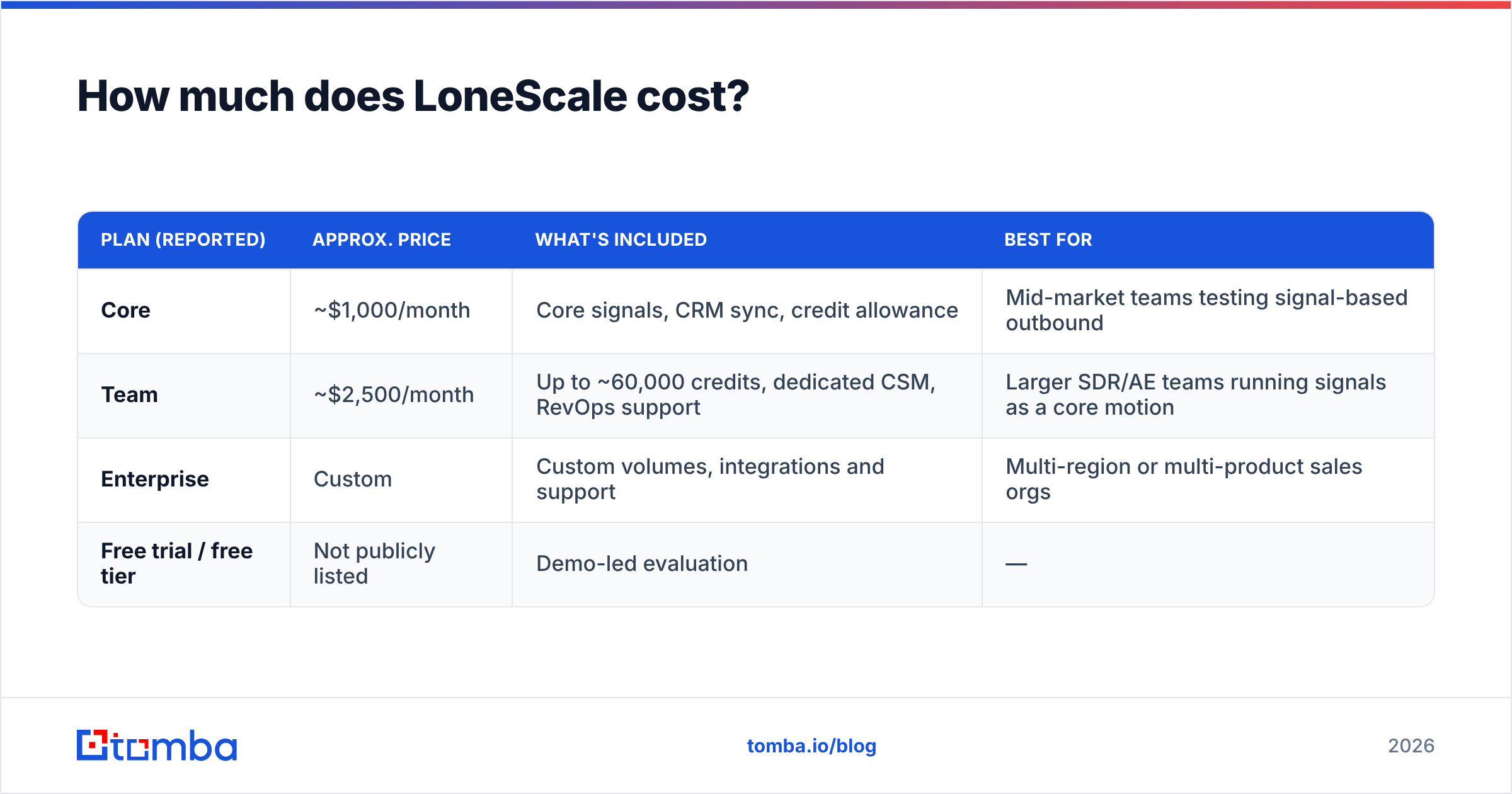
LoneScale uses quote-based pricing. Third-party reviews and G2's pricing page report roughly this structure:
| Plan (reported) | Approx. price | What's included | Best for |
|---|---|---|---|
| Core | ~$1,000/month | Core signals, CRM sync, credit allowance | Mid-market teams testing signal-based outbound |
| Team | ~$2,500/month | Up to ~60,000 credits, dedicated CSM, RevOps support | Larger SDR/AE teams running signals as a core motion |
| Enterprise | Custom | Custom volumes, integrations and support | Multi-region or multi-product sales orgs |
| Free trial / free tier | Not publicly listed | Demo-led evaluation | — |
Treat these as ballpark figures. Confirm current numbers with LoneScale directly, because quote-based vendors often discount annual contracts and adjust credit allowances during negotiation.
Two things about cost that reviewers point out:
- Credits, not seats. Unlimited users is great, but credit consumption becomes the real limit. Before you sign, estimate how many contacts you'll source and refresh each month.
- The hidden second bill. A signal tells you who to contact. You still need a verified email address or phone number to actually contact them. If your LoneScale plan doesn't cover all of your contact-data needs, budget for an email finder and verifier too.
How does LoneScale compare with alternatives?#
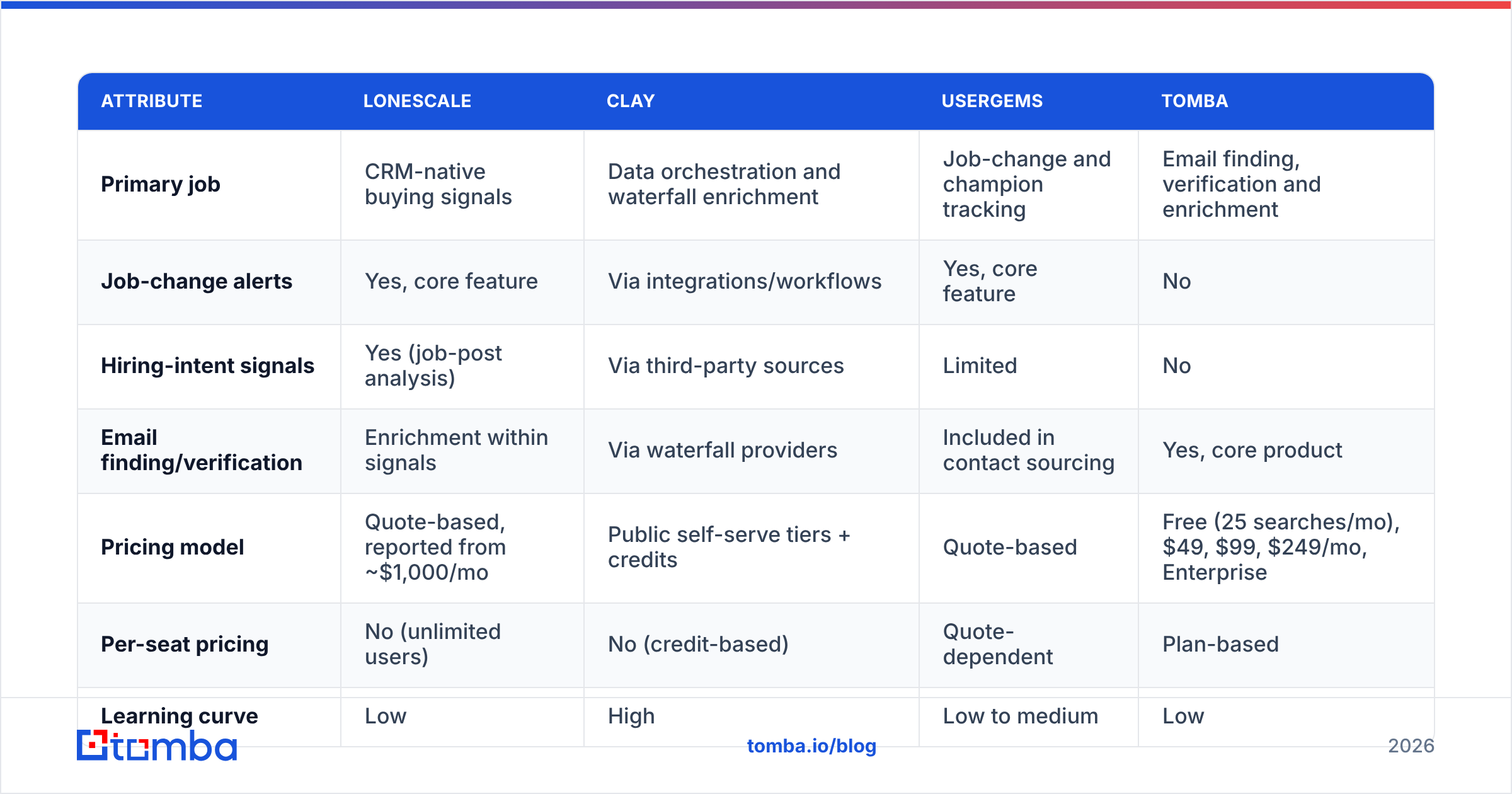
LoneScale sits in a crowded market for signals and enrichment. The table below compares it with the tools buyers most often shortlist next to it. Tomba is included because it covers the contact-data layer, not because it competes signal for signal.
| Attribute | LoneScale | Clay | UserGems | Tomba |
|---|---|---|---|---|
| Primary job | CRM-native buying signals | Data orchestration and waterfall enrichment | Job-change and champion tracking | Email finding, verification and enrichment |
| Job-change alerts | Yes, core feature | Via integrations/workflows | Yes, core feature | No |
| Hiring-intent signals | Yes (job-post analysis) | Via third-party sources | Limited | No |
| Email finding/verification | Enrichment within signals | Via waterfall providers | Included in contact sourcing | Yes, core product |
| Pricing model | Quote-based, reported from ~$1,000/mo | Public self-serve tiers + credits | Quote-based | Free (25 searches/mo), $49, $99, $249/mo, Enterprise |
| Per-seat pricing | No (unlimited users) | No (credit-based) | Quote-dependent | Plan-based |
| Learning curve | Low | High | Low to medium | Low |
| Best fit | Mid-market/enterprise RevOps | Technical growth teams | Customer-led growth teams | Any team that needs reachable contacts |
A few honest takeaways:
- LoneScale vs Clay. Clay can build almost any signal workflow, but you build it yourself. LoneScale gives you a focused set of signals ready to use. If you don't have a GTM engineer, LoneScale is the faster route to value.
- LoneScale vs UserGems. Both started with job-change tracking. LoneScale's hiring-intent analysis is the main difference. UserGems is the better-known choice for champion tracking in customer-led motions. Run a pilot on the same account list and compare match rates.
- LoneScale vs a contact-data tool. These aren't substitutes. LoneScale answers "who should I contact right now?" A tool like the Tomba Email Finder answers "what's their verified address?"
Is LoneScale accurate?#
Accuracy for a signal platform means two things, and reviews don't always separate them.
- Signal accuracy. Did the person really change jobs? Is the hiring post real and current? Reviewers generally find job-change detection reliable. Like every tool in this category, it relies on public profile updates, and some people update late or not at all.
- Contact accuracy. Once LoneScale surfaces a person, is the email deliverable? This is where signal tools vary most. Enrichment data that was correct at sourcing time decays as people move on, and catch-all domains make verification harder.
Whichever signal tool you choose, a sensible safeguard is to run surfaced contacts through an independent email verifier before they go into a sequence. Bounces damage your sender reputation quickly, and a strong signal is useless if the email never arrives.
Who should buy LoneScale?#
LoneScale is a strong fit if:
- You have a real outbound or expansion motion with SDRs or AEs who will act on alerts within days, not weeks.
- Your CRM is reasonably clean and your ICP accounts are already loaded.
- Champion tracking is a proven play for you, meaning past customers and power users have brought in pipeline before.
- Your budget allows a four-figure monthly tool and you'd rather not pay per seat.
- You work in Salesforce or HubSpot and want signals in the record, not in another dashboard.
You should probably skip it, or wait, if:
- You're pre-product-market-fit or have one or two sellers. At that size, manual LinkedIn tracking plus a cheap contact tool covers most of the value.
- You need broad intent coverage (funding, technographics, web visits) from a single vendor.
- Your main bottleneck is contact data, not timing. If reps already know who to contact but can't find their emails, a signal tool won't fix that.
What's the best way to evaluate LoneScale?#
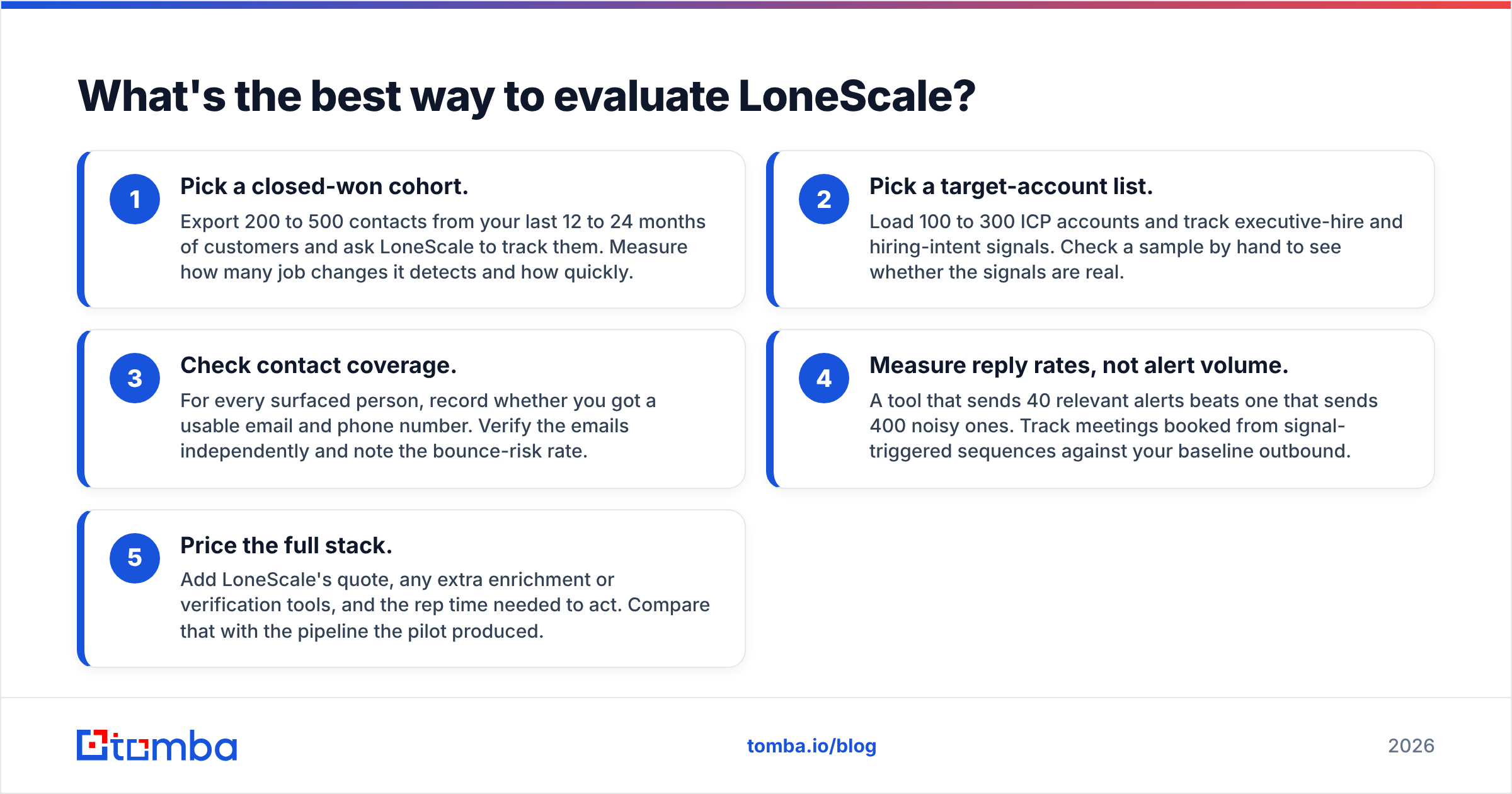
Don't judge LoneScale on the demo. Judge it on your own data. A practical two-to-four-week pilot looks like this:
- Pick a closed-won cohort. Export 200 to 500 contacts from your last 12 to 24 months of customers and ask LoneScale to track them. Measure how many job changes it detects and how quickly.
- Pick a target-account list. Load 100 to 300 ICP accounts and track executive-hire and hiring-intent signals. Check a sample by hand to see whether the signals are real.
- Check contact coverage. For every surfaced person, record whether you got a usable email and phone number. Verify the emails independently and note the bounce-risk rate.
- Measure reply rates, not alert volume. A tool that sends 40 relevant alerts beats one that sends 400 noisy ones. Track meetings booked from signal-triggered sequences against your baseline outbound.
- Price the full stack. Add LoneScale's quote, any extra enrichment or verification tools, and the rep time needed to act. Compare that with the pipeline the pilot produced.
If the pilot shows a clear lift in meetings booked from alerts, the reported pricing is easy to justify. If most alerts go untouched, you have a process problem that no signal tool will solve.
How does LoneScale fit into a modern outbound stack?#
The simplest way to picture it: LoneScale is the trigger, your contact-data layer is the ammunition, and your sequencer is the delivery method.
- Trigger: LoneScale flags that a champion joined a new target account.
- Contact data: you confirm the person's new work email, and ideally a phone number. For contacts LoneScale doesn't fully enrich, teams often use a separate finder, domain search to map the rest of the buying committee, and a verifier to clean the list.
- Sequencing: the verified contact goes into Outreach, Salesloft or your cold email tool with the signal context in the first line.
- Feedback: results are written back to the CRM so RevOps can see which signal types actually convert.
Teams that get the most out of signal platforms treat each piece of this chain as a separate job and don't expect one tool to do all four well.
Final verdict: is LoneScale worth it?#
LoneScale is worth it for mid-market and enterprise teams that already run disciplined outbound or expansion plays and want job-change and hiring signals delivered inside the CRM without building workflows themselves. The reviews back this up: users consistently praise ease of use, CRM integration and the pipeline that champion tracking produces.
It's harder to justify if you need broad intent coverage from one vendor, want transparent self-serve pricing, or are too early to act on alerts consistently. The reported ~$1,000/month entry point means you should run a proper pilot with success criteria defined before you start.
Whichever signal platform you pick, remember the gap reviewers keep describing: an alert is only as valuable as your ability to reach the person behind it. If you're pairing LoneScale (or any signal tool) with outbound, the Tomba Email Finder lets you find and verify professional email addresses by name, domain or company, so every signal leads to an email that actually arrives. You can start on the free tier with 25 searches a month and compare Tomba pricing once your signal volume grows.
Related guides#
// get started
Find, verify and enrich your first contacts today
Start on the free plan with 25 searches a month, then scale when your team is ready.
Free plan · No credit card required · GDPR & CCPA
// about the author