Loom Pricing, Reviews, Pros and Cons: 2026 Honest Breakdown
Loom costs $0 to $24 per seat a month, and the per-seat math catches teams out. Here is what each plan actually buys you, what reviewers praise and complain about, and when Loom is worth paying for.
TL;DR
- Loom has four plans in 2026: Starter (free), Business ($15/seat/mo billed annually, $18 monthly), Business + AI ($20/seat/mo annually, $24 monthly), and Enterprise (custom quote).
- The free plan caps you at 25 videos per person and 5 minutes per recording. For sales reps, that limit shows up within the first week.
- Reviewers like the speed, the easy sharing, and the viewer analytics. The common complaints are seat-based pricing, AI features locked behind the top self-serve tier, and a free plan that feels more like a trial.
- For most sales and customer-facing teams, Business is the right tier. Business + AI only earns its cost if you record several videos a day and actually use the auto-summaries, chapters, and filler-word removal.
- A Loom video only helps if it reaches the right inbox. Budget for accurate contact data along with the recording tool.
What is Loom and who actually uses it?#
Loom is an async video messaging tool. You record your screen, your camera, or both, and Loom gives you a shareable link right away. Atlassian bought Loom in 2023, and it now sits next to Jira and Confluence in Atlassian's lineup. You can see that in the Jira bug-report integrations and the enterprise admin controls.
Within B2B teams, you'll usually find Loom in three places:
- Sales and SDR teams record personalized prospecting videos, deal-desk walkthroughs, and follow-ups after demos.
- Customer success uses it for onboarding walkthroughs, answers to "how do I…" questions, and QBR recaps.
- Product and engineering record bug reports, design reviews, and async standups.
Pricing hits these groups differently. An engineer who records two videos a month can stay on the free plan indefinitely. An SDR sending 15 personalized videos a day hits the free cap before Tuesday lunch.
How much does Loom cost in 2026?#
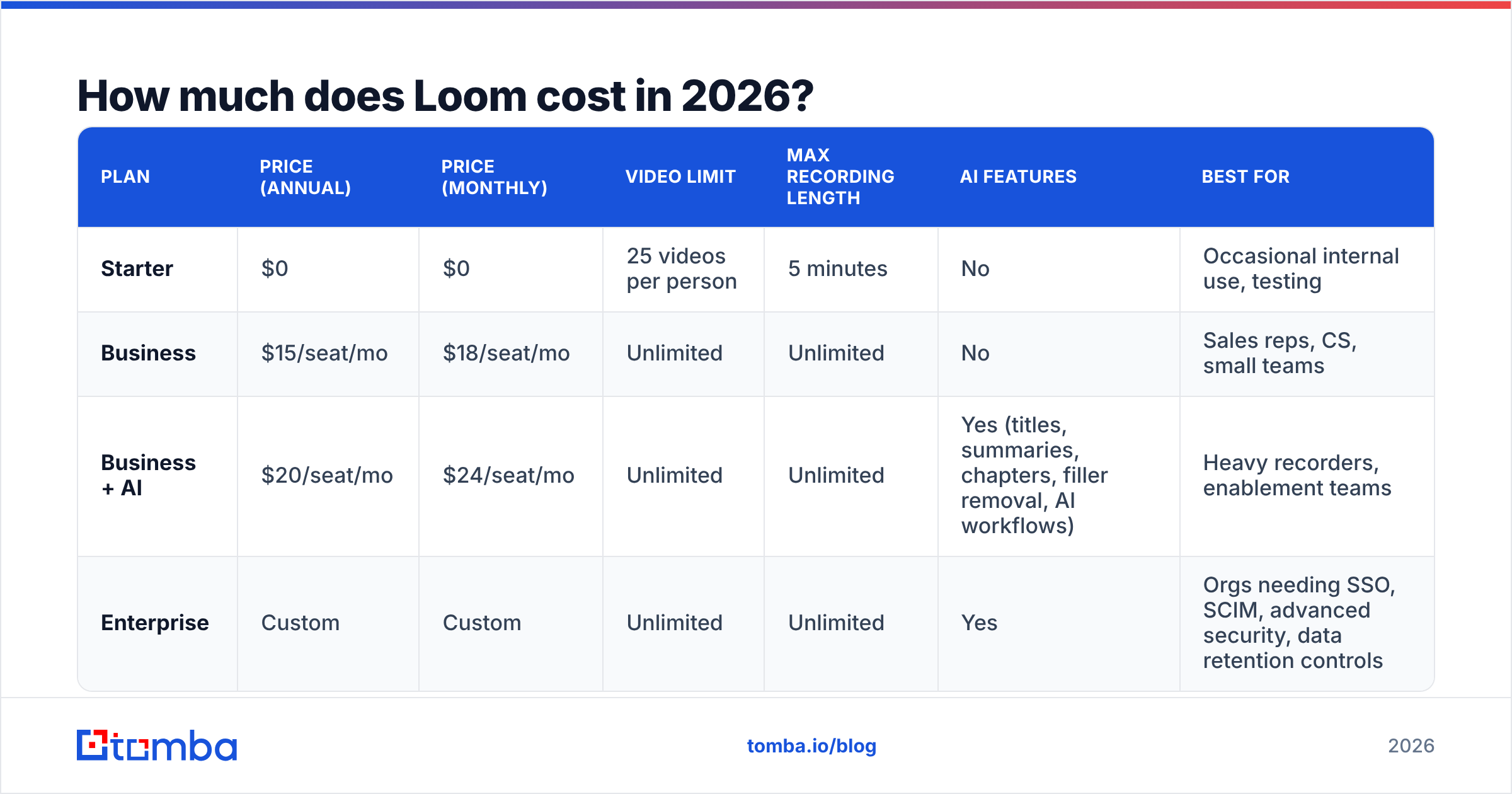
The official numbers are on the Loom pricing page. Here is the breakdown, including the limits that matter more than the headline price.
| Plan | Price (annual) | Price (monthly) | Video limit | Max recording length | AI features | Best for |
|---|---|---|---|---|---|---|
| Starter | $0 | $0 | 25 videos per person | 5 minutes | No | Occasional internal use, testing |
| Business | $15/seat/mo | $18/seat/mo | Unlimited | Unlimited | No | Sales reps, CS, small teams |
| Business + AI | $20/seat/mo | $24/seat/mo | Unlimited | Unlimited | Yes (titles, summaries, chapters, filler removal, AI workflows) | Heavy recorders, enablement teams |
| Enterprise | Custom | Custom | Unlimited | Unlimited | Yes | Orgs needing SSO, SCIM, advanced security, data retention controls |
A few details that are easy to miss:
- Annual billing saves about 17%. On Business + AI, that's the gap between $240 and $288 per seat per year.
- Pricing is per seat for people who create videos. Viewers and people who only comment don't need paid seats, but anyone who records does. Admins have to track this, because seats tend to pile up as more teammates start recording.
- Business removes the 5-minute cap and unlocks custom branding, upload, and password-protected videos. Most teams upgrade for exactly these, not for AI.
- Enterprise is quote-only. Expect a per-seat price above Business + AI plus a minimum commitment. Get a quote before assuming a number.
What does Loom cost for a real sales team?#
Say you run a 10-person SDR team and everyone records prospecting videos:
- Business, annual: 10 × $15 × 12 = $1,800/year
- Business + AI, annual: 10 × $20 × 12 = $2,400/year
- Business + AI, monthly: 10 × $24 × 12 = $2,880/year
Next to salary, that's a small line item. But it's per seat and it recurs, so every new AE, CSM, or solutions engineer who starts recording adds to the bill. For many teams, seat count grows faster than anyone budgeted for.

What do Loom reviews say?#
Loom scores well on the big review platforms. It has a rating of around 4.7 out of 5 on G2's Loom listing, with thousands of reviews, and Capterra's reviews are similarly strong. The pattern in the reviews is more useful than the star rating, though.
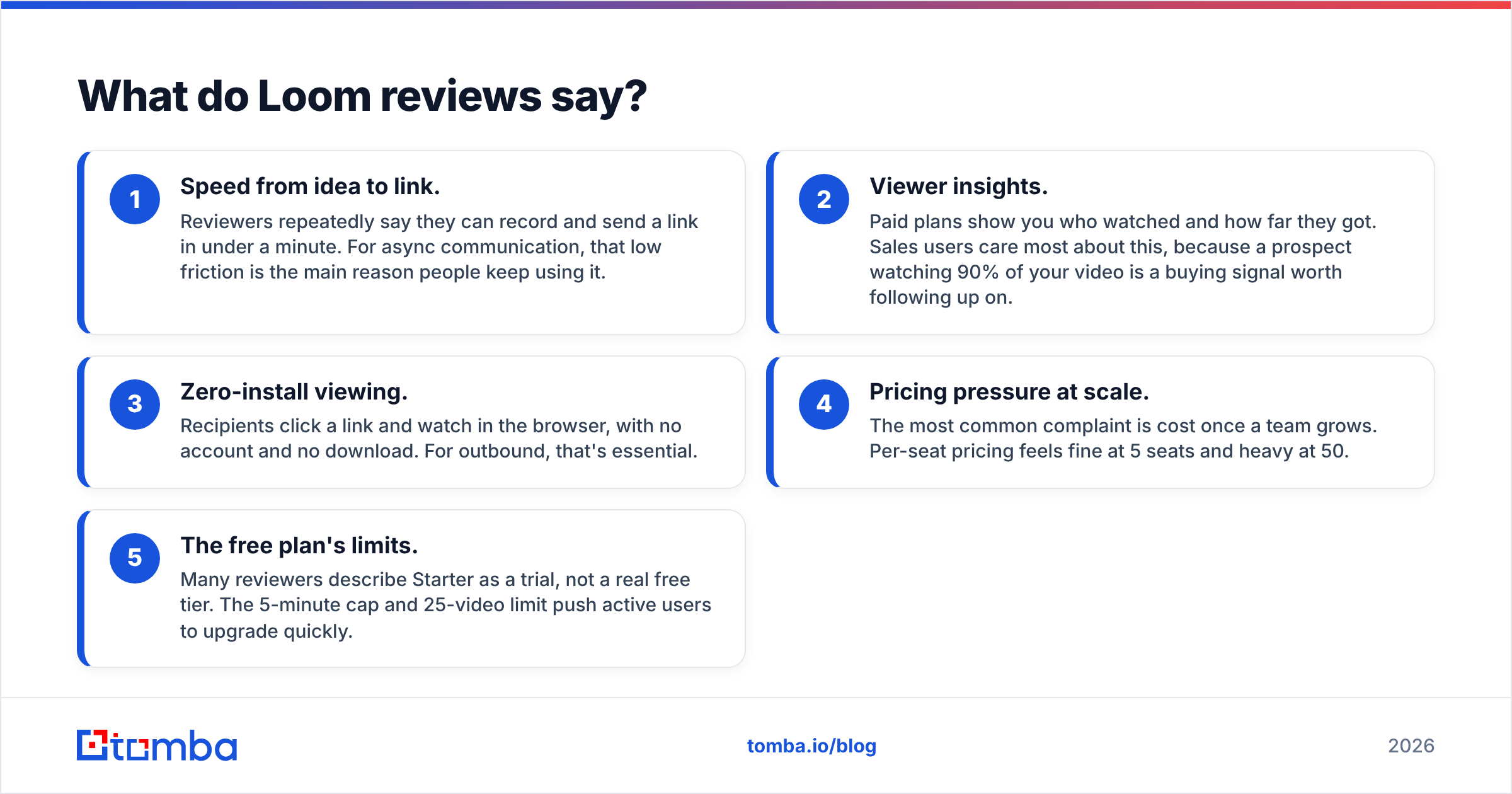
Across reviews, users keep coming back to five themes:
- Speed from idea to link. Reviewers repeatedly say they can record and send a link in under a minute. For async communication, that low friction is the main reason people keep using it.
- Viewer insights. Paid plans show you who watched and how far they got. Sales users care most about this, because a prospect watching 90% of your video is a buying signal worth following up on.
- Zero-install viewing. Recipients click a link and watch in the browser, with no account and no download. For outbound, that's essential.
- Pricing pressure at scale. The most common complaint is cost once a team grows. Per-seat pricing feels fine at 5 seats and heavy at 50.
- The free plan's limits. Many reviewers describe Starter as a trial, not a real free tier. The 5-minute cap and 25-video limit push active users to upgrade quickly.
Performance comes up now and then too. Some users on older machines or long recordings report lag or slow processing. Recording and editing are basic next to dedicated editing tools like Descript or Camtasia, but Loom was never meant to replace those.
What are the pros and cons of Loom?#
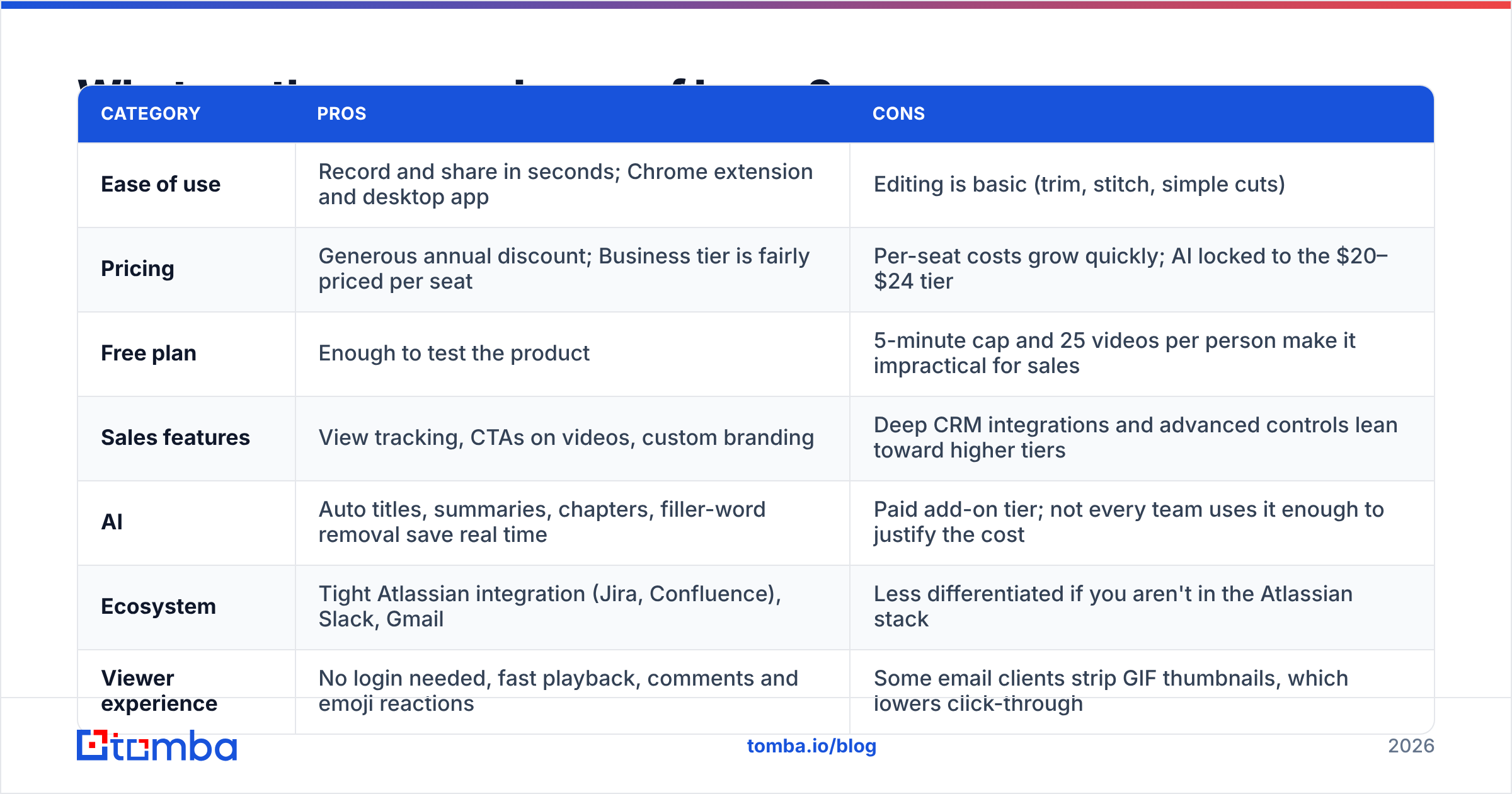
Here are the trade-offs side by side, so you can see which ones apply to your workflow.
| Category | Pros | Cons |
|---|---|---|
| Ease of use | Record and share in seconds; Chrome extension and desktop app | Editing is basic (trim, stitch, simple cuts) |
| Pricing | Generous annual discount; Business tier is fairly priced per seat | Per-seat costs grow quickly; AI locked to the $20–$24 tier |
| Free plan | Enough to test the product | 5-minute cap and 25 videos per person make it impractical for sales |
| Sales features | View tracking, CTAs on videos, custom branding | Deep CRM integrations and advanced controls lean toward higher tiers |
| AI | Auto titles, summaries, chapters, filler-word removal save real time | Paid add-on tier; not every team uses it enough to justify the cost |
| Ecosystem | Tight Atlassian integration (Jira, Confluence), Slack, Gmail | Less differentiated if you aren't in the Atlassian stack |
| Viewer experience | No login needed, fast playback, comments and emoji reactions | Some email clients strip GIF thumbnails, which lowers click-through |
Is Loom's AI tier worth the upgrade?#
It depends on volume. Business + AI adds $5 per seat per month on annual billing. Here's what you get for it:
- Auto titles and summaries so you stop naming every video "Untitled Loom"
- Auto chapters for long walkthroughs
- Filler-word and silence removal, which makes a rushed first take sound much cleaner
- AI workflows that turn a recording into a written doc, SOP, or Jira ticket
If a rep records 10+ videos a day, filler removal and auto-titling alone save enough time to cover the extra $60 per year. If a rep records three videos a week, stay on Business and write your own titles.
Is Loom worth it for sales prospecting?#
Loom can help your outbound, but it can't fix outbound that's already broken. A personalized video in a cold email often gets more attention than plain text, since it shows effort and stands out in a crowded inbox. Three things decide whether it pays off:
1. The video has to reach a real inbox. This is where most video prospecting quietly fails. You spend four minutes recording a tailored walkthrough of a prospect's pricing page, and then send it to a guessed address that bounces. You lose the video, and every bounce also hurts your sender reputation. Before recording, use an email finder to get the correct address and run it through an email verifier.
2. The email around the video matters as much as the video. Prospects decide whether to click from the subject line and the first sentence. A thumbnail with a weak hook still gets ignored. If you're stuck on copy, an AI cold email writer can draft the wrapper text, which you then tighten by hand.
3. Video should be for your best accounts, not every account. Recording a custom video costs real rep time. Use Loom for tier-1 accounts and warm follow-ups, and use strong text sequences for everything else. Teams that try to "Loom everyone" usually burn out their reps and see diminishing returns.
The reasoning is the same as with any sales tool. Loom improves the message. It doesn't create pipeline if your list is wrong.

How does Loom compare to its main alternatives?#
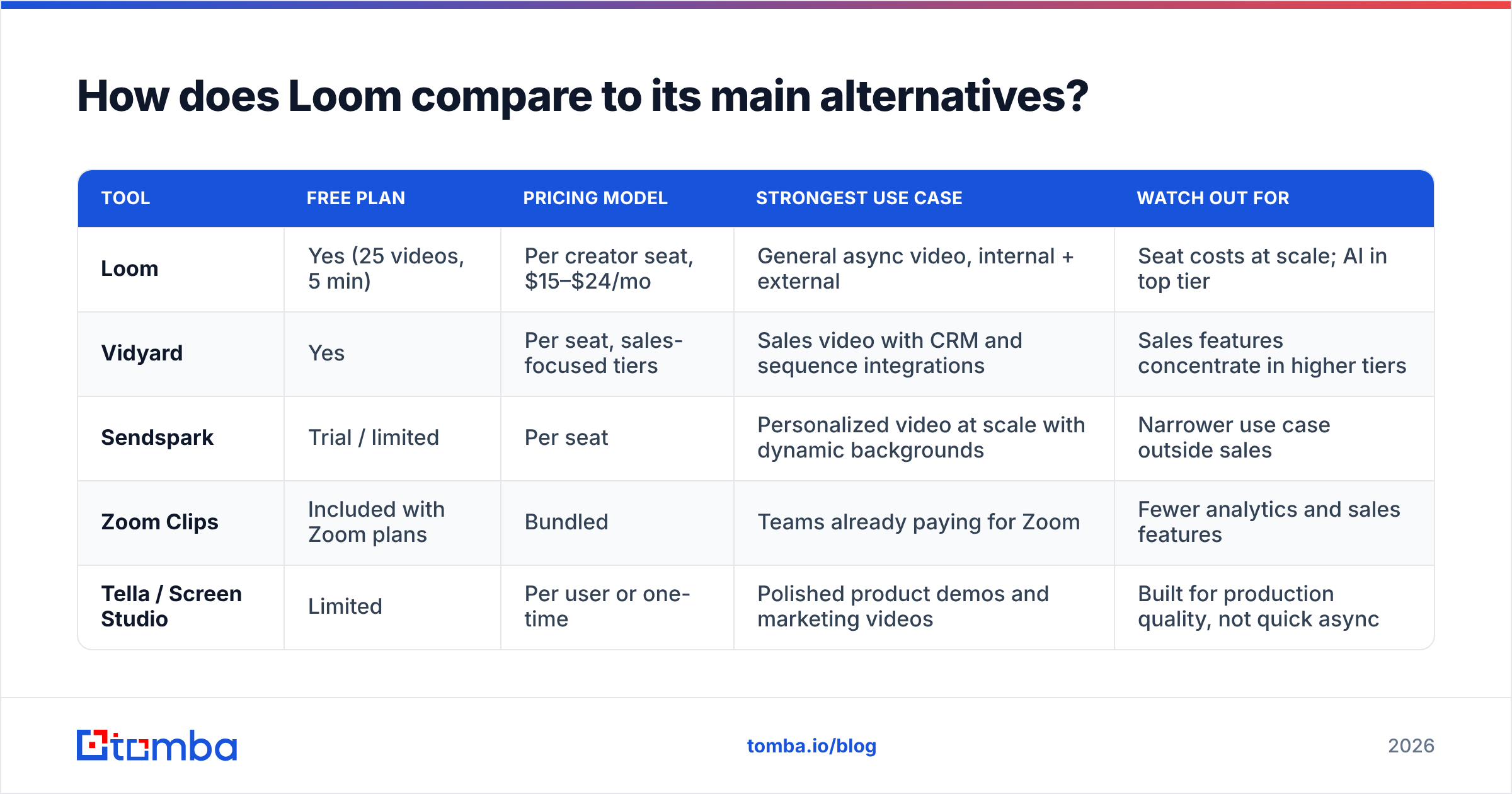
Loom isn't the only async video tool, and some alternatives price differently or target sales more directly. Plans change often, so check each vendor's current pricing page before you buy.
| Tool | Free plan | Pricing model | Strongest use case | Watch out for |
|---|---|---|---|---|
| Loom | Yes (25 videos, 5 min) | Per creator seat, $15–$24/mo | General async video, internal + external | Seat costs at scale; AI in top tier |
| Vidyard | Yes | Per seat, sales-focused tiers | Sales video with CRM and sequence integrations | Sales features concentrate in higher tiers |
| Sendspark | Trial / limited | Per seat | Personalized video at scale with dynamic backgrounds | Narrower use case outside sales |
| Zoom Clips | Included with Zoom plans | Bundled | Teams already paying for Zoom | Fewer analytics and sales features |
| Tella / Screen Studio | Limited | Per user or one-time | Polished product demos and marketing videos | Built for production quality, not quick async |
Here's how to decide:
- Choose Loom if you want one tool for sales, CS, product, and engineering, especially if you already use Jira and Confluence.
- Choose a sales-specific video tool if video is a core part of your outbound sequences and you need tight CRM and sales-engagement integrations at a lower tier.
- Choose a bundled option like Zoom Clips if you only need occasional async video and want to avoid another subscription.
How can you reduce your Loom bill?#
If you've decided Loom fits, these steps keep the cost under control:
- Pay annually. It's a 17% saving with no downside if you're committed for the year.
- Audit seats every quarter. Look for creators who haven't recorded in 60+ days and move them to viewer access.
- Split tiers where your plan allows. Put only heavy recorders on Business + AI and keep everyone else on Business, if your admin setup supports mixed seats. Otherwise, stay on Business and reassess later.
- Keep light users on Starter. Engineers who record one bug report a month don't need paid seats.
- Negotiate at renewal. Once you pass roughly 25 seats, ask for volume pricing or Enterprise-level terms, since Atlassian's sales team has room to move on larger deals.
Is Loom worth the money in 2026?#
For most B2B teams, yes. Loom Business at $15 per seat per month on annual billing is fair for a tool your team will use daily. The product is mature, recipients don't have to do anything to watch, and the viewer analytics give sales reps useful follow-up signals.
The value drops in three cases:
- You only need occasional video. The free plan or a bundled tool will do.
- You're paying for AI you don't use. Drop from Business + AI to Business.
- Your outbound data is weak. A polished video sent to a bounced address is worth $0, whatever you paid for the recording tool.
That last case is the one teams underestimate most. Before you buy more video seats to fix low reply rates, check whether your emails are reaching the right people at all. Clean, verified contact data usually improves results more than any recording feature, and it protects the sender reputation every future video depends on.
Make every Loom land in the right inbox#
If Loom is part of your prospecting stack, fix the step before recording. Tomba Email Finder finds professional email addresses from a name and company domain, and verifies them so your personalized videos don't bounce. You can start on the free tier with 25 searches a month, then move to Starter at $49/month when your team is sending video at volume. Record once, send to the right person, and let Loom's viewer analytics show you who's interested.
Related guides#
// get started
Find, verify and enrich your first contacts today
Start on the free plan with 25 searches a month, then scale when your team is ready.
Free plan · No credit card required · GDPR & CCPA
// about the author