Loom Video Cold Email: How to Get Replies Without Spam Flags
A Loom video in a cold email can double the time a prospect spends on your pitch, or send it straight to spam. Here's the format, the scripts, and the tool stack that decides which one you get.
TL;DR
- A Loom video cold email works when the video is short (60–90 seconds), personal enough that it couldn't be sent to anyone else, and delivered as a linked thumbnail. Never attach or embed it.
- Video won't fix a bad list. If the address bounces or the prospect is the wrong fit, the recording time is wasted, so find and verify contacts before you record anything.
- Don't send a video in the first touch to a cold domain. Open with plain text, then offer or send the Loom in touch 2 or 3, after some engagement or at least after your domain has built trust.
- Use Loom for high-value accounts (roughly the top 10–20% of your list). For volume, you'll get more out of personalized text or a tool built for video at scale, such as Vidyard or Sendspark.
- Track views, but judge the campaign by replies and meetings booked. A view with no reply is still a failed touch.
What is a Loom video cold email?#
A Loom video cold email is a short, unsolicited sales email that links to a screen or webcam recording made with Loom, the async video tool Atlassian acquired in 2023. The email itself stays short: a line or two of context, a clickable thumbnail (usually an animated GIF of the first few seconds), and a single call to action.
Think of it as the digital version of walking into a prospect's office with a printout of their website and a marked-up page. The prospect sees their own homepage, their own LinkedIn post, or their own pricing page on screen while you explain one specific thing you noticed. Text can't create that "they actually looked at my stuff" moment as easily.
In practice it looks like this:
- Subject line that references the prospect's company or a specific asset ("Quick walkthrough of acme.com/pricing").
- One-sentence opener that explains why you recorded something.
- GIF thumbnail linking to the Loom page, with the prospect's site visible in the frame.
- One ask, which should be low-friction ("Worth a 15-minute chat?" or "Want the full teardown?").
- Plain-text signature. Keep the logo images and banner links out of it.
Why does video outperform text in cold outreach, and when doesn't it?#
Video does well because it raises perceived effort. A buyer who gets 40 templated emails a day can tell within two seconds whether yours was mass-produced. A thumbnail showing their website in the background is expensive to fake, and prospects know that.
It doesn't always win, though. Video underperforms when:
- The video is generic. A "Hi there, let me tell you about our platform" recording is just a slower template.
- The prospect reads on mobile in a meeting. Some people won't click a video link with the sound off and a busy day ahead.
- The deal is too small to justify the time. Two minutes of recording and editing per prospect doesn't pay off on a $30/month product.
- Deliverability is already shaky. Links, images and tracking pixels all add weight to an email. On a new or poorly warmed domain, a GIF-plus-link email is more likely to land in promotions or spam than a plain one.
Loom and vendors like Vidyard publish their own engagement figures, and it's worth reading them skeptically since they come from companies that sell video. The honest summary is that video tends to lift replies on targeted, high-value outreach and does little or nothing for mass sends.
How does Loom compare with other video prospecting tools?#
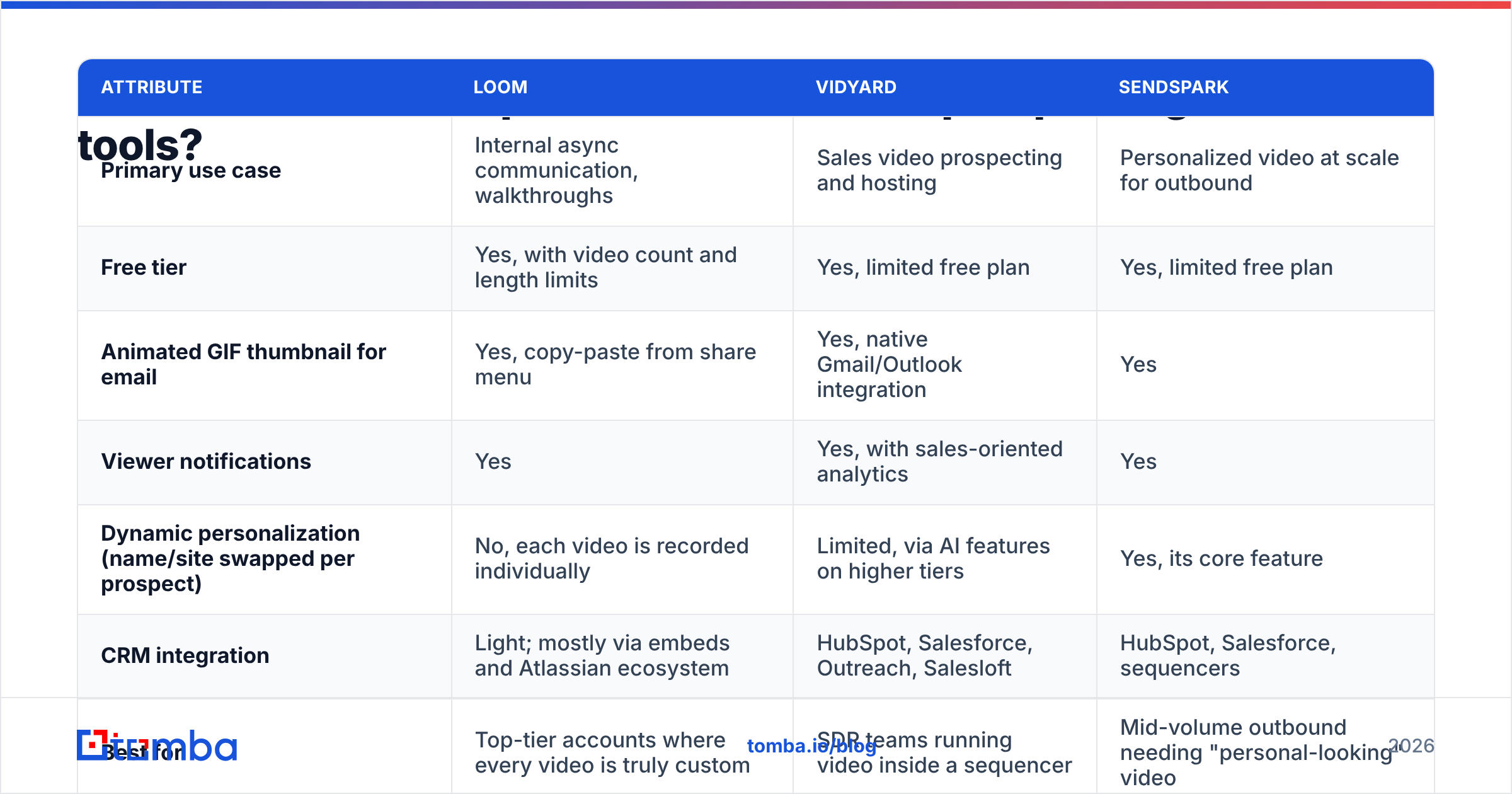
Loom is a general-purpose async video tool. It wasn't built for sales, and that difference shows up in the details. Here's how it compares with two sales-specific options on the attributes that affect cold email.
| Attribute | Loom | Vidyard | Sendspark |
|---|---|---|---|
| Primary use case | Internal async communication, walkthroughs | Sales video prospecting and hosting | Personalized video at scale for outbound |
| Free tier | Yes, with video count and length limits | Yes, limited free plan | Yes, limited free plan |
| Animated GIF thumbnail for email | Yes, copy-paste from share menu | Yes, native Gmail/Outlook integration | Yes |
| Viewer notifications | Yes | Yes, with sales-oriented analytics | Yes |
| Dynamic personalization (name/site swapped per prospect) | No, each video is recorded individually | Limited, via AI features on higher tiers | Yes, its core feature |
| CRM integration | Light; mostly via embeds and Atlassian ecosystem | HubSpot, Salesforce, Outreach, Salesloft | HubSpot, Salesforce, sequencers |
| Best for | Top-tier accounts where every video is truly custom | SDR teams running video inside a sequencer | Mid-volume outbound needing "personal-looking" video |
Plans and limits change often, so check Loom's pricing page and Vidyard before you commit. Reviews on G2 are also a quick way to see what sales teams actually use day to day.
Verdict: If you're sending under 20 custom videos a week to named accounts, Loom's simplicity is an advantage. If you're running video across an SDR team inside a sequencer, a sales-native tool will save you the copy-paste work.
What should a Loom cold email video actually say?#
The best Loom prospecting videos follow a tight, repeatable structure. Aim for 60–90 seconds. Past two minutes, drop-off climbs quickly.
- The personal hook (0–10s): Say their name and point at something on screen: "Hi Priya, I'm on your careers page and noticed you're hiring four SDRs this quarter."
- The observation (10–35s): Name one specific, verifiable thing. It might be a gap, an opportunity, or a pattern: "Your job posts mention building lists from scratch. That usually means reps spend 30% of their week on research instead of calls."
- The relevance bridge (35–60s): Connect it to one outcome you've delivered for a similar company. Use one example, not a feature list.
- The ask (60–80s): Make it small and specific: "If that's on your radar, I'm happy to show you how [similar company] handled it. Reply 'yes' and I'll send two times."
- The exit (80–90s): Thank them and stop recording. Don't ramble.
A few recording rules make a disproportionate difference:
- Keep the prospect's asset in the first frame. That frame becomes your GIF thumbnail, and the thumbnail is what earns the click.
- Put your face in the bubble, but keep it small. People connect with faces, but the screen content does the persuading.
- Don't script word-for-word. Use three bullet points on a sticky note. A read script sounds like one.
- Re-record at most once. A small stumble reads as human. Several takes eat into your time budget.
How do you write the email that carries the Loom?#
The email is the delivery vehicle, and most Loom campaigns fail here rather than in the video. Keep it under 75 words.
Template: first video touch (touch 2 in a sequence)
Subject: Recorded this for {{company}}
Hi {{first_name}},
Following up on my note last week. Rather than send another paragraph, I recorded a 70-second walkthrough of {{specific_asset}} and one thing I'd change.
[GIF thumbnail → Loom link]
Worth a quick chat if it's useful?
{{signature}}
Template: video on request (reply-triggered)
Subject: Re: {{original_subject}}
Thanks {{first_name}}. Easier to show than explain, so here's a 90-second walkthrough using your own {{asset}}:
[GIF thumbnail → Loom link]
Happy to go deeper on a call. Does Thursday work?
The second template is underrated. When a prospect replies with "tell me more," a Loom is the highest-converting response you can send, and deliverability risk is close to zero because you're replying inside an existing thread.
For more text-first frameworks to pair with video, the cold email templates library has openers you can adapt for touch 1.
Does embedding a Loom hurt email deliverability?#
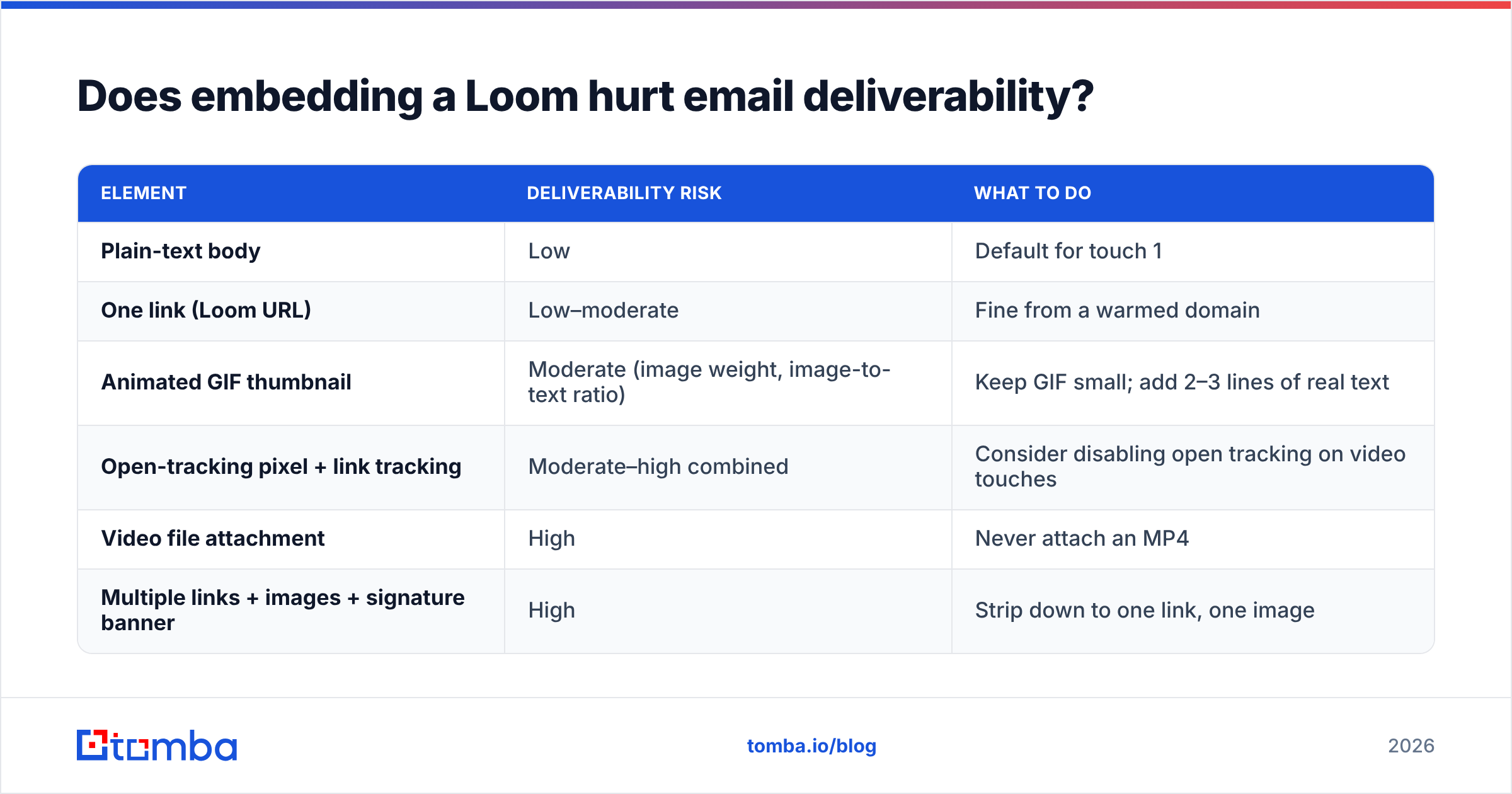
It can, and this is the part most "send Loom videos!" advice skips. Every element you add to a cold email is something a spam filter weighs:
| Element | Deliverability risk | What to do |
|---|---|---|
| Plain-text body | Low | Default for touch 1 |
| One link (Loom URL) | Low–moderate | Fine from a warmed domain |
| Animated GIF thumbnail | Moderate (image weight, image-to-text ratio) | Keep GIF small; add 2–3 lines of real text |
| Open-tracking pixel + link tracking | Moderate–high combined | Consider disabling open tracking on video touches |
| Video file attachment | High | Never attach an MP4 |
| Multiple links + images + signature banner | High | Strip down to one link, one image |
Practical rules:
- Warm the domain first. Don't run video campaigns from a domain registered last week. Use a warmup calculator to plan a realistic ramp.
- Test before you send. Run the finished email through a spam checker to catch trigger phrases and heavy markup.
- Protect your bounce rate. Bounces damage your sender reputation faster than anything else. Custom videos make this worse, because you spent time on each recording and a bounced address wastes both the video and some reputation.
How do you build a list worth recording videos for?#
Because each Loom costs you real minutes, list quality has an outsized effect on ROI. A text sequence to a sloppy list wastes a few cents per contact. A video sequence to the same list wastes hours of rep time.
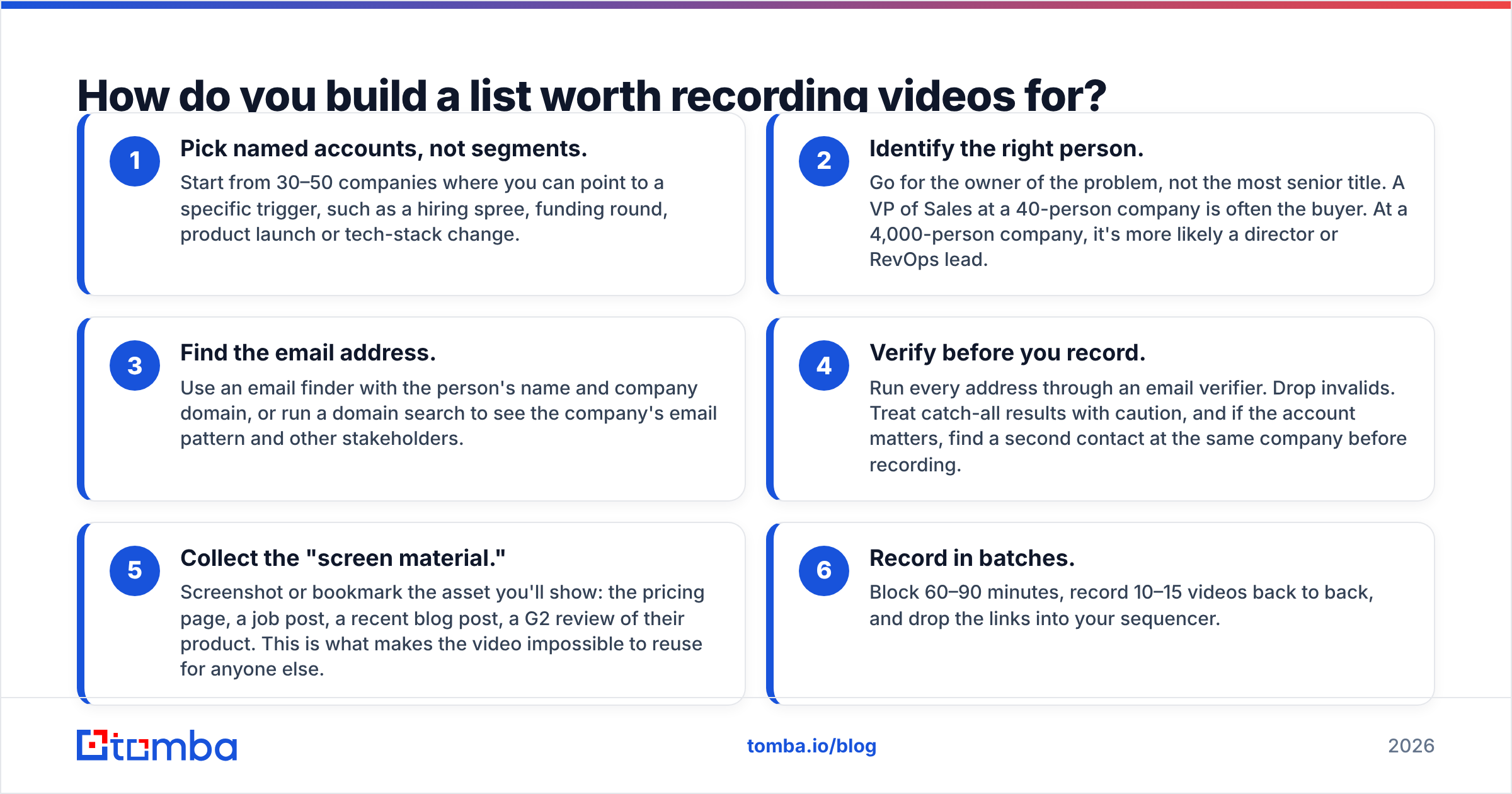
A workable pipeline:
- Pick named accounts, not segments. Start from 30–50 companies where you can point to a specific trigger, such as a hiring spree, funding round, product launch or tech-stack change.
- Identify the right person. Go for the owner of the problem, not the most senior title. A VP of Sales at a 40-person company is often the buyer. At a 4,000-person company, it's more likely a director or RevOps lead.
- Find the email address. Use an email finder with the person's name and company domain, or run a domain search to see the company's email pattern and other stakeholders.
- Verify before you record. Run every address through an email verifier. Drop invalids. Treat catch-all results with caution, and if the account matters, find a second contact at the same company before recording.
- Collect the "screen material." Screenshot or bookmark the asset you'll show: the pricing page, a job post, a recent blog post, a G2 review of their product. This is what makes the video impossible to reuse for anyone else.
- Record in batches. Block 60–90 minutes, record 10–15 videos back to back, and drop the links into your sequencer.
This order (account, person, verified email, asset, then video) is what separates teams that get meetings from Loom from teams that decide "video doesn't work."
When should you send a Loom, and when should you skip it?#
Use this as a quick decision guide:
- Send a Loom when the deal value justifies 5+ minutes of rep time per prospect, the prospect has a visible, specific asset you can critique, and you're sending from a warmed domain.
- Send a Loom as a reply whenever a prospect asks a "how would that work?" question. This is the highest-return use of video in outbound.
- Skip the Loom in touch 1 to a completely cold prospect from a new domain, on high-volume SMB campaigns, or when you have nothing specific to show on screen.
- Replace the Loom with a screenshot when the point can be made in one image. An annotated screenshot delivers most of the personalization at a tenth of the effort.
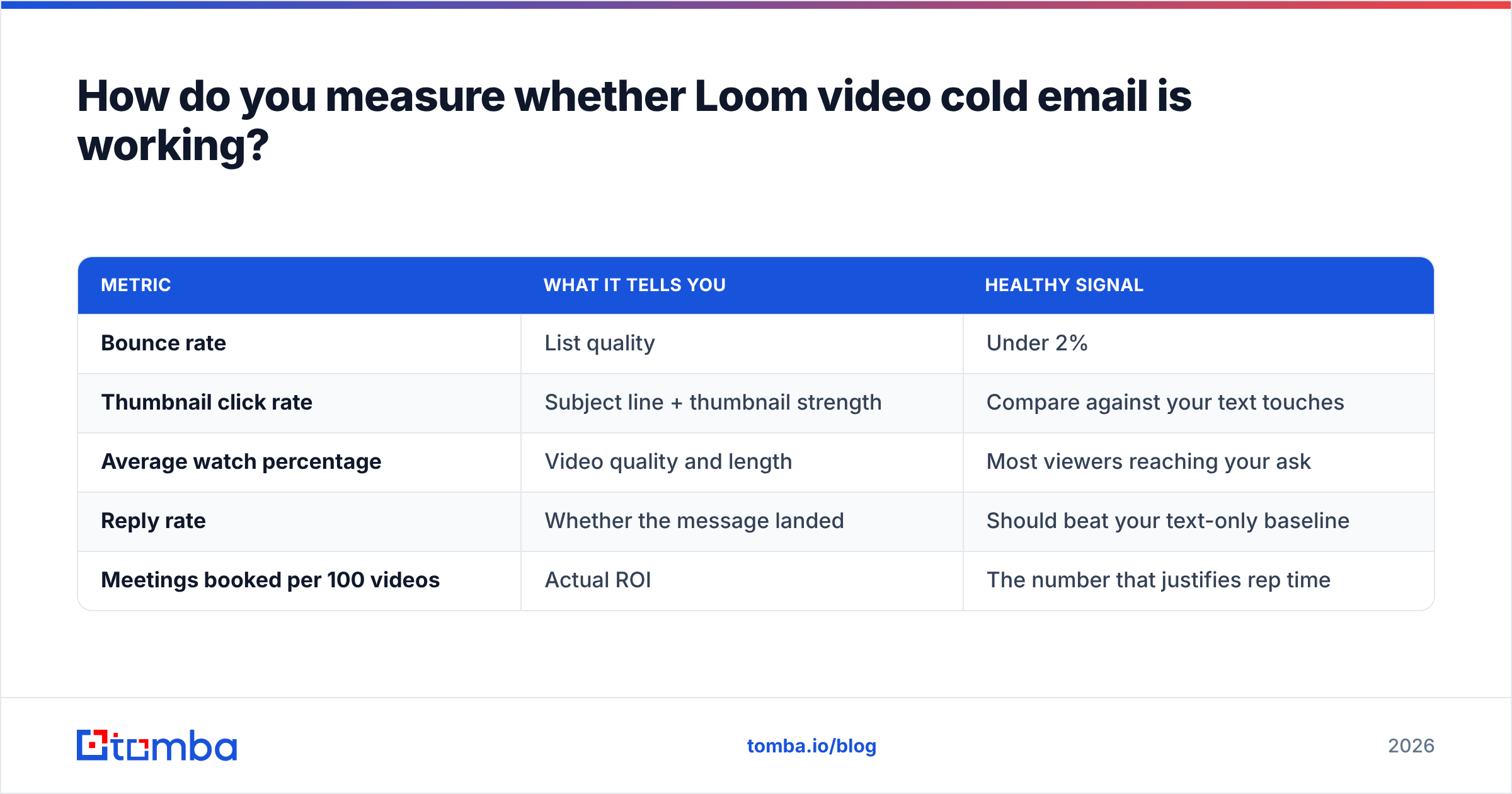
How do you measure whether Loom video cold email is working?#
Loom will tell you who watched and for how long. That's useful for timing follow-ups but not for judging success. Track these instead:
| Metric | What it tells you | Healthy signal |
|---|---|---|
| Bounce rate | List quality | Under 2% |
| Thumbnail click rate | Subject line + thumbnail strength | Compare against your text touches |
| Average watch percentage | Video quality and length | Most viewers reaching your ask |
| Reply rate | Whether the message landed | Should beat your text-only baseline |
| Meetings booked per 100 videos | Actual ROI | The number that justifies rep time |
Run a clean A/B test: split the same account list, give half a text touch 2 and half a Loom touch 2, and hold everything else constant. After 100+ prospects per arm, you'll know whether video earns its time cost for your market. A general primer on response rate benchmarks helps you set a baseline before you start.
What are the most common Loom cold email mistakes?#
- Recording before verifying. A bounced video is the most expensive bounce there is.
- Talking about yourself for the first 30 seconds. The prospect's screen should be the star.
- Videos over two minutes. Cut your intro and your feature tour.
- Generic backgrounds. If your own homepage is on screen instead of theirs, you've lost the main advantage of video.
- Multiple asks. "Book a demo, check our case study, and follow us on LinkedIn" converts worse than a single yes/no question.
- Following up with another video. Touch 3 should usually go back to short plain text: "Did you get a chance to watch the 70-second walkthrough?"
Final take: is Loom video cold email worth it in 2026?#
Yes, for the right slice of your pipeline. Loom is a strong, low-friction way to show a named account that you did the homework. It's a poor tool for volume outreach, and it makes deliverability and list-quality problems worse rather than hiding them. The teams that get results use it sparingly: on verified contacts at high-value accounts, as a second touch or a reply, with the prospect's own screen doing most of the persuading.
Your videos are only worth recording if they reach a real inbox. Before your next batch, run your target accounts through the Tomba Email Finder to get the right decision-maker's address by name and domain, then verify it, so every Loom you record lands with someone who can actually say yes. The free tier covers 25 searches a month, which is enough to build and verify your first batch of video-worthy accounts.
Related guides#
// get started
Find, verify and enrich your first contacts today
Start on the free plan with 25 searches a month, then scale when your team is ready.
Free plan · No credit card required · GDPR & CCPA
// about the author