Lost Leads: Why Deals Slip Away and How to Win Them Back
Most lost leads aren't taken by a competitor. They leak out through slow replies, dead contact data, and handoffs nobody owns. Here's how to find the leaks, fix them, and win back the leads you can still save.
TL;DR
- Most lost leads aren't taken by a competitor. They leak out through slow follow-up, bad contact data, unclear ownership, and sequences that stop too early.
- Speed matters more than most teams think. A Harvard Business Review study found that companies that responded within an hour were nearly 7x more likely to qualify a lead than companies that waited even one hour longer.
- Before you buy more leads, audit your CRM. "Closed-lost" and "no response" records are usually your cheapest source of pipeline.
- To recover a lost lead, first fix the data (is the email still valid? is the person still at that company?), then send a short, specific re-engagement message.
- To stop losing leads, you need three things: a response-time SLA, a named owner for every lead, and automatic data hygiene.
What are lost leads?#
A lost lead is a prospect who showed real interest and then fell out of your pipeline without a clear "no." They filled out a form, replied to a cold email, took a demo call, or asked for pricing. Then they went quiet, and your team eventually stopped following up.
Lost leads are different from disqualified leads. A disqualified lead is wrong for you: wrong company size, no budget, wrong use case. A lost lead may have been a good fit. The deal died from neglect, bad timing, or friction you could have controlled.
Most CRMs group these outcomes into a few buckets:
- Closed-lost (competitor): they bought something else.
- Closed-lost (no decision): they stayed with the status quo.
- Unresponsive / ghosted: they stopped replying and nobody logged why.
- Never contacted: the lead came in and nobody followed up. This is more common than anyone admits.
The last two buckets are where most recoverable revenue sits. Nobody tells you "no" in those cases. The lead was simply dropped.
Why do leads get lost? The 7 most common leaks#
Look at any pipeline post-mortem and the same causes keep showing up. Here are the seven that account for most lost leads, roughly ordered by how often they come up.
- Slow first response. Inbound interest fades within hours. In HBR's research on online sales leads, the average B2B response time was 42 hours, and 23% of companies never responded at all. By the time a rep calls back, the buyer has already booked a demo with someone else.
- Bad or decayed contact data. People change jobs, companies rebrand domains, and inboxes get shut down. If your follow-up bounces, the lead is lost without you ever knowing it.
- No clear owner. Leads that arrive through a chatbot, a webinar list, or a partner referral often land in a shared queue. When everyone owns a lead, nobody does.
- Follow-up that stops too early. Many reps send one or two touches and move on. Buyers are busy, and a lack of reply after two emails usually means "not now," not "no."
- Broken marketing-to-sales handoff. A marketing qualified lead gets passed to sales without context. The rep's first message ignores what the buyer actually downloaded or asked about, and it lands as generic spam.
- Single-threading. The whole deal depends on one contact. If that champion leaves, goes on leave, or loses the internal argument, the deal disappears.
- No re-engagement process. Once a lead is marked closed-lost, it never gets touched again, even when the reason ("no budget this quarter") has an expiry date.
Only #6 and part of #7 have much to do with how good your sales pitch is. The rest are operational problems: speed, data, ownership, and process. That's good news, because operational problems can be fixed with systems rather than heroics.
How much do lost leads actually cost you?#
Most teams underestimate the cost because lost leads don't show up as a line item. They show up as a pipeline that looks too thin, which prompts the team to buy more leads, which then get lost the same way.
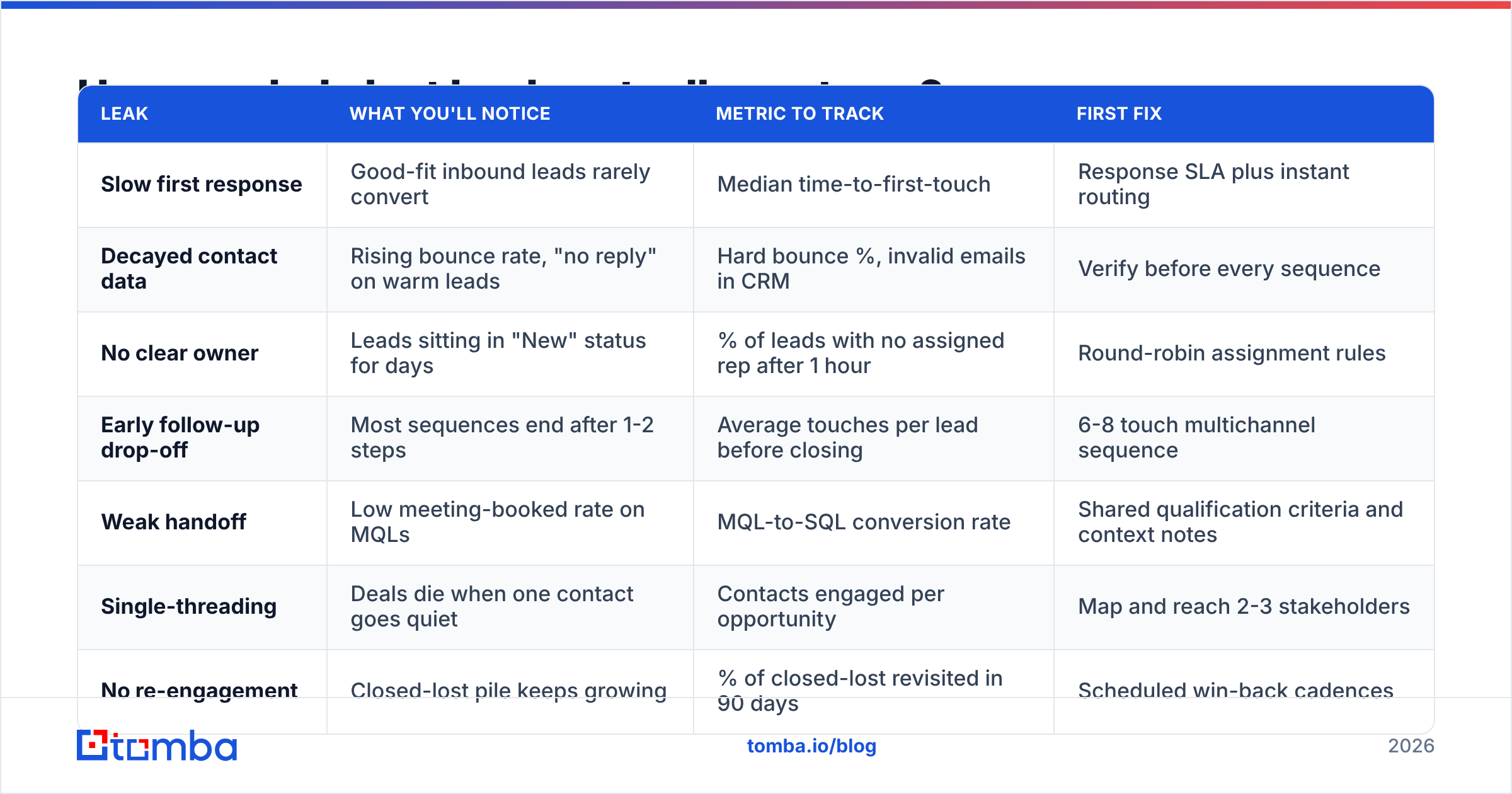
The table below maps each leak to the symptom you'll see and the metric that exposes it.
| Leak | What you'll notice | Metric to track | First fix |
|---|---|---|---|
| Slow first response | Good-fit inbound leads rarely convert | Median time-to-first-touch | Response SLA plus instant routing |
| Decayed contact data | Rising bounce rate, "no reply" on warm leads | Hard bounce %, invalid emails in CRM | Verify before every sequence |
| No clear owner | Leads sitting in "New" status for days | % of leads with no assigned rep after 1 hour | Round-robin assignment rules |
| Early follow-up drop-off | Most sequences end after 1-2 steps | Average touches per lead before closing | 6-8 touch multichannel sequence |
| Weak handoff | Low meeting-booked rate on MQLs | MQL-to-SQL conversion rate | Shared qualification criteria and context notes |
| Single-threading | Deals die when one contact goes quiet | Contacts engaged per opportunity | Map and reach 2-3 stakeholders |
| No re-engagement | Closed-lost pile keeps growing | % of closed-lost revisited in 90 days | Scheduled win-back cadences |
Try a simple exercise. Pull every lead from the last 12 months that reached "demo booked" or "replied positively" and later went cold. Multiply that count by your average deal size and your normal demo-to-close rate. The result is a rough measure of revenue that walked out the door. That number is almost always bigger than the next quarter's lead-buying budget.
How do you find the lost leads already in your CRM?#
Your CRM already holds a list of lost leads. It just isn't labelled that way. Here's a practical audit you can finish in an afternoon.
Step 1: Pull the four segments. Export leads and contacts that match any of these:
- Status "New" or "Open" with no activity in 30+ days
- Last activity was an inbound reply, a form fill, or a meeting, and nothing was logged afterwards
- Closed-lost with reason "no decision," "timing," or "budget"
- Opportunities where the only associated contact has bounced
Step 2: Check whether the contact data still works. This is the step most teams skip, and it's the reason re-engagement campaigns bounce. Run the whole export through an email verifier before sending anything. Any list older than a year will contain dead addresses, and a burst of bounces from one domain can damage your sender reputation for every other campaign you run.
Step 3: Detect job changes. When an email bounces, the person often hasn't disappeared. They've moved. That's two opportunities: a warm contact at a new company (who might bring you in), and an open seat at the old account (someone new owns the problem). Contact enrichment can refresh titles, companies, and current addresses so you know which situation you're dealing with.
Step 4: Tag by recoverability. Don't treat the whole pile the same way. Split it using the matrix in the next section.
For the underlying mechanics of how CRMs track stages and ownership, the Wikipedia overview of customer relationship management is a useful neutral primer if you're setting up these fields for the first time.
Which lost leads are worth trying to recover?#
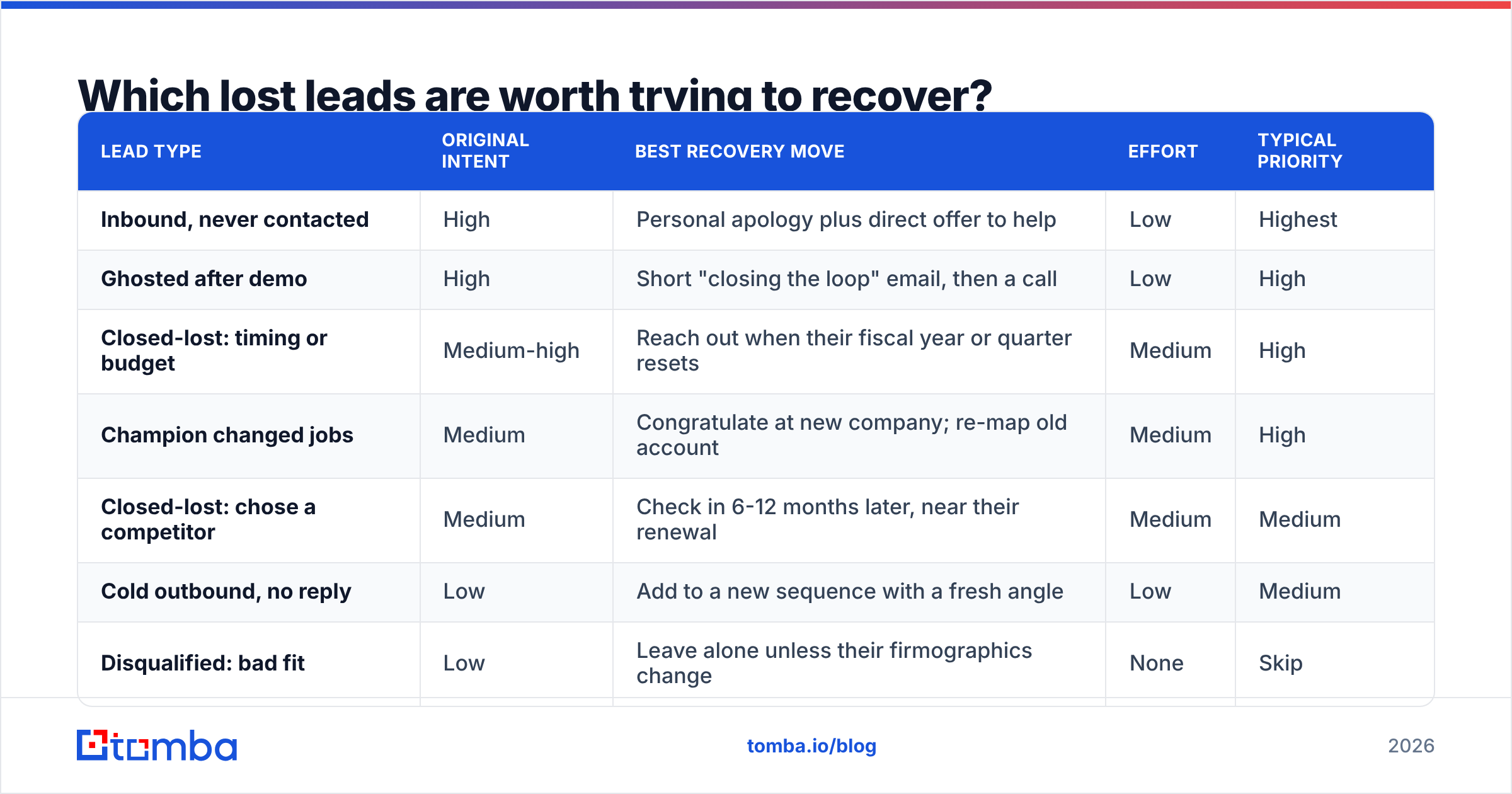
Not every lost lead deserves a rep's time. Rank them by how strong the original intent was and how long ago you lost them.
| Lead type | Original intent | Best recovery move | Effort | Typical priority |
|---|---|---|---|---|
| Inbound, never contacted | High | Personal apology plus direct offer to help | Low | Highest |
| Ghosted after demo | High | Short "closing the loop" email, then a call | Low | High |
| Closed-lost: timing or budget | Medium-high | Reach out when their fiscal year or quarter resets | Medium | High |
| Champion changed jobs | Medium | Congratulate at new company; re-map old account | Medium | High |
| Closed-lost: chose a competitor | Medium | Check in 6-12 months later, near their renewal | Medium | Medium |
| Cold outbound, no reply | Low | Add to a new sequence with a fresh angle | Low | Medium |
| Disqualified: bad fit | Low | Leave alone unless their firmographics change | None | Skip |
The top three rows usually produce most of the recovered pipeline for the least work. Start there.
How do you win back a lost lead?#
Once the data is clean and you know which bucket each lead sits in, re-engagement comes down to relevance and brevity. A lost lead has already tuned out your generic messaging. The only way back in is to show you remember what they cared about.
The four-part re-engagement message#
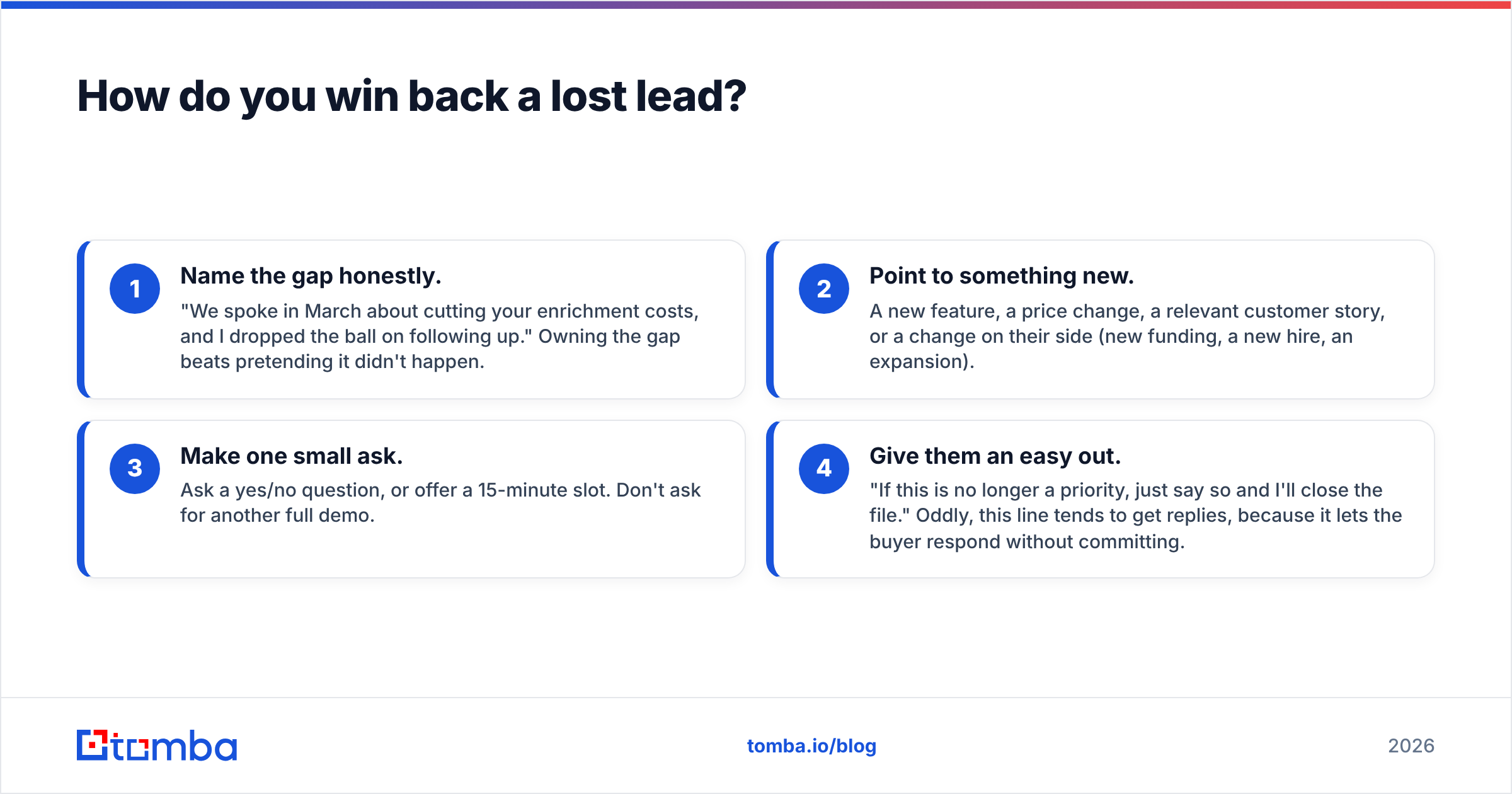
- Name the gap honestly. "We spoke in March about cutting your enrichment costs, and I dropped the ball on following up." Owning the gap beats pretending it didn't happen.
- Point to something new. A new feature, a price change, a relevant customer story, or a change on their side (new funding, a new hire, an expansion).
- Make one small ask. Ask a yes/no question, or offer a 15-minute slot. Don't ask for another full demo.
- Give them an easy out. "If this is no longer a priority, just say so and I'll close the file." Oddly, this line tends to get replies, because it lets the buyer respond without committing.
A sample win-back email#
Subject: closing the loop on [their goal]
Hi Sarah, back in May you were comparing ways to reduce bounce rates before your Q3 outbound push. I never followed up after our call, which is on me.
Since then we've added bulk catch-all checks, and that was the gap you flagged. Worth a 15-minute look before your Q1 planning?
If it's off the table, reply "no" and I'll stop reaching out.
It's under 80 words, refers to something specific, contains one ask, and gives an easy exit. Send it from a real rep's inbox rather than a marketing domain.
Sequence cadence for recovered leads#
- Day 1: Win-back email (above)
- Day 3: LinkedIn connection or comment on a recent post. Keep it social, not a pitch.
- Day 6: Short follow-up email with one piece of useful content
- Day 10: Phone call, if you have a validated direct number
- Day 14: Breakup email, then move the lead to a 90-day nurture
Which tools help prevent lost leads?#
No single tool fixes lost leads, because the leaks sit in different parts of the stack. Here's how the categories map to the problems.
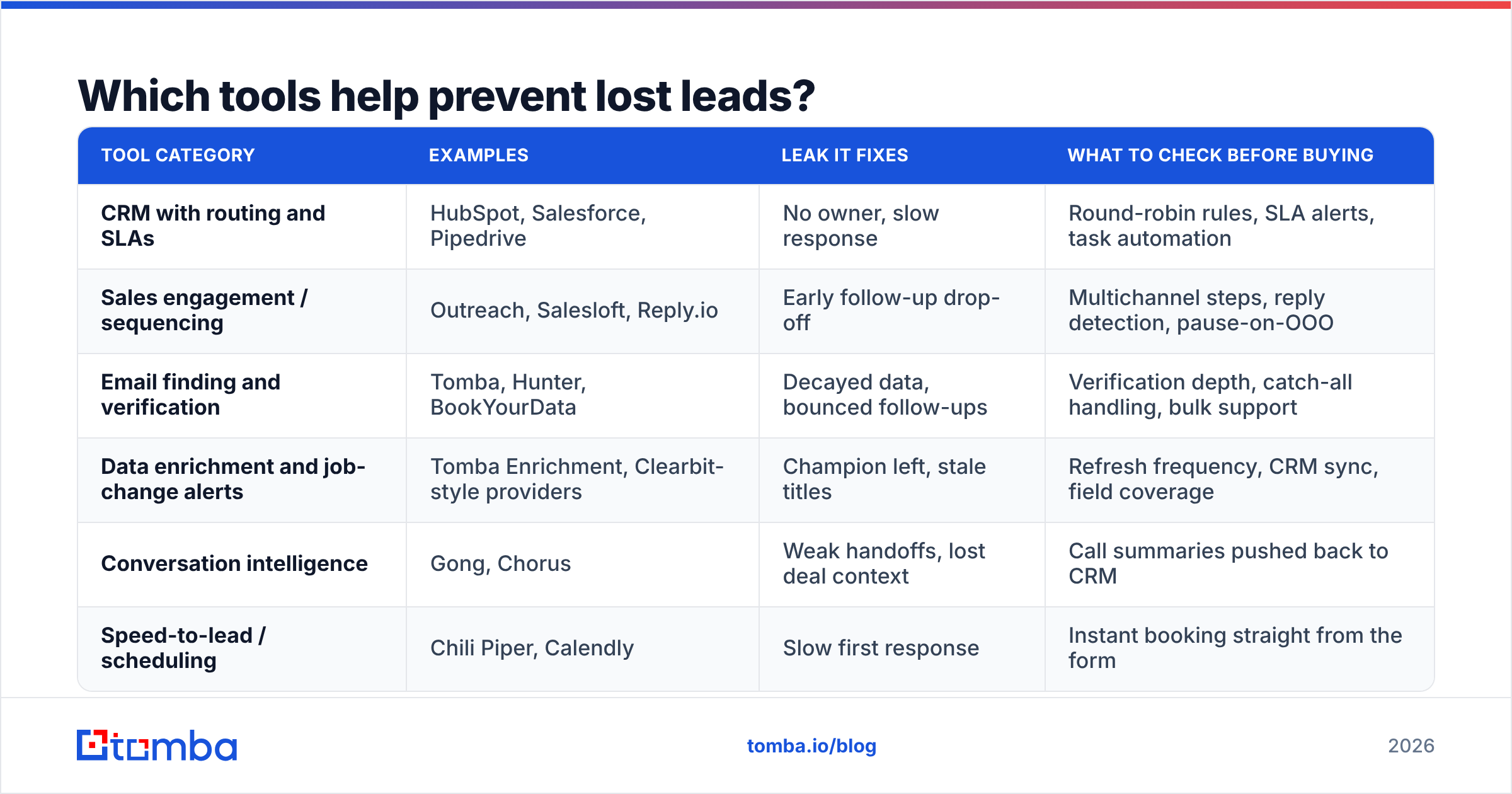
| Tool category | Examples | Leak it fixes | What to check before buying |
|---|---|---|---|
| CRM with routing and SLAs | HubSpot, Salesforce, Pipedrive | No owner, slow response | Round-robin rules, SLA alerts, task automation |
| Sales engagement / sequencing | Outreach, Salesloft, Reply.io | Early follow-up drop-off | Multichannel steps, reply detection, pause-on-OOO |
| Email finding and verification | Tomba, Hunter, BookYourData | Decayed data, bounced follow-ups | Verification depth, catch-all handling, bulk support |
| Data enrichment and job-change alerts | Tomba Enrichment, Clearbit-style providers | Champion left, stale titles | Refresh frequency, CRM sync, field coverage |
| Conversation intelligence | Gong, Chorus | Weak handoffs, lost deal context | Call summaries pushed back to CRM |
| Speed-to-lead / scheduling | Chili Piper, Calendly | Slow first response | Instant booking straight from the form |
A few notes from an honest-broker point of view:
- Your CRM is the backbone. If routing and ownership aren't configured in your CRM, no add-on will save you. Both HubSpot and Salesforce ship lead-assignment and SLA workflows natively. Use them before you buy anything else.
- The data layer is the most neglected. Teams spend heavily on sequencing tools and then point them at contact lists that are 20-30% stale. Checking addresses with a verifier or a data provider costs a fraction of what the sequencer costs, and it decides whether the sequencer's emails arrive at all.
- Data providers differ by use case. Tomba is strong at domain-based email finding, verification, and enrichment at predictable prices (free tier with 25 searches a month, then $49, $99, and $249 per month). BookYourData is a solid option if you prefer buying pre-built, filtered contact lists. Many teams use one for list building and another for verification and refresh.
How do you stop losing leads going forward?#
Recovery is a one-time win. Prevention compounds. Put these five systems in place and your lost-lead pile will shrink quarter after quarter.
- A written response-time SLA. For example: inbound demo requests get a human reply within 15 minutes during business hours, and other inbound within 4 hours. Track the median and put it on the team dashboard.
- Automatic ownership. Every new lead gets assigned to a named rep within minutes. Unassigned leads trigger an alert to the manager.
- Verification at the point of entry. Verify emails when a lead is created (form, import, or enrichment), not six months later when the sequence bounces. A bad address caught at entry costs nothing. The same address caught after a campaign costs you reputation.
- Minimum touch standards. No lead can be marked "unresponsive" until it has had at least 6 touches across 2 channels. Make the CRM enforce it with a required field or a validation rule.
- Scheduled win-back reviews. Once a quarter, pull closed-lost and "no decision" leads from 3-12 months ago, re-verify the data, and run them through a win-back cadence. Put it on the calendar the same way you'd schedule a pipeline review.
Taken together, these turn lost leads from an invisible leak into a metric you can measure and improve. A team that tracks time-to-first-touch, bounce rate, and closed-lost recovery rate will notice a leak within weeks instead of discovering it in a year-end post-mortem.
Frequently asked questions about lost leads#
What is a good lost-lead recovery rate? There's no universal benchmark, because it depends on deal size and cycle length. A realistic goal is to get a reply from a meaningful share of your "ghosted after demo" segment and to turn a smaller share of those replies into reopened opportunities. Track your own baseline for one quarter, then aim to improve it.
How long should you wait before re-engaging a closed-lost lead? It depends on the loss reason. Timing and budget losses: reach out just before their next planning cycle. Competitor losses: 6-12 months, timed near their likely renewal. Ghosted leads: 30-60 days is usually enough for the context to change.
Is it worth re-engaging a lead whose email bounced? Yes, often more than a lead whose email still works. A bounce usually means a job change. Find the person's new address and reach out to the new owner at the old company. You can win two conversations from a single bounce.
Should marketing or sales own lost-lead recovery? Sales should own the high-intent segments (ghosted demos, never-contacted inbound). Marketing can run automated nurture for lower-intent closed-lost leads. Write the split down so no segment falls between the two teams.
Stop losing leads to dead contact data#
A large share of lost leads fail at a very simple point: the follow-up never reached a real inbox. Before your next win-back campaign, refresh the list. Tomba Email Finder finds current professional addresses by name and company domain, so you can reconnect with champions who have moved and reach the new decision-makers at accounts you lost. Start on the free tier with 25 searches a month, run it against your closed-lost list, and see how many "dead" leads are actually still recoverable.
Related guides#
// get started
Find, verify and enrich your first contacts today
Start on the free plan with 25 searches a month, then scale when your team is ready.
Free plan · No credit card required · GDPR & CCPA
// about the author