Lusha vs FindEmails.com (Toofr): Which Email Finder Wins in 2026?
Lusha sells phone-rich contact data to sales teams. FindEmails.com (formerly Toofr) sells cheap, pattern-driven email credits. Here's how the two compare on price, data, and workflow, and which one fits your outbound motion.
TL;DR
- Lusha is a contact-data platform. It gives you emails and direct dials inside a Chrome extension built for LinkedIn and CRM workflows. You get a free plan with 40 credits a month, and paid plans start around $49.90/mo.
- FindEmails.com (formerly Toofr) is a lean email finder and verifier. It runs on cheap credits: $29/mo for 1,000, $49/mo for 2,500, $99/mo for 10,000.
- Pick Lusha if your reps cold-call and need mobile numbers, compliance paperwork, and CRM sync for a team.
- Pick FindEmails.com if you mostly need business emails at volume and the lowest cost per lookup matters most.
- If you want both emails and phones with transparent tiers ($49 / $99 / $249), Tomba sits between the two. It's worth a trial before you sign an annual Lusha contract.
What are Lusha and FindEmails.com (Toofr)?#
These two tools both show up when you search "email finder," but they were built for different buyers.
Lusha is a B2B contact and company data platform. It's best known for its browser extension. You open a LinkedIn profile or a company website, click the Lusha icon, and it shows the person's work email, direct dial, and sometimes a mobile number. Over time Lusha added prospecting lists, intent signals, enrichment, and integrations with Salesforce, HubSpot, and outreach tools. It targets SDR and AE teams who live in LinkedIn and the CRM.
FindEmails.com is the rebranded Toofr, one of the older email-guessing services. Its engine learns a company's email pattern (first.last@, flast@, and so on), generates candidates for a given name and domain, and then verifies them. You get a web app, bulk CSV upload, an API, and prospect pulls by domain. You won't find phone data, intent signals, or a big sales-intelligence layer. It's built as a cheap, fast way to turn names and domains into deliverable emails.
So the honest framing is that Lusha vs FindEmails.com (Toofr) isn't a like-for-like match. It's "full contact data for reps" against "budget email credits for builders and growth marketers."
How do they actually work under the hood?#
The two tools differ most in how they source and confirm a contact. That difference drives accuracy, coverage, and price:
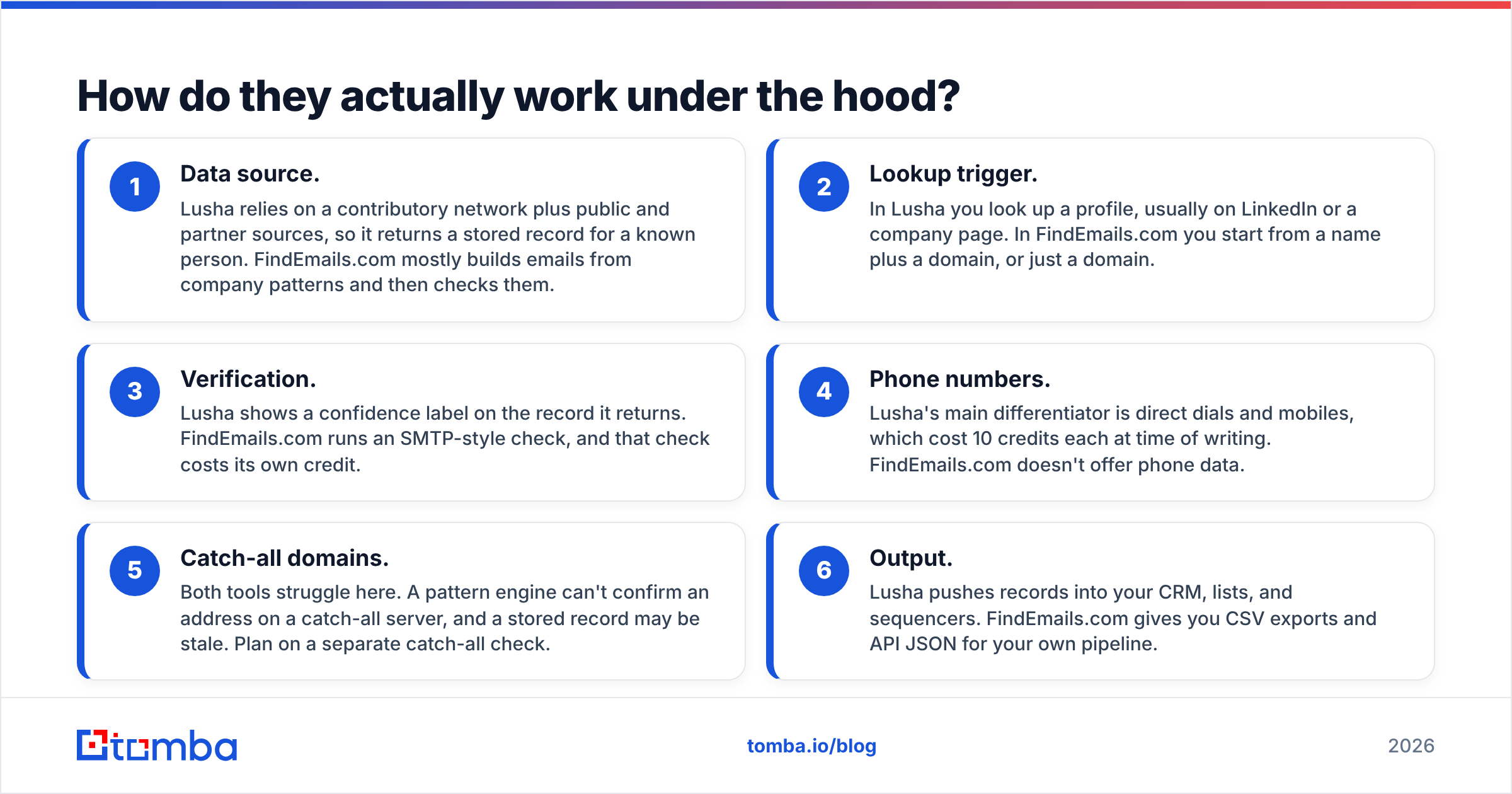
- Data source. Lusha relies on a contributory network plus public and partner sources, so it returns a stored record for a known person. FindEmails.com mostly builds emails from company patterns and then checks them.
- Lookup trigger. In Lusha you look up a profile, usually on LinkedIn or a company page. In FindEmails.com you start from a name plus a domain, or just a domain.
- Verification. Lusha shows a confidence label on the record it returns. FindEmails.com runs an SMTP-style check, and that check costs its own credit.
- Phone numbers. Lusha's main differentiator is direct dials and mobiles, which cost 10 credits each at time of writing. FindEmails.com doesn't offer phone data.
- Catch-all domains. Both tools struggle here. A pattern engine can't confirm an address on a catch-all server, and a stored record may be stale. Plan on a separate catch-all check.
- Output. Lusha pushes records into your CRM, lists, and sequencers. FindEmails.com gives you CSV exports and API JSON for your own pipeline.
You'll feel the effect of point 1 every day. A stored record is great when the person is in the database and useless when they're not. A pattern engine can produce an email for almost anyone at a company with a known format, but its confidence drops on small companies, catch-alls, and people with unusual names.

How do Lusha and FindEmails.com compare feature by feature?#
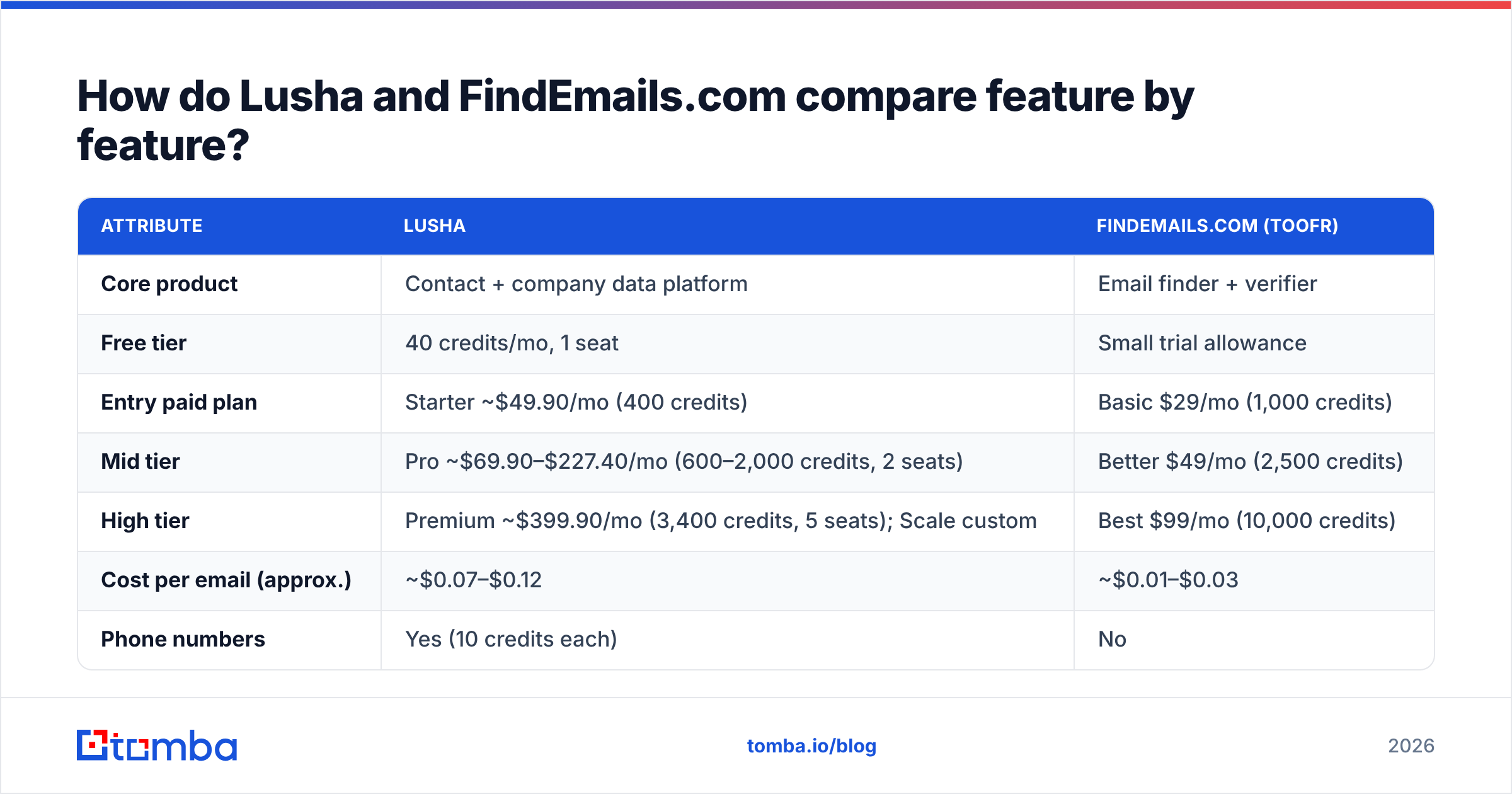
Here is the side-by-side, using public pricing pages and third-party pricing trackers at time of writing (October 2026). Always confirm on the vendor's site before you buy, because Lusha in particular changes its plan packaging often.
| Attribute | Lusha | FindEmails.com (Toofr) |
|---|---|---|
| Core product | Contact + company data platform | Email finder + verifier |
| Free tier | 40 credits/mo, 1 seat | Small trial allowance |
| Entry paid plan | Starter ~$49.90/mo (400 credits) | Basic $29/mo (1,000 credits) |
| Mid tier | Pro ~$69.90–$227.40/mo (600–2,000 credits, 2 seats) | Better $49/mo (2,500 credits) |
| High tier | Premium ~$399.90/mo (3,400 credits, 5 seats); Scale custom | Best $99/mo (10,000 credits) |
| Cost per email (approx.) | ~$0.07–$0.12 | ~$0.01–$0.03 |
| Phone numbers | Yes (10 credits each) | No |
| Verification included | Confidence shown on record | Separate credit per verify |
| Chrome / LinkedIn extension | Yes, core workflow | Limited |
| CRM integrations | Salesforce, HubSpot, Pipedrive and more | Mostly via API / CSV |
| API | Higher tiers / Scale | Yes, on all paid plans |
| Intent / signals | Yes on upper tiers | No |
| Best for | SDR teams who call + email | Builders, agencies, growth marketers |
Two things stand out. First, FindEmails.com is far cheaper per email. At the $99 tier you pay roughly a penny a lookup. Lusha costs several times that per email, before you count phones. Second, FindEmails.com charges separately for finding and verifying, so if you do both on every row, your real cost per verified contact roughly doubles. Even then it's still well below Lusha's per-email cost.

Which one is more accurate?#
You won't get a clean answer from either vendor's marketing, so here's how accuracy behaves in practice.
Lusha's accuracy is about coverage. If the person is in Lusha's dataset, the email is usually right, and the direct dial is the real prize. Coverage is strongest for North American and Western European mid-market and enterprise contacts. It gets thinner for small businesses, non-English markets, and very junior roles. Reviews on G2 back this up. Users praise the extension and the phone data and complain about missed contacts outside core regions and about how fast credits run out.
FindEmails.com's accuracy is about pattern quality. On a company with a consistent, verifiable format and a mail server that answers SMTP checks honestly, it does very well. On catch-all domains, which accept every address, a pattern guess can't be confirmed. It's either labeled risky or quietly ends up in your bounce rate.

Whichever tool you pick, add a verification pass before sending. Run every list through an email verifier and treat catch-all results as their own segment with lower send volume. That one habit protects your domain more than any choice between finders.
Is Lusha worth the higher price?#
Lusha is worth the money if three things are true:
- Your reps make calls. Direct dials and mobiles are where Lusha earns its price. Mobile data is expensive to source, and a working mobile number is worth far more than a single email credit.
- Your team prospects on LinkedIn. The extension flow (profile, click, record, push to CRM) saves real rep time, and that time is what you're paying for.
- You need compliance cover. Lusha publishes GDPR and CCPA positioning and security certifications that procurement teams ask for. FindEmails.com is a much smaller operation.
Lusha isn't worth it if you're a solo founder or an agency building lists of thousands of contacts for email-only campaigns. At 400 credits for roughly $50, you'll burn the Starter plan in a few days of list-building. Upgrading to Pro or Premium for credit volume alone is an expensive way to buy emails.
Also watch the credit math. Since a phone number costs 10 credits, a Pro plan with 1,000 credits gets you only about 100 enriched contacts with phones, not 1,000. Budget around your phone usage, not the headline credit number.
Is FindEmails.com (Toofr) good enough on its own?#
FindEmails.com is good enough for email-only outbound if you accept its limits:
- No phones. If your sequence has a call step, you'll need a second tool.
- Thin enrichment. You get the email and basic prospect info, not technographics, funding, or intent.
- Light integrations. Expect CSV exports and the API. A Zapier or Make workflow can bridge the gap, but you have to build it.
- Separate verification credits. Budget for a find and a verify on each row.
What you get in return is predictable, very low per-lookup pricing and an API simple enough to script against in an afternoon. For growth engineers enriching sign-up lists, or agencies running many small campaigns, that matters more than a polished extension.

Lusha vs FindEmails.com (Toofr): which should you choose?#
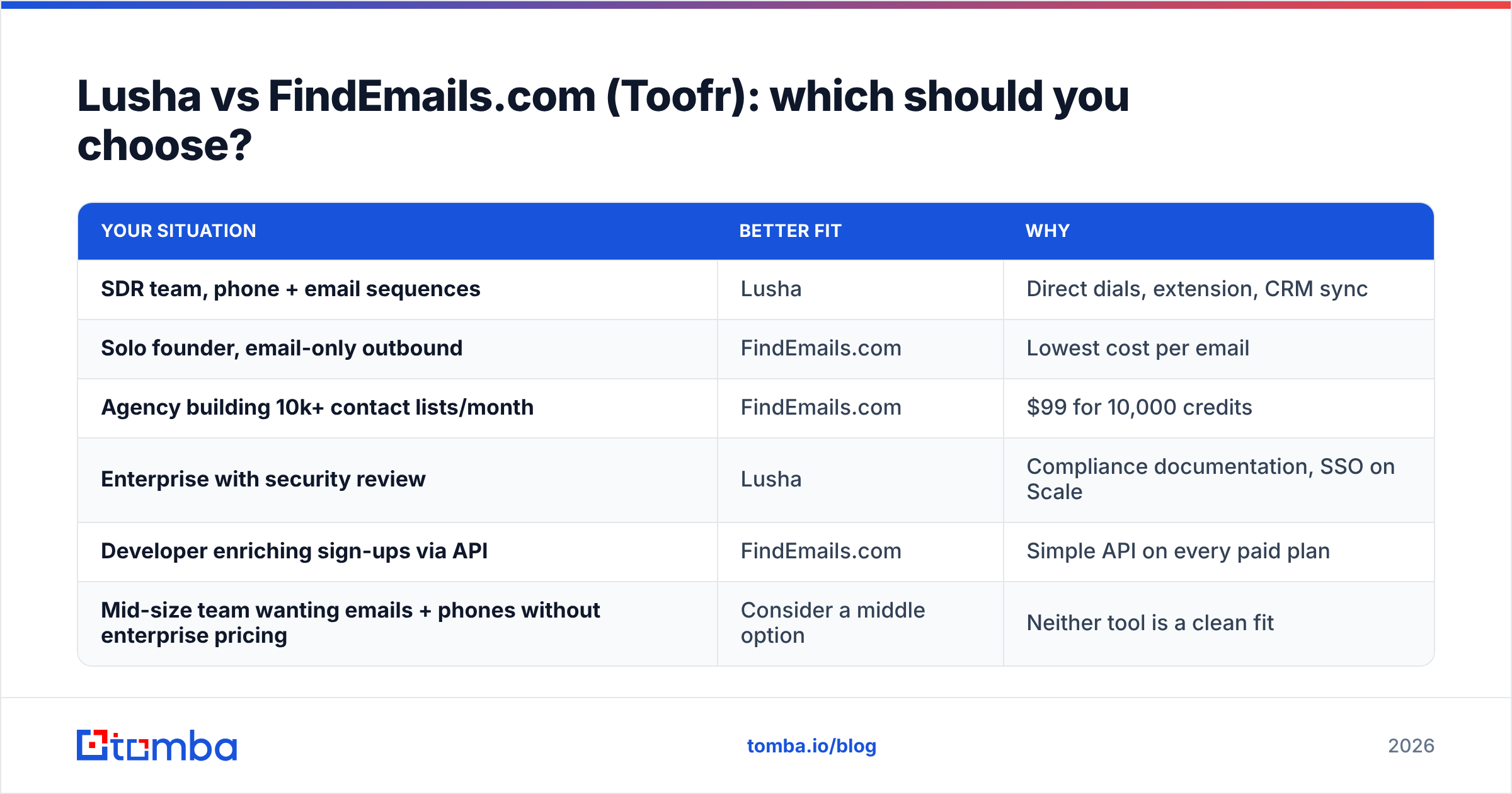
Use your workflow to decide, not the feature list:
| Your situation | Better fit | Why |
|---|---|---|
| SDR team, phone + email sequences | Lusha | Direct dials, extension, CRM sync |
| Solo founder, email-only outbound | FindEmails.com | Lowest cost per email |
| Agency building 10k+ contact lists/month | FindEmails.com | $99 for 10,000 credits |
| Enterprise with security review | Lusha | Compliance documentation, SSO on Scale |
| Developer enriching sign-ups via API | FindEmails.com | Simple API on every paid plan |
| Mid-size team wanting emails + phones without enterprise pricing | Consider a middle option | Neither tool is a clean fit |
That last row is where many teams end up. Lusha is overkill on price if phones are only an occasional need. FindEmails.com is underpowered if you need phones at all.
Where does Tomba fit between the two?#
Tomba is an email-first platform with phone data alongside it. It's built for teams who want more than a pattern guesser but don't want a seat-based sales-intelligence contract.
- Email finding from several angles. Look up by name and company with the Tomba Email Finder, pull everyone at a company through domain search, or work from LinkedIn with the browser extension.
- Verification and catch-all handling built in. These cover the step where both Lusha and FindEmails.com users usually reach for a third tool.
- Phone data when you need it. The phone finder handles calling use cases without making every lookup a phone-priced lookup.
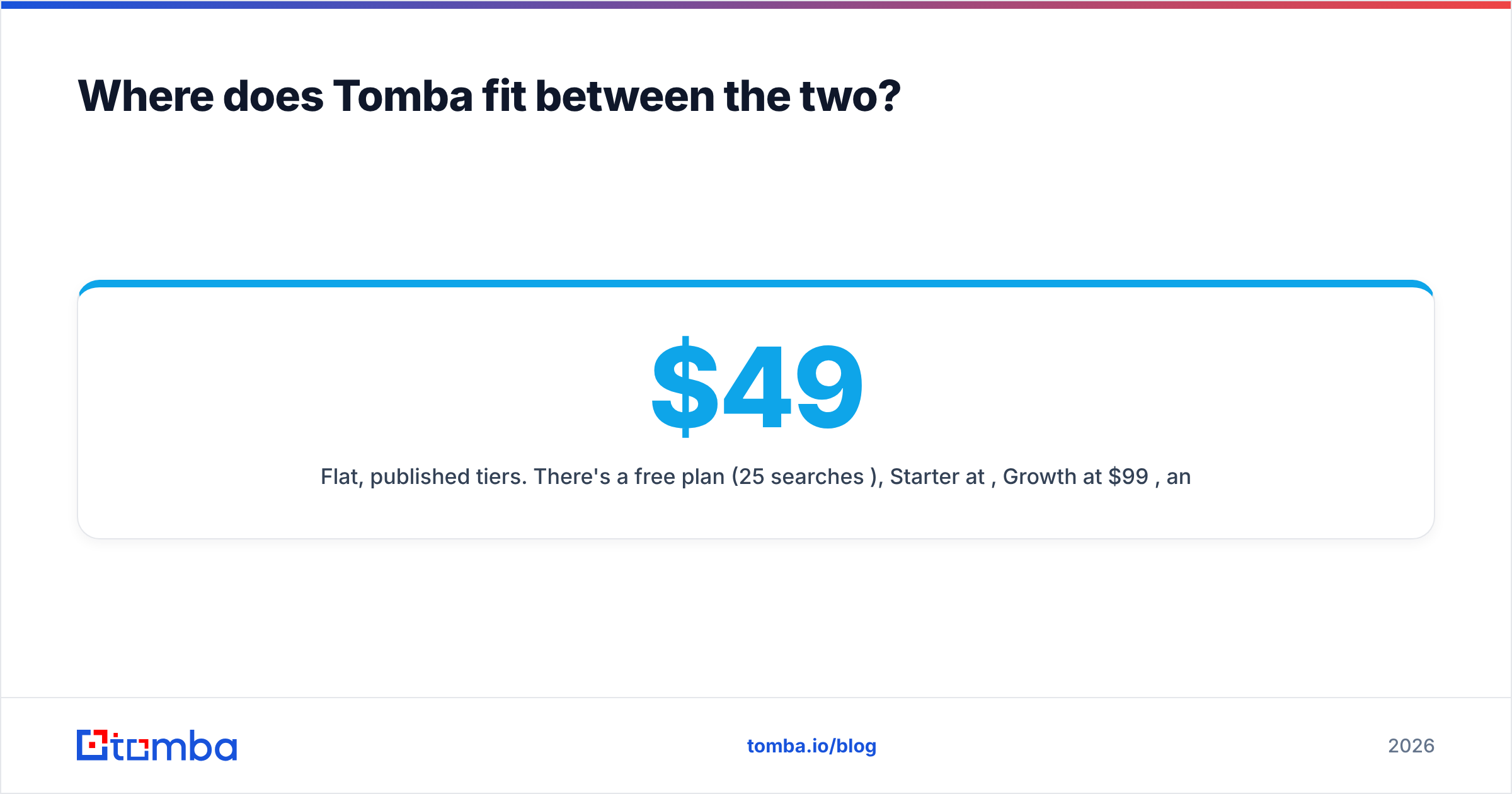
- Flat, published tiers. There's a free plan (25 searches/mo), Starter at $49/mo, Growth at $99/mo, and Pro at $249/mo, with Enterprise on request. You can check Tomba pricing without booking a demo.
To be fair: if you need deep intent data and enterprise procurement paperwork, Lusha's Scale tier is the more complete package. If your only metric is cost per raw email at very high volume, FindEmails.com's top plan is hard to beat. Tomba is the better fit for teams that want verified emails, catch-all handling, optional phones, and an API in one place at a mid-market price.
How should you test them before committing?#
Don't decide from feature pages. Run a 30-minute bake-off:
- Build a test list of 50 real targets. Mix company sizes, two or three regions, and at least five companies you know use catch-all mail servers.
- Run the same list through each tool. Use the free tiers or trials. Record found / not found and the confidence label for each.
- Verify everything independently. Push every result through one neutral verifier so the comparison is fair.
- Count the cost per valid contact, not the cost per credit. Include verification credits and phone credits.
- Time the workflow. How long does it take a rep to go from target to contact in your CRM? That's often where Lusha earns back its premium.
When you're done, you'll know your real hit rate, your real cost per deliverable email, and whether phone data changes your connect rates enough to pay for itself.
What's the bottom line?#
Lusha and FindEmails.com (Toofr) solve different problems. Lusha is a premium, rep-friendly contact platform whose main value is phone data and LinkedIn workflow. FindEmails.com is a no-frills, very cheap email engine for people who are comfortable with CSVs and APIs. Choose Lusha for calling-heavy sales teams with budget. Choose FindEmails.com for high-volume, email-only list building on a tight budget.
If you're between the two, wanting verified emails at scale, catch-all handling, and phone numbers only when they matter, start with the Tomba Email Finder. The free plan includes 25 searches a month, so you can run the same 50-contact bake-off above and compare hit rates with Lusha and FindEmails.com before you spend anything.
Related guides#
// get started
Find, verify and enrich your first contacts today
Start on the free plan with 25 searches a month, then scale when your team is ready.
Free plan · No credit card required · GDPR & CCPA
// about the author