Lusha vs Mailshunt: Email Finder Comparison for B2B Teams in 2026
Lusha sells verified contact data with phone numbers built in. Mailshunt is a cheap domain-first finder that also sends your campaigns. Here is which one fits your pipeline, and what each one really costs per contact.
TL;DR
- Lusha is a contact-data platform. It covers verified emails, direct dials and mobile numbers, and it works best for SDR teams that prospect from LinkedIn and call as much as they email.
- Mailshunt is a lightweight, domain-first email finder with campaign sending built in. Paid plans start around $19/mo, so it suits solo founders and small agencies that want "find + send" in one tab.
- Pricing models differ a lot. Lusha charges 1 credit per email and 5 credits per phone number. Mailshunt's low entry price bundles a sender you may outgrow.
- Our pick: choose Lusha if phone numbers drive your pipeline. Choose Mailshunt if you only need emails and a basic sender on a tight budget. If you need email-first accuracy with an API, verification and bulk tools at a mid-range price, look at a dedicated finder such as Tomba.
- Before you commit to either, test both on 50 contacts from your real ICP. Accuracy on your own target list matters more than any vendor's headline number.
What is the real difference between Lusha and Mailshunt?#
They solve different problems, even though both get labelled "email finders."
Lusha is a B2B contact database with a browser extension on top. You open a LinkedIn profile or a company website, click the extension, and Lusha shows emails, direct dials and mobile numbers pulled from its database. Since 2024 it has added prospecting lists, intent signals, AI recommendations and CRM enrichment. In practice it is closer to a lightweight sales-intelligence suite than a single-purpose finder.
Mailshunt works from the domain. You give it a company domain, or a first name, last name and domain, and it returns the most likely work email. Then it lets you run an outreach campaign from the same interface. It does not try to be a contact database or a phone-data vendor. The pitch is speed and price.
Here is a simple way to picture it. Lusha is a phone book you look people up in. Mailshunt works out someone's address from the street name and then posts the letter for you.
That difference shapes everything else: what each tool is accurate at, how it charges you, and which team it suits.
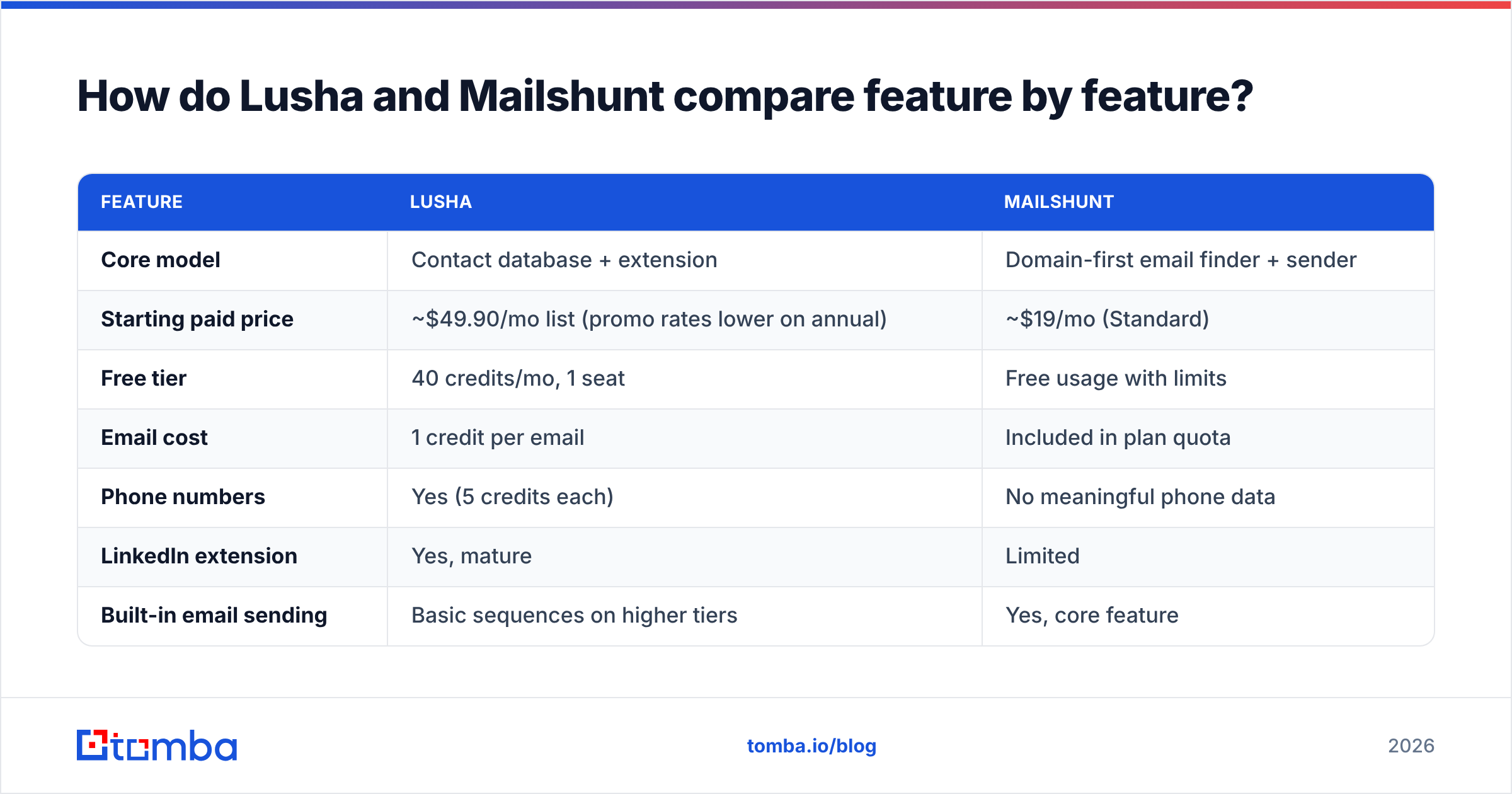
How do Lusha and Mailshunt compare feature by feature?#
| Feature | Lusha | Mailshunt |
|---|---|---|
| Core model | Contact database + extension | Domain-first email finder + sender |
| Starting paid price | ~$49.90/mo list (promo rates lower on annual) | ~$19/mo (Standard) |
| Free tier | 40 credits/mo, 1 seat | Free usage with limits |
| Email cost | 1 credit per email | Included in plan quota |
| Phone numbers | Yes (5 credits each) | No meaningful phone data |
| LinkedIn extension | Yes, mature | Limited |
| Built-in email sending | Basic sequences on higher tiers | Yes, core feature |
| CRM integrations | Salesforce, HubSpot, Pipedrive, more | Minimal |
| Credit rollover | Monthly plans roll over (up to 2x); annual plans reset | Plan-dependent |
| Best for | SDR teams calling + emailing | Solo founders, small agencies |
Two rows matter most.
Phone data. Lusha's main advantage is mobile and direct-dial coverage, especially in North America and parts of Europe. If your reps make calls, Mailshunt gives you nothing comparable.
Sending. Mailshunt lets you skip a separate sequencing tool, at least at first. Lusha expects you to push contacts into a CRM or a dedicated sender such as Outreach, Salesloft or Instantly.

Which tool is more accurate at finding emails?#
Neither vendor publishes an audited, independent accuracy figure. Treat any "98% accurate" claim as marketing until you have tested it on your own list.

The accuracy differences you will actually see come from how each tool finds data:
- Lusha returns emails it already holds in its database, often confirmed through its community-contribution model and partner sources. When Lusha has a record, it tends to be right. When it doesn't, you get nothing. Coverage drops for small companies, non-English markets and very new hires.
- Mailshunt predicts the likely pattern (first.last@, f.last@ and so on) and then checks it against the mail server. That works well on normal domains. It struggles on catch-all domains, where the server accepts any address. There, a pattern guess can't be confirmed, and you can end up sending to addresses that bounce later.
Catch-all domains are where most finder errors happen. Many mid-market and enterprise companies run them. Before you send to a large list from either tool, run it through a separate email verifier that handles catch-all scoring. A bounce rate above 2–3% will damage your sender reputation faster than any copy change can fix it.
A practical accuracy test:
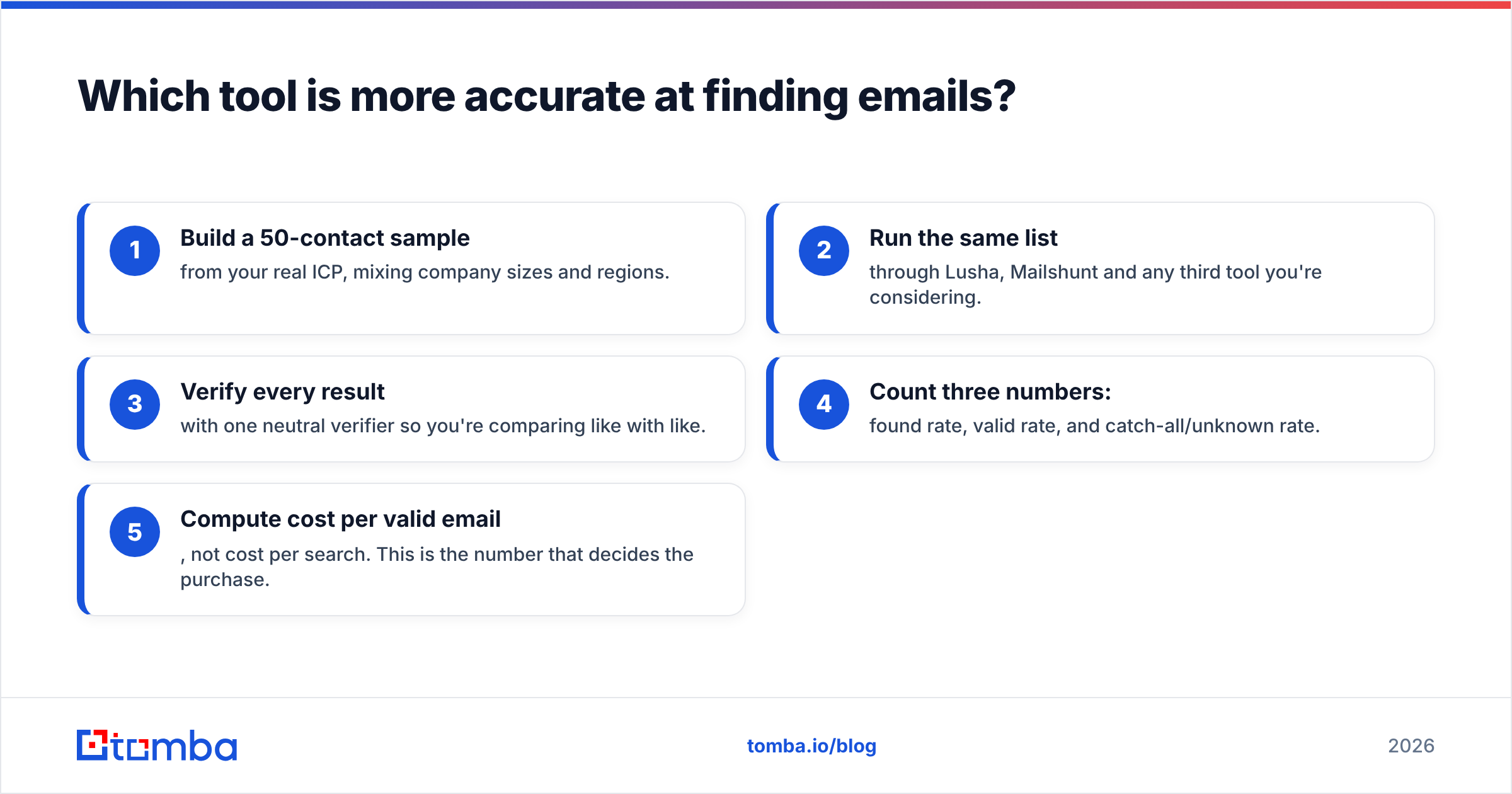
- Build a 50-contact sample from your real ICP, mixing company sizes and regions.
- Run the same list through Lusha, Mailshunt and any third tool you're considering.
- Verify every result with one neutral verifier so you're comparing like with like.
- Count three numbers: found rate, valid rate, and catch-all/unknown rate.
- Compute cost per valid email, not cost per search. This is the number that decides the purchase.
How much do Lusha and Mailshunt really cost?#
Headline prices hide most of the cost. Here's what you pay once the plan is actually in use.
Lusha pricing in 2026#
According to Lusha's pricing page, the 2026 lineup is Free, Starter, Pro, Premium and Scale. List prices are roughly $49.90, $69.90 and $399.90 per month for the paid self-serve tiers, and promotional annual rates have pushed these lower for parts of 2026. The catch is the credit system:
- 1 credit per verified email
- 5 credits per phone number
- Up to 6 credits to reveal both
- Extra credits for some API, export and AI-enrichment actions
Say your reps reveal phone numbers on most contacts. A Pro plan's 7,200 annual credits then cover roughly 1,200 full contacts a year, not 7,200. Also note that annual-plan credits reset at the end of each cycle instead of rolling over.
Mailshunt pricing in 2026#
Mailshunt has a limited free mode, and paid plans start at about $19/month for the Standard tier. The low price is real. But it covers a bundled sender, and once your volume grows you'll probably want proper warmup, inbox rotation and deliverability monitoring. At that point you'll be paying for a second sending tool on top of Mailshunt.
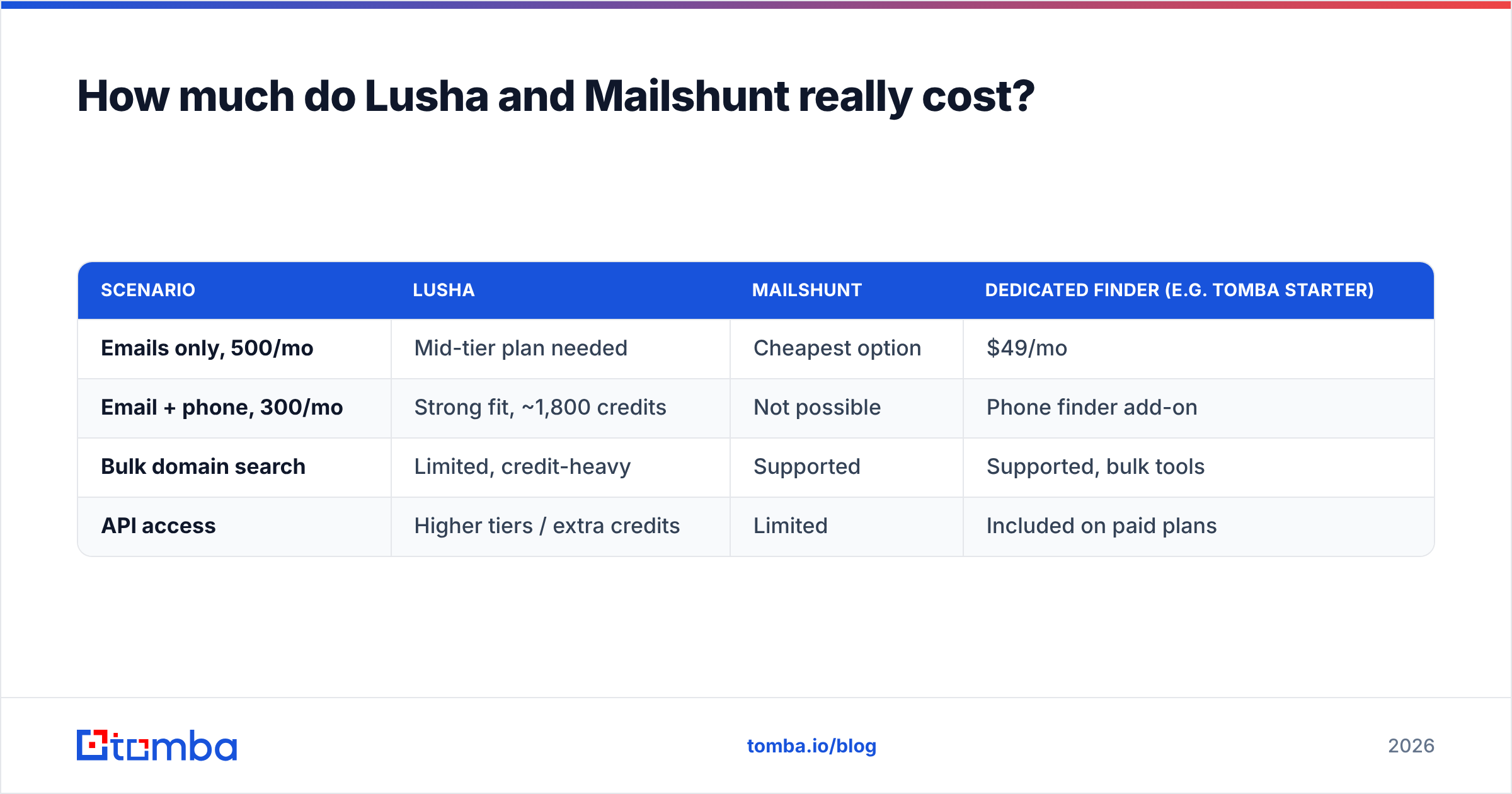
Cost per useful contact#
| Scenario | Lusha | Mailshunt | Dedicated finder (e.g. Tomba Starter) |
|---|---|---|---|
| Emails only, 500/mo | Mid-tier plan needed | Cheapest option | $49/mo |
| Email + phone, 300/mo | Strong fit, ~1,800 credits | Not possible | Phone finder add-on |
| Bulk domain search | Limited, credit-heavy | Supported | Supported, bulk tools |
| API access | Higher tiers / extra credits | Limited | Included on paid plans |
For reference, Tomba pricing runs from a 25-search free tier through Starter at $49/mo, Growth at $99/mo, Pro at $249/mo, and custom Enterprise plans.
Is Lusha better than Mailshunt for SDR teams?#
For a team of three or more reps doing multichannel outbound, yes, in most cases.
Lusha's advantages for teams:
- Phone coverage. Cold calling still books meetings, and Lusha's mobile data is the main reason teams buy it.
- Native CRM sync. Contacts go straight into Salesforce or HubSpot with ownership and dedup rules.
- Seat management. Pro and Premium include multiple seats, with shared credit pools and admin controls.
- LinkedIn-native workflow. Reps prospect where they already spend their time.
Where Lusha frustrates teams:
- Credit burn. Phone reveals use up credits quickly, and managers end up rationing them.
- Coverage gaps. Results are thinner outside North America and Western Europe, and for companies under ~50 employees.
- Annual resets. Unused annual credits disappear.
Mailshunt wasn't built for this team setup. It has no real seat model, no CRM pipeline and no phone data. A five-person SDR pod would outgrow it within a quarter.
Is Mailshunt better than Lusha for founders and small agencies?#
Often, yes, if email is your only channel.
Mailshunt makes sense when:
- You're one person handling prospecting and sending, and you don't want three tools.
- You start from domains, such as a list of target companies, rather than LinkedIn profiles.
- Your budget is under $50/mo and phone numbers don't matter.
- Your volume is low, a few hundred emails a month, so the bundled sender is enough.
Watch out for:
- Catch-all uncertainty. Pattern-based finding needs a strong verification step.
- Sender ceiling. A basic built-in sender won't give you the warmup, rotation and reputation monitoring you need past roughly 50–100 emails a day per inbox.
- Integration gaps. Getting data into a CRM later can mean CSV exports and manual cleanup.
If you're in this group but think you'll scale, separate finding from sending early. Pair a dedicated finder with whichever sender you prefer, and you can swap either one without rebuilding your stack.
What do users say about Lusha and Mailshunt?#
Lusha has a large review footprint. On G2, users consistently praise ease of use, the Chrome extension and phone-number quality. The most common complaints are credit consumption, pricing changes and thinner coverage for smaller companies and some regions.
Mailshunt is a much smaller vendor with few independent reviews. That doesn't mean it's bad. It does mean you should rely on your own test rather than social proof. Run the 50-contact test above before paying for a year.
Where does Tomba fit in the Lusha vs Mailshunt decision?#
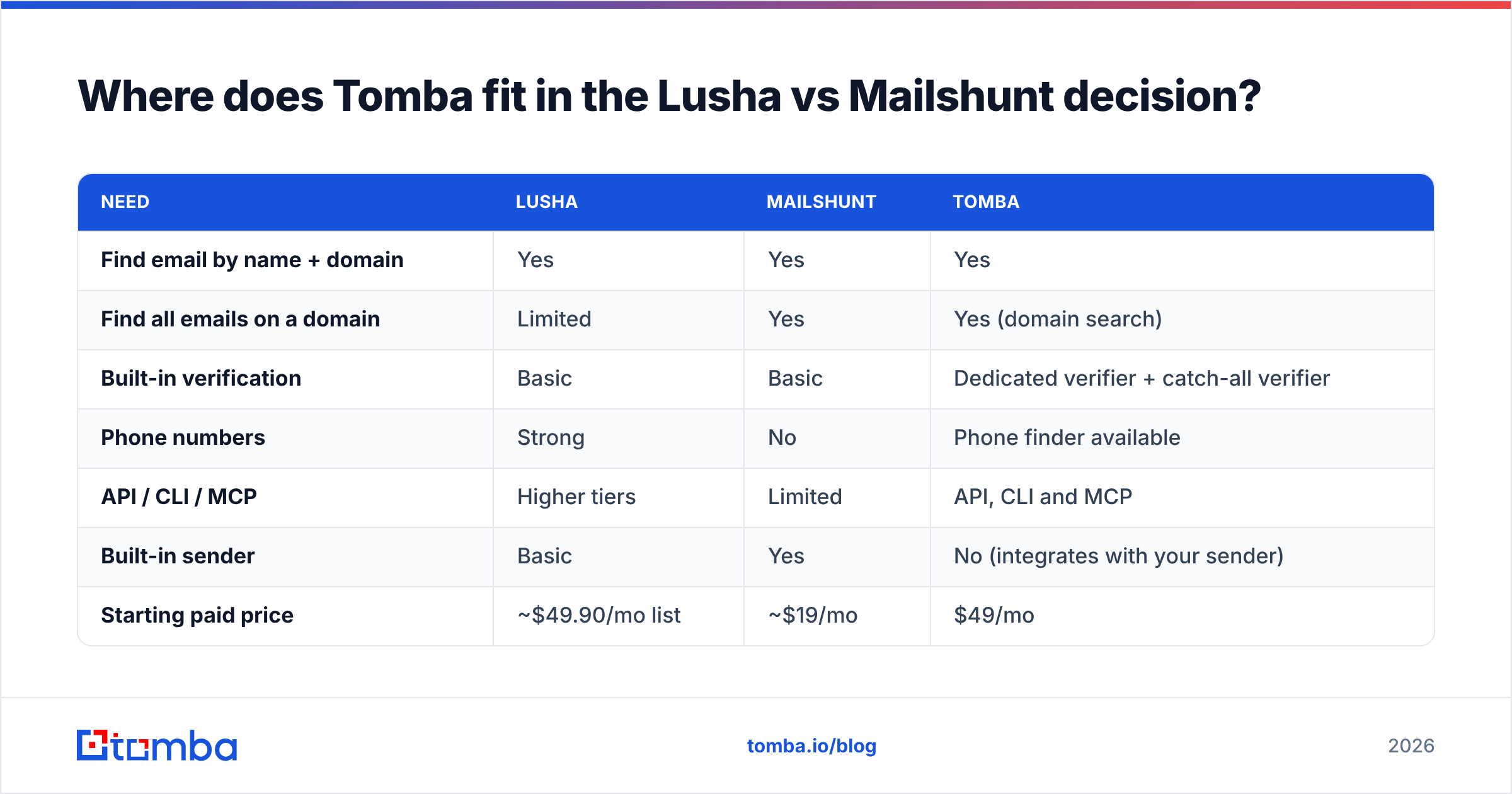
Tomba sits between the two. It's email-first like Mailshunt, but it has a database, a verifier and developer tooling closer to what larger teams expect.

| Need | Lusha | Mailshunt | Tomba |
|---|---|---|---|
| Find email by name + domain | Yes | Yes | Yes |
| Find all emails on a domain | Limited | Yes | Yes (domain search) |
| Built-in verification | Basic | Basic | Dedicated verifier + catch-all verifier |
| Phone numbers | Strong | No | Phone finder available |
| API / CLI / MCP | Higher tiers | Limited | API, CLI and MCP |
| Built-in sender | Basic | Yes | No (integrates with your sender) |
| Starting paid price | ~$49.90/mo list | ~$19/mo | $49/mo |
To be fair about it: if phone numbers are your main channel, Lusha's mobile data is the reason to buy it, and a dedicated email finder won't replace it. If you need the cheapest possible find-and-send combo for a handful of emails a week, Mailshunt is hard to beat on price. Tomba is the better fit when email is the main channel and accuracy, verification and automation matter more than an all-in-one interface. That's especially true if you're enriching lists in bulk or wiring lookups into a CRM or AI agent.

Which should you choose: Lusha or Mailshunt?#
Use this decision list:
- You call prospects regularly: choose Lusha. Nothing else in this comparison matches its phone coverage.
- You're a solo founder sending under ~500 emails/month on a tight budget: choose Mailshunt, and add a separate verification pass.
- You run a multi-rep SDR team on Salesforce or HubSpot: choose Lusha, and budget for heavy credit use.
- You want email-first accuracy, bulk domain search and API access without paying for phone credits: choose a dedicated email finder.
- You're not sure yet: run the 50-contact test on all candidates and decide on cost per valid email.
Whichever you pick, verify before you send. Finder output is a starting point, not a guarantee, and protecting your domain is worth more than any single campaign.
Frequently asked questions#
Is Lusha free? Lusha has a free plan with 40 credits per month and one seat. That's enough for about 40 emails or 6 phone numbers, which is fine for a trial but not for real prospecting.
Does Mailshunt find phone numbers? Not in any meaningful way. Mailshunt focuses on emails and sending. If you need phone data, use Lusha or a dedicated phone finder.
Which is cheaper, Lusha or Mailshunt? Mailshunt has the lower sticker price at about $19/mo. Lusha costs more but includes phone data and team features. Compare cost per valid contact, not monthly price.
Can I use Lusha and Mailshunt together? Yes. Some teams use Lusha for phone-first prospecting and a domain-first finder for bulk email lists. Just make sure both feed one CRM so you don't create duplicates.
Ready to find accurate work emails without credit math?#
If email is your main outbound channel and you want accurate addresses, catch-all handling and an API that fits your stack, try the Tomba Email Finder. Search by name, domain or company, verify in the same workflow, and start on the free tier with 25 searches a month before moving to Starter at $49/mo.
Related guides#
// get started
Find, verify and enrich your first contacts today
Start on the free plan with 25 searches a month, then scale when your team is ready.
Free plan · No credit card required · GDPR & CCPA
// about the author