Lusha vs Minelead: Email Finder Comparison for B2B Teams in 2026
Lusha sells verified phones and emails inside a sales workflow. Minelead sells cheap, domain-first email discovery. Here's what each one really costs and which fits your team.
TL;DR
- Lusha is a contact-intelligence platform for sales reps. You get direct dials and mobile numbers, a LinkedIn and CRM extension, intent signals, and compliance paperwork. It's priced per user, and phone reveals use far more credits than email reveals.
- Minelead is a lightweight email finder built around domains. It covers domain search, name-plus-company lookup, verification, a Gmail add-on, and an API on every tier. It doesn't return phone numbers or firmographics beyond the domain.
- If your team books meetings by phone and lives in Salesforce or HubSpot, Lusha is usually the better fit. If you need emails cheaply and in bulk, especially through an API, Minelead is often the better buy.
- Neither tool is a full replacement for the other. Many teams pair a domain-first email finder with a separate phone source.
- If you want domain search, email finding, verification and phone lookup in one credit pool, Tomba's plans start at $49/mo, and there's a 25-search free tier for testing.
What are Lusha and Minelead, in one sentence each?#
Lusha is a B2B contact and company data platform. Its main use is helping sales reps reveal a prospect's email and phone number from LinkedIn, a CRM record, or its own prospecting database. Minelead is an email-discovery tool. You give it a company domain or a name and company, and it returns professional email addresses, with verification and an API included.
That difference matters more than any feature checklist. Lusha is built for a rep who wants to get a buyer on the phone this afternoon. Minelead is built for someone who has a list of 2,000 domains and needs the right inboxes for a cold email campaign by Friday.
Think of it this way: Lusha is a concierge who hands you a business card with a mobile number on it. Minelead is a very fast directory where you look up who works at a company and how their inbox is formatted.
How do Lusha and Minelead compare side by side?#
Here is the high-level comparison. Pricing comes from public pricing pages and third-party reviews as of 2026. Both vendors adjust credit rules often, so check the live pricing page before you commit.
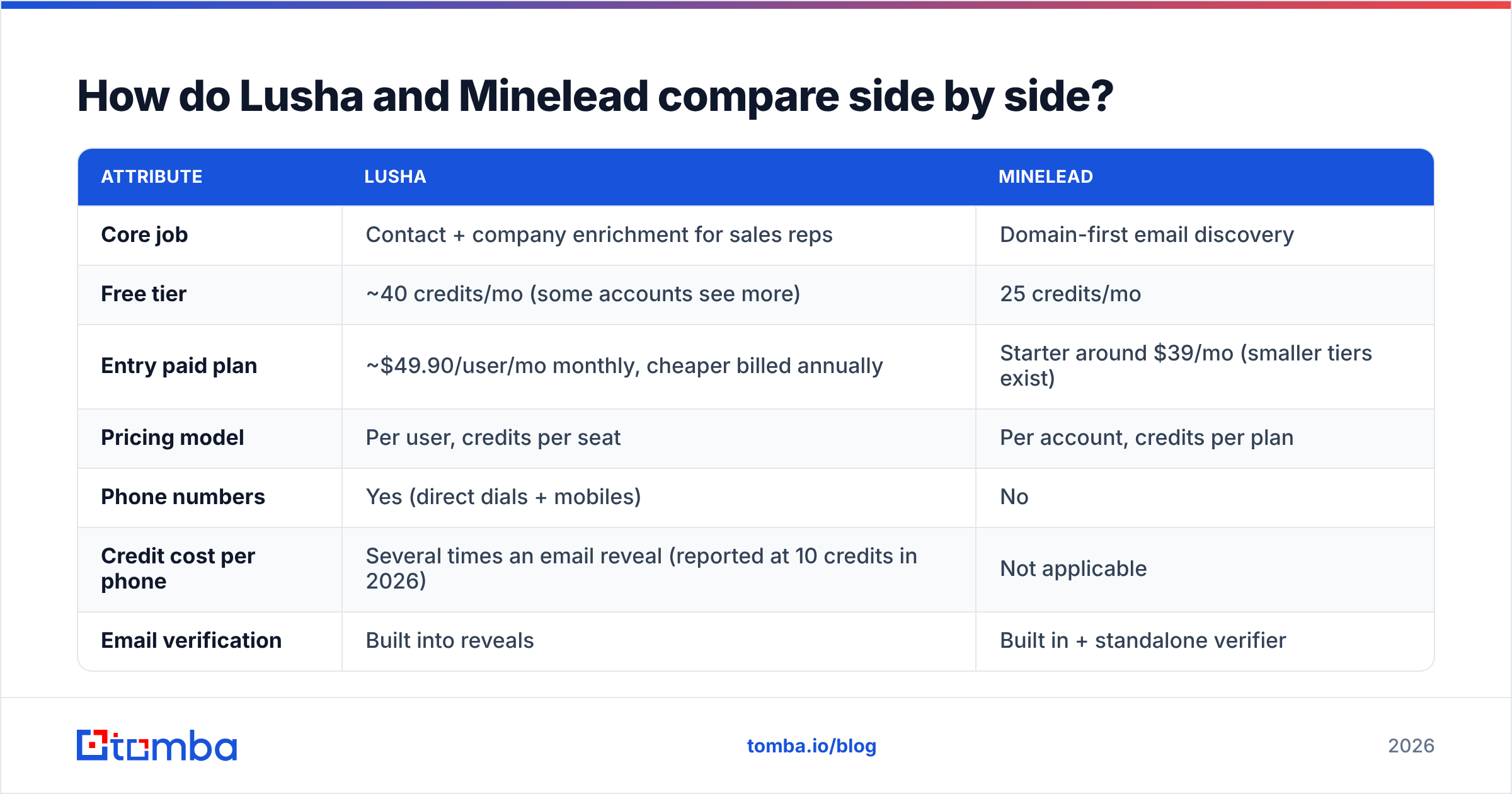
| Attribute | Lusha | Minelead |
|---|---|---|
| Core job | Contact + company enrichment for sales reps | Domain-first email discovery |
| Free tier | ~40 credits/mo (some accounts see more) | 25 credits/mo |
| Entry paid plan | ~$49.90/user/mo monthly, cheaper billed annually | Starter around $39/mo (smaller tiers exist) |
| Pricing model | Per user, credits per seat | Per account, credits per plan |
| Phone numbers | Yes (direct dials + mobiles) | No |
| Credit cost per phone | Several times an email reveal (reported at 10 credits in 2026) | Not applicable |
| Email verification | Built into reveals | Built in + standalone verifier |
| Domain search (all emails at a company) | Limited, it's contact-centric | Yes, its core feature |
| LinkedIn extension | Yes, a strong point | Chrome/Firefox extension, less LinkedIn-focused |
| CRM integrations | Salesforce, HubSpot, Pipedrive, Outreach, Salesloft and more | Lighter, relies mostly on API/exports |
| API | Paid tiers, higher plans for volume | Every tier, including free |
| Firmographics / intent | Yes (company data, technographics, intent on higher tiers) | Domain only |
| Compliance posture | ISO 27001, SOC 2, GDPR/CCPA documentation | GDPR-oriented, lighter enterprise paperwork |
| Best for | SDR/AE teams that call | Founders, growth marketers, agencies sending email |
If you only read one row, read "Phone numbers". It decides most purchases on its own.

What does each tool actually do well?#
These are the strengths that show up in real workflows, not just on a features page:
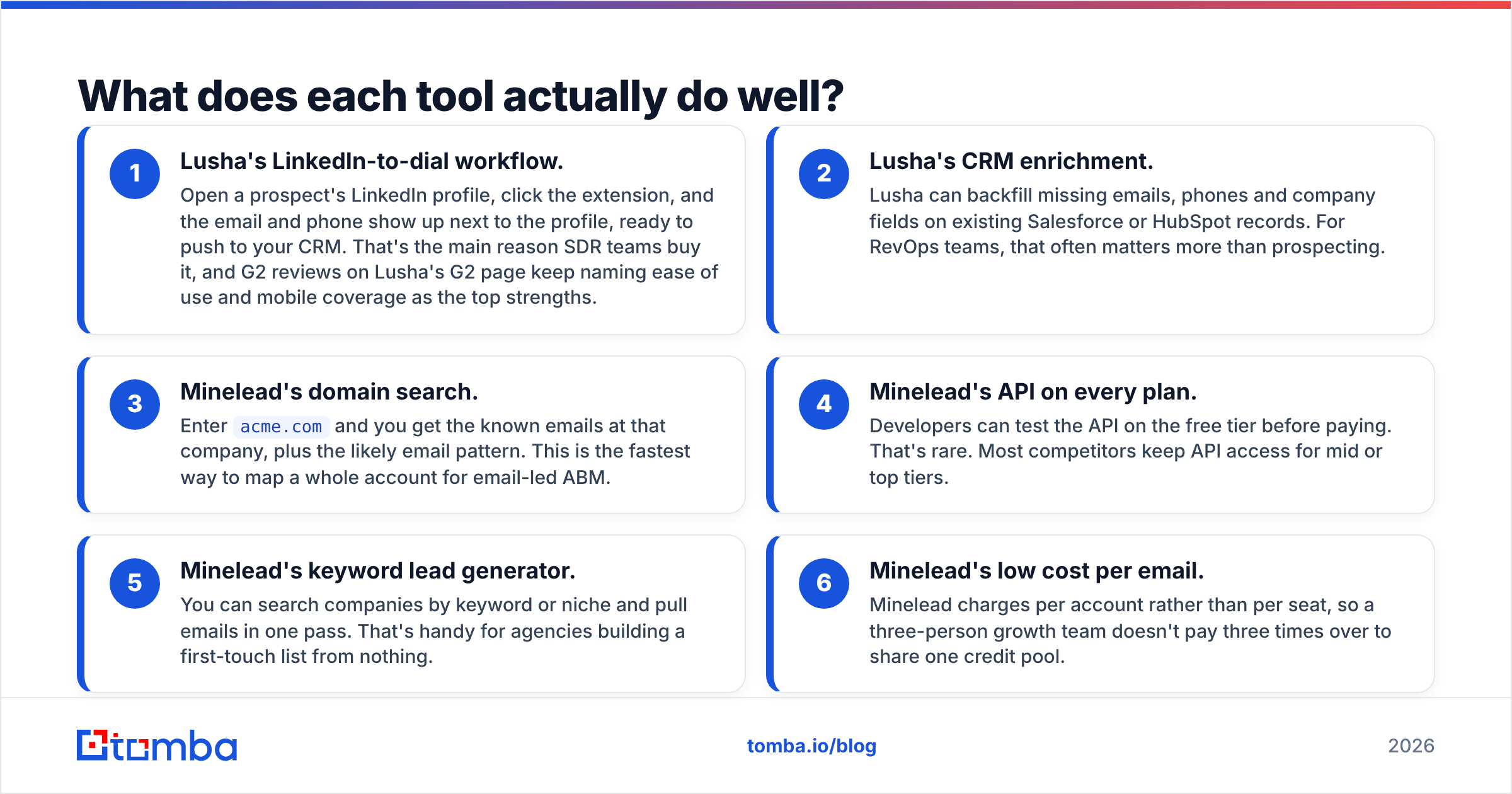
- Lusha's LinkedIn-to-dial workflow. Open a prospect's LinkedIn profile, click the extension, and the email and phone show up next to the profile, ready to push to your CRM. That's the main reason SDR teams buy it, and G2 reviews on Lusha's G2 page keep naming ease of use and mobile coverage as the top strengths.
- Lusha's CRM enrichment. Lusha can backfill missing emails, phones and company fields on existing Salesforce or HubSpot records. For RevOps teams, that often matters more than prospecting.
- Minelead's domain search. Enter
acme.comand you get the known emails at that company, plus the likely email pattern. This is the fastest way to map a whole account for email-led ABM. - Minelead's API on every plan. Developers can test the API on the free tier before paying. That's rare. Most competitors keep API access for mid or top tiers.
- Minelead's keyword lead generator. You can search companies by keyword or niche and pull emails in one pass. That's handy for agencies building a first-touch list from nothing.
- Minelead's low cost per email. Minelead charges per account rather than per seat, so a three-person growth team doesn't pay three times over to share one credit pool.
Which is more accurate, Lusha or Minelead?#
The honest answer is that it depends on region, seniority and company size. Neither vendor publishes a methodology you can reproduce.
Some patterns hold up across independent tests:
- Lusha does best on North American mid-market and enterprise contacts, especially mobiles. Its data partly comes from a community model where users share contact data, which helps phone coverage and draws privacy questions from some buyers.
- Minelead does best when the company has a predictable email pattern and enough public footprint for its crawler to confirm it. Results get weaker on small companies, on catch-all domains, and in regions where its index is thinner.
- Both struggle on catch-all domains. A catch-all server accepts every address at SMTP time, so "verified" can mean "the server didn't refuse it." If your list skews toward enterprise domains, plan on a separate catch-all verifier step.

The useful takeaway is to test on your own data, not on a vendor's demo list. Take 100 contacts you already know are correct, run them through each tool's free tier, and count hard bounces and wrong-person matches. Twenty-five Minelead credits and roughly forty Lusha credits are enough for a meaningful sample, provided you spend Lusha's credits on emails and not phones.
How much do Lusha and Minelead really cost?#
List prices hide most of the real cost. Here's what changes the math.
Lusha's per-seat model scales with headcount. A five-rep SDR team on the entry plan pays five subscriptions. Each seat gets its own credit allocation, so unused credits on a quiet rep's seat don't help a busy one.
Lusha's phone credits change the picture. Reviews from 2026 report a phone reveal at around 10 credits against 1 for an email. If your team mainly wants mobiles, a 400-credit plan covers about 40 phone numbers a month, not 400. That's the most common surprise in Lusha reviews.
Minelead's account-based model is cheaper for small teams. One plan, one credit pool, shared by everyone. The Starter tier (around $39/mo in published reviews) covers roughly 1,000 credits. For pure email volume, that comes out several times cheaper per contact than Lusha.
But Minelead has no phone channel at all. If you later need dials, you'll be buying a second tool, and the combined bill closes much of the gap.
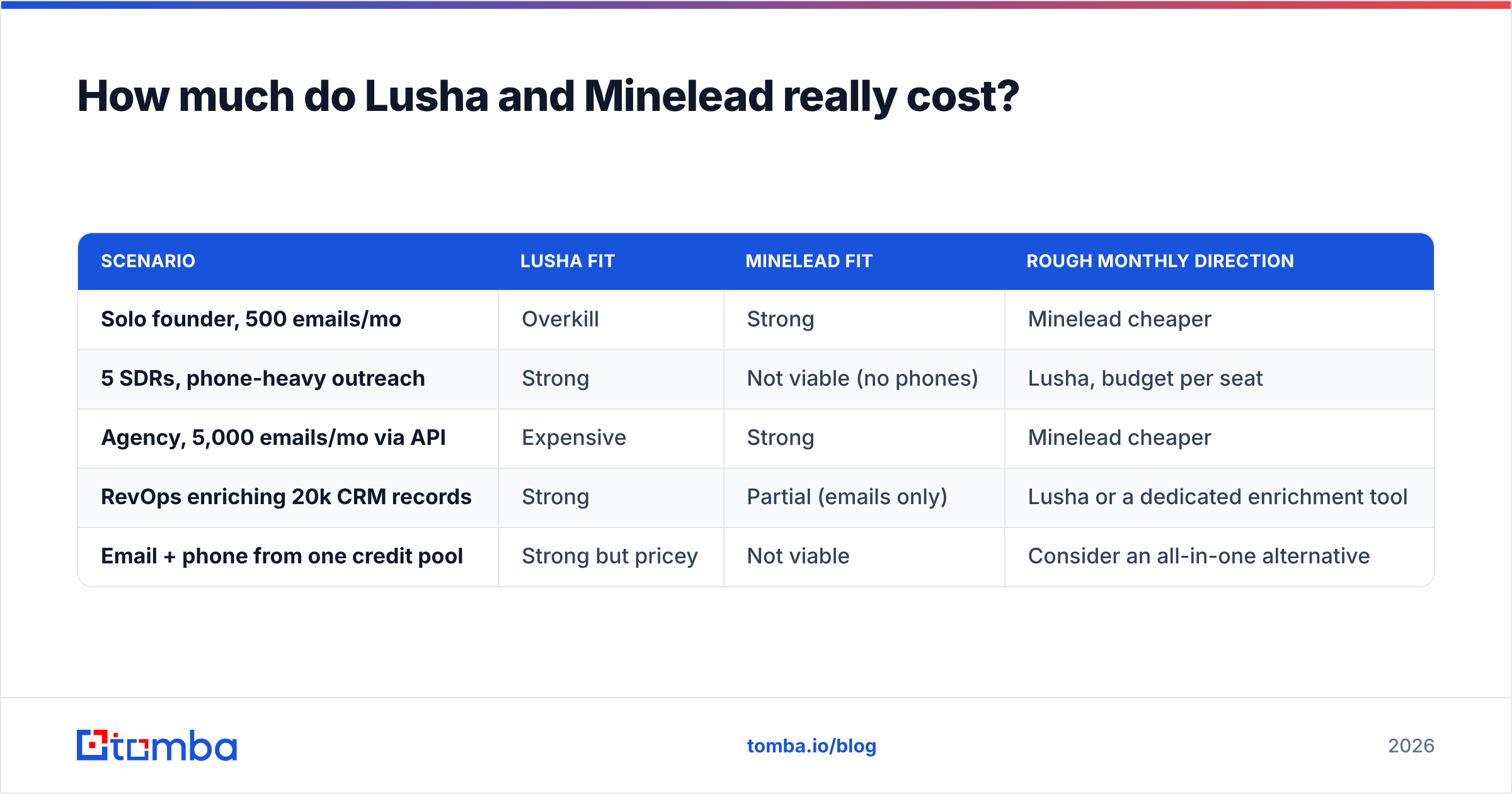
| Scenario | Lusha fit | Minelead fit | Rough monthly direction |
|---|---|---|---|
| Solo founder, 500 emails/mo | Overkill | Strong | Minelead cheaper |
| 5 SDRs, phone-heavy outreach | Strong | Not viable (no phones) | Lusha, budget per seat |
| Agency, 5,000 emails/mo via API | Expensive | Strong | Minelead cheaper |
| RevOps enriching 20k CRM records | Strong | Partial (emails only) | Lusha or a dedicated enrichment tool |
| Email + phone from one credit pool | Strong but pricey | Not viable | Consider an all-in-one alternative |
For more context on pricing models across the category, see Tomba's pricing details. They're useful as a reference point even if you never switch.
Is Lusha better than Minelead for sales teams?#
For a classic outbound sales team that phones prospects, yes. Lusha is the better fit.
Three reasons:
- Phone data is the bottleneck. Emails are relatively easy to find. Verified mobiles are not. Lusha's phone coverage is its moat, and Minelead doesn't compete there.
- Workflow integration. Lusha writes directly into Salesforce, HubSpot, Outreach and Salesloft. Reps don't export CSVs, and that's how data quality survives the trip into the CRM.
- Governance. Larger companies need SOC 2 reports, DPAs and admin controls before procurement signs off. Lusha has these ready. Minelead is lighter and better suited to SMB buying cycles.
Where Lusha is weaker:
- Cost per contact goes up quickly when you reveal phones.
- Bulk email discovery by domain isn't really its job. It's contact-centric, not company-centric.
- Per-seat pricing punishes teams with many occasional users.
Is Minelead better than Lusha for cold email?#
For email-only outbound, Minelead often gives better value. That's especially true if you're technical enough to use its API or Google Sheets workflows.
Why it fits cold email:
- Domain search finds every addressable contact at an account. You can multi-thread across a buying committee rather than hitting one person.
- Verification is built in, which protects email deliverability on new sending domains.
- API access from day one means you can wire it into Clay-style enrichment, n8n, Make, or your own scripts without upgrading.
Where Minelead is weaker:
- No phones, no LinkedIn URLs, no firmographics beyond the domain. You'll enrich elsewhere if you segment by headcount, industry or tech stack.
- A thinner enterprise footprint. Fewer native CRM connectors and less procurement documentation.
- Coverage gaps outside well-indexed regions and on small companies with little public web presence.

How do the workflows differ day to day?#
The tools assume very different daily routines, so it helps to picture a week with each.
A Lusha week (SDR):
- Build a target list in Lusha's prospecting database by title, seniority and company size.
- Open profiles on LinkedIn, then reveal mobile and email through the extension.
- Push contacts to a Salesloft or Outreach cadence with one click.
- Call first, then follow up by email. The phone number is the asset.
A Minelead week (founder or growth marketer):
- Export 1,500 domains from a market map, a funding database or a tech-stack list.
- Run a domain search through the API or a bulk upload to get the emails and patterns at each company.
- Filter by role keywords, then verify the list.
- Load it into a sequencer and send. The inbox is the channel.
If your week looks like the first list, Minelead will frustrate you. If it looks like the second, Lusha's per-seat phone credits will feel like paying for features you never use.

What should you consider instead of either?#
Some teams need what neither tool quite offers: domain-first email search and phone lookup and verification, under one account-level credit pool rather than per seat.
That's the gap tools like Tomba sit in. In practical terms:
- Domain search plus email finder works on the same domain-first idea as Minelead.
- Phone finder and phone validator cover some of the dial use case without per-seat pricing.
- Email verifier and catch-all verifier give you a dedicated step for risky enterprise domains.
- An API, Google Sheets add-on, Chrome extension and CRM integrations cover both technical and rep-led workflows.
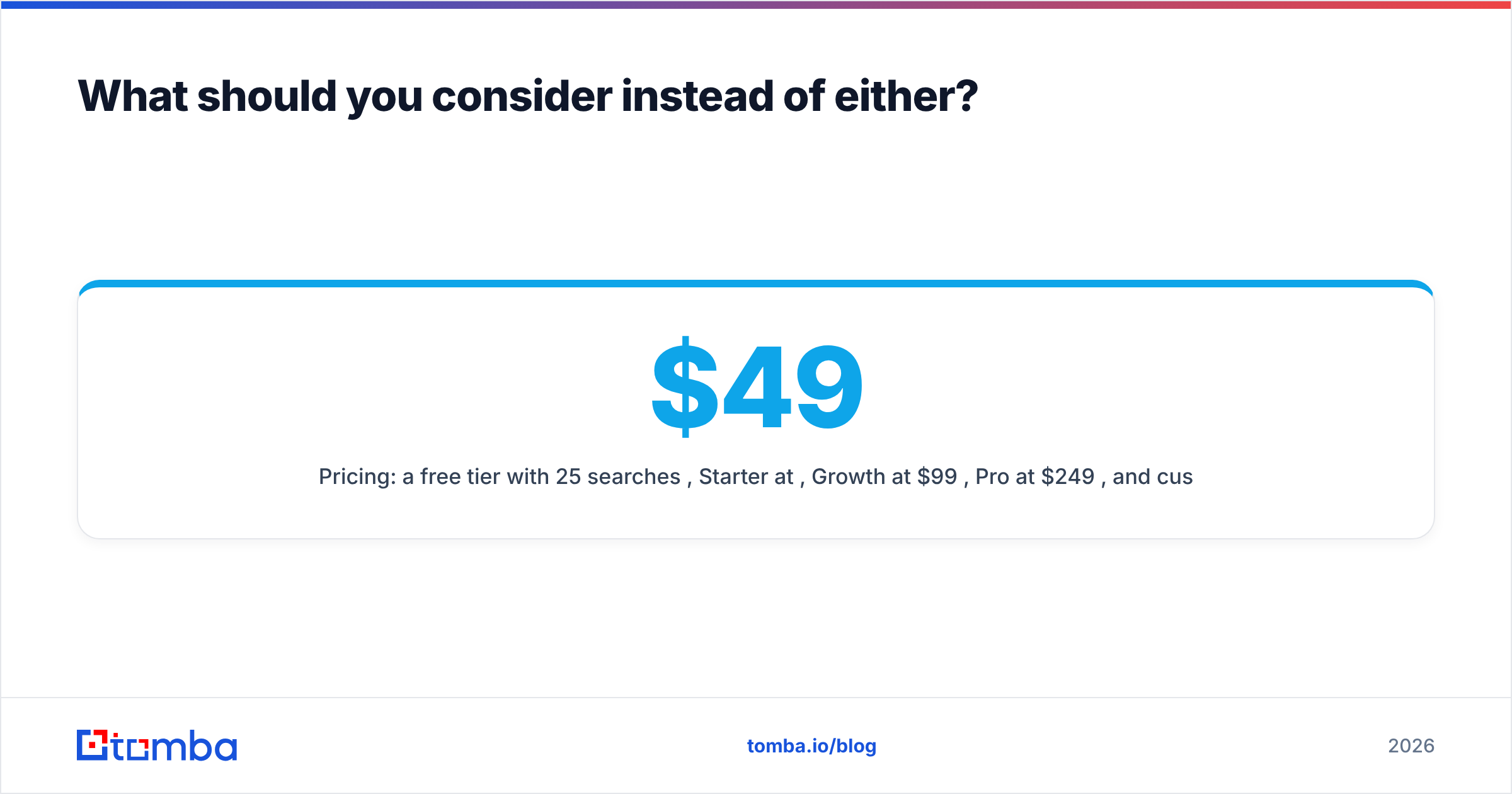
- Pricing: a free tier with 25 searches/mo, Starter at $49/mo, Growth at $99/mo, Pro at $249/mo, and custom Enterprise.
It isn't automatically better than Lusha for a phone-heavy enterprise SDR floor, where Lusha's mobile depth and governance are hard to match. It also isn't automatically cheaper than Minelead for pure, low-volume email lookups. It's the middle option for teams that keep outgrowing a single-purpose tool.
Which should you choose: Lusha or Minelead?#
Use this decision shortcut:
- Choose Lusha if your reps phone prospects, you work in Salesforce or HubSpot, you need SOC 2 and GDPR paperwork for procurement, and you can budget per seat. Plan your credits around phone reveals, not email reveals.
- Choose Minelead if you send cold email at volume, you need domain-level discovery, you want API access without an enterprise contract, and you don't need phone numbers.
- Choose both, or an all-in-one, if you run multichannel sequences and want emails cheaply but still need dials for your top-tier accounts.
Before you sign anything, run the 100-contact test described above on both free tiers. Measure bounces, wrong-person matches and time per lookup. That will tell you more than any comparison article, this one included.
Ready to test a domain-first email finder with verification built in?#
If your Lusha vs Minelead decision really comes down to finding accurate business emails by domain or by name, cheaply and in bulk, try the Tomba Email Finder. Start on the free tier with 25 searches a month, run the same 100-contact accuracy test against your current tool, and only upgrade to Starter at $49/mo if the bounce rate and match quality hold up on your own list.
Related guides#
// get started
Find, verify and enrich your first contacts today
Start on the free plan with 25 searches a month, then scale when your team is ready.
Free plan · No credit card required · GDPR & CCPA
// about the author