Lusha vs OneMoreLead (2026): Pricing, Data Quality and Our Pick
Lusha charges by the contact reveal. OneMoreLead charges by the list export. We compare pricing, credit costs, phone data, compliance and workflow fit so you can see which model suits your team before you pay for it.
TL;DR
- Lusha is a contact-enrichment tool. It works best for reps who reveal one prospect at a time from LinkedIn, Gmail or a CRM record, and it has strong direct-dial phone coverage.
- OneMoreLead is a filter-and-export B2B database. It suits agencies and founders who want to pull a few hundred targeted contacts into a CSV for a campaign.
- Pricing works differently. Lusha has a free plan and cheap entry tiers, but a phone reveal costs 5 credits. OneMoreLead starts at $99/month for 250 credits, and no free tier is advertised.
- Our pick: Lusha if your team works inside the CRM and needs mobile numbers. OneMoreLead if you build campaign lists in batches and mostly need emails.
- Neither tool should be your only source of truth. Verify every list before you send to it.
What is the real difference between Lusha and OneMoreLead?#
Both tools give you B2B contact data, but they are built for different jobs.
Lusha is an enrichment layer. You install the Chrome extension, open a LinkedIn profile, a company website or a Salesforce record, and click to reveal an email or phone number. Lusha also offers a prospecting search with filters, list exports and CRM sync. Its main strength is still putting a verified contact in front of a rep at the moment they need it. The company publishes its plans and compliance details at lusha.com, including GDPR and CCPA alignment.
OneMoreLead is a list builder. You filter a database by industry, job title, company size and location, then export the results. The vendor's homepage cites 55M+ verified B2B prospects, around 170M employee records and 27M+ companies. Third-party reviewers have noted that another landing page on the same domain gives different figures. You can check the current claims at onemorelead.com.
Put simply, Lusha answers "Who is this person and how do I reach them?" OneMoreLead answers "Give me 500 VPs of Marketing at 50-200 person SaaS companies in Texas."
How do Lusha and OneMoreLead compare feature by feature?#
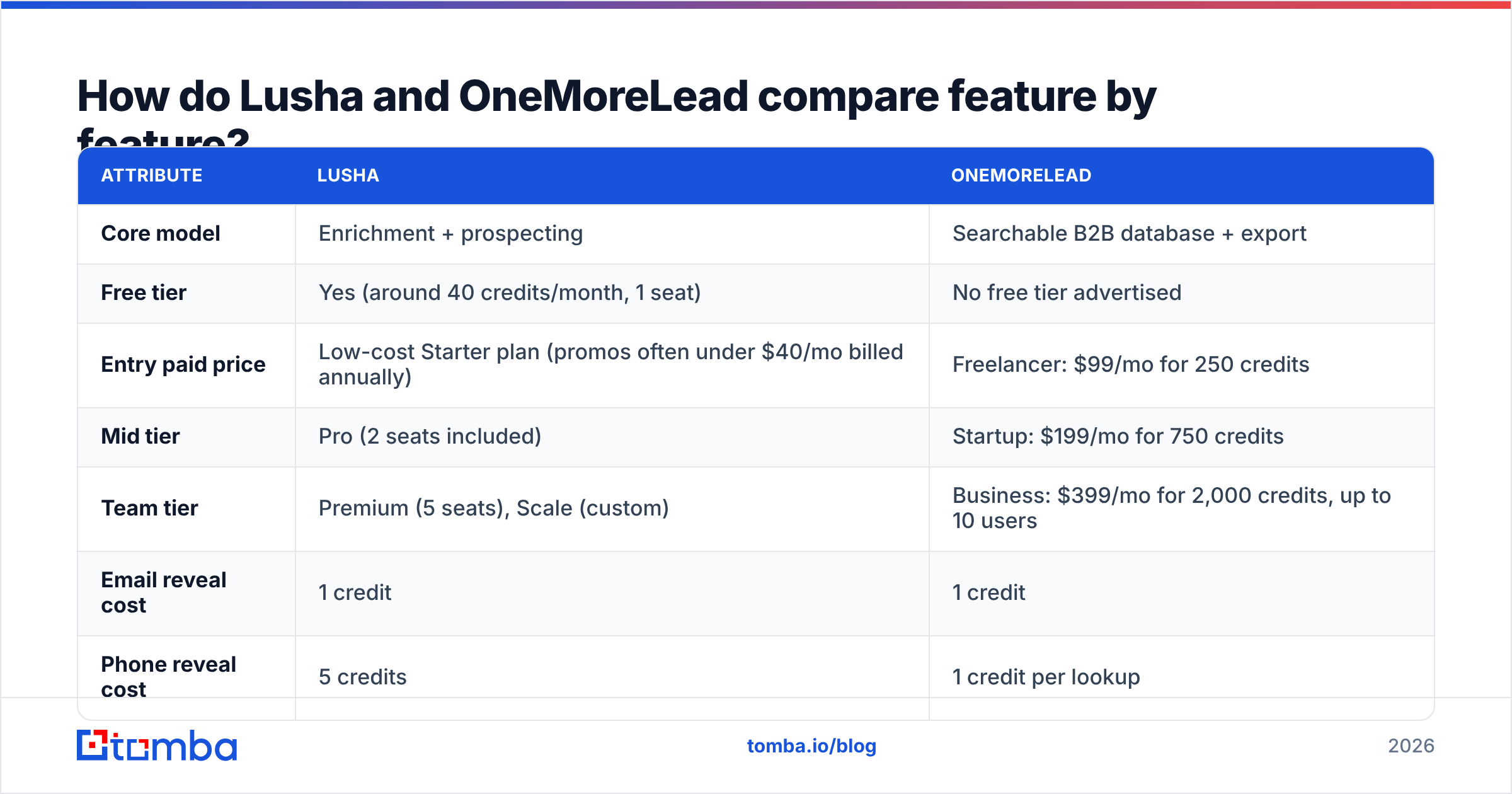
Here is a side-by-side view of the attributes that matter most when you choose between the two.
| Attribute | Lusha | OneMoreLead |
|---|---|---|
| Core model | Enrichment + prospecting | Searchable B2B database + export |
| Free tier | Yes (around 40 credits/month, 1 seat) | No free tier advertised |
| Entry paid price | Low-cost Starter plan (promos often under $40/mo billed annually) | Freelancer: $99/mo for 250 credits |
| Mid tier | Pro (2 seats included) | Startup: $199/mo for 750 credits |
| Team tier | Premium (5 seats), Scale (custom) | Business: $399/mo for 2,000 credits, up to 10 users |
| Email reveal cost | 1 credit | 1 credit |
| Phone reveal cost | 5 credits | 1 credit per lookup |
| Chrome extension | Yes, mature (LinkedIn, Gmail, Salesforce) | Limited, web-app first |
| CRM integrations | Salesforce, HubSpot, Pipedrive, Outreach, Salesloft | CSV export, lighter native integrations |
| Credit rollover | Monthly plans roll over up to 2x; annual plans reset | Check current terms; plan-based |
| Best for | AEs, SDRs, RevOps teams on a CRM | Agencies, founders, campaign list builds |
| Review footprint | Thousands of reviews on G2 | Small public review base |
Lusha pricing changes often and runs seasonal promotions, so check the live page before you budget. The structure above, with a free tier, cheap Starter and Pro plans, and a Premium team plan, has stayed fairly stable through 2026.
How much do Lusha and OneMoreLead really cost per contact?#
The sticker price hides most of the cost. What matters is the cost per usable contact.
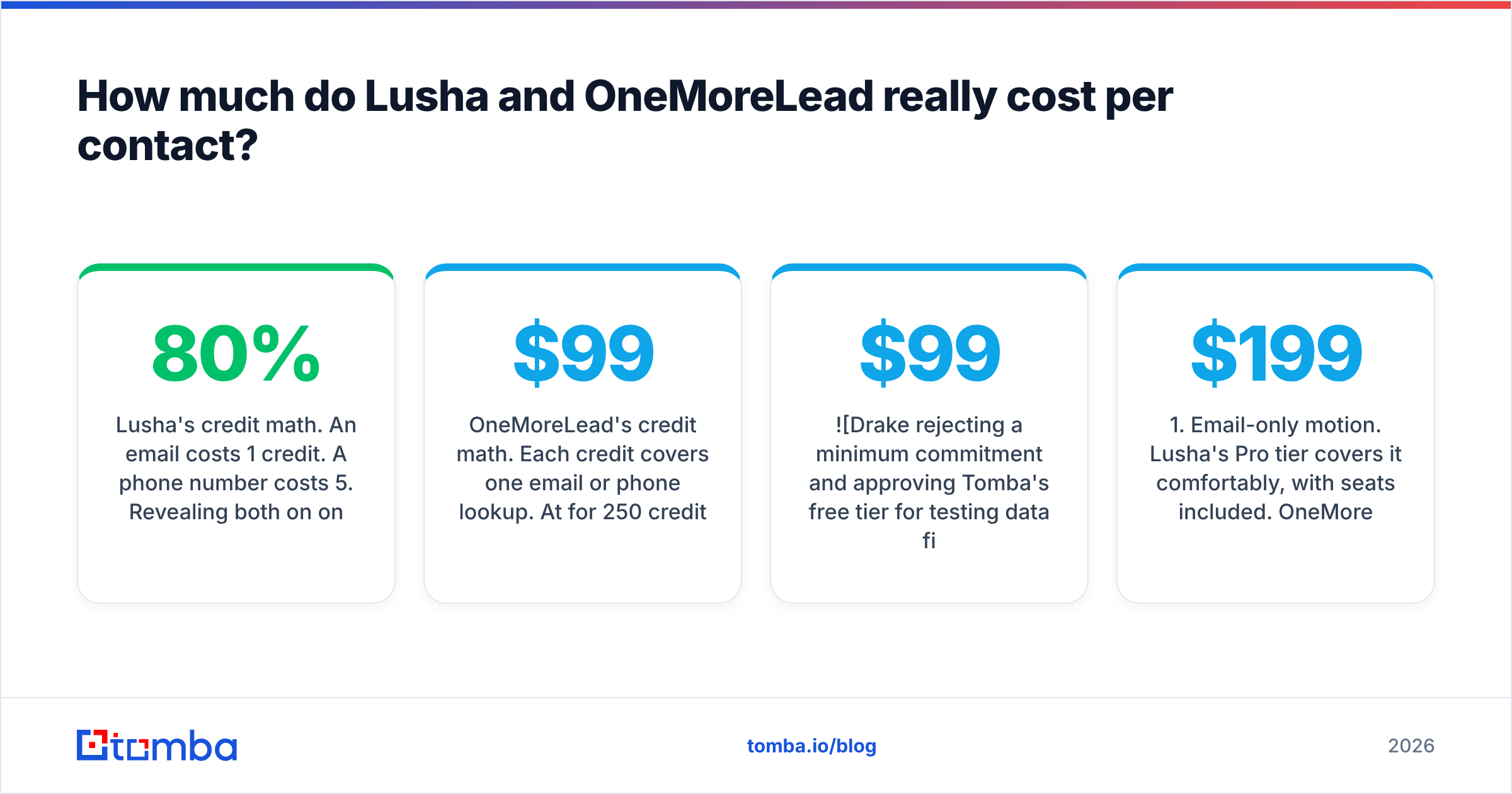
Lusha's credit math. An email costs 1 credit. A phone number costs 5. Revealing both on one person can cost up to 6. If your team mostly reveals emails, Lusha's lower tiers are cheap. If your SDRs cold-call and reveal mobiles on every prospect, your effective credit balance shrinks by about 80%. A plan that looks like 400 contacts a month becomes roughly 65-70 full email-plus-phone profiles.
OneMoreLead's credit math. Each credit covers one email or phone lookup. At $99 for 250 credits, the Freelancer plan costs about $0.40 per credit. The Business plan lowers that to about $0.20 per credit ($399 / 2,000). The catch is the starting price. You pay $99 before you have tested the data on your own ICP, and no free tier is advertised to run that test.
Here is a rough comparison for a two-person outbound team that needs 300 new contacts a month:
- Email-only motion. Lusha's Pro tier covers it comfortably, with seats included. OneMoreLead needs the Startup plan ($199/mo) to get past 250 credits. Lusha wins on cost.
- Email + phone on every contact. Lusha needs about 1,800 credits a month (300 × 6), which pushes you toward Premium. OneMoreLead needs about 600 credits (300 × 2), which also lands on Startup at $199. OneMoreLead is likely cheaper here, if its phone data connects.
- One-off campaign of 1,500 contacts. OneMoreLead's Business plan handles it in one month and you can downgrade afterwards. Lusha's annual plans make short bursts expensive.
- Occasional lookups by a founder. Lusha's free plan may be enough. OneMoreLead has no equivalent.
The pattern holds across scenarios. Lusha is cheaper for light, email-heavy, ongoing use. OneMoreLead can be cheaper for bulk, phone-inclusive batch pulls.
Which tool has better data quality?#
This is the hardest question to answer honestly, because neither vendor publishes independent accuracy audits.
Lusha has a large public review base. On G2, reviewers consistently rate its direct-dial and mobile coverage highly, especially in North America. They also report weaker coverage in parts of APAC and LATAM and outdated job titles at fast-moving startups. Its community-contribution model, where users share contact data in exchange for access, helps freshness. It has also drawn privacy scrutiny over the years, which Lusha has answered with SOC 2 and ISO 27001 certifications.
OneMoreLead has a much thinner public footprint. There are fewer independent reviews to triangulate, and the database-size claims differ between pages on its own site. That doesn't mean the data is bad. It means you have less evidence before you buy. For a $99+ commitment, run a small pilot:
- Pull 100 contacts from your real ICP, not a vendor demo segment.
- Verify every email with an independent email verifier and record valid, invalid and catch-all rates.
- Spot-check 20 job titles against LinkedIn to measure title decay.
- Call 10 phone numbers if you are paying for phone data.
- Compare bounce rates from a small send against your current source.
Apply the same pilot to Lusha's free credits and you have a fair, apples-to-apples result in about a week.
Which is better for phone numbers and cold calling?#
Lusha has the edge for cold calling, with one large caveat.
Phone data is where Lusha built its reputation. Its mobile and direct-dial coverage, especially for US and UK decision-makers, is the main reason sales teams pay for it. The caveat is the 5-credit cost per phone reveal. A team that dials heavily will burn credits fast and outgrow lower tiers within weeks.
OneMoreLead charges the same credit for a phone lookup as for an email, which looks better on paper. But there is less independent evidence of its connect rates, so test before you commit a calling team to it.
If phone numbers are your main need and email is secondary, also look at dedicated tools. A phone finder paired with a phone validator lets you check numbers before an SDR wastes a dial on a disconnected line.

Which fits your workflow: Chrome extension or list exports?#
Workflow fit usually decides the purchase more than data quality does, because a tool your reps don't open is worth nothing.
Choose Lusha if your reps live in:
- LinkedIn and Sales Navigator. The extension reveals contacts inline, so there is no copy-paste between tabs.
- Salesforce or HubSpot. Native enrichment writes data straight onto records and keeps your CRM cleaner.
- Sequencing tools. Integrations with Outreach and Salesloft push contacts into cadences directly.
- Account-based motions. Reps working 50 named accounts benefit from revealing contacts one at a time.
Choose OneMoreLead if your team:
- Builds campaigns in batches. You define a segment, export a CSV and load it into Instantly, Lemlist or Smartlead.
- Runs an agency. You build lists for several clients and need volume per credit, not per-seat enrichment.
- Doesn't run a heavy CRM. You live in spreadsheets and sending tools, so CRM sync doesn't matter.
- Needs a quick ICP sanity check. Filtering a database shows you the size of your addressable market before you commit to a campaign.
A common setup in 2026 uses both kinds of tool. A list builder fills the top of the funnel and an enrichment tool fills gaps on high-value accounts. If you go that way, deduplicate and verify the combined list before it reaches your sender, or your email deliverability will suffer from overlapping, decayed records.
What about compliance and data privacy?#
Compliance is often the deciding factor for buyers in Europe or regulated industries.
Lusha documents its approach publicly. It covers GDPR and CCPA alignment, opt-out handling, and security certifications such as SOC 2 Type II and ISO 27001. That documentation makes legal and procurement reviews easier at mid-market and enterprise companies.
OneMoreLead publishes less compliance detail. Smaller teams prospecting in North America may not mind. If you sell into the EU, ask the vendor directly how the data is sourced, what legal basis covers processing, and how opt-out requests are honored. Get the answers in writing before you sign.
Whichever you choose, compliance is partly your responsibility as the sender. That means a clear unsubscribe link, a legitimate-interest assessment for EU contacts, and suppression lists that persist across tools.
What are the pros and cons of each?#
Lusha pros
- Free plan to test data on your real ICP
- Strong mobile and direct-dial coverage in North America
- Mature Chrome extension and deep CRM integrations
- Clear public compliance documentation
- Large independent review base
Lusha cons
- Phone reveals cost 5 credits, so heavy calling gets expensive
- Annual plans reset unused credits
- Coverage outside North America and Western Europe is uneven
- Prices shift often with promotions, which makes budgeting harder
OneMoreLead pros
- Simple filter-and-export workflow for campaign list building
- Flat credit cost for email or phone lookups
- Business plan supports up to 10 users
- Lower per-credit cost at higher tiers (about $0.20)
OneMoreLead cons
- No advertised free tier, and the entry price is $99/month
- Small public review base to judge data quality
- Database-size claims differ across its own pages
- Lighter native CRM and sequencer integrations
Is Lusha better than OneMoreLead?#
For most in-house sales teams, yes. Lusha is the safer default. The free plan lets you test before you buy, the extension fits how reps already work, phone coverage is strong, and the compliance documentation will get through a procurement review.
OneMoreLead wins in a narrower but real situation. You are an agency or a lean outbound team, you build campaign lists in batches, you need emails and phones without a 5x credit penalty, and you don't need tight CRM sync. In that case its per-credit economics at the Startup and Business tiers can beat Lusha's.
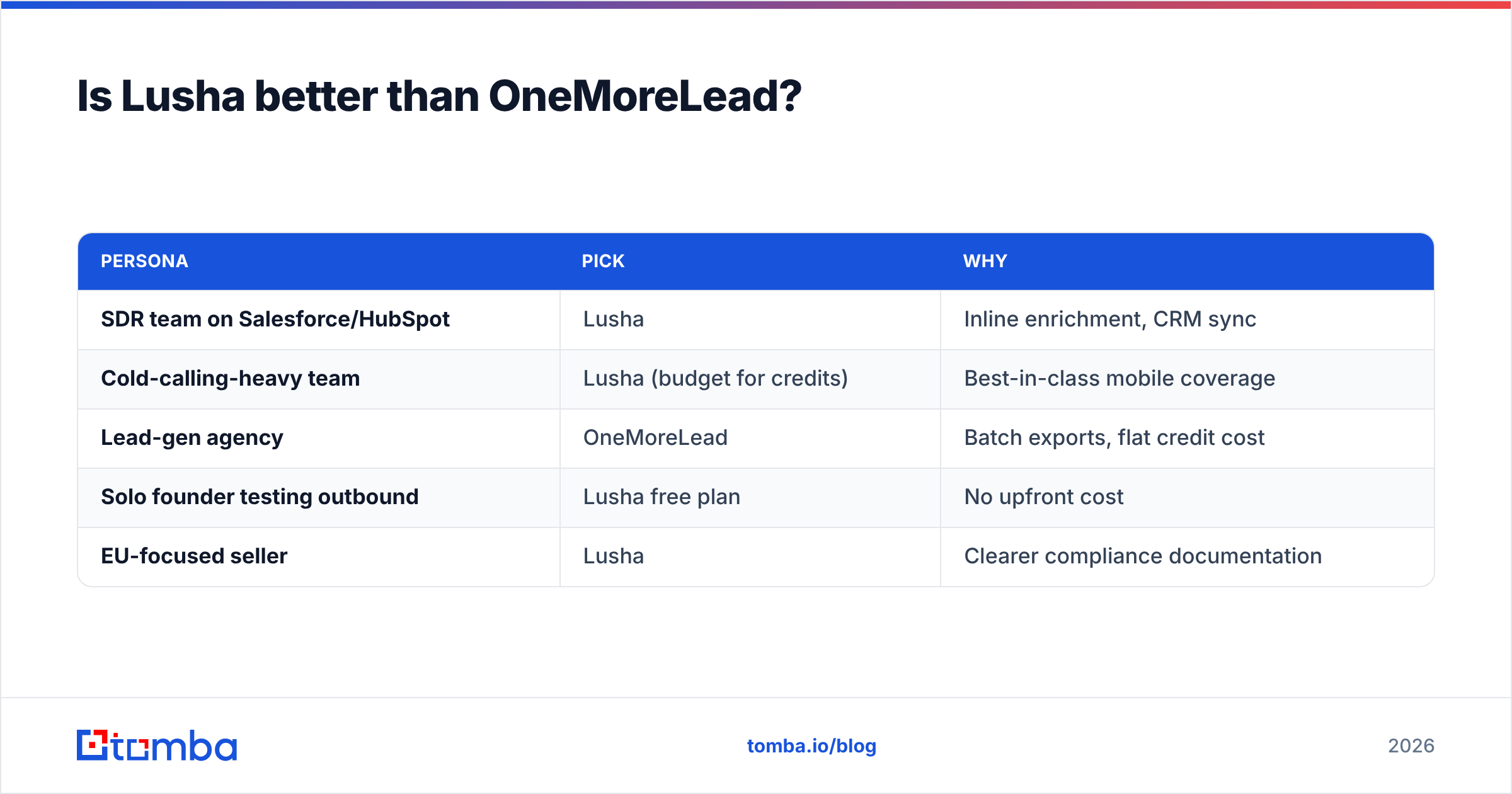
Our recommendation by persona:
| Persona | Pick | Why |
|---|---|---|
| SDR team on Salesforce/HubSpot | Lusha | Inline enrichment, CRM sync |
| Cold-calling-heavy team | Lusha (budget for credits) | Best-in-class mobile coverage |
| Lead-gen agency | OneMoreLead | Batch exports, flat credit cost |
| Solo founder testing outbound | Lusha free plan | No upfront cost |
| EU-focused seller | Lusha | Clearer compliance documentation |
If neither fits, for example because you mainly need verified work emails at a predictable price, an email-first tool may suit you better than either. Compare the Tomba pricing tiers (Free with 25 searches/month, Starter $49/mo, Growth $99/mo, Pro $249/mo) against your monthly contact volume.
How should you run a fair trial before buying?#
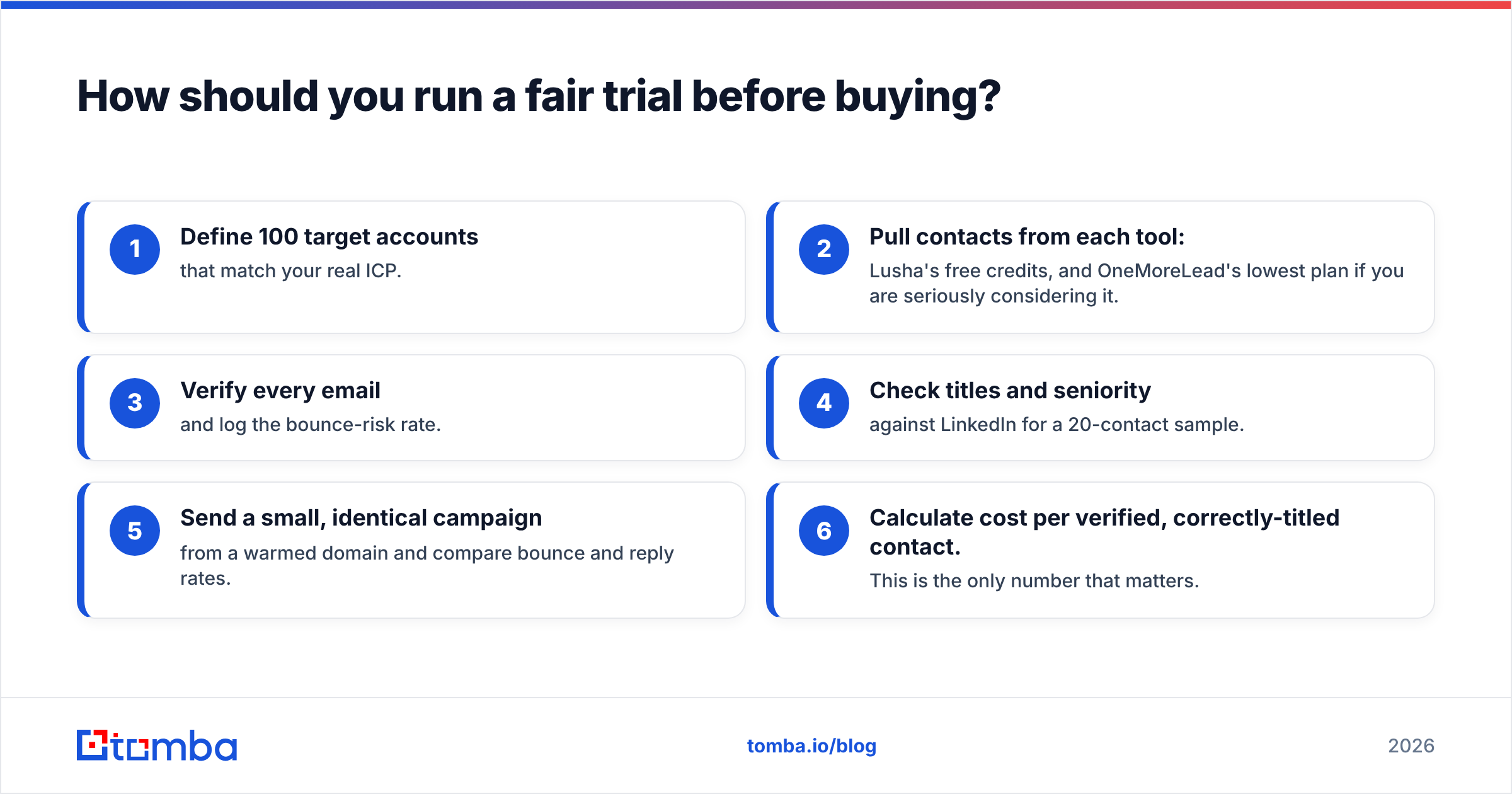
Don't decide from feature pages. Run this two-week test:
- Define 100 target accounts that match your real ICP.
- Pull contacts from each tool: Lusha's free credits, and OneMoreLead's lowest plan if you are seriously considering it.
- Verify every email and log the bounce-risk rate.
- Check titles and seniority against LinkedIn for a 20-contact sample.
- Send a small, identical campaign from a warmed domain and compare bounce and reply rates.
- Calculate cost per verified, correctly-titled contact. This is the only number that matters.
The tool with the lowest cost per usable contact for your segment is the right one, whatever its marketing claims.
Where does Tomba fit in?#
If your main need is finding and verifying professional email addresses rather than buying a full contact database, start with the Tomba Email Finder. You can look up emails by domain, name or company. Results are verified before you export, and the Chrome extension, Google Sheets add-on and API cover both one-off lookups and bulk workflows. The free tier gives you 25 searches a month to test on your own ICP, with no $99 minimum. Paid plans start at $49/mo when you are ready to scale. Run it alongside your Lusha or OneMoreLead trial and compare cost per verified contact before you commit.
Related guides#
// get started
Find, verify and enrich your first contacts today
Start on the free plan with 25 searches a month, then scale when your team is ready.
Free plan · No credit card required · GDPR & CCPA
// about the author