Lusha vs Reachfast (2026): Which Contact Finder Should You Pick?
Lusha has a large, compliance-focused B2B database and deep CRM integrations. Reachfast pulls emails and mobile numbers from a LinkedIn URL at a lower price per contact. Here's which one fits your outbound team.
TL;DR
- Lusha is a full B2B prospecting platform. You get a searchable database, buyer-intent signals, a Chrome extension and mature CRM integrations. It suits sales teams that live in Salesforce or HubSpot and need compliance paperwork.
- Reachfast is a narrow, fast tool. You paste a LinkedIn profile URL (or upload a list of them) and get back emails and mobile numbers. It suits recruiters, agencies and solo SDRs who already know who they want to reach.
- On cost per contact, Reachfast usually wins. Its mid tier is about $99.99/mo for 4,000 credits. Lusha's paid plans run roughly $50–$400/mo per seat for a few hundred to a few thousand credits.
- On workflow depth, Lusha wins. You get list building, filters, intent data, team management and native sequencing connectors.
- Neither one replaces verification. Run every exported list through an independent verifier before it goes into a sequence.
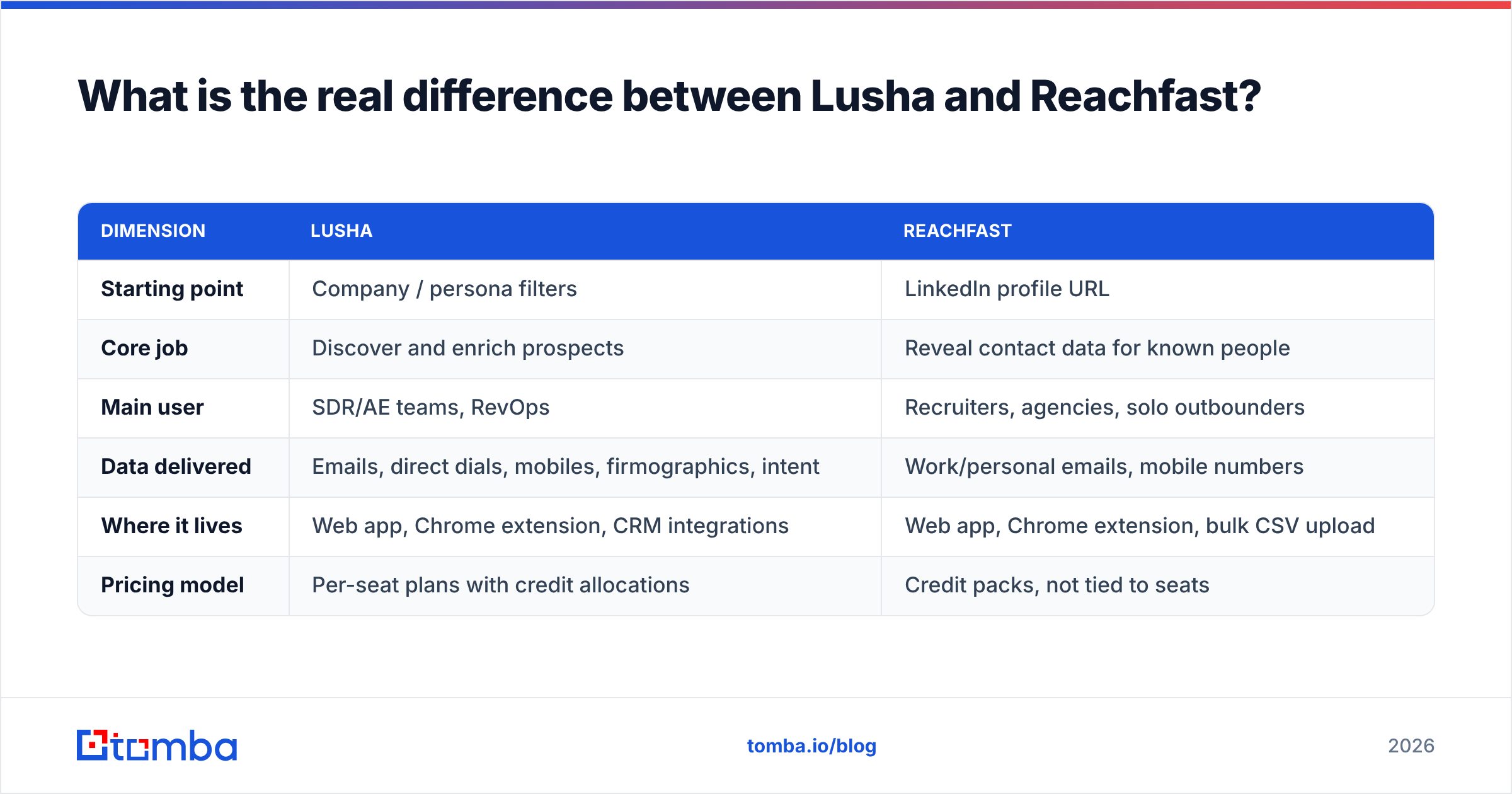
What is the real difference between Lusha and Reachfast?#
These two tools solve different jobs, so pick based on the job you have.
Lusha starts from the company or the persona. You filter by industry, headcount, title, location or tech stack, build a list and reveal contacts. It is built for discovering who to target.
Reachfast starts from a person you've already picked. You give it a LinkedIn URL and it gives you contact details. It is built for reaching people you've already chosen, which is why its marketing targets agencies and recruiters.
A rough analogy: Lusha is a department store where you browse the aisles to find what you need. Reachfast is a locksmith. You bring the door, and it opens it quickly and cheaply.
| Dimension | Lusha | Reachfast |
|---|---|---|
| Starting point | Company / persona filters | LinkedIn profile URL |
| Core job | Discover and enrich prospects | Reveal contact data for known people |
| Main user | SDR/AE teams, RevOps | Recruiters, agencies, solo outbounders |
| Data delivered | Emails, direct dials, mobiles, firmographics, intent | Work/personal emails, mobile numbers |
| Where it lives | Web app, Chrome extension, CRM integrations | Web app, Chrome extension, bulk CSV upload |
| Pricing model | Per-seat plans with credit allocations | Credit packs, not tied to seats |
If you notice you'd mostly use Lusha's Chrome extension on LinkedIn profiles and ignore its search, you're paying for a department store to use the locksmith counter.
How does Lusha work in 2026?#
Lusha has spent years moving from a LinkedIn contact-reveal extension to a full prospecting platform. The current product has four main layers:
- Prospecting database. Search contacts and companies with filters for seniority, department, location, company size, revenue and technologies.
- Chrome extension. Reveal contacts directly on LinkedIn, Sales Navigator, company websites and inside Gmail.
- Enrichment. Bulk-enrich CSVs or CRM records automatically, including scheduled enrichment of new leads in Salesforce and HubSpot.
- Signals and engagement. Job-change alerts, intent topics and lightweight sequencing on higher tiers.
Lusha charges credits: an email reveal costs less than a phone reveal. Most 2026 pricing breakdowns describe 1 credit per email and several credits (commonly 5) per phone number. Check Lusha's official pricing page before you buy, because the plan names and credit sliders change regularly.
Lusha's strongest selling point for enterprise buyers is compliance. It publishes extensive privacy and data-sourcing documentation, which helps when legal or procurement asks hard questions about GDPR and CCPA.
How does Reachfast work?#
Reachfast does one thing well. You paste a LinkedIn profile URL, or upload a CSV of them, and it returns emails and mobile numbers. The vendor says its database covers about 385 million LinkedIn professionals and that results are "triple-verified," with 97%+ email accuracy. Those are vendor claims. Treat them as an upper bound, not a guarantee.
Day to day, it looks like this:
- Single lookup: open a profile, click the extension, and the contact details appear.
- Bulk lookup: export a Sales Navigator list or a list of candidate profiles, upload the URLs, and download the enriched file.
- Credit logic: an email costs 1 credit and a mobile number costs 10 credits. So 4,000 credits buys 4,000 emails or 400 mobiles.
There is no deep prospect database to browse, no intent layer and no team-management console comparable to Lusha's. That's intentional. Reachfast keeps the product small and the price per contact low.
How do Lusha and Reachfast compare on pricing?#
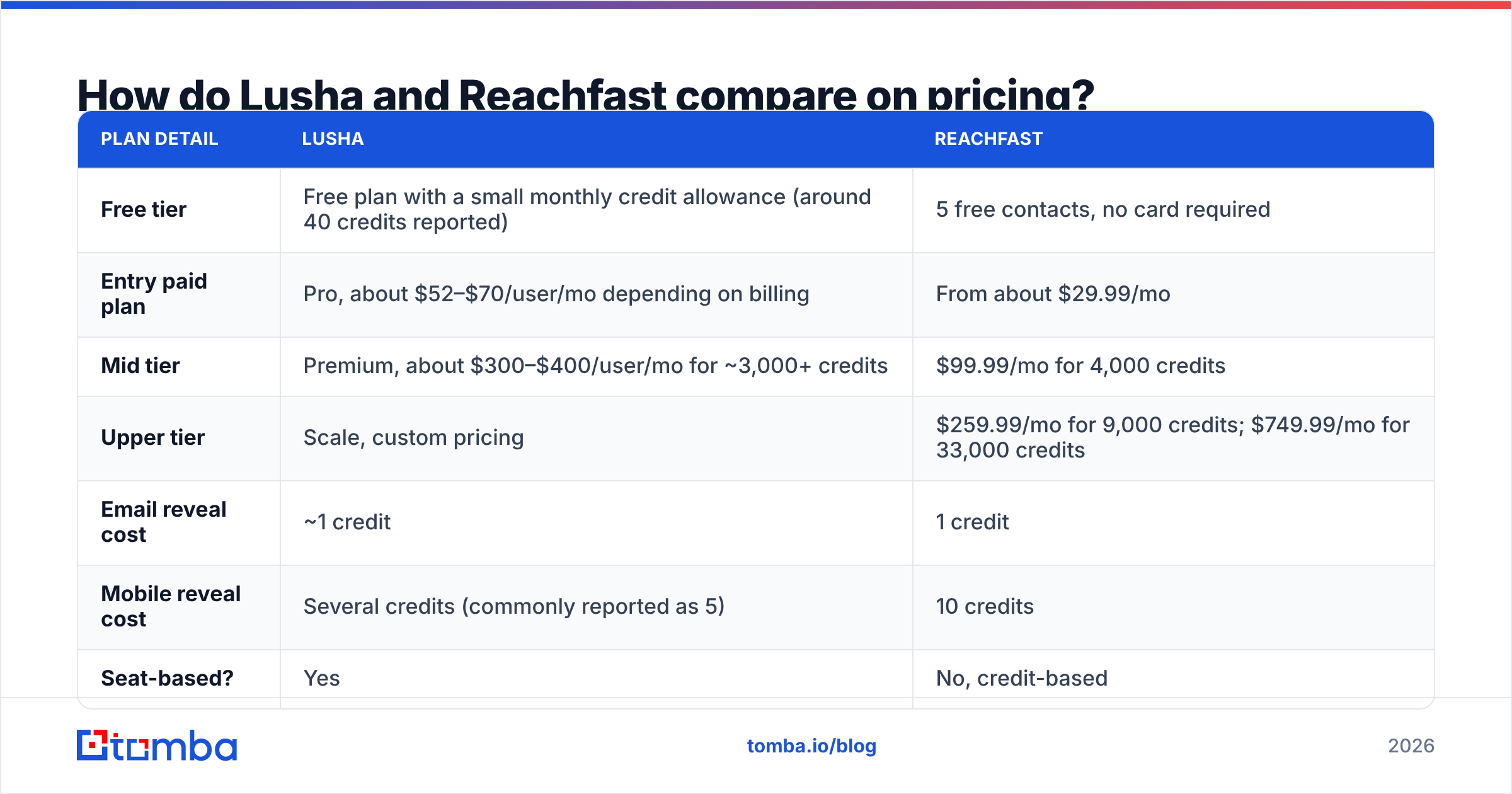
On paper, Reachfast is cheaper per contact. Lusha bundles more features into each dollar. The table below uses publicly reported 2026 numbers. Both vendors adjust them, so treat it as directional.
| Plan detail | Lusha | Reachfast |
|---|---|---|
| Free tier | Free plan with a small monthly credit allowance (around 40 credits reported) | 5 free contacts, no card required |
| Entry paid plan | Pro, about $52–$70/user/mo depending on billing | From about $29.99/mo |
| Mid tier | Premium, about $300–$400/user/mo for ~3,000+ credits | $99.99/mo for 4,000 credits |
| Upper tier | Scale, custom pricing | $259.99/mo for 9,000 credits; $749.99/mo for 33,000 credits |
| Email reveal cost | ~1 credit | 1 credit |
| Mobile reveal cost | Several credits (commonly reported as 5) | 10 credits |
| Seat-based? | Yes | No, credit-based |
| Lifetime deals | No | Has appeared on deal sites in the past |
A worked example makes the gap clear. Say a three-person SDR team needs about 1,500 emails and 150 mobile numbers a month.
- On Reachfast, that's 1,500 + (150 × 10) = 3,000 credits. The $99.99 tier covers it, and everyone shares one credit pool.
- On Lusha, that's 1,500 + (150 × 5) = 2,250 credits spread across three seats. You're looking at higher plans or a credit slider upgrade on each seat, and the monthly bill can easily be several times larger.
Lusha's higher price is fair if your team uses the search, intent, enrichment automation and CRM sync. If you don't, you're paying for features you never open.
Which tool has better data accuracy?#
Both vendors advertise high accuracy, and you shouldn't take either claim at face value. Accuracy depends on your market:
- Region: North American contacts are usually covered best. Coverage in EMEA, APAC and LATAM varies more, and phone numbers are especially uneven.
- Seniority: C-level and VP contacts at mid-market companies are well covered. Frontline staff and new hires are not.
- Company type: Domains with catch-all mail servers accept every address, so "valid" doesn't mean the mailbox exists.

User feedback on review sites such as G2 and Capterra follows a consistent pattern. Lusha is praised for mobile numbers on US contacts and for ease of use, with complaints about credit burn and pricing. Reachfast is praised for speed and value, and its review footprint is smaller because it's a younger, more niche product.
The only accuracy test that counts is your own:
- Pull 100 contacts from your real ICP, not a random sample.
- Run them through both tools during free tiers or trials.
- Verify every email with an independent email verifier. Keep "valid," "risky/catch-all" and "invalid" as separate buckets.
- Dial 20 of the mobile numbers and log connects and wrong numbers.
- Compare cost per verified contact, not cost per credit.
Step 5 usually settles the decision faster than any feature checklist.
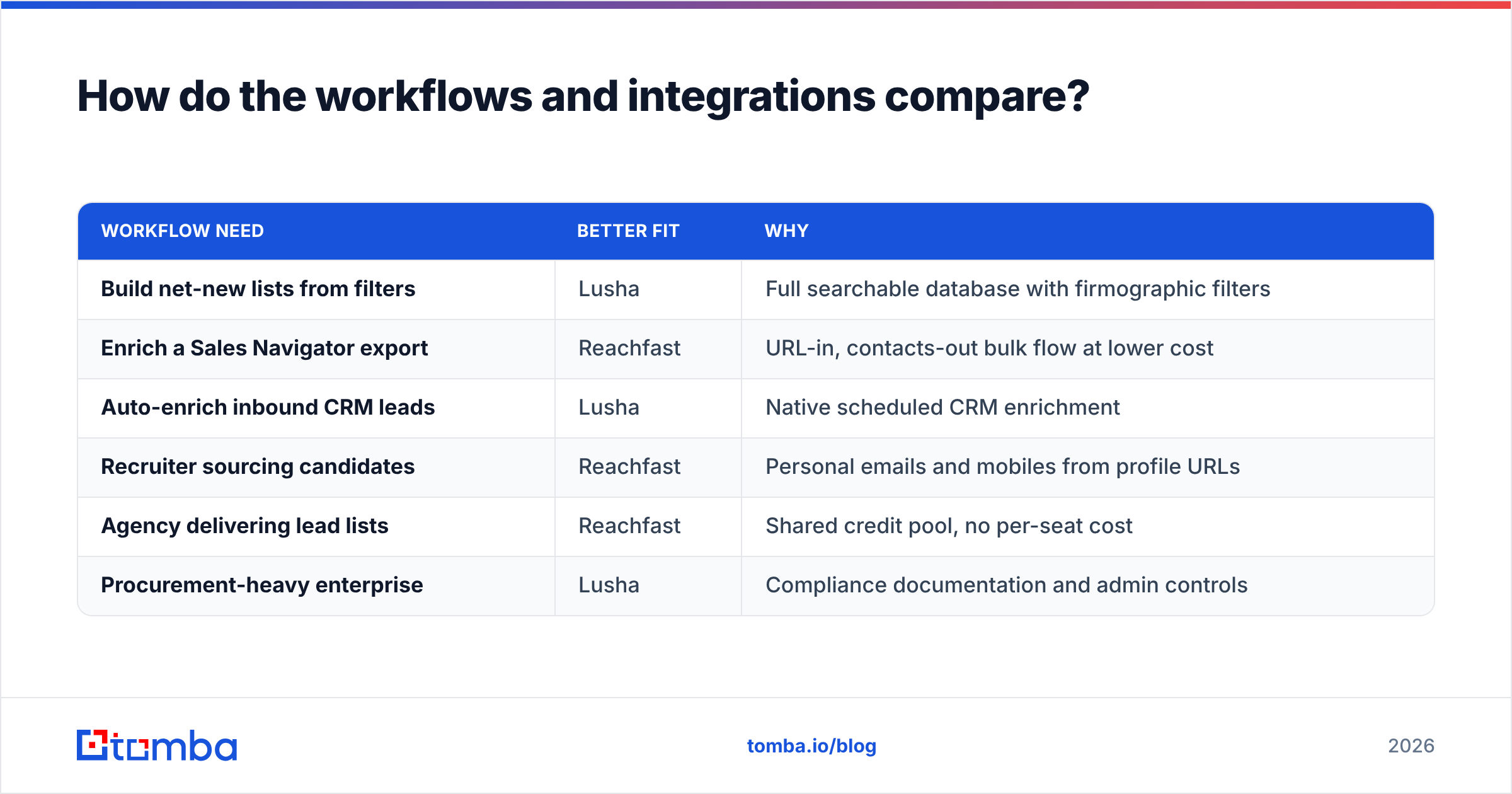
How do the workflows and integrations compare?#
This is where Lusha pulls clearly ahead.
Lusha integrations include Salesforce, HubSpot, Pipedrive, Zoho, Outreach, Salesloft and Gmail/Outlook, plus an API. On a mature sales team, this matters more than price per contact. Reps reveal a contact and it lands in the CRM with owner, source and enrichment fields already filled, with no CSV juggling.
Reachfast is built around the extension and bulk upload. You'll usually export a CSV and push it into your CRM or sequencer yourself, or through Zapier/Make-style automation if your stack supports it. For a recruiter moving candidates into an ATS, or an agency delivering a lead file to a client, that's fine. For a 20-rep team with strict CRM hygiene rules, it becomes a manual step someone has to own.
| Workflow need | Better fit | Why |
|---|---|---|
| Build net-new lists from filters | Lusha | Full searchable database with firmographic filters |
| Enrich a Sales Navigator export | Reachfast | URL-in, contacts-out bulk flow at lower cost |
| Auto-enrich inbound CRM leads | Lusha | Native scheduled CRM enrichment |
| Recruiter sourcing candidates | Reachfast | Personal emails and mobiles from profile URLs |
| Agency delivering lead lists | Reachfast | Shared credit pool, no per-seat cost |
| Procurement-heavy enterprise | Lusha | Compliance documentation and admin controls |
What are the pros and cons of each?#
Lusha pros
- Large, searchable B2B database with useful filters
- Strong US mobile-number coverage, according to user reviews
- Deep native CRM and sales-engagement integrations
- Compliance documentation that works for enterprise procurement
- Intent and job-change signals on higher tiers
Lusha cons
- Per-seat pricing grows quickly as your team grows
- Phone reveals burn credits fast
- Credit allowances on entry plans are tight for high-volume outbound
Reachfast pros
- Low cost per contact, especially for emails
- Very fast LinkedIn-URL workflow, single or bulk
- Credit-based, not seat-based, so it suits agencies and small teams
- Returns personal emails and mobiles, which recruiters value
Reachfast cons
- No real discovery database: you need to know who you're looking for
- Lighter integration footprint, so expect more CSV handling
- Mobile reveals at 10 credits make phone-heavy campaigns expensive
- Smaller review base, so independent accuracy data is thinner

Is Lusha better than Reachfast?#
It depends on whether you need to find prospects or reach ones you've already found.
Choose Lusha if:
- Your team builds lists from scratch using firmographic filters
- You run Salesforce or HubSpot and want enrichment to happen automatically
- You need intent or job-change signals
- Procurement and legal sign-off are part of every software purchase
Choose Reachfast if:
- Your targets come from Sales Navigator, LinkedIn searches or a recruiting pipeline
- You care most about cost per contact and don't want per-seat pricing
- You're an agency or recruiter who needs personal emails and mobiles
- You're fine exporting CSVs into your CRM or sequencer
Consider a third option if:
- Your workflow starts from a company domain or a name + company, not a LinkedIn URL
- You need work emails at scale more than mobile numbers
- You want verification built in instead of buying it separately
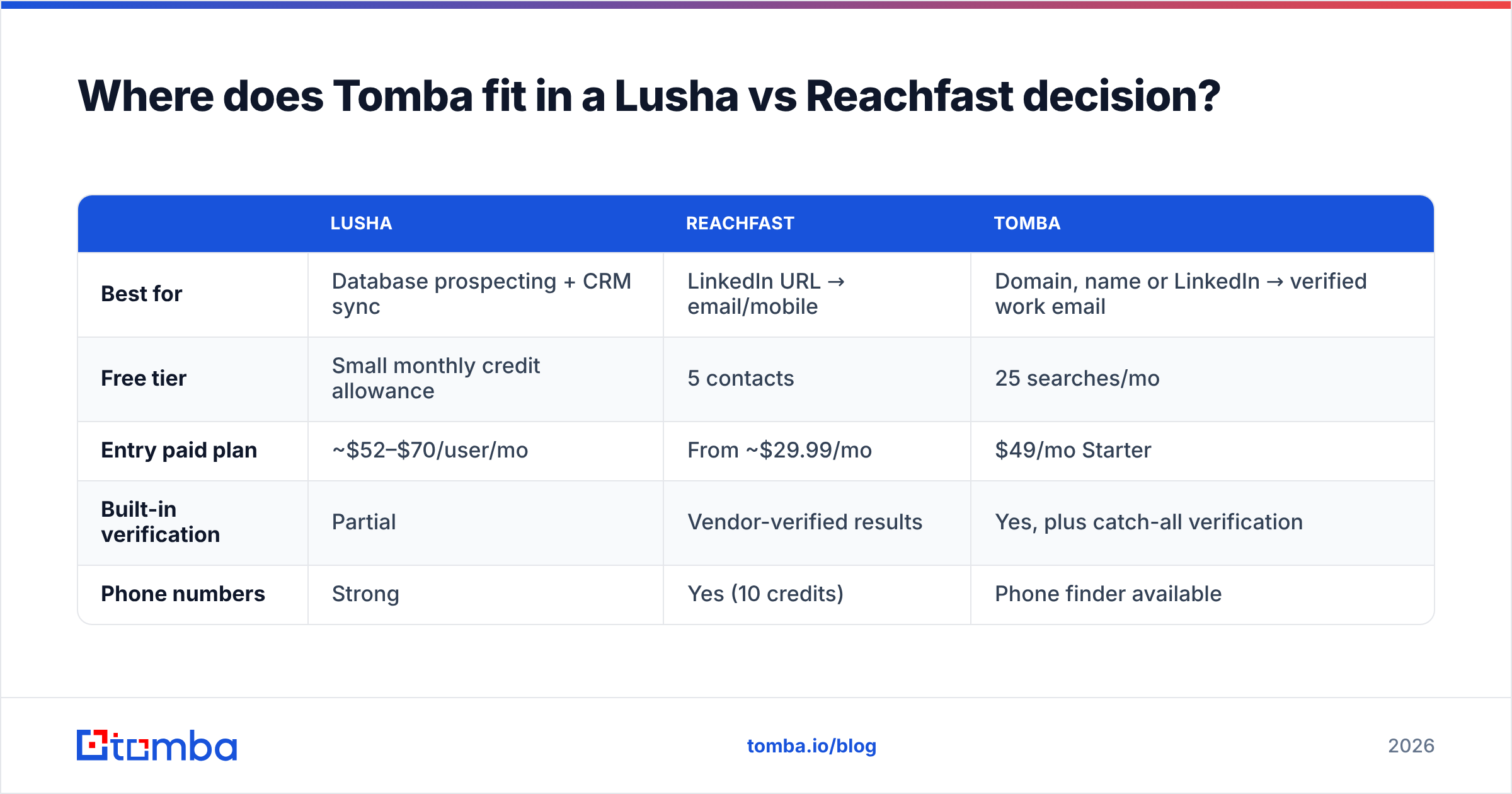
Where does Tomba fit in a Lusha vs Reachfast decision?#
Plenty of teams comparing Lusha and Reachfast mainly need verified work emails, not mobile numbers or intent data. In that case, a dedicated email finder is often the more cost-efficient choice.
Tomba is built for email-first workflows. You can find email addresses from a name and company, pull every public address on a domain, or use the LinkedIn finder when your starting point is a profile URL, as it would be with Reachfast. Verification sits in the same account, so you aren't paying a second vendor to clean the list.

| Lusha | Reachfast | Tomba | |
|---|---|---|---|
| Best for | Database prospecting + CRM sync | LinkedIn URL → email/mobile | Domain, name or LinkedIn → verified work email |
| Free tier | Small monthly credit allowance | 5 contacts | 25 searches/mo |
| Entry paid plan | ~$52–$70/user/mo | From ~$29.99/mo | $49/mo Starter |
| Built-in verification | Partial | Vendor-verified results | Yes, plus catch-all verification |
| Phone numbers | Strong | Yes (10 credits) | Phone finder available |
Plans scale from a free tier to Starter at $49/mo, Growth at $99/mo and Pro at $249/mo. Full details are on Tomba pricing.
What should you do next?#
Don't decide from feature pages. Run the 100-contact test described above with your own ICP, verify every result, and calculate cost per verified contact for each tool. Pick Lusha if the integrations and database search save your reps hours each week. Pick Reachfast if LinkedIn URLs are your starting point and price per contact matters most.
If your outbound mostly needs accurate work emails, add Tomba to the same test. Tomba Email Finder finds professional addresses by domain, name or company, verifies them in the same account, and starts with 25 free searches a month. That's enough to see whether it matches either tool on your own contacts before you spend anything.
Related guides#
// get started
Find, verify and enrich your first contacts today
Start on the free plan with 25 searches a month, then scale when your team is ready.
Free plan · No credit card required · GDPR & CCPA
// about the author