Lusha vs RocketReach: Pricing, Data Accuracy, and Our Verdict
Lusha is built for fast, phone-first prospecting inside LinkedIn and your CRM. RocketReach is built for wide lookups across a huge people index. Here is how they compare on data, credits, pricing and workflow, and which one fits your team.
TL;DR
- Lusha fits SDR teams that want direct dials and verified emails while they browse LinkedIn, Salesforce or HubSpot. Its strongest data is SMB and mid-market contacts in North America and Europe.
- RocketReach fits recruiters, PR teams and researchers who need to look up a wide range of people, including people outside tech and sales roles, and who want to search with advanced filters.
- On pricing, both have free plans that are good for testing but too small for real outbound. Paid plans start in the low tens of dollars per month, and the cost climbs fast once you need phone numbers or API access.
- Neither tool skips verification. Whichever one you pick, run its emails through a separate verifier before you send.
- If you mainly need professional emails at a predictable price, a dedicated email finder like Tomba (from $49/mo) is usually the cheaper option than either of them.
What are Lusha and RocketReach, exactly?#
Both tools sell the same basic thing: contact details for people you want to reach. They come at it from opposite directions, though.
Lusha started as a browser extension. You open a LinkedIn profile or a company website, click the extension, and see an email and phone number. Over time it added a prospecting database, intent signals, buying-committee lists and AI-assisted playbooks. The core habit hasn't changed: a rep is looking at a prospect and wants their contact info immediately.
RocketReach started as a lookup engine for people. It says it indexes hundreds of millions of professional profiles, and its search covers job title, company, location, industry, skills, and even school or past employer. Recruiters use it to find candidates and journalists use it to find sources. Sales teams use it when their target list includes roles that sales-focused databases cover poorly.
The difference is whether you're prospecting or searching:
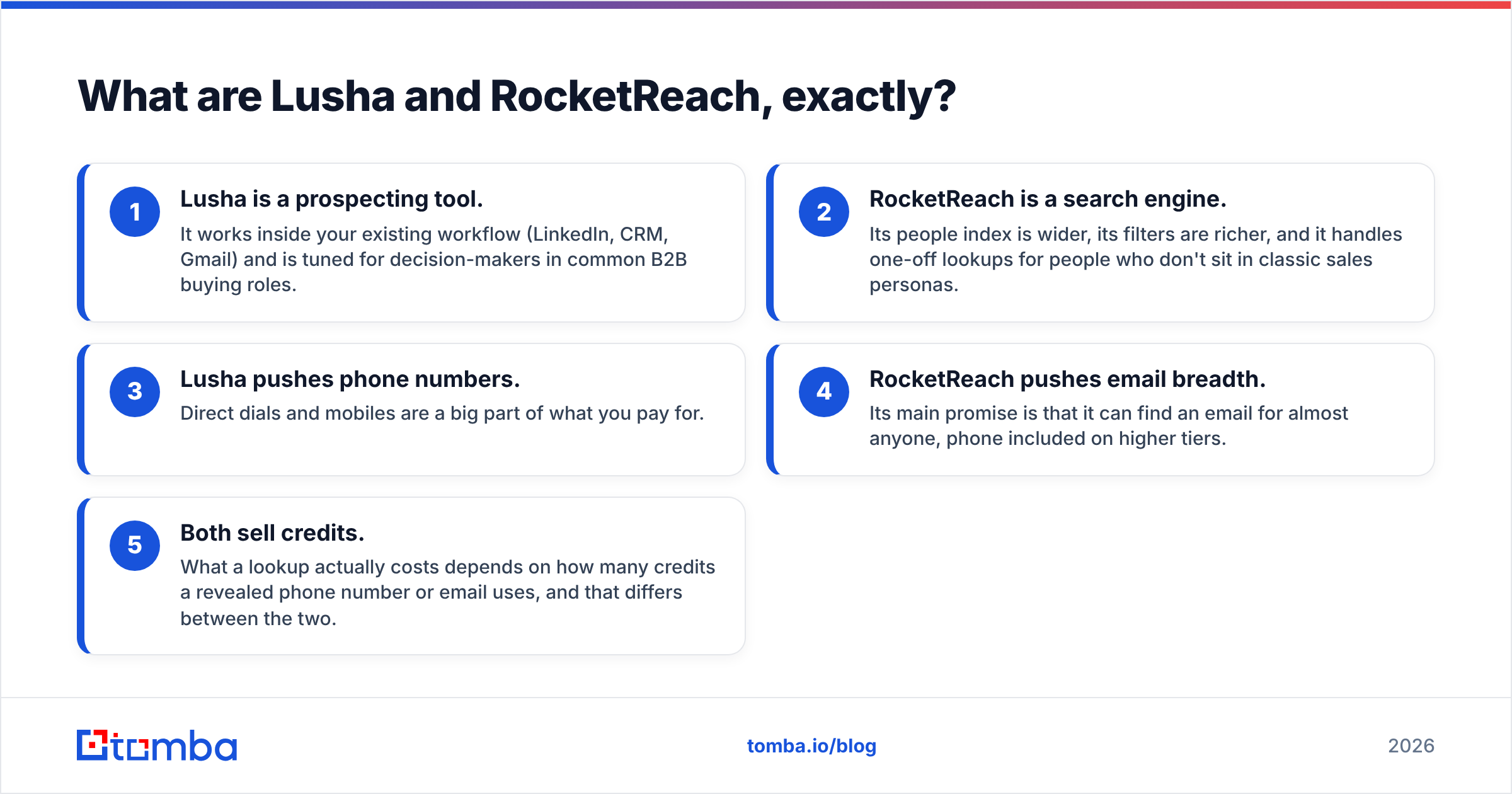
- Lusha is a prospecting tool. It works inside your existing workflow (LinkedIn, CRM, Gmail) and is tuned for decision-makers in common B2B buying roles.
- RocketReach is a search engine. Its people index is wider, its filters are richer, and it handles one-off lookups for people who don't sit in classic sales personas.
- Lusha pushes phone numbers. Direct dials and mobiles are a big part of what you pay for.
- RocketReach pushes email breadth. Its main promise is that it can find an email for almost anyone, phone included on higher tiers.
- Both sell credits. What a lookup actually costs depends on how many credits a revealed phone number or email uses, and that differs between the two.
How do Lusha and RocketReach compare side by side?#
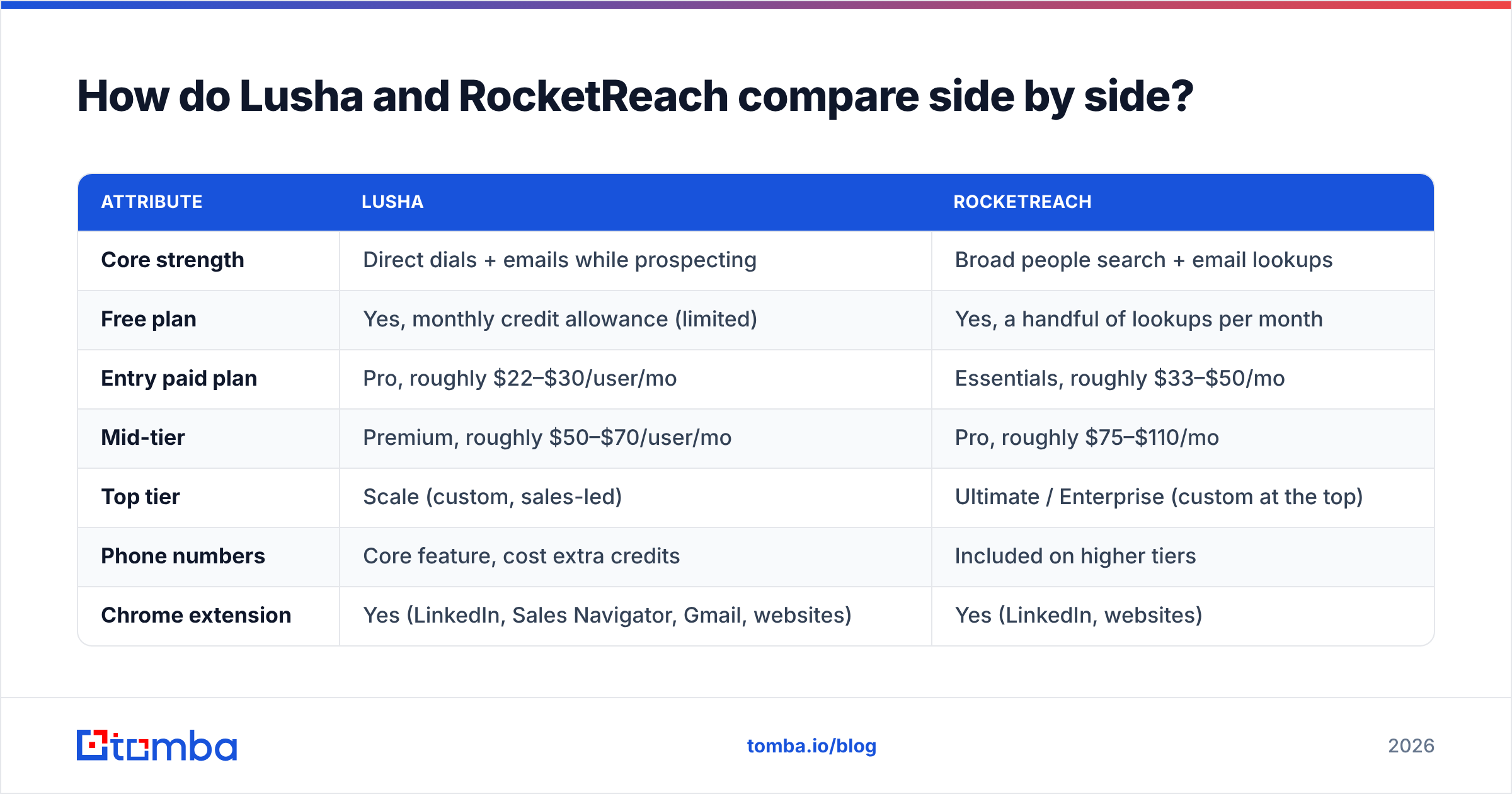
Here's the high-level matchup. Pricing reflects publicly listed 2026 plans billed annually. Both vendors change tiers and credit rules often, so check their pricing pages before you buy.
| Attribute | Lusha | RocketReach |
|---|---|---|
| Core strength | Direct dials + emails while prospecting | Broad people search + email lookups |
| Free plan | Yes, monthly credit allowance (limited) | Yes, a handful of lookups per month |
| Entry paid plan | Pro, roughly $22–$30/user/mo | Essentials, roughly $33–$50/mo |
| Mid-tier | Premium, roughly $50–$70/user/mo | Pro, roughly $75–$110/mo |
| Top tier | Scale (custom, sales-led) | Ultimate / Enterprise (custom at the top) |
| Phone numbers | Core feature, cost extra credits | Included on higher tiers |
| Chrome extension | Yes (LinkedIn, Sales Navigator, Gmail, websites) | Yes (LinkedIn, websites) |
| CRM integrations | Salesforce, HubSpot, Pipedrive, Zoho, Outreach, Salesloft | Salesforce, HubSpot, plus Zapier and others |
| API access | Higher tiers | Higher tiers |
| Best-fit buyer | SDR/AE teams, SMB to mid-market | Recruiters, PR, researchers, broad outbound |
| Data compliance | GDPR/CCPA, ISO 27001, SOC 2 claims | GDPR/CCPA compliance claims |
Two notes on the table:
- "Per user" vs "per account" matters. Lusha prices per seat, so a five-rep team pays roughly five times the listed number. RocketReach's lower tiers are effectively single-user, and team pricing is on the upper plans.
- Credit costs per reveal are not equal. On Lusha, a phone number reveal has historically used more credits than an email reveal. RocketReach counts by lookup, and phone data is gated by plan. Before comparing headline prices, work out your blended cost per usable contact.


Which is more accurate: Lusha or RocketReach?#
It depends on who you're targeting. Anyone who quotes you one accuracy number for either tool is selling something.
From hands-on testing and the patterns in user reviews on G2, here's what tends to happen:
- Lusha does better on US and European SMB and mid-market contacts in sales, marketing, ops and leadership roles. Its community-contributed data and phone data are strongest there. Direct dial hit rates are usually better than RocketReach's for those personas.
- RocketReach does better on breadth. If your list includes engineers, academics, healthcare staff, nonprofit leaders, public sector roles or very small companies, RocketReach is more likely to return something.
- Both decay. About a fifth to a third of B2B contact data goes stale every year as people change jobs. An email that was valid when the vendor last checked it can bounce today.
- Both return pattern-guessed emails on some domains. On catch-all domains, which accept mail for any address, neither tool can be fully certain an inbox exists. You'll see "likely" or graded confidence labels. Treat those as unverified.

In practice: take 200 contacts from your actual ICP, run them through both free tiers or trials, and push every returned email through an independent email verifier. Count the valid, risky and invalid results. That 30-minute test tells you more than any vendor accuracy claim.
How does pricing really work for each tool?#
Sticker prices mislead in this category. What actually determines cost is how credits are spent and how many seats you need.
Lusha pricing mechanics#
- Free: a small monthly credit allowance, enough to try the extension on a few dozen profiles.
- Pro: per-user monthly or annual billing, with a pool of credits per year. Email reveals and phone reveals use credits at different rates.
- Premium: more credits per user plus features like bulk enrichment and some intent data.
- Scale: custom pricing. Adds API, advanced CRM enrichment, signals and admin controls.
The catch is phone data. If your team mostly cold calls, you'll use credits much faster than the plan name suggests. A 10-rep team calling heavily can end up on Scale pricing quickly.
RocketReach pricing mechanics#
- Free: a few lookups per month.
- Essentials: email-focused lookups, a fixed annual lookup allowance, single user.
- Pro: adds phone numbers, more lookups, and integrations.
- Ultimate / Enterprise: high lookup volume, API access, team management and bulk features.
The catch is that bulk and API features sit near the top. If you want to enrich a 20,000-row CSV or connect lookups to an internal tool, the mid tier usually won't be enough.
Cost per usable contact: a worked example#
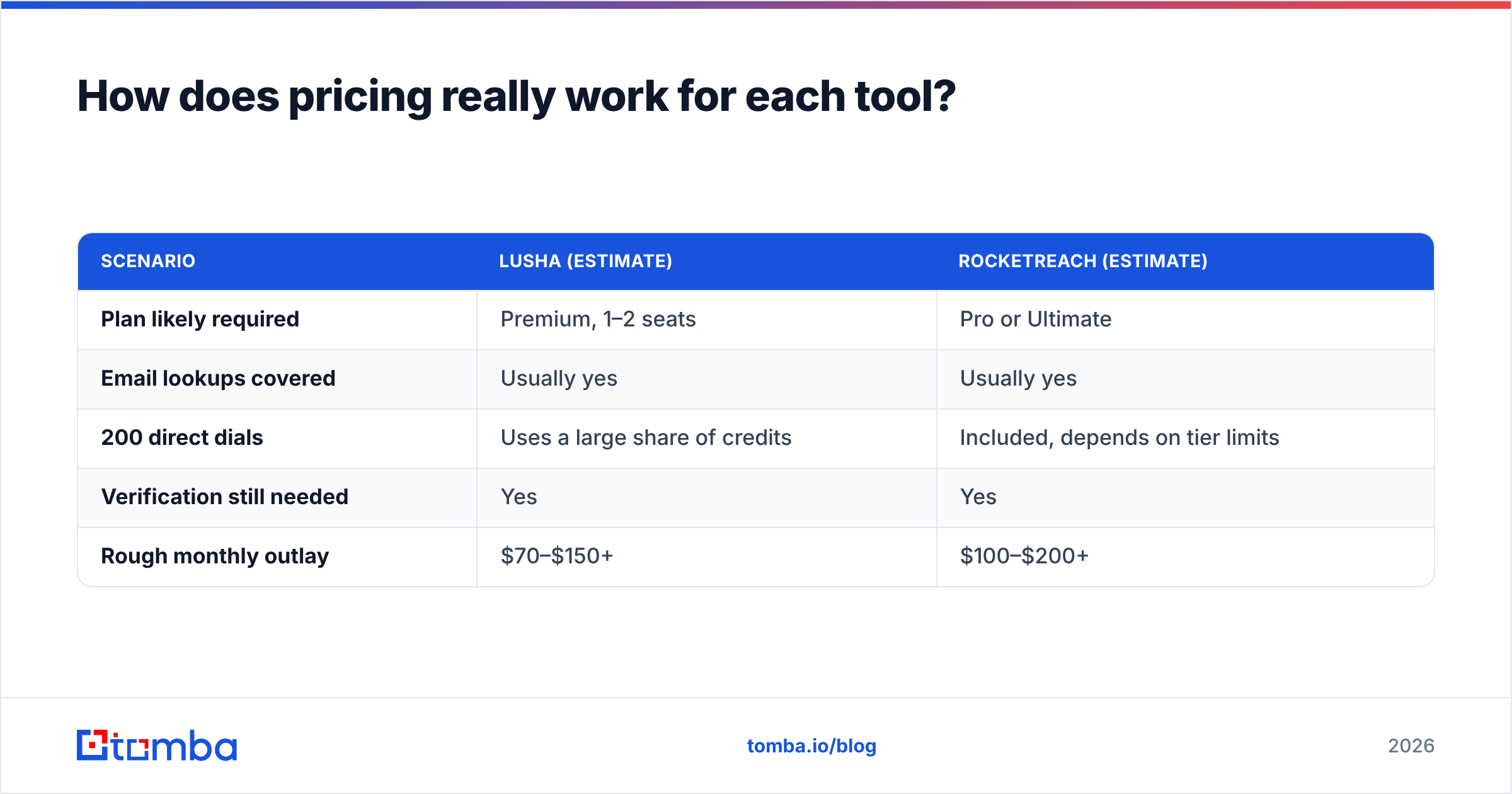
Say you need 1,000 verified emails a month for outbound, plus 200 direct dials.
| Scenario | Lusha (estimate) | RocketReach (estimate) |
|---|---|---|
| Plan likely required | Premium, 1–2 seats | Pro or Ultimate |
| Email lookups covered | Usually yes | Usually yes |
| 200 direct dials | Uses a large share of credits | Included, depends on tier limits |
| Verification still needed | Yes | Yes |
| Rough monthly outlay | $70–$150+ | $100–$200+ |
Neither one is cheap at this volume, and both still leave verification to you. That's why many teams split the work: an email finder for the email volume, and Lusha or RocketReach only for the phone-heavy slice.
Which has the better workflow and integrations?#
Lusha wins on rep workflow. The extension is quick and fits well with LinkedIn and Sales Navigator. One-click export to Salesforce or HubSpot is reliable. Lusha also integrates with sequencers like Outreach and Salesloft, so a rep can go from profile to sequence without opening a spreadsheet. Its list-building and "similar contacts" features exist so reps don't have to build lists by hand.
RocketReach wins on research workflow. Its search interface has more filter depth than Lusha's, especially for niche roles, education and past employers. Bulk lookups by name and company, or by LinkedIn URL, work well for ops people cleaning up lists. The integrations cover the main CRMs and Zapier, but they're thinner than Lusha's sales-engagement integrations.
Small quality-of-life differences to check in a trial:
- Duplicate protection: whether a re-reveal of a contact you've already paid for uses credits again. Both handle this, but confirm it on your plan.
- CRM field mapping: which fields get written, and whether you can map custom fields.
- Admin controls: credit caps per rep, usage reports, SSO. These are usually locked to the top tiers on both tools.
Is Lusha or RocketReach more compliant?#
Both tools say they comply with GDPR and CCPA and offer opt-out mechanisms. Lusha leans harder on its compliance story, with ISO 27001 and SOC 2 claims, a dedicated trust center, and a data-sourcing model built around community contributions and public sources. RocketReach publishes its own privacy and opt-out processes.
If you're selling into the EU, compliance comes down to your lawful basis for processing and how you handle outreach. No vendor badge covers that for you. Write down your legitimate-interest assessment, honour opt-outs fast, and don't email personal addresses for B2B prospecting.
Lusha vs RocketReach: which should you choose?#
Use this decision shortcut:
Choose Lusha if:
- Your reps cold call and need direct dials or mobiles.
- You target SMB and mid-market buyers in North America or Europe.
- Your team lives in LinkedIn, Salesforce/HubSpot, and a sequencer, and you want one-click flow between them.
- You'll pay per seat in exchange for a smoother rep experience.
Choose RocketReach if:
- You recruit, do PR, or prospect into roles outside the standard sales personas.
- You need deep search filters (skills, education, previous employers).
- Most of your work is research-led lookups rather than high-volume sequencing.
- You want one account with a large lookup pool rather than many rep seats.
Choose neither (or add a specialist) if:
- Your main need is professional email addresses at volume, and phones are a nice-to-have.
- You're price-sensitive and want predictable per-search pricing without credit multipliers.
- You need an API, bulk processing and verification bundled together without jumping to enterprise pricing.
That third group is bigger than most teams expect. Many companies buy Lusha or RocketReach for phones and end up using 80% of the credits on emails, which is the most expensive way to get emails.

Where does Tomba fit in the comparison?#
To be clear about its limits: Tomba isn't a like-for-like replacement for Lusha's direct-dial focus or RocketReach's recruiter-grade people search. It's an email-first platform. Its core is an email finder that works by domain, name or company, with domain search, a built-in verifier, a catch-all verifier, a phone finder and enrichment alongside it.
Where it compares well:
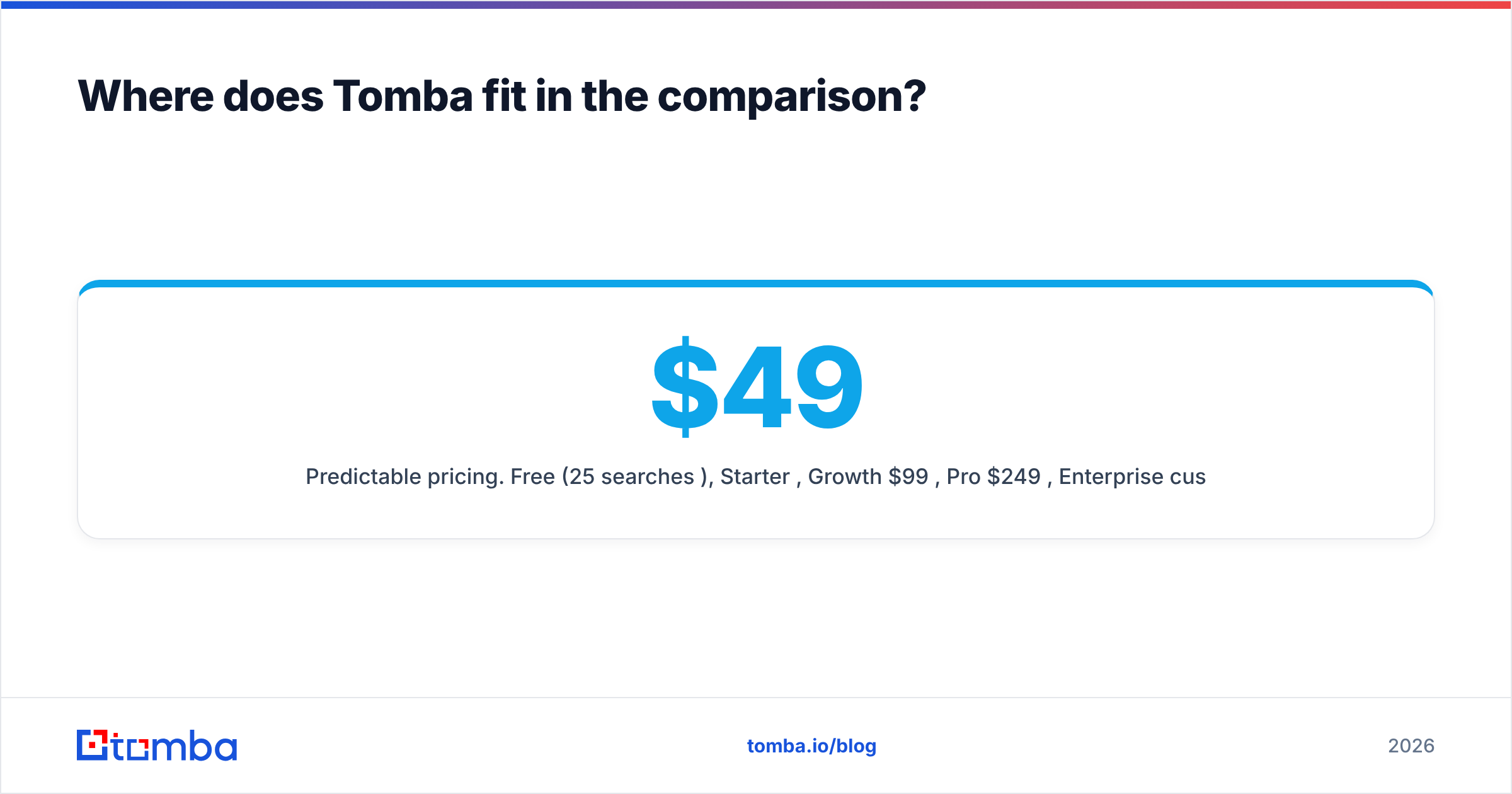
- Predictable pricing. Free (25 searches/mo), Starter $49/mo, Growth $99/mo, Pro $249/mo, Enterprise custom. See the full Tomba pricing breakdown.
- Verification included. Every found email can be checked in the same platform, so you don't need a separate verification tool.
- Developer access earlier. API, CLI, Google Sheets and Zapier-style integrations are available without enterprise negotiation.
- Domain-level discovery. Enter a company domain and get a list of known addresses and the company's email pattern. This is useful for account-based outbound.
A common stack in 2026: use Tomba for the email volume and verification, and keep a small Lusha seat (or a RocketReach plan) for the reps or researchers who need phones or hard-to-find people. If RocketReach is the tool you're reconsidering, our RocketReach alternative page goes through the switch in more detail.
What questions should you ask in a trial?#
Before signing an annual contract with either vendor, run this checklist:
- What is my verified-email yield on 200 ICP contacts? Measure it after independent verification, not with the vendor's own confidence label.
- What is my direct-dial connect rate? Call 50 numbers. Count real connects, not "number returned."
- How many credits does a full contact (email + phone) cost? Multiply by your monthly target.
- What happens to unused credits? Rollover rules differ by plan and billing cycle.
- Which features are locked behind sales calls? API, bulk enrichment, SSO and CRM auto-enrichment usually are.
- What does the renewal price look like? Ask in writing. First-year discounts are common in this category.
Final verdict#
On Lusha vs RocketReach, there's no single winner. They solve different problems. Lusha is the better pick for phone-heavy SDR teams working in LinkedIn and a CRM. RocketReach is the better pick for broad, filter-heavy people search across industries and roles. Both are solid, both are credit-priced, and both need independent verification before you send at scale.
If you mostly need professional email addresses that are found, verified and exportable at a flat monthly price, start with the Tomba Email Finder. Use the free tier's 25 searches to run the same 200-contact ICP test described above against your current tool. If the yield holds up, you'll likely save the cost of a full Lusha or RocketReach plan and keep their phone data only for the reps who actually call.
Related guides#
// get started
Find, verify and enrich your first contacts today
Start on the free plan with 25 searches a month, then scale when your team is ready.
Free plan · No credit card required · GDPR & CCPA
// about the author