Lusha vs Safetymails (2026): Which Tool Fits Your Email Workflow?
Lusha finds B2B contacts. Safetymails checks whether email addresses are deliverable. Here's what each tool does, what it costs in 2026, and when it makes sense to pay for both.
TL;DR
- Lusha and Safetymails solve different problems. Lusha is a B2B contact database with a prospecting layer that hands you names, emails and phone numbers. Safetymails is an email verification service that tells you whether addresses you already have will bounce.
- Pick Lusha if you don't have contacts yet and need direct dials, LinkedIn-side lookups and CRM enrichment for SDRs.
- Pick Safetymails if you already have a list (CRM export, webinar signups, form leads) and need to clean it in bulk or validate emails in real time at the point of capture.
- Plenty of teams end up paying for both. That means two vendors, two credit systems and two integrations. A single platform that finds and verifies emails, such as Tomba, removes that hand-off.
- Pricing at a glance (2026): Lusha's free plan includes 40 credits a month and Starter is $49.90/mo. Safetymails starts at about $7.50 per 1,000 one-time verification credits, and those credits don't expire.
What is the real difference between Lusha and Safetymails?#
Searches for "Lusha vs Safetymails" usually start from a wrong assumption: that the two tools compete. For the most part, they don't.
Think of a prospecting list as a mailing operation. Lusha writes the addresses on the envelopes. Safetymails is the postal clerk who checks each address before the envelope goes out. You can run a mailroom with only one of them, but you'll either have nothing to send or you'll send a lot of mail to houses that don't exist.
In more concrete terms:
- Lusha is a sales intelligence platform. You search for people by company, title, seniority or location, or you open a LinkedIn profile with the Chrome extension, and Lusha shows you a work email and often a direct or mobile phone number. It also enriches CRM records and adds intent signals on its higher tiers.
- Safetymails is an email validation service. You upload a list or call its API, and it classifies each address as valid, invalid, risky (catch-all/accept-all), disposable, role-based and so on. It doesn't discover new contacts.
So the useful question is which job is blocking your pipeline right now: finding contacts or keeping your sending lists clean.
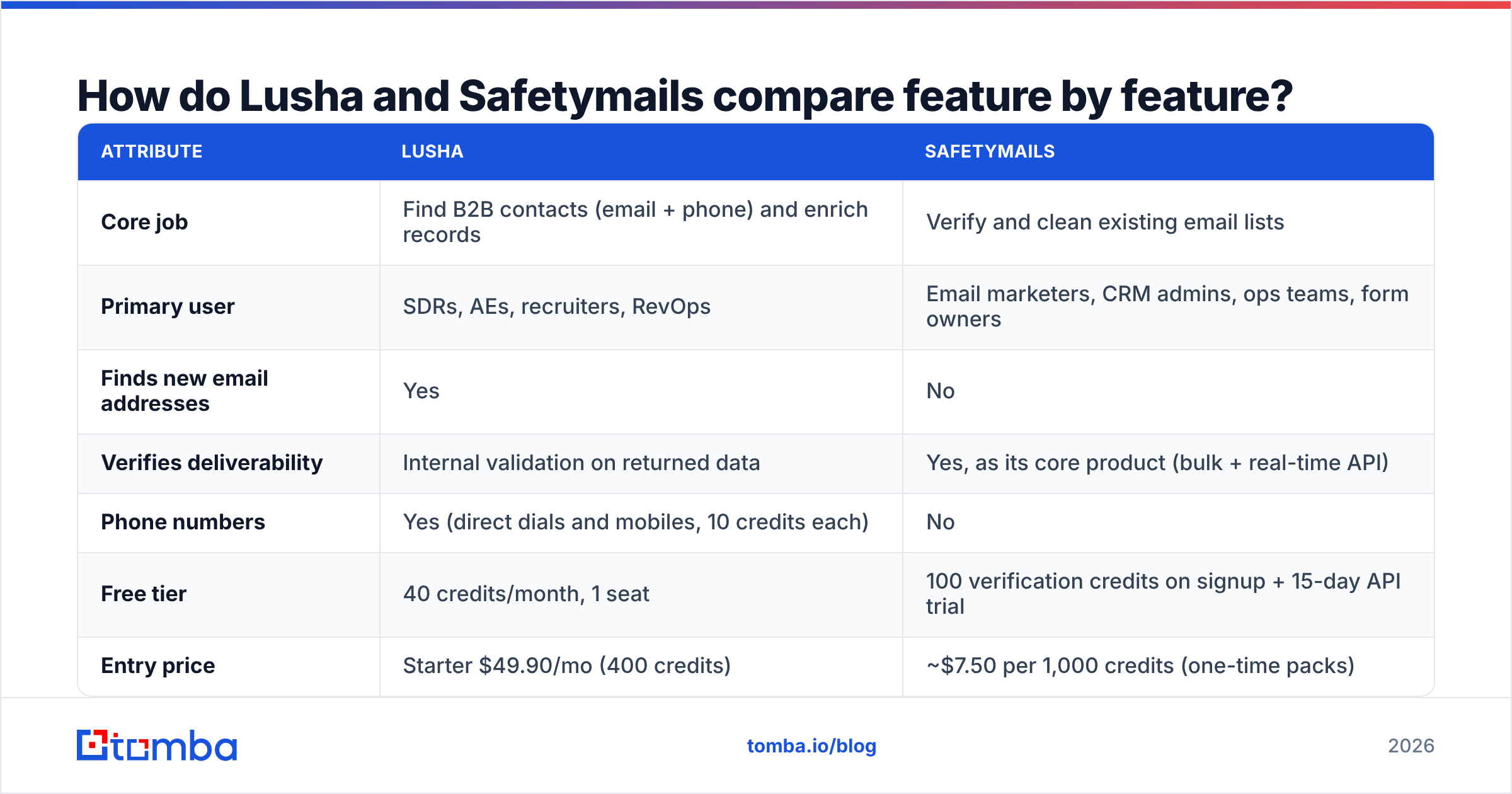
How do Lusha and Safetymails compare feature by feature?#
The table below compares the two products on the attributes buyers usually weigh. Pricing comes from public pricing pages and third-party trackers at the time of writing. Both vendors adjust plans often, so confirm on their sites before you buy.
| Attribute | Lusha | Safetymails |
|---|---|---|
| Core job | Find B2B contacts (email + phone) and enrich records | Verify and clean existing email lists |
| Primary user | SDRs, AEs, recruiters, RevOps | Email marketers, CRM admins, ops teams, form owners |
| Finds new email addresses | Yes | No |
| Verifies deliverability | Internal validation on returned data | Yes, as its core product (bulk + real-time API) |
| Phone numbers | Yes (direct dials and mobiles, 10 credits each) | No |
| Free tier | 40 credits/month, 1 seat | 100 verification credits on signup + 15-day API trial |
| Entry price | Starter $49.90/mo (400 credits) | ~$7.50 per 1,000 credits (one-time packs) |
| Mid tier | Pro $69.90–$227.40/mo (600–2,000 credits, 2 seats) | Monthly subscriptions at lower per-credit rates; required for the API |
| Credit expiry | Monthly allowance, limited rollover on Pro | One-time credits don't expire |
| Real-time form validation | No | Yes (API/form integration) |
| Chrome / LinkedIn extension | Yes | No |
| CRM integrations | Salesforce, HubSpot, Pipedrive and others | Marketing/ESP platforms and API-based connections |
| Best for | Building outbound lists from scratch | Protecting sender reputation on lists you already own |
The row that matters most is the first one. Once you see that Lusha creates data and Safetymails audits data, the rest of the table follows from it.
What does Lusha do well, and where does it fall short?#
Lusha has been a fixture in SDR tool stacks for years, mostly because it's fast. Install the extension, open a LinkedIn profile, and a phone number shows up a second later. For teams that rely on calling, that speed counts for a lot.
Where Lusha is strong:
- Phone data. Direct dials and mobile numbers are Lusha's best-known asset, and for many reps they're the reason to buy it.
- Workflow coverage. Prospecting search, list building, CRM enrichment and the browser extension sit in one interface.
- Team features. Pro and Premium include several seats, shared credit pools and admin controls, which suits small SDR pods.
- Compliance posture. Lusha publishes a lot of documentation on GDPR and CCPA, which helps procurement in regulated buying committees.
Where Lusha falls short:
- Credit math gets expensive. One phone number costs ten credits. On the Starter plan's 400 credits, that's about 40 phone reveals a month if you only pull numbers.
- Coverage varies by region. Reviews on G2 regularly mention that North American data is richer than data for smaller EMEA or APAC markets.
- Verification isn't its focus. Lusha validates its own data, but it isn't designed to clean a 50,000-row list you imported from somewhere else.
- Seat-based tiers. Larger teams end up on Premium ($399.90/mo list price) or the custom Scale plan quickly.
If your outbound motion leans on calling and LinkedIn, Lusha is a reasonable choice. If it's email-only, you're paying for a phone dataset you may not use.
What does Safetymails do well, and where does it fall short?#
Safetymails is narrower and doesn't pretend otherwise. It verifies emails and does it at a low price per address.
Where Safetymails is strong:
- Low cost per check. At roughly $7.50 per 1,000 one-time credits, cleaning a large newsletter or CRM database won't wreck your budget.
- Non-expiring credits. Buy a pack, use some now and keep the rest for next quarter. Seasonal senders find this useful.
- Real-time validation. The API and form integration catch typos ("gmial.com") and disposable addresses before they reach your database, which keeps list quality from slipping back.
- Clear result categories. Valid, invalid, risky/accept-all, role-based and disposable buckets make it easy to decide what to suppress.
Where Safetymails falls short:
- It doesn't find anyone. If you need new prospects, Safetymails has nothing to give you.
- Catch-all domains are still a gray zone. Like most verifiers, it can flag accept-all domains as risky but can't always confirm that a specific inbox exists. A dedicated catch-all verifier helps on B2B lists, where catch-all setups are common.
- API requires a subscription. One-time packs cover bulk uploads, but real-time API use needs a monthly plan.
- Marketing-first integrations. The integrations lean toward email marketing platforms rather than sales engagement tools.
If you run newsletters, signup forms or large CRM databases, Safetymails is a cheap way to protect sender reputation. It doesn't replace a prospecting tool.
Is Lusha better than Safetymails?#
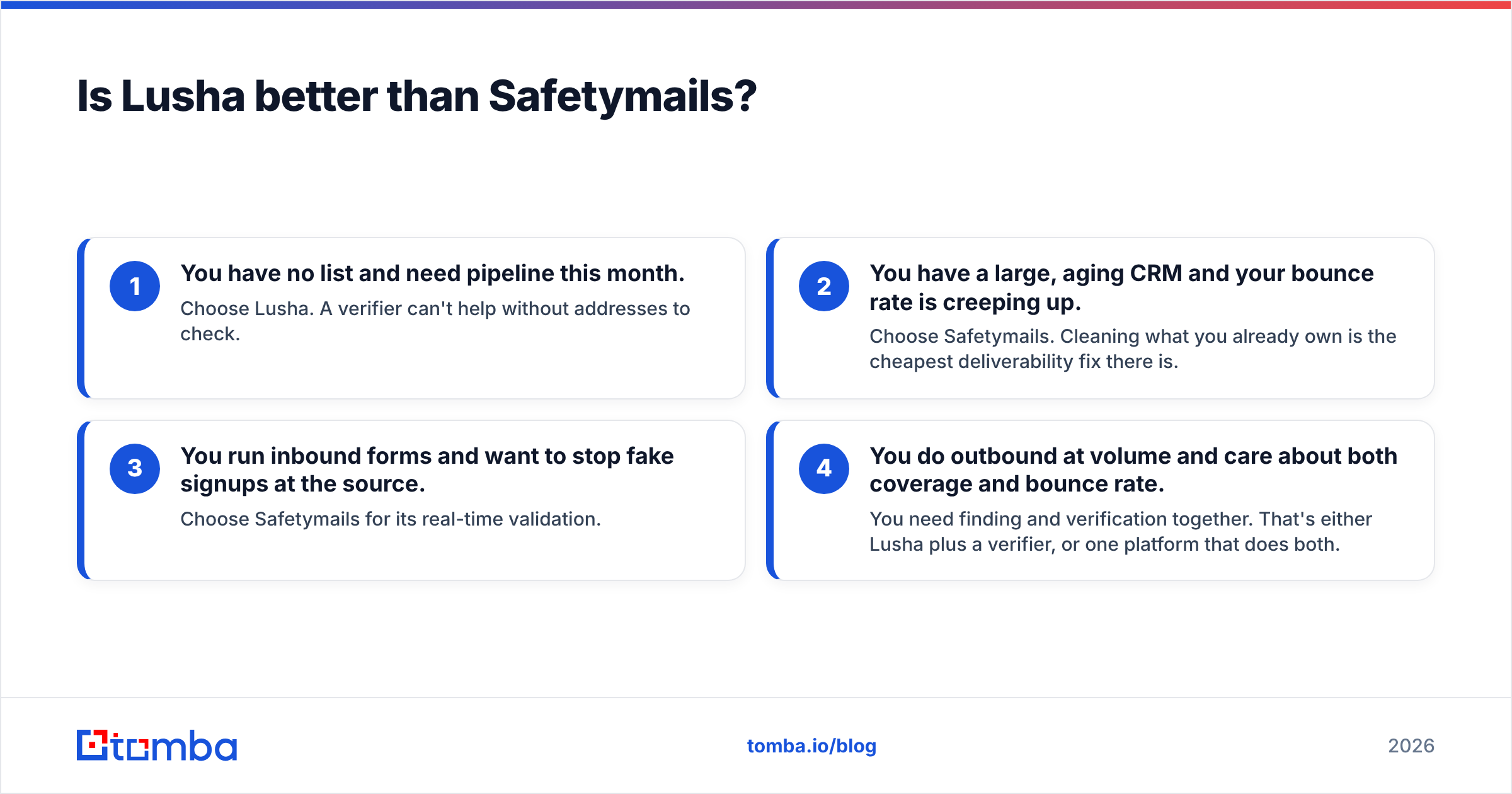
Neither one wins outright, because they don't do the same job. "Better" depends on which of these four situations matches yours:
- You have no list and need pipeline this month. Choose Lusha. A verifier can't help without addresses to check.
- You have a large, aging CRM and your bounce rate is creeping up. Choose Safetymails. Cleaning what you already own is the cheapest deliverability fix there is.
- You run inbound forms and want to stop fake signups at the source. Choose Safetymails for its real-time validation.
- You do outbound at volume and care about both coverage and bounce rate. You need finding and verification together. That's either Lusha plus a verifier, or one platform that does both.
That fourth case is where most growing sales teams land, and it's where the cost of running two tools adds up.
Do you need both tools, or one platform that does both?#
Look at what the two-tool stack involves day to day.
A rep pulls 500 contacts from Lusha and exports a CSV. Someone uploads that CSV to Safetymails, waits for the results, downloads a cleaned file, filters out risky and invalid rows, and re-imports the survivors into the sequencer or CRM. Every step means another file, another tab and another chance for stale data to slip through. You're also managing two credit balances, two renewal dates and two security reviews.
Running data through a separate verifier is still a sensible habit. Even good contact databases go stale as people change jobs, and B2B data is commonly estimated to decay by around a quarter or more each year. Sending to unverified addresses is one of the quickest ways to damage your email deliverability.
The alternative is a platform where finding and verifying happen in one pass. Tomba checks each address it returns, offers a standalone email verifier for lists you already have, and handles catch-all domains with a dedicated checker. It doesn't replace Lusha's depth on mobile numbers, though Tomba does offer a phone finder. For email-first outbound, it combines both jobs.
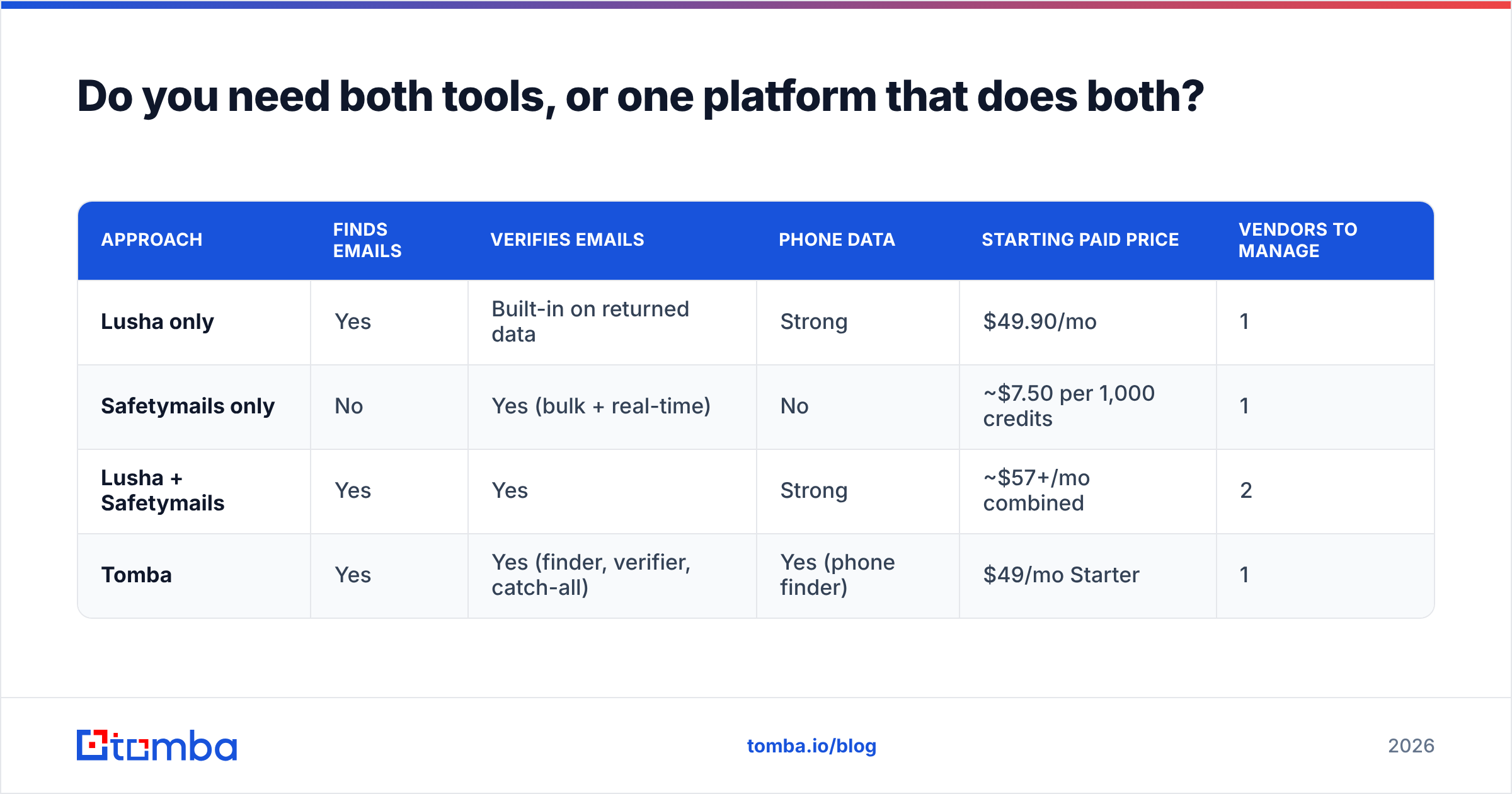
Here's how the three approaches compare on cost and workflow:
| Approach | Finds emails | Verifies emails | Phone data | Starting paid price | Vendors to manage |
|---|---|---|---|---|---|
| Lusha only | Yes | Built-in on returned data | Strong | $49.90/mo | 1 |
| Safetymails only | No | Yes (bulk + real-time) | No | ~$7.50 per 1,000 credits | 1 |
| Lusha + Safetymails | Yes | Yes | Strong | ~$57+/mo combined | 2 |
| Tomba | Yes | Yes (finder, verifier, catch-all) | Yes (phone finder) | $49/mo Starter | 1 |
Tomba's paid plans are Starter at $49/mo, Growth at $99/mo and Pro at $249/mo, plus a free tier with 25 searches a month. The full breakdown is on the Tomba pricing page.

How should you decide between Lusha and Safetymails?#
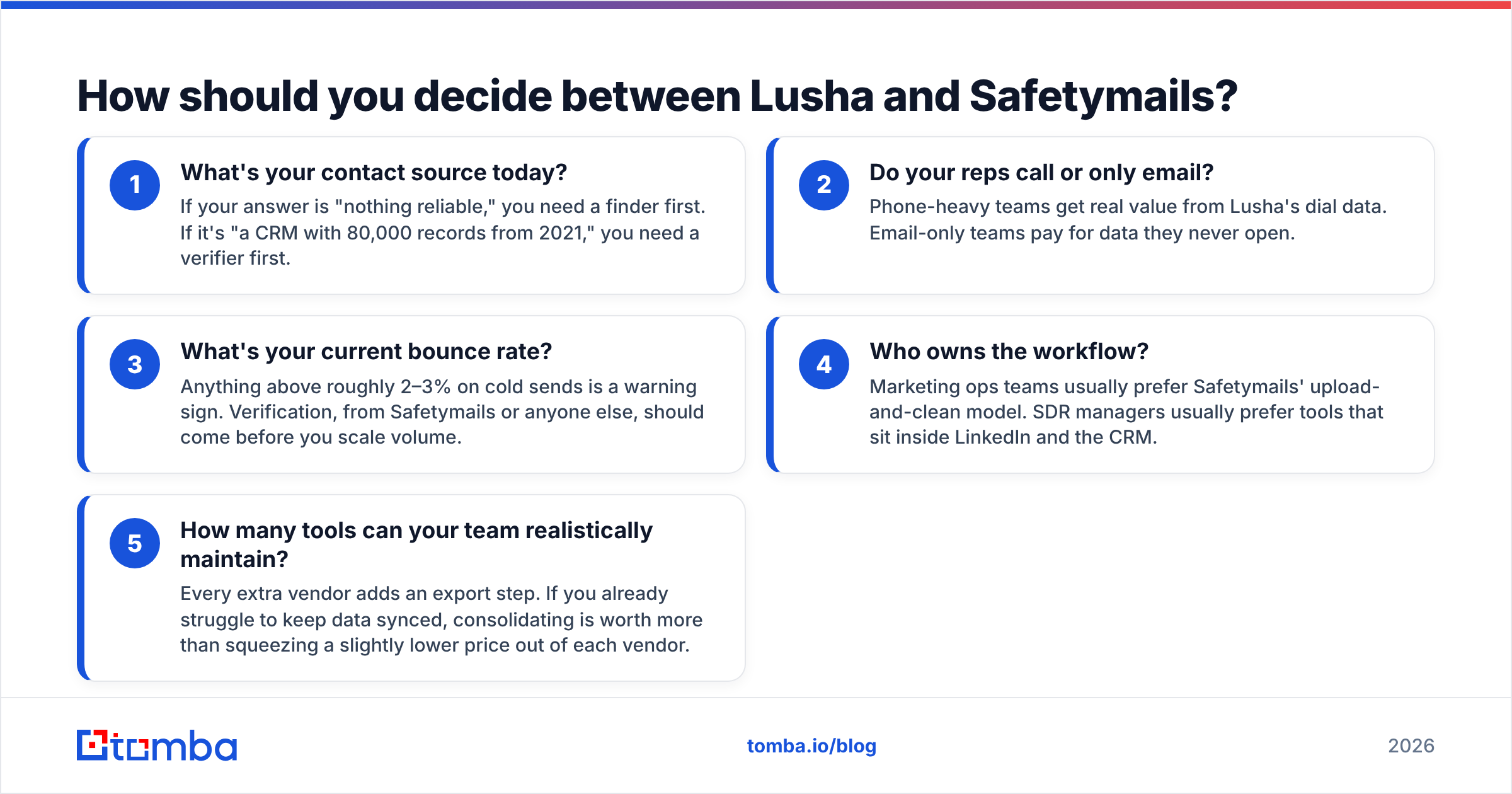
Answer these five questions honestly before you sign anything:
- What's your contact source today? If your answer is "nothing reliable," you need a finder first. If it's "a CRM with 80,000 records from 2021," you need a verifier first.
- Do your reps call or only email? Phone-heavy teams get real value from Lusha's dial data. Email-only teams pay for data they never open.
- What's your current bounce rate? Anything above roughly 2–3% on cold sends is a warning sign. Verification, from Safetymails or anyone else, should come before you scale volume.
- Who owns the workflow? Marketing ops teams usually prefer Safetymails' upload-and-clean model. SDR managers usually prefer tools that sit inside LinkedIn and the CRM.
- How many tools can your team realistically maintain? Every extra vendor adds an export step. If you already struggle to keep data synced, consolidating is worth more than squeezing a slightly lower price out of each vendor.
For a broader view, compare reviews on Capterra and G2 rather than relying on vendor pages. Filter reviews by company size and region, because both factors change how each tool performs.
Which teams should pick which tool?#
To boil it down:
- Choose Lusha if you're a phone-first SDR team, prospect mostly in North America, live inside LinkedIn and Salesforce/HubSpot, and have the budget for seat-based plans.
- Choose Safetymails if you're a marketing or ops team with existing lists, need inexpensive bulk cleaning with credits that don't expire, or want to block bad emails at signup forms.
- Choose both if you're running high-volume outbound with Lusha data and want an independent check before every send. It works, but plan for the extra export and import steps.
- Choose a combined finder + verifier if your outbound is mostly email and you want one credit system, one integration set and verification built into how contacts are found.
Both Lusha and Safetymails do their own job well. The mistakes come from buying one while expecting it to do the other's job.
Ready to find and verify emails in one step?#
If your team spends more time moving CSVs between a contact database and a verifier than writing outreach, put the whole job in one place. The Tomba Email Finder looks up professional email addresses by name, company or domain and verifies each result before you send, so you prospect and protect your sender reputation in the same pass. Start on the free tier with 25 searches a month, then move to Starter at $49/mo once your volume grows.
Related guides#
// get started
Find, verify and enrich your first contacts today
Start on the free plan with 25 searches a month, then scale when your team is ready.
Free plan · No credit card required · GDPR & CCPA
// about the author