Lusha vs Snappy Leads: Pricing, Data Quality and Best Fit in 2026
Lusha charges per credit and backs it with compliance paperwork and CRM integrations. Snappy Leads offers unlimited lookups for £10 a month. Here is when each one is the right buy, and when neither is.
TL;DR
- Lusha is an established, credit-based contact data platform. You get a Chrome extension, native CRM integrations, compliance paperwork and team controls. List prices start at $49.90/mo. A phone reveal costs 5 credits, an email costs 1.
- Snappy Leads is a UK-based contact database. It sells unlimited email and phone lookups on a flat subscription, advertised at about £10/mo, and says it holds more than a billion professional contacts.
- Choose Lusha if you sell into regulated or enterprise accounts, need CRM sync, or have to pass a procurement review.
- Choose Snappy Leads if you're a solo founder or a small agency, you're on a tight budget, and you can verify every record yourself before you send.
- Whichever you pick, run the exported emails through a separate verifier before a sequence goes out. A bad list will hurt your domain no matter how cheap it was.
What are Lusha and Snappy Leads?#
These two tools fix the same problem: you know who you want to reach, but you don't have a working email address or direct dial. They price that fix very differently.
Lusha has been around since 2016 and is one of the best-known names in B2B contact data. Most reps use it through its Chrome extension, which shows contact details on LinkedIn profiles and company websites. It also has a prospecting web app, list building, enrichment, intent signals and an API. Everything is metered in credits.
Snappy Leads is a smaller British company with a simpler offer. You pay one low monthly fee and look up as many emails and phone numbers as you like. The company says its database holds more than a billion professional contacts, covering business and personal emails, phone numbers and social profiles, and that records are found and verified with proprietary AI. It pitches itself against tools like Apollo and Hunter, which cost far more.
So this isn't really a comparison of two similar products. One is a full sales-intelligence platform with metered usage. The other is a lookup utility with unmetered usage. Which one is better depends almost entirely on how many contacts you pull each month and what happens to them after export.
How do Lusha and Snappy Leads compare side by side?#
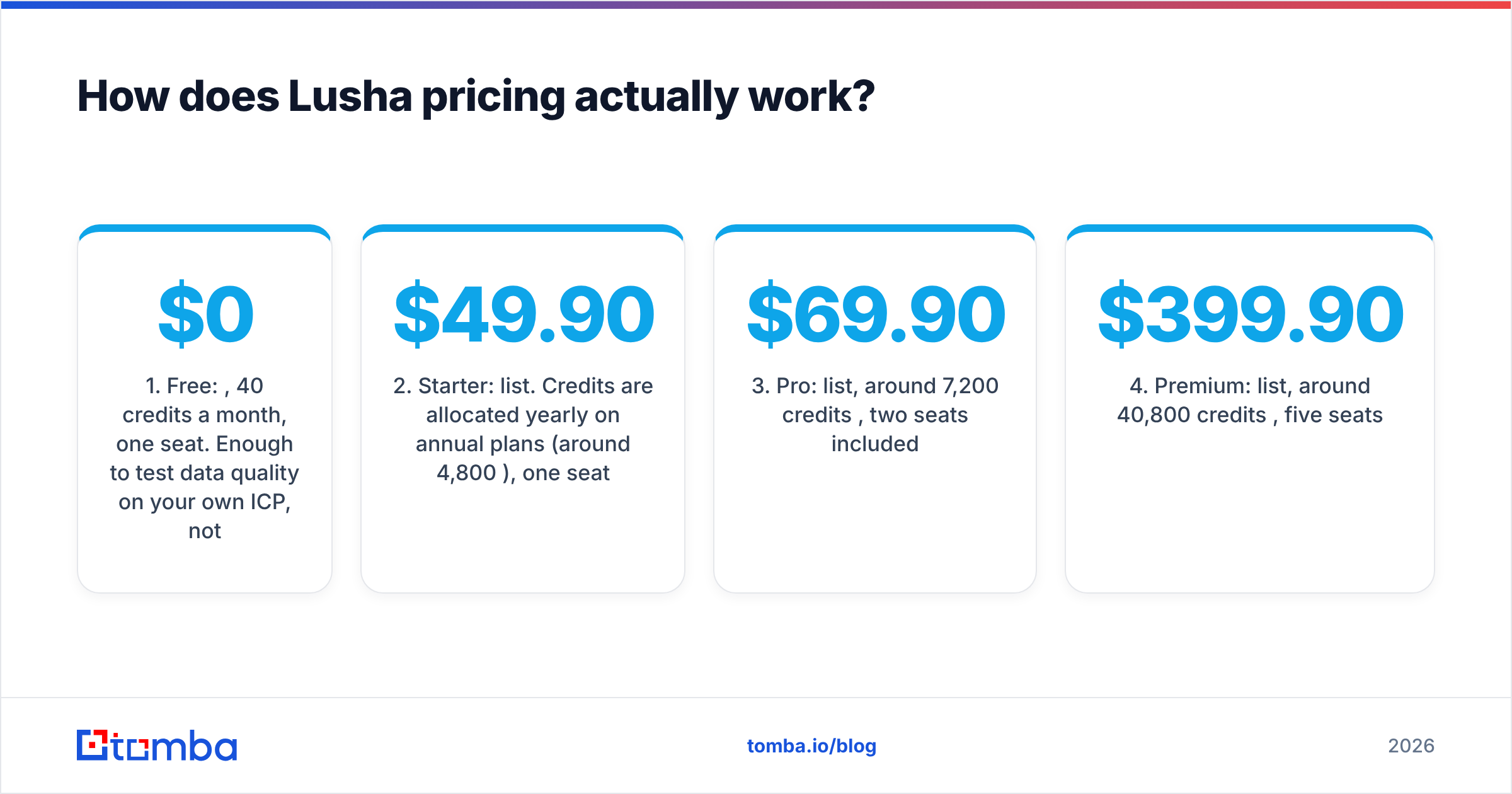
| Attribute | Lusha | Snappy Leads |
|---|---|---|
| Pricing model | Credits per reveal | Flat subscription, unlimited lookups |
| Entry paid price | $49.90/mo list (Starter); annual promos often lower | About £10/mo (advertised) |
| Free option | 40 credits/mo, 1 seat | Check current site terms |
| Email reveal cost | 1 credit | Included |
| Phone reveal cost | 5 credits (up to 6 for email + phone) | Included |
| Claimed database size | Hundreds of millions of business profiles | 1B+ contacts (company claim) |
| Personal emails | Business-focused | Business and personal (company claim) |
| Chrome extension / LinkedIn overlay | Yes, mature | Check current offering |
| Native CRM integrations | Salesforce, HubSpot, Pipedrive, others | Not a core part of the pitch |
| Team seats and admin controls | Yes, from Pro tier | Built for individual users |
| Compliance documentation | Public GDPR/CCPA program, security certifications | Limited public detail |
| Best fit | SDR teams, mid-market, enterprise | Solo founders, freelancers, small agencies |
Lusha prices are based on its published plans as of mid-2026. Lusha often runs annual-billing promotions (Starter has been listed at about $37.45/mo during sales), so check the live Lusha pricing page before you budget. Snappy Leads prices are from its own subscription page and may change.
How does Lusha pricing actually work?#
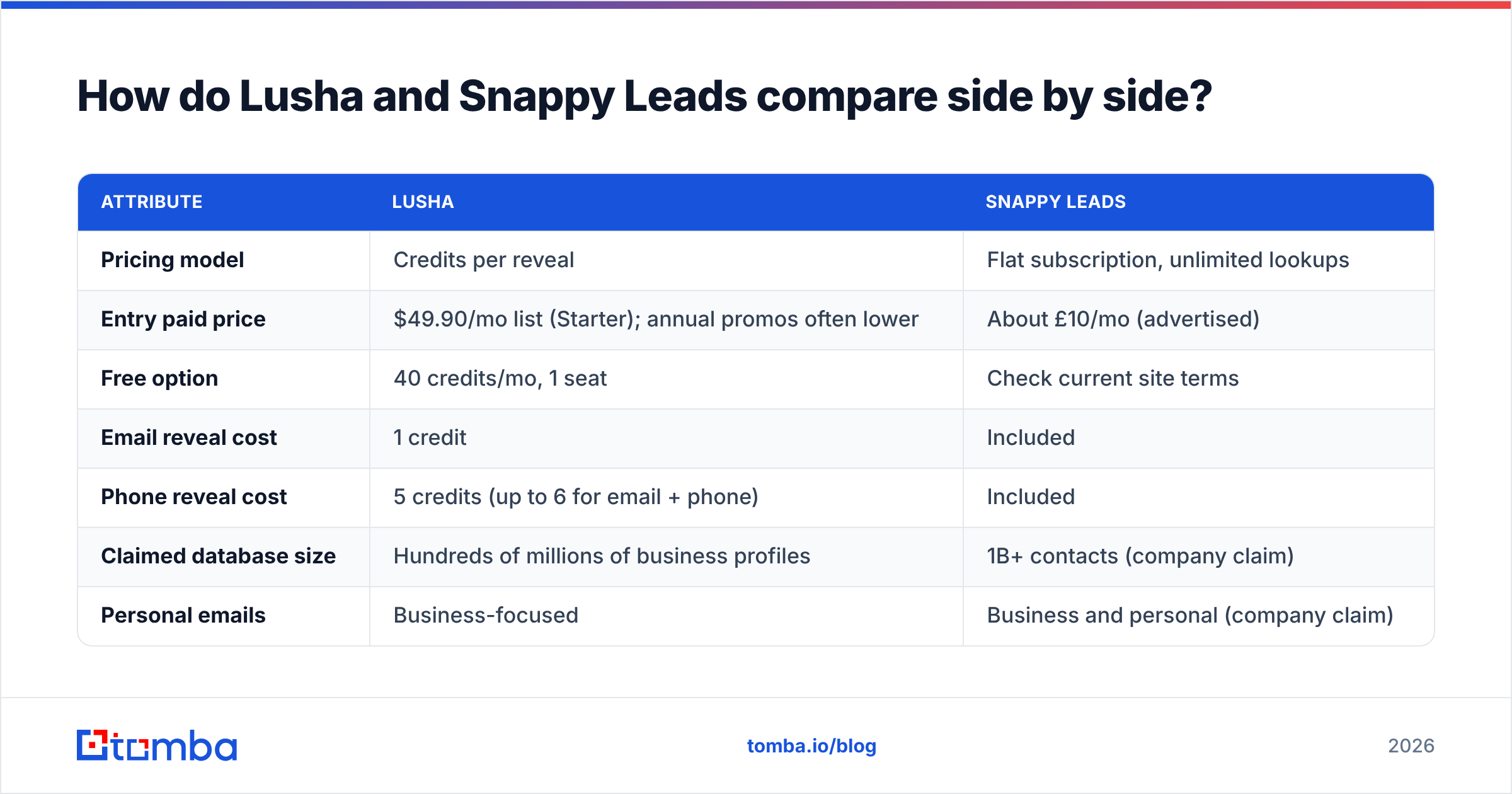
Lusha has five tiers:
- Free: $0, 40 credits a month, one seat. Enough to test data quality on your own ICP, not enough to run outbound.
- Starter: $49.90/mo list. Credits are allocated yearly on annual plans (around 4,800/year), one seat.
- Pro: $69.90/mo list, around 7,200 credits/year, two seats included.
- Premium: $399.90/mo list, around 40,800 credits/year, five seats.
- Scale: custom pricing, credits and seats.
The cost that catches people out is credit consumption, not the sticker price. An email costs 1 credit and a phone number costs 5. If your team mostly cold calls, a Starter plan's monthly credits disappear after a few dozen full reveals. API calls, workspace exports and AI enrichment can use credits too.
Rollover depends on billing. On monthly plans, unused credits roll over up to twice the monthly allotment. On annual plans, they reset at the end of the cycle. If you prospect in bursts (heavy in Q1, quiet in summer), monthly billing may cost less in practice even though the per-month price is higher.
How does Snappy Leads pricing actually work?#
Snappy Leads keeps it simple. It advertises one subscription at roughly £10 a month with unlimited email and phone lookups, no credit ceiling and no hidden fees. For someone used to watching Lusha or Apollo credit counters, that's very appealing.
The economics are easy to work out. If you pull 500 contacts a month with phone numbers, that's up to 3,000 Lusha credits, which pushes you toward Pro or Premium. On Snappy Leads it's still £10.
The questions to ask are about what you get for that price:
- Where does the data come from, and how often is it refreshed? "1B+ contacts" is a big number, but contact data decays. People change jobs and companies change domains. Refresh frequency matters more than database size.
- What does "verified" mean? SMTP-checked at lookup time, checked at some earlier point, or pattern-matched? Each one produces a very different bounce rate.
- How are personal emails and phone numbers handled under UK GDPR? Personal data needs a lawful basis for processing. If you sell into the EU or UK, your legal team will ask.
None of this makes Snappy Leads a bad product. A flat-rate, low-cost model just puts more of the quality-control work on you.

Which tool has more accurate contact data?#
No vendor's marketing claim settles this, and neither publishes an independent accuracy audit you can rely on fully. What you can do is understand the structural differences and then test on your own data.
Lusha's advantage is the feedback loop. A large paying user base, many CRM integrations and contributor-network data give Lusha a steady stream of signals about which records are stale. Its business emails are generally rated well in user reviews on G2. The most common complaints are about mobile number coverage outside North America and credit burn, not about made-up emails.
Snappy Leads' advantage is breadth per pound. If its 1B+ figure holds up, you get very wide coverage, including personal emails, which Lusha mostly doesn't focus on. The trade-off is less public information about verification methods and refresh cycles.
The test that answers the question for your market:
- Export 100 contacts from your real ICP from each tool. Use the same companies and the same titles.
- Run both lists through an independent email verifier before you send anything.
- Compare valid, invalid, catch-all and unknown rates side by side.
- For phone numbers, have an SDR dial 30 from each list and log connect rates.
An afternoon of that work will tell you more than any review roundup, including this one.
What do you get beyond raw contact data?#
This is where the comparison is lopsided, and it explains most of the price gap.
Lusha includes:
- Chrome extension that works on LinkedIn, Sales Navigator, Gmail and company websites
- Prospecting app with filters for title, seniority, headcount, industry, location and technology
- Enrichment for CSV uploads and CRM records, with scheduled refreshes on higher tiers
- Intent and job-change signals to time outreach
- CRM and sequencing integrations: Salesforce, HubSpot, Pipedrive, Zoho, Outreach, Salesloft and more
- Admin controls: seat management, credit allocation per user, usage reporting
Snappy Leads includes:
- Lookups: search for a person or company and get emails, phones and social profiles
- Unlimited volume within the subscription
- Simplicity: no credit maths, no tier upgrades, no sales call needed
If your workflow is "find contact, copy into spreadsheet, send from Gmail," Snappy Leads covers it. If your workflow is "push enriched contacts into Salesforce, route them to the right rep, and trigger an Outreach sequence," Lusha does work that Snappy Leads doesn't try to do.
Is Lusha or Snappy Leads better for GDPR and compliance?#
If you sell to European, UK or regulated-industry buyers, compliance can decide the purchase.
Lusha has put real money into this. It runs a public privacy center, offers data-subject opt-out, publishes material on GDPR and CCPA alignment, and holds widely recognized security certifications that procurement teams look for. That doesn't make every use of its data lawful automatically, since you still need a legitimate-interest assessment for outreach, but it gives your DPO something concrete to review.
Snappy Leads is a UK company, so it falls under UK GDPR. It publishes less detail about its sourcing and lawful-basis model, though. Because it also surfaces personal emails, ask it directly for its data processing terms and sourcing explanation before you put its data into a regulated pipeline. If you're a solo consultant emailing small UK businesses, the risk is smaller. If you're a 50-person SDR team at a fintech, it matters a lot.
The GDPR overview on Wikipedia is a quick primer on why lawful basis and data minimization apply to B2B prospecting as well.
Which should you choose: Lusha or Snappy Leads?#

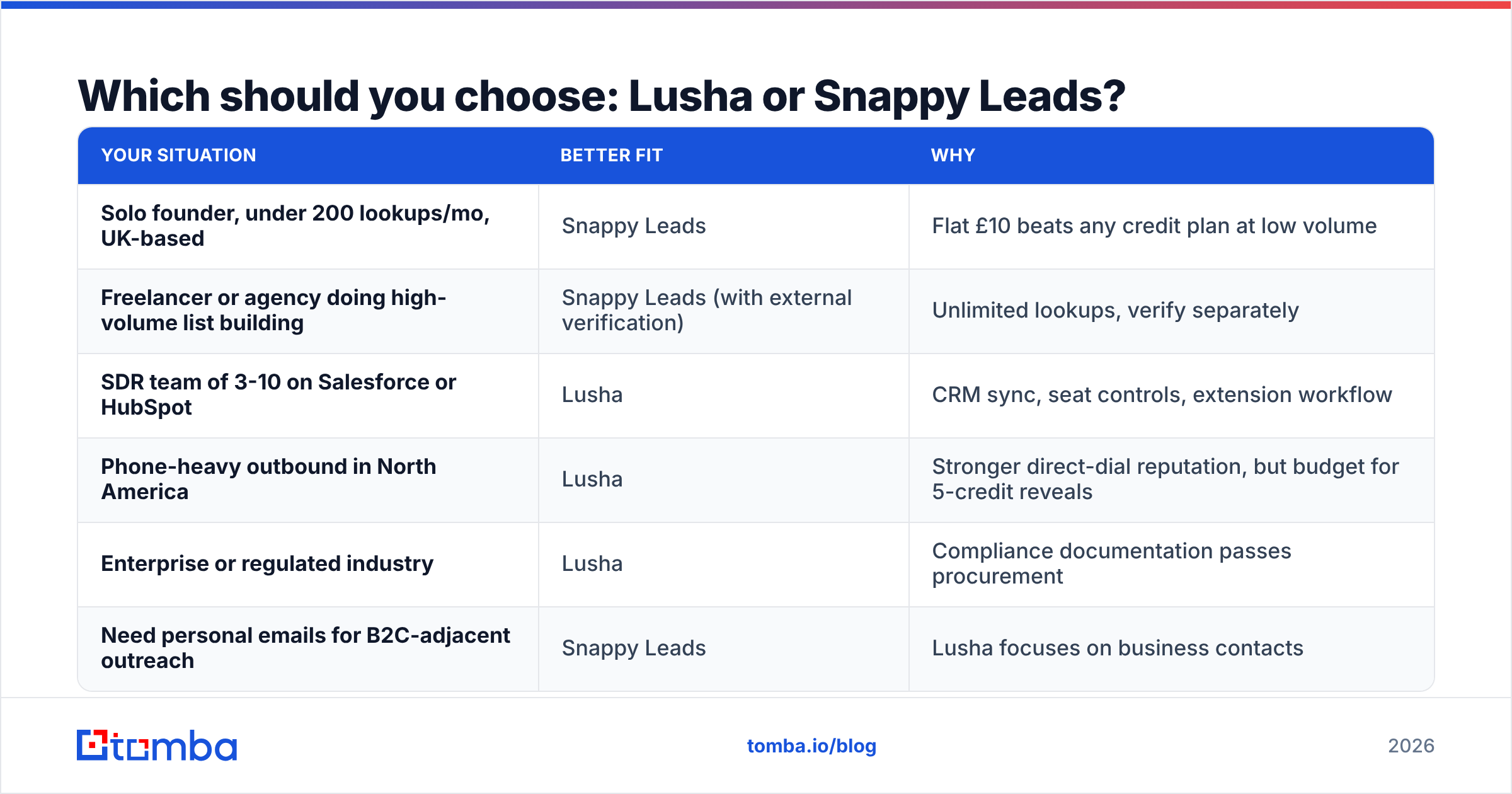
Here's the decision broken down by the team you're on.
| Your situation | Better fit | Why |
|---|---|---|
| Solo founder, under 200 lookups/mo, UK-based | Snappy Leads | Flat £10 beats any credit plan at low volume |
| Freelancer or agency doing high-volume list building | Snappy Leads (with external verification) | Unlimited lookups, verify separately |
| SDR team of 3-10 on Salesforce or HubSpot | Lusha | CRM sync, seat controls, extension workflow |
| Phone-heavy outbound in North America | Lusha | Stronger direct-dial reputation, but budget for 5-credit reveals |
| Enterprise or regulated industry | Lusha | Compliance documentation passes procurement |
| Need personal emails for B2C-adjacent outreach | Snappy Leads | Lusha focuses on business contacts |
Lusha's weakness is cost at volume, especially for phone numbers. Snappy Leads' weakness is everything outside the lookup: integrations, team controls and visible compliance. Neither is "better" in general. They suit different buyers.
Is there a middle-ground option worth considering?#
If neither one fits, the usual reasons are that Lusha costs too much per contact and Snappy Leads doesn't give you enough confidence in the data. In that case, look at a tool built around email finding and verification first rather than a full sales-intelligence suite.
That's where Tomba fits. It's an email finder with verification built in. You can find emails by name and company, or run a domain search to pull every public address on a company domain. A dedicated verifier and catch-all handling help stop the export from bouncing. Pricing is in the middle: a free tier with 25 searches a month, Starter at $49/mo, Growth at $99/mo, Pro at $249/mo and custom Enterprise. Full breakdown on the Tomba pricing page.
To be honest about the trade-offs: if mobile direct dials for US enterprise accounts are your main channel, Lusha's phone data is the stronger reason to pay its prices. If you need personal emails at the lowest possible cost, Snappy Leads' flat fee is hard to beat. Tomba is the better fit when work email accuracy and deliverability are the bottleneck.
What mistakes do buyers make when comparing these tools?#
Teams tend to run into the same few problems:
- Comparing sticker prices instead of cost per usable contact. A £10 plan with a 15% bounce rate can cost you more in domain reputation than a $69.90 plan with a 3% bounce rate.
- Ignoring phone credit multipliers. On Lusha, 100 full reveals is up to 600 credits, not 100.
- Skipping verification because the vendor says "verified". Every vendor says this. Check it yourself before you send.
- Buying annual before testing. Use Lusha's free tier and a single month of Snappy Leads on the same ICP first.
- Forgetting who owns compliance. The vendor supplies the data, but you're the one sending the email, and regulators will look at you.
The bottom line#
Lusha is the safer, better-integrated, more expensive choice. It's built for teams that live in a CRM and need to show their work to procurement. Snappy Leads is the cheap, unlimited, no-frills choice for individuals and small shops who are happy to do their own quality control. Pick based on volume, channel (email or phone) and compliance exposure, not the headline price.
If what you actually need is accurate work emails that don't bounce, at a price between those two, try the Tomba Email Finder. Start on the free plan with 25 searches a month, run it against the same 100-contact test list you'd use for Lusha and Snappy Leads, and compare the verified results.
Related guides#
// get started
Find, verify and enrich your first contacts today
Start on the free plan with 25 searches a month, then scale when your team is ready.
Free plan · No credit card required · GDPR & CCPA
Get the Tomba newsletter
Product and data updates
// about the author