Lusha vs Webbula: Prospecting Data or Data Hygiene in 2026?
Lusha and Webbula show up on the same shortlists, but they solve different problems. One finds new contacts and the other cleans the data you already have. Here's how to tell which one you need.
TL;DR
- Lusha is a prospecting tool. You use it to find new B2B contacts (emails, direct dials, firmographics) through a Chrome extension, a web app, and CRM integrations. Pricing is self-serve and per seat.
- Webbula is a data hygiene and enhancement vendor. You use it to verify and clean lists you already have, and to append missing fields to them. It's strongest at threat detection (spam traps, bot traps, toxic addresses), and most of its pricing is quote-based.
- They rarely replace each other. Lusha fills the top of the funnel and Webbula protects your sender reputation and database quality.
- If you want one affordable tool that finds and verifies B2B emails, you'll get more from an email finder with built-in verification than from either tool alone.
What is the real difference between Lusha and Webbula?#
They sit at opposite ends of the data lifecycle. Lusha creates contact records for you. Webbula audits and repairs records you already have.
Here's an analogy. Lusha is the recruiter who finds candidates. Webbula is the background-check firm that confirms the people on your payroll are who they say they are and still work at the address on file. Both deal with people data, and both get called "data providers" in procurement spreadsheets. Their jobs are still different.
That's why "Lusha vs Webbula" is a confusing search. Usually a RevOps or demand-gen team has both on a vendor list and is trying to work out whether they need one, the other, or both. The honest answer depends on where your data problem actually is:
- You don't have enough contacts. That's a Lusha-type problem.
- You have plenty of contacts but bounces, spam complaints, or blocklist hits keep climbing. That's a Webbula-type problem.
- You have both problems. You need a sourcing tool plus a verification layer, or one platform that does both well enough.
What is Lusha and who is it built for?#
Lusha is a B2B contact and company data platform, founded in Israel in 2016. Most people know it through its Chrome extension. You open a LinkedIn profile or a company website, click the Lusha icon, and spend a credit to reveal an email address or phone number. Over the years it has added a prospecting database with filters, intent signals, job-change alerts, list building, and integrations with Salesforce, HubSpot, Outreach, Salesloft, and others.
Who it fits best:
- SDRs and AEs who prospect one contact at a time and want speed over depth
- Small and mid-size sales teams that want a self-serve tool without a procurement process
- Teams that put a lot of weight on direct phone numbers, which have long been one of Lusha's strongest selling points
Where it is weaker:
- Credit economics. Phone reveals usually cost more credits than email reveals, and heavy users burn through allowances quickly.
- Coverage varies by region and seniority. Like every contact database, it does best on North American tech and mid-market companies and gets thinner in niche verticals and smaller markets.
- It is not a list-hygiene tool. Lusha verifies the data it gives you, but it won't scrub a 200,000-row legacy CRM export for spam traps.
On review sites such as G2, users mostly praise ease of use and the extension. The most common complaints are about data gaps in specific segments and how fast credits run out.
What is Webbula and who is it built for?#
Webbula is a US-based data quality company focused on email hygiene, data enhancement, and audience data. Its best-known product is email verification with a strong emphasis on threat detection. That goes beyond "does this mailbox exist?" to whether the address is a spam trap, honeypot, bot trap, disposable domain, known complainer, or another address that can quietly damage your sender reputation.
Its other main line is data enhancement: appending missing fields (demographic, firmographic, or contact attributes, depending on the dataset) to records you already hold. Webbula has historically had a strong B2C and marketing-data angle alongside B2B, so it shows up often in conversations with email marketers, publishers, and agencies running large list programs.
Who it fits best:
- Marketing ops and deliverability teams that send at volume and can't afford blocklisting
- Companies that acquired lists (events, co-registration, purchased data, legacy CRMs) and need to know what's toxic before mailing
- Data teams that want to enrich an existing file instead of sourcing net-new contacts
Where it is weaker:
- It isn't a prospecting tool. There's no "find me the VP of Finance at this company" workflow for an SDR.
- Pricing is less transparent. Enhancement and larger verification jobs typically go through sales.
- It's built for files and pipelines, not for a rep clicking around LinkedIn.

How do Lusha and Webbula compare feature by feature?#
Here's the side-by-side. Pricing in this space changes often, so treat the numbers as directional and check each vendor's pricing page before you sign anything.
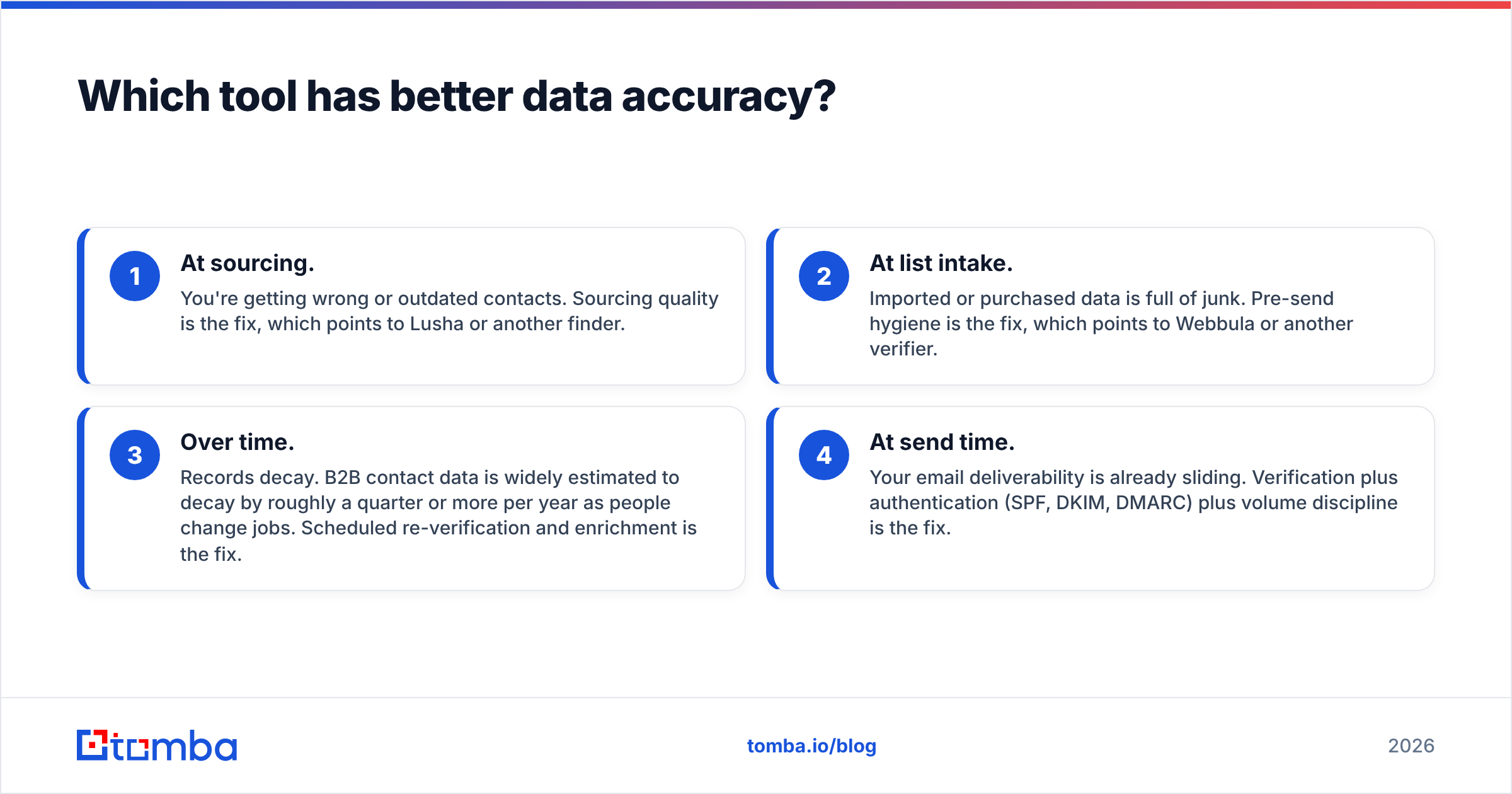
| Attribute | Lusha | Webbula |
|---|---|---|
| Primary job | Find new B2B contacts and companies | Verify, clean, and enhance existing data |
| Core user | SDRs, AEs, small sales teams | Marketing ops, deliverability, data teams |
| Main interface | Chrome extension, web app, CRM apps | File upload, API, managed data services |
| Email finding | Yes, core feature | Not a prospecting finder |
| Email verification | Verifies data it returns | Yes, core feature with threat detection |
| Spam trap / bot trap detection | Not a focus | Yes, a key differentiator |
| Direct dial phone numbers | Yes, a strength | Not a focus |
| Data append / enrichment | Enrichment of CRM records | Yes, broad demographic and firmographic appends |
| Free tier | Yes, limited monthly credits | No meaningful free plan for ongoing use |
| Paid pricing model | Per seat, credit-based, self-serve tiers | Mostly quote-based or volume-based |
| Best for | Building pipeline | Protecting deliverability and database quality |
The table shows that there's very little overlap. Lusha's verification exists so the data it sells is usable. Webbula's verification is the product.
Which tool has better data accuracy?#
The answer depends on what you're measuring, because they're accurate at different things.
Lusha's accuracy is about whether the email or phone number it returns belongs to the right person at their current employer. That depends on how fresh the database is, how fast job changes get picked up, and coverage in your segment. You can test it by pulling 100 contacts from your real ICP, sending a low-volume, carefully warmed campaign, and measuring hard bounces and wrong-person replies.
Webbula's accuracy is about classification. Does it correctly flag the addresses that will bounce, the ones that are traps, and the ones that will complain? A verifier can tell you a mailbox exists and still miss a recycled spam trap, and that miss is exactly what gets your domain blocklisted. Webbula's pitch is that its threat data catches what basic SMTP checks miss.
So the useful comparison isn't "Lusha 92% vs Webbula 95%." A better question is: at which stage are you losing data quality?
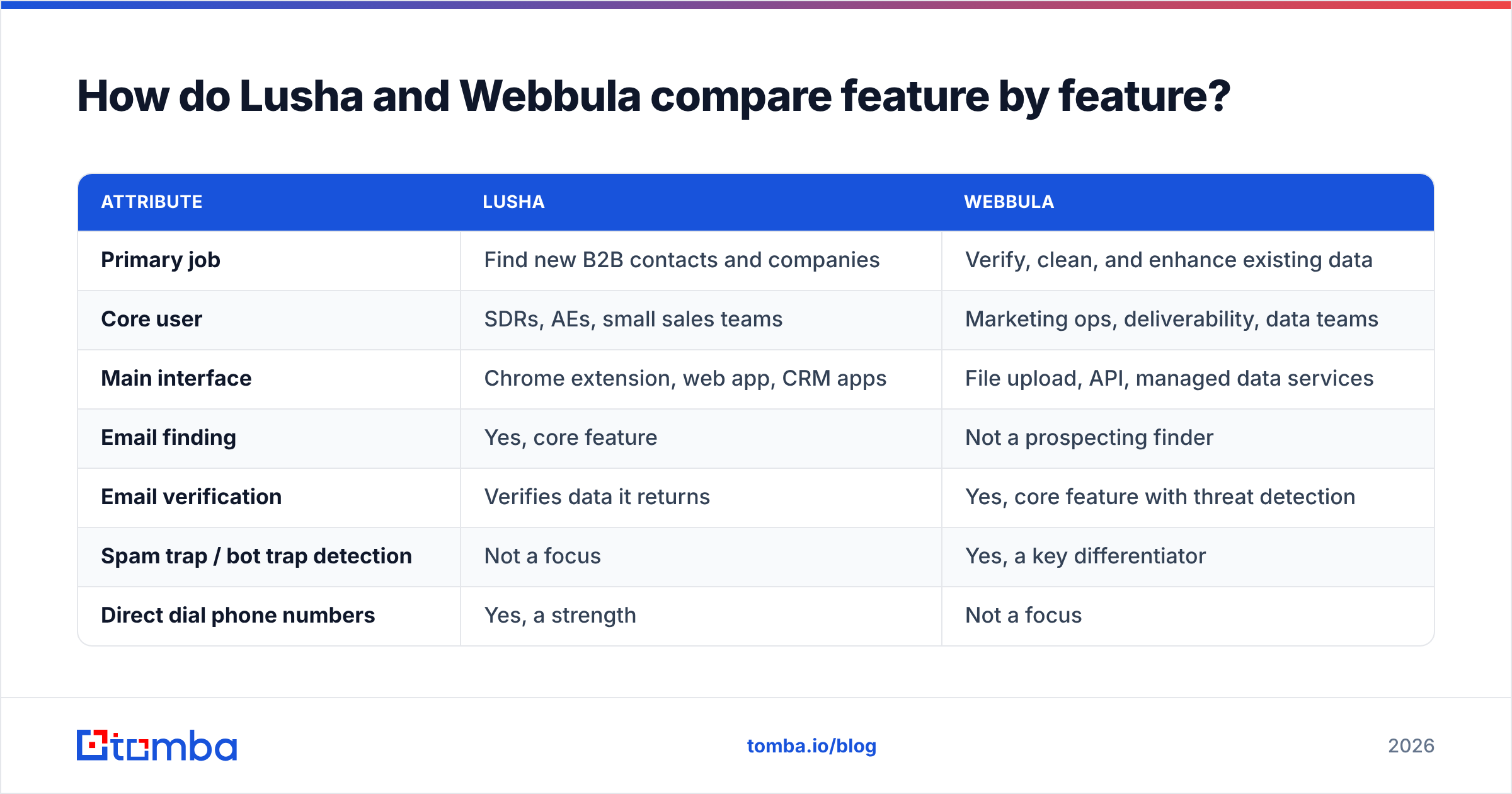
- At sourcing. You're getting wrong or outdated contacts. Sourcing quality is the fix, which points to Lusha or another finder.
- At list intake. Imported or purchased data is full of junk. Pre-send hygiene is the fix, which points to Webbula or another verifier.
- Over time. Records decay. B2B contact data is widely estimated to decay by roughly a quarter or more per year as people change jobs. Scheduled re-verification and enrichment is the fix.
- At send time. Your email deliverability is already sliding. Verification plus authentication (SPF, DKIM, DMARC) plus volume discipline is the fix.
How does pricing compare between Lusha and Webbula?#
Lusha publishes its pricing. There's a free plan with a small monthly credit allowance, then paid Pro, Premium, and Scale tiers billed per user. At the time of writing, entry-level paid seats cost tens of dollars per user per month on annual billing. Phone reveals cost more credits than email reveals, and the Scale tier is custom-quoted. The model is predictable for small teams and gets expensive as you add seats or lean on phone numbers.
Webbula mostly prices by volume and engagement. Email verification is typically charged per record or in bulk tiers. Data enhancement and audience products are scoped and quoted by sales. That suits a marketing team cleaning a few hundred thousand records each quarter. It's less convenient for a three-person startup that wants to swipe a card and start.
The practical takeaway:
- Budget-constrained sales team: Lusha's self-serve model is easier to start with.
- High-volume marketing program: Webbula's per-record model can work out cheaper per contact than seat-based tools, and it solves a different problem.
- Running both: you're paying for a sourcing tool and a hygiene tool. That's a valid stack, but check whether one tool could cover 80% of the job first.
Is Lusha better than Webbula for cold outreach?#
For finding people to email, yes. Webbula isn't designed to find net-new prospects, so Lusha wins by default if your bottleneck is pipeline.
For protecting cold outreach, Webbula has the edge. Cold email is the channel where one bad list can burn a domain. If your team imports contacts from several sources (events, scraped lists, older CRM records, partner lists), a threat-aware verifier before sending is cheap insurance.
Many outbound teams end up with this workflow:
- Source: a finder tool (Lusha or an alternative) builds the target list.
- Verify: a dedicated verifier checks every address, with extra scrutiny on catch-all domains.
- Enrich: missing firmographics or titles get appended so personalization and routing work.
- Sync: clean records flow into the CRM and the sequencer.
- Re-verify: stored contacts get re-checked on a schedule before they're re-sequenced.
Lusha covers the first and partly the third step. Webbula covers the second and third. Neither covers all five well on its own.
When should you choose Lusha?#
Choose Lusha if most of these apply to you:
- Your reps prospect inside LinkedIn and company websites every day and want one-click reveals.
- Direct dials matter to your motion, for example phone-first SDR teams.
- You want self-serve onboarding and transparent per-seat pricing.
- Your main problem is not enough of the right contacts, not dirty data.
- You're fine running a separate verification step for anything imported from outside Lusha.
When should you choose Webbula?#
Choose Webbula if most of these apply:
- You send email at volume, and a blocklist event would cost real revenue.
- You inherit or buy lists and need to know what's toxic before the first send.
- You need large-scale appends to existing records, not new contact discovery.
- You have a marketing ops or data team that can handle file-based or API workflows.
- You're comfortable with a sales-led buying process and volume pricing.

Do you actually need both, or is there a simpler option?#
Larger organizations often do run both kinds of tool: a prospecting database for sales and an enterprise hygiene vendor for marketing. That's a reasonable setup when the volume and the risk justify two contracts.
Most small and mid-size B2B teams don't have a split between "prospecting data" and "hygiene data." They have one list, and they want it to be found and verified in the same pass. For them, a third option is often more practical: an email finder that verifies every result as it returns it, paired with a standalone email verifier for bulk-checking older or imported lists.
Here's how that middle path compares:
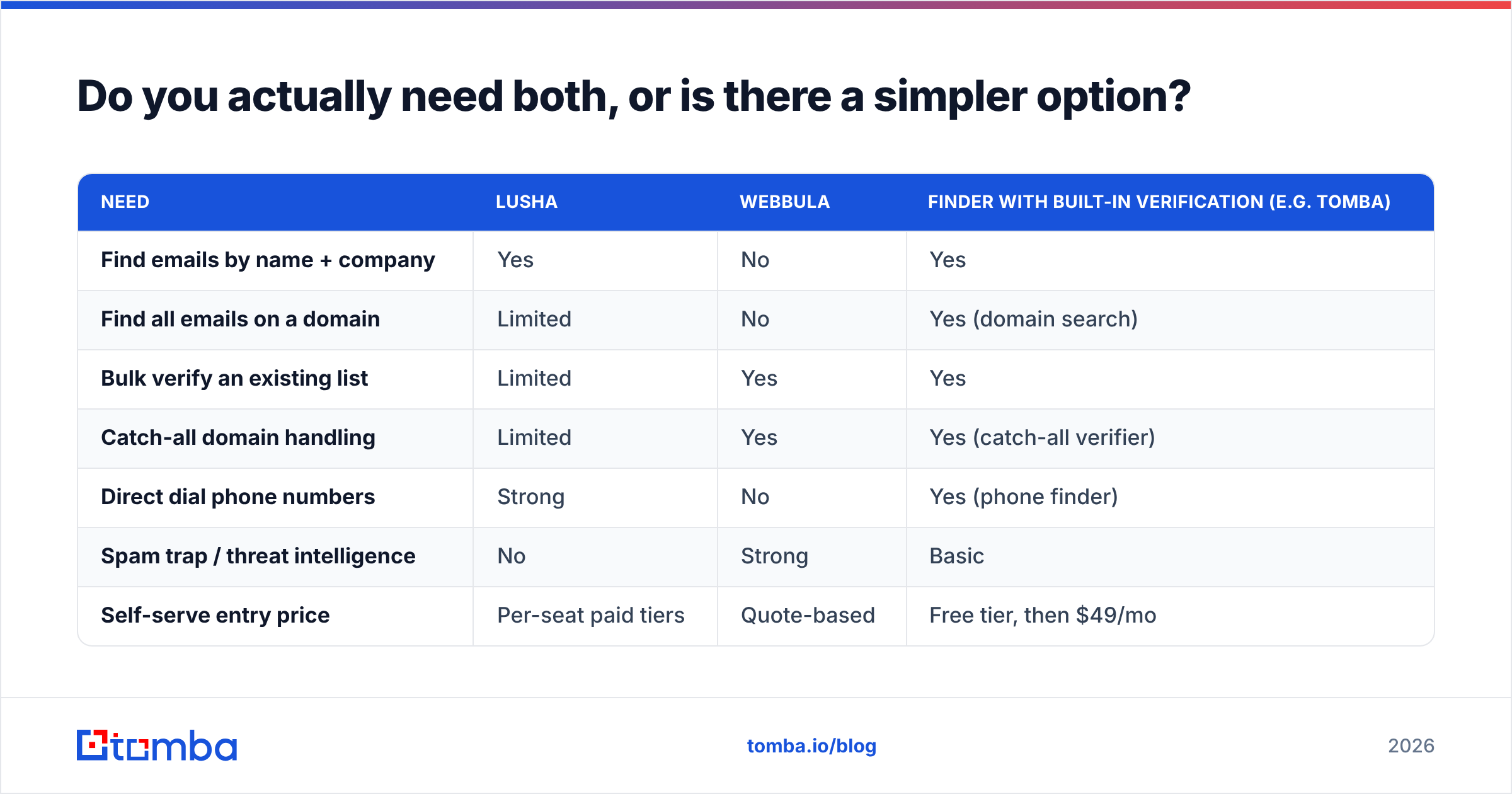
| Need | Lusha | Webbula | Finder with built-in verification (e.g. Tomba) |
|---|---|---|---|
| Find emails by name + company | Yes | No | Yes |
| Find all emails on a domain | Limited | No | Yes (domain search) |
| Bulk verify an existing list | Limited | Yes | Yes |
| Catch-all domain handling | Limited | Yes | Yes (catch-all verifier) |
| Direct dial phone numbers | Strong | No | Yes (phone finder) |
| Spam trap / threat intelligence | No | Strong | Basic |
| Self-serve entry price | Per-seat paid tiers | Quote-based | Free tier, then $49/mo |
This middle path doesn't replace Webbula's deep threat intelligence. If you're mailing millions of consumer records, a dedicated hygiene vendor still earns its fee. For B2B outbound at normal volumes, finding and verifying in one tool removes a whole handoff, and you'll know the cost up front from the published Tomba pricing (Free with 25 searches/month, Starter at $49/mo, Growth at $99/mo, Pro at $249/mo, Enterprise custom).
Teams that need richer records can layer on data enrichment to fill in titles, company size, and socials without buying a separate append contract.
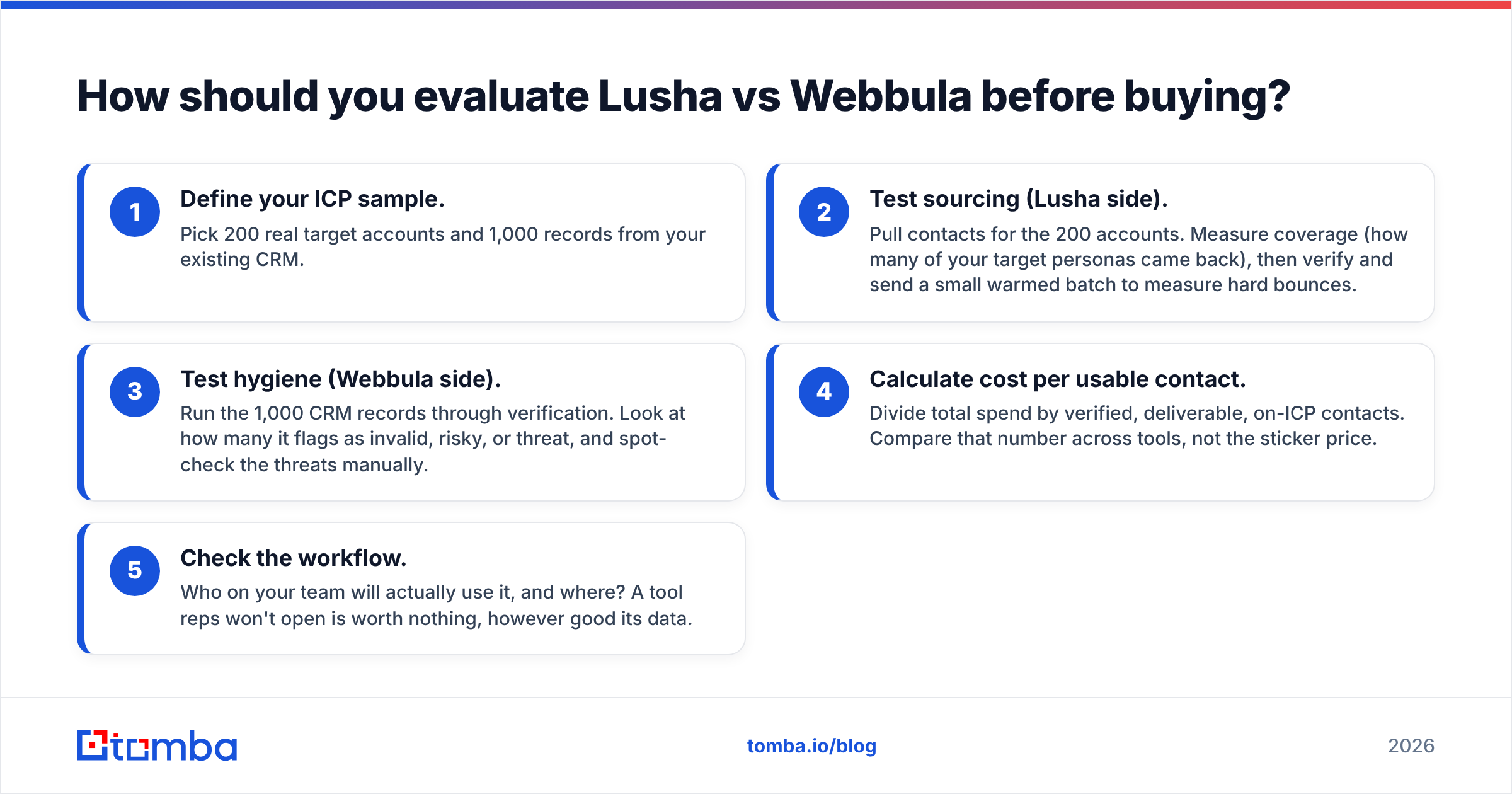
How should you evaluate Lusha vs Webbula before buying?#
Don't decide from feature pages. Run a two-week test against your own data:
- Define your ICP sample. Pick 200 real target accounts and 1,000 records from your existing CRM.
- Test sourcing (Lusha side). Pull contacts for the 200 accounts. Measure coverage (how many of your target personas came back), then verify and send a small warmed batch to measure hard bounces.
- Test hygiene (Webbula side). Run the 1,000 CRM records through verification. Look at how many it flags as invalid, risky, or threat, and spot-check the threats manually.
- Calculate cost per usable contact. Divide total spend by verified, deliverable, on-ICP contacts. Compare that number across tools, not the sticker price.
- Check the workflow. Who on your team will actually use it, and where? A tool reps won't open is worth nothing, however good its data.
That last step settles most comparisons. Lusha suits reps. Webbula suits data teams. Pick the one that matches the person who has the problem.
What is the final verdict on Lusha vs Webbula?#
Lusha is the better choice if you need to build pipeline. It's fast, rep-friendly, strong on phone numbers, and easy to buy.
Webbula is the better choice if you need to protect a large mailing program. Its threat detection and enhancement go deeper than prospecting tools try to.
They complement each other more than they compete. Comparing them head to head is mostly useful because it forces you to name your actual problem: not enough contacts, or contacts you can't trust.
If your answer is "a bit of both, and I don't want two contracts," start with a tool that finds and verifies in one step. Tomba Email Finder finds professional email addresses by name, domain, or company and checks each one before it reaches your list, so you can build B2B outreach lists without a separate hygiene vendor. The free plan includes 25 searches a month, and paid plans start at $49/mo.
Related guides#
// start free
See who Tomba finds at any company
Type a company's domain to see its people, their roles and verified work emails, each with the pages it was found on. Free account, no card.
Free plan · No credit card required · GDPR & CCPA
// about the author