Lusha vs ZoomInfo (2026): Pricing, Data Quality and Our Pick
Lusha is self-serve and priced per seat. ZoomInfo is an enterprise platform with five-figure annual contracts. Here's how they compare on data, pricing, intent signals and fit, and when a lighter tool covers what you actually need.
TL;DR
- Lusha is a self-serve contact-data tool built around a Chrome extension. It has a free plan and per-seat paid plans, and it's quick to set up. It suits SMB sales teams and individual reps.
- ZoomInfo is a full go-to-market intelligence platform with intent data, org charts, website visitor tracking, conversation intelligence and workflow automation. It's sold through annual contracts that usually run to five figures.
- On data: ZoomInfo has more depth on North American mid-market and enterprise accounts. Lusha holds up well on direct dials and European contacts for its price.
- On cost: for most teams under about 15 reps, Lusha (or a lighter email-first tool) gives better value. ZoomInfo pays off when RevOps will actually use intent, enrichment and routing at scale.
- If you mostly need verified work emails, neither one is the cheapest route. A dedicated email finder costs much less per contact.
What is the real difference between Lusha and ZoomInfo?#
These two tools sit in different weight classes, even though they often end up on the same shortlist.
Lusha began as a browser extension that shows emails and phone numbers on LinkedIn profiles and company websites. It has since added a prospecting database, list building, basic intent signals, CRM enrichment and AI-assisted recommendations. Its core use is still the same: a rep finds a person and gets their contact details in seconds.
ZoomInfo began as a data company (DiscoverOrg merged with ZoomInfo in 2019) and now sells itself as a go-to-market platform. Contact data is only the base layer. Its products include SalesOS, MarketingOS, Copilot (AI account prioritization), buyer-intent topics, WebSights visitor identification, Chorus conversation intelligence, and data-ops tooling for CRM hygiene. You can see the product range on ZoomInfo's official site.
Think of the difference as a power drill versus a full workshop. Lusha is a tool you pick up and use. ZoomInfo is infrastructure you build processes on, and you pay for the whole building whether or not you use every room.
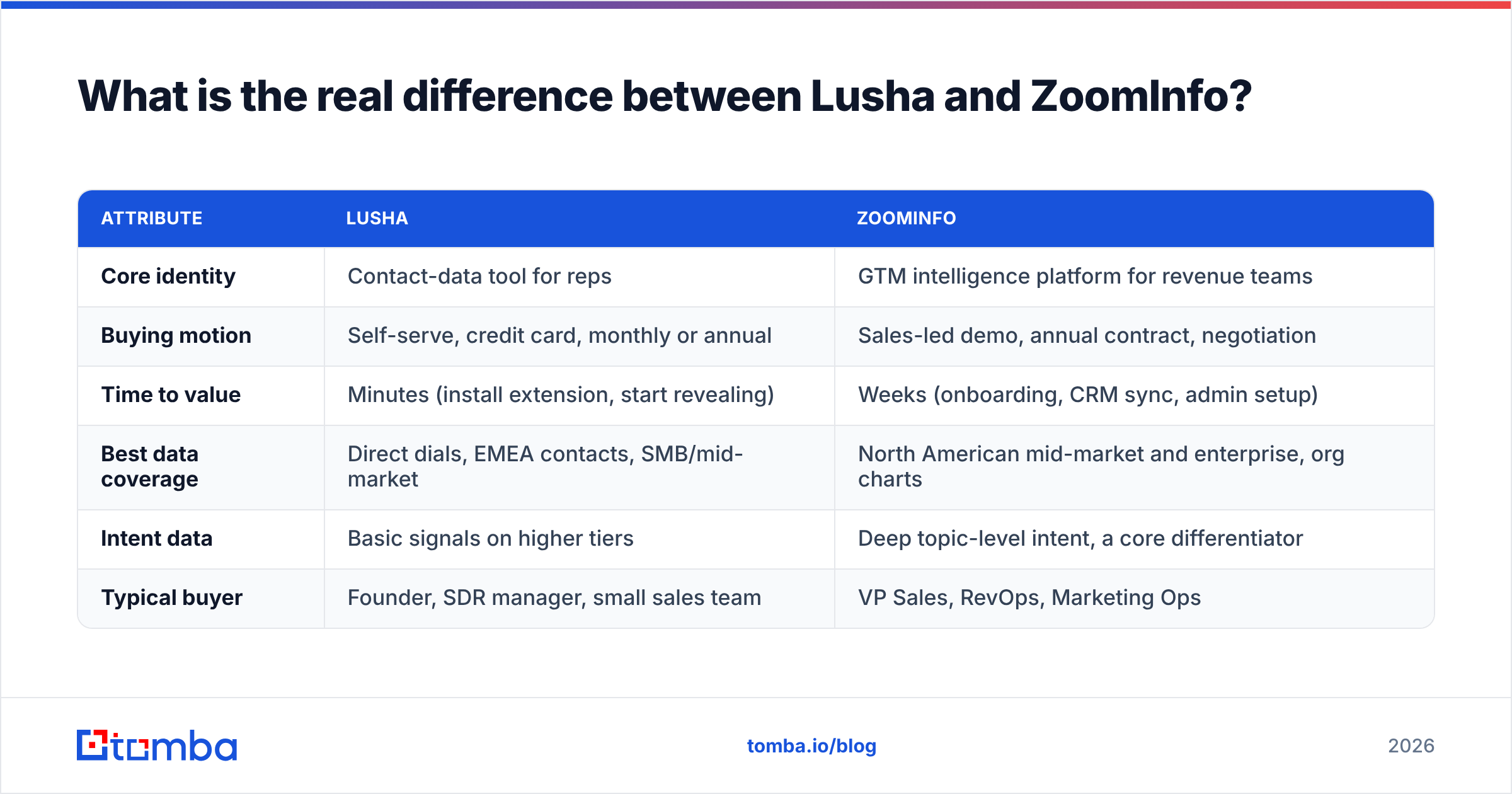
Here's how they line up on the attributes that usually decide the purchase:
| Attribute | Lusha | ZoomInfo |
|---|---|---|
| Core identity | Contact-data tool for reps | GTM intelligence platform for revenue teams |
| Buying motion | Self-serve, credit card, monthly or annual | Sales-led demo, annual contract, negotiation |
| Time to value | Minutes (install extension, start revealing) | Weeks (onboarding, CRM sync, admin setup) |
| Best data coverage | Direct dials, EMEA contacts, SMB/mid-market | North American mid-market and enterprise, org charts |
| Intent data | Basic signals on higher tiers | Deep topic-level intent, a core differentiator |
| Typical buyer | Founder, SDR manager, small sales team | VP Sales, RevOps, Marketing Ops |
How does pricing compare between Lusha and ZoomInfo?#
Pricing is where the two differ most, and it's usually what settles the decision.
Lusha publishes its pricing. You get a free plan with a small monthly credit allowance, enough to test data quality on your own ICP. Paid tiers (Pro and Premium) are charged per user and billed most cheaply on annual plans. Revealing an email costs fewer credits than revealing a phone number, so a team that relies on phones uses credits faster than the headline numbers suggest. A Scale tier with custom pricing adds enterprise controls, deeper integrations and higher credit pools. Check the current figures on Lusha's pricing page, because Lusha has reworked its credit model more than once.
ZoomInfo does not publish pricing. You book a demo, scope seats, credits and modules, then negotiate. Buyer reports on platforms like G2 and procurement-data sites put entry contracts in the low-to-mid five figures per year. Adding intent, more seats or MarketingOS pushes the total higher. Multi-year commitments and auto-renewal clauses come up often in reviews, so read the renewal terms before you sign.
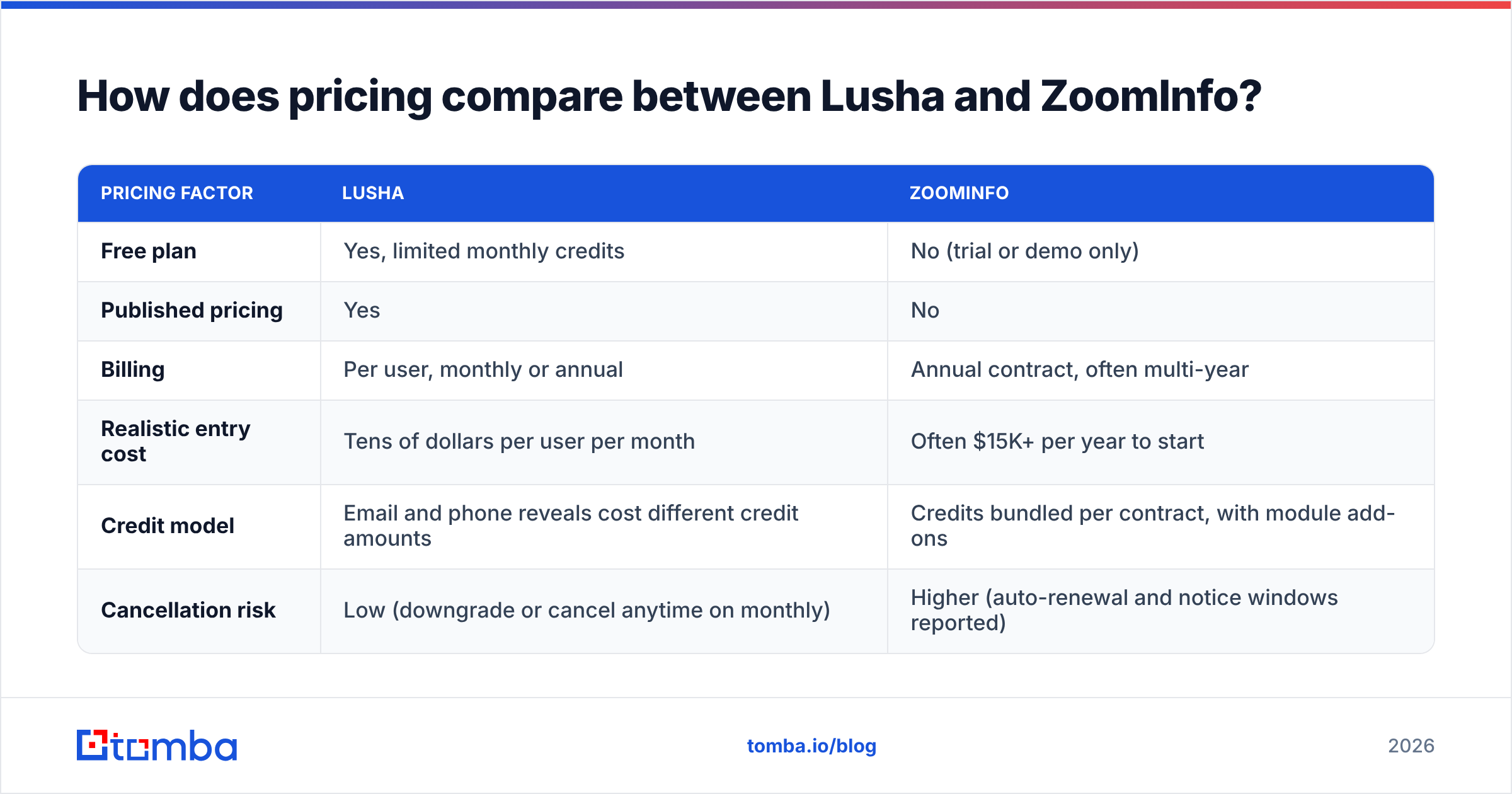
| Pricing factor | Lusha | ZoomInfo |
|---|---|---|
| Free plan | Yes, limited monthly credits | No (trial or demo only) |
| Published pricing | Yes | No |
| Billing | Per user, monthly or annual | Annual contract, often multi-year |
| Realistic entry cost | Tens of dollars per user per month | Often $15K+ per year to start |
| Credit model | Email and phone reveals cost different credit amounts | Credits bundled per contract, with module add-ons |
| Cancellation risk | Low (downgrade or cancel anytime on monthly) | Higher (auto-renewal and notice windows reported) |

In practice: if your annual tooling budget for contact data is under $10K, ZoomInfo is usually out of reach unless you negotiate a stripped-down package. If the budget is $30K or more and you have RevOps capacity, the comparison gets closer.
Which has better data accuracy: Lusha or ZoomInfo?#
Neither tool's accuracy claims are worth much until you test them on your own target list. Coverage changes a lot by region, industry and seniority.
Patterns that show up consistently in user reviews and side-by-side tests:
- ZoomInfo is stronger on depth in the US enterprise segment. Org charts, reporting lines, department headcounts, technographics and funding events are where it leads. If you sell into Fortune 1000 accounts and need to map buying committees, ZoomInfo has more structured detail per account.
- Lusha does well on mobile and direct dials for the price, especially for contacts in the UK, DACH, France and Israel. Much of its data comes from a community-contributed model plus public sources, which helps it surface personal-adjacent work numbers that some platforms don't have.
- Both decay. B2B contact data degrades every year as people change jobs, get promoted or leave. Bounce rates on unverified exports from either tool can creep into the high single digits on older records. Run an email verifier before any outbound campaign, whatever your source.
- Catch-all domains are a blind spot for everyone. If a company's mail server accepts every address, "valid" in either tool may only mean "not rejected." Treat those records as risky.
How to test them fairly: take 100 contacts from your real ICP, split across regions and seniority levels. Reveal each one in both tools, verify every email independently, then call 20 of the phone numbers. Count verified emails, connected dials and wrong-person rates. An afternoon of this tells you more than any vendor accuracy figure.
How do the features stack up beyond contact data?#
This is where ZoomInfo justifies its price, if you'll actually use what you're paying for.
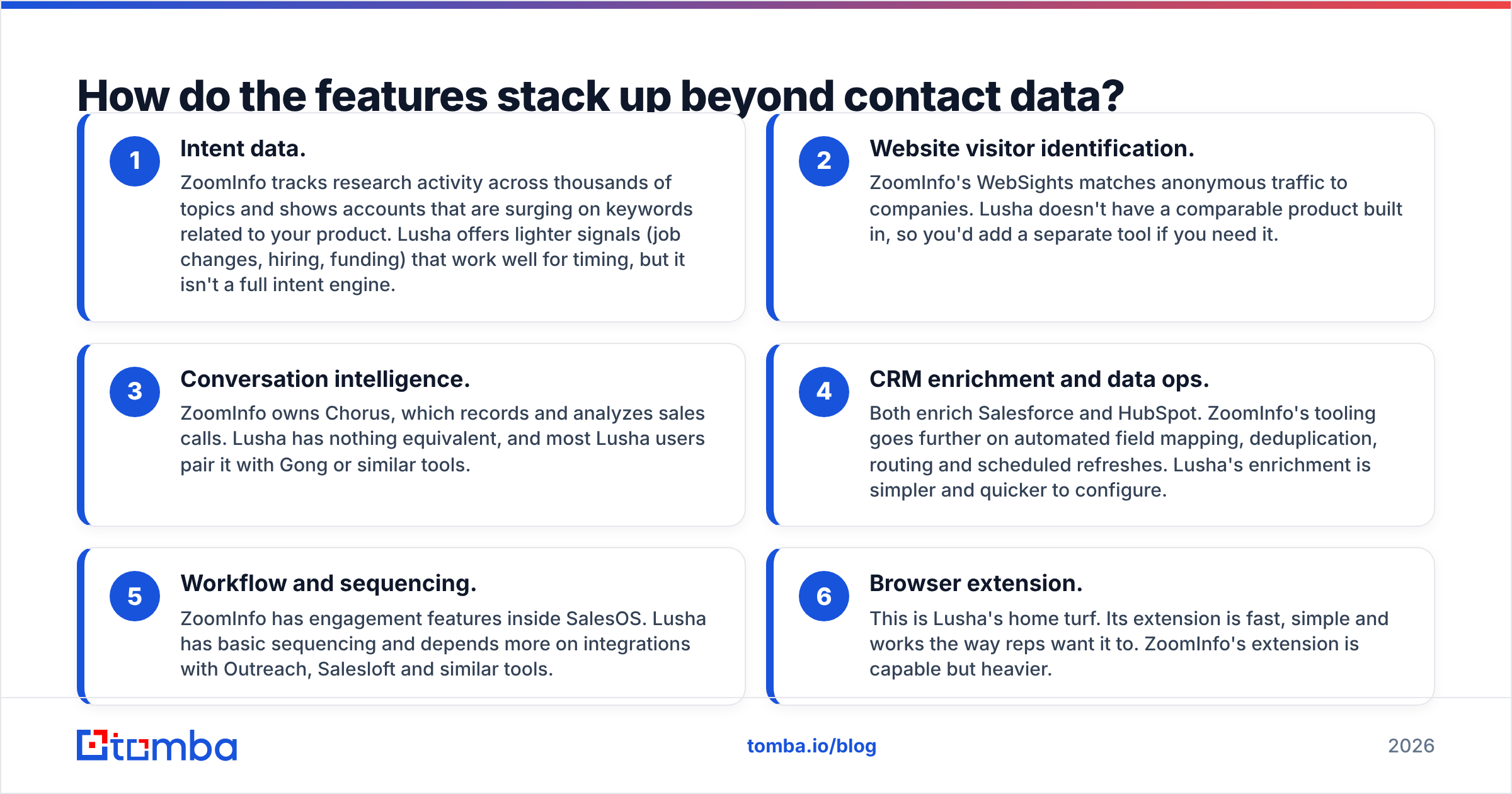
- Intent data. ZoomInfo tracks research activity across thousands of topics and shows accounts that are surging on keywords related to your product. Lusha offers lighter signals (job changes, hiring, funding) that work well for timing, but it isn't a full intent engine.
- Website visitor identification. ZoomInfo's WebSights matches anonymous traffic to companies. Lusha doesn't have a comparable product built in, so you'd add a separate tool if you need it.
- Conversation intelligence. ZoomInfo owns Chorus, which records and analyzes sales calls. Lusha has nothing equivalent, and most Lusha users pair it with Gong or similar tools.
- CRM enrichment and data ops. Both enrich Salesforce and HubSpot. ZoomInfo's tooling goes further on automated field mapping, deduplication, routing and scheduled refreshes. Lusha's enrichment is simpler and quicker to configure.
- Workflow and sequencing. ZoomInfo has engagement features inside SalesOS. Lusha has basic sequencing and depends more on integrations with Outreach, Salesloft and similar tools.
- Browser extension. This is Lusha's home turf. Its extension is fast, simple and works the way reps want it to. ZoomInfo's extension is capable but heavier.
If you're a five-person team that needs to find a VP of Finance's email and call them, items 1 to 5 are features you'll pay for and not use. If you're a 60-seat revenue org with RevOps, those same items are why you'd buy ZoomInfo.
Is Lusha or ZoomInfo better for compliance and data privacy?#
Both take compliance seriously, and both have been scrutinized for how they collect data.
- Lusha states GDPR and CCPA compliance and holds ISO 27001 and SOC 2 certifications. Its community-contributed data model (where users who install certain plugins share contact metadata) has drawn privacy questions in the past. Lusha documents the model and its opt-out process publicly.
- ZoomInfo also states GDPR and CCPA compliance, runs a public opt-out and privacy center, and has invested heavily in notice-and-consent programs, particularly for EU data.
Whichever you pick, your legal team should review the data processing agreement, and your outbound program should include a lawful basis for contacting EU prospects. The vendor's compliance doesn't make your own outreach compliant.
Who should choose Lusha?#
Pick Lusha if most of these apply:
- You have a sales team of 1 to 20 people and no dedicated RevOps person.
- Your reps prospect manually on LinkedIn and company sites and want contact details in one click.
- You sell into Europe as much as North America, or phone outreach is a big part of your motion.
- You want to start this week, pay monthly and cancel without a procurement process.
- You don't need intent data or visitor identification yet, or you already get them elsewhere.
The trade-off is that you won't get ZoomInfo's org-chart depth or enterprise-grade data ops. For most SMB teams that isn't a real loss.
Who should choose ZoomInfo?#
ZoomInfo is the better fit if:
- You run a mid-market or enterprise sales org with at least one RevOps or Marketing Ops owner.
- Your ICP is concentrated in North American mid-market and enterprise accounts.
- You'll use intent data to prioritize accounts and route leads, rather than just buying it as a checkbox.
- You want one vendor for contacts, enrichment, intent, visitor ID and call recording.
- You have the budget and the negotiating capacity for a multi-year contract.
The trade-off is cost and lock-in. A common pattern in reviews is that teams buy the full platform, use 30% of it, and then find the renewal date has passed. Put a calendar reminder 90 days before renewal on the day you sign.
Are there cheaper alternatives to Lusha and ZoomInfo?#
Yes. The right one depends on which part of the job you actually need done.
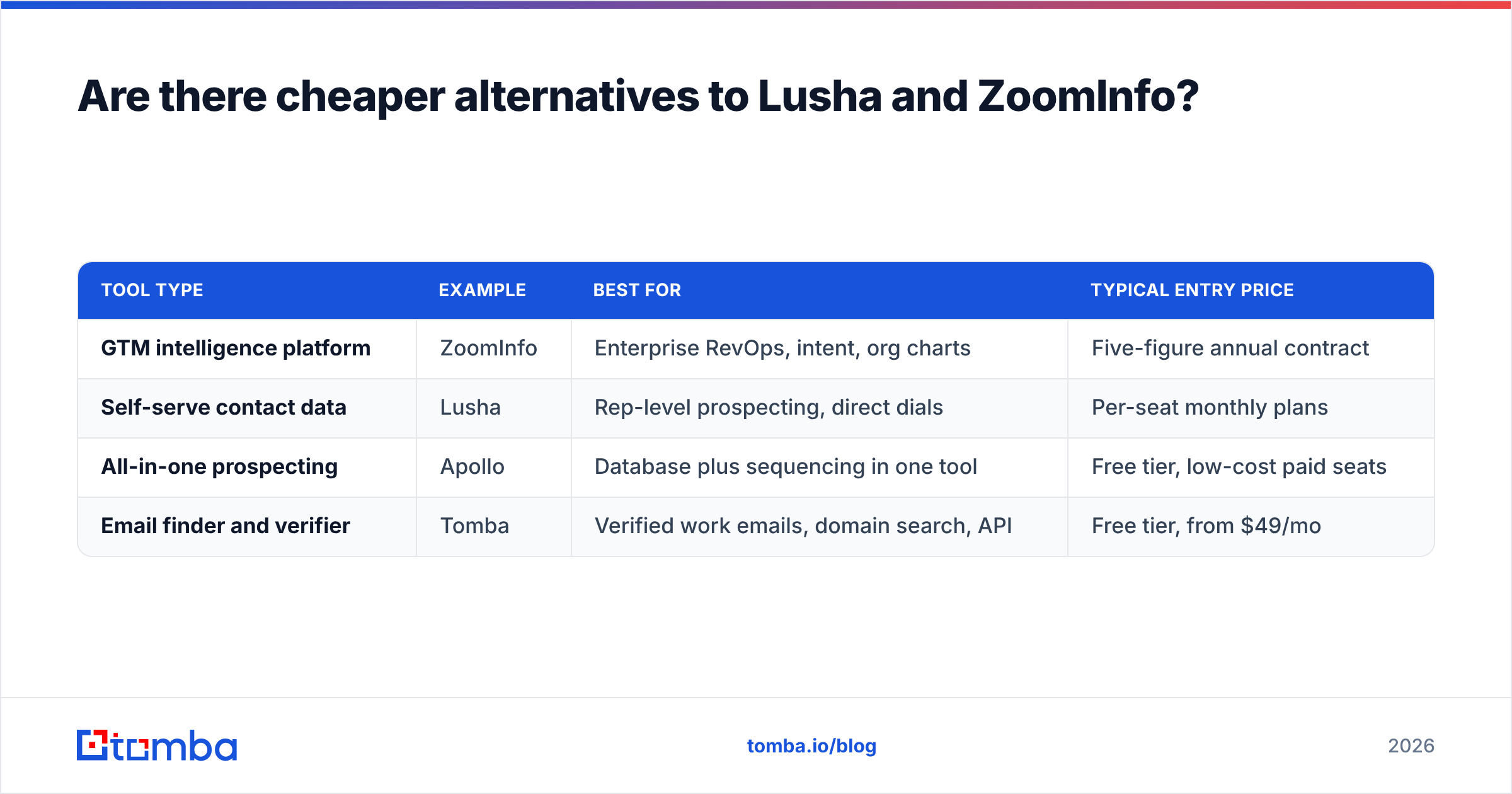
Many teams evaluating Lusha vs ZoomInfo find that 80% of their usage is one task: getting a verified work email for a known person at a known company. For that, paying for phone credits, intent topics or a platform seat is overkill.
| Tool type | Example | Best for | Typical entry price |
|---|---|---|---|
| GTM intelligence platform | ZoomInfo | Enterprise RevOps, intent, org charts | Five-figure annual contract |
| Self-serve contact data | Lusha | Rep-level prospecting, direct dials | Per-seat monthly plans |
| All-in-one prospecting | Apollo | Database plus sequencing in one tool | Free tier, low-cost paid seats |
| Email finder and verifier | Tomba | Verified work emails, domain search, API | Free tier, from $49/mo |
If you're comparing beyond these two, our breakdowns of the RocketReach alternative and Apollo.io alternatives cover the same decision from different angles.

A modular stack is a good fit for many teams under 20 reps. It looks like this:
- An email finder for verified work emails, priced per search rather than per seat.
- A phone finder for the smaller set of contacts where calling is worth it.
- Your existing CRM and sequencer for workflow.
- Intent and visitor ID added later, once you have a process that can act on them.
You'll often spend less than one ZoomInfo seat bundle, and every part can be swapped out if a vendor's data quality slips.
What is the final verdict on Lusha vs ZoomInfo?#
Lusha wins for most small and mid-size teams. It's cheaper, faster to roll out, flexible on contract terms and good on direct dials. You can be productive the same afternoon you sign up.
ZoomInfo wins for enterprise revenue orgs that will use intent, enrichment, org charts and visitor identification together, and that have the people to run them. For those teams, the platform's depth is worth the premium.
Before committing to either, run the 100-contact test described above. Use your real ICP, verify independently and count outcomes. The vendor that scores better on your data is the right choice, whatever the comparison grids say.
Need verified emails without the platform price?#
If your Lusha vs ZoomInfo evaluation keeps coming back to "we mainly need accurate work emails," try the Tomba Email Finder. You can find professional email addresses by name, domain or company, verify them in the same workflow, and push results to your CRM or sequencer through integrations or the API. The free plan includes 25 searches a month, and paid plans start at $49/month (see Tomba pricing), with no annual lock-in or per-seat sales call. Test it on the same 100 contacts you use for Lusha and ZoomInfo and compare the bounce rates.
Related guides#
// start free
See who Tomba finds at any company
Type a company's domain to see its people, their roles and verified work emails, each with the pages it was found on. Free account, no card.
Free plan · No credit card required · GDPR & CCPA
// about the author