Machine Learning for Sales: Use Cases, Tools, and Data Needs
Machine learning can help sales teams score leads, forecast revenue, and spot churn, but only if the data underneath is clean. Here is where it pays off, which tools do it well, and what to fix before you buy.
TL;DR: machine learning for sales
- Machine learning for sales finds patterns in your past deals, emails, calls, and contact data. It then predicts what happens next: which lead converts, which deal slips, which account churns.
- Five use cases pay off most often: lead scoring, deal-risk forecasting, call analysis, intent detection, and contact enrichment.
- Most machine learning for sales projects fail because of the data, not the model. Bounced emails, duplicate records, and empty CRM fields teach the model the wrong lessons.
- Buy before you build. The ML built into your CRM or sales tool covers about 80% of what a typical mid-market team needs.
- Fix your contact data first: verify emails, enrich missing fields, and deduplicate. Then switch on predictive features.
What is machine learning for sales?#
Machine learning for sales means using models that learn from your past sales data. They turn that history into predictions reps and managers can act on. You don't hand-code rules like "leads from companies with 200+ employees get 10 points." The model looks at thousands of past deals. It works out which signals split the wins from the losses.
Think of it like a sales manager who has reviewed every deal your company ever ran. That manager stops trusting gut feel and starts noticing things. Deals with a second buyer on the call by week two close far more often. Leads who open the pricing email three times but never reply usually go cold. ML does the same pattern-spotting, across far more data, and it doesn't favor recent deals.
Technically, most sales ML falls into three families. All fit the general machine learning definition:
- Classification: will this lead convert, yes or no? Will this deal close this quarter?
- Regression: how much revenue will this account generate? How many days until close?
- Natural language processing (NLP): what did the buyer say on the call, and was the sentiment positive or hesitant?
Large language models (LLMs) are a newer layer on top. They write emails, sum up calls, and research accounts. Predictive ML is the older, quieter layer. It decides who to contact and when. This post is about that layer.
How does machine learning actually work inside a sales stack?#
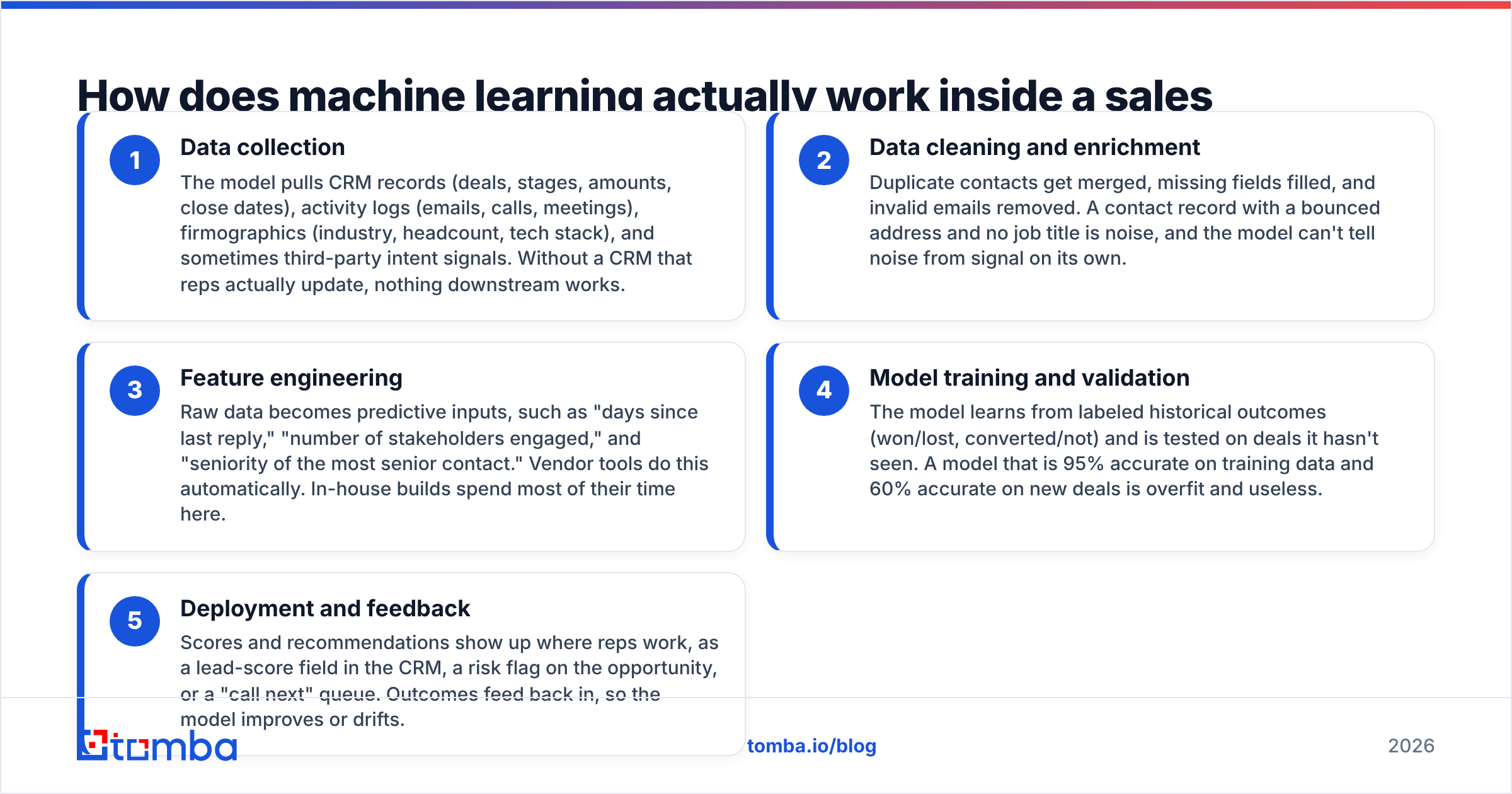
Machine learning for sales runs as a five-step pipeline. Each step depends on the one before it, and most teams skimp on the first two:
Data collection: The model pulls CRM records (deals, stages, amounts, close dates), activity logs (emails, calls, meetings), firmographics (industry, headcount, tech stack), and sometimes third-party intent signals. Without a CRM that reps actually update, nothing downstream works.
Data cleaning and enrichment: Duplicate contacts get merged, missing fields filled, and bad emails removed. A record with a bounced address and no job title is noise. The model can't tell noise from signal on its own.
Feature engineering: Raw data becomes useful inputs, such as "days since last reply" or "number of buyers engaged." Vendor tools do this for you. In-house builds spend most of their time here.
Model training and validation: The model learns from past outcomes (won/lost, converted/not). Then it is tested on deals it hasn't seen. A model that is 95% right on training data but 60% right on new deals is overfit and useless.
Deployment and feedback: Scores show up where reps work: a lead-score field in the CRM, a risk flag on a deal, or a "call next" queue. Outcomes feed back in, so the model improves or drifts.
The weak point is almost always step 2. That is where most failures start.
Which sales use cases benefit most from machine learning?#
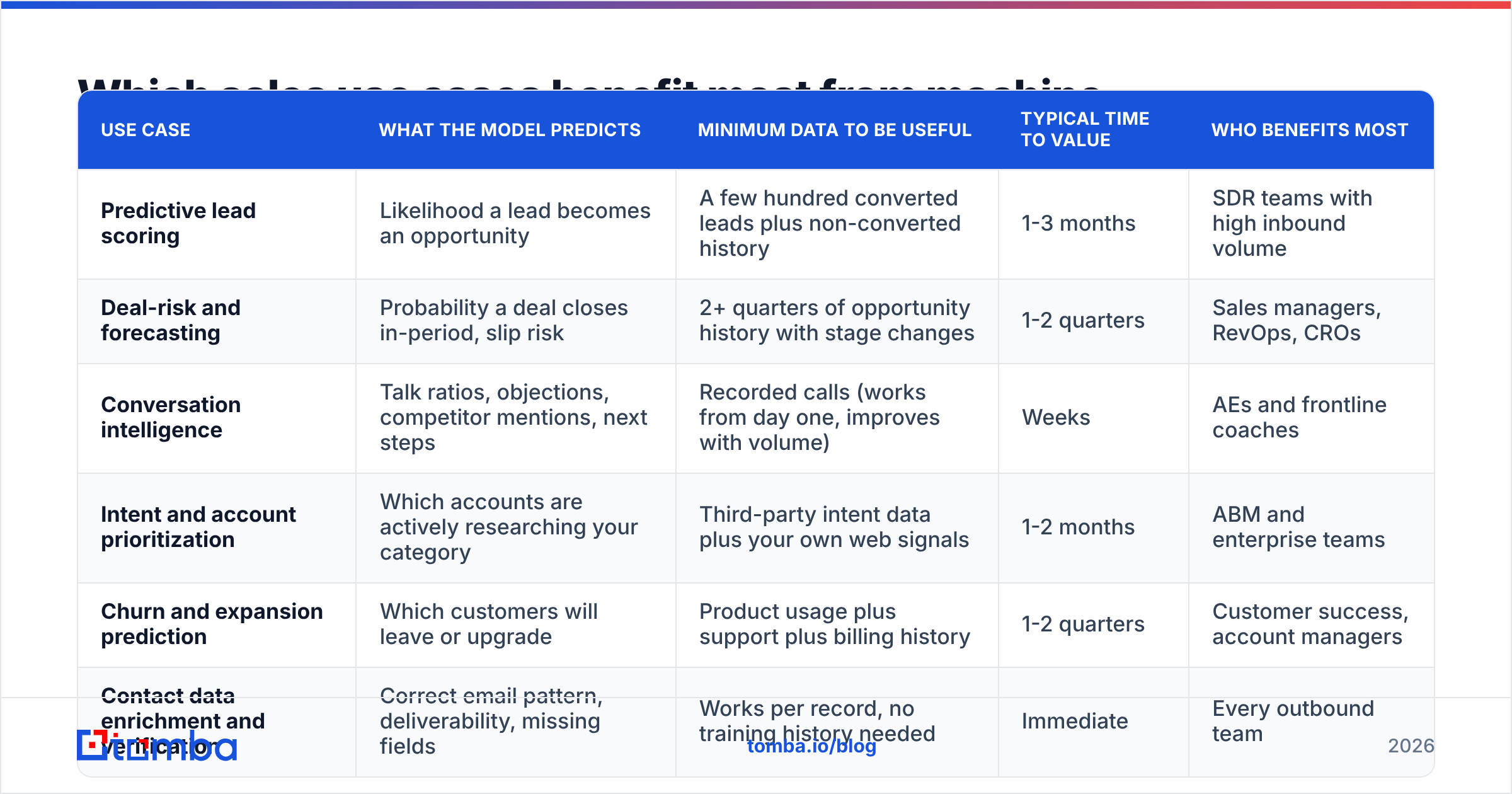
Some sales problems get a lot out of ML. Others barely change. This table ranks the common use cases by how much data they need and how fast they show results.
| Use case | What the model predicts | Minimum data to be useful | Typical time to value | Who benefits most |
|---|---|---|---|---|
| Predictive lead scoring | Odds a lead turns into a deal | A few hundred won leads plus lost ones | 1-3 months | SDR teams with lots of inbound leads |
| Deal-risk and forecasting | Odds a deal closes this period, slip risk | 2+ quarters of opportunity history with stage changes | 1-2 quarters | Sales managers, RevOps, CROs |
| Conversation intelligence | Talk ratios, objections, competitor mentions, next steps | Recorded calls (works from day one, gets better with more) | Weeks | AEs and frontline coaches |
| Intent and account prioritization | Which accounts are looking at tools like yours | Third-party intent data plus your own web signals | 1-2 months | ABM and enterprise teams |
| Churn and expansion prediction | Which customers will leave or upgrade | Product use plus support and billing history | 1-2 quarters | Customer success, account managers |
| Contact data enrichment and verification | Correct email format, whether mail lands, missing fields | Works per record, no past data needed | Right away | Every outbound team |
Two things stand out. Forecasting and churn need the longest history. They suit companies with years of clean CRM data. Contact enrichment and verification pay off right away. They also improve the data every other model trains on. That makes them a smart first step in machine learning for sales, even if you plan something bigger later.
Is predictive lead scoring better than rule-based scoring?#
Usually yes. But only once you have enough data, and only if you can explain the scores to reps.
Rule-based scoring is a points system someone wrote in a spreadsheet. A VP title gets +10. An email open gets +5. A demo request gets +20. It is clear and easy to change. But it reflects what marketing believes matters, not what actually led to a sale.
Predictive scoring flips that. The model finds the weights itself. It often spots signals humans missed. For example, company size may matter much less than whether a second person from the same domain also engaged.
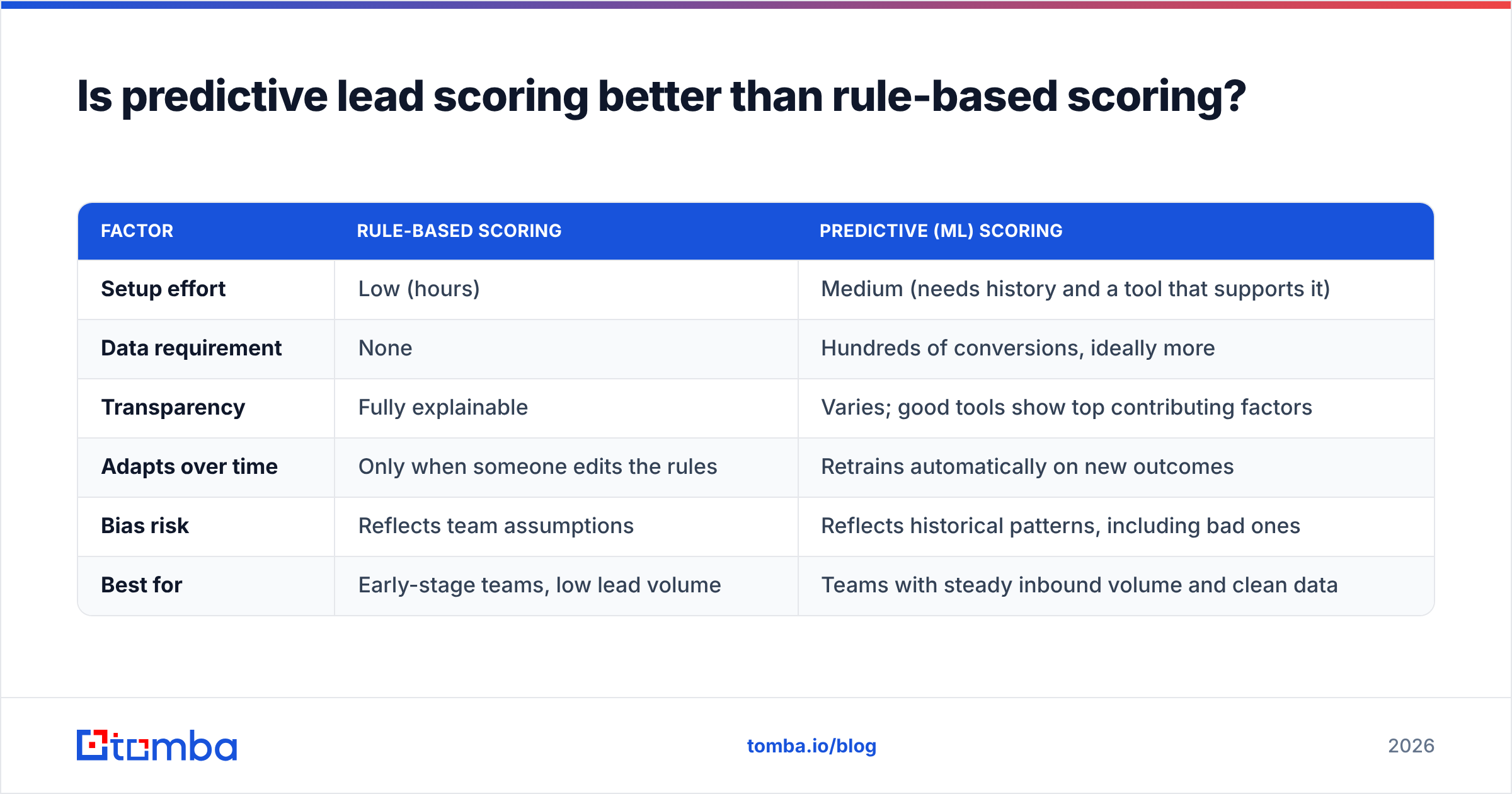
| Factor | Rule-based scoring | Predictive (ML) scoring |
|---|---|---|
| Setup effort | Low (hours) | Medium (needs history and a tool that supports it) |
| Data requirement | None | Hundreds of conversions, ideally more |
| Transparency | Fully explainable | Varies; good tools show the top reasons |
| Adapts over time | Only when someone edits the rules | Retrains itself on new outcomes |
| Bias risk | Reflects team guesses | Reflects past patterns, bad ones too |
| Best for | Early-stage teams, low lead volume | Teams with steady inbound volume and clean data |
Many RevOps teams take a middle path. They run both for a quarter, check which score better predicted real pipeline, and then commit. HubSpot documents how its predictive lead scoring "likelihood to close" property works. It is a useful guide to what a vendor model looks at.
What machine learning tools do sales teams actually use?#
You probably don't need a data science team. In 2026, most machine learning for sales is built into tools you already pay for. Here is how the main options compare.
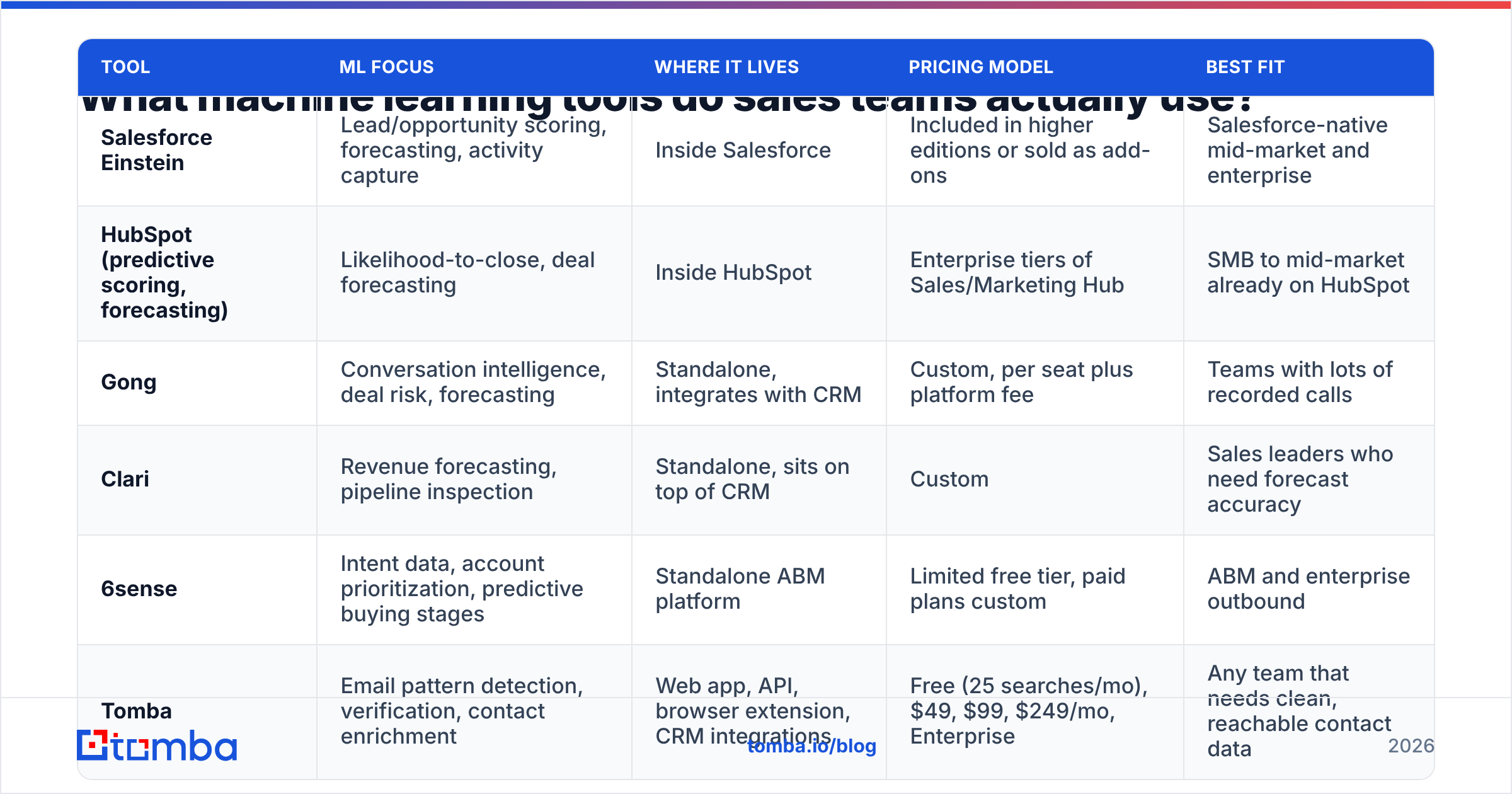
| Tool | ML focus | Where it lives | Pricing model | Best fit |
|---|---|---|---|---|
| Salesforce Einstein | Lead and deal scoring, forecasting, activity capture | Inside Salesforce | In higher editions or sold as add-ons | Mid-market and enterprise teams on Salesforce |
| HubSpot (predictive scoring, forecasting) | Likelihood-to-close, deal forecasting | Inside HubSpot | Enterprise tiers of Sales/Marketing Hub | SMB to mid-market already on HubSpot |
| Gong | Conversation intelligence, deal risk, forecasting | Standalone, integrates with CRM | Custom, per seat plus platform fee | Teams with lots of recorded calls |
| Clari | Revenue forecasting, pipeline inspection | Standalone, sits on top of CRM | Custom | Sales leaders who need forecast accuracy |
| 6sense | Intent data, account ranking, buying stages | Standalone ABM platform | Limited free tier, paid plans custom | ABM and enterprise outbound |
| Tomba | Email pattern detection, verification, contact enrichment | Web app, API, browser extension, CRM integrations | Free (25 searches/mo), $49, $99, $249/mo, Enterprise | Any team that needs clean, reachable contact data |
Some notes:
- Einstein and HubSpot are the easiest choice, since the model already sees your data. The trade-off is less control, and you need the right edition. Salesforce's own Einstein overview shows what is bundled in which edition.
- Gong and Clari overlap more each year. Gong starts from conversations and works outward to forecasting; Clari starts from forecasting and works inward.
- 6sense and similar intent tools are only as useful as your ability to reach the people they flag. Knowing an account is "in market" doesn't help if you can't find a valid email for the buyers.
- Tomba isn't a predictive scoring tool. It sits underneath the others. It finds and verifies the contact data those models score, route, and sequence.
Why do most machine learning projects in sales fail?#
Analysts have warned for years that many AI projects never deliver real value. Gartner's sales research often flags data quality as a top blocker for machine learning for sales. In practice, the failures look like this:
- Garbage training data: Say 20% of your past leads had invalid emails. The model learns that those leads "didn't convert." In truth, they never got a message. Bad data looks like a real pattern to the model.
- Too little history: A team closing 40 deals a year can't train a reliable custom win-prediction model. There isn't enough signal.
- Reps don't trust the score: If a rep can't see why a lead scored 87, they ignore it. Reps need to see the reasons.
- No feedback loop: When outcomes aren't logged (deals left open forever, lost reasons blank), the model never learns from its mistakes.
- Optimizing the wrong metric: A model tuned to book more meetings may push reps toward easy, low-value ones. Tie the target to pipeline or revenue, not activity.
The first failure deserves the most attention because it is the cheapest to fix. Before you switch on predictive scoring, run your contact list through an email verifier and fill gaps with data enrichment. Almost every sales model relies on accurate titles, seniority, company size, and working emails.
Should you build or buy machine learning for sales?#
For most teams, buy. Build machine learning for sales in-house only when no vendor solves your problem and you have the data to back it.
| Question | If yes, lean toward... |
|---|---|
| Do you have fewer than ~1,000 closed opportunities in history? | Buy (vendor models pool patterns across customers) |
| Is your CRM Salesforce or HubSpot on a higher tier? | Use built-in ML first |
| Do you have a data engineer and a data scientist with spare capacity? | Building becomes viable |
| Is your prediction problem unusual (complex usage-based expansion, multi-product bundles)? | Build, or buy and customize |
| Do you need results this quarter? | Buy |
A custom model makes sense for product-led companies that want to know which free users will pay. The signal there comes from product usage that generic sales tools don't see. For a standard B2B pipeline, vendor models usually win. They learn from many customers, not just your few thousand records.
How do you roll out machine learning in a sales team without wrecking adoption?#
Here is a rollout plan for machine learning for sales. It works whether you are switching on Einstein or testing Gong.
Step 1: Audit your data (weeks 1-2). Pull a sample of 500 contacts and 100 closed deals. Count bad emails, missing titles, duplicates, and deals with no lost reason. If more than 15% of records have a big gap, fix that first.
Step 2: Clean and enrich (weeks 2-4). Verify every email, fill in company data and job titles, and merge duplicates. Then make the fields your model needs required in the CRM.
Step 3: Pick one use case (month 2). Start with the problem that hurts most and has the most data. For teams with lots of inbound leads, that is usually lead scoring. For enterprise teams, it is usually deal risk or forecasting.
Step 4: Run in shadow mode (months 2-3). Show scores to managers, but don't route leads on them yet. Compare predictions with what actually happened. This builds trust and catches problems before they cost deals.
Step 5: Go live with explanations (month 3+). Put the score where reps work and always show the top three reasons behind it. Track whether reps who follow the score see a better win rate than those who don't.
Step 6: Review quarterly. Models drift as markets, products, and ideal buyers change. Put a quarterly accuracy check on the RevOps calendar.
What does machine learning for sales look like in 2026?#
A few shifts are worth planning around:
- Predictive and generative are merging. Most platforms now pair a score ("this deal is at risk") with an LLM-written action ("here is a follow-up email on Tuesday's pricing question"). The prediction decides what to do. The LLM drafts how.
- AI agents are arriving, carefully. Agents that research accounts, find contacts, and draft outreach now run at many companies. They depend on accurate contact data. An agent that emails bad addresses hurts your sender reputation at machine speed.
- Your own data matters more. Third-party cookies and some intent sources are fading. So models lean on your own data: product usage, site visits, email replies, and call notes.
- Clear reasons are expected. Reps and regulators both want to know why a model made a call. Black-box scores are losing ground.
All of these trends make data quality more important for machine learning for sales. The more automated your pipeline gets, the more bad inputs cost you.
Frequently asked questions#
Do small sales teams need machine learning?#
Not custom models, no. Small teams get the most from ML that needs no training history. Think email finding and verification, enrichment, and call summaries. Predictive scoring is worth it once you have a steady flow of conversions to learn from.
Is AI the same as machine learning in sales?#
Machine learning is a subset of AI. In sales tools, "AI" now usually means both predictive ML (scoring, forecasting) and generative AI (email drafts, call summaries). When you assess a vendor, ask which one a feature uses.
How accurate is ML-based sales forecasting?#
It depends on your data history and how often reps update deals. Vendors often quote strong accuracy, but your result depends on your own data. Run a shadow-mode test for a full quarter before you trust it for board reports.
What data does a sales ML model need most?#
It needs clean outcomes (won/lost with reasons), accurate contact and company data, and activity history. Of the three, contact and company data is the fastest to fix.
Where should you start?#
Start with the input layer. Machine learning for sales makes better predictions on contacts with verified emails and accurate job data. That holds whether you use Einstein, HubSpot, Gong, an intent tool, or your own build. The Tomba Email Finder finds work email addresses by domain, name, or company. It verifies them before they reach your CRM or sequences. Use it to fill the gaps your scoring model would otherwise misread. The free tier gives you 25 searches a month to test it on your own pipeline. Paid plans start at $49/mo when you're ready to clean up at scale.
Related guides#
// start free
See who Tomba finds at any company
Type a company's domain to see its people, their roles and verified work emails, each with the pages it was found on. Free account, no card.
Free plan · No credit card required · GDPR & CCPA
// about the author