Mail Append in 2026: How Email Appending Works and When It Fails
Mail append adds email addresses to records you already hold, like postal addresses or names and companies. It can bring a dead customer file back to life, or it can wreck your sender reputation in one send. Here's how it works and how to do it safely.
- Mail append (also called email append or email appending) matches records you already have, such as names, postal addresses or companies, against a third-party database and adds a current email address to each match.
- B2C and B2B append use different methods. Consumer append depends on licensed opt-in data matched on name and postal address. B2B append depends on company domains, email patterns and SMTP verification.
- Match rates are usually far below what vendors suggest. Plan for 20-50% on consumer files and more on B2B files that include a company domain.
- The real risk is sending to the appended addresses, not the append. Verify every appended address and warm it up before it goes anywhere near a cold sequence.
- In B2B, you can do this yourself with an email finder and a verifier and skip the opaque service bureau.
What is mail append?#
Mail append is the process of taking a file of known contacts that is missing email addresses and filling those gaps from an outside data source. You send a vendor a CSV of names plus postal addresses, phone numbers or company names. The vendor matches each row against its database and sends back the rows it could match, with an email address added.
The term comes from direct-mail marketing. Retailers, nonprofits and publishers held years of postal records and wanted to reach the same people more cheaply by email. Appending was cheaper than collecting the addresses again, so a whole industry of "data append" bureaus grew up to do it.
Today the term covers two different jobs:
- Consumer (B2C) email append: matching a household or individual to a personal email address, usually Gmail, Outlook or Yahoo.
- Business (B2B) email append: matching a person at a company to a work email address, such as jane.doe@acme.com.
They have the same name but run on different data, different legal rules and different failure modes. Most bad append projects go wrong because someone bought one type and expected it to behave like the other.
How does mail append actually work?#
Every append vendor follows roughly the same five-step pipeline. Knowing the steps tells you where the quality problems come from.
- Normalization: Your file is cleaned up. Names get split into first and last, addresses are standardized against postal databases (CASS in the US), and company names are mapped to domains. Bad input here caps your match rate before matching even starts.
- Matching: Each record is compared against the vendor's reference data. Consumer vendors match on name plus postal address, often requiring an exact or near-exact hit. B2B vendors match on name plus company domain, then either find a known address or infer one from the company's email pattern.
- Confidence scoring: Good vendors score each match. An exact name-plus-address hit on an address seen recently scores higher than a fuzzy match on a record last updated four years ago.
- Verification: The appended address is checked for syntax, MX records and mailbox existence. Some vendors skip this step or do it badly. That's how you end up with 15% hard bounces on your first send.
- Delivery (and sometimes a permission pass): In consumer append, reputable vendors send a "welcome" or opt-out email to each new address before releasing it to you. Anyone who opts out is removed. This step is the main thing separating compliant consumer append from list buying.

The weak points are steps 2 and 4. Matching decides how many addresses you get back. Verification decides how many of them actually work.
Is B2C mail append different from B2B mail append?#
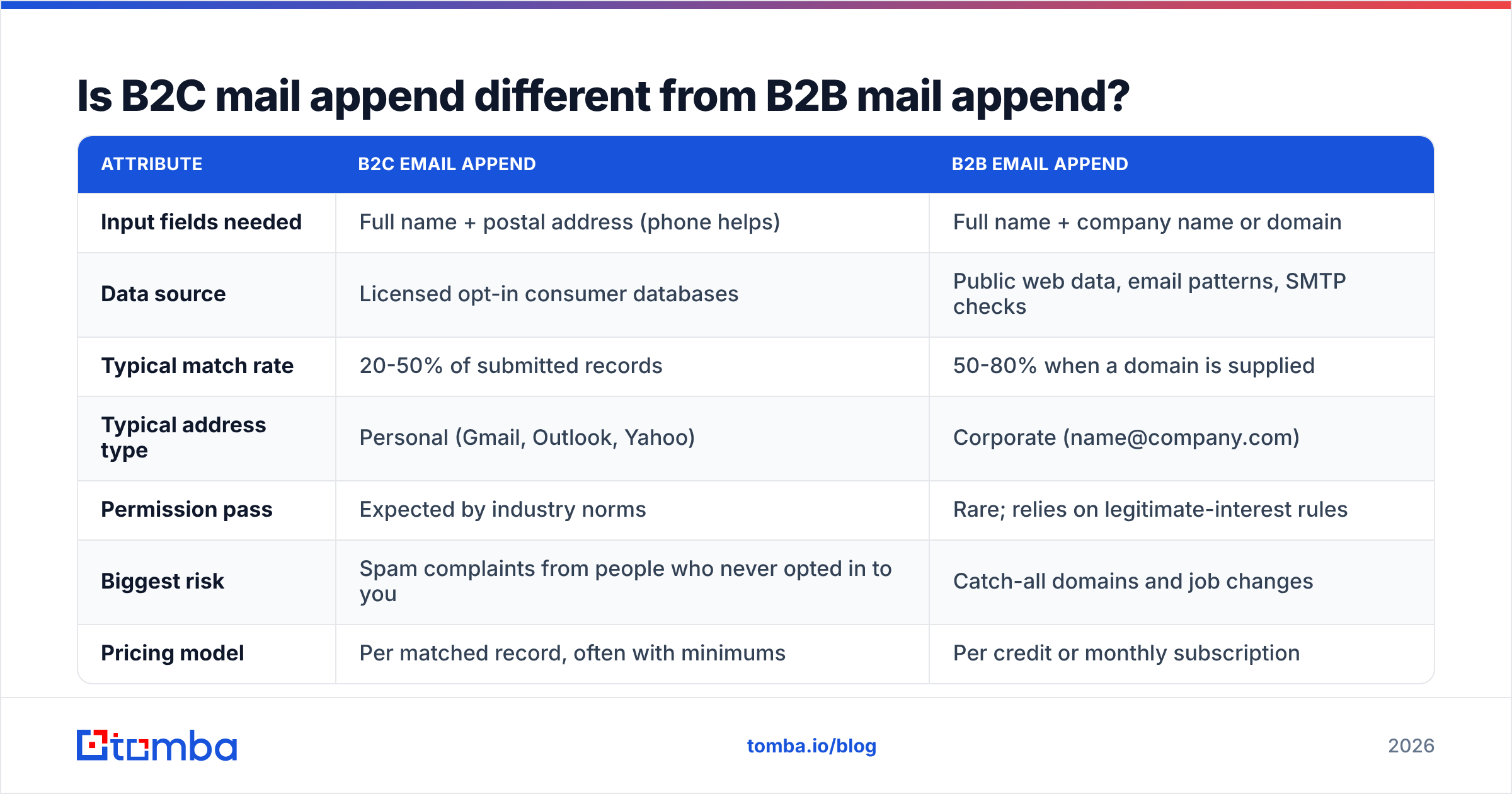
Yes. Here's how the two compare on the attributes that matter when you're budgeting or planning a send.
| Attribute | B2C email append | B2B email append |
|---|---|---|
| Input fields needed | Full name + postal address (phone helps) | Full name + company name or domain |
| Data source | Licensed opt-in consumer databases | Public web data, email patterns, SMTP checks |
| Typical match rate | 20-50% of submitted records | 50-80% when a domain is supplied |
| Typical address type | Personal (Gmail, Outlook, Yahoo) | Corporate (name@company.com) |
| Permission pass | Expected by industry norms | Rare; relies on legitimate-interest rules |
| Biggest risk | Spam complaints from people who never opted in to you | Catch-all domains and job changes |
| Pricing model | Per matched record, often with minimums | Per credit or monthly subscription |
| Self-serve option | Rare; mostly service bureaus | Common (email finder + verifier) |
The table points to a practical rule. If your file is consumers, you almost always need a specialist service bureau with licensed data and a permission pass. If your file is business contacts, you can usually do the append yourself and get more control over quality.
What match rate should you expect from a mail append?#
Lower than the sales deck says. Vendors quote "up to" match rates that assume a clean, recent file. Your file is probably neither of those.
What drives the rate:
- Record age: People move house and change jobs. A B2B record more than two years old has a good chance of pointing to someone who has left the company.
- Input completeness: A record with name, street address, city and ZIP matches far better than name plus city. For B2B, a domain matters much more than a company name, because "Acme" could be dozens of companies.
- Geography: Consumer append databases are deepest in the US. Coverage in the EU is thin, mostly because of GDPR.
- Vendor matching strictness: A vendor that accepts fuzzy matches will report a higher rate and deliver more wrong-person emails. A high match rate with poor accuracy is worse than a lower honest one.
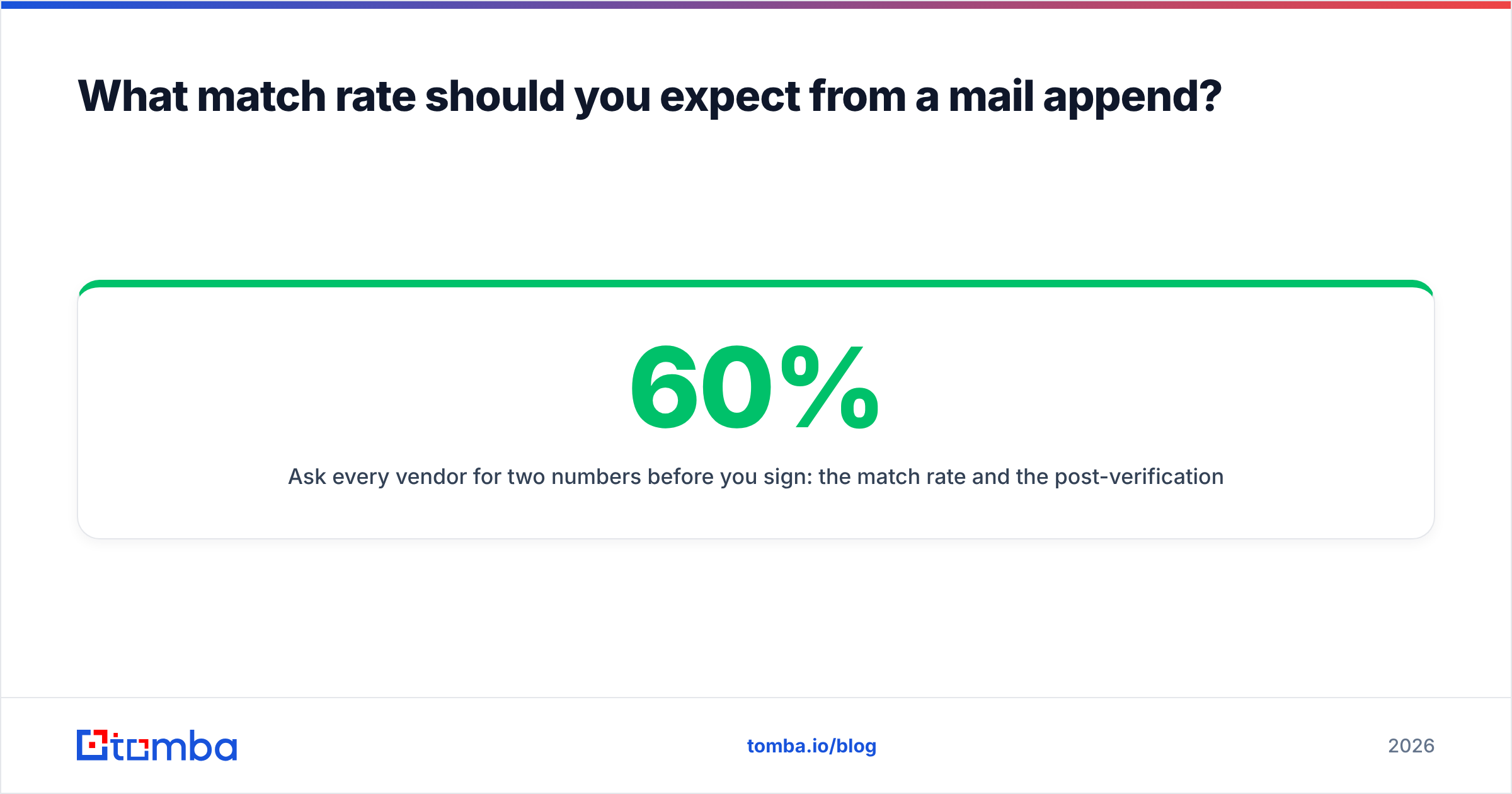
Ask every vendor for two numbers before you sign: the match rate and the post-verification deliverable rate on that matched set. A 60% match where only 70% of the matches are deliverable gives you 42% usable records. A 45% match that is 95% deliverable gives you about 43%, with far fewer bounces hurting your domain.
Is mail append legal?#
It depends on who you're appending and where they live. In most jurisdictions the append is legal. Whether you can then email the addresses is a separate question.
- United States: The CAN-SPAM Act doesn't require prior consent for commercial email. It does require accurate headers, a physical address and a working opt-out. That's why consumer append is mostly a US practice. Industry bodies have still long expected a permission pass before marketing to appended consumer addresses.
- EU and UK: Under GDPR you need a lawful basis to process personal data. Emailing consumers for marketing usually needs consent under ePrivacy rules, so consumer append is close to unworkable. B2B outreach to work addresses can sometimes rely on legitimate interest under GDPR Article 6(1)(f). You must document a balancing test and offer an easy opt-out.
- Canada: CASL requires express or implied consent. Appended addresses rarely meet that bar for consumers.
This is general information, not legal advice. If you're appending EU consumer records, talk to counsel before you talk to a vendor.
What does a mail append cost?#
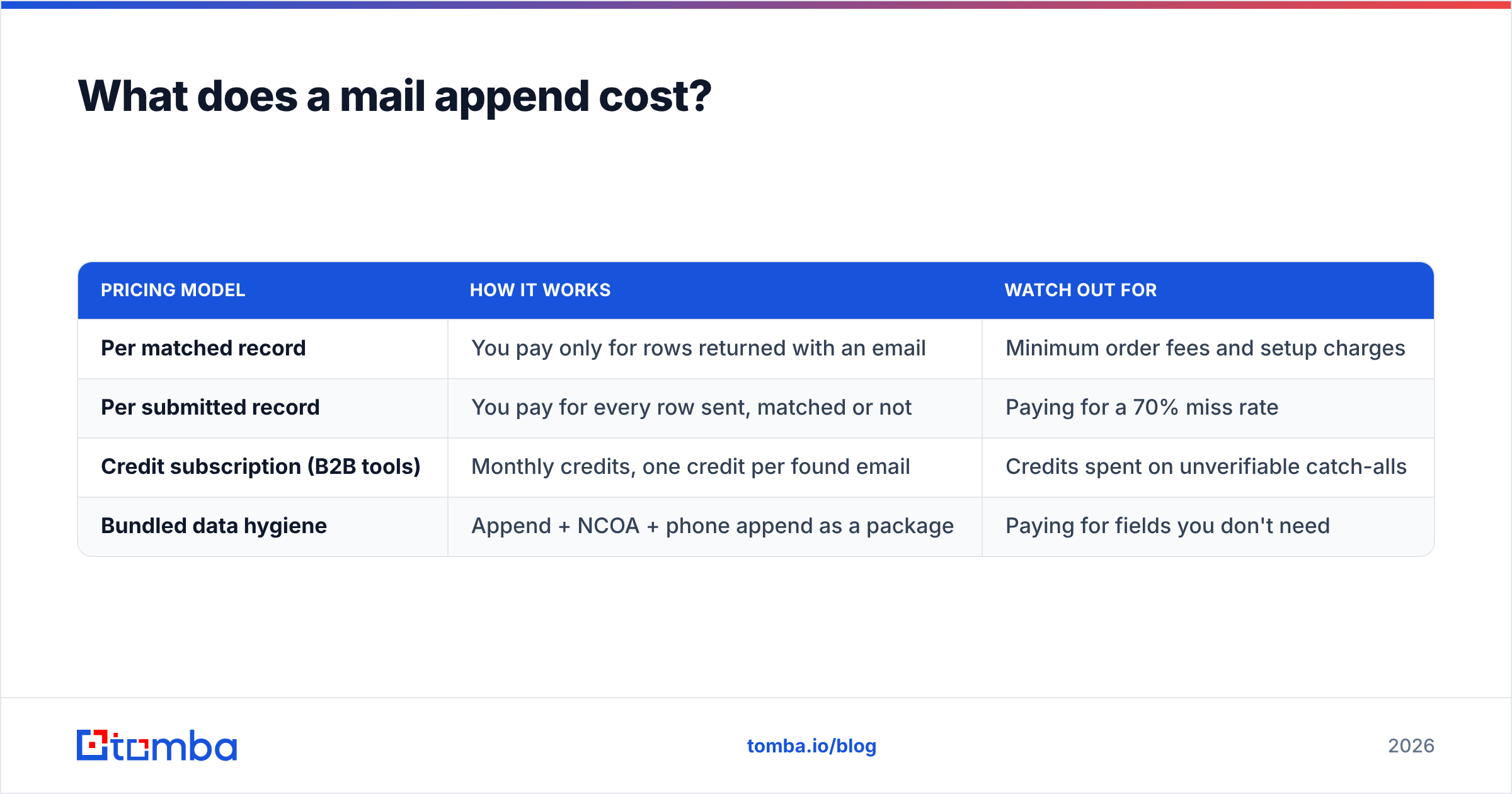
Pricing models vary, and the headline number is rarely what you end up paying. Here's what to look for:
| Pricing model | How it works | Watch out for |
|---|---|---|
| Per matched record | You pay only for rows returned with an email | Minimum order fees and setup charges |
| Per submitted record | You pay for every row sent, matched or not | Paying for a 70% miss rate |
| Credit subscription (B2B tools) | Monthly credits, one credit per found email | Credits spent on unverifiable catch-alls |
| Bundled data hygiene | Append + NCOA + phone append as a package | Paying for fields you don't need |
For B2B, a self-serve stack is usually cheaper and easier to audit. For example, Tomba's free tier includes 25 searches a month for testing, and paid plans run $49/mo (Starter), $99/mo (Growth) and $249/mo (Pro), with custom Enterprise pricing. Full limits are on the Tomba pricing page. Run a few hundred records through any tool before you commit to a large job. A test run tells you more than any vendor's case study.
When does mail append backfire?#
The append itself rarely causes harm. Problems show up the first time you hit "send." Four patterns account for most failures:
- Blasting the whole appended file at once: A sudden spike of mail to never-contacted addresses is exactly the pattern mailbox providers flag. Your sender reputation drops, and your opted-in customers start landing in spam too.
- Skipping verification: Appended addresses decay like any other data. Sending without running every row through an email verifier first is how teams get 10%+ hard bounces on day one.
- Treating catch-all addresses as valid: Many company domains accept mail for any address, so an SMTP check returns "accept" whether or not the person exists. If these aren't flagged and segmented, they look fine on paper and bounce later.
- Ignoring context: Someone who bought from you in 2019 doesn't remember you. Treat appended contacts as cold, not as lapsed customers. A "we've missed you" email to someone who never gave you their address reads as creepy.

The fix is the same in every case: verify, segment by confidence, and ramp volume slowly. Start the appended segment at a small fraction of your normal daily volume and raise it only while bounce and complaint rates stay low. Google's sender guidelines expect spam complaint rates below 0.3%, and you should aim well under that.
How do you run a B2B mail append yourself?#
If your file is business contacts, you don't need a service bureau. Here's a workflow you can run in an afternoon:
- Clean the input: Deduplicate, split names, and drop rows with no company. Map company names to domains. Domains matter more than anything else for B2B match rates.
- Find addresses by name + domain: Run the file through an email finder in bulk. Tools like Tomba check known public sources first, then fall back to the company's email pattern. You can also run a domain search on key accounts to see who else at the company is publicly listed. That's useful when your original contact has left.
- Verify every result: Use a separate verification pass, even if the finder returns a confidence score. Split results into valid, catch-all, risky and invalid.
- Enrich what's left: Add job title, LinkedIn URL and company size with data enrichment. That way you can check the person still holds the role you expect before you write to them.
- Segment and sync: Push only "valid" rows into your sequencer at first. Hold catch-alls in a separate, low-volume segment. Write the append date and source to your CRM so you can audit it later. HubSpot's guidance on list hygiene and similar CRM docs recommend tracking source fields for exactly this reason.
- Re-verify on a schedule: B2B data decays as people change jobs. Re-verify appended segments before every major campaign, not once a year.
This gives you something a black-box bureau can't: row-level visibility into why each address was returned and how confident the tool was.
Should you use a service bureau or a self-serve tool?#
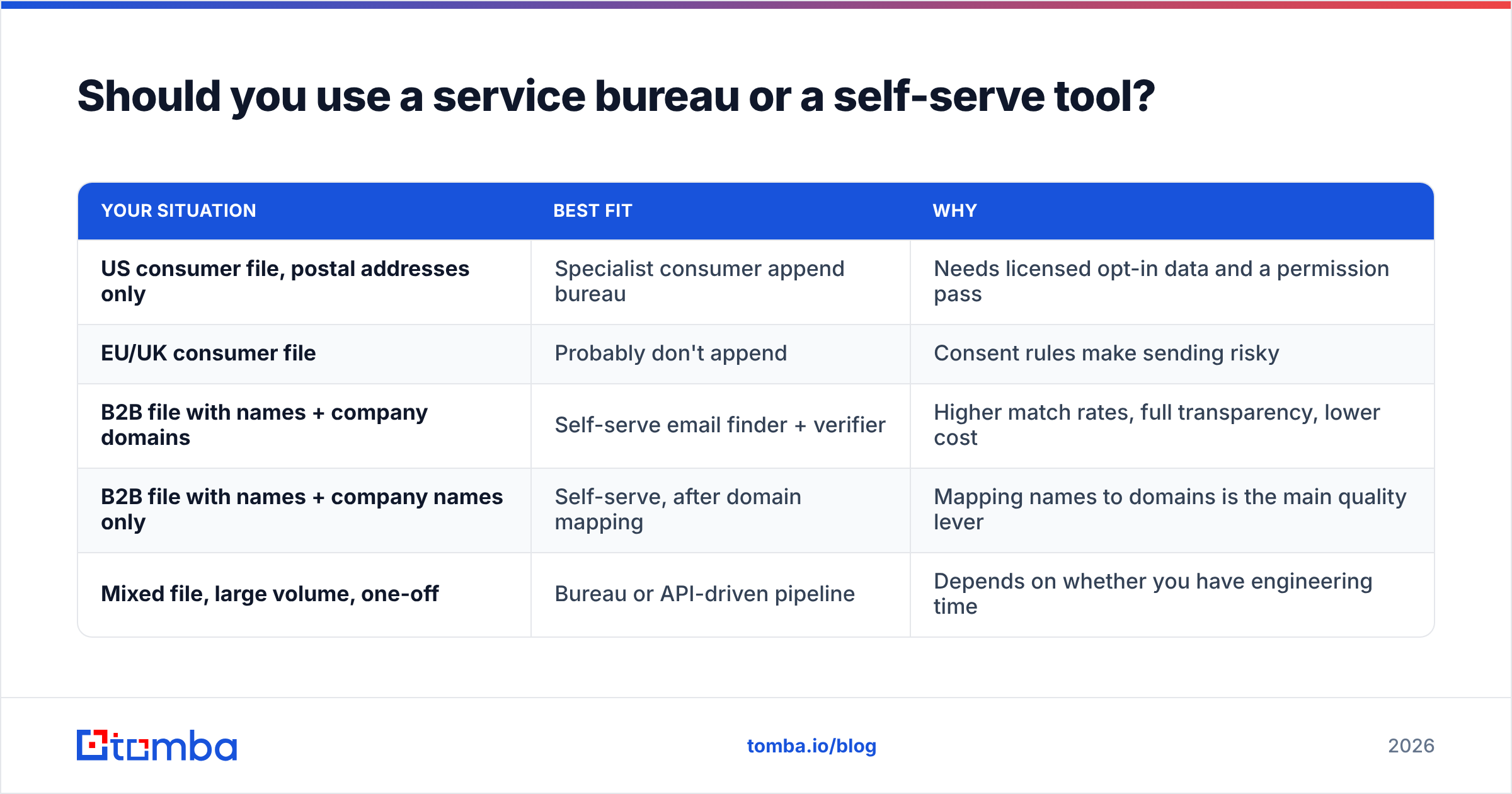
Pick based on the file, not the brand:
| Your situation | Best fit | Why |
|---|---|---|
| US consumer file, postal addresses only | Specialist consumer append bureau | Needs licensed opt-in data and a permission pass |
| EU/UK consumer file | Probably don't append | Consent rules make sending risky |
| B2B file with names + company domains | Self-serve email finder + verifier | Higher match rates, full transparency, lower cost |
| B2B file with names + company names only | Self-serve, after domain mapping | Mapping names to domains is the main quality lever |
| Mixed file, large volume, one-off | Bureau or API-driven pipeline | Depends on whether you have engineering time |
If you run the job from a spreadsheet or script, an API or bulk upload will handle tens of thousands of rows without manual work. Either way, set aside a test batch of a few hundred records and compare results before you commit the full file.
What should you ask an append vendor before you sign?#
Use this checklist on every vendor call:
- Where does the data come from? "Proprietary sources" isn't an answer. Ask whether the consumer data is opt-in and how it was collected.
- What's the matching standard? Exact match, or fuzzy? Can you choose?
- Is verification included, and how fresh is it? Ask for the date of the last SMTP check on returned addresses.
- How are catch-alls handled? Flagged separately, or counted as valid?
- Is there a permission pass for consumer data? If not, walk away.
- What's the deliverability guarantee? Some vendors refund or credit hard bounces above a threshold. Get it in writing.
- Can you run a free or paid test file? Any vendor confident in its data will.
Independent reviews on sites like G2 can help you shortlist vendors. A test file on your own data is still the only number you can trust.
Is mail append worth it in 2026?#
For US consumer files with a proper permission pass, it can still be worth it, as long as you treat the result as a new cold audience and not a revived customer list. For EU consumer data, it's mostly not worth the legal exposure. For B2B, the old service-bureau model is largely obsolete: self-serve finding and verification is cheaper, more transparent and easier to repeat.
The rule is the same in every case. An appended address is a guess until you've verified it, and a verified address is still a stranger until you've earned their attention. Budget for the cleanup and the slow ramp, not just the append fee.
If your file is B2B contacts with names and companies, start with the Tomba Email Finder. Upload your list, find work addresses by name and domain, verify every result in the same workflow, and push only clean rows to your CRM. You can test it on 25 free searches a month before you commit to a paid plan.
Related guides#
// start free
See who Tomba finds at any company
Type a company's domain to see its people, their roles and verified work emails, each with the pages it was found on. Free account, no card.
Free plan · No credit card required · GDPR & CCPA
// about the author