7 Best Mailarrow Alternatives for Cold Email Teams in 2026
Mailarrow is cheap and simple, but caps on active prospects and thin multichannel features push growing teams elsewhere. Here are 7 Mailarrow alternatives, compared on price, limits, and deliverability.

TL;DR
- Mailarrow is a low-cost cold email sender: $39/mo for Basic, $59 for Professional, $99 for Growth. Every plan includes unlimited mailboxes and warmup. The limits that matter are active prospects and monthly email volume.
- Instantly and Smartlead are the closest swaps if you mainly need more sending volume and better inbox rotation at about the same price.
- lemlist and Reply.io are worth the higher price if you need LinkedIn steps, calls, or proper multichannel sequences.
- Saleshandy and Woodpecker suit agencies and small teams that want strong deliverability guardrails without much setup.
- No sender can fix a bad list. Whichever tool you choose, find and verify addresses before you upload them, or your bounce rate will damage your domains.
What is Mailarrow, and why do teams look for alternatives?#
Mailarrow is a cold email platform for small outbound teams and agencies. You connect as many Google Workspace or Microsoft 365 inboxes as you like, warm them up inside the app, and run multi-step email sequences with AI personalization on the higher tiers.
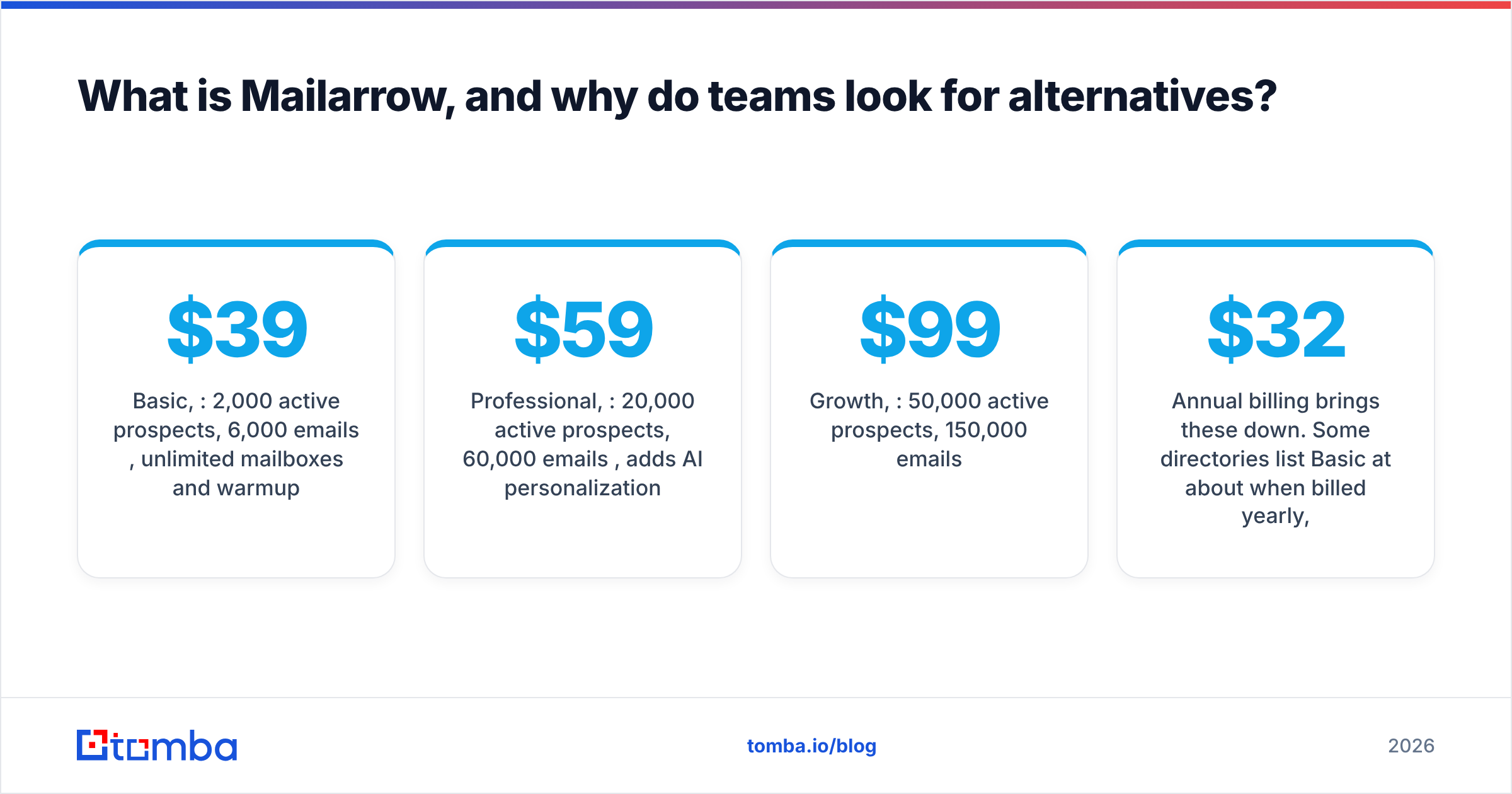
Pricing is simple. According to Mailarrow's pricing page and third-party listings on G2, the plans in 2026 are:
- Basic, $39/mo: 2,000 active prospects, 6,000 emails/month, unlimited mailboxes and warmup
- Professional, $59/mo: 20,000 active prospects, 60,000 emails/month, adds AI personalization
- Growth, $99/mo: 50,000 active prospects, 150,000 emails/month
Annual billing brings these down. Some directories list Basic at about $32/mo when billed yearly, but check the vendor's page before you budget around that figure.
For a two-person team sending a few hundred emails a day, that is good value. Teams usually start looking elsewhere for four reasons:
- Prospect caps arrive early. On Basic, 2,000 active prospects runs out quickly once you have several campaigns going at once.
- The product is email-only. If you want LinkedIn touches, call tasks, or SMS in the same sequence, you will need a second tool.
- The integration ecosystem is thin. Directories disagree on whether Mailarrow has a public API. That alone tells you it isn't built for RevOps teams that sync everything to a CRM.
- There is no contact data. Mailarrow sends emails. It doesn't help you find or verify the people you send to.
If none of these affect you, Mailarrow may be the right tool already. If one or more does, read on.
Which Mailarrow alternatives are worth considering?#
Each tool below was chosen because it fixes at least one of the four limits above. The ones that are only more expensive versions of Mailarrow were left out.
- Instantly: best for high-volume sending on a flat fee. It has unlimited inboxes and warmup like Mailarrow, plus a larger warmup network, inbox rotation, and an optional lead database.
- Smartlead: best for agencies running many client domains. It offers white-labelling, client sub-accounts, and detailed mailbox rotation.
- lemlist: best for personalized multichannel outreach. You get LinkedIn steps, image and video personalization, and a built-in lead database.
- Reply.io: best for full sales-engagement workflows. It handles email, LinkedIn, calls, SMS, and WhatsApp, and has an AI SDR layer.
- Saleshandy: best budget option with deliverability guardrails. It has sender rotation, built-in email verification, and pricing based on prospects.
- Woodpecker: best for careful senders and smaller teams. Its bounce-protection and catch-all handling are conservative by design.
- Apollo.io: best if you want data and sending in one login. Its sequencer is attached to a large B2B contact database.
How do the top Mailarrow alternatives compare on price and limits?#
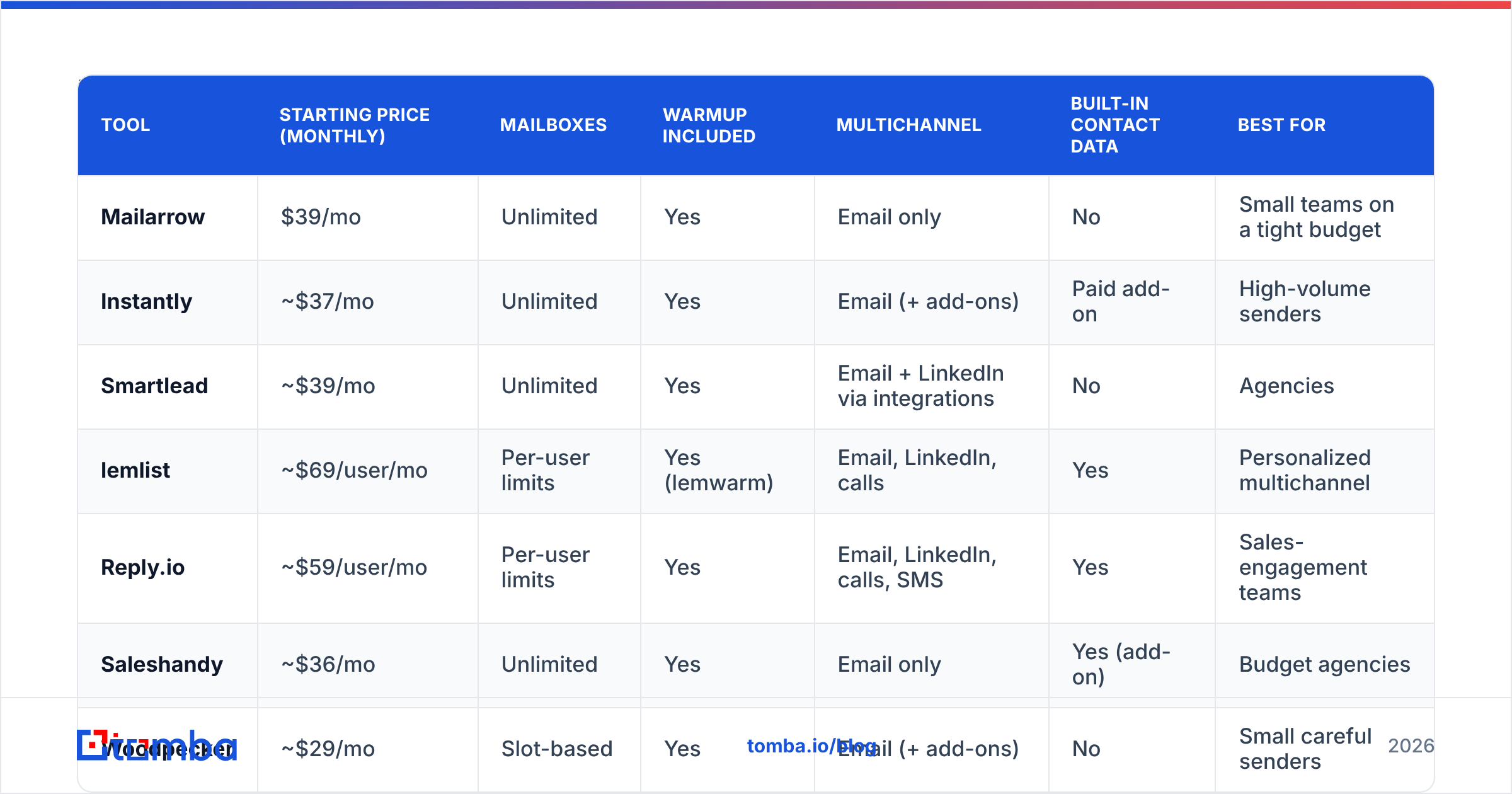
Prices below are publicly listed monthly starting rates in late 2026, rounded. Annual plans are usually 15–20% cheaper. Vendors change these figures often, so check each one before you commit.
| Tool | Starting price (monthly) | Mailboxes | Warmup included | Multichannel | Built-in contact data | Best for |
|---|---|---|---|---|---|---|
| Mailarrow | $39/mo | Unlimited | Yes | Email only | No | Small teams on a tight budget |
| Instantly | ~$37/mo | Unlimited | Yes | Email (+ add-ons) | Paid add-on | High-volume senders |
| Smartlead | ~$39/mo | Unlimited | Yes | Email + LinkedIn via integrations | No | Agencies |
| lemlist | ~$69/user/mo | Per-user limits | Yes (lemwarm) | Email, LinkedIn, calls | Yes | Personalized multichannel |
| Reply.io | ~$59/user/mo | Per-user limits | Yes | Email, LinkedIn, calls, SMS | Yes | Sales-engagement teams |
| Saleshandy | ~$36/mo | Unlimited | Yes | Email only | Yes (add-on) | Budget agencies |
| Woodpecker | ~$29/mo | Slot-based | Yes | Email (+ add-ons) | No | Small careful senders |
| Apollo.io | ~$59/user/mo | Per-user limits | Basic | Email, calls, LinkedIn tasks | Yes (large) | All-in-one prospecting |
The main difference is how each tool prices. Mailarrow, Instantly, Smartlead, and Saleshandy charge per workspace, so a ten-mailbox setup costs the same as a one-mailbox setup. lemlist, Reply.io, and Apollo charge per seat. That works well for an in-house SDR team and badly for an agency running forty client inboxes.

Is Instantly better than Mailarrow?#
For most teams that are hitting Mailarrow's prospect caps, yes. Instantly uses the same core model: unlimited sending accounts with warmup included. Its Growth plan starts at a similar price and allows far more contacts per month. Instantly's warmup pool is also one of the largest, which helps when you're bringing new domains online.
The trade-offs:
- Add-ons stack up. The lead database, CRM, and website-visitor features are billed separately, so the real monthly cost can be double the headline price.
- Support is mostly self-serve on the lower tiers.
Choose Instantly if volume is your main problem. If you're weighing it against other options too, our Instantly alternative breakdown covers what it does poorly.
Is Smartlead a good Mailarrow alternative for agencies?#
Smartlead is designed for agencies. Each client gets a sub-account, you can white-label the dashboard, and mailbox rotation runs automatically across hundreds of inboxes. Mailarrow treats your workspace as one pool. Smartlead lets you keep client domains separate, so one client's bad list doesn't hurt everyone else's sender reputation.
Its weak points are a busier interface and a learning curve for the rotation and webhook settings. If you run outbound for five or more clients, the extra setup time is worth it.
When should you pay more for lemlist or Reply.io?#
Pay per seat when the sequence needs more than one channel.
lemlist stands out for personalization: custom images, personalized landing pages, and LinkedIn visit and connect steps placed between emails. It now includes a contact database, so a small team can source and send in one place. At about $69 per user per month on the email-and-LinkedIn tier, a five-SDR team pays several times what it would on Mailarrow.
Reply.io goes further into sales engagement, with call tasks, SMS, WhatsApp, and an AI SDR agent that can run sequences with little supervision. It fits teams that have outgrown "a cold email tool" and need a proper engagement platform tied to their CRM.
Neither is the right choice if your process really is email-only. You would be paying for channels you never use.
Which budget tools compete with Mailarrow on price?#
Saleshandy is the most direct budget competitor. It has unlimited email accounts, sender rotation, and pricing based on active prospects, which is easy to compare with Mailarrow's model. It also includes email verification, which is useful because Mailarrow doesn't. Our Saleshandy alternative review covers the limits of its lower tiers.
Woodpecker is more conservative. It automatically pauses sending when bounces rise, handles catch-all addresses carefully, and keeps daily limits low by default. That makes it slower to scale, but it's hard to get your domain blacklisted with it. If your main worry is protecting a new domain, that's a good trade.
Should you use Apollo.io instead of Mailarrow?#
Only if contact data is the bigger problem. Apollo combines a very large B2B database with a sequencer, so you can filter, export, and enroll leads without leaving the app. The sequencer is weaker than a dedicated sender's. It has fewer warmup controls, mailbox rotation is limited, and per-seat pricing gets expensive. Many teams use Apollo for data and Instantly or Smartlead for sending.
Data quality also varies between segments. Apollo's records go stale in fast-moving markets and smaller companies, so bounce rates can rise even with its built-in verification. Check a sample before you load thousands of contacts into a sequence.
What do most Mailarrow comparisons leave out?#
The sender is rarely what caps your results. The list is.
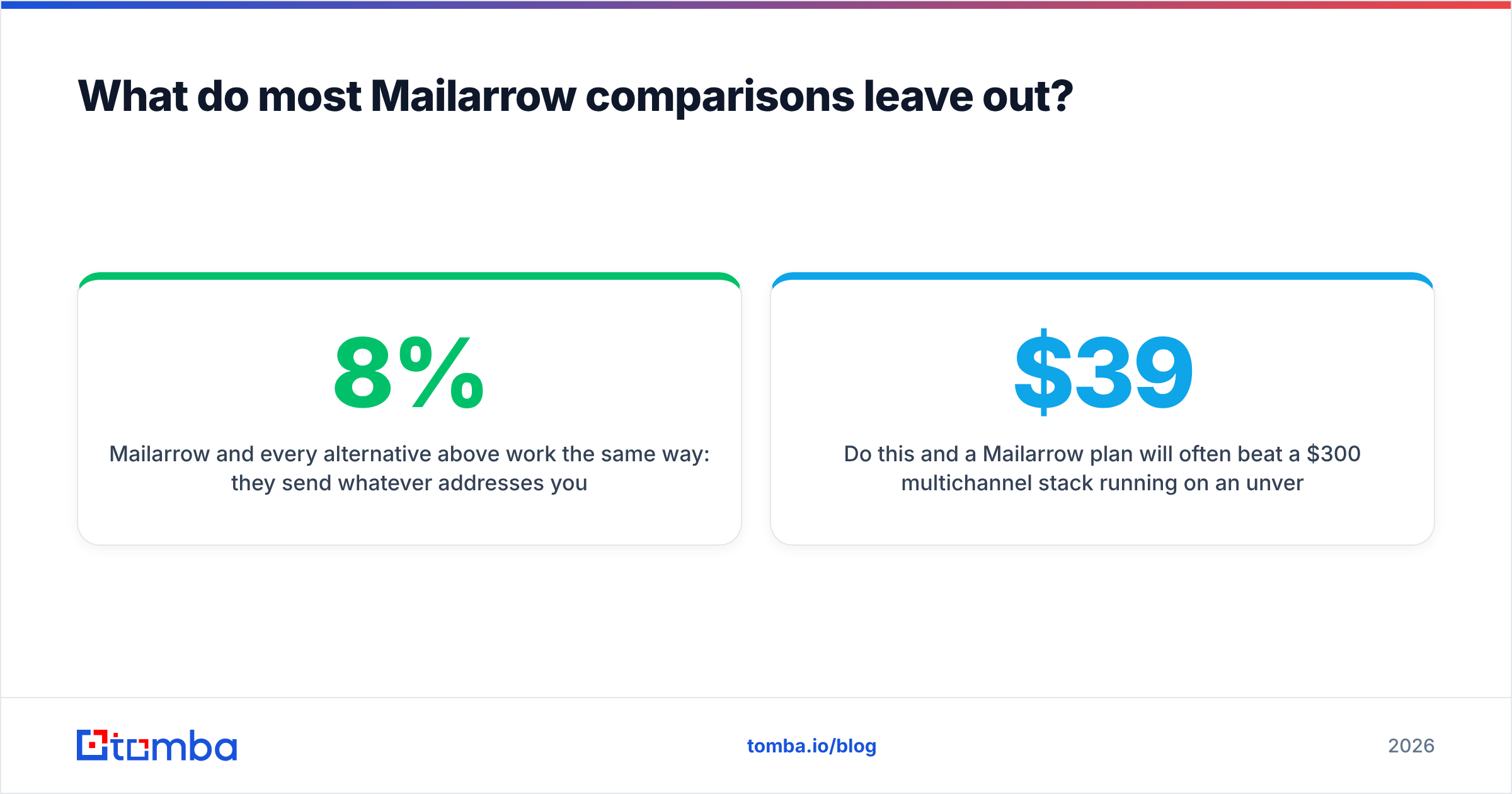
Mailarrow and every alternative above work the same way: they send whatever addresses you upload. If 8% of those addresses bounce, the warmup work is undone, Google and Microsoft start filtering you, and reply rates fall. This happens no matter which tool sent the email.

Whatever tool you pick, run this order of operations:
- Find addresses from a real source. Use an email finder that tells you where it found each address, rather than guessing a pattern like firstname.lastname@ and hoping it's right.
- Verify every address before upload. Run the list through an email verifier and remove invalid, disposable, and role-based addresses. Treat catch-all domains as their own segment.
- Send catch-alls from a separate campaign with lower daily limits, so a few silent bounces don't affect your main domains.
- Keep each inbox under about 30–50 cold emails a day while it warms up, then increase slowly. Gmail's sender guidelines also require SPF, DKIM, and DMARC on any domain that sends in bulk.
- Re-verify any list older than 60–90 days. B2B contact data decays steadily as people change jobs.
Do this and a $39 Mailarrow plan will often beat a $300 multichannel stack running on an unverified list.
Which Mailarrow alternative should you choose?#
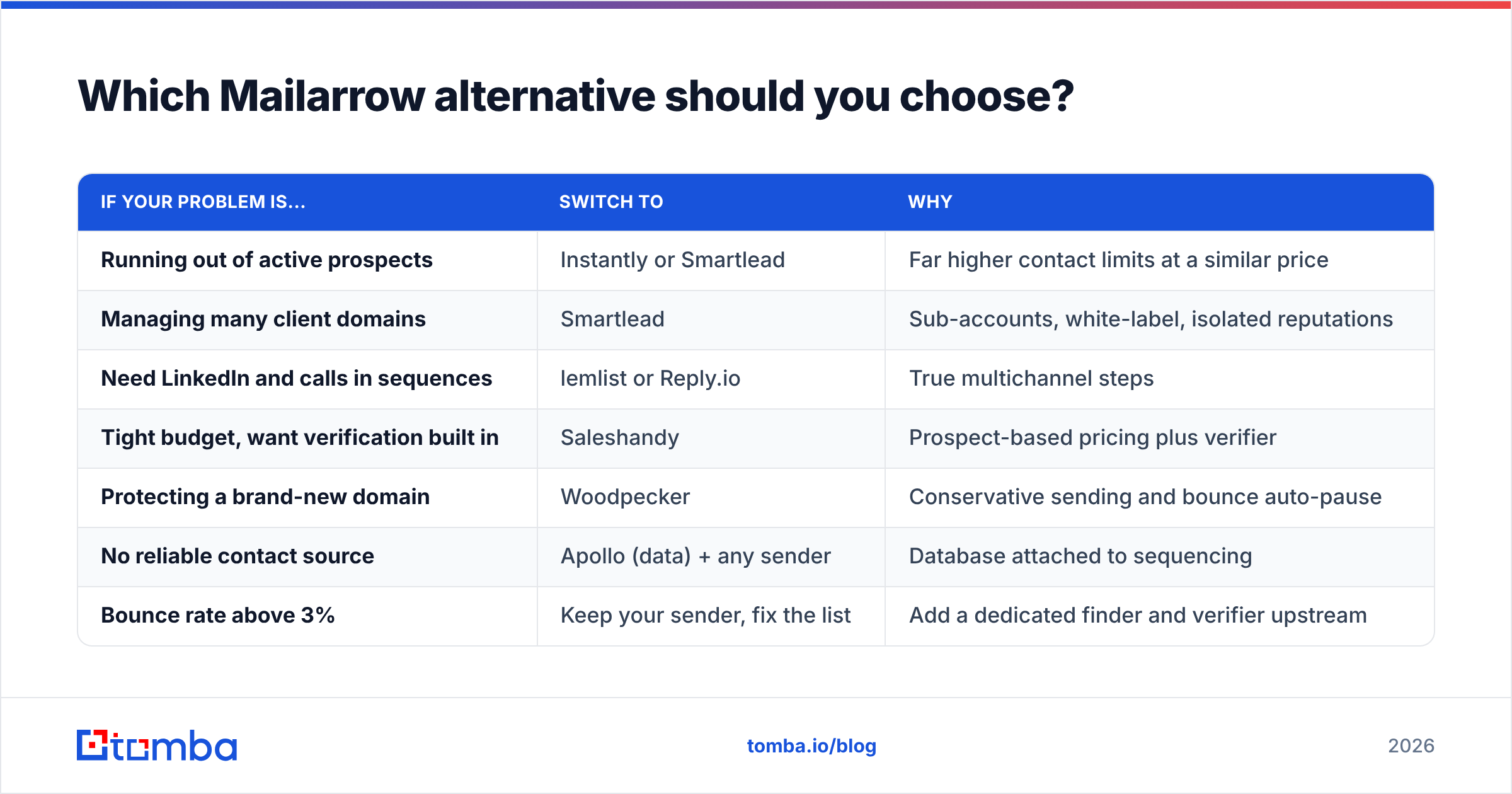
Start from the limit you're actually hitting:
| If your problem is... | Switch to | Why |
|---|---|---|
| Running out of active prospects | Instantly or Smartlead | Far higher contact limits at a similar price |
| Managing many client domains | Smartlead | Sub-accounts, white-label, isolated reputations |
| Need LinkedIn and calls in sequences | lemlist or Reply.io | True multichannel steps |
| Tight budget, want verification built in | Saleshandy | Prospect-based pricing plus verifier |
| Protecting a brand-new domain | Woodpecker | Conservative sending and bounce auto-pause |
| No reliable contact source | Apollo (data) + any sender | Database attached to sequencing |
| Bounce rate above 3% | Keep your sender, fix the list | Add a dedicated finder and verifier upstream |
If you're happy with Mailarrow's interface and price and your only problem is bounces or a shortage of good contacts, you probably don't need to switch. Add a data step before it.
Get cleaner lists into whatever sender you choose#
Mailarrow, Instantly, Smartlead, and the others all send what you give them, and none of them can tell you whether an address is real. Tomba Email Finder finds professional addresses by name, company, or domain, shows the public sources behind each result, and links to Tomba's verifier so you can clean the list before it reaches your sequences. Plans start with a free tier of 25 searches a month and go to $49/mo for Starter. That's enough to supply a Mailarrow Basic workspace with verified contacts and keep your new domains out of spam.
Related guides#
// start free
See who Tomba finds at any company
Type a company's domain to see its people, their roles and verified work emails, each with the pages it was found on. Free account, no card.
Free plan · No credit card required · GDPR & CCPA
// about the author