Mailbox Verification: How SMTP Checks Work and When to Trust Them
Mailbox verification asks a mail server whether an inbox exists, without sending anything. Here is how the SMTP handshake works, why catch-all and greylisting servers break it, and how to act on each result.
- Mailbox verification checks whether a specific inbox exists on a mail server. It does this through an SMTP conversation that stops before any message is sent.
- It is one layer of a full email verification stack. The other layers are syntax, domain/MX, catch-all detection, and risk flags such as role-based or disposable addresses.
- Catch-all domains, greylisting, and providers that block probes (Microsoft 365, Yahoo) are why no verifier can be 100% certain. Expect a share of "unknown" or "accept-all" results.
- Treat "valid" as safe to send, "invalid" as delete, and "catch-all/unknown" as a separate segment you send slowly or skip.
- Verify close to send time. B2B data decays because people change jobs, so a list verified six months ago is not a verified list.
What is mailbox verification?#
Mailbox verification confirms that a single email address, such as jane.doe@acme.com, maps to a real inbox that will accept mail. That is a stricter check than confirming the address is formatted correctly or that acme.com has a mail server.
Think of it like calling a building's front desk and asking whether Jane works on the 4th floor. You never deliver the package. You only want to know whether there's someone to receive it.
In technical terms, a verifier opens an SMTP session with the recipient domain's mail server. It introduces itself, names a sender, then names the recipient with an RCPT TO command. The server's reply code shows whether the mailbox exists. The verifier then closes the session with QUIT, so no email is ever sent. The full protocol is defined in RFC 5321. For a lighter overview, see the SMTP entry on Wikipedia.
Outbound teams care because bounces hurt. A hard bounce tells mailbox providers you're mailing addresses you shouldn't have. Enough of them and your sender reputation drops, which pushes even your good emails toward spam.
How does mailbox verification actually work?#
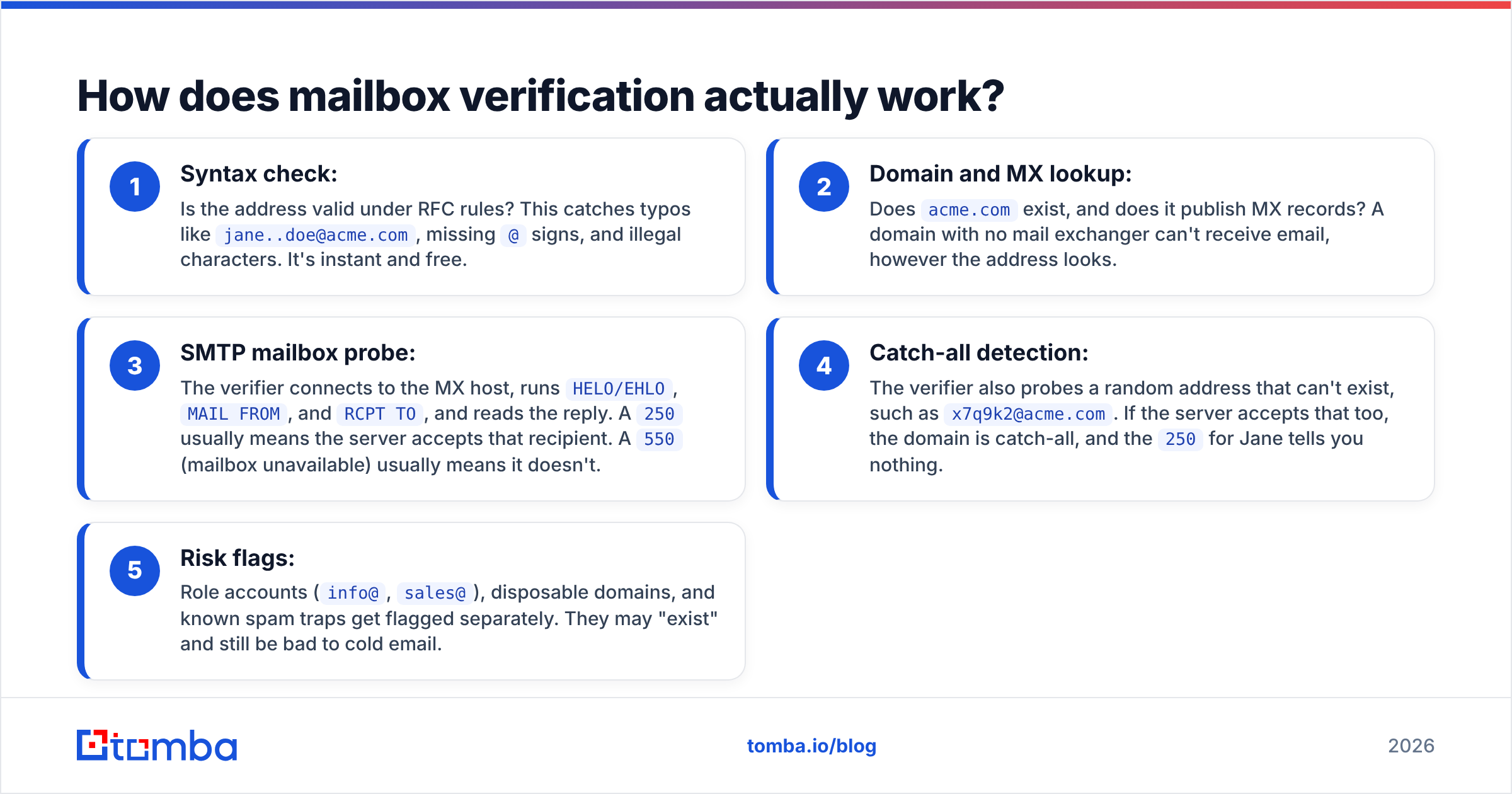
A proper check runs in layers, from cheapest to most expensive. Each layer filters out bad addresses before the next one runs.
- Syntax check: Is the address valid under RFC rules? This catches typos like
jane..doe@acme.com, missing@signs, and illegal characters. It's instant and free. - Domain and MX lookup: Does
acme.comexist, and does it publish MX records? A domain with no mail exchanger can't receive email, however the address looks. - SMTP mailbox probe: The verifier connects to the MX host, runs
HELO/EHLO,MAIL FROM, andRCPT TO, and reads the reply. A250usually means the server accepts that recipient. A550(mailbox unavailable) usually means it doesn't. - Catch-all detection: The verifier also probes a random address that can't exist, such as
x7q9k2@acme.com. If the server accepts that too, the domain is catch-all, and the250for Jane tells you nothing. - Risk flags: Role accounts (
info@,sales@), disposable domains, and known spam traps get flagged separately. They may "exist" and still be bad to cold email.
Only layer 3 is mailbox verification in the strict sense. In practice, most people use the term for the whole stack, because a mailbox probe without the other layers gives misleading results.
What does each verification layer catch, and what does it miss?#
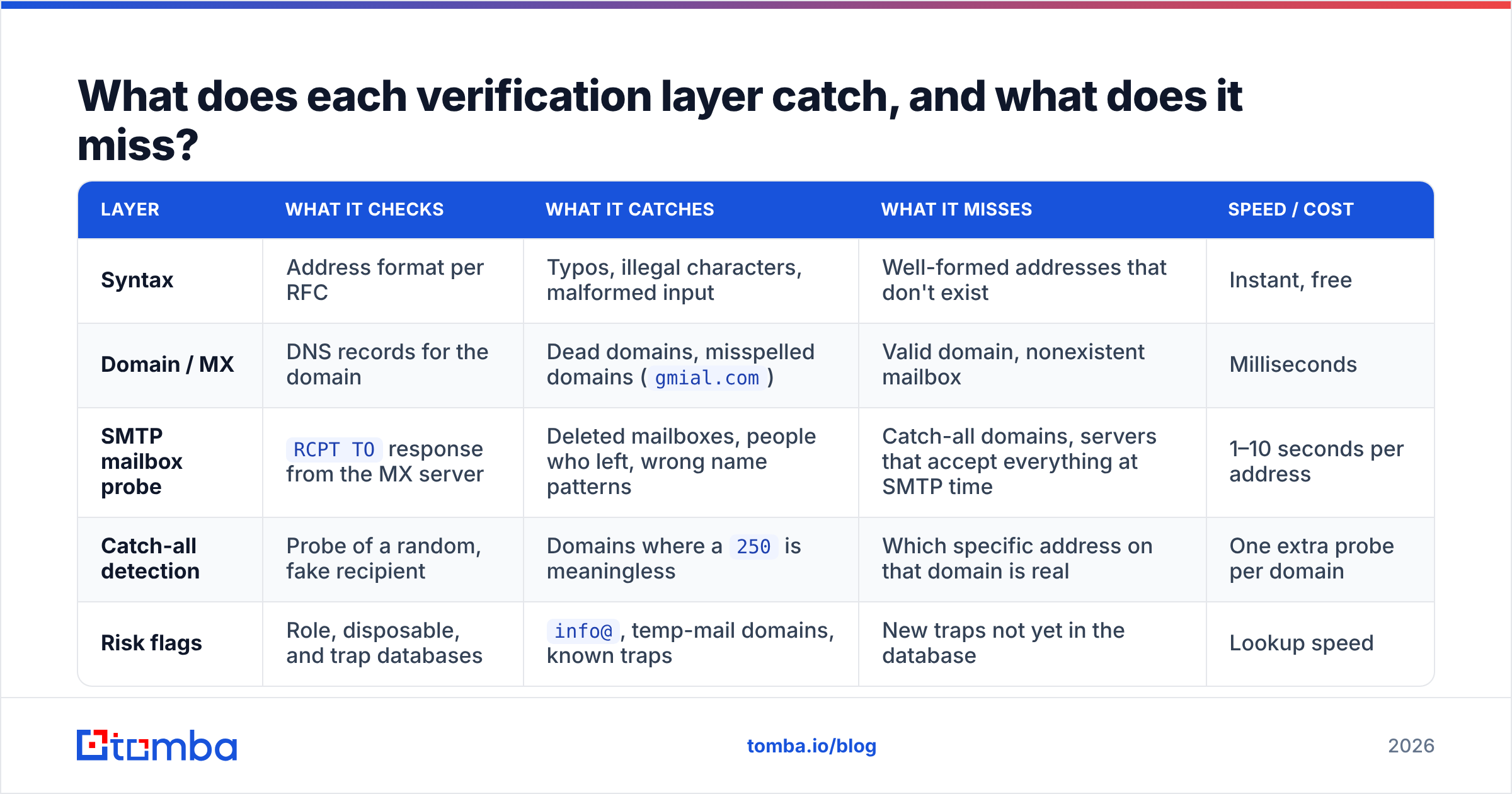
This is the core trade-off. Each layer is cheap or expensive, and certain or uncertain, in different ways.
| Layer | What it checks | What it catches | What it misses | Speed / cost |
|---|---|---|---|---|
| Syntax | Address format per RFC | Typos, illegal characters, malformed input | Well-formed addresses that don't exist | Instant, free |
| Domain / MX | DNS records for the domain | Dead domains, misspelled domains (gmial.com) |
Valid domain, nonexistent mailbox | Milliseconds |
| SMTP mailbox probe | RCPT TO response from the MX server |
Deleted mailboxes, people who left, wrong name patterns | Catch-all domains, servers that accept everything at SMTP time | 1–10 seconds per address |
| Catch-all detection | Probe of a random, fake recipient | Domains where a 250 is meaningless |
Which specific address on that domain is real | One extra probe per domain |
| Risk flags | Role, disposable, and trap databases | info@, temp-mail domains, known traps |
New traps not yet in the database | Lookup speed |
The SMTP probe is the only layer that says anything about a specific person, and it's also the least reliable one, as the next section explains.
Why can't mailbox verification be 100% accurate?#
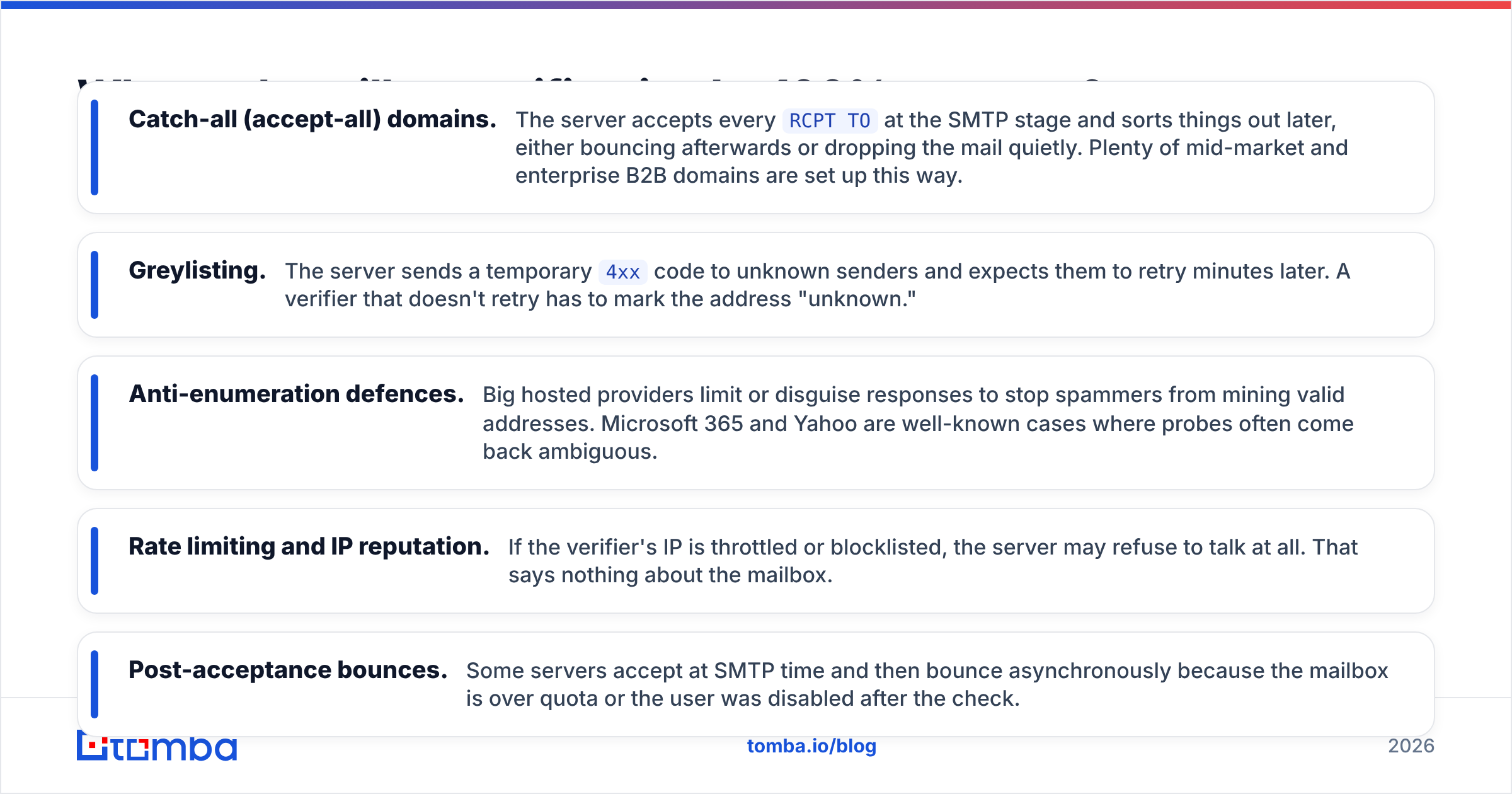
The receiving server decides how honest it is with you, and many aren't, on purpose. Several behaviours get in the way:
- Catch-all (accept-all) domains. The server accepts every
RCPT TOat the SMTP stage and sorts things out later, either bouncing afterwards or dropping the mail quietly. Plenty of mid-market and enterprise B2B domains are set up this way. - Greylisting. The server sends a temporary
4xxcode to unknown senders and expects them to retry minutes later. A verifier that doesn't retry has to mark the address "unknown." - Anti-enumeration defences. Big hosted providers limit or disguise responses to stop spammers from mining valid addresses. Microsoft 365 and Yahoo are well-known cases where probes often come back ambiguous.
- Rate limiting and IP reputation. If the verifier's IP is throttled or blocklisted, the server may refuse to talk at all. That says nothing about the mailbox.
- Post-acceptance bounces. Some servers accept at SMTP time and then bounce asynchronously because the mailbox is over quota or the user was disabled after the check.
So when a vendor claims "99% accuracy," ask what it means. Usually it's accuracy on the addresses the tool gave a definite verdict on, with catch-alls and unknowns left out of the calculation. A useful question for any provider: what share of your B2B list comes back as "unknown" or "accept-all"? That number matters more than the headline figure.
What do mailbox verification results mean, and what should you do with each?#
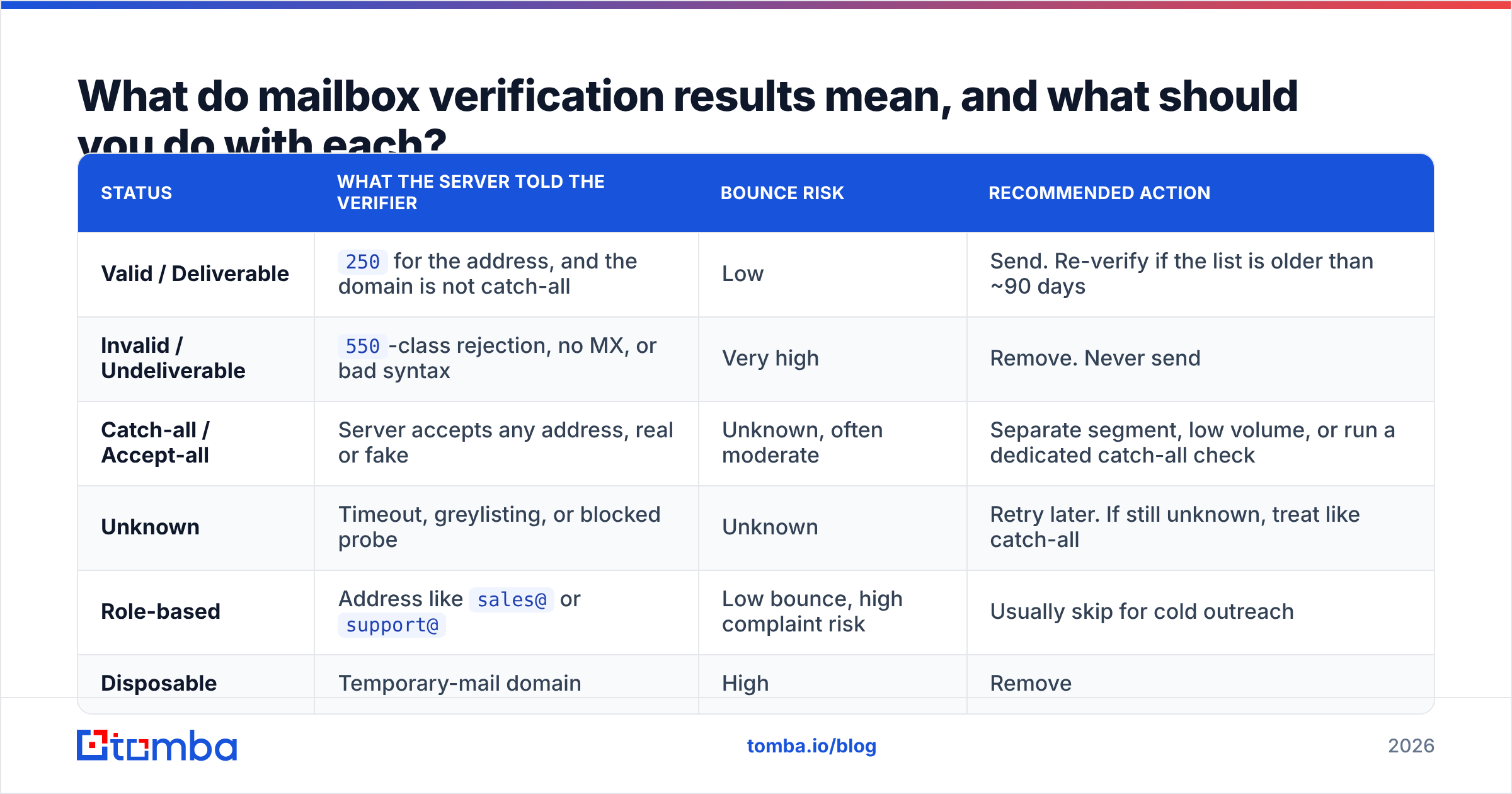
Most verifiers use similar statuses, though the labels vary. Here's how to act on each one in a cold outbound program.
| Status | What the server told the verifier | Bounce risk | Recommended action |
|---|---|---|---|
| Valid / Deliverable | 250 for the address, and the domain is not catch-all |
Low | Send. Re-verify if the list is older than ~90 days |
| Invalid / Undeliverable | 550-class rejection, no MX, or bad syntax |
Very high | Remove. Never send |
| Catch-all / Accept-all | Server accepts any address, real or fake | Unknown, often moderate | Separate segment, low volume, or run a dedicated catch-all check |
| Unknown | Timeout, greylisting, or blocked probe | Unknown | Retry later. If still unknown, treat like catch-all |
| Role-based | Address like sales@ or support@ |
Low bounce, high complaint risk | Usually skip for cold outreach |
| Disposable | Temporary-mail domain | High | Remove |
Don't put all of these in one bucket and send. A list that is 80% valid and 20% catch-all can still bounce badly if the catch-all part is mostly stale. Send the valid segment first, watch bounce rates, and only then work through the risky segment at a slower pace.
Catch-alls get their own tooling. A dedicated catch-all verifier uses signals beyond the SMTP reply, such as whether the address shows up publicly, matches the company's naming pattern, or has engagement history, to estimate whether a specific address on an accept-all domain is real. It's still a probability, not a guarantee. It's a much better probability than "the server said 250 to everything."
Is mailbox verification the same as email verification?#
Mostly, yes. Strictly, mailbox verification is the SMTP-level check for whether an inbox exists. Email verification is the broader process that includes syntax, DNS, catch-all, and risk scoring. Vendors use the two terms interchangeably, and so do most buyers.
What matters is that a tool runs every layer and reports catch-alls and unknowns honestly, instead of rounding them up to "valid." When you assess an email verifier or any competitor, upload a sample of addresses where you already know the answer: a few you know bounce, a few you know are live, and a few on known catch-all domains. See how each tool labels them. Ten minutes of testing will tell you more than the marketing page.
How does mailbox verification protect deliverability?#
Verification protects your sending reputation by keeping hard bounces low, and mailbox providers weigh bounces heavily.
Since 2024, Google's bulk sender requirements have pushed every outbound team to keep spam complaint rates low and authentication clean. The rules are in Google's email sender guidelines. Bounces aren't the same as complaints, but they come from the same place: mailing people who never expected your email. A list full of invalid addresses usually also contains old, scraped, or trap-laden data.
The usual working threshold in cold email is to keep hard bounces under about 2% per campaign. Above that, many sequencing tools pause the mailbox automatically, and inbox placement tends to suffer for days afterwards. Verification is the cheapest way to stay under that line.

What verification won't fix: missing SPF/DKIM/DMARC, sending too much from a new domain, or copy that gets marked as spam. It handles list quality only.
When should you run mailbox verification?#
Run it at three points:
- At the point of capture. When an address enters your system through a form, an enrichment tool, or a manual import, verify it in real time so bad data never lands in the CRM.
- Immediately before a campaign. Even if the address was valid when captured, people leave jobs. B2B contact data decays steadily as people switch roles, companies rebrand, and mailboxes get deprovisioned. Verify within a few days of the first send.
- On a schedule for long-lived lists. Newsletters, nurture tracks, and customer lists should be re-verified every quarter or so, or after any long gap without sending.
The biggest mistake is verifying once at import and treating the result as permanent. A "valid" result describes one moment. It isn't a lasting property of the address.
How do email finders and mailbox verification work together?#
Every email finder is really two systems: one guesses or retrieves a candidate address, and the other verifies it. When a finder builds jane.doe@acme.com from a name plus the company's naming pattern, the address is only a hypothesis until a mailbox check confirms it.
That's why the most useful finder output isn't the email alone but the email with a verification status and confidence score. Pull the status into your CRM or sequencer and filter on it before anything sends. A workflow that works well for most outbound teams:
- Find the address with an email finder using name plus company domain.
- Read the attached verification status. Push "valid" straight to the sequence.
- Send "accept-all" results through a catch-all check, or hold them for a slower, lower-volume send.
- Re-verify everything in bulk right before launch if the list sat for more than a few weeks.
You get fewer contacts per search than a tool that returns every guess as "found." But most of the bounces you would otherwise get come from exactly those extra contacts.
What should you look for in a mailbox verification tool?#
Ignore headline accuracy claims and look at how the tool behaves:
- Honest status breakdown. Does it separate valid, invalid, catch-all, and unknown, or merge them?
- Greylisting retries. Does it retry temporary failures, or mark them unknown right away?
- Catch-all handling. Is there a dedicated method for accept-all domains, or only a "risky" label?
- No-send guarantee. Verification should never send a real email to the contact.
- Workflow fit. Can you verify in bulk (CSV), in real time (API), and inside your CRM or spreadsheet without manual exports?
- Credit model. Are unknowns and duplicates charged? Some tools refund or skip charges on inconclusive results, and that matters at volume.
Price matters less than people think. A cheap tool that labels too much as "valid" costs you more in burnt domains than it saves in credits. Compare the free tier and paid plans side by side, including Tomba's pricing details, against how many verifications you'll actually run each month.
Should you trust a "valid" result completely?#
Trust it enough to send, but not blindly. A "valid" result from a non-catch-all domain is the strongest signal mailbox verification gives, and those addresses bounce rarely. Mail can still bounce later because of full mailboxes, disabled accounts after the check, or strict content filters.
The practical rule: verification lowers risk a lot but doesn't remove it. Pair it with domain warmup, sensible daily send limits, and bounce monitoring on every campaign. If a sequence starts bouncing above your threshold, pause it and re-verify. The list has likely gone stale since you checked.
The bottom line on mailbox verification#
Mailbox verification is the cheapest insurance your outbound program can buy. The SMTP check confirms inboxes that the server will vouch for. Catch-all detection shows you where the server's answer can't be trusted. Risk flags remove addresses that are technically real but bad to cold email. Run all three, segment by status, and verify close to send time.
If you're building lists from scratch, start with the Tomba Email Finder. It finds professional addresses from a name and company domain and attaches a verification status to each result, so you know which contacts are safe to sequence before you load them. The free plan includes 25 searches a month, and paid plans start at $49/mo when you're ready to scale.
Related guides#
// start free
See who Tomba finds at any company
Type a company's domain to see its people, their roles and verified work emails, each with the pages it was found on. Free account, no card.
Free plan · No credit card required · GDPR & CCPA
// about the author